AllMCPs
BrowseBestCategoriesStackCompareToolsGuidesBlog Log in Submit MCP

Stay in the loop

Get new MCP servers and top picks in your inbox.

AllMCPs

The open directory for discovering and installing Model Context Protocol servers.

Explore

  • Browse servers
  • Best MCP servers
  • Categories
  • MCP clients
  • Agent prompts
  • Stack Builder
  • Compare servers
  • Tags index
  • Submit a server
  • Pricing

Learn

  • Guides hub
  • What is MCP?
  • Install guide
  • Troubleshooting
  • Security
  • Blog
  • Blog RSS

Tools

  • All tools
  • Config generator
  • Config validator
  • MCP playground
  • OpenAPI β†’ MCP
  • Badge generator

For agents

  • API docs
  • Trust & traffic
  • llms.txt β†— (opens in a new tab)
  • Catalog JSON β†— (opens in a new tab)
  • Remote MCP β†— (opens in a new tab)

Company

  • About
  • Contact
  • X (@AllMCPs) β†— (opens in a new tab)
  • GitHub β†— (opens in a new tab)
  • Terms
  • Privacy
AllMCPs VerifiedAllMCPs VerifiedFeatured on Nick LaunchesFeatured on Nick LaunchesLaunch Llama NewsletterLaunch Llama NewsletterVerified DR - allmcps.comVerified DR - allmcps.comFeatured on SaaSGrowFeatured on SaaSGrowFeatured on Twelve ToolsFeatured on Twelve ToolsFeatured on Saaspa.geFeatured on Saaspa.geFeatured on Findly.toolsFeatured on Findly.toolsFeatured on Startup FameFeatured on Startup FameFeatured on LaunchKiwiFeatured on LaunchKiwiFeatured on ScrollLaunchFeatured on ScrollLaunchFeatured on DailyPingsFeatured on DailyPingsFazier badgeFazier badgeFeatured on NewTool.siteFeatured on NewTool.siteFeatured on saasfame.comFeatured on saasfame.comDR Checker - Domain RatingDR Checker - Domain RatingListed on Turbo0Listed on Turbo0Launched on LaunchBoard - Product Launch PlatformLaunched on LaunchBoard - Product Launch PlatformList on SimilarlabsList on Similarlabshttps://codetrendy.comhttps://codetrendy.comListed on DevTool.ioFeatured on BuildlistFeatured on BuildlistAllMCPs VerifiedAllMCPs VerifiedFeatured on Nick LaunchesFeatured on Nick LaunchesLaunch Llama NewsletterLaunch Llama NewsletterVerified DR - allmcps.comVerified DR - allmcps.comFeatured on SaaSGrowFeatured on SaaSGrowFeatured on Twelve ToolsFeatured on Twelve ToolsFeatured on Saaspa.geFeatured on Saaspa.geFeatured on Findly.toolsFeatured on Findly.toolsFeatured on Startup FameFeatured on Startup FameFeatured on LaunchKiwiFeatured on LaunchKiwiFeatured on ScrollLaunchFeatured on ScrollLaunchFeatured on DailyPingsFeatured on DailyPingsFazier badgeFazier badgeFeatured on NewTool.siteFeatured on NewTool.siteFeatured on saasfame.comFeatured on saasfame.comDR Checker - Domain RatingDR Checker - Domain RatingListed on Turbo0Listed on Turbo0Launched on LaunchBoard - Product Launch PlatformLaunched on LaunchBoard - Product Launch PlatformList on SimilarlabsList on Similarlabshttps://codetrendy.comhttps://codetrendy.comListed on DevTool.ioFeatured on BuildlistFeatured on Buildlist
Β© 2026 Jackalope Digital LLC. All rights reserved.
  1. Home
  2. 🧠 Knowledge & Memory
  3. Marrow
M
Health: Not checked yetWe have not completed a health check for this listing yet.Last checked 8/11/2026, 12:28:38 AM

Marrow

Enrichment pendingWe haven’t run our AI enrichment pass on this listing yet, so the overview, use cases, and FAQ below may be sparse or missing. We work through the catalog over time β€” check back soon.
View RepositoryVisit Website

Shared memory for parallel AI coding agents. Local, free, with rooms and file claims.

Quick Install

Automated & IDE Setup

Copy the AI prompt to install this server into Claude Code, Cursor, or another agent β€” or use 1-click editor setup below.

Add to CursorAdd to VS Code
Manual Client & Custom JSON ConfigExpand JSON β–Ύ

Install Config Generator

Choose your client
claude_desktop_config.json
{
  "mcpServers": {
    "marrow-2": {
      "command": "npx",
      "args": [
        "-y",
        "marrow-2"
      ]
    }
  }
}

πŸ’‘ Paste into ~/Library/Application Support/Claude/claude_desktop_config.json (macOS) or %APPDATA%\Claude\claude_desktop_config.json (Windows)

Install Directory Badge Claim listing Alternatives🧠 More in Knowledge & Memory

Documentation Overview

Marrow and Spinal Cloud

marrow

Memory that keeps working after Claude's runs out β€” shared across your projects, machines and tools.

Release License Website Built with Rust Stars

MCP Claude Code Cursor Codex

Claude's memory stops at 25KB. This one doesn't.

Claude Code's built-in memory loads the first 200 lines of one file into every session. That is fine for a young project. A codebase two years old knows more than fits in 200 lines, and everything past the cut is simply dropped.

Marrow retrieves instead of loading. Ask a question and it returns the twenty memories that answer it, plus the ones linked to those, out of however many thousand you have.

At 1,000 project facts that is 2.1Γ— less context per turn (p = 0.002) and $0.50 a task instead of $0.90. Numbers and method below.

It also does three things the built-in memory does not:

  • One brain across projects. Built-in memory is per repository. Marrow's hive lets an agent in api recall what webapp knows.
  • One brain across machines and teammates. Built-in memory is explicitly machine-local. Marrow syncs through a relay you run, or Spinal Cloud if you would rather not.
  • One brain across tools. Claude Code, Cursor and Codex read and write the same memory over MCP.

And because several agents share it, it also keeps them from colliding: a file another live session is editing is claimed, and every agent's actions land in one append-only, hash-chained record you can read.

Free forever, AGPL-3.0, runs on your machine. Every memory is a markdown file you can open and delete.

Does it actually help? We measured it
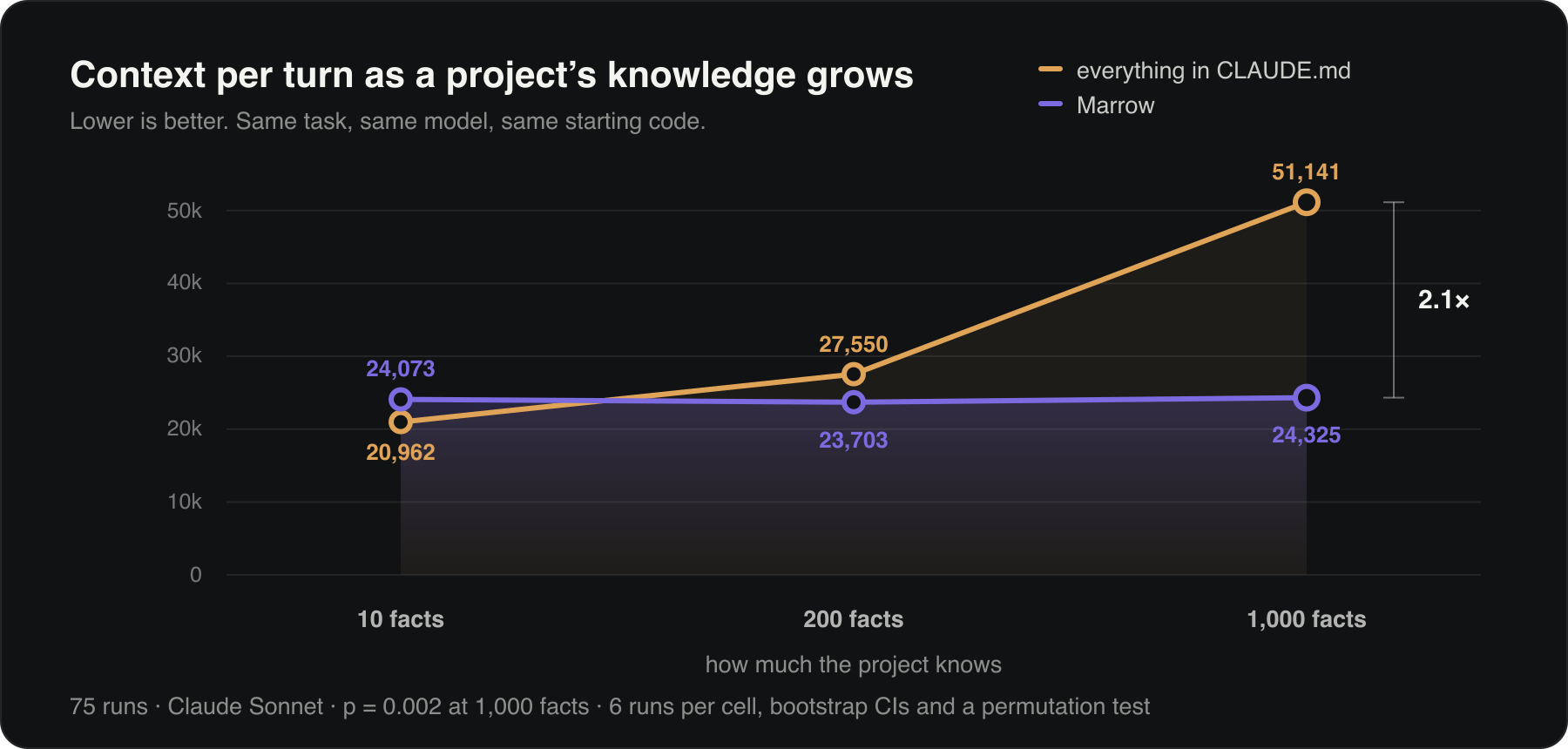
Context per turn stays flat for Marrow from 10 to 1,000 project facts, while a CLAUDE.md climbs from 20,962 to 51,141 tokens per turn

The usual way to tell an agent how your project works is to write it all into a CLAUDE.md, which it then reads on every single turn. That is fine for ten things. A codebase a couple of years old knows a thousand.

We gave a coding agent the same task and the same repo three ways: nothing, everything in a CLAUDE.md, and the same facts in Marrow. 75 runs.

  • A CLAUDE.md costs more the more your project knows. 21k tokens per turn at 10 facts, 51k at a thousand. Marrow stays flat: 24.1k, 23.7k, 24.3k. At a thousand facts that is 2.1Γ— less context (p = 0.002) and $0.50 a task instead of $0.90.
  • Below roughly a hundred facts, just write the file. Marrow loses that one, 0.87Γ—, and takes more turns. We would rather say so than pretend it wins everywhere.
  • An agent with no project memory broke things. It invented a database table, reached for uuid4 where ids are meant to be sortable, and wrote a naive timestamp. Both of the arms that had the knowledge got those right.

Method: same fixture repo and prompt each time, graded by running the code rather than reading it, with bootstrap intervals and a permutation test over 6 runs per cell. There is more on the numbers at marrow.works.

What about Claude Code's built-in memory?

Fair question, and the honest answer is that for a small project you may not need this.

Claude Code ships auto memory: Claude writes notes to ~/.claude/projects/<project>/memory/, and a MEMORY.md index is loaded into every session. It is on by default and it costs nothing. Use it and be happy until one of these starts to bite:

Built-in auto memoryMarrow
How memories reach the modelFirst 200 lines / 25KB of one index file, every sessionRanked retrieval: the matches, plus what they link to
What happens when it outgrows thatClaude is told to delete entriesNothing; retrieval just searches more
ScopeOne repositoryEvery project on the machine
Across your machinesNo β€” "files are not shared across machines"Yes, via a relay you run or Spinal Cloud
Across toolsClaude Code onlyClaude Code, Cursor, Codex, any MCP client
Shared with teammatesNoYes
Record of what agents didNoAppend-only, hash-chained, auditable
Flags memory that code has outgrownNoYes, for anchored Rust symbols

The rule of thumb: under a hundred facts, one repo, one machine, one tool β€” use the built-in. Marrow starts paying for itself past that, and our own benchmark says so out loud (we lose at 10 facts).

The two are not exclusive. Auto memory is Claude's private scratchpad; Marrow is the shared record.

Get started

Claude Code, one command:

Code
/plugin marketplace add aryawidjaja/marrow
/plugin install marrow@marrow

Then install the binaries it drives (brew install aryawidjaja/marrow/marrow, or irm marrow.works/install.ps1 | iex on Windows) and restart.

Everything else β€” Cursor, Codex, Claude Desktop, or if you would rather not use a plugin:

bash
brew install aryawidjaja/marrow/marrow    # macOS/Linux; Windows: irm marrow.works/install.ps1 | iex
marrow setup                              # add --global to wire every repo at once

marrow setup seeds your brain with what it can work out about the repo on its own, so the first session is not empty, and reports anything still missing. Restart your agent afterwards. The hooks need jq and never block your work when Marrow is unavailable. Already mid-session? Run /marrow-save to keep what is worth carrying forward.

Changed your mind? marrow uninstall puts everything back and keeps your memories. More ways to install, including the no-terminal Claude Desktop bundle, are further down.

The memory lives in .marrow/ in your project.

See your brain

Marrow isn't a black box, it's a graph you can explore, like a second brain.

bash
marrow-serve          # opens the dashboard at http://localhost:8088

Every memory is a neuron, grouped into the area it belongs to, so the graph has real structure instead of being a hairball. Links connect memories that share a topic, a tag, or related meaning (from embeddings). Browse the tree, drag, zoom, click to read, filter, and add, edit, or delete memories right there. The Hive tab shows every project at once.

Your memories are organised, not a pile

Every memory lives in an area of the project: auth, billing, infra. The agent files it as it writes, so the brain has a shape you can navigate instead of one flat heap.

Code
project  β†’  area  β†’  topic  β†’  versions
bash
marrow areas          # the map: auth 11 Β· billing 10 Β· infra 23 Β· monitoring 10

Your agent sees that same map the moment a session starts, so it knows what the project knows before it answers. It can also weight a recall toward one area without hiding the rest:

bash
marrow add --kind decision --topic jwt-expiry --area auth "We use 15-minute JWTs."

Nothing is forced. If a memory fits no area, it stays unfiled and is still fully searchable. A wrong area is worse than none.

One brain across your projects

By default each project has its own brain. Opt any project into a machine-wide hive with one command, and your agents can recall across all of them:

bash
cd ~/code/webapp && marrow hub register --name webapp
cd ~/code/api    && marrow hub register --name api

marrow hub recall "how do we do auth"   # searches every project, tagged by project

Now an agent working in api can ask what webapp knows. In the dashboard, the Hive tab shows a central core neuron (you) with every project orbiting it, bridged where they share ideas.

Give your agents a room to talk

Once a project joins the hive, its agents can open named rooms, ask each other questions, reply, and hand work over without relying on one giant chat. Claude Code, Codex, Cursor, and other MCP agents on the same machine can use the same channel.

Agents check the inbox when they start and before touching work another session may own. You can read every room in the dashboard's Channel tab, so the coordination stays visible instead of happening behind your back.

One brain across your devices (beta)

Each project is local and private by default. Share the one project you want synced, and the rest stay on your machine. It's like sharing a repo, not your whole disk.

bash
# once, on a server (Docker, Fly.io, any host; see deploy/)
MARROW_TOKEN=$(openssl rand -hex 16) marrow-server

# then in the project you want shared, on each machine
MARROW_TOKEN=<the-token> marrow share --gateway https://your-gateway --space team-app

Same gateway + space + token on two machines routes their MCP memory tools to one remote project store. A decision saved through an agent on your laptop is available to an agent on your desktop. Every other project is untouched. The backbone currently uses one bearer token; run it on infrastructure you control over HTTPS and back up its data volume.

bash
marrow status     # shows whether this project is shared or local
marrow unshare    # back to local, nothing is deleted

Your agent is told which mode it is working in. You can configure sharing from the dashboard's Manage Projects panel. The local dashboard still visualizes the local project store; shared-memory reads and writes happen through the agent's MCP tools. Full scope and deployment guidance are in deploy/README.md. Code anchors and freshness checks need the source tree, so they remain local-only.

More install options

Prebuilt binaries, no Rust:

Terminal
curl -fsSL marrow.works/install.sh | sh

From source:

bash
cargo install --git https://github.com/aryawidjaja/marrow marrow-cli marrow-mcp marrow-web marrow-server

This puts marrow, marrow-mcp, marrow-serve, and the cross-device marrow-server on your PATH.

Windows

powershell
irm marrow.works/install.ps1 | iex

Or with Scoop:

powershell
scoop install https://github.com/aryawidjaja/marrow/releases/latest/download/marrow.json

Either way you get marrow, marrow-mcp, marrow-serve and marrow-server, no admin rights, no Rust, semantic search already built in.

Just want it in Claude Desktop? Download marrow-mcp.mcpb from Releases and double-click. No terminal at all: it asks which project to remember and that is the whole setup.

The hooks that warm-start sessions and stop two agents editing the same file are shell scripts, so they need Git for Windows and jq. The installer says so if either is missing:

powershell
winget install Git.Git jqlang.jq

Without them memory still works; the automatic coordination stays off. Prefer WSL2? Install the Linux way inside it and everything behaves exactly as it does on Linux.

Bringing in an existing project

A fresh brain starts empty. To seed it from docs you already have, the first warm start nudges your agent to run marrow ingest, it lists your README and docs/ and distills them into memory. After that, later sessions can start with those memories available. Any time, run /marrow-save to preserve the decisions and discoveries worth carrying forward.

Using Cursor, Codex, or other MCP agents

The automatic hooks are Claude Code specific, but any MCP agent gets the full memory toolset. Register the server for every Claude Code project:

Terminal
claude mcp add marrow -s user -- marrow-mcp --root .

For one project, add the same server to .mcp.json (Claude Code), .cursor/mcp.json (Cursor), or your Codex TOML.

Semantic search

Builds that ship with the local embedding model (the marrow-semantic formula, and the Windows and install.sh builds) use meaning-based recall by default, so a note about "JWT" is found by searching "login security". The plain marrow formula is keyword-only and smaller:

bash
brew install aryawidjaja/marrow/marrow-semantic   # multilingual, downloads a small model on first use

marrow status shows the mode; marrow embed none switches back, marrow embed fastembed switches on. Semantic search also powers the "related meaning" links in the dashboard graph.

CLI

Your agent drives Marrow for you, but you can too:

bash
marrow add --kind decision --topic auth "We use short-lived JWTs."   # save
marrow search "token expiry" --weight 1                              # find (0=keyword, 1=semantic)
marrow hub recall "rate limiting"                                    # search the whole hive
marrow list-stale --repo .                                           # notes whose code drifted
marrow consolidate --repo . --apply                                  # merge duplicates
marrow audit                                                         # prove the ledger untampered

marrow add writes a plain markdown file under .marrow/memory/, the YAML frontmatter is metadata, the text below is the memory. The SQLite index is a rebuildable cache over these files.

It doesn't forget the old stuff

The obvious worry with a memory that only ever grows: does the good idea from four months ago just sink? Two things stop it.

Recall follows the links. Ask a question and Marrow doesn't only return what matched your words. It takes the matches and spreads outward through the graph, a few links at a time, weakening with each step. So a note that shares none of your vocabulary still surfaces if it sits behind one that does. That old decision stays reachable through its neighbours, which is exactly what the links are for.

And the brain strengthens what it uses. Every recall is recorded. A memory the agents keep reaching for gets easier to reach again; one nobody has ever touched stays where it is. Recall a thing enough and it comes to you.

When a decision changes, the agent supersedes the old memory instead of appending another active version. Marrow preserves the lineage so the current answer stays clear without losing history.

What's under the hood

  • Staleness detection for Rust: a memory can cite a Rust symbol; Marrow fingerprints it and flags the note when that symbol changes, while tolerating formatting changes and supported relocations.
  • Consolidation: finds genuine duplicates (a near-identical restatement, or a pair that are mutually each other's closest match) and merges them, preserving lineage. It will not merge notes that are merely similar.
  • Associative recall: a question returns the matches and the memories connected to them, found by following links, shared topics and related meaning outward from the hits.
  • Hive mind: sessions join warm, publish best-effort file claims, and read a live activity trail. Claude Code hooks can block a detected local collision, but deliberately fail open rather than risk blocking work when their prerequisites are unavailable.
  • Audit & provenance: every write, edit, and recall lands in an append-only, hash-chained ledger; any answer traces back to its sources. Turn signing on and marrow audit also catches a memory file edited on disk behind Marrow's back.
  • Typed & validated: every memory is a fact or a decision (or an entity), filed in an area under a short topic; bad writes are rejected with the reason, so the brain can't fill up with junk.
  • Expiry & confidence: a memory can say how sure it is, and can carry an expiry date for things that are only true for now. Marrow retires them when they lapse.
  • Runs anywhere: offline single binaries; markdown is the source of truth, SQLite a disposable cache.

The name

Marrow is where the immune system's memory begins: the quiet layer that remembers while the rest of the body keeps changing. Your agents share one too, but it stays yours, on your machine and on your terms.

License

The engine (crates/) is AGPL-3.0-only; the embeddable Python backend (python/marrow-anthropic) is Apache-2.0. Using Marrow from your agent over MCP or the CLI is a separate process, not a derivative work. A commercial license is available, see COMMERCIAL.md.

Related MCP Servers

View all in Knowledge & Memory View all alternatives
  • Moxie Docs MCP logoMoxie Docs MCP
    β˜… Featured

    MCP & Agent Skills for Automated Documentation, and codebase conventions + context

    🧠 Knowledge & Memory17 views
    Compare vs Moxie Docs MCP β†’
  • S
    Stdio Proxy

    Undisk MCP: safe file memory for AI agents.

    🧠 Knowledge & Memory0 views
    Compare vs Stdio Proxy β†’
  • Mcp logoMcp

    AI memory layer β€” one shared, persistent memory across every AI tool you connect.

    🧠 Knowledge & Memory0 views
    Compare vs Mcp β†’
  • V
    Vibsync

    One shared brain for your AI coding agents: team memory, agent Q&A, tasks, and file claims.

    🧠 Knowledge & Memory0 views
    Compare vs Vibsync β†’

Frequently Asked Questions about Marrow

Add the following block to your claude_desktop_config.json under mcpServers: "mcpServers": { "marrow": { "command": "npx", "args": ["-y", "Marrow"] } }

AllMCPs Directory Badge

Full Badge Customizer

Showcase your server listing on GitHub or your project documentation. Embed this dynamic SVG badge to highlight official listing status and live engagement.

Badge Style:
Live Dynamic SVG PreviewMarrow AllMCPs Directory Badge

Markdown (GitHub README)
[![AllMCPs](https://allmcps.com/api/badge/marrow-2?style=directory)](https://allmcps.com/mcp/marrow-2)
HTML Embed
<a href="https://allmcps.com/mcp/marrow-2"><img src="https://allmcps.com/api/badge/marrow-2?style=directory" alt="Marrow on AllMCPs" /></a>

Technical Specs & Signals

Category🧠Knowledge & Memory
More technical detailsExpand β–Ύ
TransportSTDIO
RuntimeNode.js
0/4 checks healthy over the last 6h
Views0
Unique ViewsTotal visits recorded for this listing page on AllMCPs.
Installs0
Installs & Copy ActionsTotal times users copied install commands or configuration snippets for this server.
27Quality signal: Emerging Β· 27/100How this signal is calculated β–Ύ
Server availabilityNot measured

Not scored for repo-hosted servers β€” we can't reach the running server, only its GitHub page. Hosted MCP endpoints are health-checked live.

Verified ownership8/20
Documentation & tools11/30
Adoption & activity1/15
Community engagement0/10

A guidance signal from public completeness & health data β€” not a user rating. New listings start lower and rise as they add docs, get verified, and grow adoption. Signals we can't observe for a listing are skipped, not counted against it.

β˜… Spotlight Slot

Feature Your MCP Server

Get maximum visibility for your server across our directory, search results, and detail pages.

Spotlight Your Server

Own this project?

This directory is pre-filled from public sources. Claim via GitHub README, site badge, or DNS TXT to get the verified badge.

Free dofollow backlink: after claiming, verify your product site and place a dofollow AllMCPs badge β€” we recheck it stays live.

Claim & get free dofollow

Share & Embed

Add our SVG badge (dark/light directory styles) or embeddable widget to your site.

Explore more

More in 🧠 Knowledge & Memory β†’Best MCP servers for Memory & Knowledge β†’Alternatives to Marrow β†’Install in Claude DesktopInstall in CursorInstall in VS Code