Amazon Ads MCP Server logo

Amazon Ads MCP Server

by marketplaceadpros

Connects AI clients to Amazon Advertising data for campaign analysis, reporting, configuration queries, and marketplace recommendations.

Install Amazon Ads MCP Server

Pick your client, then add it in one click or paste the config.

STDIONode.js
~/Library/Application Support/Claude/claude_desktop_config.json
claude_desktop_config.json
{
  "mcpServers": {
    "marketplaceadpros-amazon-ads-mcp-server": {
      "command": "npx",
      "args": [
        "@marketplaceadpros/amazon-ads-mcp-server"
      ],
      "env": {
        "BEARER_TOKEN": "YOUR_VALUE_HERE"
      }
    }
  }
}

Settings → Developer → Edit Config, merge this into mcpServers, then fully quit and reopen Claude Desktop.

Values are written into the snippet above so you can paste it as is. They never leave your browser.

Install not yet sandbox-tested— we haven't run this command through our automated sandbox yet. Not a red flag; we're working through the catalog.

Overview

The marketplaceadpros/amazon-ads-mcp-server MCP server connects MCP clients to Amazon Advertising data through MarketplaceAdPros. It exposes advertising resources for Sponsored Products, Sponsored Brands, and Sponsored Display, including campaigns, ad groups, keywords, product ads, and targeting. Agents can access reports and query report data in plain English, while subscribers can use Marketplace Ad Pros recommendations and experiments. Use it when you need conversational access to Amazon Ads campaign data through stdio or the hosted Streamable HTTP endpoint.

Use cases

  • Analyze Amazon Ads campaign performance
  • Query advertising reports with plain English
  • Inspect ad groups, keywords, and targeting
  • Review Sponsored Products, Brands, and Display resources
  • Use subscription-based recommendations and experiments

Key features

  • Amazon Advertising resource access
  • Campaign and configuration analysis
  • Plain-English report queries
  • Sponsored Products, Brands, and Display support
  • Marketplace Ad Pros recommendations and experiments
  • stdio and Streamable HTTP access

Security & health

What it can reach and how reliably it runs — from our own checks, not the maintainer’s claims.

ActiveLast checked 1d ago

Recent health check succeeded.

17/20 checks healthy over the last 79d

Supply-chain signal

No high-severity advisories surfaced by our automated scan.

Critical 0High 0Medium 0Low 0

Scanned 12d ago via OSV.dev · @marketplaceadpros/amazon-ads-mcp-server (npm)

Adoption & maintenance

Factual signals from GitHub, npm, and our automated checks — not a rating.

GitHub stars29Stargazers on the source repository.
npm downloads56Package downloads in the last 30 days.
Last commit6d agoMost recent push to the default branch.
Directory activity5 viewsConfig copies, upvotes, and views on AllMCPs.

How Amazon Ads MCP Server works

What marketplaceadpros/amazon-ads-mcp-server does

The marketplaceadpros/amazon-ads-mcp-server MCP server connects an MCP-compatible AI client with Amazon Advertising data through MarketplaceAdPros. It covers resources from three Amazon advertising product types: Sponsored Products, Sponsored Brands, and Sponsored Display.

Available advertising resources include campaigns, ad groups, keywords, product ads, and targeting. The server also provides reports and supports asking questions about report data using plain English. Marketplace Ad Pros recommendations, experiments, and additional subscription-based features are available when included with the purchased plan.

How it works

The marketplaceadpros/amazon-ads-mcp-server MCP server can run locally over stdio or be accessed remotely through the Streamable HTTP endpoint at https://app.marketplaceadpros.com/mcp.

For a local setup, an MCP client starts the package with npx, or runs the compiled Node.js entry point after the repository has been built. The local process authenticates with a MarketplaceAdPros bearer token supplied through the BEARER_TOKEN environment variable.

Clients that support Streamable HTTP can connect directly to the hosted endpoint.

Setup and configuration

The marketplaceadpros/amazon-ads-mcp-server MCP server requires a bearer token obtained from MarketplaceAdPros. For Claude Desktop, add a server entry to the platform’s MCP configuration file and set BEARER_TOKEN in its environment block.

A package-based configuration starts @marketplaceadpros/amazon-ads-mcp-server with npx. If using a local checkout instead, install dependencies with npm install, build with npm run build, and point the client to build/index.js using Node.js. npm run watch provides automatic rebuilding during development.

For remote access, configure the MCP client with the Streamable HTTP URL. Authentication details depend on the client: the documented LibreChat example uses an Authorization header with a bearer token.

Tools and capabilities

The server provides access to:

  • Sponsored Products campaigns, ad groups, keywords, product ads, and targeting
  • Sponsored Brands advertising resources
  • Sponsored Display advertising resources
  • Amazon Advertising reports
  • Plain-English queries over report data
  • Marketplace Ad Pros recommendations and experiments for plans that include them

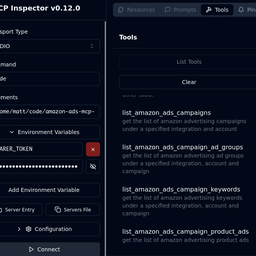
The repository also provides an MCP Inspector script through npm run inspector for examining and debugging the local stdio server in a browser.

Limitations and notes

Access to Marketplace Ad Pros recommendations, experiments, and other subscription features depends on the purchased subscription plan.

The hosted endpoint requires an MCP client with Streamable HTTP support. Local use requires Node.js tooling capable of running npx or the built JavaScript entry point, plus a valid MarketplaceAdPros bearer token. Keep that token in client configuration or another protected environment rather than exposing it in prompts or source code.

Reviews

No reviews yet — be the first to share how it worked for you.

Frequently Asked Questions about Amazon Ads MCP Server

marketplaceadpros/amazon-ads-mcp-server is an MCP server that connects AI clients to Amazon Advertising data through MarketplaceAdPros. Its main tools cover Sponsored Products, Sponsored Brands, and Sponsored Display resources, including campaigns, ad groups, keywords, product ads, targeting, reports, plain-English report queries, and subscription-based recommendations or experiments.

Install it by adding an MCP configuration that runs the package with npx, or build the cloned repository and run its generated Node.js entry point. Set the BEARER_TOKEN environment variable to a token from MarketplaceAdPros. The README provides Claude Desktop examples for both methods.

Yes, it supports Streamable HTTP through https://app.marketplaceadpros.com/mcp. Configure a compatible MCP client with that URL. The documented LibreChat example also sends the MarketplaceAdPros token in an Authorization bearer header.

It requires BEARER_TOKEN. Set this variable to the bearer token obtained from MarketplaceAdPros when running the local stdio package or built server. Remote clients may instead provide the token through their supported authorization configuration, as shown for LibreChat.

Debug it with the MCP Inspector by running npm run inspector in the repository. The inspector exposes a browser-accessible URL for examining the local stdio server. Development builds can be refreshed automatically with npm run watch.

Related MCP servers

Add a badge to your READMEShow it’s listed — live SVG, Markdown or HTML.

AllMCPs Directory Badge

Full Badge Customizer

Showcase your server listing on GitHub or your project documentation. Embed this dynamic SVG badge to highlight official listing status and live engagement.

Badge Style:
Live Dynamic SVG PreviewAmazon Ads MCP Server AllMCPs Directory Badge
Markdown (GitHub README)
[![AllMCPs](https://allmcps.com/api/badge/marketplaceadpros-amazon-ads-mcp-server?style=directory)](https://allmcps.com/mcp/marketplaceadpros-amazon-ads-mcp-server)
HTML Embed
<a href="https://allmcps.com/mcp/marketplaceadpros-amazon-ads-mcp-server"><img src="https://allmcps.com/api/badge/marketplaceadpros-amazon-ads-mcp-server?style=directory" alt="Amazon Ads MCP Server on AllMCPs" /></a>
