MCP server for Malt.fr. Read your freelance profile, stats, and missions from Claude.
Quick Install
Automated & IDE SetupCopy the AI prompt to install this server into Claude Code, Cursor, or another agent — or use 1-click editor setup below.
Not yet automatically verified
We haven't yet run this listing's install command through our automated sandbox check. This isn't a red flag — we're steadily working through the catalog.
Manual Client & Custom JSON ConfigExpand JSON ▾
Client Config & Setup
Choose your client or environment
Target File:
💡 Paste the JSON block into your client's configuration file under mcpServers, then restart the application.
Capabilities & Tool Schemas (6)
Inspect callable tools, capabilities, and parameters exposed to AI agents by Malt MCP.
authenticateLog in to Malt interactively from Claude Desktop
get_profileGet freelance profile info (bio, daily rate, skills, rating). Omit username to fetch your own profile.
get_statisticsView profile stats (views, response rate, missions)
get_missionsList mission conversations from messaging
get_mission_detailsGet full details of a specific mission (budget, skills, messages)
close_sessionClose the browser and free resources
Documentation Overview
Malt MCP Server



MCP server for Malt.fr. Lets Claude (or any MCP client) read your freelance profile, stats, and missions.



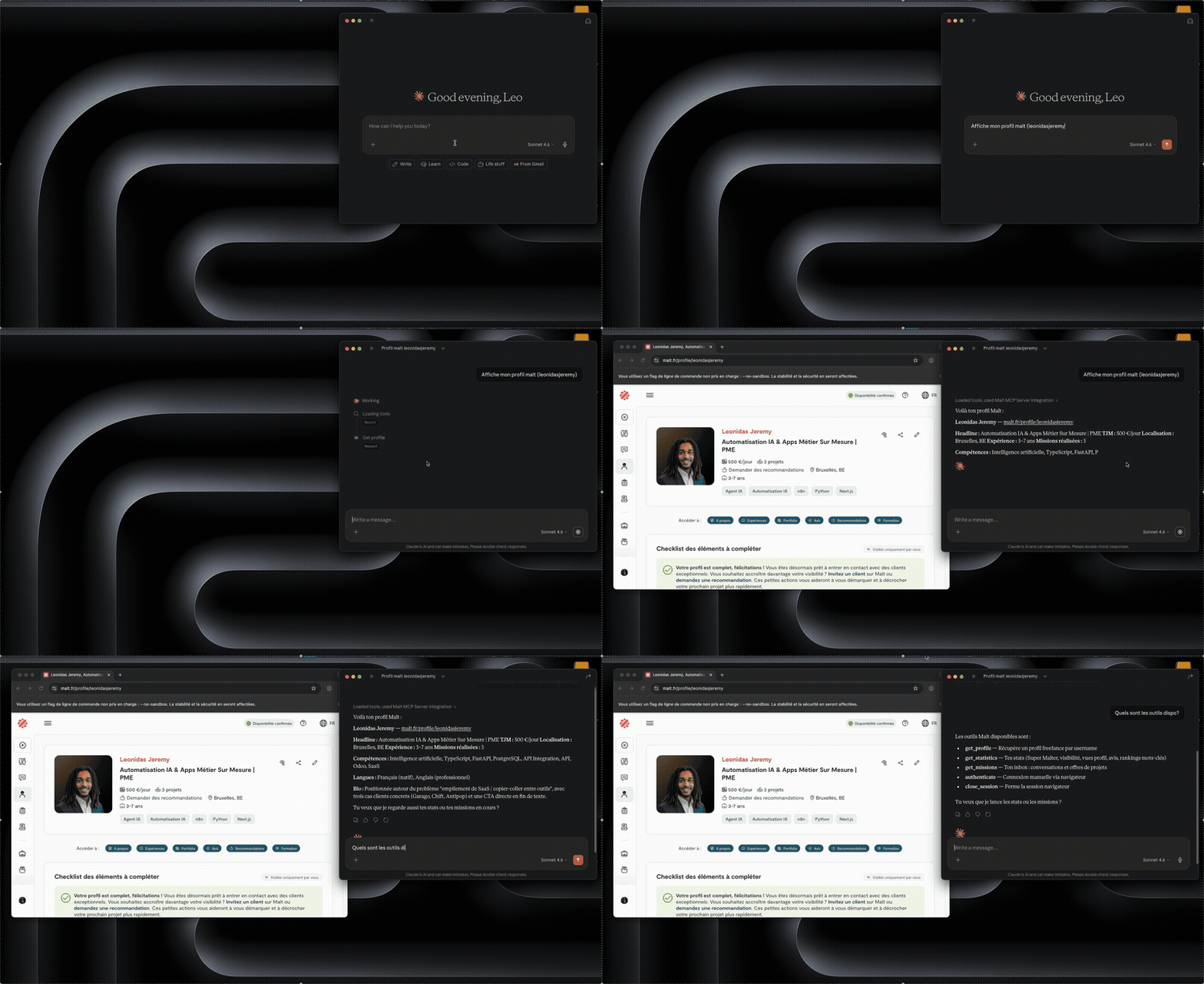
Tools
| Tool | Description | Status |
|---|---|---|
authenticate | Log in to Malt interactively from Claude Desktop | working |
get_profile | Get freelance profile info (bio, daily rate, skills, rating). Omit username to fetch your own profile. | working |
get_statistics | View profile stats (views, response rate, missions) | working |
get_missions | List mission conversations from messaging | working |
get_mission_details | Get full details of a specific mission (budget, skills, messages) | working |
close_session | Close the browser and free resources | working |
📦 Claude Desktop MCP Bundle
Prerequisites: Claude Desktop.
One-click installation:
- Download the latest
.mcpbfrom releases - Double-click the
.mcpbfile to install it into Claude Desktop - Ask Claude "connecte-moi a Malt" - a browser opens, you log in, done
- Call any Malt tool
No terminal needed. Session is saved in ~/.malt-mcp/ and reused across restarts.
[!NOTE] Google OAuth doesn't work (blocked by Google when automated). Use email/password.
🚀 uvx Setup (Universal)
Prerequisites: uv installed.
Add to your MCP client config (Claude Desktop, Claude Code, or any MCP-compatible client):
@latest pulls the newest version from PyPI on each launch. First auth-requiring call opens a browser for login.
To log in ahead of time:
Docker (coming soon)
⚙️ CLI Options
| Option | Description |
|---|---|
--login | Open browser to log in and save session |
--logout | Clear stored browser profile |
--no-headless | Show browser window (debug) |
--log-level | Set log level (DEBUG, INFO, WARNING, ERROR) |
--timeout | Browser timeout in ms (default: 5000) |
❗ Troubleshooting
Login issues:
- Google OAuth won't work. Use email/password.
- Session expired? Re-run
uvx malt-mcp@latest --login. - Cloudflare challenge on first load is normal - the browser handles it, give it a few seconds.
Timeout issues:
- Pages not loading? Try
--timeout 10000. Slow connections might need15000.
Browser issues:
- Headless mode doesn't work - Cloudflare blocks it. The browser window is expected.
- First run downloads Chromium (~200 MB via Patchright). One-time thing.
- Upgrading from v0.3.x? Run
uvx malt-mcp@latest --logoutthen--login. The browser engine changed from system Chrome to managed Chromium.
🔒 How it works
Under the hood, this is browser automation via Patchright (Playwright fork). No API, no reverse-engineering - it drives a real browser like you would.
- Credentials stay local. Cookies live in
~/.malt-mcp/profile/, nowhere else. - Read-only. Nothing is modified on your Malt account (for now).
- Runs locally. The server talks to Malt.fr and nothing else.
[!IMPORTANT] Malt's TOS may prohibit automated tools. Don't bulk-scrape. Use responsibly.
🐍 Development
Contributions welcome! See CONTRIBUTING.md for architecture guidelines.
Run the MCP Inspector (local testing):
Run tests:
Type check:
License
Related MCP Servers
Adoption & maintenance
Factual signals from GitHub, npm, and our automated checks — not a rating.
GitHub stars
2
Stargazers on the source repository.
Last commit
4mo ago
Most recent push to the default branch.
Tools exposed
6
Callable tools this server registers over MCP.
Directory activity
2 views
Config copies, upvotes, and views on AllMCPs.
Reviews
No reviews yet — be the first to share how this listing worked for you.
Frequently Asked Questions about Malt MCP
AllMCPs Directory Badge
Showcase your server listing on GitHub or your project documentation. Embed this dynamic SVG badge to highlight official listing status and live engagement.
Badge Style:
Live Dynamic SVG Preview
Markdown (GitHub README)
[](https://allmcps.com/mcp/malt-mcp)HTML Embed
<a href="https://allmcps.com/mcp/malt-mcp"><img src="https://allmcps.com/api/badge/malt-mcp?style=directory" alt="Malt MCP on AllMCPs" /></a>Technical Specs & Signals
CategoryDeveloper Tools
11/12 checks healthy over the last 46d
48Quality signal: Fair · 48/100How this signal is calculated ▾
Server availabilityNot measured
Not scored for repo-hosted servers — we can't reach the running server, only its GitHub page. Hosted MCP endpoints are health-checked live.
Verified ownership10/20
Documentation & tools24/30
Adoption & activity2/15
Community engagement0/10
A guidance signal from public completeness & health data — not a user rating. New listings start lower and rise as they add docs, get verified, and grow adoption. Signals we can't observe for a listing are skipped, not counted against it.
Supply-chain signal
No high-severity advisories surfaced by our automated scan.
Critical 0High 0Medium 0Low 0
Scanned 5d ago via OSV.dev · Setup (PyPI)
Own this project?
This directory is pre-filled from public sources. Claim via GitHub README, site badge, or DNS TXT to unlock edit access and the Official badge — proof is checked automatically, then reviewed by our team.
Free dofollow backlink: add your website and place the AllMCPs badge on it — no claim needed. We detect it automatically and keep it verified as long as the badge stays live.
Claim & get free dofollowShare & Embed
Add our SVG badge (dark/light directory styles) or embeddable widget to your site.