
MailFathom




A brain for your mail — self-hosted, AI-native, and yours alone.
[!WARNING] MailFathom is under active development, and nothing between two releases is guaranteed to stay compatible until version 1.0.0. Any release before it may change the MCP tools, the configuration, the database schema, or the deployment in a breaking way — up to a release that cannot run over the previous one's configuration or data at all. Read the changelog before every upgrade, and keep a backup you can go back to.
MailFathom synchronizes your IMAP accounts into a PostgreSQL database you run, indexes that copy, and serves it to AI agents as tools over the Model Context Protocol. Reading answers from your copy rather than from a mail server, and it never marks anything read there. Writing — marking, drafting, sending — is a separate act each account and each credential has to be given, and every one of them is off until you turn it on.
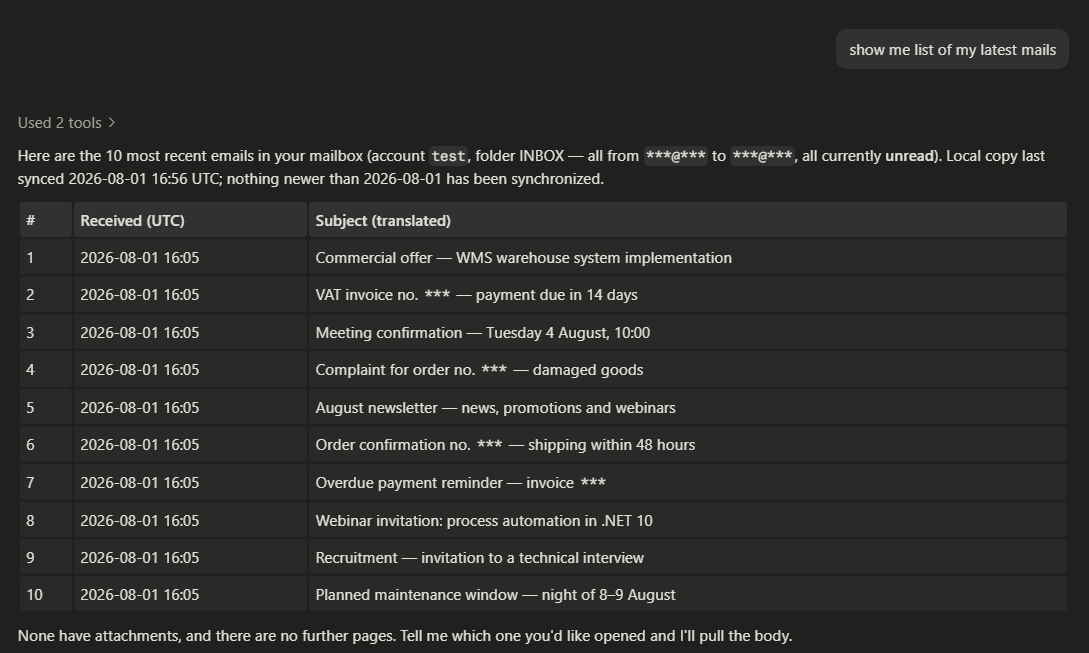
One question, answered from the local copy in an ordinary chat client. The *** in these screenshots were blacked out by hand before the files entered a public repository — until you turn SensitiveContent on, MailFathom redacts nothing on its way to a client.
Install
Docker Compose is the recommended first installation. It is the only shape that provisions PostgreSQL for you, and its defaults publish both ports on loopback, so nothing is reachable from another machine until you decide it should be.
git clone https://github.com/fathomise/MailFathom.git
cd MailFathom
scripts/quick-start-compose.sh
That third line is the quick way to try it, not the way to run it: the script asks where your mailbox lives, writes the configuration, starts the stack, offers the schema step, records you and your mailbox, and hands you the key a chat client connects with — and what it prepares serves that one machine over plain HTTP, keeps its credentials in files under the checkout, and backs nothing up. It prints that list when it finishes.
Installing MailFathom is the real thing: what every shape needs, and the guide for Compose, Podman Quadlet, Kubernetes, or a native systemd process. Getting started then walks from an installed instance to a first successful tool call. To evaluate from the checkout instead, the local Aspire orchestration provisions PostgreSQL and applies the schema on its own — local development has that path.
Start here
| You are | Start at |
|---|---|
| Deciding whether MailFathom is for you | What it does well below, then the user guide |
| Installing or operating it | Installing MailFathom, then getting started |
| Connecting an agent to a running instance | Using the tools |
| Reading any of that with an AI assistant beside you | Hand it the documentation below |
| Contributing | CONTRIBUTING.md |
Hand the documentation to your agent
If an AI assistant is helping you install, configure, or use MailFathom, give it the documentation rather than a search over the site. One line is the whole of it:
Read https://fathomise.github.io/MailFathom/docs/llms.txt and follow it to the pages that answer my question.
That address is the current release's map: every published page, what it answers, and a link to its source, so the agent fetches the one page that owns your question instead of fragments of several. MailFathom also resolves in Context7 as /fathomise/mailfathom, which mirrors the default branch rather than a release.
→ Handing this guide to your own agent
What an agent gets
Twenty-one tools, and they are the whole surface.
| Reading your mail | list_accounts, list_emails, search_emails — ranked lexically, and by embedding similarity once you configure a model — get_email_content for up to ten messages in full, and ask_mail, which answers a question from your mail and cites every message it drew on |
| Marking it | set_mail_flags marks a message read or unread, stars it, and writes the keywords your client shows as tags |
| Sending | send_email sends one message; reply_to_email and forward_email answer one you already hold, deriving the addressing, subject, threading, quotation, and attachments from your stored copy; get_outgoing_email and cancel_outgoing_email report what became of a send and stop one that has not left |
| Drafting | save_draft, update_draft, and delete_draft write a message into your own Drafts folder and send nothing at all; send_draft is what sends one |
| Contacts | Six tools over MailFathom's own book of people — not addresses — which lives in your database rather than at your mail provider |
Two properties hold everywhere, and much of the design follows from them:
- Reading is local. A read answers from your copy and never contacts a mail server, so it is fast, it works while the server is down, and it changes nothing remotely. Every result states how fresh the local copy is.
- Nothing writes unless you asked for it. Retrieval cannot set the remote
\Seenflag at all. What can change your mailbox is what you configured — a mail rule, a spam action — or a tool a credential was explicitly granted. Sending is stricter again: it is off on every account, refused outright while the deployment is read-only, and bounded by a recipient policy and a per-period ceiling you set.
No send is performed while the caller waits. Each is written down, answered with a record identity, and offered by a delivery pass that survives a crash — so a message MailFathom says it queued is one it will actually try to deliver, and the seconds before it leaves are the only window in which it can be withdrawn. Nothing a client sends decides who a message is from.
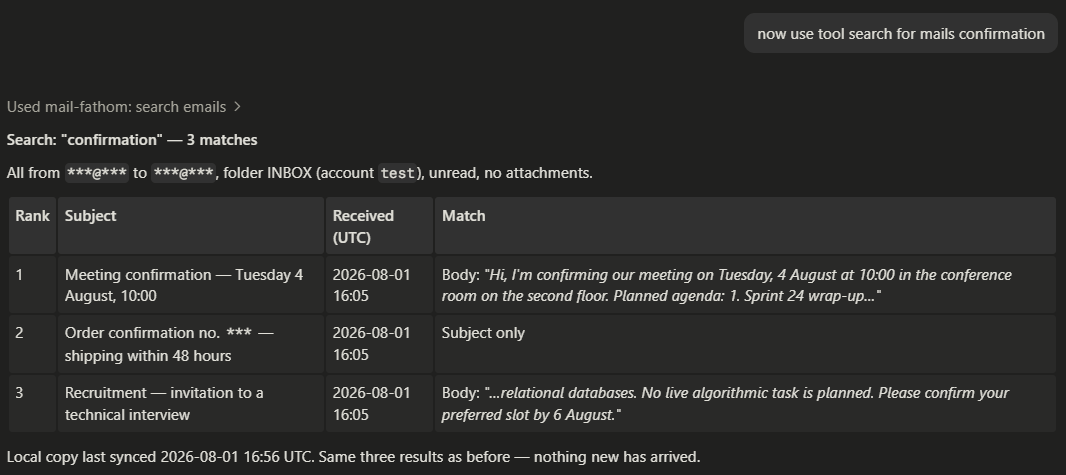
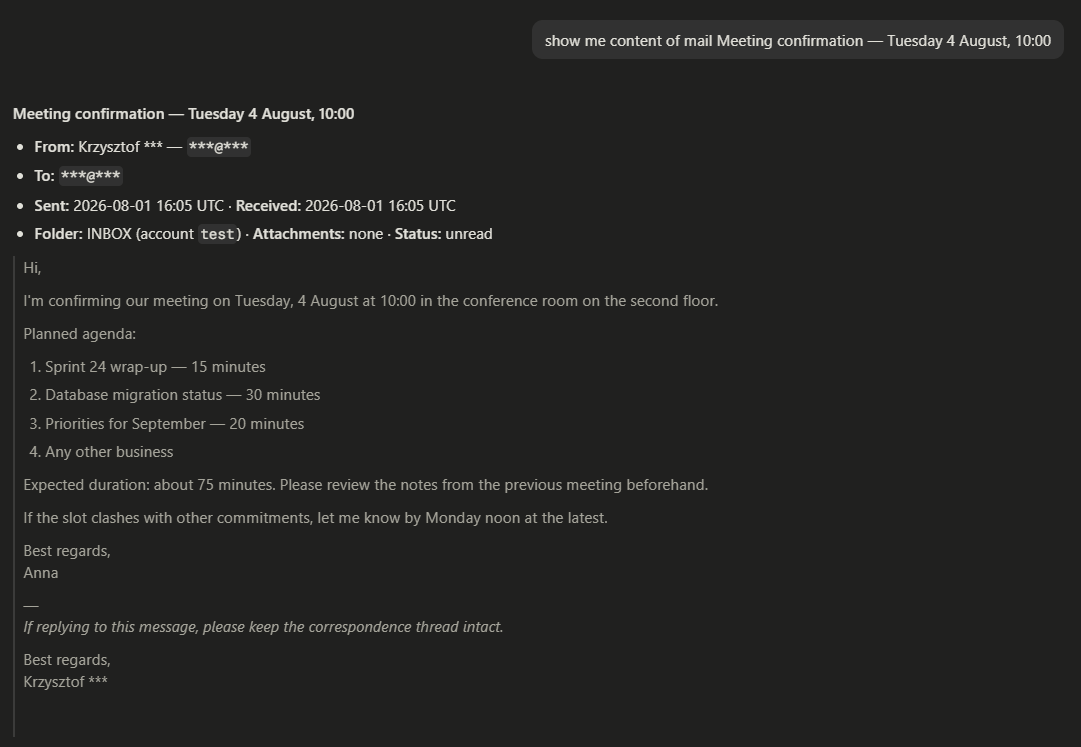
Beside what a tool returns, MailFathom records what it can establish about each message: who authenticated its sender and whether you recognize that author, how much its text reads as machine written, and the conversation it belongs to. What each tool answers, refuses, and never repeats back is the contract.
Project status
0.8.0 is the current release, and it is the one in which a deployment stops being one person's mailbox described in a configuration file. The people it serves, their mail accounts, their credentials, and the roles that decide what each of them may do are records in your database, administered with mfctl while the deployment runs — so one deployment serves several people, shares a mailbox between them, and runs as more than one replica.
Upgrading from 0.7.0 is a new installation over a backup, not an upgrade in place. Applying the schema discards the stored mail, which synchronization fetches again, and nothing imports the mailboxes or credentials a 0.7.0 configuration declared: each is recorded again through mfctl. The changelog states each break against the surface it breaks, and what to do about it.
Nightly images are built from main and published beside the releases. A nightly is not a release: its schema can be ahead of any published migration, it has no upgrade path in either direction, and it is deleted once newer ones accumulate. What a nightly build risks states the whole of it.
Where the artifacts are published
| Artifact | Where |
|---|---|
| Container image | ghcr.io/fathomise/mailfathom and docker.io/fathomise/mailfathom |
| Helm chart | oci://ghcr.io/fathomise/charts/mailfathom |
| Database schema script | attached to each release |
mfctl, the administrative command | attached to each release, one self-contained binary per platform, verified by the checksum file beside them, and installed on Linux by one command that does both |
Both registries carry the same manifest list under the same digest, so pull from whichever your environment already reaches. There is no binary artifact for the service itself: a native installation starts from a checkout.
What it does well
MailFathom is built as an enterprise-grade system from the first line, even while its feature scope is still small. Every claim below is a property of the code and the deployment assets today.
- Every act is behind a grant, and no grant implies another. Reading your mail, changing a flag, writing a draft, and sending are four separate permissions, checked when a tool is listed and again when it is called; an administrative route is checked the same way. An endpoint can also publish only some kinds of tool at all, so a deployment can offer reading and drafting while withholding sending from every credential. → Permissions
- Secure by default, and explicit about every weakening. The MCP endpoint is off until you enable it, and enabling it means saying whether it requires a credential; the unauthenticated posture is legal, warned about at startup, and never the default. Client certificates and per-client rate limits belong to the endpoint rather than to a proxy. IMAP is TLS-on-connect, and a configuration that weakens the transport fails startup unless it says so explicitly. → The MCP endpoint
- Credentials never live in configuration. A secret-bearing setting holds a reference — a file path, a systemd credential, an environment variable — so a configuration file is safe to review, diff, and back up: leaking it leaks paths, not passwords. No file MailFathom reads is ever written back; what an administrator changes while it runs is persisted in the database, behind a permission of its own. → Secret provisioning, configuration sources
- Mail is handled as personal data by the code that touches it. Content, metadata, extracted text, and search extracts are never logged and never carried in an error message; every call is bounded, so a deployment decides how much mail one call may draw out. Whether a deployment satisfies GDPR still depends on how you run it — what MailFathom offers is an architecture that keeps those choices open, with explicit seams for the data-subject workflows. → Using the tools
- It fails fast and says why. Startup resolves every secret reference and verifies the database schema before serving anything, and a refusal names the key or the pending migration that caused it. Migrations are never applied while starting, in any environment. → ,
Documentation
Every documentation link here goes to the documentation site, which is the readable form: the same pages with search, an API reference generated from the source, and a version selector. It opens on the current release, and an address here names no version, so a link keeps working across releases. docs/ is the index for reading the same pages in the repository instead.
| User guide | Install, configure, run, and use MailFathom |
| Configuration reference | Every user-settable option, its default, and whether changing it needs a restart |
| Permissions | What a credential may do, and what a refusal says |
| MCP tools | The tool contracts, their arguments and results, and the stable error codes |
| Mail delivery | What a send passes through before it leaves, and what bounds it |
| Architecture | The boundaries, the projects, and why they are drawn there |
Documentation under docs/ describes behavior that exists. Where something is planned, it is tracked as an issue rather than written up as though it worked.
Why it exists
A mailbox is the largest archive most people own and the least usable one. Contracts, decisions, invoices, threads that ended without a conclusion, attachments nobody will ever find again: all of it is in there, and none of it is reachable except by scrolling. Mail clients are built to show you the newest of it, one message at a time. After twenty years of accumulation, that is the wrong shape entirely.
MailFathom is being built to change what mail is to software: keep the local copy current, index it so the whole of it is reachable rather than only its most recent slice, and serve it to agents as tools. MCP is how agents reach it; it is not what MailFathom is. None of it depends on somebody else's service — the copy is yours, the database is yours, the deployment is yours, and the AI capabilities arrive as providers you choose and point at rather than as ones compiled into the product.
Where it is going
The tools are the foundation, not the product. Sending was the capability whose effect first reached somebody who is not this mailbox's user; what an agent still cannot do to a mailbox is move, file, and delete. Every later capability takes the route these took: a named permission, a recorded change, and a pass of its own that owns the mail server.
A client of MailFathom's own is being built, and it is an alpha. A web client travels inside the image, off until a deployment serves it, and the same client is attached to each release as a desktop application for Linux and Windows. It is there to be tried rather than relied on: it is incomplete, it changes from one release to the next, and the tools above remain the supported way to reach your mail. → The client endpoint, The desktop client
Ideas, not yet scope — recorded as open questions, each waiting on a decision rather than on effort. Discussions is where they are argued, and the Ideas category is open to yours: encrypted and signed mail, antivirus scanning of stored attachments, OAuth for outbound IMAP and SMTP, and skill-based jobs, whose body is an instruction an agent carries out against a slice of your mail rather than a deterministic rule.
Contributing
Contributions are welcome, and the entry point is CONTRIBUTING.md: it gets you from a clone to a passing verification run and states the few rules a pull request has to satisfy. Every change starts from an issue, so open one — or comment on an existing one — before writing code, and wait for a reply on anything larger than a typo.
MailFathom is developed AI-first, and close to zero-touch. Nearly every line here was written by an autonomous coding agent working from an issue and the rules in AGENTS.md, and reviewed before merge. Working the same way is encouraged rather than merely tolerated; a hand-written patch is judged identically. What does not change either way is that you read your diff before submitting it, and that the same gates and licensing obligations apply.
Fork the repository, clone your fork, and point it at this one — every verification gate measures your branch against the base it will actually merge into:
git clone https://github.com/<you>/MailFathom.git
cd MailFathom
git remote add upstream https://github.com/fathomise/MailFathom.git
git fetch upstream main
If you work with a coding agent, hand the rest to get-started-contributors, the workflow skill written for somebody arriving for the first time; in Claude Code it is /get-started-contributors, and any other agent can be pointed at the file. Setting up by hand takes the same steps, written out in From a clone to a green run. Development is on Linux; nothing here is verified against anything else.
Discussions takes questions in Q&A and proposals in Ideas. A defect or a piece of scope belongs in issues — except a vulnerability, which has a private channel below. CODE_OF_CONDUCT.md applies to everyone taking part.
Security
MailFathom holds mailbox credentials, OAuth tokens, certificate material, and a local copy of someone's mail. Report a vulnerability privately through SECURITY.md rather than in a public issue.
Privacy policy. MailFathom transfers no information to other networked systems unless specifically requested by the user or the person installing or operating it. It reaches the mail servers, the database, and the model provider a deployment configures, and nothing else: it collects no telemetry, phones no home, and exports OpenTelemetry data only to an endpoint an operator sets. Where mail is stored, who can reach it, and which model receives a result are deployment decisions.
Verifying what you downloaded. No mfctl binary carries a code signature, on any platform, so Windows warns about an unknown publisher. The checksum file attached beside them is what tells a genuine download from a tampered one:
sha256sum --check --ignore-missing 'mfctl-<version>.sha256'
The container image and the Helm chart each carry a signed build provenance statement instead, so gh attestation verify answers where one came from without your having to trust the registry. The container image records how to check one.
License
MailFathom is licensed under the GNU Affero General Public License, Version 3, SPDX identifier AGPL-3.0-only. Source files repeat that grant in a header the build enforces, and a published artifact carries LICENSE and NOTICE beside the binaries. The identifier is the -only arm: this release is offered under version 3 of the license and not under a later version the Free Software Foundation has yet to write.
MailFathom was originally created by Krzysztof Kasprowicz. The root NOTICE records that attribution, which section 7(b) of the license permits a distribution to require be preserved. The notice adds no use restriction and claims nothing about contributions written by other copyright holders. A contributor accepts the contributor licence agreement once, and that agreement is what places their contribution under this license — the AGPL carries no clause of its own that does, where Apache-2.0's section 5 did. It is a licence rather than a transfer — contributors keep the copyright in what they write — and it carries two things beside that: the freedom to publish MailFathom under other terms in future without tracing every past contributor, and the contributor's own statement that the code was theirs to give. That freedom is what the move from Apache-2.0 to AGPL-3.0-only was taken with, and it changes nothing about what this release grants you.
Third-party components MailFathom consumes are reviewed separately in THIRD_PARTY_LICENSES.md. That register records what MailFathom depends on and under which terms; it grants nothing in MailFathom itself, which LICENSE alone does. The application icon in assets/ is MailFathom's own asset and the same grant covers it.
What the license asks of you if you run MailFathom. Running an unmodified published release for yourself or your organisation asks nothing beyond what this repository already publishes: the source is here, and the artifacts point at it. Section 13 is what makes AGPL different from GPL, and it applies when you modify MailFathom and let other people use the modified version over a network — through its MCP surface, its client endpoint, or any other listener. Then those users must be offered the corresponding source of the version they are actually talking to, and the usual way to do that is to publish your fork and point at it from wherever they reach the service. Modifying it and running it only for yourself triggers nothing, and neither does an unmodified deployment, however many people use it.
What the license grants, it grants without promising that the software works. Sections 15 and 16 give MailFathom as is, without warranties or conditions of any kind, and state that no copyright holder is liable for damages arising out of its use or out of an inability to use it — a synchronization that falls behind, a search that misses what was there, or mail disclosed by a deployment that was reachable when it should not have been. The license text is what governs rather than this summary of it: read sections 13, 15, and 16 before pointing MailFathom at a mailbox that matters.