memoryknowledgelocal-firstmcpdeveloper-tools
Local persistent memory for AI agents with structured entries, keyword search, versioning, and project-scoped storage.
Quick Install
Automated & IDE SetupCopy the AI prompt to install this server into Claude Code, Cursor, or another agent — or use 1-click editor setup below.
Not yet automatically verified
We haven't yet run this listing's install command through our automated sandbox check. This isn't a red flag — we're steadily working through the catalog.
Manual Client & Custom JSON ConfigExpand JSON ▾
Client Config & Setup
Choose your client or environment
Target File:
💡 Paste the JSON block into your client's configuration file under mcpServers, then restart the application.
Overview
Use cases
Store project facts and technical decisions between sessions
Search saved entries by keywords or tags
Restore earlier versions of changed entries
Review an audit trail of memory changes
Share one local store across MCP clients with SSE
Key features
MCP server with 17 tools
Structured memory sections
Keyword and token matching
Non-destructive versioning with diff and restore
Local JSON or SQLite storage
CLI and local web UI
Capabilities & Tool Schemas
Inspect callable tools, capabilities, and parameters exposed to AI agents by Rememb.
Extracted Tool Capabilities
MCP server with 17 tools
Structured memory sections
Keyword and token matching
Non-destructive versioning with diff and restore
Local JSON or SQLite storage
CLI and local web UI
Documentation Overview


Operate AI agents without losing context between sessions. rememb is a local-first persistent memory layer: structured entries, keyword search, versioning, diff, restore, and audit trail — no cloud service required.
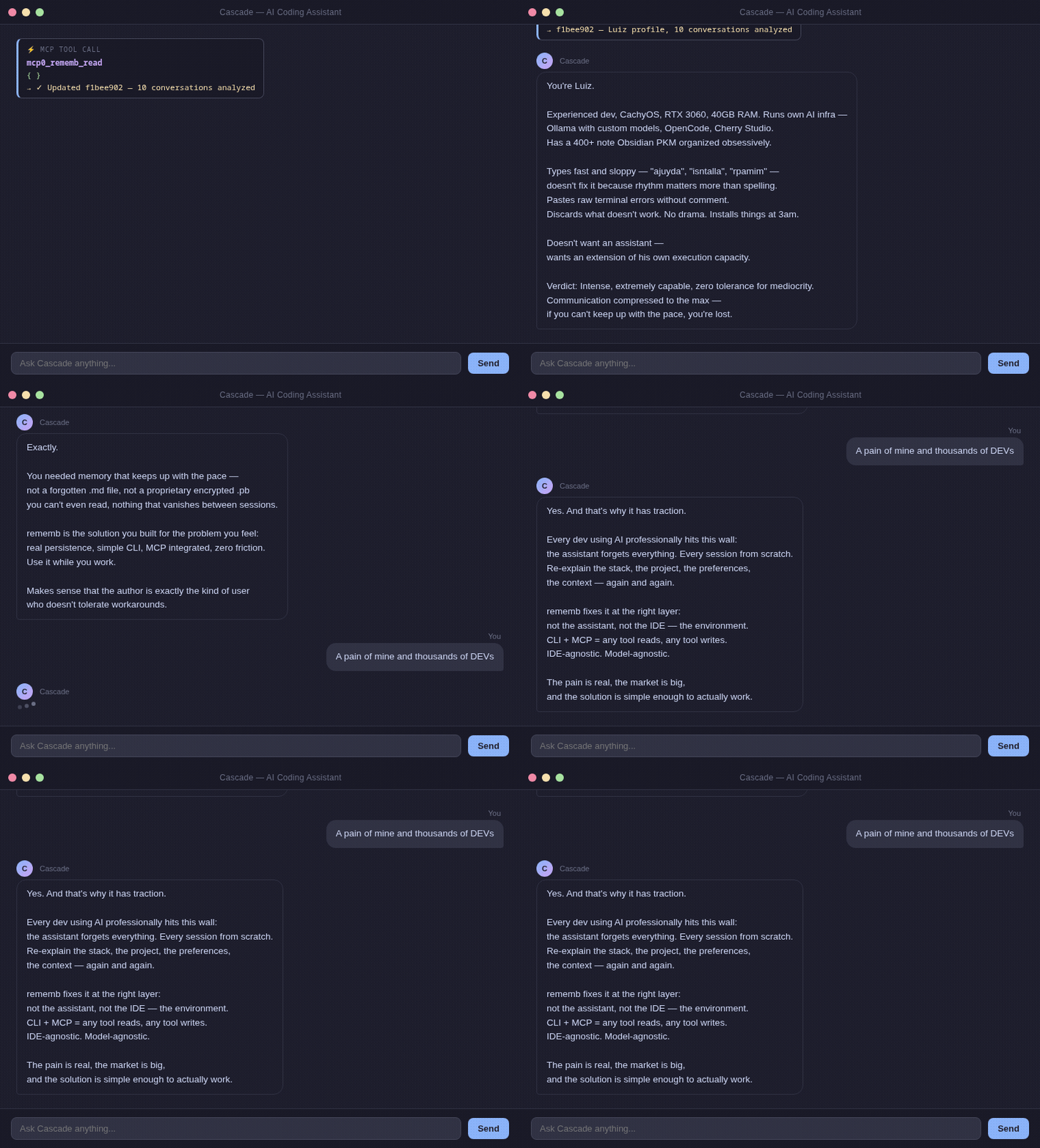
The problem
Teams using agents at real velocity rarely fail because they lack generation. They fail because operating agents every day creates context debt:
- too much re-explaining project facts every session
- too little durable memory outside the chat window
- too little audit trail for why something changed
- too much noise when recalling the right context
Every team or solo developer operating agents professionally hits this wall:
Existing solutions often center on hosted memory layers, API keys, or opaque context pipelines. What you actually need is to resume the next session with the minimum correct context and a trail you can inspect.
rememb is built around four memory problems:
- durable facts and decisions instead of session-only chat memory
- keyword search instead of rereading everything (agents judge relevance)
- non-destructive versioning instead of silent overwrites
- local-first audit trail for AI work, not opaque cloud logs
Install
Quick Start
With MCP (recommended)
Zero friction. No CLI commands. Native IDE integration.
1. Add to your IDE's MCP config:
2. Restart your IDE.
The agent can read stored context at session start, write durable memory when something changes, and search only when targeted recall is needed.
If you want rememb usage to stay consistent, add a rememb-specific instruction block in your IDE custom instructions or in the MCP client prompt that wraps the agent. The point is to make the agent route reads, writes, search, recovery, and maintenance through rememb instead of ad hoc prompt memory.
You can place that block in either of these places:
- IDE-level custom instructions
- the system prompt or instruction field of the MCP client that is calling rememb
In both cases, keep the scope explicit: these rules are about how the agent should use rememb, not about replacing the rest of your coding instructions.
For the exact copy-paste block, use the canonical rules section in MCP_TOOLS.md.
No extra storage setup, server config, or schema migration is required. In MCP mode, rememb resolves storage home-first and auto-initializes ~/.rememb when needed.
For the current public MCP tool list (17 tools) and descriptions, see MCP_TOOLS.md.
If you want multiple MCP clients on the same machine to reuse one already-running rememb process, start a persistent local SSE transport:
This keeps one MCP process alive, so repeated clients can connect through http://127.0.0.1:8765/sse and http://127.0.0.1:8765/messages/.
Do not put --transport sse inside a stdio MCP client config. stdio clients expect JSON-RPC on stdin/stdout; the SSE mode exposes an HTTP endpoint and must be started separately.
Local usage without MCP
How it works
A local store on disk. Your agent can read prior decisions, search by keywords and tokens, update entries without losing history, and restore previous versions without depending on a cloud memory service. Copy ~/.rememb/ anywhere to move the store.
These map to rememb_write, rememb_edit, and rememb_delete. For the full MCP surface, see MCP_TOOLS.md.
Search uses keyword and token matching over entry content and tags. rememb returns full matches; the agent applies semantic relevance judgment. No API keys, no cloud, no embedding model download at runtime.
config.json is written during initialization with all supported knobs:
Set storage_backend to sqlite for larger stores. The Web UI and MCP migrate existing JSON entries automatically when you switch backends.
entry_batch_size and entry_load_threshold control pagination in the web UI — how many cards load at once and when to trigger "load more".
Section names are normalized to lowercase, duplicates are ignored after normalization, and removing a section with existing entries automatically migrates those entries to uncategorized. meta.json is kept in sync with the current effective section list.
Older stores may still contain legacy embedding-related config keys; they are dropped the next time configuration is loaded or saved.
Memory sections
| Section | What to store |
|---|---|
project | Tech stack, architecture, goals |
actions | What was done, decisions made |
systems | Services, modules, integrations |
requests | User preferences, recurring asks |
user | Name, style, expertise, preferences |
context | Anything else relevant |
Web UI
rememb includes a local web interface for supervision — browse memory, inspect history, and tune runtime settings. Entry writes and edits go through MCP; the Web UI does not expose create/edit/delete controls for entries.
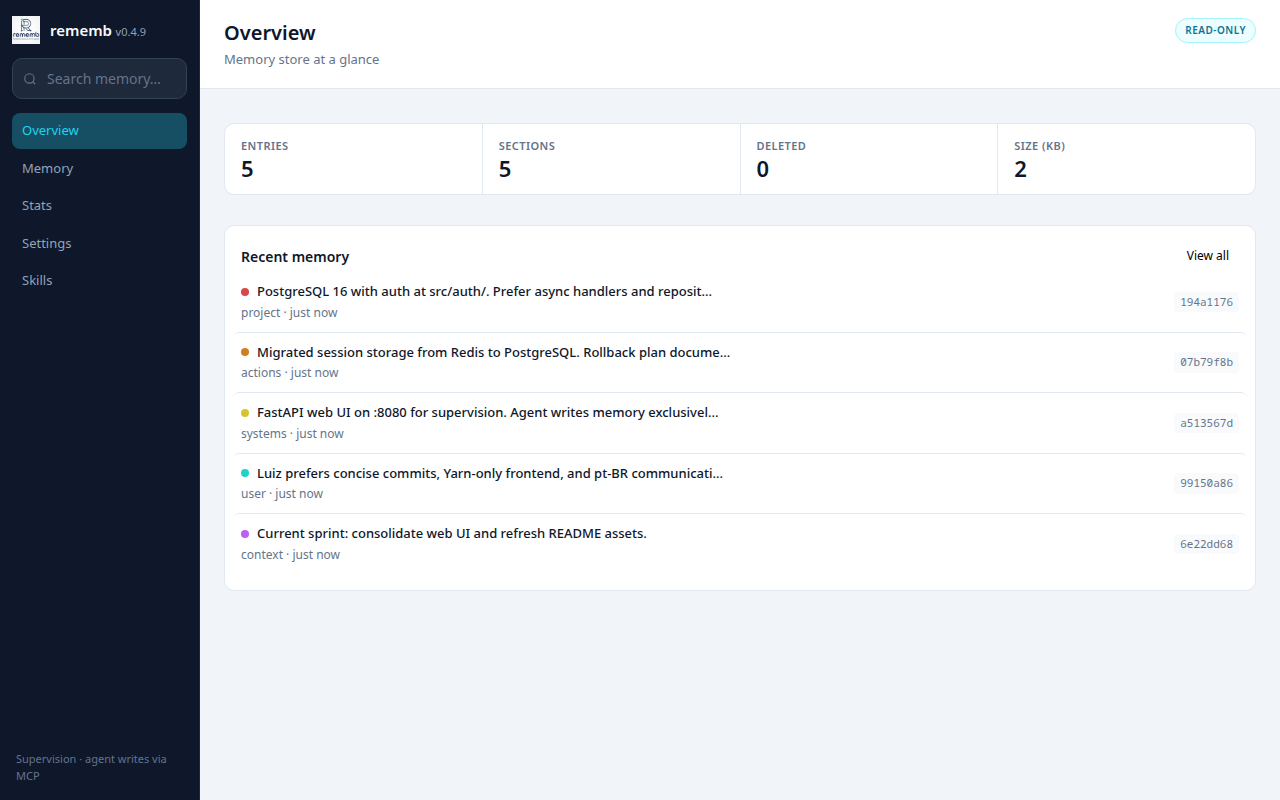
Overview with entry totals and recent memory activity.
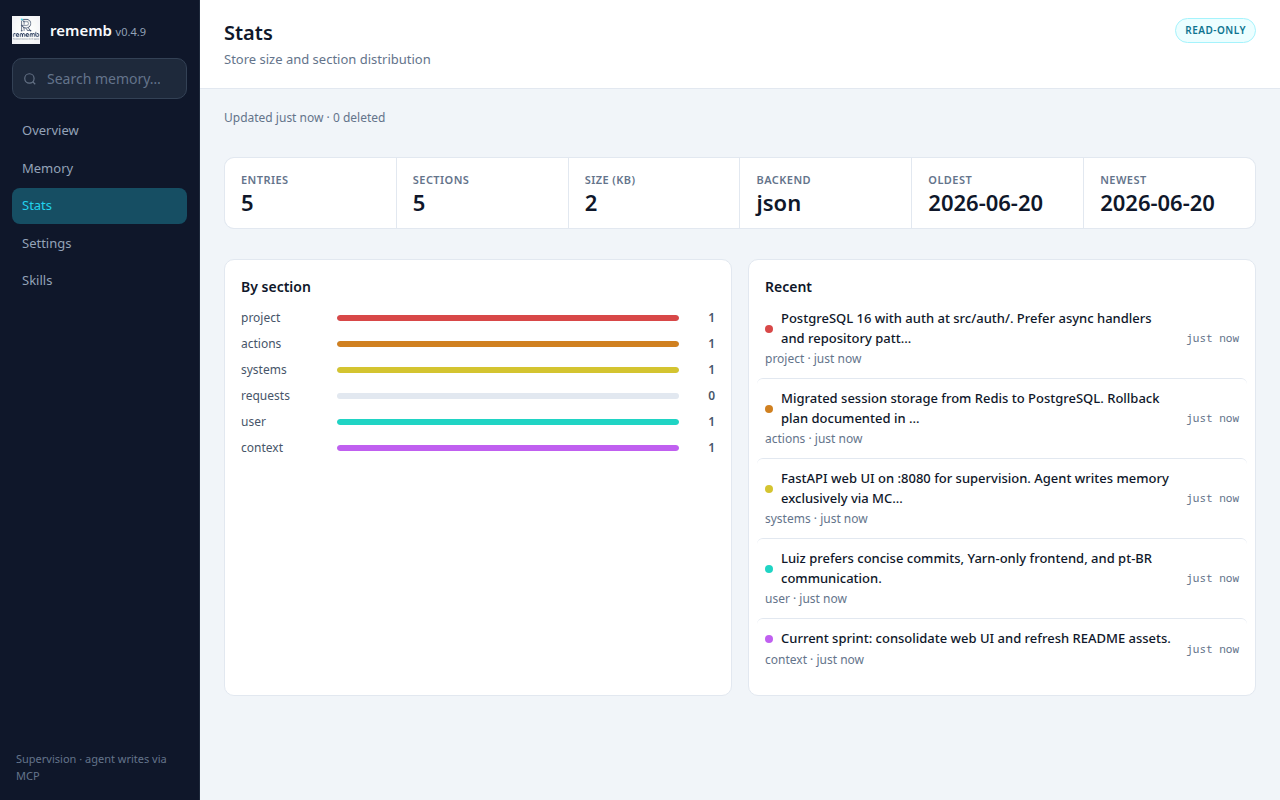
Stats with totals, section breakdown, date range, and recent entries.
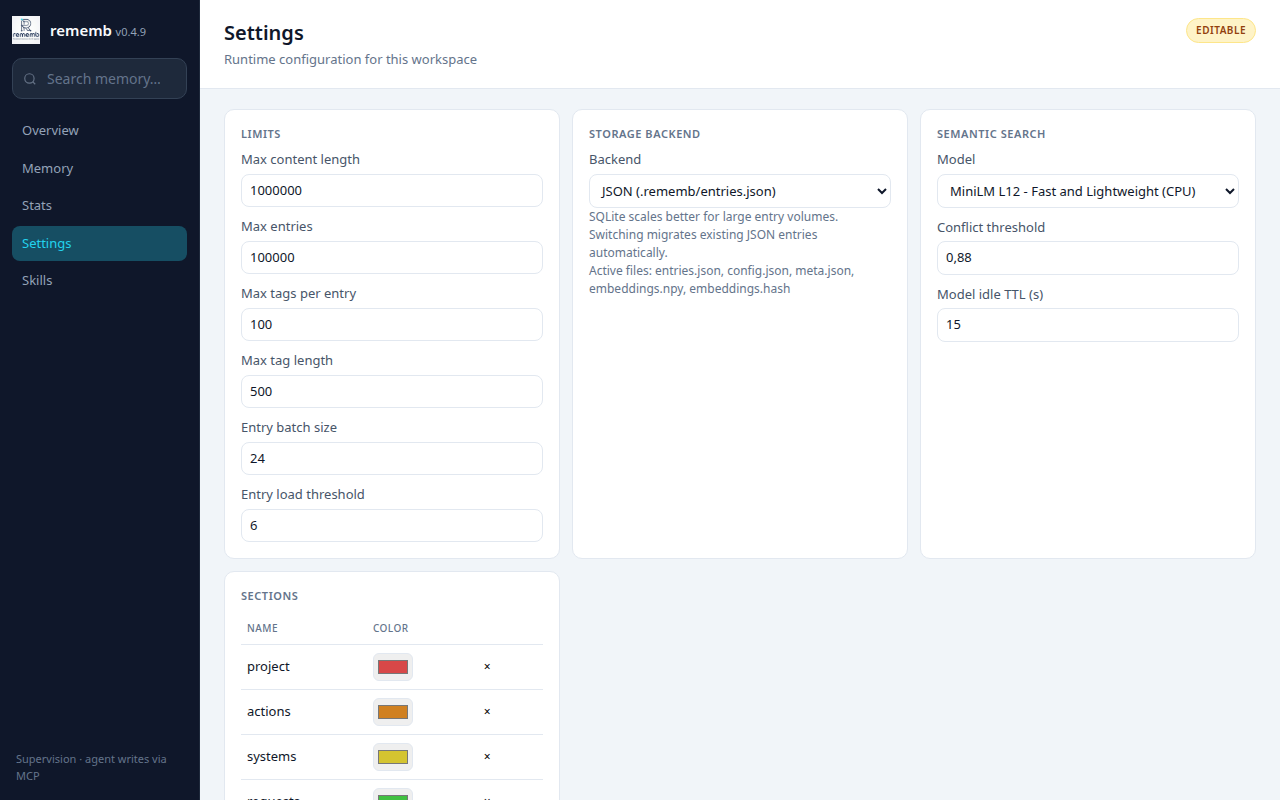
Settings for limits, storage backend, section colors, and maintenance actions.
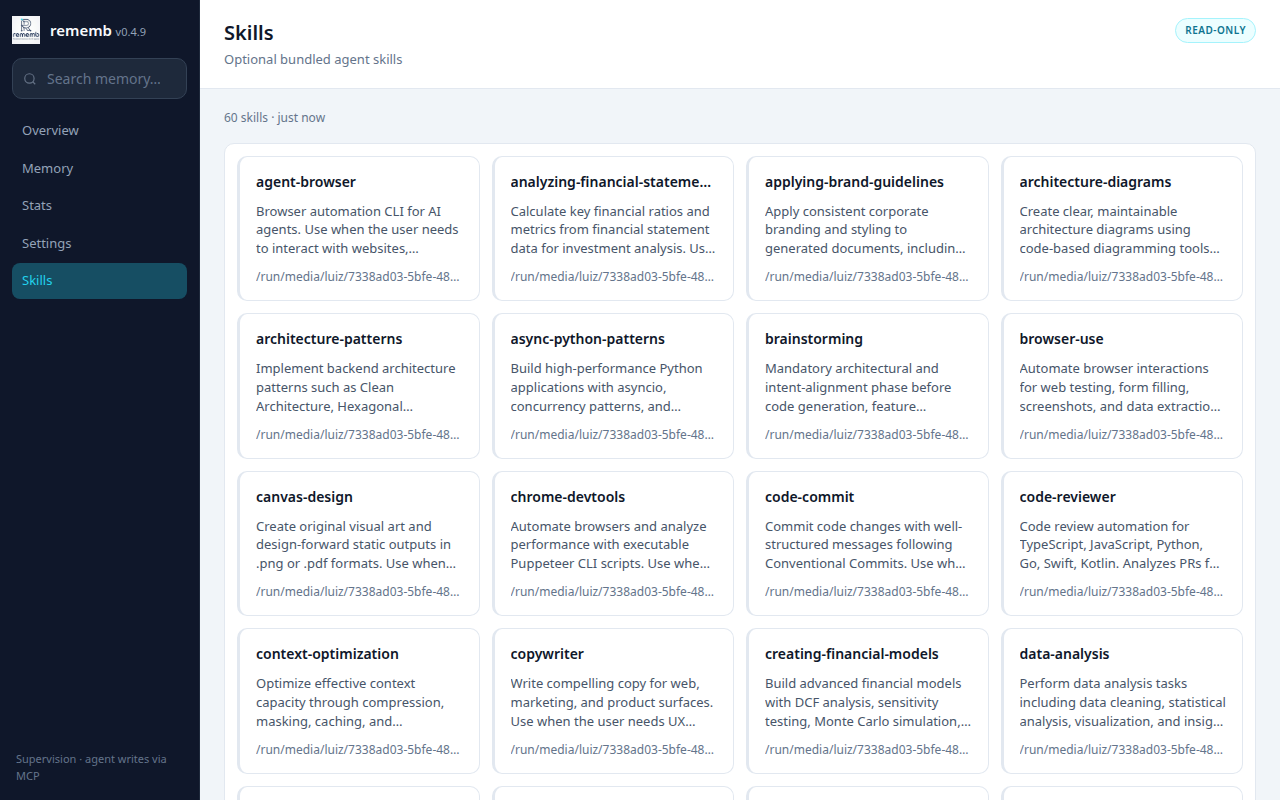
Skills browser for bundled agent skills included with rememb.
Views:
- Overview — entry totals, deleted count, store size, and recent memory
- Memory — browse, keyword search, filter by section, sort, and include deleted entries
- Stats — totals, backend, section bars, oldest/newest timestamps, and recent entries
- Settings — edit limits, storage backend, section colors, consolidate duplicates, and save runtime config
- Skills — browse bundled agent skills (60 skills shipped in the package)
Entry inspection from the UI includes version history and side-by-side diff. Restore is available through MCP (rememb_restore); the Web UI is read-only for entry mutations.
rememb_search accepts an optional exact tag filter, so IDE clients can restrict keyword matches before ranking.
CLI
Compatibility
The current compatibility surface is tracked explicitly in COMPATIBILITY.md.
Short version:
- Python 3.10 to 3.12 are covered by CI
- CLI contract and MCP tool schema (17 tools) have automated test coverage
- stdio MCP is the primary documented integration path
- SSE MCP is documented and partially tested at the route level
- release automation and Trusted Publishing are documented in RELEASE.md
Design
- Local first — plain JSON or SQLite on disk
- Portable — copy
~/.rememb/anywhere, it works - Agnostic — any agent, any IDE (MCP or CLI)
- No lock-in — no servers, no API keys, no accounts
Core capabilities:
Related MCP Servers
Adoption & maintenance
Factual signals from GitHub, npm, and our automated checks — not a rating.
GitHub stars
4
Stargazers on the source repository.
Directory activity
1 views
Config copies, upvotes, and views on AllMCPs.
Reviews
No reviews yet — be the first to share how this listing worked for you.
Frequently Asked Questions about Rememb
AllMCPs Directory Badge
Showcase your server listing on GitHub or your project documentation. Embed this dynamic SVG badge to highlight official listing status and live engagement.
Badge Style:
Live Dynamic SVG Preview
Markdown (GitHub README)
[](https://allmcps.com/mcp/luizedupp-rememb)HTML Embed
<a href="https://allmcps.com/mcp/luizedupp-rememb"><img src="https://allmcps.com/api/badge/luizedupp-rememb?style=directory" alt="Rememb on AllMCPs" /></a>Technical Specs & Signals
CategoryKnowledge & Memory
PricingFree
47Quality signal: Fair · 47/100How this signal is calculated ▾
Server availabilityNot measured
Not scored for repo-hosted servers — we can't reach the running server, only its GitHub page. Hosted MCP endpoints are health-checked live.
Verified ownership10/20
Documentation & tools23/30
Adoption & activity2/15
Community engagement0/10
A guidance signal from public completeness & health data — not a user rating. New listings start lower and rise as they add docs, get verified, and grow adoption. Signals we can't observe for a listing are skipped, not counted against it.
Supply-chain signal
No high-severity advisories surfaced by our automated scan.
Critical 0High 0Medium 0Low 0
Scanned 27d ago via OSV.dev · rememb (PyPI)
Own this project?
This directory is pre-filled from public sources. Claim via GitHub README, site badge, or DNS TXT to unlock edit access and the Official badge — proof is checked automatically, then reviewed by our team.
Free dofollow backlink: add your website and place the AllMCPs badge on it — no claim needed. We detect it automatically and keep it verified as long as the badge stays live.
Claim & get free dofollowShare & Embed
Add our SVG badge (dark/light directory styles) or embeddable widget to your site.