MCP-first control plane for ComfyUI workflows with explicit approvals and no silent downloads.
Quick Install
Automated & IDE SetupCopy the AI prompt to install this server into Claude Code, Cursor, or another agent — or use 1-click editor setup below.
Manual Client & Custom JSON ConfigExpand JSON ▾
Client Config & Setup
Choose your client or environment
Target File:
💡 Paste the JSON block into your client's configuration file under mcpServers, then restart the application.
Documentation Overview
Local GPU Imagegen
An MCP-first control plane with cryptographic model identity, explicit approvals, and durable run evidence for the ComfyUI setup you already use.
Run a supported ComfyUI workflow from Codex without modifying your setup.
Setup stores a resolved, version-pinned launcher equivalent to
uvx --from local-gpu-imagegen==0.9.1 local-gpu-imagegen serve; it does not
depend on a console script from the temporary uvx environment. If an older
entry reports client_setup_drift, remove only that client entry and apply
setup again. Starting ComfyUI does not repair an MCP launcher failure; backend
readiness is checked after the client loads the server.
Ask Codex:
This path requires Python 3.11 or 3.12, Codex, an already-running local ComfyUI
instance, an already-installed model, and one ordinary txt2img API workflow
using the supported built-in topology. It uses your existing local image
backend and model with no silent model downloads or switches. It does not
install a backend, download a model, convert UI-format JSON, or execute a
workflow that requires unsupported custom nodes. An explicit Windows portable
managed-start option is documented below.
The v0.9 supported host scope is Windows 10/11 x64 with NVIDIA. The single
py3-none-any wheel describes pure-Python packaging, not a separate Linux
edition or a claim of Linux managed-generation support. Ubuntu CI verifies the
platform-neutral MCP, packaging, existing-backend, and unsupported-platform
contracts; Windows runs the complete portable-bootstrap suite.
ComfyUI generates the pixels. Local GPU Imagegen controls authority, reproducibility, review, and recovery around that generation.
Five-minute Quickstart | Launch playbook | Alternatives
Bring Your Own ComfyUI Workflow
The retained Codex workflow-onboarding session inspected and registered a supported graph, then bound its exact model components; it did not submit a prompt or use the GPU. Historical generated-image records remain available for technical audit, but v0.9 does not use them as promotional visuals or as evidence of image-quality superiority.
This path requires an existing local image backend and model; there are no silent model downloads or switches.
Guided Bootstrap (Windows NVIDIA)
For an existing environment, run bootstrap status and reuse only a verified
portable root, checkpoint, and loopback endpoint. For a zero-environment setup,
bootstrap plan shows the exact portable archive, checkpoint, byte ceiling,
license URLs, SHA-256 hashes, disk/VRAM requirements, and bounded rollback;
bootstrap apply requires the displayed explicit confirmation. Downloads are
resumable and never silent. The frozen scope is Windows 10/11 x64 with NVIDIA
RTX 20-series or newer, 10 GiB VRAM, and 30 GiB free disk. Docker is not
required. This model-free
bootstrap contract does not prove image generation or production readiness.
setup is read-only without --apply. The apply path delegates to the client's official mcp add command; Local GPU Imagegen does not edit client configuration files directly or download a model.
Trust proof: the retained ordinary-route result came from one installed Codex session. Discovery did not load weights; trust and route identity were explicit; successful rounds were bounded; review used the original-resolution PNG; finalization was bound to the reviewed bytes; and the run state remains recoverable. The evidence proves this one result, not complete 9+3 acceptance, measured performance, or production readiness.
v0.9 local acceptance: a fresh Windows/NVIDIA installation built from the user-approved ComfyUI archive and SDXL checkpoint reached managed readiness, served exactly seventeen MCP tools, and finalized one reviewed non-human environment image with byte-identical source and final hashes. The artifact remains local until a separate sanitized export and is not bundled in the package. Two separate character attempts failed strict hand, eye, or tail review; prominent-human anatomy quality is therefore not established.
Optional Managed ComfyUI Startup
Windows setup can register one existing portable root for managed startup:
The opt-in command validates the fixed portable layout and registers
python_embeded\python.exe -s ComfyUI\main.py at 127.0.0.1:8188. It does not
install ComfyUI or download a model. An already-running endpoint is reused but
never owned or stopped. A child started by the MCP process is stopped at MCP
exit only when its queue is empty; a non-empty queue is retained and reported.
Both modes use the existing backend and model with no silent model downloads
or switches. Workflow execution remains limited to supported built-in
topologies; managed startup does not remove or manage custom nodes already
present in the selected portable installation.
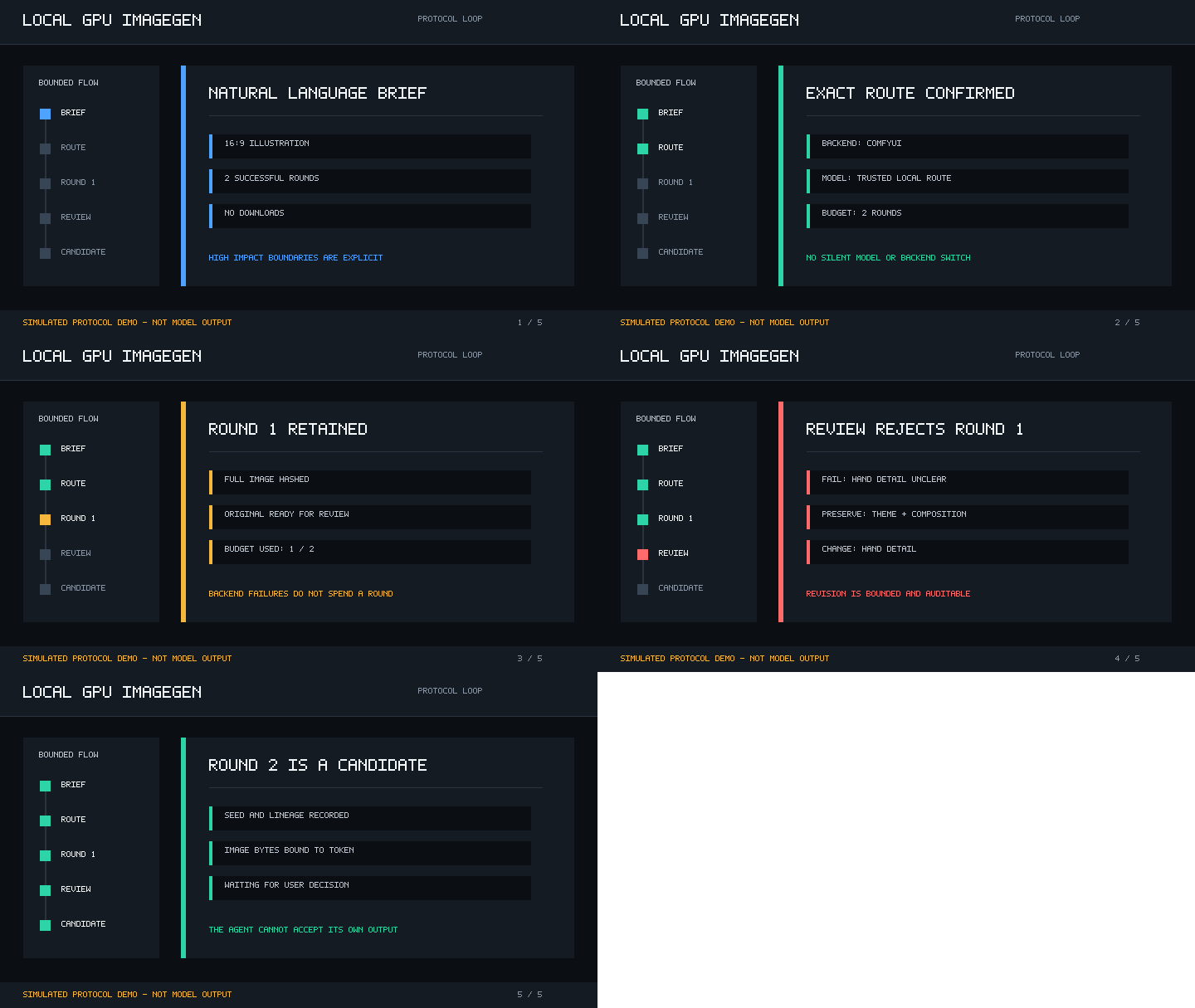
The animation is a deterministic simulated protocol demonstration, not model output or image-quality evidence. It remains secondary to the protocol and test evidence. Model-free tests cover the protocol and backend contracts, not image quality, broader named-client generation, performance, or complete 9+3 acceptance.
For Claude Code, use uvx local-gpu-imagegen setup claude-code --apply. Remove the entries with codex mcp remove local-gpu-imagegen or claude mcp remove --scope user local-gpu-imagegen. Use uvx local-gpu-imagegen doctor to inspect local backend readiness. The setup contracts and equivalent stdio launches are verified; one Codex installed-client generation is retained, while Claude Code generation remains pending. See Client compatibility.
DeepSeek Harness (DSH) connects through the same standard stdio MCP protocol with no setup command: register the server through dsh plugin --profile <name> add or point any MCP-compatible client at scripts/mcp_server.py. A real DSH-driven run completed the full discover_models (api_only) → recommend_models → start_run → get_run → generate_round sequence against a live ComfyUI checkpoint and produced a round-01.png artifact; initialize/tools/list/ping, verify_mcp.py, and verify_client_configs.py all pass.
Before PyPI publication, install the verified wheel or a source checkout, then use the equivalent local-gpu-imagegen verify and local-gpu-imagegen setup ... commands.
Why This Project
- Run supported workflows from your Agent: inspect and register ordinary ComfyUI API graphs instead of rebuilding them as one-off scripts.
- Reuse or explicitly manage your backend: ComfyUI is the primary existing-workflow path; an opt-in Windows portable supervisor removes manual startup without taking ownership of an existing process. AUTOMATIC1111/Forge and Diffusers remain compatibility paths.
- Make runs reproducible: freeze workflow, model identity, prompts, settings, seed, budget, and output hashes in a durable manifest.
- Use the installed CLI: verify readiness and delegate setup to the official Codex or Claude Code command without requiring a source checkout.
- Keep model authority explicit: discovery never loads weights, and generation cannot silently download or switch a model.
- Retain structured evidence: routes, budgets, attempts, image hashes, reviews, and recovery actions remain machine-readable and durable.
- Keep acceptance with the user: original-resolution review and later byte-bound finalization separate a generated image from an accepted final.
- Agent-guided workflow: a bundled Agent Skill turns a natural-language brief into a catalog-gated, confirmed run.
- Three delivery Profiles: standalone illustrations, presentation visuals, and UI visual assets share one deterministic run and review contract.
- Auditable hot revision: an immutable child run records a preserve/change contract and uses prompt refinement, img2img, or explicitly confirmed inpainting.
- Dependency-light MCP layer: protocol checks and tests use the Python standard library and require no GPU.
- Focused scope: image generation is kept separate from planning, memory, and unrelated agent features.
Experimental Composition Controls
The golden path uses ordinary sdxl-txt2img. The sdxl-regional-txt2img and sdxl-two-stage-copy-subject routes remain experimental, are not part of the golden path, and provide no fallback from the ordinary route. Their retained negative evidence does not establish a visual-quality improvement.
Image Quality Boundary
Model and workflow quality remain user supplied. Local GPU Imagegen adds explicit execution, review, recovery, and evidence; it does not modify diffusion algorithms or guarantee that a prompt workflow improves an image. Review now treats a change to the requested product medium, subject, practical use, or asset slot as semantic substitution and a failed constraint, even when the replacement looks cleaner.
See Image quality control and the frozen workflow no-regression gate. The retained gate ended in FAIL_WORKFLOW_REGRESSION; no public image-quality superiority claim is supported.
Source Checkout And Backend Setup
1. Verify The MCP Server
Python 3.11 or 3.12 is enough for this check. No GPU, model, or AI client is required.
Related MCP Servers
Reviews
No reviews yet — be the first to share how this listing worked for you.
Frequently Asked Questions about Local GPU Imagegen
AllMCPs Directory Badge
Showcase your server listing on GitHub or your project documentation. Embed this dynamic SVG badge to highlight official listing status and live engagement.
Badge Style:
Live Dynamic SVG Preview
Markdown (GitHub README)
[](https://allmcps.com/mcp/local-gpu-imagegen-2)HTML Embed
<a href="https://allmcps.com/mcp/local-gpu-imagegen-2"><img src="https://allmcps.com/api/badge/local-gpu-imagegen-2?style=directory" alt="Local GPU Imagegen on AllMCPs" /></a>Technical Specs & Signals
CategoryDeveloper Tools
27Quality signal: Emerging · 27/100How this signal is calculated ▾
Server availabilityNot measured
Not scored for repo-hosted servers — we can't reach the running server, only its GitHub page. Hosted MCP endpoints are health-checked live.
Verified ownership8/20
Documentation & tools11/30
Adoption & activity1/15
Community engagement0/10
A guidance signal from public completeness & health data — not a user rating. New listings start lower and rise as they add docs, get verified, and grow adoption. Signals we can't observe for a listing are skipped, not counted against it.
Own this project?
This directory is pre-filled from public sources. Claim via GitHub README, site badge, or DNS TXT to unlock edit access and the Official badge and attach your website — proof is checked automatically, then reviewed by our team.
Free dofollow backlink: add your website and place the AllMCPs badge on it — no claim needed. We detect it automatically and keep it verified as long as the badge stays live.
Claim & get free dofollowShare & Embed
Add our SVG badge (dark/light directory styles) or embeddable widget to your site.