Connect Claude to any OpenAI-compatible LLM endpoint and offload routine work to a local model.
Quick Install
Automated & IDE SetupCopy the AI prompt to install this server into Claude Code, Cursor, or another agent — or use 1-click editor setup below.
One-click editor setup isn’t available for this listing yet — we don’t have a confirmed install command, and we’d rather show nothing than point your editor at the wrong package or host. Follow the project’s own setup instructions, linked above.
Manual Client & Custom JSON ConfigExpand JSON ▾
No confirmed setup config for this listing yet. We only publish a config block when the install details come from the project itself — its README, its docs, or a verified owner. We haven’t found those for lm, and we’d rather show nothing than a guess you’d paste into your client. Follow the project’s own setup instructions for the current steps.
Documentation Overview

Houtini LM (@houtini/lm) - Offload Work from Claude Code to a Local LLM, OpenAI GPT-5/6, a Router or a Cheaper Cloud Model




Houtini LM is an MCP server that lets Claude (or any MCP client) hand bounded work to another model - a local LLM on your GPU, OpenAI's latest GPT models, a LiteLLM router, OpenRouter or a cheap cloud API - while you carry on working in the AI platform you already like. It cuts your token bill, and it gives you a second model to review your code whenever you want one.
Quick Navigation
What's new | Why use it | Install | How it handles different models | What to hand over | Tools | Reading the footer | Configuration | Endpoints | The manual
I built this because I kept leaving Claude Code running overnight on big refactors and the token bill was painful. A huge chunk of that spend went on bounded tasks any decent model handles fine - generating boilerplate, code review, commit messages, format conversion, the sort of work that doesn't need Claude's reasoning or its tool access.
So Claude stays the architect, doing the planning, the multi-file changes and the judgement calls, and houtini-lm passes the drafting to whatever model you've got running. That could be Qwen on a GPU box under your desk, GPT-5 or GPT-6 straight from OpenAI, a model behind a LiteLLM router, one of OpenRouter's 300+ models or DeepSeek at pennies per million tokens. Claude QAs everything that comes back.
I wrote a full walkthrough of why I built this and how I use it day to day if you'd like the longer story.
What's new in 3.3
houtini-lm now speaks to far more than a local GPU. Point it at OpenAI directly and GPT-5, GPT-6 and the o-series reasoning models work without any router in between. They reject parameters every open model accepts (max_tokens, temperature), so houtini-lm sends them max_completion_tokens only, learns a model's output cap from its own error when the endpoint doesn't report it, and leaves the image, speech and moderation models out of the list. Point it at a LiteLLM router and it reads which real model sits behind each alias, along with that model's true context window and output cap, so a mixed fleet of local and hosted models is sized and profiled correctly. Thinking is now your call (auto, off or on), there's a Docker guide built from a working deployment, and the manual has a page per job. The changelog has the detail.
Why use houtini-lm?
The bottom line before we go deep: you keep your favourite AI platform, and you stop paying frontier prices for work that doesn't need a frontier model.
The obvious win is cost. When Claude delegates a review with code_task_files, the source files are read by the houtini-lm process and sent straight to the other model, so they never enter Claude's context window at all. Claude sends a short tool call and reads back a short answer. I benchmarked this on real TypeScript source files:
| Task | Claude reads it directly | Delegated | Saved |
|---|---|---|---|
| Code review (1,352 lines) | 14,466 tokens | 769 tokens | 95% |
| Architecture review (2,022 lines) | 20,014 tokens | 983 tokens | 95% |
| External repo review (581 lines) | 5,344 tokens | 741 tokens | 86% |
| Code explanation (833 lines) | 8,678 tokens | 744 tokens | 91% |
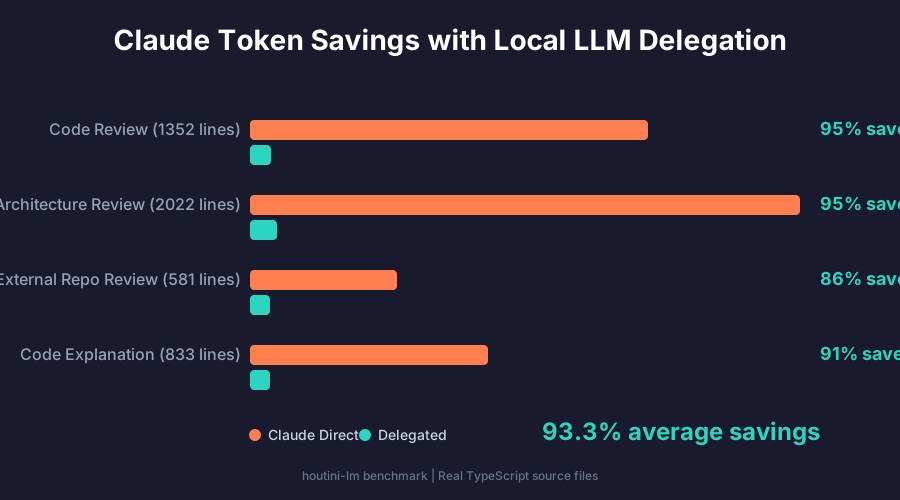
That averages out at 93.3% saved across the session. To be fair, small tasks like a one-line question or a commit message don't save much, because the tool call overhead (around 250 tokens) is about the same size as the answer. Anything that involves reading files, which is most of a real coding session, pays for itself straight away. You can run the same benchmark against your own setup with LM_STUDIO_URL=http://your-server:1234 node scripts/benchmark.mjs.
The less obvious win is a second opinion. A different model reads your code with different blind spots, and it costs you next to nothing to ask. As it happens, the 3.3.0 release of this repo is a decent example: I had Claude point houtini-lm at gpt-6-astra (through my LiteLLM router) and ask it to review the release's own 14,000-token diff. It came back with three real bugs - a router probe that cached a temporary 429 as a permanent "not a router", an output cap that got overwritten, and a race in the model list cache - and all three were fixed before the release shipped. Two of the three new test files were drafted the same way, then reviewed by Claude before commit.
Code review is where this pays off hardest, because reviews are exactly the bounded, read-a-lot-write-a-little work that a cheaper model does well. From there the list keeps growing: test stubs, docstrings, commit messages, changelog drafts, format conversion, mock data, type definitions, embeddings for a RAG pipeline, a quick sanity check on a regex, brainstorming three approaches before Claude commits to one, and so on.
The trade-off is wall-clock time. Local inference is typically 3-30x slower than a frontier model, so delegation wins on bounded, self-contained tasks rather than everything. A local model keeps your code private and costs nothing per token, a cloud model is cheap, and neither touches your Claude quota or its rate limits.
How it works
Claude's the architect, the other model's the drafter, and Claude checks everything that comes back.
Install
You'll need Node 22.5 or newer and an OpenAI-compatible endpoint: LM Studio, Ollama, vLLM, SGLang, a LiteLLM router, or a cloud API key for OpenAI, DeepSeek, Groq and the like. In Claude Code, with LM Studio running on the same machine, it's one command:
That's it. LM Studio listens on localhost:1234 by default, which is where houtini-lm looks first, so Claude can start delegating straight away. Anywhere else, set the URL (and a key, if the endpoint needs one):
OpenAI works the same way. Pin the model you want, because OpenAI lists dozens and they all score the same in routing:
Installing houtini-lm walks through every route: a GPU on another machine, OpenAI and other cloud APIs, OpenRouter, a LiteLLM router, Claude Desktop and other MCP clients, plus how to check it worked and how to update. If you'd rather run it in a container, Running houtini-lm in Docker covers both a plain docker run -i and serving it over HTTP behind Docker's MCP Gateway. New to local models altogether? Start with Getting started, which covers which models fit on 16, 32, 64, 96 or 128 GB of VRAM.
To check everything's wired up, ask Claude to run houtini-lm's discover tool. It tells you the version, which endpoint it found, which model is active and how big its context window is.
How houtini-lm handles different models
No two open source LLMs are the same. They differ in context window, output cap, prompt template, whether they think before they answer and how much of that they report, so a lot of houtini-lm's code is about working out what it's talking to and adjusting for it. How houtini-lm handles different models has the full detail, and here's the short version.
Related MCP Servers
Reviews
No reviews yet — be the first to share how this listing worked for you.
Frequently Asked Questions about Lm
AllMCPs Directory Badge
Showcase your server listing on GitHub or your project documentation. Embed this dynamic SVG badge to highlight official listing status and live engagement.
Badge Style:
Live Dynamic SVG Preview
Markdown (GitHub README)
[](https://allmcps.com/mcp/lm-2)HTML Embed
<a href="https://allmcps.com/mcp/lm-2"><img src="https://allmcps.com/api/badge/lm-2?style=directory" alt="Lm on AllMCPs" /></a>