A repository wiki of Markdown pages anchored to real code: read, search, and verified writes.
Quick Install
Automated & IDE SetupCopy the AI prompt to install this server into Claude Code, Cursor, or another agent — or use 1-click editor setup below.
Not yet automatically verified
We haven't yet run this listing's install command through our automated sandbox check. This isn't a red flag — we're steadily working through the catalog.
Manual Client & Custom JSON ConfigExpand JSON ▾
Client Config & Setup
Choose your client or environment
Target File:
💡 Paste the JSON block into your client's configuration file under mcpServers, then restart the application.
Documentation Overview
livewiki
Code-anchored documentation that knows when it is stale.
livewiki turns a repository into a Markdown wiki whose every code reference is anchored to a real indexed symbol. An LLM writes the prose; livewiki does the deterministic work — planning the pages, running structural anti-hallucination checks on what the model wrote, tracking which anchored symbols changed, and preserving your edits.
The wiki is exposed to any coding agent by
@livewiki/mcp — an MCP (Model Context Protocol)
server with eight tools for reading, searching, and safely writing the wiki.


livewiki view builds a self-contained offline site from the wiki — grouped
sidebar, offline search, diagrams, and dark mode:
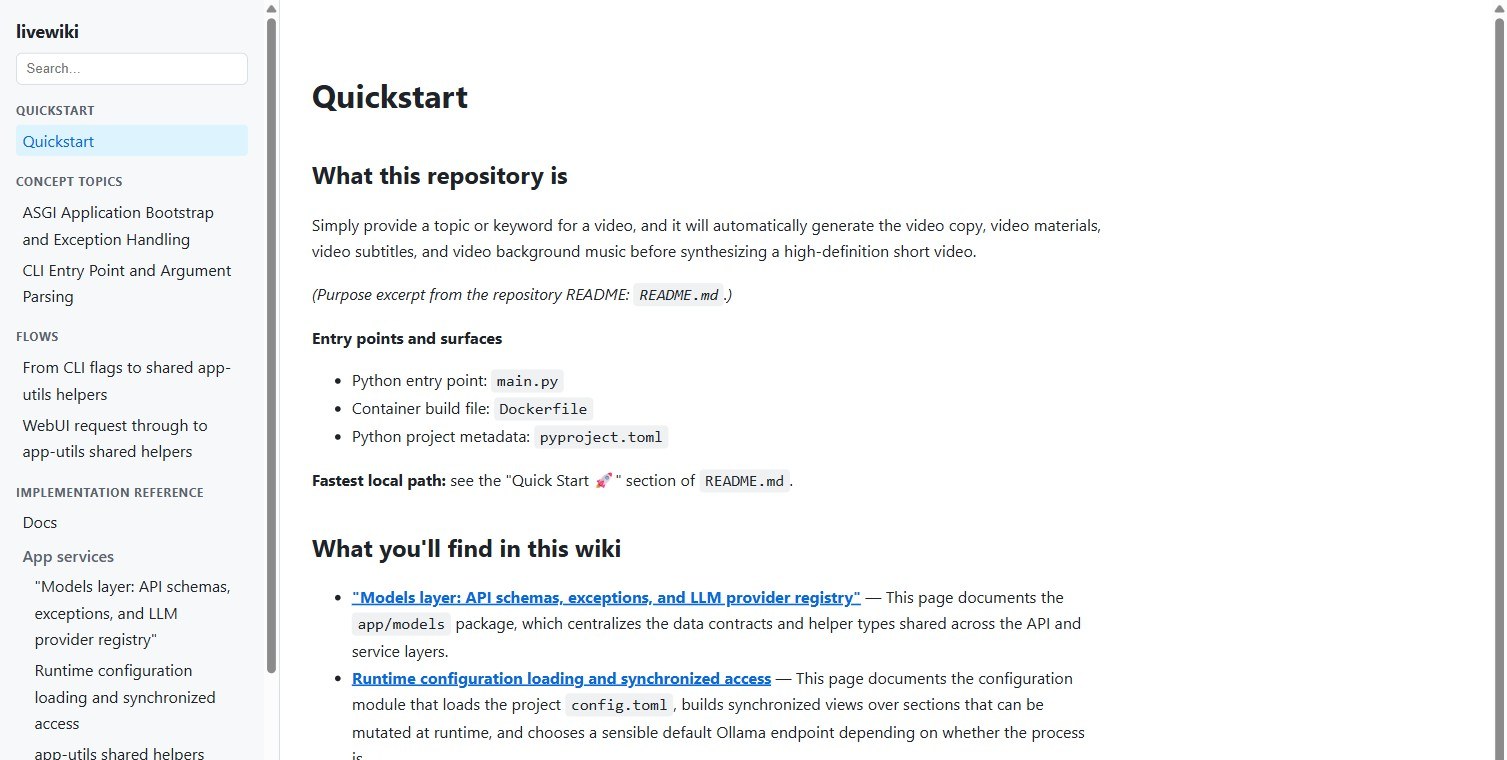
Example wiki generated by livewiki for MoneyPrinterTurbo-Plus, an external Python repository.
Why
Technical docs go stale the moment the code changes. livewiki makes that visible and cheap to fix instead of silent:
- Deterministic anti-hallucination checks. Every code reference must point
at a real indexed symbol.
livewiki verifyreads the wiki fresh from disk and fails on invented symbols, broken anchors, and signatures that no longer match — including references the LLM wrote seconds ago, without runningindexfirst, and without spending a token. Structural, not semantic; the section below draws the line. - Your edits win. Pages you mark
owner: humanare never rewritten, andlw:manualblocks are preserved byte-for-byte. - Debt is tracked, not discovered.
livewiki statusranks what drifted; a GitHub Action can gate every merge on zero documentation debt, without spending tokens. - Works where you already work. Bootstrap and maintain through the coding agent you use, or run a fully automated batch.
What verify checks — and what it doesn't
The anti-hallucination layer is deterministic and structural. livewiki verify
reads the wiki fresh from disk — so a page an LLM wrote seconds ago is checked
without running index first — and fails on:
- a cited symbol that does not exist in the code;
- an anchor that broke because the symbol moved, was renamed, or was deleted;
- a cited signature that no longer matches the indexed one;
- an internal link that does not resolve;
- a referenced artifact that is missing from disk;
- frontmatter or page structure that violates the format contract.
That removes whole classes of fabricated content — the invented function, the API that never existed, the reference that quietly rotted — before a reader ever sees it, at zero token cost. Anything that fails is rejected and rolled back rather than merged.
It does not prove that a sentence is true. A plausible but wrong explanation of code that really does exist passes every check above, because every check above is about structure and identity, not meaning. Read "anti-hallucination" here as a layer that mechanically eliminates a large class of fabrication and tells you the moment code moves under the prose — not as a guarantee of factual accuracy. Reviewing the explanation itself is still your job.
Quick start
Requires Node.js 24 or newer.
1. Install
(npx @livewiki/cli works too, without installing globally.)
2. Initialize
From the root of the repository you want documented:
Indexes the code and creates the wiki skeleton under livewiki/, plus a
derived cache under .livewiki/ (added to .gitignore). Deterministic — no
LLM call, no tokens.
3. Bootstrap the wiki once
You have two routes — pick one.
Route A — through your coding agent (no API key needed):
The installer detects your agent, wires the MCP server, the
document-as-you-go skill, and git hooks. Then ask the agent to bootstrap the
wiki; it pulls tasks from livewiki_next_task and submits pages with
livewiki_write_doc using the model it already has.
Route B — a configured LLM API (unattended):
The wizard lists the providers, asks for your API key (typed without echo),
and saves it. Bare livewiki on an unconfigured repo starts the same wizard.
Then:
The resumable pipeline plans real page units and writes one page per source
file and folder, plus flows, concept topics, diagrams, and an
understanding.md synthesis. Interrupt it and resume with
livewiki batch resume <runId>.
4. Verify and browse
Works with your coding agent
livewiki install auto-detects and wires 13 agents over MCP (with skills
and hooks where the agent supports them):
Claude Code · Codex · Cursor · Kimi · Gemini CLI · OpenCode · OpenClaw · Cline · Kiro · Qwen · Warp · Zed · Hermes
Prefer manual wiring? Any stdio MCP client works:
The server is also published to the official MCP
Registry as
io.github.eduardoabreu81/livewiki, so a client that resolves servers from the
registry can find it by name instead of using the snippet above.
Languages
| Language | Anchored docs (symbols extracted) |
|---|---|
| TypeScript | ✅ .ts |
| JavaScript | ✅ .js .mjs .cjs |
| TSX / JSX | ✅ .tsx .jsx |
| Python | ✅ .py |
| Go | ✅ .go |
| Rust | ✅ .rs |
| Java | ✅ .java |
| Everything else | Prose floor — every text file is walked and documented as prose, no symbols |
Anchored pages cite real symbols; the prose floor still gives every file a place in the wiki. Tier-1 language support grows as the pattern is proven (Go, Rust, and Java each landed this way).
Providers
livewiki config lists these 17 presets. Each reads its own API-key
environment variable; livewiki config show prints the one your preset
expects without ever showing the value.
| Provider | Preset | Env var |
|---|---|---|
| Anthropic | anthropic | ANTHROPIC_API_KEY |
| OpenAI | openai | OPENAI_API_KEY |
| OpenRouter | openrouter | OPENROUTER_API_KEY |
| DeepSeek | deepseek | DEEPSEEK_API_KEY |
| Kimi (Moonshot) | kimi | MOONSHOT_API_KEY |
| MiniMax | minimax | MiniMax_API_KEY |
| Google Gemini | gemini | GEMINI_API_KEY |
| NVIDIA | nvidia | NVIDIA_API_KEY |
| Ollama (local) | ollama | OLLAMA_API_KEY (optional) |
| LM Studio (local) | lmstudio | LMSTUDIO_API_KEY (optional) |
| Fireworks | fireworks | FIREWORKS_API_KEY |
| Novita | novita | NOVITA_API_KEY |
| GMI | gmi | GMI_API_KEY |
| StepFun | stepfun | STEPFUN_API_KEY |
| Hugging Face | huggingface | HF_TOKEN |
| xAI | xai | XAI_API_KEY |
| Alibaba (DashScope) | alibaba | DASHSCOPE_API_KEY |
ollama and lmstudio need no key for a local server. For CI and headless
automation, set the env var directly — it takes precedence over the saved key.
What a generated page looks like
Excerpt from this repository's own
livewiki/core-src/verify.md:
The prose explains the implementation; the lw:anchors marker ties the section
to real indexed symbols, so staleness and invalid references are detected
mechanically.
How it works
- Deterministic layer — the CLI indexes source, extracts symbols, computes staleness, plans work, tracks debt, and verifies — without a model.
- Writing layer — a connected agent (or an API-backed batch) writes the prose, from a closed list of allowed symbol keys.
- Anti-hallucination layer — deterministic and structural: code anchors, cited signatures, internal links, artifacts, and page structure are all checked against disk; invalid writes are rolled back. It eliminates fabricated and rotted references, not semantic mistakes.
- Human ownership —
owner: humanpages are never rewritten;lw:manualblocks are preserved byte-for-byte. - Portable baseline — the accepted state of every documentation obligation
lives in a versioned
livewiki/.baseline.json, so debt is enforced against a real baseline and the wiki survives a deleted local cache.
Documentation debt can gate every merge in CI, without LLM calls or tokens — see the GitHub Actions template.
Historical comparison methodology and dated results are archived in Benchmarks.
Packages
Related MCP Servers
Reviews
No reviews yet — be the first to share how this listing worked for you.
Frequently Asked Questions about Livewiki
AllMCPs Directory Badge
Showcase your server listing on GitHub or your project documentation. Embed this dynamic SVG badge to highlight official listing status and live engagement.
Badge Style:
Live Dynamic SVG Preview
Markdown (GitHub README)
[](https://allmcps.com/mcp/livewiki)HTML Embed
<a href="https://allmcps.com/mcp/livewiki"><img src="https://allmcps.com/api/badge/livewiki?style=directory" alt="Livewiki on AllMCPs" /></a>Technical Specs & Signals
CategoryDeveloper Tools
36Quality signal: Fair · 36/100How this signal is calculated ▾
Server availabilityNot measured
Not scored for repo-hosted servers — we can't reach the running server, only its GitHub page. Hosted MCP endpoints are health-checked live.
Verified ownership10/20
Documentation & tools16/30
Adoption & activity1/15
Community engagement0/10
A guidance signal from public completeness & health data — not a user rating. New listings start lower and rise as they add docs, get verified, and grow adoption. Signals we can't observe for a listing are skipped, not counted against it.
Own this project?
This directory is pre-filled from public sources. Claim via GitHub README, site badge, or DNS TXT to unlock edit access and the Official badge — proof is checked automatically, then reviewed by our team.
Free dofollow backlink: add your website and place the AllMCPs badge on it — no claim needed. We detect it automatically and keep it verified as long as the badge stays live.
Claim & get free dofollowShare & Embed
Add our SVG badge (dark/light directory styles) or embeddable widget to your site.