Linux MCP Daemon




A high-performance, Go-based Model Context Protocol (MCP) daemon (mcpd) designed to securely bridge AI agents directly with the Linux operating system.
Overview
This project implements a zero-dependency (kernel-first) philosophy. It allows AI agents to introspect and interact with the host Linux system directly via raw syscalls and the Virtual File System (/proc, /sys) without requiring bloated third-party parsing libraries.
Communication happens directly between the AI agent and the daemon via Server-Sent Events (SSE) and JSON-RPC over HTTPS on port 9091 (TLS is on by default, with a self-signed certificate generated on first start).
Why
An AI agent that helps run a server needs to see it - load, memory, disks, processes, services, logs, the network - and sometimes to act on it. The usual way is an SSH shell, and a shell is everything at once: any command, any file the account can reach, with sudo all of root, and hard to tell afterwards what was done. mcpd gives the agent typed tools instead of a shell:
- Diagnose without a shell. "Why is the site slow?" -
processes/top,memory/usage,disks/usage,logs/journal-control,logs/dmesg,network/connections,services/listanswer it, with structured output (json/yaml) the agent doesn't have to scrape fromtopordf. - Root per tool, not per session. A user runs every tool as its own OS account; root is granted per tool in
mcp-sudo.yamland limited by paths, network destinations and sysctl keys - "may read/var/logas root and restart services" rather than "is root". - One agent, one account, one token. Each agent gets its own user, and every call is logged with the user, tool, arguments (secrets redacted) and result - an audit trail of what the agent did.
- Small and self-contained. One static Go binary, reading
/proc,/sysand systemd over D-Bus itself; it runs on a bare host, in Docker or in Kubernetes, andlinuxctlgives people the same tools as a kubectl-like CLI.
Grant carefully. A root grant is root for an agent that follows instructions found in what it reads. Some grants that look narrow are full root (writes to
/etc,services/manage, sysctl writes). Read Permissions and Risks before granting anything.
How It Works
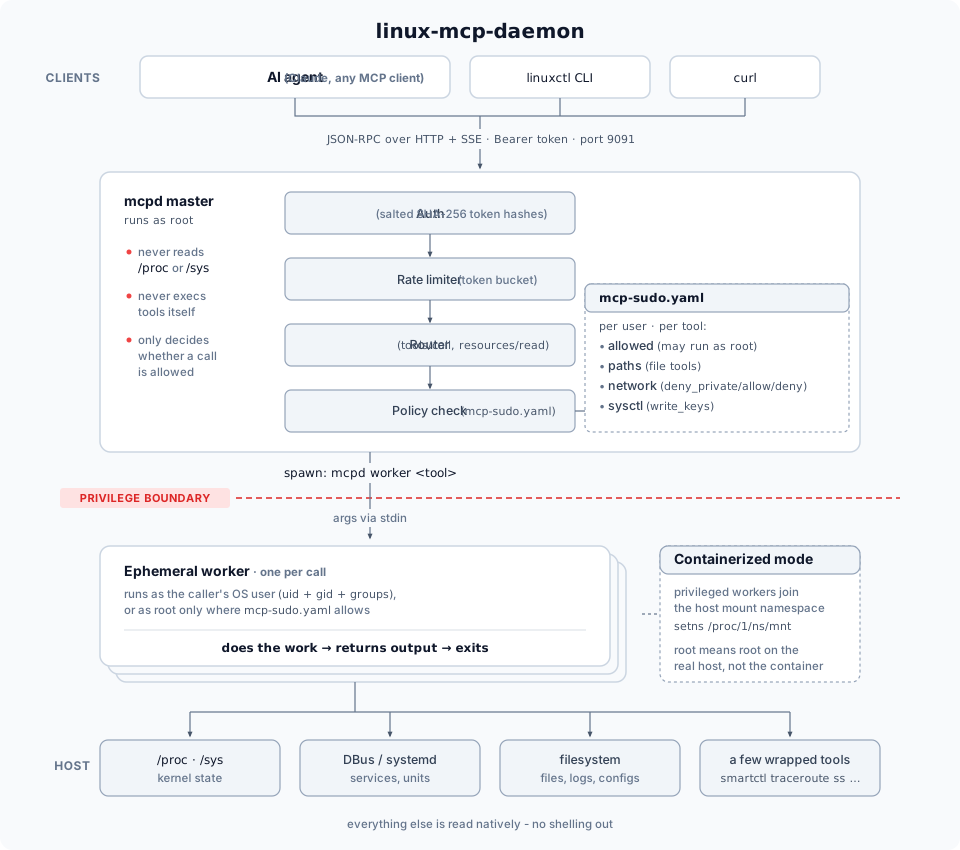
- Every tool/resource call spawns a fresh worker process and exits. There's no long-lived state per call -
internal/worker/spawner.gore-execs themcpdbinary itself inworkermode (arguments on stdin, never argv), withsyscall.Credential{Uid, Gid, Groups}set to a real OS account resolved viauser.Lookup(). This is the actual privilege isolation, not a config flag: an unprivileged user's worker process is a genuinely different Linux UID than a privileged one's. configs/mcp-sudo.yamldecides, per user and per tool, whetherprivileged: trueis honored. Two grants exist for resources specifically (seeARCHITECTURE.md's gotcha section) - one for the resource URI itself, one for the internal worker tool name behind it.- When
mcpdruns containerized (configs/daemon.yaml'sworker.containerized: true, this project's actual Kubernetes deployment), a privileged worker also joins the real host's mount namespace (setns(CLONE_NEWNS)on/proc/1/ns/mnt, no externalnsenterbinary) - soprivileged: truemeans root on the real host, not just root inside the daemon's own container image. - Bearer tokens are salted+hashed in
users.yaml(token_salt+token_hash,sha256, constant-time compared; the file is0600), not stored in plaintext. Users and grants are edited only locally, on the host, vialinuxctl <verb> mcpd userandlinuxctl edit mcpd config(validated likevisudo) - there is no MCP tool that edits them, so nothing with just a bearer token can grant itself anything. The running daemon applies changes without a restart throughdaemon/reload-config, which only re-reads the files and rejects invalid ones (see Daemon User Administration). - Every read is schema-driven, not hand-listed.
linuxctlfetchestools/list/resources/list/resources/templates/listfrom the live daemon on every invocation and resolves its<verb> <group> [keyword]grammar against that - a new tool added server-side is immediately usable client-side with zero code changes (seeplan/linuxctl-redesign.md).
Features
- Direct AI Interaction: HTTP/SSE transport for immediate agent-to-daemon communication.
- Strict Security: Rate limiting, salted+hashed Bearer token authentication, and directory traversal protection.
- Privilege Separation: Master daemon runs as root, spinning up ephemeral unprivileged/privileged workers based on rules defined in
configs/mcp-sudo.yaml. - High Performance: Uses
singleflightdeduplication and TTL caching for efficient system introspection. - Docker & Kubernetes Ready: Fully containerized with a multi-stage Docker build and Kubernetes deployment manifests that allow safe host introspection.
Get started
Install on Linux (systemd)
Needs sudo and curl on an amd64/arm64 host (in a bare ubuntu/debian container: apt update && apt install -y curl ca-certificates, then pipe to bash as root). This downloads the latest release for your architecture (amd64/arm64), verifies its sha256 checksum, installs mcpd and linuxctl to /usr/local/bin, writes clean configs to /etc/mcpd/configs (no default users or tokens), creates a first user mcp and prints its token once, and starts the mcpd systemd service. Then:
- Upgrade: run the same command again - configs are kept, the service restarts only if
mcpdchanged. From v0.1.0, grant your first userdaemon/reload-configonce - see Upgrading. - Pin a version / name the user:
... | sudo bash -s -- --version v0.1.0 --user alice - More users: each needs an OS account of the same name - see Adding more users.
- Uninstall:
... | sudo bash -s -- --uninstall(add--purgeto delete/etc/mcpd; themcpOS account stays -sudo userdel -r mcp) - Packages:
.deband.rpmfor amd64/arm64 on every release -sudo apt install ./linux-mcp-daemon_<version>_amd64.deborsudo dnf install ./linux-mcp-daemon-<version>-1.x86_64.rpm, then the next steps it prints. - Container image:
ghcr.io/nucleusv/linux-mcp-daemon(amd64/arm64) - setup steps in the installation docs. - macOS (CLI only): the same script installs just
linuxctl-curl -fsSL .../install.sh | bash -s -- --bin-dir ~/.local/bin, thenexport PATH="$HOME/.local/bin:$PATH"(not on macOS's default PATH) - to drive a remote mcpd.
mcpd listens on all interfaces over TLS (a self-signed certificate it creates on first start; clients pin its fingerprint). Plain HTTP is off by default - bearer tokens would travel in clear text. Root access for tools is granted per user and per tool in
mcp-sudo.yaml.
Full guide: Installation · Connect an AI agent · mcp-sudo.yaml
Development: build from source
1. Build and Deploy the Server (mcpd)
-
Build the Docker image:
-
Deploy to your local Kubernetes cluster:
2. Build the Client (linuxctl)
You can build the CLI client directly on your host machine (e.g. macOS):
Installed from a release (install.sh, .deb/.rpm), linuxctl is already on your PATH.
3. Usage (local development)
The daemon runs on port 9091. You can connect via your AI client using SSE, or use the linuxctl CLI tool:
linuxctl speaks a small verb/group grammar (linuxctl <verb> <group> [target-keyword] [args], design in plan/linuxctl-redesign.md) and dynamically discovers every tool and resource from the running daemon - there's no separate client-side command list to keep in sync. Full reference: linuxctl docs or man linuxctl. Every example below shows both forms: linuxctl, and the raw MCP JSON-RPC curl call it resolves to - the full per-tool/resource reference with these side by side for every single one lives at MCP API docs.
Calling the API directly with curl
mcpd speaks JSON-RPC 2.0 over HTTP + SSE, not plain request/response HTTP - every call is a two-step handshake: open an SSE stream to get a one-time POST endpoint, then POST the JSON-RPC request there (the actual result streams back on the SSE connection, not in the POST's response body):
Every example below follows this exact pattern - only the -d payload changes.
Files
Resources (direct by URI)
Disks
Processes: one result vs many, and rich detail
Logs (host-only tool, requires privileged: true in containerized deployments)
Mutations (services, kernel)
Introspecting the MCP protocol itself
Direct-by-name escape hatches (bypassing the verb grammar)
Daemon user/token administration (local-only, no network call at all)
There's no curl equivalent for this group - see Daemon User Administration for why it's deliberately kept off the network entirely.
Project Structure
cmd/mcpd/: Main server application entrypoint.cmd/linuxctl/: The CLI client application.configs/: Configuration files (Daemon config, Sudo rules).internal/: Encapsulated business logic:auth/: Per-user rate limiting.config/:daemon.yaml,users.yamlandmcp-sudo.yamlparsing and validation (shared by mcpd andlinuxctl).rpc/: MCP JSON-RPC handlers - tool/resource registry, authorization, config reload.worker/: Spawns each call as a short-lived worker under the caller's OS account (or root).tools/,resources/: One package per tool and resource.fsafe/: Opening paths without following symlinks (openat with O_NOFOLLOW).kernel/,procstat/: Parsing/proc(sockets, processes).logging/: Leveled, structured logging.netpolicy/: Network destination policy fornetwork/curlandnetwork/ping.
k8s/: Kubernetes deployment manifests.scripts/: Build and deployment automation.
Releases
Pushing a SemVer tag (git tag -a v0.1.0 -m v0.1.0 && git push origin v0.1.0) runs .github/workflows/release.yml: tests, then GoReleaser publishes per-platform archives, checksums.txt and a changelog to GitHub Releases, and a multi-arch image to ghcr.io/nucleusv/linux-mcp-daemon.
License
Apache License 2.0 - see also NOTICE.
