Turn one sentence into an event pack: event card, identity badges, QR codes, and .ics.
Quick Install
Automated & IDE SetupCopy the AI prompt to install this server into Claude Code, Cursor, or another agent — or use 1-click editor setup below.
Manual Client & Custom JSON ConfigExpand JSON ▾
Client Config & Setup
Choose your client or environment
Target File:
💡 Paste the JSON block into your client's configuration file under mcpServers, then restart the application.
Documentation Overview
Lineup
Turn one sentence into a full event pack — inside ChatGPT.
Lineup is a ChatGPT App (built on Alpic Skybridge) that takes a freeform event description and generates a Luma-style event card, an identity badge for every attendee (generated avatar + role + scannable vCard QR), an RSVP QR, and a calendar .ics — in about ten seconds, in the conversation you're already in.
"Announce Friday's panel — speakers Lea, Marco and Priya — accent red, notionists style."
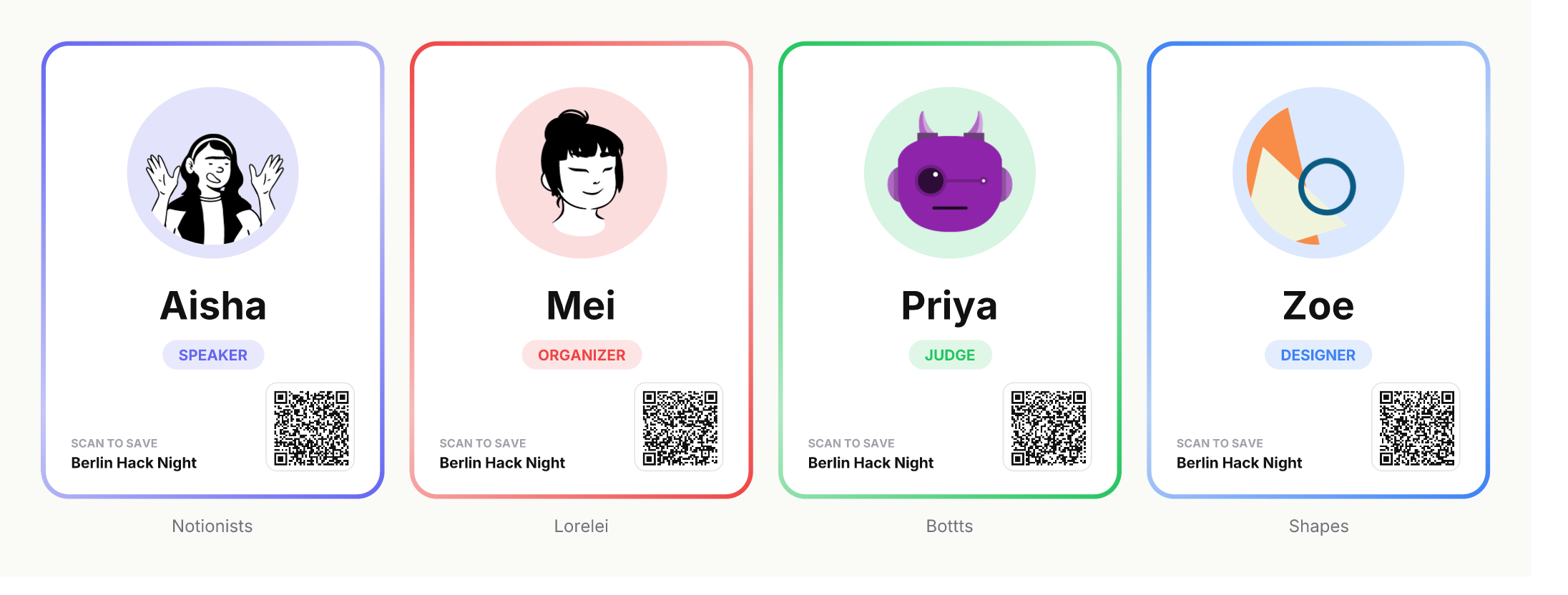
Built for Berlin Hack Night (May 2026) with the Skybridge framework. Coded mainly with Claude Code, with OpenAI Codex in support.
Why
Keep Luma for the real event page. But the moment you need to announce it — an email, a Slack post, a story, a "who's speaking" card — you're back to juggling Canva + a QR generator + a calendar file. Lineup is the 10-second asset generator that lives in the chat: one sentence in, shareable assets out.
It complements Luma / Mailchimp / your CMS rather than replacing them.
What it does
- Event card — title, date, venue, accent gradient, "Add to calendar", RSVP QR
- Identity badges — one per attendee: deterministic DiceBear avatar in a halo, first name, role pill, vCard QR (scan → save contact), gradient accent border
- Pick the avatar style from the prompt — four styles ship; tell the LLM the vibe and it picks (see below)
- PNG badge export — download any badge as a real 480×640 "trading card" PNG, composed server-side with Satori + Resvg
- Shareable event page — a scannable link that opens the whole pack as a public web page (see below)
Avatar styles — pick from the prompt, or flip them live
The whole crew renders in one consistent style. Two ways to set it:
- From the sentence — the LLM picks the style from your prompt and passes it as an argument.
- Live in the view — a row of four Style chips above the badges. Click → every avatar flips in place with a soft fade. The PNG download and the share link follow whatever you've picked.
| Style | Vibe | Try saying… |
|---|---|---|
notionists (default) | Notion-style sketch — friendly meetups | "…default style" (or omit) |
lorelei | Monochrome line art — calm, professional | "…in lorelei line-art style" |
bottts | Colorful robots — playful trading cards | "…make it a hackathon robot roster" |
shapes | Abstract geometric — anonymous-looking | "…anonymous voting cards" |
One primitive, many use cases
people + a moment + a scannable code reshapes into:
| Use case | What it gives you |
|---|---|
| 📣 Announce an event | Card + QR + .ics to paste into an email or post |
| 🎤 Share who's speaking | A badge per speaker — avatar, role, contact QR |
| 🗳️ Voting / polls | A unique card + ballot QR per voter |
| 🪪 Conference ID / access | Printable badge, role, check-in QR |
| 🤝 Networking | Badge QR drops your contact into a phone |
| 🏆 Team rosters / crews | A collectible "trading card" per member |
The shareable page is zero-knowledge by design
The "Share this page" QR/link encodes the entire compact payload in the URL #fragment. A static page (docs/index.html on GitHub Pages) decodes it and regenerates the event card + badges client-side (avatars and QRs are deterministic).
Nothing is stored in any database. Browsers never send URL fragments to servers, so neither GitHub nor the author can read a shared link — only the people you send it to can.
🔗 Live share page: https://kaiser-data.github.io/lineup/ (open with a Lineup #… fragment)
Live
- App (MCP endpoint):
https://lineup-bf157e35.alpic.live/mcp - Playground: https://lineup-bf157e35.alpic.live/try
- Share page: https://kaiser-data.github.io/lineup/
Add to ChatGPT
- ChatGPT → Settings → Connectors → Create
- Server URL:
https://lineup-bf157e35.alpic.live/mcp· Authentication: No Auth - In a chat:
@lineup Generate a Lineup for Berlin Hack Night at Mindspace, 18:00, accent red, with Marty (Host), Lea (Judge), and Tomás (Hacker).
Architecture
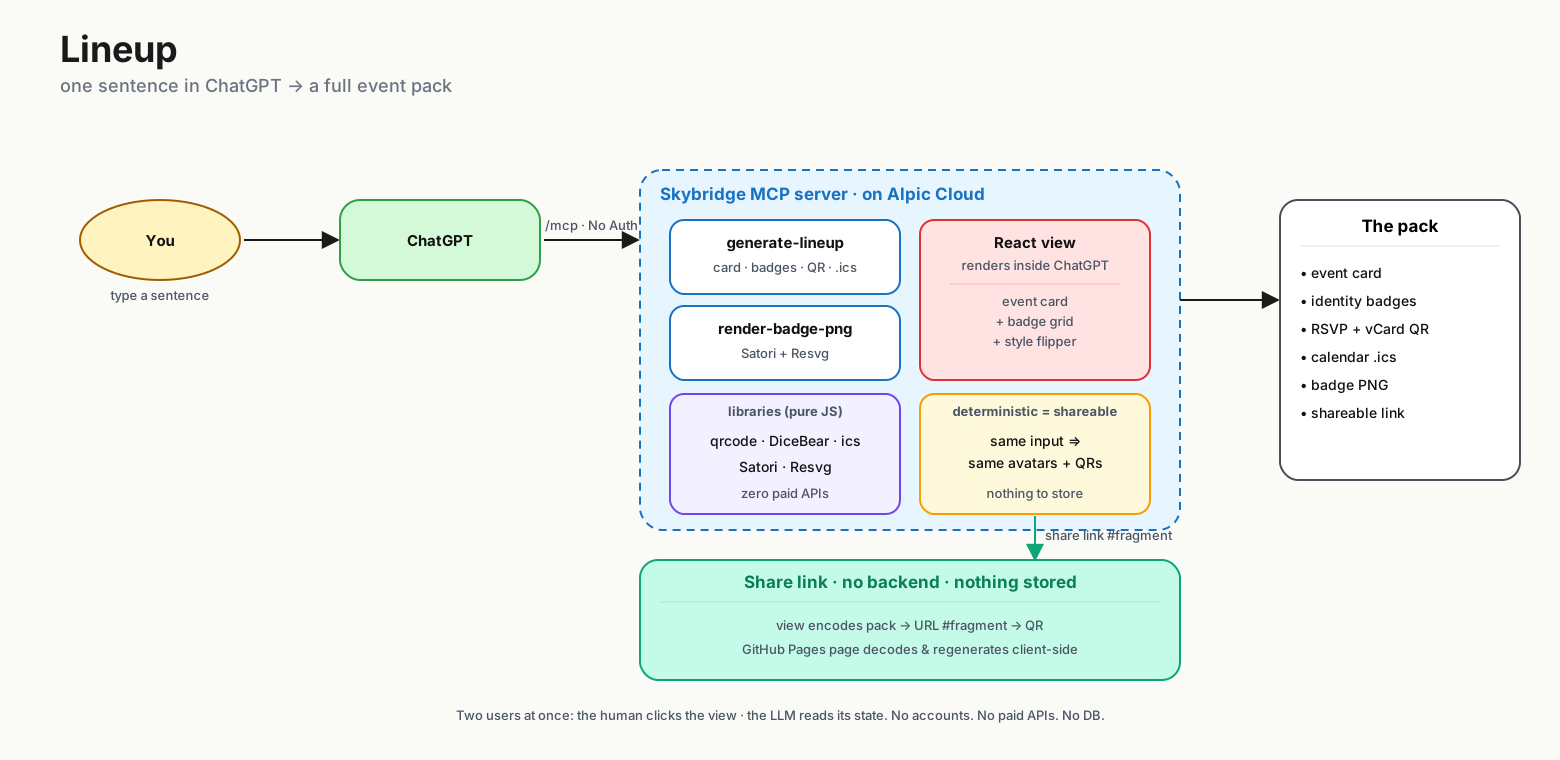
Everything is deterministic and pure-JS where it matters (avatars, QRs, calendar), so the same input always produces the same pack — which is exactly why the shareable page can regenerate it from the link alone.
The Excalidraw source is at
architecture.excalidraw— open it at excalidraw.com to edit or export a hand-drawn version.
Tech
Skybridge · React · TypeScript · qrcode / qrcode.react · @dicebear · ics · satori · @resvg/resvg-js
Develop
Tools live in src/server.ts; the view is src/views/generate-lineup.tsx; generators are in src/lib/.
Helper scripts in scripts/: status.sh, test.sh <payload>, save-artifacts.sh, tunnel.sh, stop.sh. Test payloads (incl. voting / conference / announcement use cases) in test-payloads.json.
Deploy & self-host
Yes — Lineup is fully self-hostable, and it generates every graphic itself.
There is no external image service and no API key: avatars (DiceBear),
QR codes (qrcode), the calendar .ics
(ics) and the 480×640 PNG badges
(Satori + Resvg)
are all rendered in pure JavaScript/WASM inside your own deployment. Host it
anywhere that runs Node or an edge runtime and you own the whole pipeline.
The MCP app (the server + ChatGPT view):
Because the generators are pure-JS / edge-friendly (no sharp, no native
canvas), Cloudflare Workers is a viable target too.
The share page (docs/index.html) is a single static file with no backend —
host it on GitHub Pages (the default), Netlify, Cloudflare Pages, or any static
host. It regenerates the whole pack client-side from the link #fragment, so
self-hosting it stores nothing and needs no server.
License & attribution
Lineup itself is MIT — see LICENSE.
It is built on third-party frameworks and assets, each under its own license. The generated graphic in particular carries attribution requirements:
- Avatar designs — DiceBear (code MIT). Styles:
lorelei(Lisa Wischofsky, CC0 1.0),notionists(Zoish, CC0 1.0),bottts(Pablo Stanley, free for personal & commercial use),shapes(DiceBear, CC0 1.0). - Inter font — The Inter Project Authors, SIL OFL 1.1.
- Satori & Resvg — MPL-2.0 (used unmodified).
The full component list and licenses are in
THIRD-PARTY-NOTICES.md.
Related MCP Servers
Reviews
No reviews yet — be the first to share how this listing worked for you.
Frequently Asked Questions about Lineup
AllMCPs Directory Badge
Showcase your server listing on GitHub or your project documentation. Embed this dynamic SVG badge to highlight official listing status and live engagement.
Badge Style:
Live Dynamic SVG Preview
Markdown (GitHub README)
[](https://allmcps.com/mcp/lineup)HTML Embed
<a href="https://allmcps.com/mcp/lineup"><img src="https://allmcps.com/api/badge/lineup?style=directory" alt="Lineup on AllMCPs" /></a>Technical Specs & Signals
CategoryDeveloper Tools
27Quality signal: Emerging · 27/100How this signal is calculated ▾
Server availabilityNot measured
Not scored for repo-hosted servers — we can't reach the running server, only its GitHub page. Hosted MCP endpoints are health-checked live.
Verified ownership8/20
Documentation & tools11/30
Adoption & activity1/15
Community engagement0/10
A guidance signal from public completeness & health data — not a user rating. New listings start lower and rise as they add docs, get verified, and grow adoption. Signals we can't observe for a listing are skipped, not counted against it.
Own this project?
This directory is pre-filled from public sources. Claim via GitHub README, site badge, or DNS TXT to unlock edit access and the Official badge and attach your website — proof is checked automatically, then reviewed by our team.
Free dofollow backlink: add your website and place the AllMCPs badge on it — no claim needed. We detect it automatically and keep it verified as long as the badge stays live.
Claim & get free dofollowShare & Embed
Add our SVG badge (dark/light directory styles) or embeddable widget to your site.