Lifeos README
The full upstream README, mirrored here for reference. Install config, tool schemas, adoption signals, and an original overview live on the Lifeos listing page.
Edi Life OS
Your habits, goals, focus, money and projects in one self-hosted dashboard that your AI assistant can use too.





Website · Quick start · Tour · AI / MCP · Deploy · API · Donate · Contact · Español
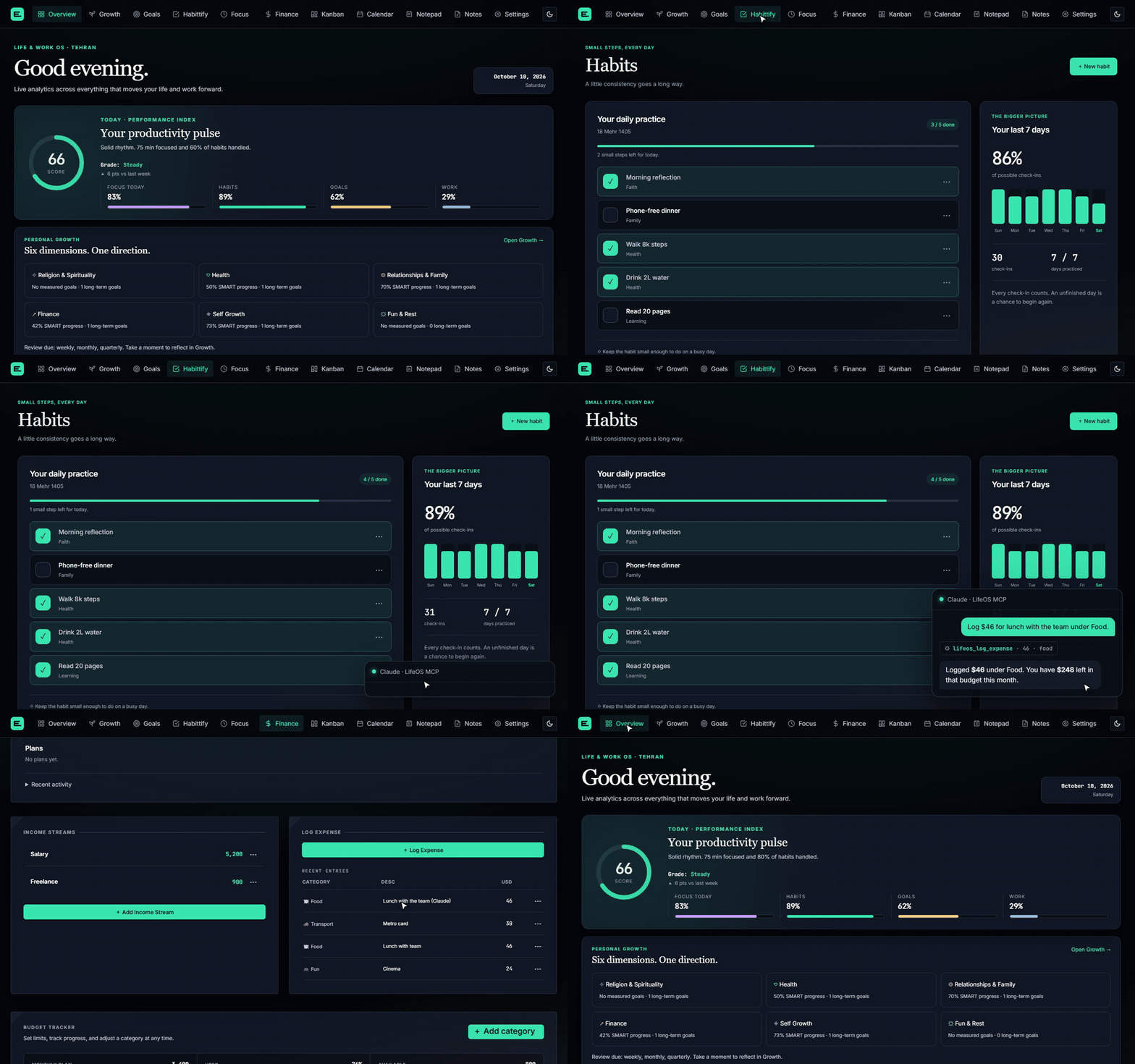
Tick a habit, ask Claude to log an expense, and see it land in Finance. The expense is written through the real API with sample data.
Most of us run our lives across a to-do app, a habit tracker, a budgeting spreadsheet, a Pomodoro timer and a notes app, and none of them know about each other. Edi Life OS puts all of it in one calm, private dashboard and connects the small things you do today to the direction you want your life to take.
- Everything in one place. Ten workspaces share one design, one sign-in and one database.
- Connected, not just collected. Habits drive goal progress, Kanban cards show up in the calendar, and the Overview turns it all into one daily score.
- Yours. Runs on any PHP + MySQL host, even cheap shared hosting. No subscription, no tracking, no vendor lock-in.
- AI-ready. A built-in MCP server lets Claude and other assistants read your dashboard, plan goals, log habits and track expenses for you.
[!TIP] If Edi Life OS is useful to you, a ⭐ on GitHub helps other people find it.
A quick tour

Overview — One daily score built from focus, habits, goals and work, plus your six life dimensions at a glance.

Growth — Six life dimensions, each linked to long-term goals, SMART goals, habits and tasks. Guided weekly, monthly and quarterly reviews. |

Focus — Pomodoro sessions with breaks, a built-in focus soundtrack and a landscape that follows the time of day. |

Habittify — Small daily habits, streaks and a seven-day picture of your consistency. |

Kanban — Boards with labels, priorities, due dates, checklists, comments and attachments. |
All ten workspaces
| Workspace | What you can do |
|---|---|
| Overview | A live productivity score, focus and habit trends, goals, finances and a seven-day weather forecast. |
| Growth | Connect six life dimensions to long-term goals, SMART goals, habits and tasks. Run weekly, monthly or quarterly reviews. Guide |
| Focus | Timed sessions with short and long breaks, session history and a focus soundtrack. |
| Finance | Expenses, income and budgets in the currency you choose in Settings (Toman by default). Debts you owe and credits owed to you, one-time or recurring, recorded straight into the ledger. Guide |
| Habittify | Daily habits with completion, streaks and monthly progress. |
| Kanban | Draggable cards and lists with priorities, labels, dates, checklists, comments and file attachments. |
| Calendar | Due cards and financial dues across all boards in Month or Schedule view. |
| Goals | SMART goals with measures, deadlines, priorities, editable and sortable checklists — or progress driven by a habit. Click a checklist title to edit it; save with Enter or cancel with Escape. |
| Notepad | Markdown notes with preview and export. Persian/Arabic and Hebrew notes automatically use RTL writing; mixed-language preview blocks detect their own direction, while code stays LTR. |
| Notes | Sticky notes with colors, fonts and connections. |
Dates follow Asia/Tehran. The weather card shows Qeshm Island via Open-Meteo; its tide figure is a modeled estimate, not for navigation.
Talk to your Life OS with AI
Edi Life OS ships with an optional MCP server that exposes 15 tools across your dashboard, goals, tasks, habits, finances and notes. Connect it to Claude Desktop, Claude Code or any MCP client and ask in plain language:
"Show me my LifeOS dashboard."
"Create a SMART goal called Build a home studio, due in three months, and add Buy acoustic panels as a task."
"Mark Reading complete for today."
"Log a 450,000 Toman food expense and show my balance."
The MCP server talks to your app only through its token-protected HTTP API. It never touches your database or credentials. Setup takes a minute — see MCP server below.
Quick start
With Docker (recommended)
Open localhost:8080 and sign in. MySQL, the app and your attachments each live in their own volume, so docker compose up -d --build after a git pull upgrades without losing data.
On shared hosting
Download lifeos-<version>.zip from the latest release and extract it into your hosting home directory, so public_html/ becomes your web root and the backend sits safely above it. Copy config.example.php to config.php, fill in your MySQL details, and open your site. See the deployment guide for details.
With PHP locally
You need PHP 8.1+ (with pdo_mysql and mbstring) and MySQL 8+ (or MariaDB 10.4+).
Edit config.php with your database connection and the username and password you want to sign in with, then start the server:
Open localhost:8000 and sign in. The database and tables are created on first use. Use Settings → My account to change your sign-in, or Settings → Accounts to add people with their own passwords and private workspaces. Account guide
[!IMPORTANT]
config.phpand.envhold real credentials and are gitignored. Never commit them.
Requirements
| Component | Requirement |
|---|---|
| PHP | 8.1+ with pdo_mysql and mbstring |
| Database | MySQL 8+; also tested with MariaDB 10.4 |
| Web server | PHP's built-in server locally; Apache with rewrites for hosting |
| Weather | PHP curl and outbound HTTPS |
| MCP server | Optional: Node.js 22.9+ |
| API tests | Optional: pdo_sqlite |
API and integrations
HTTP API
A private /api/v1 API covers the dashboard, goals, tasks, habits, finances and sticky notes. It uses its own bearer token, separate from your browser sign-in.
Set the result as api_token in config.php (or the LIFEOS_API_TOKEN environment variable), then:
See the API reference for endpoints, payloads and errors.
MCP server
The server runs over stdio; there is no hosted MCP endpoint. The MCP guide lists every tool and shows client configuration for Claude and Codex.
Your data stays yours
- Everything lives in your MySQL database. Habits use dedicated tables; other workspaces store JSON documents in
app_state. - Saves use revision checks, so a stale tab can't silently overwrite newer changes. API writes use transactions and row locks.
- Data from older browser-only versions is imported once; conflicting copies are archived as
legacy_backup_*records. - Back up the database, attachment files and your configuration together.
Moving from the old Habittify SQLite database? See migrating Habittify.
Security
Edi Life OS supports multiple accounts with separate private data. New accounts are members, who see only their own workspace. Administrators can also add accounts, reset passwords and deactivate access; because a password reset lets them sign in as that person, make only trusted people administrators.
- The operator API token grants read and write access to supported domains for one active account (
api_user_id, default1). Per-user token issuance, token scopes and API rate limiting are not implemented, so set request limits at the hosting layer. - Use HTTPS anywhere other than localhost, and keep tokens out of URLs, frontend code, screenshots and logs.
- Secret notes are hidden from API reads by default. The secret flag controls visibility; it is not separate encryption.
Project structure
Built with PHP, MySQL and vanilla JavaScript — no frontend build step, no framework.
Dockerfile, docker-compose.yml and docker/config.php run the app with configuration from environment variables.
Documentation
- API reference — authentication, routes, data formats and concurrency
- MCP guide — tools, environment settings and client setup
- Deployment guide — Apache, shared hosting, backups and migration
- Development guide — local checks and disposable integration fixtures
- Growth workspace · Debts and credits
Donations
If Edi Life OS is useful to you, consider supporting its development with a donation.
Donate through Donatr — choose an available donation method on my public page.
You can also donate directly to these public receiving addresses:
| Cryptocurrency | Network | Receiving address |
|---|---|---|
| Bitcoin (BTC) | Bitcoin (on-chain) | bc1qdwdpeqv0l8ala8tm46rtfeghuxl70een84npj3 |
| Ether (ETH) | Ethereum mainnet | 0x695CCF873d51E4C2dC1321b405C63BFE99c5a536 |
| Solana (SOL) | Solana mainnet | C2d9u9nY2hZfxsi5Fwz1o5VjGGQujWmxeqZ3upKvHBfD |
Send only the listed cryptocurrency on the specified network.
Contact
For questions, feedback or collaboration, email edris.qeshm2@gmail.com.
For bugs and feature requests, please open a GitHub issue so the discussion is easy to follow.
License
MIT © 2026 Edris Ranjbar. Use it, fork it and build on it.
Contributing
Ideas, bug reports and pull requests are welcome. Read the contributing guide to get set up, and look for good first issue if you want somewhere to start.
If Edi Life OS helps you run your days, consider giving it a ⭐ — it helps others find it.