Leteo README
The full upstream README, mirrored here for reference. Install config, tool schemas, adoption signals, and an original overview live on the Leteo listing page.
Install • How it works • Commands • Languages • Specs



Leteo — persistent memory for AI coding agents
Your coding agent forgets everything when the session ends, and most of it when the context is compacted. Leteo is the memory it keeps: decisions, bug fixes, conventions and the discoveries that were expensive to make, stored in a local SQLite database and handed back when they are relevant.
One binary, no server, no API key. Nothing leaves your machine unless you turn on cloud replication for a project you name.
Measured against itself — the same agent, the same questions, once with it and once without:
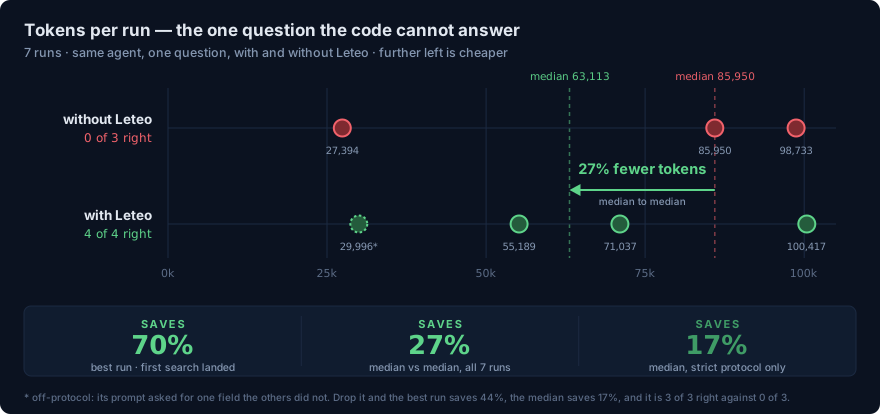
Four right answers out of four, where the agent without it got none out of three. That is the finding that survives the variance, and the tokens are the noisier half of it. Every run is here — both baselines, the fixed cost of about 15,400 tokens a session that both arms pay, and the pairing from these same seven runs that says Leteo costs 3.7x as much.
Works with: Claude Code · ZCode · Codex · Cursor · Gemini CLI · OpenCode · Windsurf · VS Code Copilot · Kilo Code · Qwen · Kiro · Antigravity · Pi · DeepSeek Harness
What it feels like
You never prompt it to remember. That is the whole idea. Your agent opens each session already holding what the project knows, and saves as it goes while you work — a bug fixed, a convention agreed, something non-obvious learned. Those notes are written for its future self rather than for you, so they stay out of the conversation.

The rest is a SQLite file you own. leteo tui opens it, leteo export takes it
with you, and leteo delete means it.

Does it pay for itself?
Measured rather than asserted, over thirteen runs: four right answers out of four on the questions the code cannot answer, where an agent without it got none out of three — or three out of three against that same none out of three, on the strict protocol. That is the finding that survives the variance.
The tokens are noisier. On those same questions the median saving is 27% and the best case 70% — or 17% and 44% if you drop the one run whose prompt differed by a field, which the article does for you. On questions the code does answer the difference is inside the noise, and the same thirteen runs support "costs 3.7x as much" if you pick the opposite pair.
does memory save tokens? shows every run, both baselines, the fixed per-session cost of about 15,400 tokens, and where the number is weak. The honest summary is that it does not reliably save you tokens — it stops your agent confidently answering something else.
Install
Or through a package manager, if you already keep your tools in one. Homebrew covers macOS and Linux, on both architectures:
That last one puts leteo on your PATH for the command line, and is the one
route that cannot configure an agent: leteo setup refuses from a binary npm
is holding, because the path it would write down is one npm deletes. Configure
the agent with the npx line instead, or
install by any of the routes above.
Then open Leteo and set your agent up from the Setup screen:
That is all of it. Nothing else to install first — not Rust, not SQLite, not a
runtime: the archives are prebuilt binaries with SQLite compiled in, and each
script checks its download against the published SHA256SUMS before installing
anything. From the scripts the binary lands in ~/.local/bin, or
%LOCALAPPDATA%\leteo\bin on Windows — Homebrew and Scoop put it where they
put everything else. LETEO_INSTALL_DIR moves that, LETEO_VERSION takes a
tag other than the latest release, and LETEO_BASE_URL downloads from
somewhere other than GitHub releases. Those three belong to the scripts rather
than to the binary, which is why they are not in the
Environment table.
Releases carry five builds — x86-64 Linux, Windows and macOS, and arm64 Linux and macOS. The two Linux ones ask for nothing newer than glibc 2.34, so they run on Debian 12, Ubuntu 22.04, RHEL 9 and anything later. That floor is pinned in the release workflow rather than inherited from whichever image GitHub calls latest: v0.1.0 inherited it, and wanted a glibc newer than Debian stable's. On anything else, build from source, which is the one route that needs Rust:
That builds the released version from crates.io.
cargo binstall leteo fetches the same release binary instead of compiling it,
which is the faster half of that sentence. To build whatever is on main
instead, including work that has not been released yet, ask for the repository:
cargo install --git https://github.com/asanabrial/leteo.
Without installing anything
Most MCP documentation assumes npx, so there is a wrapper on npm that fetches
the release binary for your platform, checks it against the same published
SHA256SUMS, and hands it every argument:
bunx @asanabrial/leteo mcp works the same way — it is the same package from
the same registry, and the wrapper depends on nothing but what both runtimes
already have. npm install -g above is that same package installed once
instead of fetched per run.
The npm version is the release tag, so pinning one in npm pins the binary it
fetches — a guard holds the two numbers together, because published one behind
it would quietly serve the previous release to everybody arriving this way. It
is a way in rather than the way to run it: a binary on your PATH starts
without a download and is what leteo setup writes into your agent.
As a plugin
Claude Code takes Leteo as a plugin, which registers the same MCP entry and the
same five lifecycle hooks leteo setup writes, through Claude Code's own plugin
machinery:
The plugin carries configuration, not the binary. Install leteo by one of the
routes above first: the MCP entry and every hook the plugin registers run
leteo from PATH, so without it they are five commands that are not there.
What the plugin replaces is the setup step, and removing it takes those entries
away again.
Pick one of the two, not both. Registered twice, every lifecycle event runs
twice — which stored each prompt twice, 23 identical pairs on the machine where
it was found, before anybody noticed anything was wrong. leteo setup --hooks
now looks for an installed bundle and refuses rather than adding a second
registration, naming the file it found.
Codex has the same bundle under plugin/codex, and there it is
the only route to the hooks — leteo setup codex registers the MCP server and
no hooks at all, which leaves Codex holding the tools with nothing telling it
when to reach for them.
ZCode has one under plugin/zcode, from the same marketplace.
Adding a marketplace is a desktop action, not a command: Settings → Plugins →
Create → Add marketplace, pointing at asanabrial/leteo. Then install
leteo-zcode from the list.
Its CLI does not add marketplaces — zcode plugins lists and enables what is
already installed, and nothing more. Checked against zcode 0.16.5:
It registers three hooks rather than five, because that client fires neither
SubagentStop nor SessionEnd. It is also the route that does not depend on
somebody else's switch: ZCode runs configuration-file hooks only while
hooks.enabled is true in ~/.zcode/cli/config.json, which starts off, and
enabling the plugin is what enables the plugin's hooks.
Uninstall
The first reports what would go and changes nothing. The second carries it out: Leteo leaves every agent it configured, and then the machine. On Windows it also registers itself in Installed apps, so it can be removed from there instead.
To leave one agent and stay in the rest:
That takes out the MCP entry, the lifecycle hooks and the protocol block, and nothing else — other servers, other tools' hooks and your own notes stay where they are.
MCP
A 22-tool MCP server over standard input/output, run directly or written into a
client by leteo setup:
Run like that it offers all of them. Three of the twenty-two change or count
the whole store, and leteo setup leaves those out: what it writes into an
agent is --tools=agent, the nineteen an agent reaches for while it works.
--tools picks a profile or a single tool, and --project fixes the project
for the process.
Alongside it there is a JSON command line, an interactive terminal UI, and setup support for fourteen MCP clients — the list at the top of this page.
Its name in the MCP Registry is
mcp-name: io.github.asanabrial/leteo, which is what server.json
publishes. The line is written out rather than hidden in a comment because that
is what the registry reads to believe this repository owns the crate, and
crates.io strips HTML comments when it renders this file.
What you type
Rarely anything: the saving and the recalling happen without you. This is the
store from the outside, for the times you want to look yourself. Every command
that answers prints JSON — tui is the exception, being a screen rather than an
answer — and the default database is ~/.leteo/leteo.db.
Reading it. search is the one you will actually use, and --all-projects
widens it past the project you are standing in. recent is the last few in time
order; context is the block an agent is handed when a session opens, so it
shows what yours are starting with; timeline reads what was saved either side
of one memory; stats counts what is there. tui is all of it on one screen.
Writing by hand. Seldom needed, since the agent saves as it works — but a memory you want in your own words, and the session boundaries an agent would otherwise draw for you:
Setting an agent up. On its own it walks through it; naming an agent does
that one. --hooks adds the lifecycle hooks that make memory automatic, and
--dry-run reports every file it would touch without writing one:
Keeping it well. doctor runs every check and says which one failed and
why; --repair carries out the three that are safe to make on their own —
restoring missing full-text triggers, rebuilding the indexes, and recomputing
stale hashes.
export and import move a store between machines, and obsidian-export
writes it into a vault as Markdown:
Projects. A project is worked out from the directory, so the same work can
end up filed under two names. consolidate folds a group of them into one name,
prune drops the ones holding no memories at all:
Conflicts. When a new memory looks like it contradicts an older one the two
are paired and the agent settles the pair. These read the same pairs from
outside: list and show for what is there, scan to look for pairs nobody
has recorded yet, stats to count them by verdict:
Deleting. Without --hard a memory is marked deleted and stops coming back
in answers; with it, the row is gone and its relations are cut. A project takes
the same flag. A session takes none, and while it still holds memories deleting
it is refused outright and says how many — a session goes when it is empty, not
by taking its memories with it:
projects consolidate, projects prune and conflicts scan change nothing
until --apply: without it each one reports exactly what it would do.
Languages
Three settings, because they answer three different questions.
interface is Leteo's own screens: the panels, the menus, the help. Twelve
languages — English, español, português, français, Deutsch, italiano, català,
galego, euskara, Nederlands, polski, svenska — deliberately the same twelve
offered for memories, from the same table. Left unset it follows the machine's
locale, so a Spanish computer gets a Spanish dashboard without being asked.
voice_language is what Sardi speaks, and it is separate because those
lines are written into your agent's conversation rather than onto Leteo's
screens. Working in English on a Spanish machine is an ordinary thing to do.
Left unset it follows interface. It is the same twelve languages.
language is what memories are written in. It is handed to a model rather
than parsed, so it is free text and not limited to the twelve above: español,
Spanish, português do Brasil and 日本語 all work. Left unset, each memory
is written in the language of the conversation that produced it.
Settings
Those three and two more are kept in settings.json, in the data directory —
~/.leteo/settings.json unless you moved it. The Setup screen writes the file,
and it is also meant to be opened by hand: a value it cannot read costs that one
setting rather than the whole file. Nothing says so at the time, though, because
a hook must not fail while you are mid-edit — leteo doctor is what names a
setting being read past.
| Key | Values | Unset means |
|---|---|---|
interface | one of the twelve above | follow the machine's locale |
voice_language | one of the twelve above | follow interface |
language | free text | the language of each conversation |
voice | all, reminders, quiet | all |
context_size | slim, full, deep | full |
The two languages are written as the language's own name — español, not es —
and read back forgivingly, because this is a file people type into: the English
name, the ISO code and the spelling without the accent all work.
voice is how much of its own work Sardi says out loud — everything, the save
reminder alone, or nothing. context_size is how many memories a session opens
with: twenty, fifty or eighty, for a small context window or for a store that
matters more than the budget.
Two of the five are flags as well, because changing them should not mean reconfiguring an agent. Either one on its own is a whole command:
Cloud
Optional, off by default, and per project. Your machine is the client; the cloud never connects back.
Turning it on takes two answers: where the server is, and which projects go
to it. config set writes the first into the data directory — into a file with
restricted permissions, because it holds a token — and enroll names a project.
Nothing replicates until both are done, and the commands below say so rather
than starting quietly:
config show reads the configuration back with the token replaced by a presence
flag, so it is safe to paste.
Once it is on, health asks the server whether it is there and answering.
status contacts nothing at all: it reports this machine's own view — what is
enrolled, how many changes are waiting and since when, and whether the last
attempt failed and with what. sync runs one cycle now, and leteo serve keeps
running them in the background until interrupted:
Not to be confused with leteo cloud serve, which is the other end — the server
itself, which you only run if you are hosting one. That side, with its Compose
stack, managed tokens and project grants, is in
openspec/specs/replication.md.
Coming From Engram
Leteo is an independent Rust product derived from the workflow and MIT-licensed implementation of Gentleman Programming's Engram. It is not affiliated with or endorsed by that project, and promises no drop-in CLI compatibility.
It reads an Engram database directly, so moving across is a copy. The first reports what it would adopt and writes nothing; the second carries it out, and refuses a second time rather than importing everything twice:
It defaults to ~/.engram/engram.db; pass --source for another path. The copy
folds in the write-ahead log, so a running Engram's most recent memories come
across and its own file is never written to.
Build
Leteo requires Rust 1.97 or newer.
CI runs the tests. The formatting and the lints are on you before you commit,
which is why they are listed here and in AGENTS.md rather than
only in a workflow.
The cloud tests need a real PostgreSQL and are skipped without one. Point
TEST_DATABASE_URL at a throwaway database and run cargo test -- --ignored;
they create and drop their own schema, and are not written to share one.
Contributors — human or agent — should read AGENTS.md first.
Documentation
This file is the user-facing guide. What the system guarantees, and why, is in
openspec/ — one document per capability, cross-linked:
| Document | Covers |
|---|---|
project.md | what Leteo is, the crate layout, the system-wide invariants |
specs/memory-model.md | what a memory is, its types, review windows, normalisation |
specs/search.md | matching, ranking, the three stages, the narrowings |
specs/store-and-schema.md | the database, migrations, doctor and its repairs |
specs/mcp-tools.md | the MCP surface and the shape of its replies |
specs/hooks.md | the five lifecycle events and their time budgets |
specs/cli.md | the command line and what its answers explain |
specs/replication.md | the optional PostgreSQL peer |
Longer write-ups of individual measurements live in docs/. The first
is there was nothing worth tuning: the third
search stage answers questions belonging to another project 90.2% of the time,
which is more often than it answers its own, and four rules swept across their
whole range say that is not a threshold anybody can fix.
The second is does memory save tokens?, which asks the question this project was launched with and answers it against itself: on questions the repository already answers the saving is inside the noise, on questions it cannot answer the agent without memory spends more and still gets it wrong three times out of three, and six of eleven sampled memories from the opening block turn out to be recoverable from the repository anyway — code, specs, tests and the git history together.
Environment
None of these has to be set. This is an inventory of every variable the
binary reads — a test fails the build when the binary honours one this table
leaves out — and not a list of things to configure. leteo setup writes what an
installation needs into each agent's own configuration file, and the choices you
make in the interface are kept in settings.json. Neither of them
sets a variable in your environment.
All but the last are a command-line flag as well, and the flag wins: the variable is read only when the command line does not answer the same question.
| Variable | Flag | Purpose |
|---|---|---|
LETEO_DATA_DIR | --data-dir | Local data directory; defaults to ~/.leteo |
LETEO_DATABASE | --database | Explicit local SQLite path |
LETEO_TOOLS | mcp --tools | agent, admin, all, or single tool names. Every tool when nothing names any |
LETEO_PROJECT | mcp --project | Project the MCP server trusts for the whole process; without it, the working directory decides |
LETEO_AGENT_CLI | conflicts scan --semantic | Agent CLI that judges conflict candidates: claude or opencode |
LETEO_SYSTEM_LANGUAGE | — | Language this machine works in, when LANG does not say. Read once, to offer it in leteo setup |
Two are worth a sentence more, because they are where the flag winning bites:
LETEO_TOOLSis already answered for every agent Leteo sets up: the MCP entry it writes runsleteo mcp --tools=agent. Exporting the variable afterwards changes nothing for that agent — edit the profile in its configuration file, or run the setup again.LETEO_DATA_DIRis the one with a real reason to be exported. The MCP server is started by the agent rather than by you, so a database somewhere other than~/.leteohas to reach it either through that agent's environment or as a--data-dirin the command its configuration runs.
Cloud, on your machine
leteo cloud config set persists the server and the token in the data directory
and is how this is configured. These two are read only where that file leaves
the field empty, so a setup that predates it keeps working unchanged.
| Variable | Purpose |
|---|---|
LETEO_CLOUD_SERVER | Cloud base URL for cloud health, cloud sync and the client config |
LETEO_CLOUD_TOKEN | Sync bearer token, at least 32 bytes |
leteo cloud serve reads LETEO_CLOUD_TOKEN too, as its own legacy static
token — on a machine that is both client and server, one name means two things.
Cloud, on the server
These belong to whoever runs leteo cloud serve, and they are set where that
service is defined — see
docker/docker-compose.yml. There is no wizard for
them on purpose: they are deployment secrets rather than preferences, and none
of this applies to a normal installation.
| Variable | Purpose |
|---|---|
LETEO_DATABASE_URL | PostgreSQL URL for cloud serve |
LETEO_DASHBOARD_SECRET | Dashboard signing secret, at least 32 bytes |
LETEO_CLOUD_TOKEN_PEPPER | Managed-token HMAC pepper, at least 32 bytes |
LETEO_CLOUD_ADMIN | Optional legacy admin bearer token, at least 32 bytes |
LETEO_CLOUD_ALLOWED_PROJECTS | Required allowlist for legacy cloud tokens |
LETEO_CLOUD_HOST | Cloud bind host; defaults to 127.0.0.1 |
LETEO_CLOUD_PORT | Cloud port; defaults to 8080 |
LETEO_CLOUD_MAX_POOL | PostgreSQL connection-pool limit |
LETEO_CLOUD_MAX_PUSH_BYTES | Maximum cloud push body size |
License And Attribution
Leteo is distributed under the MIT License. See LICENSE and
NOTICE for upstream attribution and the exact reference revision.
Tagged binary archives also include a generated THIRD_PARTY_LICENSES.html
covering their Rust dependencies.