leesgit/passbaton

🧠 Knowledge & Memory
0 Views
0 Installs

πŸ“‡ 🏠 🍎 πŸͺŸ 🐧 - Zero-config session continuity for Claude Code, OpenAI Codex CLI & Google Gemini CLI, sharing one local db. Auto context injection on start, compaction handover, and 24 tools for memory, tasks, solutions, and a knowledge graph. Multilingual semantic search (94+ languages), 100% local, $0 API cost. npm i -g passbaton

Quick Install

One-Click IDE Configuration
claude_desktop_config.json
{
  "mcpServers": {
    "leesgit-passbaton": {
      "command": "npx",
      "args": [
        "-y",
        "leesgit-passbaton"
      ]
    }
  }
}
Or

Using an AI coding agent (Claude Code, Cursor, etc.)? Copy a ready-made prompt that tells it to fetch the setup instructions and install this server for you.

Documentation Overview

passbaton

Session continuity for AI coding agents. Your agent picks up where it left off — never re-explain your project again. Persistent memory for Claude Code, OpenAI Codex CLI & Google Gemini CLI, sharing one local db: auto context injection, compaction handover, semantic search, and error→solution recall. Zero config, zero API cost, 100% local.


npm version npm downloads License: MIT

⚑ One install β†’ context auto-loads every session Β· 🧩 survives compaction (0 re-explaining) Β· πŸ”’ 100% local, $0 API

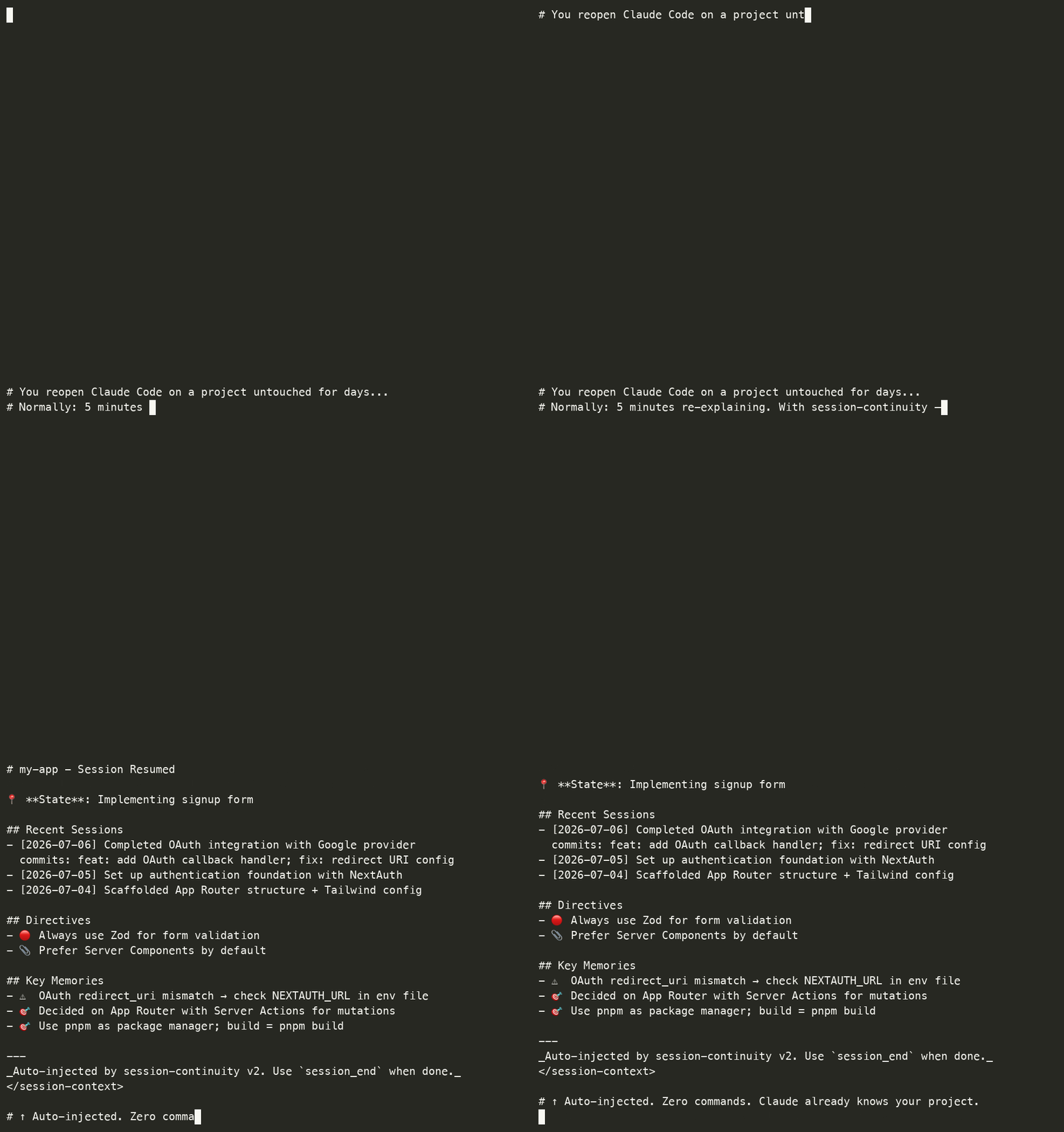
Session continuity demo β€” your coding agent auto-restores project context on session start

Renamed (v2.0.0): this project was previously claude-session-continuity-mcp. The old name suggested it was Claude-only β€” it never was. Claude Code, Codex CLI, and Gemini CLI are all first-class and share one local memory. Existing installs keep working: the old claude-hook-* commands still ship as aliases. See Migrating from v1.

The Problem

Every new session β€” whether you're in Claude Code, Codex CLI, or Gemini CLI:

"This is a Next.js 15 project with App Router..."
"We decided to use Server Actions because..."
"Last time we were working on the auth system..."
"The build command is pnpm build..."

5 minutes of context-setting. Every. Single. Time.

The Solution

Fully automatic. Lifecycle hooks handle everything without manual calls β€” on Claude Code, OpenAI Codex CLI, and Google Gemini CLI, sharing one local memory so context carries across all three:

# Session start β†’ Auto-loads relevant context + recent session history
# When asking β†’ Auto-injects relevant memories/solutions
# During conversation β†’ Tracks active files + auto-injects error solutions
# On compact β†’ Structured handover context for continuity
# On exit β†’ Extracts commits, decisions, error-fix pairs from transcript
← Auto-output on session start:
# my-app - Session Resumed

πŸ“ **State**: Implementing signup form

## Recent Sessions
### 2026-02-28
**Work**: Completed OAuth integration with Google provider
**Commits**: feat: add OAuth callback handler; fix: redirect URI config
**Decisions**: Use Server Actions instead of API routes

### 2026-02-27
**Work**: Set up authentication foundation
**Next**: Implement signup form validation

## Directives
- πŸ”΄ Always use Zod for form validation
- πŸ“Ž Prefer Server Components by default

## Key Memories
- 🎯 Decided on App Router, using Server Actions
- ⚠️ OAuth redirect_uri mismatch β†’ check env file

Zero manual work. Context follows you.


Why this over other memory tools?

Most Claude memory tools rely on explicit tool calls ("remember this"), a cloud API, or a background AI worker. This one is deliberately different:

passbatonTypical cloud/AI-memory MCP
Setupnpm i -g β†’ hooks auto-installManual server + API key
Trigger5 automatic hooks (no commands)You call a remember tool
Storage100% local SQLiteCloud / external service
API cost$0 β€” local embeddingsPer-token / subscription
Latency< 5ms (on-device)Network round-trip
PrivacyNever leaves your machineSent to a provider
SearchFTS5 + local semantic, KO/EN/JA cross-lingualVaries

If you want zero-config, offline, no-cost memory that just happens while you work β€” this is it.

Auto-injection vs. explicit search

There's also a great class of local search tools (e.g. ctx) that index your agent history so you can query it (search "failed migration"). That's complementary, not the same job:

passbatonLocal-search tools (ctx, etc.)
How you use itAutomatic β€” context appears on session start, no commandYou (or the agent) run a search query
CompactionPreCompact hook re-injects a handover β†’ 0 context re-explained after a compactNot its job (it's a search index)
Best atNever losing your thread across sessions & compacts, hands-offFinding a specific past decision/command on demand
CoverageClaude Code + Codex CLI + Gemini CLI (where auto-injection is possible)Often 30+ agents indexed for search

Use search when you want to look something up. Use this when you want your context to follow you without asking.


Codex CLI support (v1.16.0+)

Beyond Claude Code, this also supports OpenAI Codex CLI. If ~/.codex exists, the installer registers the same hooks in ~/.codex/hooks.json (SessionStart, UserPromptSubmit, PreCompact, Stop), and the hooks auto-detect the host and emit the right output format (Codex's hookSpecificOutput.additionalContext).

The same local sessions.db is shared, so context carries across both agents: what you did in Codex is available in Claude Code and vice versa.

Scope: session save + context injection work on both. Codex file-change tracking (PostToolUse) isn't wired yet β€” session save already covers most of it via transcript parsing. Codex's transcript_path is treated as an unstable interface (it can be null at startup), so host detection uses an installer-injected --codex marker rather than relying on the path.


Gemini CLI support (v1.17.0+)

Also supports Google Gemini CLI. If ~/.gemini exists, the installer registers the hooks in ~/.gemini/settings.json (SessionStart, BeforeAgent, PreCompress, SessionEnd β€” Gemini's event names), preserving your other settings. Same shared local sessions.db, so context carries across all three agents.

Gemini's transcript format was verified against real ~/.gemini/tmp/.../chats/*.jsonl files β€” it uses two shapes (a flat {type, content} line and an older {"$set":{"messages":[…]}} diff line); the parser handles both. Like Codex, transcript_path can be null at startup, so host detection uses a --gemini marker.

Honest scope note: session save (SessionEnd) and context output are verified working. Gemini's SessionStart context injection is documented as advisory-only upstream (gemini-cli#15413) β€” if your Gemini build doesn't render the injected context on startup, that's an upstream limit, not this tool. Session continuity still works via the saved history.


Migrating from v1

If you installed this as claude-session-continuity-mcp (v1.x), nothing breaks β€” the v1 claude-hook-* commands still ship as aliases in v2.

To move to the new name:

npm install -g passbaton          # installs the new package
npm uninstall -g claude-session-continuity-mcp   # optional: drop the old one

The installer rewrites your hook entries to passbaton-hook-* and removes the old claude-hook-* lines β€” it matches on both names, so you won't end up with duplicates. Your existing sessions.db is untouched: all past sessions, memories, and solutions carry over.

Nothing else changes β€” same hooks, same database, same behavior.


Quick Start

Requires Node.js 22+. The native better-sqlite3 dependency only ships prebuilt binaries for Node 22, 24, and 26 (the currently supported lines β€” Node 18 and 20 are both end-of-life). On older Node it falls back to compiling from source, which fails without build tools. Node 22 and up install cleanly with no compiler needed.

Recommended: Global Installation

npm install -g passbaton

That's it! The postinstall script automatically:

  1. Registers MCP server in ~/.claude.json
  2. Installs Claude Hooks in ~/.claude/settings.json

Why Global (-g)?

This tool is designed to track all your Claude Code projects in a single unified database. Global installation is strongly recommended because:

ReasonDetail
Single source of truthOne binary serves every project β€” no version drift between projects
Hooks are user-scoped~/.claude/settings.json lives in your home directory, not per-project
Cross-project contextSessions from app-a and app-b share the same DB and search index
One update = everything refreshednpm install -g <latest> updates all projects at once; no per-project reinstall
npm exec resolves global firstHooks call npm exec -- passbaton-hook-* which finds the global package reliably regardless of cwd

Important: Even with global install, you can still disable the hook for specific projects (see below). Global β‰  forced on every project.

Disabling Hooks for Specific Projects

Global install does not mean "always on everywhere". You have three layers of control:

LayerFileScope
1. Global ON (default)~/.claude/settings.jsonAll projects
2. Project-wide OFF<project>/.claude/settings.jsonWhole team (committed)
3. Personal-only OFF<project>/.claude/settings.local.jsonJust you (gitignored)

To disable hooks in a specific project, create the override file with empty hook arrays:

// <project>/.claude/settings.json  (or settings.local.json for personal-only)
{
  "hooks": {
    "SessionStart": [],
    "UserPromptSubmit": [],
    "PostToolUse": [],
    "PreCompact": [],
    "Stop": []
  }
}

Empty arrays override the global setting β†’ that project's sessions are no longer tracked.

Updating to a New Version

npm install -g passbaton@latest

That's the only step β€” all projects pick up the new binary on next Claude Code restart. No need to reinstall in each project.

Alternative: Local Install (Not Recommended)

If you really want per-project install (e.g., locked version for one project):

cd <project> && npm install passbaton

Drawback: you must install separately in every project, and npm exec may not find the local copy reliably from hook context (cwd-dependent). Stick with -g unless you have a specific reason.

What Gets Installed

MCP Server (in ~/.claude.json):

{
  "mcpServers": {
    "project-manager": {
      "command": "npx",
      "args": ["passbaton"]
    }
  }
}

Claude Hooks (in ~/.claude/settings.json):

{
  "hooks": {
    "SessionStart": [{ "hooks": [{ "type": "command", "command": "npm exec -- passbaton-hook-session-start" }] }],
    "UserPromptSubmit": [{ "hooks": [{ "type": "command", "command": "npm exec -- passbaton-hook-user-prompt" }] }],
    "PostToolUse": [{ "matcher": "Edit", "hooks": [{ "type": "command", "command": "npm exec -- passbaton-hook-post-tool" }] }, { "matcher": "Write", "hooks": [{ "type": "command", "command": "npm exec -- passbaton-hook-post-tool" }] }],
    "PreCompact": [{ "hooks": [{ "type": "command", "command": "npm exec -- passbaton-hook-pre-compact" }] }],
    "Stop": [{ "hooks": [{ "type": "command", "command": "npm exec -- passbaton-hook-session-end" }] }]
  }
}

Note (v1.5.0+): Full lifecycle coverage with 5 hooks. Uses npm exec -- which finds local node_modules/.bin first.

Installed Hooks (v1.5.0+)

HookCommandFunction
SessionStartpassbaton-hook-session-startAuto-loads project context on session start
UserPromptSubmitpassbaton-hook-user-promptAuto-injects relevant memories + past reference search
PostToolUsepassbaton-hook-post-toolTracks active files (Edit, Write) + auto-injects error solutions (Bash)
PreCompactpassbaton-hook-pre-compactStructured handover context before compression
Stoppassbaton-hook-session-endExtracts commits, decisions, error-fix pairs from transcript

Manual Hook Management

# Check hook status
npx passbaton-hooks status

# Reinstall hooks
npx passbaton-hooks install

# Remove hooks
npx passbaton-hooks uninstall

3. Restart Claude Code

After installation, restart Claude Code to activate the hooks.


Features

FeatureDescription
πŸ€– Zero Manual WorkClaude Hooks automate all context capture/load
🎯 Quality Memory Only(v1.10.0) Only decisions, learnings, errors β€” no file-change noise
🧠 Semantic Searchmultilingual-e5-small embedding (94+ languages, 384d)
🌍 MultilingualKorean/English/Japanese + cross-language search (ENβ†’KR, KRβ†’EN)
πŸ”— Git IntegrationCommit messages auto-extracted from transcripts
πŸ•ΈοΈ Knowledge GraphMemory relations (solves, causes, extends...)
πŸ“Š Memory Classification5 types: observation, decision, learning, error, pattern
βœ… Integrated VerificationOne-click build/test/lint execution
πŸ“‹ Task ManagementPriority-based task management
πŸ”§ Auto Errorβ†’Solution(v1.12.0) Bash errors auto-detect β†’ inject past solutions; session-end auto-records error-fix pairs
πŸ’° Token Efficiency(v1.11.0) Removed loadContext from UserPromptSubmit (saves 24-60K tokens/session)
πŸ“‘ Progressive Disclosure(v1.11.0) memory_search returns index first, memory_get for full content
⏳ Temporal Decay(v1.11.0) Memory scoring with type-specific half-lives for relevance
πŸ“ Structured Handover(v1.10.0) PreCompact saves work summary, active files, pending actions
πŸšͺ Smart Session End(v1.10.0) Extracts commits, decisions, error-fix pairs from transcript
πŸ—‘οΈ Auto Noise Cleanup(v1.10.0) Auto-deletes stale observation memories (3d+)
πŸ” Past Reference Detection(v1.8.0) "μ €λ²ˆμ— X μ–΄λ–»κ²Œ ν–ˆμ–΄?" auto-searches DB
πŸ“ User Directive Extraction(v1.8.0) Auto-extracts "always/never" rules from prompts

Feature toggles β€” everything is opt-in

(v2.1.0+) Five behaviours are individually toggleable; the rest are shown for transparency but are always on (a hook's mere existence is controlled by your settings.json, not by config) or not yet wired. Config lives in a plain, hand-editable JSON file (~/.claude/passbaton.config.json) β€” separate from your data, so it survives a db reset. No file = today's defaults (nothing changes for existing users).

passbaton config                            # grouped table; ●/β—‹ = toggleable, Β· = always on
passbaton config set solutionCapture off    # flip a toggleable feature
passbaton config set strictSolutionGate on  # opt into the strict error→fix filter
passbaton config preset minimal             # minimal | default | everything
passbaton config reset                       # back to defaults
passbaton config path                        # print the active config file path

Trying to set an always-on / not-yet-wired feature is rejected with a clear message. Each toggleable feature also has an env override for one-off/CI use: PASSBATON_<FEATURE>=0 (e.g. PASSBATON_SOLUTIONCAPTURE=0) wins over the config file.

On-by-default rule: a feature ships on only if it's silent, safe, and universally useful. Anything that speaks unprompted, guesses, or writes speculative rows ships off.

Legend: ●/β—‹ = toggleable (on/off) Β· Β· = always on, not a config toggle Β· β‹― = not yet wired.

Core (on by default)

FeatureKeyToggleWhat it does
Session start injectionsessionStartΒ· always onRestore prior context on start
Compaction handover+compactionHandover● toggleableBefore a compaction, carry over your working state plus hot files and last build status β€” the one gap platform auto-memory structurally can't cover
Session persistsessionEndΒ· always onSave session state on exit
Auto memory surfacingautoInjectΒ· always onAuto-surface relevant past memories on start
Task trackingtaskTrackingΒ· always onRead/write the task list via MCP + hooks
Hot-path pre-warmhotPathPrewarm● toggleableOn start, surface the files you edit most in this project, ranked by real access count
Verification ledgerverificationLedger● toggleableWarn on start if a recent session left the build red or issues open

sessionStart/sessionEnd are "always on" because a hook either runs or it doesn't β€” that's controlled by the hook registration in ~/.claude/settings.json, not by config. To disable them, remove the hook there.

Cross-agent (on by default)

FeatureKeyToggleWhat it does
Cross-agent sharecrossAgentSyncΒ· inherentOne local db shared across Claude Code / Codex / Gemini (not a toggle β€” it's how storage works)
Tool-use capturepostToolCaptureΒ· always onObserve tool use to build hot-paths (low-noise)
Solution capturesolutionCapture● toggleableAuto-record errorβ†’fix pairs to a solution archive. Set off to skip it entirely (session save is unaffected)

Experimental (off by default)

FeatureKeyToggleWhat it does
Strict solution gatestrictSolutionGate○ opt-inStricter error→fix capture filter — fewer noise entries, but may drop some real ones
Trigger matchingtriggerMatchingβ‹― not yet wired(planned) Match prompt keywords to auto-inject solutions
Pattern miningpatternMiningβ‹― not yet wired(planned) Mine work patterns and suggest workflows
Memory auto-storememoryAutoStoreβ‹― not yet wired(planned) Auto-write observation memories from prompts
Status linestatusLineInjectβ‹― not yet wired(planned) Append a passbaton status line to session-start output

The only genuinely user-flippable flags today are compactionHandover, hotPathPrewarm, verificationLedger, solutionCapture (on) and strictSolutionGate (opt-in).


Claude Hooks - Auto Context System

How It Works

SessionStart Hook (npx passbaton-hook-session-start):

  • Auto-detects project: monorepo (apps/project-name/) or single project (package.json root folder name)
  • Loads context from .claude/sessions.db
  • Injects: Current state, 3 recent sessions with commits/decisions, directives, pending tasks, filtered key memories
  • Auto-cleans stale noise memories (3d+ auto-tracked, 14d+ auto-compact)

UserPromptSubmit Hook (npx passbaton-hook-user-prompt):

  • Runs on every prompt submission
  • (v1.11.0) No longer calls loadContext() β€” saves 24-60K tokens/session
  • Injects relevant context (filtered: decisions, learnings, errors only)

PostToolUse Hook (npx passbaton-hook-post-tool):

  • Tracks hot file paths and updates active_context.recent_files
  • (v1.12.0) Auto-detects Bash errors β†’ searches solutions DB β†’ injects past solutions into context
  • No longer creates observation memories (v1.10.0 β€” eliminates [File Change] noise)

PreCompact Hook (npx passbaton-hook-pre-compact):

  • Builds structured handover context: work summary, active file, pending action, key facts, recent errors
  • No longer stores auto-compact memories (v1.10.0)

Stop Hook (npx passbaton-hook-session-end):

  • Extracts commit messages from JSONL transcript (git commit -m patterns)
  • Extracts error-fix pairs (error β†’ resolution within 3 messages)
  • (v1.12.0) Auto-records errorβ†’fix pairs to solutions table for future reuse
  • Extracts decisions ("because", "instead of", "chose" patterns)
  • (v1.11.0) Single-pass transcript parsing (4 JSONL reads β†’ 1)
  • Stores structured metadata in sessions.issues column as JSON

Example Output (Session Start)

# my-app - Session Resumed

πŸ“ **State**: Implementing signup form
🚧 **Blocker**: OAuth callback URL issue

## Recent Sessions
### 2026-02-28
**Work**: Completed OAuth integration
**Commits**: feat: add OAuth handler; fix: redirect config
**Decisions**: Use Server Actions over API routes
**Next**: Implement form validation

## Directives
- πŸ”΄ Always use Zod for validation

## Pending Tasks
- πŸ”„ [P8] Implement form validation
- ⏳ [P5] Add error handling

## Key Memories
- 🎯 Decided on App Router, using Server Actions
- ⚠️ OAuth redirect_uri mismatch β†’ check env file

Hook Management

# Check status
npx passbaton-hooks status

# Reinstall
npx passbaton-hooks install

# Remove
npx passbaton-hooks uninstall

# Temporarily disable
export MCP_HOOKS_DISABLED=true

Past Reference Detection (v1.8.0)

When you ask about past work, the UserPromptSubmit hook automatically searches the database:

You: "μ €λ²ˆμ— μΈμ•±κ²°μ œ μ–΄λ–»κ²Œ ν–ˆμ–΄?"
β†’ Hook detects "μ €λ²ˆμ—" + extracts keyword "μΈμ•±κ²°μ œ"
β†’ Searches sessions, memories (FTS5), and solutions
β†’ Injects matching results into context automatically

Supported patterns (Korean & English):

PatternExample
μ €λ²ˆμ—/전에/이전에 ... μ–΄λ–»κ²Œ"μ €λ²ˆμ— CORS μ—λŸ¬ μ–΄λ–»κ²Œ ν•΄κ²°ν–ˆμ§€?"
~ν–ˆλ˜/λ§Œλ“€μ—ˆλ˜/ν•΄κ²°ν–ˆλ˜"μˆ˜μ •ν–ˆλ˜ 둜그인 둜직"
μ§€λ‚œ μ„Έμ…˜/μž‘μ—…μ—μ„œ"μ§€λ‚œ μ„Έμ…˜μ—μ„œ 결제 κ΅¬ν˜„"
last time/before/previously"How did we handle auth last time?"
did we/did I ... before"Did we fix the database migration before?"
remember when/recall when"Remember when we set up CI?"

Output example:

## Related Past Work (auto-detected from your question)

### Sessions
- [2/14] 카카였 둜그인 μ•±ν‚€ μˆ˜μ •, μΈμ•±κ²°μ œ IAP ν”Œλ‘œμš° μˆ˜μ •

### Memories
- 🎯 [decision] ν…ŒμŠ€νŠΈ: μΈμ•±κ²°μ œ μƒν’ˆ 등둝 μ™„λ£Œ

### Solutions
- **IAP_BILLING_ERROR**: StoreKit 2 migration으둜 ν•΄κ²°

Why npm exec? (v1.4.3+)

Previous versions used absolute paths or npx:

// v1.3.x - absolute paths (broke on multi-project)
"command": "node \"/path/to/project-a/node_modules/.../session-start.js\""

// v1.4.0-1.4.2 - npx (required global install or hit npm registry)
"command": "npx passbaton-hook-session-start"

Now we use npm exec --:

"command": "npm exec -- passbaton-hook-session-start"

npm exec -- finds local node_modules/.bin first, then falls back to global. Works with both local and global installation without hitting npm registry.


Tools (v5 API) - 25 Focused Tools

1. Session Lifecycle (4) ⭐

// Start of session - auto-loads context
session_start({ project: "my-app", compact: true })

// End of session - auto-saves context
session_end({
  project: "my-app",
  summary: "Completed auth flow",
  modifiedFiles: ["src/auth.ts", "src/login/page.tsx"]
})

// View session history
session_history({ project: "my-app", limit: 5 })

// Semantic search past sessions
search_sessions({ query: "auth work", project: "my-app" })

2. Project Management (4)

// Get project status with task stats
project_status({ project: "my-app" })

// Initialize new project
project_init({ project: "my-app" })

// Analyze project tech stack
project_analyze({ project: "my-app" })

// List all projects
list_projects()

3. Task Management (4)

// Add a task
task_add({ project: "my-app", title: "Implement signup", priority: 8 })

// Update task status
task_update({ taskId: 1, status: "done" })

// List tasks
task_list({ project: "my-app", status: "pending" })

// Suggest tasks from TODO comments
task_suggest({ project: "my-app" })

4. Solution Archive (3)

// Record an error solution
solution_record({
  errorSignature: "TypeError: Cannot read property 'id'",
  solution: "Use optional chaining: user?.id"
})

// Find similar solutions (keyword or semantic)
solution_find({ query: "TypeError property", semantic: true })

// AI-powered solution suggestion
solution_suggest({ errorMessage: "Cannot read property 'email'" })

5. Verification (3)

// Run build
verify_build({ project: "my-app" })

// Run tests
verify_test({ project: "my-app" })

// Run all (build + test + lint)
verify_all({ project: "my-app" })

6. Memory System (5)

// Store a classified memory
memory_store({
  content: "State management with Riverpod makes testing easier",
  type: "learning",  // observation, decision, learning, error, pattern
  project: "my-app",
  tags: ["flutter", "state-management"],
  importance: 8,
  relatedTo: 23  // Connect to existing memory
})

// Search memories β€” returns index (id, type, tags, score) for token efficiency
memory_search({
  query: "state management test",
  type: "learning",
  semantic: true,  // Use embedding similarity
  limit: 10
})

// Get full memory content by ID (v1.11.0)
memory_get({ memoryId: 23 })

// Find related memories (graph + semantic)
memory_related({
  memoryId: 23,
  includeGraph: true,
  includeSemantic: true
})

// Get memory statistics
memory_stats({ project: "my-app" })

7. Knowledge Graph (2)

// Connect two memories with a typed relation
graph_connect({
  sourceId: 23,
  targetId: 25,
  relation: "solves",  // related_to, causes, solves, depends_on, contradicts, extends, example_of
  strength: 0.9
})

// Explore knowledge graph
graph_explore({
  memoryId: 23,
  depth: 2,
  relation: "all",  // or specific relation type
  direction: "both"  // outgoing, incoming, both
})

Memory Types

TypeDescriptionUse Case
observationPatterns, structures found in codebase"All screens are separated in features/ folder"
decisionArchitecture, library choices"Decided to use SharedPreferences for caching"
learningNew knowledge, best practices"Riverpod is better for testing"
errorOccurred errors and solutions"Provider.read() doesn't rebuild β†’ use watch()"
patternRecurring code patterns, conventions"Avoid late keyword abuse"

Relation Types

RelationDescriptionExample
related_toGeneral relationA and B are related
causesA causes BCaching decision β†’ folder structure change
solvesA solves BRiverpod learning β†’ Provider bug fix
depends_onA depends on BFolder structure β†’ Caching decision
contradictsA conflicts with BTwo design decisions conflict
extendsA extends Blate pattern β†’ Extended to Riverpod learning
example_ofA is example of BSpecific code is example of pattern

Data Storage

SQLite database at ~/.claude/sessions.db:

TablePurpose
memoriesClassified memories (observation, decision, learning, error, pattern)
memories_ftsFull-text search index (FTS5)
memory_relationsKnowledge graph relations
embeddings_v4Semantic search vectors (multilingual-e5-small, 384d)
project_contextFixed project info (tech stack, decisions)
active_contextCurrent work state
tasksTask backlog
solutionsError solution archive
sessionsSession history

Environment Variables

VariableDefaultDescription
WORKSPACE_ROOT-Workspace root path (required)
MCP_HOOKS_DISABLEDfalseDisable Claude Hooks
LOG_LEVELinfoLog level (debug/info/warn/error)
LOG_FILE-Optional file logging path

Development

# Clone
git clone https://github.com/leesgit/passbaton.git
cd passbaton

# Install
npm install

# Build
npm run build

# Test
npm test

# Test with coverage
npm run test:coverage

Performance

MetricValue
Context load (cached)<5ms
Memory search (FTS)~10ms
Semantic search~50ms
Build verificationProject-dependent

Roadmap

  • v2 API (15 focused tools)
  • v4 API (24 tools - memory + graph)
  • v5 Claude Hooks (auto-capture)
  • Knowledge Graph with typed relations
  • Memory classification (6 types)
  • Semantic search (embeddings)
  • Multilingual pattern detection (KO/EN/JA)
  • Git commit integration
  • 111 tests (6 test suites)
  • GitHub Actions CI/CD
  • Multilingual semantic search (v1.6.0 - multilingual-e5-small)
  • Cross-language search EN↔KR (v1.6.0)
  • Solution semantic search (v1.6.0)
  • Fix hooks settings file path (v1.6.1 - settings.json, not settings.local.json)
  • Auto-migrate legacy hooks (v1.6.1)
  • Fix PostToolUse matcher format to string (v1.6.3)
  • Fix README documentation for new hook format (v1.6.4)
  • Empty session skip and techStack save improvements (v1.7.1)
  • Past reference auto-detection in UserPromptSubmit hook (v1.8.0)
  • User directive extraction ("always/never" rules) (v1.8.0)
  • Memory quality overhaul β€” no more [File Change] noise (v1.10.0)
  • Structured handover context in PreCompact (v1.10.0)
  • Smart session-end: commit/decision/error-fix extraction from transcript (v1.10.0)
  • Auto noise cleanup (3d+ observations, 14d+ auto-compact) (v1.10.0)
  • 3 recent sessions display with structured metadata (v1.10.0)
  • Token efficiency β€” remove loadContext from UserPromptSubmit, saves 24-60K tokens/session (v1.11.0)
  • Single-pass transcript parsing, 4 JSONL reads β†’ 1 (v1.11.0)
  • Temporal decay for memory scoring with type-specific half-lives (v1.11.0)
  • Progressive disclosure β€” memory_search returns index, memory_get for full content (v1.11.0)
  • Memory consolidation via Jaccard similarity (v1.11.0)
  • Auto errorβ†’solution pipeline β€” PostToolUse detects Bash errors, injects past solutions (v1.12.0)
  • SessionEnd auto-records error-fix pairs to solutions table (v1.12.0)
  • Cross-project solution search with current project prioritization (v1.12.0)
  • sqlite-vec native vector search (v2 - when data > 1000 records)
  • Web dashboard
  • Cloud sync option

Contributing

PRs welcome! Please:

  1. Fork the repo
  2. Create a feature branch
  3. Add tests for new features
  4. Ensure npm test passes
  5. Submit PR

License

MIT Β© Byeongchang Lee


Acknowledgments


If this saves you from re-explaining your project, consider giving it a ⭐ β€” it genuinely helps others find it.

Related MCP Servers

modelcontextprotocol/server-memoryVerified

πŸ“‡ 🏠 - Knowledge graph-based persistent memory system for maintaining context

🧠 Knowledge & Memory2 views
0xshellming/mcp-summarizer

πŸ“• ☁️ - AI Summarization MCP Server, Support for multiple content types: Plain text, Web pages, PDF documents, EPUB books, HTML content

🧠 Knowledge & Memory0 views
20alexl/claude-engram

🐍 🏠 - Persistent memory and session intelligence for Claude Code. Auto-tracks mistakes, decisions, and context via hooks. Mines session history for patterns and cross-session search. Loop detection, pre-edit warnings, context compaction survival. Runs locally with Ollama.

🧠 Knowledge & Memory0 views
a2cr/a2cr

🐍 ☁️ 🏠 🍎 πŸͺŸ 🐧 - MCP server for AI-agent handoffs. Saves client-encrypted WorkBaton checkpoints and WorkStash notes so Codex, Claude Code, Roo Code, and other MCP clients can resume work without passing full chat history.

🧠 Knowledge & Memory0 views

Engagement

Views
0
Installs
0
Upvotes
0

Views and upvotes are unique per visitor network (hashed IP). Installs count copy actions.

Status

Health: Not checked yet

We have not completed a health check for this listing yet.

No check timestamp yet.

Unclaimed listing (imported or pending owner verification). Claim it β†’
β˜… Spotlight Slot

Feature Your MCP Server

Get maximum visibility for your server across our directory, search results, and detail pages.

Spotlight Your Server

Own this project?

This directory is pre-filled from public sources. Claim via GitHub README, site badge, or DNS TXT to get the verified badge and attach your website.

Claim this listing

Promote this listing

Optional paid placement. Free listings stay free forever.

Share & Embed

Add our SVG badge (dark/light directory styles) or embeddable widget to your site.