slackcoding-agentsawsgithubpull-requests
Self-hosted Slack AI teammate that uses Claude Code or Codex to investigate code and logs, run tests, and open pull requests.
Quick Install
Automated & IDE SetupCopy the AI prompt to install this server into Claude Code, Cursor, or another agent — or use 1-click editor setup below.
We couldn’t automatically confirm this listing starts correctly
We ran the install command below but it didn't respond within our test window — this can mean a slow first-time install rather than a real problem.
npx -y @lawrencehui/citioNo response to initialize.
This is an experimental automated check and can have false negatives — missing environment variables, a slow cold install, etc. It doesn’t necessarily mean something’s wrong. Last checked 4d ago.
Manual Client & Custom JSON ConfigExpand JSON ▾
Client Config & Setup
Choose your client or environment
Target File:
💡 Paste the JSON block into your client's configuration file under mcpServers, then restart the application.
Overview
Use cases
Investigate bugs from Slack
Query CloudWatch logs
Run allowlisted tests and commands
Create branches and pull requests
Check CI status
Key features
Slack DMs and channel mentions
Claude Code and OpenAI Codex support
Controlled MCP tool layer
GitHub, AWS, and Slack credential isolation
Persistent workspace and memory with optional AWS EFS
AWS ECS Fargate deployment
Capabilities & Tool Schemas
Inspect callable tools, capabilities, and parameters exposed to AI agents by Citio.
Extracted Tool Capabilities
Slack DMs and channel mentions
Claude Code and OpenAI Codex support
Controlled MCP tool layer
GitHub, AWS, and Slack credential isolation
Persistent workspace and memory with optional AWS EFS
AWS ECS Fargate deployment
Documentation Overview
🤖 Citio
Your own AI engineering teammate, self-hosted, living in Slack.
@mention it or DM it and ask for real engineering work (investigate a bug, dig through CloudWatch logs, fix code, open a PR) and Citio runs Claude Code or OpenAI Codex inside your own infrastructure to do it. Slack is the interface, a controlled MCP tool layer is the safety boundary, and every credential stays in your own infrastructure.
No Team or Enterprise plan required. Citio runs on an individual Claude Max/Pro or ChatGPT Go/Plus/Pro (Codex) subscription, the agent you already pay for, now working from Slack.







Quickstart · How it works · Compare · Configuration · Customize · Architecture · Contributing · Security
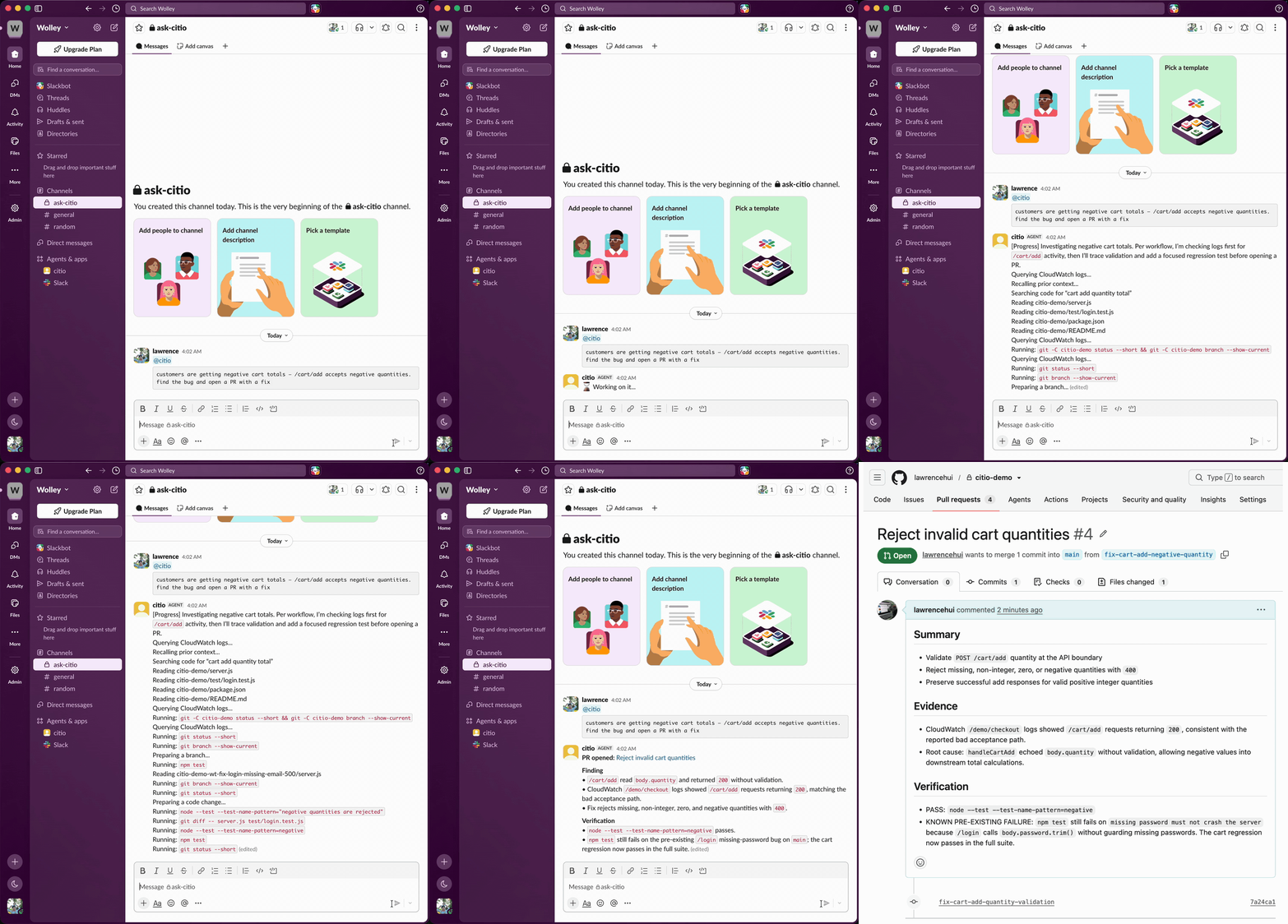
A Slack message becomes an investigated, tested pull request, without leaving the thread.
✨ Why Citio
Most teams can already chat with an LLM. The harder problem is letting a team ask for real engineering work from Slack without handing a raw shell and a pile of credentials directly to the model.
Citio closes that gap:
- 💬 Slack is the user interface: DM the bot or
@mentionit in a channel. - 🧠 Claude Code or Codex is the execution engine: the provider CLI does the reasoning and planning.
- 🛡️ Citio is the control plane: it owns orchestration, session handling, repo setup, AWS/GitHub access, and a controlled MCP tool layer so the agent never touches raw credentials.
- 🏠 Everything runs in your infra: your container, your cloud account, your keys.
The result is something that can investigate bugs, inspect logs, edit code, and open pull requests, without a human sitting in the middle of every request.
Where it runs. Citio is a self-hosted container. This first version ships a native one-command AWS Fargate deploy (on Fargate Spot by default, ~$5–11/month, or
citio pauseto $0 when idle). Running on other hosts (a cheap VPS, Fly.io / Railway, or your own homelab) and a pay-per-use serverless mode are on the roadmap.
🆚 Citio vs. hosted Slack agents
Anthropic's Claude Tag (June 2026) popularized exactly this idea (@mention an AI teammate in Slack and it does the work in-thread), but it's an Anthropic-hosted service gated to Claude Team and Enterprise plans, Claude-only. Citio takes the self-hosted, bring-your-own-subscription path:
| Citio | Claude Tag | |
|---|---|---|
| Hosting | Your AWS account, your infra | Anthropic-hosted SaaS |
| Plan required | Individual Claude Max/Pro or ChatGPT Go/Plus/Pro | Claude Team or Enterprise |
| Providers | Claude Code or OpenAI Codex | Claude only |
| Credentials | Stay with you, behind an MCP allowlist | Managed by the vendor |
| Best for | Solo devs & small teams who self-host | Orgs already on Team/Enterprise |
If you already pay for a Claude or ChatGPT subscription, Citio puts that same agent to work from Slack, no per-seat enterprise upgrade, no handing your code and credentials to someone else's cloud.
🧩 Features
- 🤝 Bring your own agent: Claude Code or OpenAI Codex, your subscription or API key.
- 🧰 Controlled MCP tools:
investigate_codebase,read_file,write_file,create_branch,create_pr,run_command(allowlisted),check_ci_status,query_logs,recall_context, and more. - 🔐 Credential boundary: the agent calls MCP tools; secrets live with Citio, not the model. Command execution is allowlisted and shell-metacharacter-rejected.
- 🧵 Slack-native: DMs and channel mentions, streamed progress, redacted output.
- 💾 Persistent workspace & memory: optional AWS EFS keeps repos, sessions, and provider auth across redeploys.
- 🪄 One-command installer: interactive setup wires up Slack, GitHub, provider auth, and deploys to ECS.
🏗️ How it works
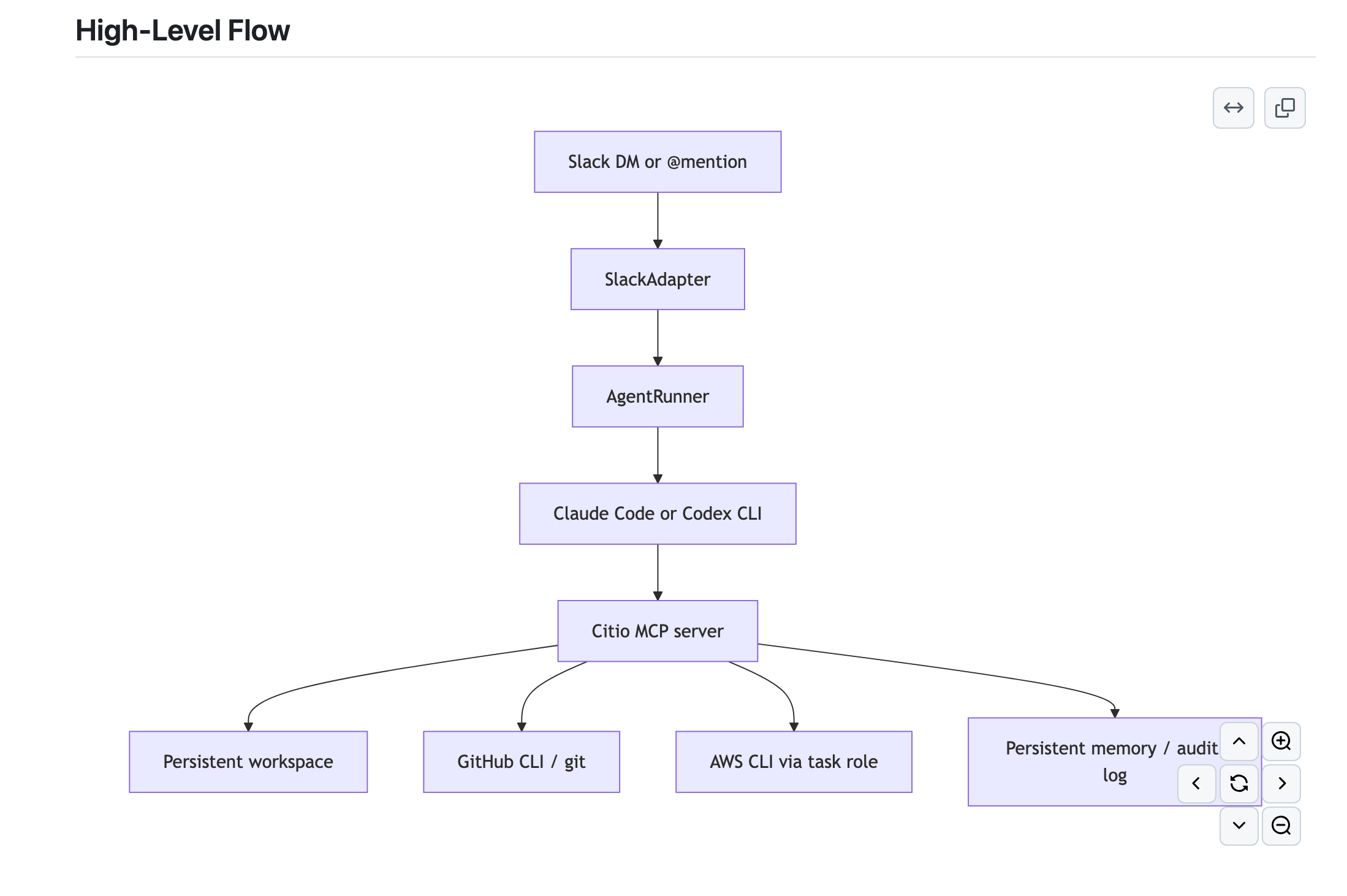
Runtime shape:
- A Slack request is normalized by the Slack adapter.
- AgentRunner serializes work and manages provider sessions (one active task per container).
- It spawns the Claude Code / Codex CLI as the agent, wired to Citio's MCP server via
--mcp-config. - The agent uses MCP tools for codebase reads/writes, PR creation, log queries, and progress updates, never raw credentials.
- Workspace, memory, and auth persist through EFS when enabled.
More detail: docs/ARCHITECTURE.md
🚀 Quickstart
Prerequisites
On your machine (the installer hard-checks for Docker, AWS CLI, and Git):
| Tool | Version / note |
|---|---|
| Node.js | ≥ 22 |
| Docker | Running. The image is built linux/amd64: on Apple Silicon, Docker Desktop's buildx cross-builds it. |
| AWS CLI | v2, authenticated with a profile that has the permissions below, see Setting up your AWS profile. |
| Git | Any recent version. |
The agent CLIs (
claude,codex),gh, andjqship inside the container image: you don't install them on the host.
Accounts & tokens
- An agent subscription: Claude Max/Pro, or ChatGPT Go/Plus/Pro for Codex (API key works as a fallback).
- A Slack app (the installer can create it for you from a config token) + the target channel ID.
- A GitHub fine-grained PAT with
contents: write+pull_requests: writeon the repos you want worked on.
Setting up your AWS profile
Citio deploys into your own AWS account. This takes about 10 minutes from "no AWS CLI" to "ready to install". If aws sts get-caller-identity already prints your account ID, skip to Permissions.
1. Install the AWS CLI
| OS | Command |
|---|---|
| macOS | brew install awscli |
| Ubuntu/Debian | sudo apt install awscli (or the official v2 installer) |
| Windows | MSI installer |
Verify with aws --version (v2.x recommended).
2. Connect the CLI to your account
No AWS account yet? Create one at aws.amazon.com. Then pick one route:
Option A: IAM user + access key (simplest for a personal account)
- AWS Console → IAM → Users → Create user (e.g.
citio-admin) - Attach permissions (see Permissions below)
- Open the user → Security credentials → Create access key → choose Command Line Interface (CLI)
- Configure the profile:
Option B: IAM Identity Center / SSO (if your org uses it)
Verify either way: this must print your account ID:
The installer lists your profiles automatically and re-runs this check before it touches anything.
Permissions
The deploy creates an ECR repository, an ECS cluster/service/task definition, an IAM task role, a security group, CloudWatch log groups, a Secrets Manager secret, and (optionally) an EFS filesystem.
Related MCP Servers
Adoption & maintenance
Factual signals from GitHub, npm, and our automated checks — not a rating.
GitHub stars
2
Stargazers on the source repository.
npm downloads
35
Package downloads in the last 30 days.
Last commit
1mo ago
Most recent push to the default branch.
Install check
Inconclusive
Didn't respond in our test window — often a slow first install.
Directory activity
1 views
Config copies, upvotes, and views on AllMCPs.
Reviews
No reviews yet — be the first to share how this listing worked for you.
Frequently Asked Questions about Citio
AllMCPs Directory Badge
Showcase your server listing on GitHub or your project documentation. Embed this dynamic SVG badge to highlight official listing status and live engagement.
Badge Style:
Live Dynamic SVG Preview
Markdown (GitHub README)
[](https://allmcps.com/mcp/lawrencehui-citio)HTML Embed
<a href="https://allmcps.com/mcp/lawrencehui-citio"><img src="https://allmcps.com/api/badge/lawrencehui-citio?style=directory" alt="Citio on AllMCPs" /></a>