Lastest README
The full upstream README, mirrored here for reference. Install config, tool schemas, adoption signals, and an original overview live on the Lastest listing page.

Free, open-source visual regression testing with AI-generated tests
Record it. Test it. Ship it.
Website • Wiki • Features • Quick Start • How It Works • Why Lastest • Comparison • Commands • Config




The Problem
Visual regression testing is either expensive, flaky, or painful to maintain.
- Cloud tools: per-screenshot pricing, cloud-only, no self-hosting
- Enterprise tools: steep learning curve, locked to specific frameworks
- Open-source tools: free but no dashboard, no collaboration, no AI, or in maintenance mode
Meanwhile, you just need to know: "Did my last commit break the UI?"
The Solution
Lastest is a free, self-hosted visual regression testing platform that records your tests, writes them with AI, runs them anywhere, and fixes them when they break — all in one tool.
When self-hosted, your data stays on your server and your screenshots never leave your infra.
Three Ways to Work
Lastest adapts to how you want to build tests — from fully manual to fully autonomous.
1. AI-Free (Manual Recording)
Open the recorder, click through your app, hit stop. Lastest captures every interaction and generates deterministic Playwright code — no AI involved, no API keys needed. You own the test code and can edit it by hand.
Best for: Teams that don't want AI, air-gapped environments, simple flows.
2. AI-Assisted (Human-in-the-Loop)
AI generates, fixes, or enhances tests — but you review and approve before anything is saved. Feed it a URL and get a test back. Import OpenAPI specs or user stories and AI extracts test cases. When a test breaks, AI proposes a fix and you decide whether to accept it.
Best for: Day-to-day development, iterating on tests, fixing breakages fast.
3. Full Autonomous (Play Agent)
One click kicks off an 11-step pipeline: check settings, select repo, set up environment, scan routes & apply testing template, plan functional areas, review plan, generate tests, run them, fix failures (up to 3 attempts per test), re-run, and report results. Uses specialized sub-agents (Orchestrator, Planner, Scout, Diver, Generator, Healer). The agent pauses and asks for help only when it hits something it can't resolve on its own. You resume and it picks up where it left off.
Best for: Onboarding a new project, generating full coverage from scratch, CI bootstrapping.
One Way to Run: Embedded Browser
Every test runs inside an Embedded Browser (EB) pod — a containerized Chromium with live CDP streaming back to the UI. There is no local-Playwright fallback and no remote-runner daemon anymore: the host never launches its own browser, and if an EB is unavailable a test fails rather than falling back. The EB stack is therefore required for every run and recording, even in local development.
- System-managed (default) — EB pods are provisioned automatically: into a local k3d cluster in dev, or your Kubernetes cluster in production, from an on-demand pool (worker-pool per build, warm-pool keep-alive, egress-restricted). One EB per test.
- Bring-your-own (BYO) — run the
lastest-ebcontainer yourself (docker run … -p 9223:9223 -p 9224:9224) and register it in Settings → Runners to get a token. This is the replacement for old "remote runners": you bring a browser on the machine/network/OS you want, not a Playwright daemon.
EB pods handle both running and recording. Builds can be triggered manually (click Run), by webhook (PR opened/updated), from CI/CD (GitHub Action or the @lastest/runner CLI, which only triggers a build and polls — execution still happens in the EB pool), or on a schedule (cron-based automation). Smart Run analyzes git diffs to run only affected tests.
Migrating from remote runners? The standalone runner daemon that executed Playwright on remote machines has been retired. To run tests on your own machine/network, register a BYO Embedded Browser instead. The
@lastest/runnernpm package lives on as a lightweight, browser-free CI trigger client only.
Build Once, Run Forever
Tests are recorded or generated once, then stored as code. Every subsequent run re-executes the same code, captures new screenshots, and diffs them against approved baselines.
- First run: screenshot becomes the baseline
- Every run after: new screenshot is SHA256-hashed — if it matches the baseline, instant pass (no pixel comparison needed). If it differs, the diff engine runs and you review the change.
- AI costs are one-time: AI is only used during test creation and fixing. Running tests uses zero AI — it's pure Playwright execution.
- No per-screenshot pricing on self-hosted: every run is unlimited regardless of volume.
Features
Core
- Record Browser Interactions — Point-and-click test recording via Playwright with multiple engines (custom recorder or Playwright Inspector). No code required.
- AI Test Generation — Claude generates robust test code with multi-selector fallback (data-testid → id → role → aria-label → text → css → OCR).
- Multi-Engine Visual Diffing — Three comparison engines: pixelmatch (pixel-perfect), SSIM (structural similarity), and Butteraugli (human-perception-aligned). Choose the best trade-off between speed and accuracy.
- Multi-Step Screenshots — Capture multiple labeled screenshots per test run for multi-page flow testing.
- Approval Workflow — Review visual diffs before they become baselines. Catch regressions, approve intentional changes.
- Check Modes — Unified verification control across 9 layers (visual, text, DOM, network, console, a11y, design, performance, URL), each set to enforce, log, or disable per repo — replacing scattered per-feature toggles.
- Verify Board — Per-step card board for reviewing multi-layer check results: change map, per-layer baselines, and reviewer feedback in one focused view. Verify is now the single execution surface: the old
/runand/buildspages were retired into it, bringing the build-history graph (header drawer), the smart/all/comparison run split-button, "Accept all safe" on unsorted diffs, live EB streaming during a build, and the step-label editor. - Environments — PROD / UAT / prerelease deployments of the system under test as a first-class object (
key,label,baseUrl,releaseLabel,refreshedAt), with per-environment variables and baselines. Run one suite against UAT and PROD without the two fighting over one set of approvals; promote baselines between environments and survive a vendor sandbox refresh. Fully additive — a repo that never creates an environment behaves exactly as before. - Per-Repo Credential Store — Named credential sets encrypted at rest (AES-256-GCM) and injected into the test process at run time via a dedicated
credentialsparameter, never through variable substitution — so rotating a password does not changecodeHash, invalidate a baseline, or land in plaintext run records. - App Map + Explore — A live map of your app's screens, routes, and flows, built by a multi-EB swarm crawler that explores in parallel. Tree outline, screens gallery, node detail, and flow playback; feeds route discovery and test planning.
- Interactive Test Playback — Replay a recorded run step-by-step in the UI with the captured evidence layer (including storage state) attached to each step.
- Run Results (Triage) — Build-scoped results screen that clusters failures by root cause rather than functional area, writes a run-level narrative, and suggests a verdict per cluster with reviewer verdicts tracked separately.
- GitHub Issues with Full Evidence — Open an issue carrying the complete failure evidence (screenshots, diffs, console/network), optionally assign an AI engineer, and auto-close on confirm-when-green.
- Design System Verification — Design-token comparison layer that flags drift from your design system (colors, spacing, typography) as its own check layer.
- URL Diff — Capture and diff URL trajectories across runs to catch unexpected redirects and navigation changes.
- API Tests — Headless HTTP API testing as a first-class test type (
method/url/headers/query/body/auth+ assertions). Runs in-process with no browser or EB dispatch, feeds the same step-comparison and verdict pipeline as browser tests, and can be generated from captured network calls. Includes a burst/load runner for firing concurrent requests at an endpoint (single up-front SSRF validation, per-connection re-check). - Analyze URL — Pre-recording selector tuning: scans the target page, measures selector-strategy coverage (data-testid, aria, ids, …), and recommends a priority order matched to your app.
- Git-Aware Builds — Run tests per branch/commit. Compare across PRs. Track coverage.
- Branch Comparison — Dedicated compare view for side-by-side branch-to-branch test result diffing.
- Test Suites — Organize tests into ordered suites for structured execution.
- Test Versioning — Full version history with change reasons (manual edit, AI fix, AI enhance, restored).
- Test Composition — Cherry-pick tests and pin specific test versions per build via the Compose page. Override latest with any historical version.
- Functional Area Hierarchy — Organize tests into nested parent/child functional areas with drag-and-drop reordering.
- Debug Mode — Step-by-step test execution with live feedback for diagnosing failures.
- Testing Templates — One-click preset configurations for common app types: SaaS/Dashboard, Marketing Website, Canvas/WebGL, E-commerce, Documentation, Mobile-First, SPA, and CMS.
- Auto-Detect Capabilities — Recording automatically detects required browser capabilities (file upload, clipboard, downloads, network interception) and enables corresponding Playwright settings.
- Early Adopter Mode — Team-level toggle to access experimental features before general release.
- Scheduled Test Runs — Cron-based automated builds with preset schedules (daily, weekly, hourly) or custom cron expressions. Auto-disables after consecutive failures. Optional branch targeting.
- Success Criteria Tab — Parsed assertion tracking per test: see which
expect()calls passed/failed with expected vs actual values, error messages, and code line references. - WCAG 2.2 AA Compliance Scoring — Automated 0–100 accessibility score per build with severity-weighted deductions (critical/serious/moderate/minor), trend sparklines across builds, and per-test violation detail.
- Guided Onboarding — 8-step setup guide for new users: connect GitHub, configure AI, scan routes, record first test, run, set baselines, re-run, check results. Auto-detects completion.
- AI Failure Triage — Automatic classification of test failures into real regression, flaky test, environment issue, or test maintenance — with confidence scores and reasoning.
- Bug Reports — In-app bug reporting with auto-captured context (URL, viewport, console errors, failed requests, breadcrumbs), screenshot attachment, and GitHub issue creation.
- Review Todos — Branch-specific actionable items created when a reviewer flags a diff. Track review feedback as todos tied to specific builds and tests.
- Gamification (Beat the Bot) — Competitive scoring layer where humans compete against AI bots on a team leaderboard. Earn points for creating tests (+10), catching regressions (+100), approving real changes (+15), resolving review todos (+5). Small flaky-test penalty (−5, daily-capped). Seasonal play with named seasons, achievements (first test, first regression, beat-the-bot tiers), and Bug Blitz events with configurable multipliers (2–5×). Team-level toggle. Celebratory toasts on score events via SSE.
- Leaderboard — Ranked season standings for humans and bots with top-3 podium styling, per-actor breakdowns (tests created, regressions caught, flakes incurred), and "you are here" row for viewers outside the top 10.
- Public Share Links — Publish a run, build, or diff as a watermarked, publicly-viewable
/r/<slug>report — no login required for viewers. Includes optional AI-written demo notes, session video (WebM with MP4 conversion + fallback), zip download of artifacts, and social-share flows with media-aware cards for X, YouTube, and TikTok. Links are revokable and reuse a stable URL on re-publish. - Test Migration — Move tests and functional areas between Lastest instances. Connect to a remote instance via URL + API key, browse remote repos, and import with idempotent name-based upsert. Also available via REST API (
GET /export+POST /import). - API Tokens — Generate long-lived Bearer tokens (
lastest_api_*) for the MCP server, VS Code extension, CI scripts, and cross-instance migration. Revokable per-user with labels.
AI-Powered
- Multiple AI Providers — Claude CLI, OpenRouter, Claude Agent SDK, direct Anthropic API, OpenAI, or Ollama (local models).
- Separate AI Diff Provider — Use a different AI provider for diff analysis than test generation.
- AI Diff Analysis — AI-powered visual diff classification (insignificant/meaningful/noise) with confidence scores and change categories.
- AI Test Fixing — Automatically fix failing tests or enhance existing ones.
- Fix-the-App Advisor — When a failure is classified as a real regression, AI produces a structured application-code fix recommendation (file, snippet, rationale, confidence) by localizing the root cause against recently-changed files. Distinct from the test healer — it patches your app, not the test — and it never auto-applies: it hands the suggestion back to you or your coding agent. Exposed via the MCP
suggest_app_fixtool. - Diff-Scoped Validation — AI validates and decides on individual visual diffs (
validate_diff/decide_diff), scoping analysis to a single diff for precise, low-noise verdicts. - Spec-Driven Testing — Import OpenAPI specs, user stories, or markdown files. AI extracts stories and generates tests automatically.
- Route Discovery — AI scans your source code to discover routes and suggest tests.
- MCP Selector Validation — Real-time selector validation on live pages via Claude MCP.
- Play Agent (Autonomous) — One-click 11-step pipeline: check settings → select repo → environment setup → scan & template → plan areas → review → generate tests → run → fix failures (up to 3 attempts) → re-run → summary. Uses specialized sub-agents (Orchestrator, Planner, Scout, Diver, Generator, Healer). Pause/resume, approve plans, skip steps.
- Agents Console —
/agentsis the single entry point for agent work: one roster of every agent working the selected repo, what each is doing, what it is blocked on, and which embedded browsers it is holding. Paused (browser released) and blocked-on-a-human (browser still held) are shown as different states, and escalations from parked sessions and pushed-back tasks are merged into one queue. Drill into a row to reach the QA agent, the Triage agent, the Healer, or the Explorer (Ranger, Play and QuickStart are one-shot onboarding flows and have no roster row). Pro-plan gated. - QA Agent — Autonomous comprehensive-suite builder on an eight-phase pipeline: preflight → discovery (static GitHub-tree route scan + live EB crawl with verified selectors and observed API endpoints) → risk-prioritized plan → human plan review (approve / exclude / send feedback) → generation (one test per plan item over the EB's CDP endpoint) → run → heal → summary. Console shows a live pipeline strip, coverage matrix, direction queue, and activity feed.
- Triage Agent — Replaces the two independent AI passes (per-diff analysis and per-test failure triage) with one build-scoped classifier that groups by root cause, ranks by risk, and suggests verdicts.
- Healer Agent — After triage, repairs failing tests in a heal → verify loop and stops itself. It only touches failures triage classified as a test problem (
test_maintenance,flaky_test); real regressions, environment issues, unclassified failures and cases a reviewer already decided are left red with the reason recorded. Hard stops: a per-test attempt budget (default 2, counted fromai_fixversions since the test last passed or was hand-edited), a per-build cap (default 5), an identical-error no-progress guard, one campaign per repo at a time, and heal/verify timeouts. Every patch is a versionedai_fixedit you can revert./healer-agentowns the toggle, the budgets, a Stop button and a per-test outcome ledger. - Agent Monitoring & Activity Feed — Real-time tracking of Play Agent sessions with step-by-step progress, SSE streaming, and session history. Monitor active/paused/completed agents from the dashboard.
- Codebase Intelligence — Automatic detection of project context (framework, CSS framework, auth, state management, API layer, key dependencies) to enrich AI prompts. 100+ package database mapping dependencies to testing recommendations.
Stabilization & Flaky Test Prevention
- Text-Region-Aware Diffing — OCR-based two-pass comparison with separate thresholds for text vs non-text regions. Reduces false positives from dynamic text and cross-OS font rendering.
- Timestamp Freezing — Replace
Date.now()andnew Date()with fixed values for deterministic screenshots. - Random Value Seeding — Seed
Math.random()for consistent outputs. - Cross-OS Consistency — Bundled fonts + Chromium flags for identical screenshots across operating systems.
- Burst Capture — Multi-frame instability detection: take N screenshots and compare for stability before saving.
- Auto-Mask Dynamic Content — Automatically detect and mask timestamps, UUIDs, and relative times before comparison.
- Network Idle Waiting — Wait for network activity to settle before capture.
- DOM Stability Detection — Wait for DOM mutations to stop before screenshot.
- Third-Party Blocking — Block third-party domains with configurable allowlist, mock external images.
- Font Loading Wait — Wait for webfonts to load, or disable them entirely.
- Loading Indicator Hiding — Auto-hide spinners and loading states with custom selectors.
- Page Shift Detection — Detect vertical content shifts (inserted/deleted rows) with fuzzy row matching.
Integrations
- GitHub — OAuth login, repo sync, PR comments, webhook-triggered builds, reusable GitHub Action.
- GitLab — OAuth login (self-hosted supported), MR comments, webhook triggers.
- Google OAuth — Sign in with Google.
- SUT Connectors (Veeva Vault, Salesforce) — Connect directly to the system under test: N connectors per type per repo, each bound to an environment and pointing at a credential set. Profiles the target over its real REST API to ground test generation in the live configuration.
- Google Sheets — Use spreadsheet data as test data sources with per-team OAuth, multi-tab support, custom header rows, fixed ranges, and caching.
- Notifications — Slack, Discord, custom webhooks, and GitHub/GitLab PR comments for build results.
- Email — Team invitation emails via Resend.
Infrastructure
- Smart Run — Analyzes git diffs to run only tests affected by your changes.
- Embedded Browser (only execution path) — Containerized Chromium with CDP live streaming back to the UI. Records and runs every test — no local Playwright, no remote-runner daemon. System-managed EBs run in an on-demand Kubernetes pool (one test per browser, worker-pool per build, warm-pool keep-alive, busy-state tracking with graceful reaping during deploys, restricted pod egress); BYO EBs are
lastest-ebcontainers you host and register yourself. JPEG streaming with configurable quality/framerate, WebSocket auth, concurrent contexts. If no EB is available the run fails — the host never launches its own browser. - CI Trigger CLI (
@lastest/runner) — Lightweight, browser-free npm client that triggers a build on your Lastest server and polls for results (writesGITHUB_OUTPUT/GITHUB_STEP_SUMMARY, exits non-zero on failure or--fail-on-changes). Execution runs server-side in the EB pool; the old distributed-execution runner daemon has been retired. - Parallel Test Execution — Configurable max parallel tests bounds the embedded-browser pool per build. CNI burst protection throttles pod creation to avoid networking storms.
- Docker Deployment — Production-ready multi-stage Docker setup based on official Playwright image with persistent volumes.
- Core + Plugin Architecture — The codebase is split into a
core/kernel (contracts, browser, data, jobs, storage) and 20+ self-containedplugins/(explorer, qa-agent, app-map, recorder, share, ci, scheduling, gamification, rca, api-test, design-system, a11y, data-sources, …) that talk to core only through capability contracts, plus purelibs/packages. Enforced by an architecture test (pnpm arch). - MCP Server — Model Context Protocol server (
@lastest/mcp-server) exposing a consolidated, resource-oriented surface of 29 tools for AI agent integration: run/verify tests, review and decide diffs, approve baselines, create/heal tests, suggest app fixes, publish shares, check coverage. Install vianpx @lastest/mcp-server. - Remote MCP with OAuth 2.1 —
/api/mcpis an OAuth-protected resource: RFC 8414 metadata, RFC 7591 dynamic client registration, PKCE S256, and RFC 9728WWW-Authenticateon 401, so an agent platform can connect knowing nothing but the URL. A tool-access policy narrows the surface by caller —read(observe),write(create/update/run/approve),full(deletes and anything that makes data public, API keys only) — by rewriting tool schemas rather than rejecting calls after the fact. - WebMCP (browser AI agents) — Lastest publishes its own typed tools to the page's AI agent via
document.modelContext(Chrome origin trial, ChatGPT desktop/Work, Codex "site tools"), with a polyfill fallback, a consent dialog, a team-level toggle, and public-share tools. Backed by a cookie-authed/api/mcp/sessionsibling endpoint that reuses the same server, narrowed to 16 agent-facing tools with route ids taken from the page, never from the agent. - OCR Service Container — Tesseract runs in its own container (
packages/ocr-service,pnpm ocr:up) rather than in-process; setOCR_SERVICE_URLto enable OCR selectors and text-region-aware diffing. - EB Priority Classes — Kubernetes priority classes per tenant class so restricted-tenant browsers cannot be starved by, or starve, the general pool.
- VSCode Extension API — REST + SSE API (
/api/v1/) for IDE integration. - Accessibility Audits — Automated axe-core checks on every screenshot capture with WCAG 2.2 AA compliance scoring.
- Network & Console Tracking — Capture network requests and browser console errors during test runs.
- Secrets Encrypted at Rest — OAuth tokens and AI provider API keys are encrypted in the database; provider keys are never serialized to the browser.
- Server-Side Quotas — Run-minute and project limits are enforced server-side (used by hosted billing tiers; unbounded when self-hosted).
- Customer-Code Isolation — Customer and AI-authored test code is evaluated inside EB pods, never in the host process; MCP browser agents route through EB pods with a mandatory CDP endpoint.
Advanced
- Ignore Regions — Mask dynamic areas (timestamps, ads, counters) from diff comparison with configurable mask styles (solid-color or placeholder-text).
- Planned Screenshots — Compare against design files (Figma exports, etc.) with separate planned vs actual diff tracking.
- Branch Baseline Management — Fork baselines per branch, merge back on PR merge, promote test versions across branches. SHA256-based carry-forward matching.
- Setup & Teardown Orchestration — Repository-default multi-step setup and teardown sequences, build-level execution, and per-test overrides with skip/add extra steps. Supports Playwright (browser), API (HTTP seeding), and test-as-setup/teardown script types. Teardown errors are non-blocking.
- App State Inspection — Access internal app state during tests (
window.__APP_STATE__, Redux stores, etc.) for complex assertions. - Selector Stats — Track selector success/failure rates and response times for automatic optimization recommendations.
- Diff Sensitivity — Configurable pixel/percentage thresholds for unchanged/flaky/changed classification.
- AI Prompt Logs — Full audit trail of all AI requests and responses.
- Background Jobs — Queue tracking for long-running operations (AI scans, builds).
- Diff Engine Benchmarks — Built-in benchmark framework comparing all three diff engines across synthetic test scenarios with timing and accuracy metrics.
Team & Auth
- Multi-Tenant Teams — Slug-based team workspaces with invitations.
- Role-Based Access — Owner, admin, member, viewer roles.
- Multiple Auth Methods — Email/password (Argon2 hashing), GitHub OAuth, GitLab OAuth, Google OAuth via better-auth.
- Email Invitations — Send team invitations via Resend with verification and password reset tokens.
- Regulated Profile (pharma / life sciences) — Onboarding forks on segment: the pharma path seeds a project with Veeva Vault and Salesforce release-regression suites, and turns on the regulated profile for the team. One module encodes the restrictions: nothing probabilistic produces a verdict, nothing leaves the tenant without an authenticated identity attached, and nothing on screen suggests the tool is a game. Eval defaults shift accordingly (text and DOM raised to enforce; network and console dropped to log).
- Billing (hosted) — Stripe subscriptions for hosted deployments: Starter / Growth / Pro tiers, monthly + yearly, checkout + customer portal, period-end downgrades, immediate prorated upgrades. Self-hosted instances run free with billing disabled (no Stripe keys needed).
Quick Start
Local dev
Running tests requires the Embedded Browser stack — there is no local-Playwright fallback. Bring up the database, the host app, and the k3d EB cluster together:
Open http://localhost:3000.
- Stop the DB:
docker compose down(data persists in thelastest-pgdatavolume). - Wipe the DB:
docker compose down -v.
Embedded Browser stack (required for any test run)
The dev app runs on the host while EB pods are dynamically provisioned into a local k3d cluster — one EB per test. Without pnpm stack running, no test can execute or record.
The .env.local keys the EB stack requires (already added by the Quick Start block above):
Note on defaults:
EB_PROVISIONERdefaults to'none'in code, so omitting it letspnpm devstart cleanly but every test will silently fail to provision an EB. Always set it for any environment that runs tests.
See k8s/ and scripts/k3d-*.sh for the manifests and bootstrap scripts.
First steps
- Create an account (local, no external auth required)
- Add a repository and set its local path or connect GitHub/GitLab
- Click Record — interact with your app, Lastest captures everything
- AI generates test code automatically
- Run the test — screenshots are captured and diffed against baselines
- Review visual changes and approve or reject
Requirements
- Docker: Docker 20+ with Compose v2
- Node.js: 18+ and pnpm 10.x
- Required for running/recording tests:
k3d≥ 5.6,kubectl,openssl(the EB stack — no local-Playwright fallback)
How It Works
Core Flow
-
Create: Build tests your way — record manually in the browser, let AI generate from a URL or spec, or let the Play Agent autonomously scan your entire app.
-
Run: Every test executes inside an Embedded Browser pod — provisioned on demand, one per test, and streamed live to the UI. Trigger from the UI, a webhook, a schedule, or CI/CD via the
@lastest/runnertrigger CLI. Screenshots are captured at key steps. No AI needed — pure Playwright execution at zero cost. There is no local-Playwright fallback and no remote-runner daemon; the EB stack is required. -
Compare: New screenshots are diffed against baselines using your chosen engine (pixelmatch, SSIM, or Butteraugli). Text-region-aware comparison available. Accessibility audits run automatically.
-
Review: Visual diffs are classified (unchanged/flaky/changed). AI can optionally auto-classify with confidence scores. Approve intentional changes — they become the new baseline.
-
Fix: When tests break, AI can propose fixes (human-in-the-loop) or the Play Agent can fix and re-run autonomously. When a failure is a real regression, the Fix-the-App Advisor can instead suggest a fix to your application code (never auto-applied). Or edit the code by hand — your choice.
Development & Review Flow
End-to-end view of how Lastest fits into a CI/CD workflow — from git push through preview-env validation to merge approval.
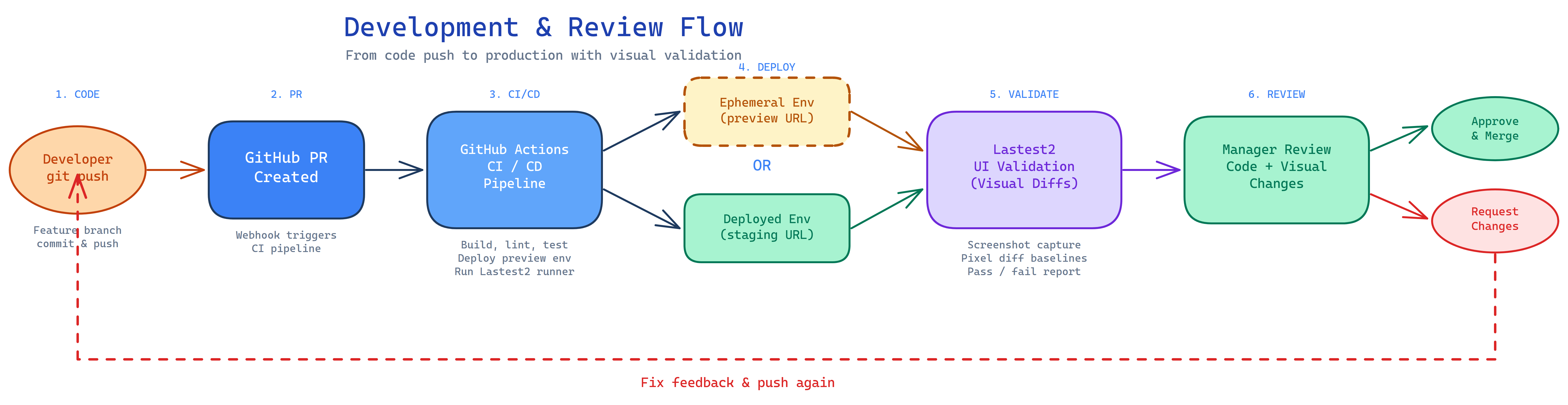
Embedded Browser Execution
All test execution happens in Embedded Browser pods. When a build starts, the Lastest server provisions EB pods on demand into the Kubernetes cluster (k3d locally, your cluster in production) — one browser per test, bounded by a per-build worker pool with warm-pool keep-alive. Each pod runs Playwright, streams its screen live over CDP, captures screenshots, and reports results back. Pod egress is restricted and pod creation is throttled (CNI burst protection). The host process never launches a browser; if no EB is available, the run fails rather than falling back.
For CI/CD, the @lastest/runner CLI creates a build over HTTP and polls for the result — it carries no browser and executes nothing locally; the EB pool does all the work server-side.
Why Lastest
Comparison
| Capability | Lastest | Percy | Applitools | Chromatic | Argos | Meticulous | Playwright |
|---|---|---|---|---|---|---|---|
| Price | Free self-hosted / hosted plans | Paid | Paid | Paid | Paid | Paid | Free |
| Screenshot volume (self-hosted) | Unlimited | Limited | OSS only | Limited | Limited | None | Unlimited |
| Self-hosted | Yes | No | Enterprise | No | OSS core | No | Yes |
| Open source | FSL-1.1-ALv2 | SDKs only | SDKs only | Storybook | MIT core | No | Apache-2.0 |
| No-code recording | Yes | No | Low-code | No | No | Session | Codegen |
| AI test generation | Yes | No | NLP | No | No | Session-based | No |
| AI auto-fix tests | Yes | No | No | No | No | Auto-maintain | No |
| Autonomous agent | Yes (Play Agent) | No | No | No | No | No | No |
| AI diff analysis | Yes | AI Review Agent | Visual AI | No | No | Deterministic | No |
| Multi-engine diffing | 3 engines | No | Visual AI | No | No | No | No |
| Text-region-aware diffing | Yes | No | No | No | No | No | No |
| Spec-driven test gen | Yes | No | No | No | No | No | No |
| Approval workflow | Yes | Yes | Yes | Yes | Yes | PR-based | No |
| Accessibility | axe-core | No | No | Enterprise | ARIA snaps | No | No |
| Route discovery | Yes | No | No | No | No | No | No |
| Multi-tenancy | Yes | Projects | Enterprise | Projects | Teams | Projects | No |
| Figma integration | Yes | No | Yes | No | No | No | No |
| Google Sheets data | Yes | No | No | No | No | No | No |
| Debug mode | Yes | No | No | No | Traces | No | Trace |
| CI trigger CLI | Yes (@lastest/runner) | Cloud | Cloud | Cloud | Cloud | Cloud | No |
| Embedded browser execution | Yes (container + live stream) | No | No | No | No | No | No |
| Headless API testing | Yes | No | No | No | No | No | No |
| Public share links | Yes (watermarked /r/) | No | No | No | No | No | No |
| AI app-code fix advisor | Yes | No | No | No | No | No | No |
| Local AI (Ollama) | Yes | No | No | No | No | No | No |
| Cross-OS consistency | 12 stabilization features | No | No | No | Stabilization engine | No | No |
| GitHub Action | Yes | Cloud-only | Cloud-only | Cloud-only | Cloud-only | Cloud-only | No |
| GitLab integration | Yes (self-hosted) | Yes | Yes | No | No | No | No |
| Test composition | Yes | No | No | No | No | No | No |
| Testing templates | 8 presets | No | No | No | No | No | No |
| Setup/teardown orchestration | Yes | No | No | No | No | No | No |
| Branch baseline management | Yes | Yes | Yes | Yes | No | No | No |
| Scheduled test runs | Yes (cron) | Cloud | Cloud | Cloud | Cloud | Cloud | No |
| MCP server (AI agent API) | Yes (29 tools) | No | No | No | No | No | No |
| Remote MCP with OAuth 2.1 | Yes (DCR + scoped tools) | No | No | No | No | No | No |
| WebMCP (browser agent tools) | Yes | No | No | No | No | No | No |
| App map / swarm crawler | Yes (multi-EB) | No | No | No | No | Crawler | No |
| Environments (PROD/UAT) | Yes (per-env baselines) | No | Enterprise | No | No | No | No |
| Per-repo secret store | Yes (encrypted) | Cloud | Cloud | Cloud | Cloud | Cloud | No |
| WCAG compliance scoring | Yes (0–100) | No | No | No | No | No | No |
| AI failure triage | Yes | No | No | No | No | No | No |
| Assertion tracking | Yes | No | No | No | No | No | No |
| Agent monitoring | Yes (real-time SSE) | No | No | No | No | No | No |
| In-app bug reports | Yes (auto-context) | No | No | No | No | No | No |
| Gamification | Yes (leaderboard + achievements) | No | No | No | No | No | No |
| Cross-instance migration | Yes (API export/import) | No | No | No | No | No | No |
| API tokens | Yes (long-lived Bearer) | Cloud | Cloud | Cloud | Cloud | Cloud | No |
What makes Lastest different
- Record + AI generate + run + diff + approve in one self-hosted tool — no competitor does all five
- Embedded browser execution: every test runs in a containerized browser with live CDP streaming — no local Playwright install and no remote-runner daemon; trigger and poll builds from CI with the lightweight, browser-free
@lastest/runnerCLI - Headless API testing: test backend endpoints (methods, headers, auth, assertions) alongside your visual tests, through the same verdict pipeline — with a burst/load runner for endpoints
- Public share links: publish any run or diff as a watermarked, login-free
/r/report with AI demo notes, session video, and X/YouTube/TikTok social cards - Fix-the-app advisor: for real regressions, AI suggests the fix to your application code (file, snippet, rationale), not just the test
- Autonomous Play Agent: one-click 11-step pipeline scans routes, generates tests, runs them, fixes failures, and reports results
- AI auto-fix: tests break as your UI evolves, Lastest fixes them automatically
- Self-hosted with unlimited screenshots — no per-screenshot pricing, no volume limits when you run it on your own infra
- Your data never leaves your server — screenshots stay local, no cloud dependency
- MCP server with 29 consolidated tools — let AI agents (Claude, etc.) run tests, review diffs, heal failures, and suggest app-code fixes autonomously; reachable remotely over OAuth 2.1 with a read/write/full tool policy, and published to in-browser agents via WebMCP
- Agents console: one roster for the QA agent, the Triage agent, the Healer, and the Explorer — with what each is doing, what it is blocked on, and which browsers it is holding
- Self-healing with guardrails: the Healer fixes only what triage called a test problem, inside a declared budget, and escalates everything else with evidence — a real bug is a valid test result, not something to heal away
- QA Agent: eight-phase autonomous suite builder (discover → plan → human review → generate → run → heal → summary) grounded in a live crawl of your app
- Root-cause triage: failures are clustered by cause with a run-level narrative and a suggested verdict per cluster, not classified one test at a time
- Environments + SUT connectors: run one suite against PROD and UAT with separate baselines, and connect straight to Veeva Vault or Salesforce
- Core + plugin architecture: a small enforced kernel with 20+ self-contained plugins, so features ship without widening the core
- Scheduled test runs — cron-based automation with smart failure handling
- WCAG 2.2 AA compliance scoring — automated 0–100 accessibility score per build with trend tracking
- 6 AI providers including OpenAI and Ollama — run AI completely locally with zero API costs
- Agent monitoring — real-time SSE activity feed tracking Play Agent progress step-by-step
- Codebase intelligence — auto-detects your stack to generate better, more relevant tests
- Spec-driven testing — feed it OpenAPI specs, user stories, or markdown files and get tests back
- 3 diff engines — pixelmatch, SSIM, and Butteraugli with OCR-based text-region-aware comparison
- 12 stabilization features — timestamp freezing, random seeding, burst capture, auto-masking, DOM/network stability, and more
- Auto-capability detection — recordings auto-detect clipboard, upload, download, and network needs
- Gamification — "Beat the Bot" leaderboard with seasonal scoring, achievements, and Bug Blitz multiplier events
- Cross-instance migration — export/import tests between Lastest deployments via REST API or in-app UI
Commands
Tech Guides
In-depth docs for every integration live on the Lastest Wiki. The README keeps things at a glance — click through for flags, payloads, and CI examples.
| Guide | What it covers | Wiki |
|---|---|---|
| CLI Test Runner (CI/CD) | pnpm test:visual --repo-id <id> for GitHub Actions / other pipelines; auto-captures GITHUB_HEAD_REF / GITHUB_REF_NAME / GITHUB_SHA | CI/CD Integration |
| GitHub Action | Reusable composite action las-team/lastest/action@main — zero local Playwright, triggers a build on your Lastest server (executed in the EB pool); outputs status + build URL + counts | CI/CD Integration · GitHub Integration |
| Smart Run | Diff-based test selection — only tests affected by changed files run, comparing the feature branch against the default branch via GitHub/GitLab API | Running Tests |
| Self-Hosted Deployment | pnpm deploy:zima (ZimaBoard / CasaOS via docker compose) and pnpm deploy:olares (Olares via kubectl); shared multi-stage Dockerfile, GET /api/health. Required env: POSTGRES_PASSWORD, BETTER_AUTH_SECRET, SYSTEM_EB_TOKEN | Docker Deployment |
| CI Trigger CLI | @lastest/runner on npm — lastest-runner trigger -r <repo> -t <token> -s <url> creates a build and polls for results (no local browser); execution runs server-side in the Embedded Browser pool | CI Trigger CLI |
| MCP Server | npx @lastest/mcp-server --url <…> --api-key <…> exposes 29 consolidated tools (run/verify/heal/approve/decide-diff/suggest-app-fix/publish-share/coverage/…) for Claude and other agents; structured JSON responses | MCP Server |
| Remote MCP / WebMCP | /api/mcp over OAuth 2.1 (dynamic client registration, PKCE, read/write/full tool policy) for agent platforms; document.modelContext tools for in-browser agents, behind a consent dialog and a team toggle | MCP Server |
| Environments & Connectors | PROD / UAT / prerelease environments with per-environment variables and baselines; Veeva Vault and Salesforce connectors bound to an environment and a credential set | Settings Reference |
| QA Agent | Eight-phase autonomous suite builder — preflight, discovery (static route scan + live EB crawl), plan, human plan review, generate, run, heal, summary | Agent Monitoring |
| Scheduled Runs | Cron-based automated builds with presets (daily 3am, weekly, hourly, every 15min) or custom expressions; auto-disable after 5 consecutive failures | Scheduled Runs |
| Google Sheets Integration | Spreadsheet-backed test data — per-team OAuth, multi-tab spreadsheets, custom header row, fixed ranges; surfaces values on the test Vars tab | Google Sheets |
| Custom Webhooks | POST build.completed payloads (status / counts / git refs / build URL) to any HTTP endpoint, with custom method + headers | Custom Webhooks |
| VSCode Extension | lastest-vscode — Test Explorer in the Activity Bar, run tests from the editor, live status bar, real-time WebSocket updates; powered by /api/v1/ REST + SSE | VSCode Extension API |
| API Tokens | Long-lived Bearer tokens for programmatic access (CI runners, MCP server, REST clients) | API Tokens |
| Bug Reports | In-app reporting with auto-captured browser/network/console context, optional GitHub-issue creation | Bug Reports |
| Agent Monitoring | Real-time SSE activity feed tracking Play Agent sessions step-by-step | Agent Monitoring |
| Gamification | "Beat the Bot" — scoring, seasons, leaderboards, Bug Blitz multiplier events | Gamification |
| Test Migration | Cross-instance export / import of tests, areas, and configs via REST API or in-app UI | Test Migration |
Settings
All configuration lives under a unified Settings page. Per-section deep dives live on the Settings Reference wiki — the table below is the quick map.
| Section | Description | Wiki |
|---|---|---|
| GitHub | Connect account, select repositories, manage PR-comment + issue-creation hooks | GitHub Integration |
| GitLab | Connect account (supports self-hosted instances), MR comments, webhooks | GitLab Integration |
| Google Sheets | Connect Google Drive, manage data sources, surface vars on the test Vars tab | Google Sheets |
| Playwright | Browser type, viewport, headless/shell mode, selector priority, recording engine, animation freezing, screenshot delay, max parallel tests, headed playback for debugging | Settings Reference |
| Stabilization | Network idle, DOM stability, timestamp freezing, random seeding, third-party blocking, font loading, loading-indicator hiding, cross-OS consistency, burst capture, auto-mask dynamic content | Stabilization |
| Environment | Server startup (manual vs auto-start), health check URLs, EB-mode toggles | Environment Vars |
| Check Modes | Per-layer verification control (visual / text / DOM / network / console / a11y / design / perf / URL — enforce, log, or disable); supersedes the old Diff Sensitivity card. Diff engine selection (pixelmatch / SSIM / Butteraugli), text-region-aware diffing, page-shift detection, per-step ignore regions | Visual Diffing |
| AI | Test-generation provider, diff-analysis provider, API keys, model, custom instructions, Ollama / OpenAI / Claude / OpenRouter support, MCP wiring for "Enhance with AI" | AI Configuration |
| Notifications | Slack, Discord, custom webhook config, auto-create GitHub issue from a visual diff | Custom Webhooks |
| Branches | Baseline and scanning branch selection, branch baseline fork/merge/promote | Visual Diffing |
| AI Logs | Audit trail of all AI requests (last 50 entries) with cost + latency | AI Configuration |
| Testing Templates | One-click preset configurations for SaaS, Marketing, Canvas, E-commerce, Documentation, Mobile-First, SPA, CMS | Testing Templates |
| Setup | Default repository-wide multi-step setup scripts (Playwright and API types), with per-test overrides | Settings Reference |
| Teardown | Default repository-wide multi-step teardown scripts with per-test overrides | Settings Reference |
| Schedules | Cron-based automated test runs with presets and custom expressions | Scheduled Runs |
| Environments | PROD / UAT / prerelease environments — base URL, release label, per-environment variables and baselines, and the SUT connectors (Veeva Vault, Salesforce) bound to each | Settings Reference |
| Credentials | Per-repo named credential sets, encrypted at rest and injected into the test process at run time (never substituted into test source) | Settings Reference |
| Vars | Test-data variables — static, AI-generated (with presets), and Google Sheets-backed | Google Sheets |
| API Tokens | Long-lived Bearer tokens for programmatic + MCP access | API Tokens |
| Account | Email preferences, unsubscribe, GDPR / self-serve account deletion | — |
| Users | Team member management, invitations (admin only) | Getting Started |
| Runners & API Access | Register BYO Embedded Browser containers, create CI trigger tokens for @lastest/runner, and manage API keys (admin only) | CI Trigger CLI |
Tech Stack
- Architecture:
core/kernel + 20+plugins/behind capability contracts, plus purelibs/packages (enforced bypnpm arch) - Framework: Next.js 16 (App Router)
- UI: React 19, Radix UI, Tailwind CSS 4
- Browser Automation: Playwright
- Visual Diffing: pixelmatch, SSIM, Butteraugli
- Accessibility: axe-core
- Database: PostgreSQL + Drizzle ORM
- Auth: better-auth (email/password with Argon2, GitHub, GitLab, Google OAuth)
- AI: Claude (Agent SDK, CLI, OpenRouter, direct Anthropic API), OpenAI, Ollama
- MCP:
@lastest/mcp-serverfor AI agent integration - OCR: Tesseract in a dedicated
ocr-servicecontainer (OCR_SERVICE_URL), with a Tesseract.js fallback - Test Data: Google Sheets integration
- Email: Resend
- Billing: Stripe via
@better-auth/stripe(hosted plans; optional) - Testing: Vitest (unit), Playwright (visual)
- State: TanStack React Query
Environment Variables
Roadmap
- GitHub Actions integration (CLI runner)
- Slack/Discord notifications
- Team collaboration features
- GitLab integration (OAuth, MR comments, webhooks)
- Docker deployment
- Smart run (git-diff based test selection)
- Custom webhook notifications
- Google OAuth
- Google Sheets test data integration
- AI diff analysis with confidence scoring
- Spec-driven test generation
- Accessibility audits (axe-core)
- VSCode Extension API
- Remote runners with WebSocket
- Test versioning and history
- Planned screenshots (design comparison)
- Ignore regions for dynamic content
- Setup script orchestration
- Ollama support (local AI models)
- Cross-OS screenshot consistency
- Flaky test prevention (timestamp/random freezing, burst capture)
- Auto-mask dynamic content
- Page shift detection
- Multi-step screenshots
- Debug mode
- Branch comparison view
- App state inspection
- Network & console error tracking
- GitHub Action (reusable composite action)
- Test composition (cherry-pick tests + version overrides)
- Testing templates (8 preset configurations)
- Teardown orchestration (default + per-test overrides)
- Branch baseline management (fork/merge/promote)
- Functional area hierarchy (parent/child organization)
- Multi-engine diffing (SSIM, Butteraugli alongside pixelmatch)
- Text-region-aware diffing (OCR-based)
- Diff engine benchmark framework
- Auto-detect capabilities from recording
- Early adopter mode (experimental feature gating)
- Runner v2 (concurrent execution, code integrity, remote recording)
- better-auth migration (replaced Clerk)
- Remote runner NPM package (
@lastest/runneron npm) - Embedded browser container (live streaming, no local Playwright needed)
- Runner management UI (register, monitor, configure from dashboard)
- Play Agent (autonomous 11-step test generation pipeline with sub-agents)
- Guided onboarding (8-step setup guide with auto-detection)
- MCP server v2 (
@lastest/mcp-serverfor AI agent integration) - AI failure triage (auto-classify failures: regression, flaky, environment, maintenance)
- Scheduled test runs (cron-based automation with preset schedules)
- WCAG 2.2 AA compliance scoring (severity-weighted 0–100 score with trends)
- Success criteria tab (parsed assertion tracking with pass/fail per
expect()) - Selector stats & recommendations (auto-suggest enable/disable/reorder)
- Storage state management (browser state persistence for auth flows)
- OpenAI provider (6th AI provider)
- Agent monitoring & activity feed (real-time SSE tracking of Play Agent sessions)
- Codebase intelligence (auto-detect project context for AI prompts)
- Bug reports (in-app reporting with auto-captured context + GitHub issue creation)
- Review todos (branch-specific reviewer feedback tracking)
- GitHub issues integration (cached issues for analytics and bug report linking)
- DB-backed runner commands (persistent command queue replacing in-memory approach)
- Embedded session lifecycle management (claim/release with status tracking)
- On-demand Kubernetes EB pool (1 test per browser, worker-pool per build, warm-pool keep-alive)
- EB busy-state tracking + graceful reaping during deploy
- Per-step ignore regions (per-screenshot dynamic-content masking instead of per-test)
- Test spec & agent plan consolidation (
test_specs+agent_planreplace freeform descriptions) - Step-level success criteria parsing (per-step assertions tracked individually)
- AI test data variables (AI-generated values + presets, Google Sheets vars surfaced on Vars tab)
- Auto-create GitHub issues from visual diffs (notification setting + per-diff one-click)
- DOM-based diff fallback (catches structural changes when pixel diff is inconclusive)
- Favorite repos (pin frequently-used repos in the selector)
- Mobile-responsive shell (mobile top bar, sidebar, recording flows)
- Headed playback for debugging (replay tests with visible browser)
- Recording verification step (sanity-check captured selectors before save)
- Selector resolution speedup (faster fallback chain evaluation at runtime)
- Auto-reload page on transient sub-resource failures during
goto - CNI burst protection (throttle pod creation to avoid k8s networking storms)
- Runner TypeScript stripping (annotations stripped at execution time)
- Refreshed auth pages (brand logo + card layout, GDPR opt-in, auto-signup on unknown email)
- Email unsubscribe flow + self-serve account deletion
- Umami analytics integration (privacy-friendly product analytics)
- Watermarked share links + share-link refactor (publicly viewable runs/diffs)
- Gamification / "Beat the Bot" (scoring, seasons, leaderboards, Bug Blitz)
- "Enhance with AI" MCP wiring (live test names while AI builds)
- Check modes (9 verification layers with enforce/log/disable control)
- Verify board (per-step multi-layer review with change map)
- Design-system verification layer (design-token drift detection)
- URL diff (navigation trajectory capture + comparison)
- Analyze URL (selector-priority tuning before recording)
- Stripe billing for hosted plans (monthly/yearly subscriptions, customer portal)
- Embedded-Browser-only execution (retired the remote-runner daemon + host-Playwright fallback;
@lastest/runneris now CI-trigger-only) - MCP consolidation (52 → 24 resource-oriented tools;
verify/decide_diff/validate_diff/suggest_app_fix/publish_share/scout_urladded) - Headless API tests (
method/url/headers/body/auth+ assertions in the same verdict pipeline; generate from captured network calls; burst/load runner) - Fix-the-App Advisor (AI application-code fix suggestions for real regressions — never auto-applied)
- Public share links (watermarked
/r/reports with AI demo notes, session video + MP4, X/YouTube/TikTok social cards, stable-URL re-publish) - Debug "record from here" (resume recording from a chosen step)
- Secrets encrypted at rest (OAuth tokens + AI provider keys) and provider keys kept out of the browser
- EB pod egress restriction (block metadata/link-local) + customer/AI code evaluated only inside EB pods, never the host
- Server-side run-minute + project quota enforcement (hosted tiers)
- Core + plugin architecture refactor (enforced kernel boundary, 20+ plugins,
libs/promotions) - App Map + Explore (multi-EB swarm crawler, screens gallery, flow playback)
- Interactive test playback + storage-state evidence layer
- QA Agent (eight-phase autonomous suite builder with human plan review)
- Agents console (
/agentsroster, escalations, held-browser capacity read-out, Pro-gated) - Triage agent + Run Results screen (root-cause clustering replacing the two per-diff/per-test AI passes)
- Healer agent (triage-gated heal → verify loop with per-test / per-build budgets;
/healer-agent) - Full-evidence GitHub issues, AI-engineer assignment, confirm-on-green auto-close
- Per-repo credential store with run-time injection (encrypted, outside the substitution path)
- Environments as a first-class object (per-environment variables, baselines, promotion, sandbox refresh)
- Veeva Vault + Salesforce SUT connectors
- Regulated profile + pharma segment fork in onboarding
- Verify as the single execution surface (
/runand/buildsretired into it) - OAuth 2.1 on the remote MCP endpoint + read/write/full tool-access policy
- WebMCP — tools published to in-browser AI agents via
document.modelContext(consent dialog, team toggle) - OCR service containerization (
OCR_SERVICE_URL) - EB priority classes per tenant class
- Hosted (managed) deployment option — in progress
Contributing
External pull requests are not being accepted at this time. For bugs, feature requests, or questions, please open an issue or visit lastest.cloud.
License
FSL-1.1-ALv2 — see LICENSE
Built for solo founders who ship fast and break things (then fix them before users notice).