Smart hands for your AI agents - write-capable KVM+BMC+SSH MCP server: gated, verified, audited.
Quick Install
Automated & IDE SetupCopy the AI prompt to install this server into Claude Code, Cursor, or another agent — or use 1-click editor setup below.
One-click editor setup isn’t available for this listing yet — we don’t have a confirmed install command, and we’d rather show nothing than point your editor at the wrong package or host. Follow the project’s own setup instructions, linked above.
Manual Client & Custom JSON ConfigExpand JSON ▾
No confirmed setup config for this listing yet. We only publish a config block when the install details come from the project itself — its README, its docs, or a verified owner. We haven’t found those for kvm-pilot, and we’d rather show nothing than a guess you’d paste into your client. Follow the project’s own setup instructions for the current steps.
Documentation Overview






kvm-pilot
Smart hands for your AI agents. A write-capable, multi-plane (KVM + BMC + SSH) MCP server for controlling physical machines — gated, verified, audited.
kvm-pilot lets an agent drive a headless box through POST, firmware, the
bootloader, and an OS install with no agent on the target: it works at the
pixel level through an IP-KVM (PiKVM, the GL.iNet GLKVM fork GL-RM1 /
GL-RM1PE, BliKVM), at the structured-state level through a BMC (Redfish on
iDRAC/iLO/OpenBMC, IPMI on BMCs that predate Redfish), at the firmware level
through Intel AMT/vPro (a BIOS/POST/GRUB screenshot + power + SOL on a
business laptop an HDMI-capture KVM can't see boot on), and over SSH once an OS
is up. A pluggable vision subsystem reads a KVM screenshot and tells you what
boot phase the machine is in — bios_menu, grub_menu, installer_progress,
login_prompt, crash_screen, and so on — and a safety layer gates every
destructive operation behind operator opt-ins and per-call approvals.
Vision runs on Claude or any local OpenAI-compatible VLM (LM Studio, Ollama, vLLM, llama.cpp). Point it at a model on your own GPU and the screenshots never leave your network and cost nothing per frame.
How it works
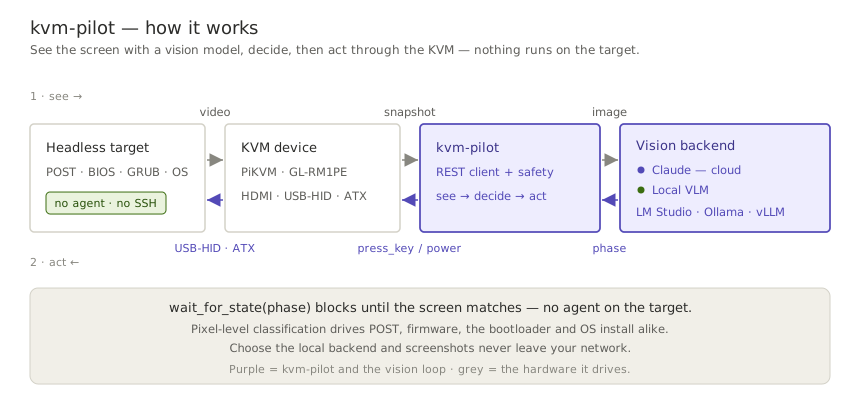
kvm-pilot runs a see → decide → act loop, and the screen is its only sensor:
it pulls a screenshot from the KVM, a vision model classifies the boot phase, and
kvm-pilot acts back through the KVM's keyboard and power. Because it works at the
pixel level, there is no agent on the target — the same loop drives POST,
firmware, the bootloader, and an OS install.
A real, unedited run against a GLKVM on the home fleet — an honest preflight, a headless snapshot (watch it wake the on-demand encoder), a gated dry-run power-cycle, and the boot console the agent actually saw:

Quickstart
One install gives you the whole product — the kvm-pilot CLI, the
kvm-pilot-mcp MCP server, and the bundled Claude skill — nothing to
clone. The current release line is a pre-release: install it with --pre,
which is explicit and keeps selecting the beta line once a stable release ships
(0.1.0a1 is yanked and much older than this README — don't pin it).
Driving a KVM from an AI agent (MCP)
KVM_PILOT_MCP_READ_ONLY=1 is the recommended first rung of the trust ladder
— the agent can see everything and touch nothing until your hardware is
verified. The Getting started guide
covers credentials, Claude Desktop JSON config, sample prompts, and climbing
the ladder. The server is published to the official
MCP registry
as io.github.DustinTrap/kvm-pilot, so registry-aware hosts can discover
and install it by name. Agents: the repo root carries an
llms.txt doc map.
Scripting from Python
For the latest unreleased tree:
CLI
The CLI prompts for confirmation before any destructive action (power, virtual
media — including uploads — keyboard/mouse injection, GPIO). Use --yes to
skip prompts in automation, or --dry-run to log intended actions without
sending them — dry-run short-circuits before the prompt, so it never blocks
waiting for input. --timeout (HTTP per-request timeout) is a global flag and
goes before the subcommand; watch keeps its own --timeout for the vision
wait deadline.
Profiles like homelab live in ~/.config/kvm-pilot/config.toml. See
docs/cli.md for the full command table (every subcommand, the
capability it needs, and its gating), and
docs/configuration.md for the config-file format,
every KVM_PILOT_* environment variable, and the precedence between flags,
env, and profiles.
GLKVM setup note: on GL.iNet firmware the PiKVM REST API is disabled by default (every
/api/*call 404s, surfaced as a clearApiDisabledError), and a firmware upgrade can re-disable it. Enable it in/etc/kvmd/nginx-kvmd.confand pin the driver with--driver glkvm/driver = "glkvm"— full steps in the troubleshooting guide.
The tool surface, by plane
The same capability protocols span three actuation planes, so one agent workflow can mix pixels, structured BMC state, and shell access — with every destructive effect gated per class:
| Plane | Read | Act (operator-gated) |
|---|---|---|
| KVM — pixels & HID (PiKVM · GLKVM · BliKVM) | snapshot · classify_screen · wait_for_state · power_state · logs · list_virtual_media | power · type_text / press_key / send_shortcut / mouse · calibrate_mouse · mount_iso / eject |
| BMC — structured state (Redfish · IPMI) | info · boot_options · logs (SEL) · sensors (CLI) | power · set_boot_device · SOL console (CLI console) |
| Firmware — Intel AMT/vPro (spans both planes) | info · snapshot (firmware BIOS/POST/GRUB) · boot_options · power_state | power · set_boot_device · type/mouse · SOL (console) · amt_enable (open SOL/KVM listeners) |
| SSH — in-band & appliance | ssh_reachable · appliance_status · access_paths | ssh_exec · host_exec (ssh/winrm auto-picked) · wake (WoL) · appliance_reboot |
| Meta — evidence & intake | capabilities · support_matrix · healthcheck | file_firmware_report |
A machine with no KVM and no BMC at all is itself a first-class target:
driver = "ssh" plus ssh_host (the machine's own address, #248) stands
kvm-pilot on the recovery ladder's in-band rung — every device capability
honestly absent, and the healthcheck saying plainly that there is no
out-of-band recovery path there.
The canonical per-tool reference — annotations, effect gates, approval lifecycle — is the MCP server README; the CLI covers the full surface in docs/cli.md.
Status & maturity
Related MCP Servers
Adoption & maintenance
Factual signals from GitHub, npm, and our automated checks — not a rating.
GitHub stars
6
Stargazers on the source repository.
Last commit
1mo ago
Most recent push to the default branch.
Reviews
No reviews yet — be the first to share how this listing worked for you.
Frequently Asked Questions about Kvm Pilot
AllMCPs Directory Badge
Showcase your server listing on GitHub or your project documentation. Embed this dynamic SVG badge to highlight official listing status and live engagement.
Badge Style:
Live Dynamic SVG Preview
Markdown (GitHub README)
[](https://allmcps.com/mcp/kvm-pilot)HTML Embed
<a href="https://allmcps.com/mcp/kvm-pilot"><img src="https://allmcps.com/api/badge/kvm-pilot?style=directory" alt="Kvm Pilot on AllMCPs" /></a>Technical Specs & Signals
CategoryDeveloper Tools
33Quality signal: Emerging · 33/100How this signal is calculated ▾
Server availabilityNot measured
Not scored for repo-hosted servers — we can't reach the running server, only its GitHub page. Hosted MCP endpoints are health-checked live.
Verified ownership10/20
Documentation & tools11/30
Adoption & activity4/15
Community engagement0/10
A guidance signal from public completeness & health data — not a user rating. New listings start lower and rise as they add docs, get verified, and grow adoption. Signals we can't observe for a listing are skipped, not counted against it.
Own this project?
This directory is pre-filled from public sources. Claim via GitHub README, site badge, or DNS TXT to unlock edit access and the Official badge — proof is checked automatically, then reviewed by our team.
Free dofollow backlink: add your website and place the AllMCPs badge on it — no claim needed. We detect it automatically and keep it verified as long as the badge stays live.
Claim & get free dofollowShare & Embed
Add our SVG badge (dark/light directory styles) or embeddable widget to your site.