
Cli
by @kurlo
Kurlo's command line: run API collections in CI and serve them to AI agents over MCP.
Install Cli
Pick your client, then add it in one click or paste the config.
~/Library/Application Support/Claude/claude_desktop_config.json{
"mcpServers": {
"kurlo-cli": {
"command": "npx",
"args": [
"-y",
"@kurlo/cli"
]
}
}
}
Settings → Developer → Edit Config, merge this into mcpServers, then fully quit and reopen Claude Desktop.
Install not yet sandbox-tested— we haven't run this command through our automated sandbox yet. Not a red flag; we're working through the catalog.
Overview
Security & health
What it can reach and how reliably it runs — from our own checks, not the maintainer’s claims.
We have not completed a health check for this listing yet.
From the project README
Kurlo
The open-source Postman alternative your AI agent can drive.
No account, no paid plan, no telemetry. Collections live as YAML in your Git repo.



Download · Website · Docs · MCP server · Compare
Why Kurlo
- Free for a team of any size. There is no paid plan to grow into and no account to create. A team shares a workspace through any Git host, and every request is a readable YAML file that gets reviewed in the same pull request as the API change.
- Your Postman collections keep working. Import a Postman, Insomnia, Bruno, OpenAPI or HAR file.
pm.test,pm.expectwith chai,pm.sendRequestandrequire('lodash')run as they were written. - Your AI agent can use it.
kurlo mcplets Claude Code, Cursor, Codex and any other MCP client run your saved requests with their auth and tests, write new requests and tests, and explain why the last call failed. Secrets are sent to the API but never shown to the model. - See what the browser will do. Send a request with a browser's CORS and CSP rules and get the error before your users do. Postman, Insomnia and Bruno do not do this.
- Small and native. Built with Go and the system WebView instead of Electron, so the macOS download is 23.2 MB and the Linux one is 12.3 MB.
| Kurlo | Postman | Insomnia | Bruno | |
|---|---|---|---|---|
| Free plan | ✅ Every feature, any team size | 1 user | Up to 3 Git Sync users | Private Git hosts need Pro |
| Account needed | ✅ No | For collections | Beyond Scratch Pad | No |
| Collections in your Git repo | ✅ | Native Git in the desktop app | ✅ | ✅ |
Postman pm.* scripts | ✅ Run as written | Native | Compatibility layer | Converted to bru.* |
| Mock server | ✅ Local, no cap | Cloud, needs an account | 1,000 requests/mo free | ✅ Local |
| MCP | ✅ Client and server | Client | Client | Community servers |
| Browser CORS and CSP checks | ✅ | — | — | — |
Checked against vendor pricing pages on 15 October 2026. Details and sources: vs Postman, vs Insomnia, vs Bruno.
If Kurlo saves you time, a ⭐ helps other people find it.
Download
Grab the latest build from the releases page.
| Platform | Installer |
|---|---|
| macOS (Apple Silicon + Intel) | .dmg |
| Windows 10/11 (x64, arm64) | .exe (NSIS installer), .msix |
| Linux (x64) | .AppImage |
Every release ships SHA256 checksums and minisign signatures, and the in-app updater refuses any binary that fails either check.
The command line (kurlo run for CI, kurlo mcp for AI agents) is also on npm as @kurlo/cli, with prebuilt binaries for macOS, Linux and Windows on x64 and arm64. It does not need the desktop app:
npx -y @kurlo/cli --version
Guides, the scripting reference, and the YAML workspace format live in the documentation site.
Features
Requests
- All HTTP methods: GET, POST, PUT, PATCH, DELETE, HEAD, OPTIONS
- Query params, headers, body (JSON, form-data, x-www-form-urlencoded, raw text/XML/HTML, binary file)
- cURL import — paste a curl command into the URL field, it parses automatically
- Bulk edit for params, headers and form fields — switch the table to a
key: valuetext area and back - GraphQL, Server-Sent Events, WebSocket, Socket.IO, gRPC, and MCP request types — an MCP call discovers the server's tools, resources and prompts, seeds the arguments from the tool's schema, and shows the raw JSON-RPC exchange
- Postman, Insomnia, Bruno/OpenCollection, OpenAPI/Swagger, HAR, cURL, and all-data backup import paths
- OpenAPI/Swagger imports from a link as well as a file — paste the spec URL and Kurlo fetches it and builds the collection
- Postman, OpenAPI, OpenCollection, and all-data backup export paths
Authentication
- Bearer Token
- Basic Auth
- Digest Auth — MD5, SHA-256 and SHA-512-256 plus their
-sessvariants, withqop=authandauth-int - API Key — in header or query string
- OAuth 2.0 — Client Credentials, Authorization Code (with PKCE), Password, and Device Code grants; loopback browser sign-in, refresh tokens, and automatic token refresh before each send
- AWS Signature v4
- Client certificates (mutual TLS), per request or inherited from a collection
- Per-request and collection defaults with inheritance
Scripting — pre-request and test scripts in sandboxed JavaScript, with legacy Tengo support:
// pre-request: inject a header
pm.request.headers.set("X-Client", "kurlo")

// pre-request: rewrite and sign the body
pm.request.body.update(JSON.stringify({ ...pm.request.body.json(), nonce: pm.crypto.randomHex(8) }))

// test: assert status and shape
pm.test("status is 200", () => pm.response.to.have.status(200))
pm.test("has an id", () => pm.response.to.have.jsonSchema({ type: "object", required: ["id"] }))
require resolves bundled stand-ins for lodash, ajv, tv4, uuid, crypto-js, and chai, so imported Postman scripts keep working. pm.sendRequest makes an HTTP call from a script, and pm.execution.skipRequest() skips the send.
Environments & Variables
- Multiple environments per workspace, switch with one click
- Matrix view — every variable as a row, every environment as a column, edited in place
{{variable}}template syntax in URLs, headers, params, body, auth fields- Set variables from test scripts (
pm.variables.set,pm.environment.set) - Manual-save and autosave modes both cover request and environment edits
Workspaces & Collections
- Multiple workspaces for separate projects or clients
- Collections with nested folder hierarchy and empty-folder preservation
- Drag-and-drop organisation
- Request history — every send on its own page, request and stored response side by side, reopenable in the editor (14-day retention, 1000 entries)
- Collection runner — sequential or parallel, data files, iterations, an HTML report, and the last run of every collection kept
- Load testing with k6 — collection flows with extraction and checks, virtual users or iteration rates, thresholds, CSV/JSON data, script export, local runs and last-run reports
- Git-backed YAML workspaces with diagnostics, conflict helpers, and local-only secrets
- CLI runner —
npx -y @kurlo/cli run ./workspace --env CIexecutes requests and their test scripts for CI, with data-driven iterations (--data), pretty/JSON/JUnit reporters, variable export, and a non-zero exit code on failure.kurlo load list|export|runlists collection load tests, exports k6 scripts or runs local k6 with threshold results and reports
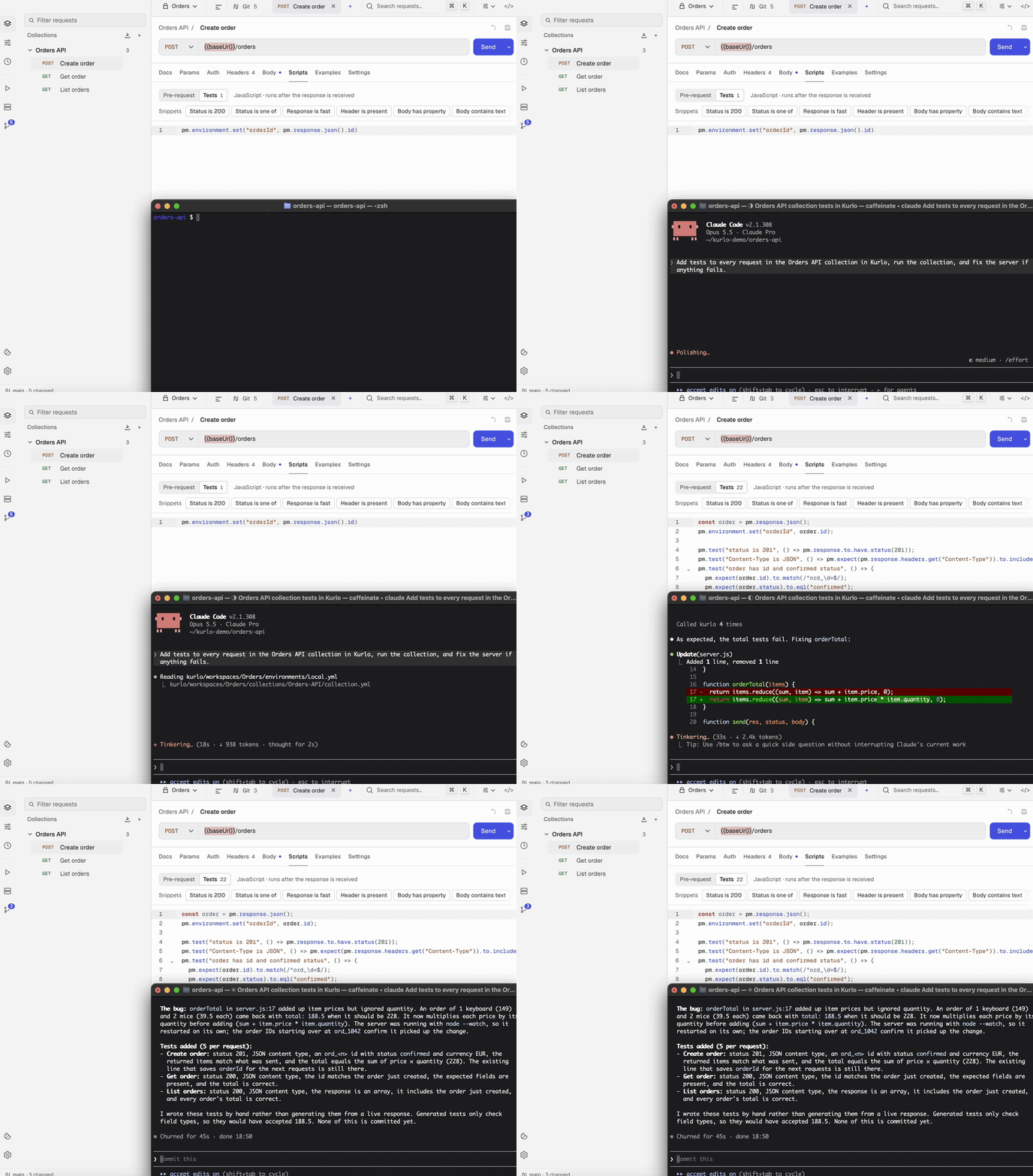
AI agents (MCP server) — the Kurlo binary is also a Model Context Protocol server, so Claude Code, Codex, Cursor, Claude Desktop or any other MCP client can list your collections and environments, run saved requests and whole collections with their auth, scripts and tests, and send one-off calls with your {{variables}}. It can also keep the workspace up to date: add and change requests with their pm.* tests, save responses as examples and set environment variables, in the same YAML the app writes, never storing a secret. It reads the last request you sent from the app, so "why did that fail?" needs no copying. Secret values are sent to the API but masked as [secret] in everything the model sees, and environments you mark protected are off limits. One command sets up every client on the machine:
npx -y @kurlo/cli mcp install --env Staging
Add --project to write a repository's shared .mcp.json and .cursor/mcp.json instead, so the whole team gets the server by cloning. Manual setup, the tools and the flags are covered in the MCP server guide.
Response examples — save any response as a named example on its request: the status, headers and body it came back with, alongside the request that produced it. Secrets are redacted on capture, a clean body is stored byte for byte, and examples ride along through Postman, OpenCollection, HAR and OpenAPI imports and exports. A response can be diffed against an example instead of against the previous send.
Cookies — a per-workspace cookie jar with a per-domain editor, disableable per request.
- Cookie sync: pair Kurlo with the in-repo browser extension (
apps/desktop/extension, Chromium + Firefox) and the session you already have in the browser is the session Kurlo sends with. A loopback-only bridge that stays off until you turn it on, an approval you give in Kurlo by matching a six-digit code, and a per-domain allowlist enforced on both sides. Cookies travel one way: browser into Kurlo.
Reviews
No reviews yet — be the first to share how it worked for you.
Frequently Asked Questions about Cli
Related MCP servers
Add a badge to your READMEShow it’s listed — live SVG, Markdown or HTML.
AllMCPs Directory Badge
Showcase your server listing on GitHub or your project documentation. Embed this dynamic SVG badge to highlight official listing status and live engagement.
[](https://allmcps.com/mcp/kurlo-cli)<a href="https://allmcps.com/mcp/kurlo-cli"><img src="https://allmcps.com/api/badge/kurlo-cli?style=directory" alt="Cli on AllMCPs" /></a>