Srunx README
The full upstream README, mirrored here for reference. Install config, tool schemas, adoption signals, and an original overview live on the Srunx listing page.

srunx
A unified CLI, web dashboard, and Python API for SLURM job management.
Stop juggling sbatch scripts, squeue loops, and SSH sessions.







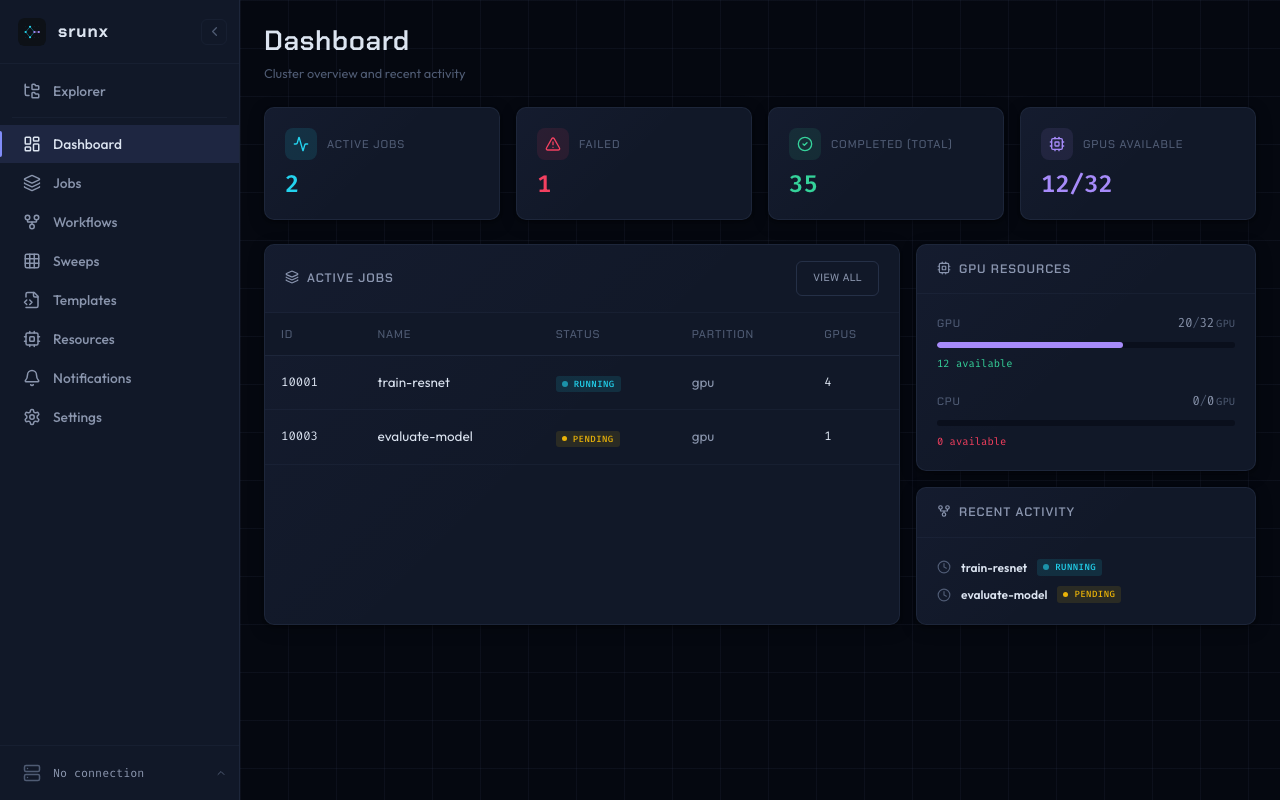
- Submit & manage SLURM jobs from CLI, browser, or Python
- Orchestrate multi-step workflows with YAML and dependency graphs
- Monitor GPU availability and job states with Slack notifications
- Local or remote, one CLI — target a local SLURM or any SSH'd cluster with
--profile <name>; no shell-in, no separate "remote" commands — the same verbs you already know - Container-native — Pyxis, Apptainer, and Singularity support built in
Installation
Requires Python 3.12+ and access to a SLURM cluster (local or via SSH).
The web dashboard and Slack notifications are included in the base install — no extras required.
For AI agent integration (MCP server), add the mcp extra:
Quick Start
Submit a job, wait for it, and view the logs — end to end:
Or describe the whole pipeline once and let srunx drive it:
Same commands, remote cluster
Every command above accepts --profile <name> and dispatches transparently over SSH — same syntax, same output, same feel as local:
srunx rsyncs your code under a per-mount lock, runs sbatch in place on the remote, and streams logs back. Your shell never leaves the laptop.
Why srunx?
Instead of stitching together sbatch, squeue, SSH, and a pipeline runner, srunx offers one coherent surface that covers the day-to-day SLURM loop.
| Capability | srunx | submitit | simple-slurm | Snakemake |
|---|---|---|---|---|
| CLI for submit / status / cancel | ✅ | ❌ | ❌ | ⚠️ partial |
| Python API | ✅ | ✅ | ✅ | ✅ |
| Web dashboard | ✅ | ❌ | ❌ | ❌ |
| Workflow DAG with dependencies | ✅ | ❌ | ❌ | ✅ |
| Inter-job value passing (load-time) | ✅ | ❌ | ❌ | ⚠️ via files |
| Matrix parameter sweeps | ✅ | ⚠️ manual | ❌ | ⚠️ via wildcards |
| GPU availability monitoring | ✅ | ❌ | ❌ | ❌ |
| SSH remote submit + file sync | ✅ | ❌ | ❌ | ❌ |
| Container support (Pyxis / Apptainer / Singularity) | ✅ | ⚠️ limited | ❌ | ⚠️ via rules |
| Slack notifications | ✅ | ❌ | ❌ | ⚠️ plugin |
If you need full-featured scientific workflow tooling, Snakemake / Nextflow are still the right call. srunx targets the sweet spot of "SLURM + a few dependencies + a nice UI" without Airflow-scale infrastructure.
CLI
Every command below runs locally or against a remote cluster over SSH. Add --profile <name> (or set $SRUNX_SSH_PROFILE) and sbatch / squeue / sinfo / sacct / history / gpus / tail / watch / flow run transparently dispatch through the SSH adapter — no shell-in first, no separate "remote" subcommand. srunx ssh is just for managing those profiles (add / list / sync / test); it does not run jobs itself.
Type column: SLURM = mirrors the native SLURM CLI (muscle memory maps directly); srunx = srunx-original command with no direct SLURM counterpart.
Job submission & control (SLURM parity)
| Command | Type | Description |
|---|---|---|
srunx sbatch <script> / srunx sbatch --wrap "<cmd>" | SLURM | Submit a SLURM job |
srunx scancel <id> | SLURM | Cancel a job |
Status & accounting
| Command | Type | Description |
|---|---|---|
srunx squeue | SLURM | List active jobs (use -j <id> for a single job's state) |
srunx sinfo | SLURM | Partition / state / nodelist listing (native-sinfo parity) |
srunx sacct | SLURM | Real SLURM sacct wrapper (cluster accounting DB) |
srunx history | srunx | srunx's own submission history (SQLite-backed) |
srunx gpus | srunx | GPU aggregate summary across partitions |
srunx tail <id> | srunx | View / stream job logs |
srunx watch jobs|resources|cluster | srunx | Watch for state changes / resource availability |
Workflows & sweeps
| Command | Type | Description |
|---|---|---|
srunx flow | srunx | Run / validate YAML workflows |
srunx flow run --arg KEY=VALUE | srunx | Override workflow args from the CLI |
srunx flow run --sweep KEY=V1,V2 --max-parallel N | srunx | Ad-hoc matrix parameter sweep |
Environment & tooling
| Command | Type | Description |
|---|---|---|
srunx ssh | srunx | Manage SSH profiles (add / list / sync / test) — remote execution itself is --profile on the commands above |
srunx config | srunx | Manage configuration |
srunx template | srunx | Manage job templates |
srunx ui | srunx | Launch the web dashboard |
More CLI examples: User Guide · Python-side counterparts: API Reference
Web Dashboard
A dashboard for visual cluster management. Connect to your SLURM cluster over SSH and manage jobs, workflows, and resources from a browser.
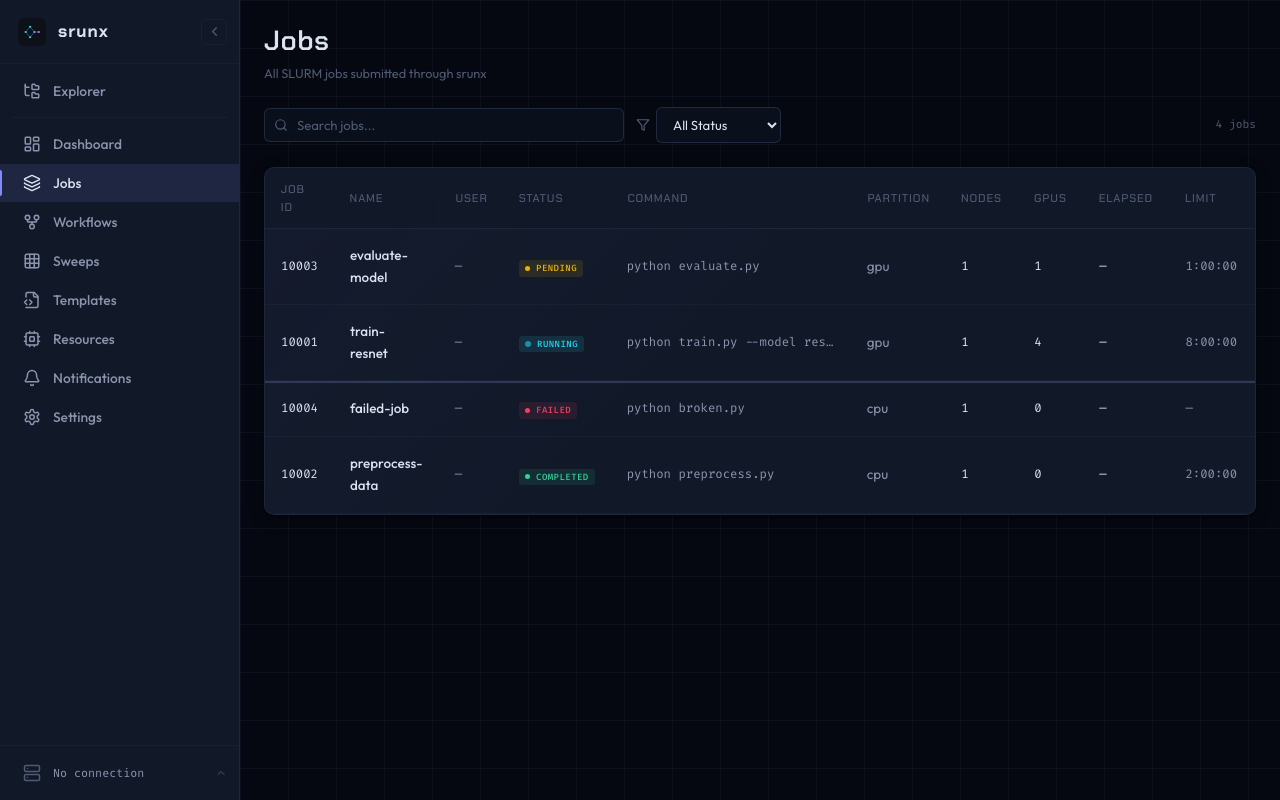
Jobs
Browse, search, filter, and cancel jobs.
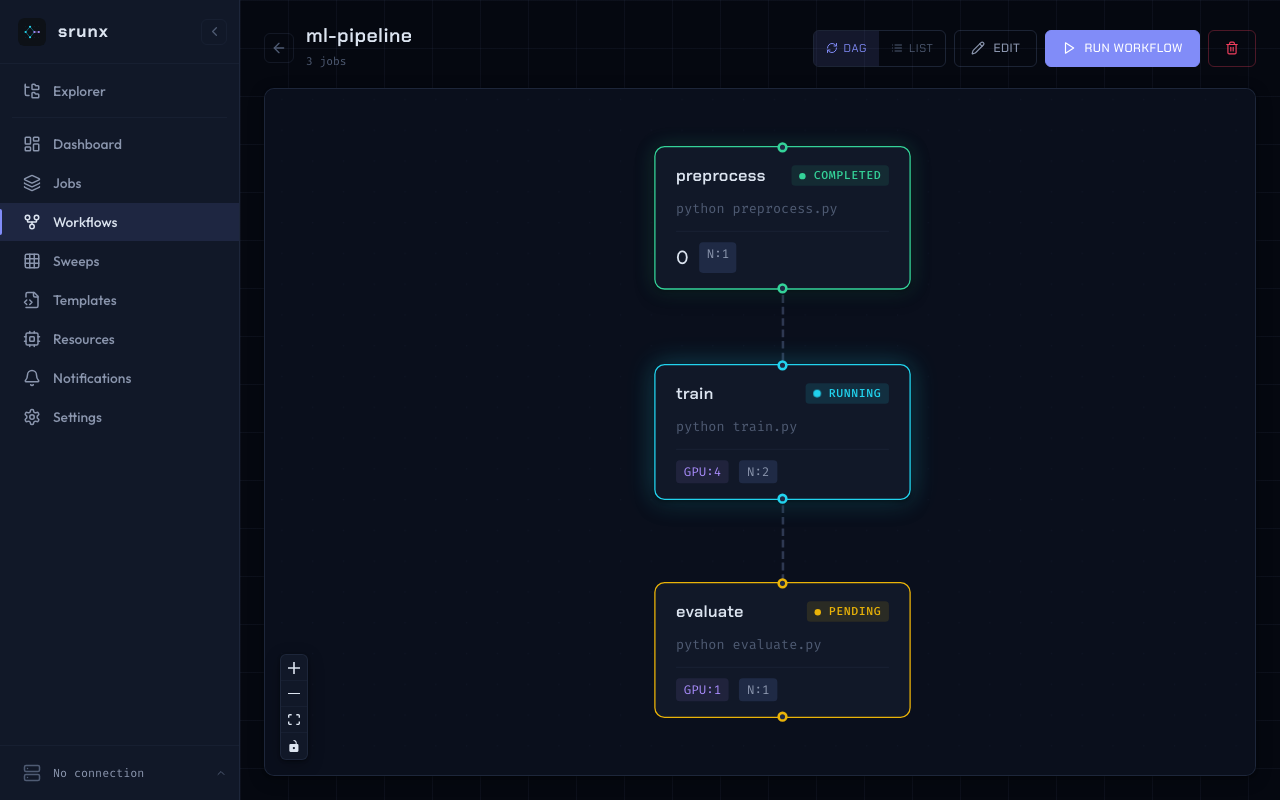
Workflow DAG
Visualize job dependencies. Run workflows directly from the UI.
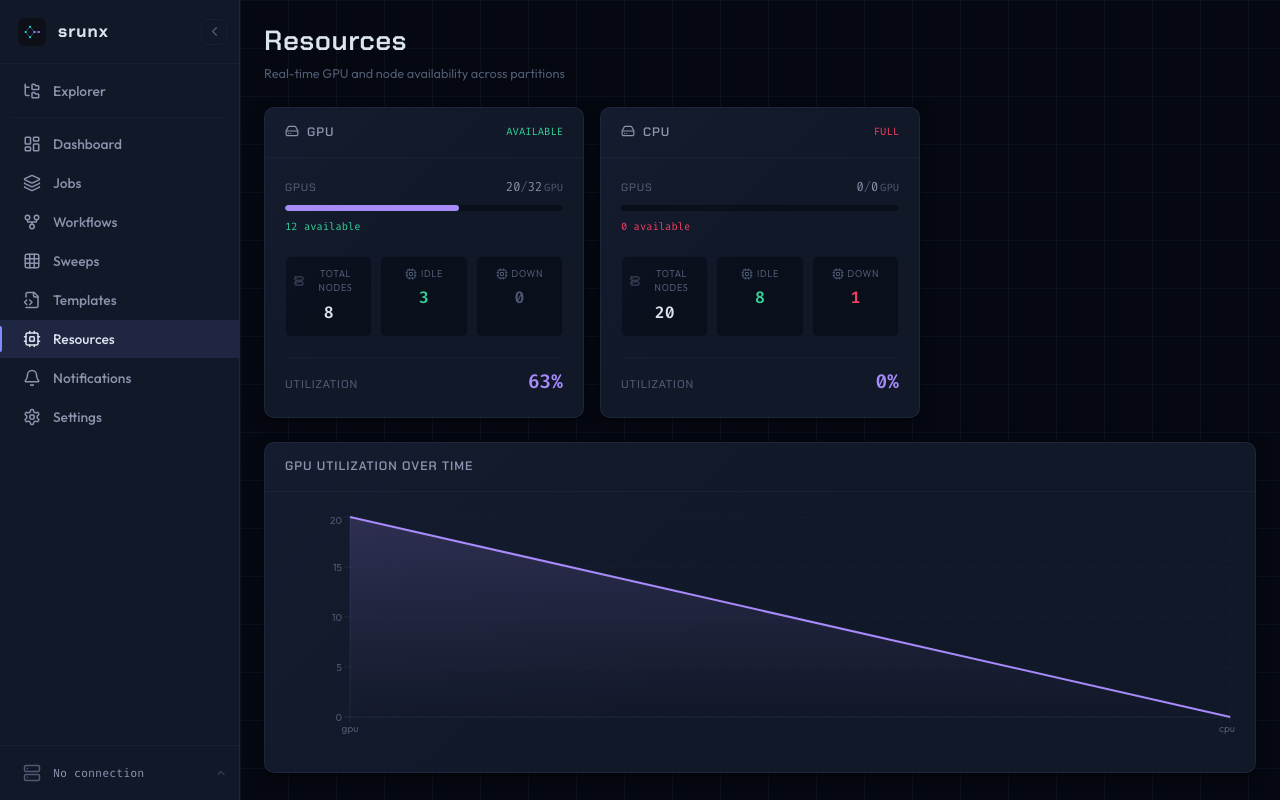
Resources
GPU and node availability per partition.
Explorer
Browse remote files via SSH mounts. Shell scripts can be submitted as sbatch jobs directly from the file tree.
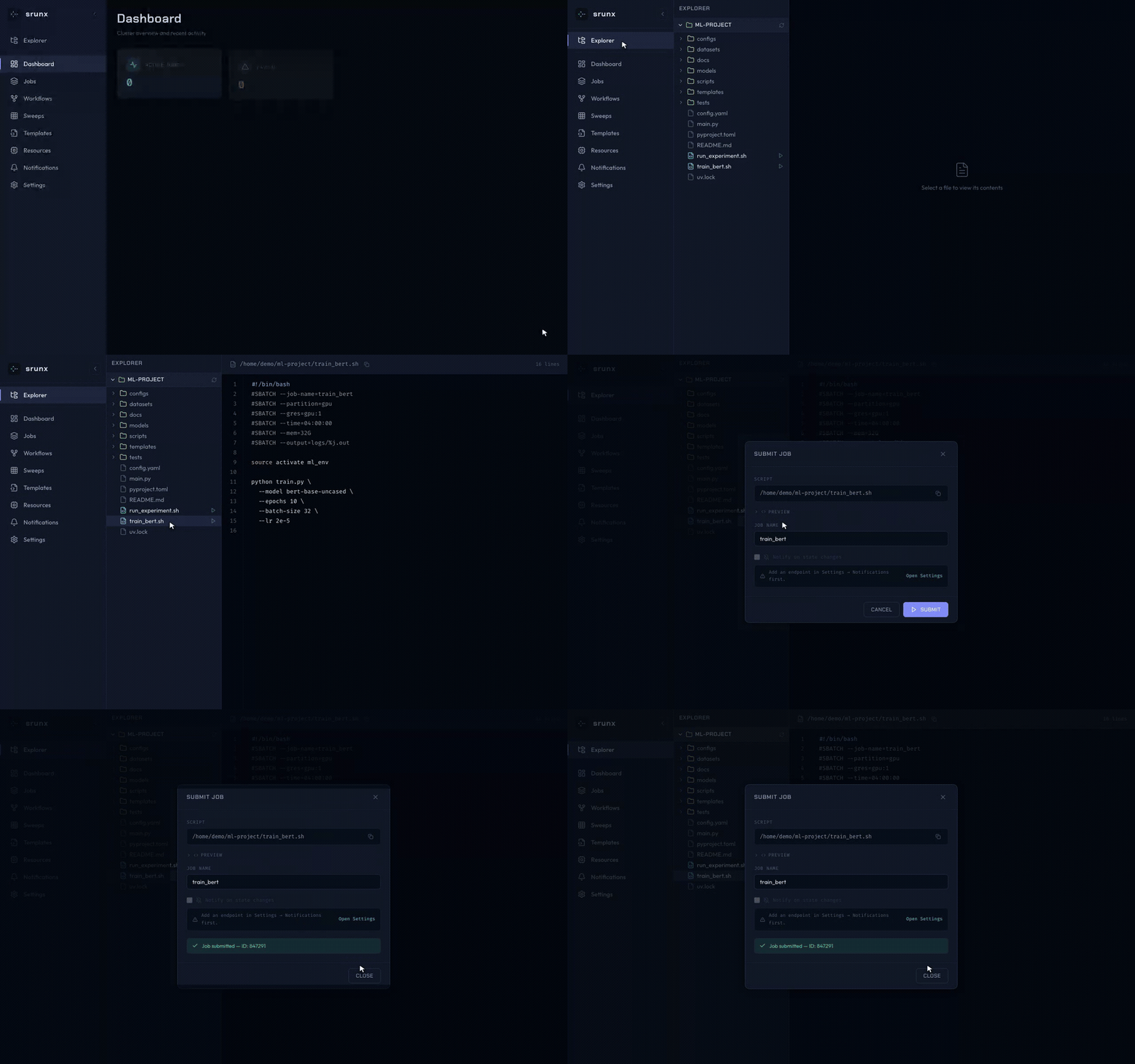
Full walkthrough: Web UI tutorial · Web UI how-to · Explorer how-to
Workflow Orchestration
Define pipelines in YAML. Jobs run as soon as their dependencies complete — independent branches execute in parallel automatically.
What this shows off:
argswith Jinja2 — reusable, parameterized pipelines ({{ model }},{{ output_dir }})- Inter-job exports — parents declare
exports:; children read them via{{ deps.<parent>.<key> }}, fully resolved at workflow load time (no runtime env files) - Containers per job — Pyxis / Apptainer / Singularity are first-class (
environment.container) - Dependency-driven scheduling —
evaluateblocks ontrain; parallel branches run automatically
Run it:
Retry with retry: N and retry_delay: <seconds> per job.
Parameter Sweeps
Run the same workflow across a matrix of hyperparameters without copying YAML. Each cell materializes into its own sbatch submission and is tracked independently.
Run it — or declare the axes ad-hoc on the command line:
Sweeps are a first-class concept across CLI, Web UI, and MCP. Web-triggered sweeps route cells through a bounded SlurmSSHExecutorPool against the configured SSH profile, while CLI and MCP runs use the local SLURM client by default. The Web UI surfaces per-cell progress with ETA, filter / sort, and per-cell cancellation.
Full workflow surface (validation, retries, partial execution, sweep recipes): Workflows how-to
Monitoring
Full monitoring options (continuous watch, thresholds, scheduled reports): Monitoring how-to
Remote SSH
Keep your local editor workflow while the jobs actually run on the cluster. Configure a profile once, and every srunx command accepts --profile <name> with the same syntax as local:
- SSH config hosts, saved profiles, and ProxyJump support
- Environment variable passthrough (
--env KEY=VALUE) - File sync via rsync with per-mount locking — auto-detects profile from current directory
Mount model, sync semantics, and in-place execution rules: SSH sync how-to
Slack Notifications
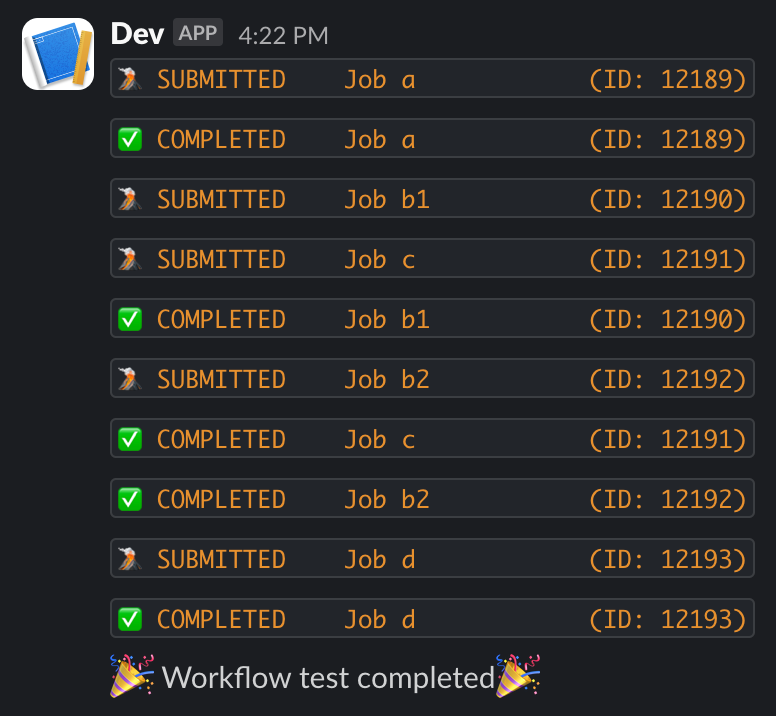
Get notified when jobs finish — set SLACK_WEBHOOK_URL (or configure it in the web dashboard), then append --slack to any srunx flow run command. In Python, pass SlackCallback to the runner (see the Python API section below).
MCP Server
srunx ships an MCP server so Claude Code (and other MCP clients) can submit jobs, inspect the queue, and drive workflows over stdio. Install the extra and register the server with your client:
Once connected, the agent can call run_workflow with optional sweep and mount parameters:
transport="<profile>" selects the remote cluster; the optional mount=<name> translates work_dir / log_dir into that mount's remote paths. mount requires transport — passing mount alone is an error — so the agent can launch mount-aware submissions against a remote cluster without leaving the chat.
Setup + tool-by-tool usage: MCP Setup tutorial · MCP Usage how-to · MCP Tools reference
Python API
The full CLI surface is available as a Python library. Use it inside notebooks, existing Python pipelines, or custom tooling.
Submit and wait:
Fire-and-track:
Run a YAML workflow programmatically, with callbacks:
Documentation
Full docs (Diátaxis-structured) at ksterx.github.io/srunx:
- Tutorials (learn by doing) — Installation · Quickstart · Web UI · MCP setup
- How-to guides (solve specific tasks) — User guide · Workflows & sweeps · Monitoring · SSH sync · Web UI · Explorer · MCP usage · Settings · Smoke-test notifications
- Reference (look up exact API) — Python API · Web API · MCP tools
- Explanation (how it works under the hood) — Architecture · MCP architecture
Development
Contributions welcome — please open an issue or PR on GitHub.
License
Apache-2.0