plannerproductivitycalendarnotesmcp
Self-hostable Go planner with notes, todos, calendar, search, and a built-in MCP server for AI clients.
Quick Install
Automated & IDE SetupCopy the AI prompt to install this server into Claude Code, Cursor, or another agent — or use 1-click editor setup below.
One-click editor setup isn’t available for this listing yet — we don’t have a confirmed install command, and we’d rather show nothing than point your editor at the wrong package or host. Follow the project’s own setup instructions, linked above.
Manual Client & Custom JSON ConfigExpand JSON ▾
No confirmed setup config for this listing yet. We only publish a config block when the install details come from the project itself — its README, its docs, or a verified owner. We haven’t found those for krtw00/konbu, and we’d rather show nothing than a guess you’d paste into your client. Follow the project’s own setup instructions for the current steps.
Overview
Use cases
Search notes, tasks, events, and tables from one query
Manage todos and schedules through an AI assistant
Store Markdown memos with tags and live preview
Import calendar events from iCal
Export planner data as JSON or Markdown ZIP files
Key features
Cross-resource full-text search
Built-in MCP server and CLI client
Markdown memos with tags
Todos with due dates, tags, and notes
Calendar with event CRUD and iCal import
JSON and Markdown ZIP export
Capabilities & Tool Schemas
Inspect callable tools, capabilities, and parameters exposed to AI agents by Konbu.
Extracted Tool Capabilities
Cross-resource full-text search
Built-in MCP server and CLI client
Markdown memos with tags
Todos with due dates, tags, and notes
Calendar with event CRUD and iCal import
JSON and Markdown ZIP export
Documentation Overview

konbu
Your personal digital planner, kept by an AI butler.
CLI · MCP · Self-hostable · AI-native
One Go binary that binds your memos, todos, schedule, and tables into a single planner — searchable from one place, kept by AI.
Connect Claude, Cursor, or any MCP client to your data.


日本語 | English
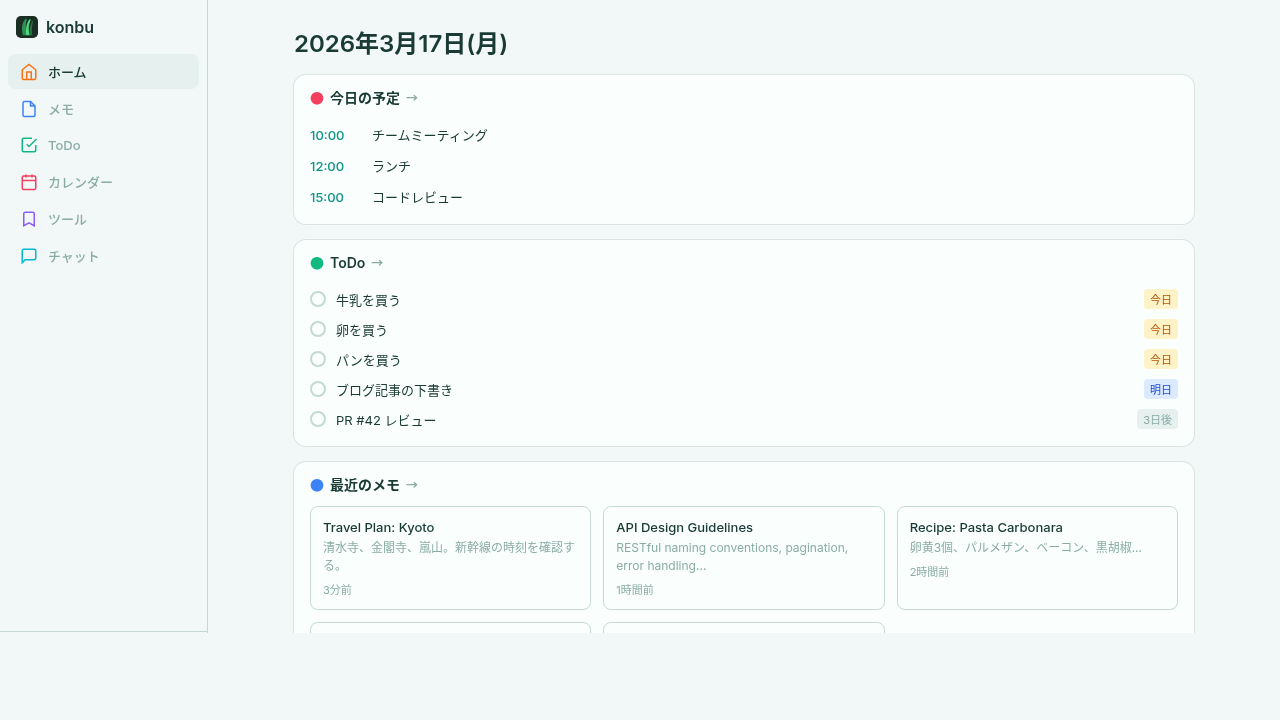
Try It
- Cloud -- Use instantly at konbu-cloud.codenica.dev (free, no setup)
- Self-hosted -- Run on your own server with Docker (see below)
What is konbu?
konbu is a personal digital planner — a Filofax-style system planner, digitized. A self-hostable Go binary that binds your memos, todos, schedule, and structured tables into one notebook, kept by an AI butler, and surfaces everything from a single search interface. It's yours alone — nothing is ever shared out. Not a replacement for Notion + Todoist + Calendar — a replacement for the act of searching four apps to find one thing.
What's different:
- Native MCP server + CLI client -- Two parallel routes for the AI butler (Claude / Cursor / any MCP client) or shell / scripts to operate your planner.
- Cross-resource full-text search -- One query across memos, todos, events, and structured tables. This is the core UX, not a side feature.
- Structured tables (= table-memo, planned) -- Track blood pressure, household budgets, or inventory. Markdown can't express these; tables can.
- BYOK AI chat -- Bring your own OpenAI/Anthropic API key, or use the included free tier.
- Personal by design -- One notebook, for you only. Pulls in from outside (Google Calendar), never leaks out.
- Self-hostable -- One Go binary, Docker compose, or use the hosted version.
End the state of having your day scattered across four different apps.
Features
- Cross-resource Full-text Search -- Search across memos, todos, events, and structured tables in one query (core UX)
- CLI & MCP Server -- Built-in CLI client and MCP server. AI agents like Claude and Cursor can read and write your data directly
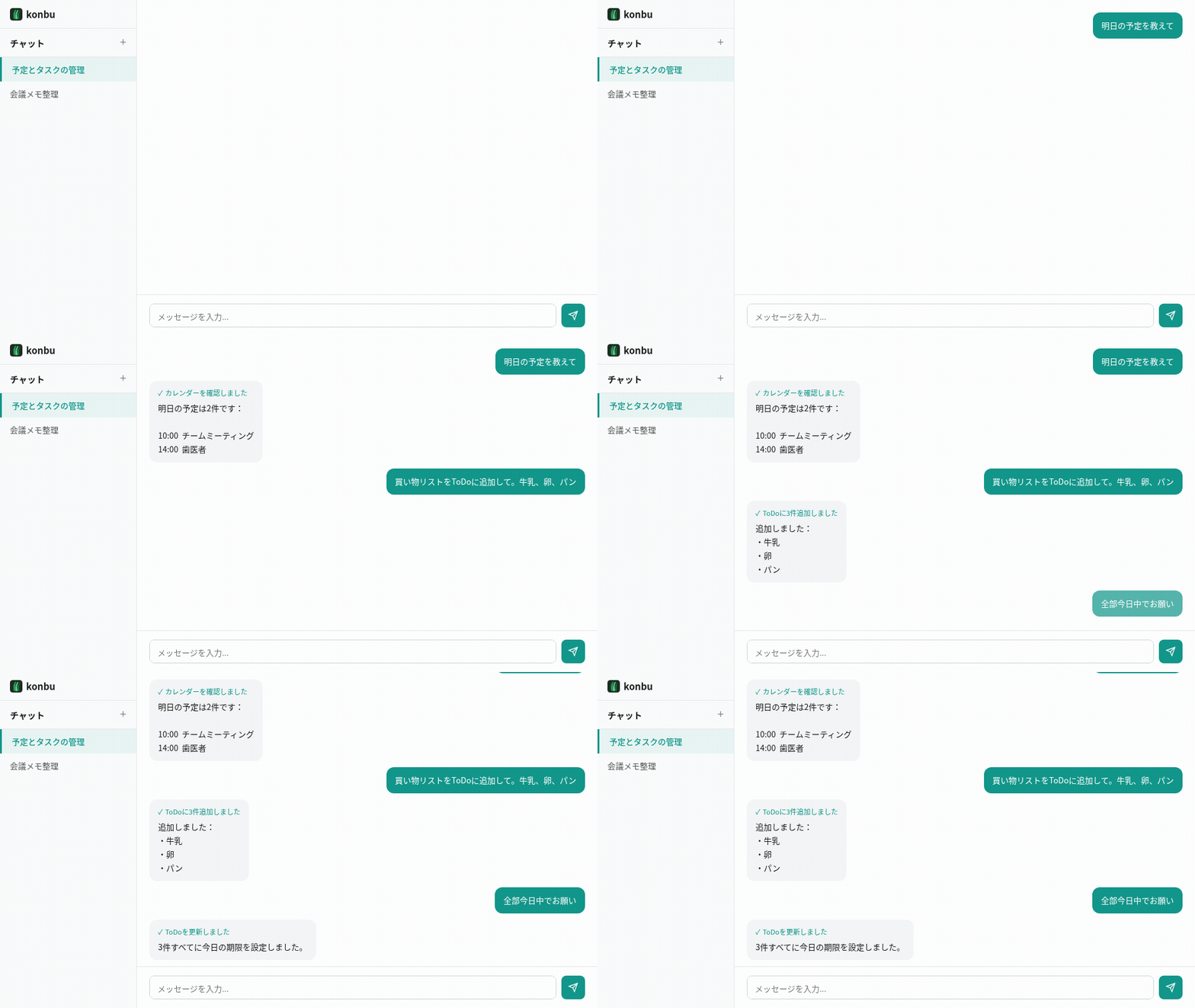
- AI Agent Chat -- "Add groceries to my todo" "What's on my schedule tomorrow?" in natural language. BYOK supported, free tier included
- Memos -- Markdown notes with tagging, live preview
- ToDo -- Inline task creation with due dates, tags, and notes
- Calendar -- Monthly view with event CRUD and iCal import (personal, owner-only)
- Structured Tables (= table-memo, planned) -- Track structured data (blood pressure, household budget, inventory) as rows × columns
- Export/Import -- JSON export, Markdown ZIP export, iCal import
- i18n -- English and Japanese
Quick Start
Open http://localhost:8080 and create your account. The dev compose file sets DEV_USER=dev@local to skip registration.
Production (with Traefik)
Native (without Docker)
Configuration
| Variable | Required | Default | Description |
|---|---|---|---|
DATABASE_URL | Yes | -- | PostgreSQL connection string |
SESSION_SECRET | Yes | dev fallback | Session signing key |
PORT | No | 8080 | Server port |
DEV_USER | No | -- | Auto-login as this email (dev only) |
OPEN_REGISTRATION | No | -- | Set true to allow anyone to register (for Cloud) |
BASE_URL | No | -- | Public app URL used for OAuth callbacks |
GOOGLE_CLIENT_ID | No | -- | Enable Google OAuth login |
GOOGLE_CLIENT_SECRET | No | -- | Enable Google OAuth login |
WEBHOOK_SECRET | No | -- | GitHub Sponsors webhook secret |
STRIPE_SECRET_KEY | No | -- | Enable Stripe checkout and subscription billing |
STRIPE_WEBHOOK_SECRET | No | -- | Verify incoming Stripe webhook events |
STRIPE_PRICE_MONTHLY | No | -- | Stripe Price ID used for monthly Pro checkout |
STRIPE_PRICE_YEARLY | No | -- | Stripe Price ID used for yearly Pro checkout |
GITHUB_FEEDBACK_TOKEN | No | -- | GitHub token used to create anonymized feedback issues |
GITHUB_FEEDBACK_REPO | No | -- | Repository to receive feedback issues, e.g. krtw00/konbu |
GITHUB_FEEDBACK_LABELS | No | -- | Comma-separated labels added to forwarded feedback issues |
AI_ENCRYPTION_KEY | No | -- | 64 hex chars used to encrypt BYOK AI keys |
DEFAULT_AI_PROVIDER | No | openai | Server-side free-tier AI provider |
DEFAULT_AI_API_KEY | No | -- | Server-side free-tier AI key |
DEFAULT_AI_ENDPOINT | No | -- | Override free-tier provider endpoint |
DEFAULT_AI_MODEL | No | -- | Override free-tier provider model |
R2_ACCESS_KEY_ID | No | -- | Attachment upload credentials |
R2_SECRET_ACCESS_KEY | No | -- | Attachment upload credentials |
R2_ENDPOINT | No | Cloudflare R2 default | Attachment storage endpoint |
R2_BUCKET | No | konbu-attachments | Attachment storage bucket |
R2_PUBLIC_URL | No | -- | Optional public base URL for attachments |
SMTP_HOST | No | -- | SMTP relay host for reminder emails (e.g. smtp-relay.brevo.com). Notifications are disabled unless all five SMTP_* variables are set. |
SMTP_PORT | No | -- | SMTP relay port (typically 587 for STARTTLS) |
SMTP_USERNAME | No | -- | SMTP relay login |
SMTP_PASSWORD | No | -- | SMTP relay password / API key |
SMTP_FROM | No | -- | From address for outgoing reminder emails |
NOTIFICATION_TICK_INTERVAL | No | 1m | Notification sweep interval (Go duration, e.g. 30s, 2m) |
Reminders / notifications
When the SMTP_* variables above are all set, the server starts a single in-process sweep loop that sends email reminders for upcoming events and due ToDos. Each user opts in via Settings (user_settings.notifications.enabled = true) and can override the recipient email, lead time, due-time, and timezone.
Notifications are a server-only feature — they run inside the API server process and require PostgreSQL. The MCP --standalone mode (SQLite) does not send reminders.
Docker Compose (prod) variables
| Variable | Description |
|---|---|
POSTGRES_PASSWORD | PostgreSQL password |
KONBU_DOMAIN | Domain for Traefik TLS routing |
CLI
The CLI is a standalone client that connects to a remote konbu server via API. Server code is not included in the CLI binary.
Setup
Generate an API key in Settings > Security on the web UI.
Commands
All commands support --json flag for machine-readable output.
Short IDs (first 8 chars) can be used in place of full UUIDs.
MCP Server
konbu can run as a built-in MCP (Model Context Protocol) server in two modes — pick whichever fits.
Standalone mode (SQLite, no server required)
If you just want konbu as a local MCP backend for Claude Desktop, Cursor, or any MCP client, install the CLI and run it with --standalone. No PostgreSQL, no web server, no API key — everything is stored in a local SQLite file.
Related MCP Servers
Adoption & maintenance
Factual signals from GitHub, npm, and our automated checks — not a rating.
GitHub stars
1
Stargazers on the source repository.
Last commit
2mo ago
Most recent push to the default branch.
Directory activity
2 views
Config copies, upvotes, and views on AllMCPs.
Reviews
No reviews yet — be the first to share how this listing worked for you.
Frequently Asked Questions about Konbu
AllMCPs Directory Badge
Showcase your server listing on GitHub or your project documentation. Embed this dynamic SVG badge to highlight official listing status and live engagement.
Badge Style:
Live Dynamic SVG Preview
Markdown (GitHub README)
[](https://allmcps.com/mcp/krtw00-konbu)HTML Embed
<a href="https://allmcps.com/mcp/krtw00-konbu"><img src="https://allmcps.com/api/badge/krtw00-konbu?style=directory" alt="Konbu on AllMCPs" /></a>Technical Specs & Signals
CategoryWorkplace & Productivity
PricingFreemium
40Quality signal: Fair · 40/100How this signal is calculated ▾
Server availabilityNot measured
Not scored for repo-hosted servers — we can't reach the running server, only its GitHub page. Hosted MCP endpoints are health-checked live.
Verified ownership10/20
Documentation & tools17/30
Adoption & activity3/15
Community engagement0/10
A guidance signal from public completeness & health data — not a user rating. New listings start lower and rise as they add docs, get verified, and grow adoption. Signals we can't observe for a listing are skipped, not counted against it.
Own this project?
This directory is pre-filled from public sources. Claim via GitHub README, site badge, or DNS TXT to unlock edit access and the Official badge — proof is checked automatically, then reviewed by our team.
Free dofollow backlink: add your website and place the AllMCPs badge on it — no claim needed. We detect it automatically and keep it verified as long as the badge stays live.
Claim & get free dofollowShare & Embed
Add our SVG badge (dark/light directory styles) or embeddable widget to your site.