AllMCPs
BrowseBestCategoriesStackCompareToolsGuidesBlog Log in Submit MCP

Stay in the loop

Get new MCP servers and top picks in your inbox.

AllMCPs

The open directory for discovering and installing Model Context Protocol servers.

Explore

  • Browse servers
  • Best MCP servers
  • Categories
  • MCP clients
  • Agent prompts
  • Stack Builder
  • Compare servers
  • Tags index
  • Submit a server
  • Pricing

Learn

  • Guides hub
  • What is MCP?
  • Install guide
  • Troubleshooting
  • Security
  • Blog
  • Blog RSS

Tools

  • All tools
  • Config generator
  • Config validator
  • MCP playground
  • OpenAPI β†’ MCP
  • Badge generator

For agents

  • API docs
  • Trust & traffic
  • llms.txt β†— (opens in a new tab)
  • Catalog JSON β†— (opens in a new tab)
  • Remote MCP β†— (opens in a new tab)

Company

  • About
  • Contact
  • X (@AllMCPs) β†— (opens in a new tab)
  • GitHub β†— (opens in a new tab)
  • Terms
  • Privacy
AllMCPs VerifiedAllMCPs VerifiedFeatured on Nick LaunchesFeatured on Nick LaunchesLaunch Llama NewsletterLaunch Llama NewsletterVerified DR - allmcps.comVerified DR - allmcps.comFeatured on SaaSGrowFeatured on SaaSGrowFeatured on Twelve ToolsFeatured on Twelve ToolsFeatured on Saaspa.geFeatured on Saaspa.geFeatured on Findly.toolsFeatured on Findly.toolsFeatured on Startup FameFeatured on Startup FameFeatured on LaunchKiwiFeatured on LaunchKiwiFeatured on ScrollLaunchFeatured on ScrollLaunchFeatured on DailyPingsFeatured on DailyPingsFazier badgeFazier badgeFeatured on NewTool.siteFeatured on NewTool.siteFeatured on saasfame.comFeatured on saasfame.comDR Checker - Domain RatingDR Checker - Domain RatingListed on Turbo0Listed on Turbo0Launched on LaunchBoard - Product Launch PlatformLaunched on LaunchBoard - Product Launch PlatformList on SimilarlabsList on Similarlabshttps://codetrendy.comhttps://codetrendy.comListed on DevTool.ioFeatured on BuildlistFeatured on BuildlistAllMCPs VerifiedAllMCPs VerifiedFeatured on Nick LaunchesFeatured on Nick LaunchesLaunch Llama NewsletterLaunch Llama NewsletterVerified DR - allmcps.comVerified DR - allmcps.comFeatured on SaaSGrowFeatured on SaaSGrowFeatured on Twelve ToolsFeatured on Twelve ToolsFeatured on Saaspa.geFeatured on Saaspa.geFeatured on Findly.toolsFeatured on Findly.toolsFeatured on Startup FameFeatured on Startup FameFeatured on LaunchKiwiFeatured on LaunchKiwiFeatured on ScrollLaunchFeatured on ScrollLaunchFeatured on DailyPingsFeatured on DailyPingsFazier badgeFazier badgeFeatured on NewTool.siteFeatured on NewTool.siteFeatured on saasfame.comFeatured on saasfame.comDR Checker - Domain RatingDR Checker - Domain RatingListed on Turbo0Listed on Turbo0Launched on LaunchBoard - Product Launch PlatformLaunched on LaunchBoard - Product Launch PlatformList on SimilarlabsList on Similarlabshttps://codetrendy.comhttps://codetrendy.comListed on DevTool.ioFeatured on BuildlistFeatured on Buildlist
Β© 2026 Jackalope Digital LLC. All rights reserved.
  1. Home
  2. πŸ’» Developer Tools
  3. Kotlin Lib Mcp
K
Health: Not checked yetWe have not completed a health check for this listing yet.Last checked 8/11/2026, 12:26:57 AM

Kotlin Lib Mcp

Enrichment pendingWe haven’t run our AI enrichment pass on this listing yet, so the overview, use cases, and FAQ below may be sparse or missing. We work through the catalog over time β€” check back soon.
View Repository

Exposes the public API, KDoc and sources of Maven-published Kotlin/Java libraries to MCP clients

Quick Install

Automated & IDE Setup

Copy the AI prompt to install this server into Claude Code, Cursor, or another agent β€” or use 1-click editor setup below.

Add to CursorAdd to VS Code
Manual Client & Custom JSON ConfigExpand JSON β–Ύ

Install Config Generator

Choose your client
claude_desktop_config.json
{
  "mcpServers": {
    "kotlin-lib-mcp": {
      "command": "npx",
      "args": [
        "-y",
        "kotlin-lib-mcp"
      ]
    }
  }
}

πŸ’‘ Paste into ~/Library/Application Support/Claude/claude_desktop_config.json (macOS) or %APPDATA%\Claude\claude_desktop_config.json (Windows)

Install Directory Badge Claim listing AlternativesπŸ’» More in Developer Tools

Documentation Overview

kotlin-lib-mcp

CI CodeQL Release License Kotlin GitHub MCP Registry

Give your AI agent the real sources of any Maven-published Kotlin/Java library.

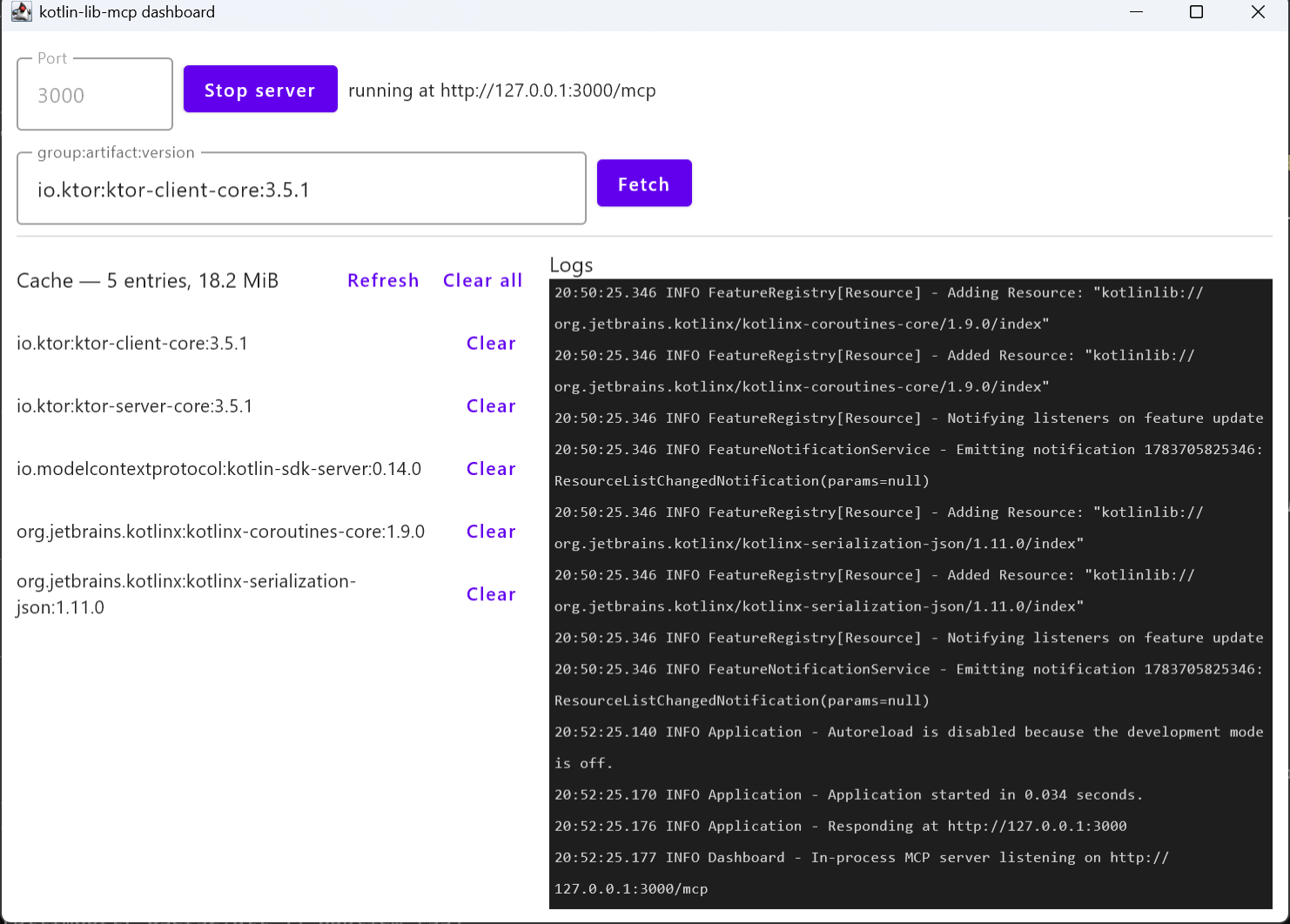
An MCP server that, on request, downloads the sources of a library (e.g. io.ktor:ktor-client-core:3.5.1), parses them with the Kotlin Analysis API (standalone K2/FIR mode), and exposes structured information β€” public API surface, KDoc, dependencies/metadata, raw source + search β€” to MCP clients: Claude Code, Claude Desktop, IntelliJ IDEA (AI Assistant / Junie), VS Code and GitHub Copilot. An optional Compose Desktop dashboard runs the same server in-process.

Ten tools β€” fetch_library Β· list_packages Β· list_declarations Β· get_api_signature Β· get_kdoc Β· get_source Β· search_source Β· get_dependencies Β· list_versions Β· get_latest_version β€” plus MCP resources and a prompt.

Install in VS Code Install in VS Code Insiders

Those install the Docker image. For Claude Code, IntelliJ IDEA, or to run the release zip without Docker, see Quick start.
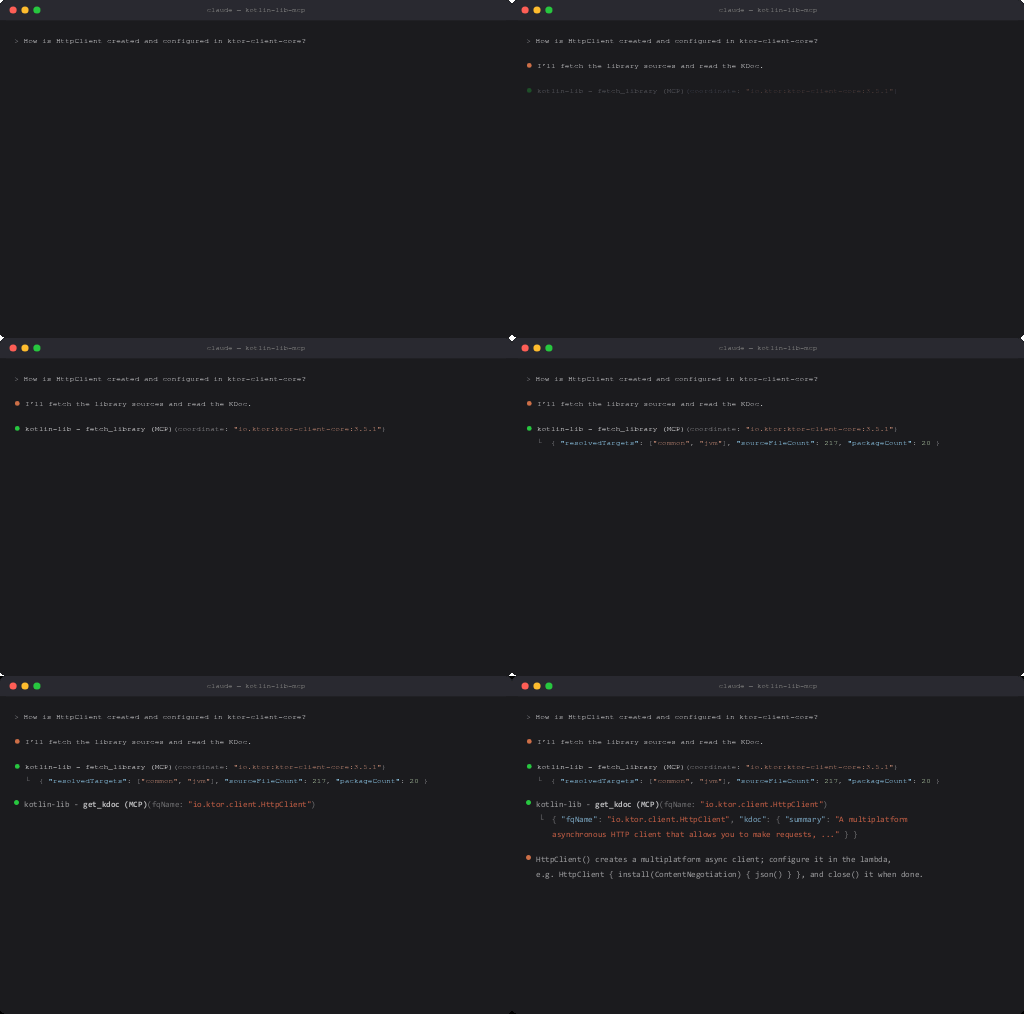
Claude Code fetching a library and reading KDoc via kotlin-lib-mcp

Compose Desktop dashboard

The dashboard: in-process MCP server, pre-warm form, cache browser and live logs

Why this and not a docs-lookup server?

Most documentation MCP servers scrape rendered doc sites or feed the model pre-digested summaries. This one works from the published sources jar β€” the ground truth:

  • Resolved signatures, not regex guesses. Declarations are analyzed with the same Analysis API that powers the Kotlin IDE, so get_api_signature returns real, type-resolved signatures (with graceful best-effort fallback when transitive dependencies are missing).
  • KMP-aware. Kotlin Multiplatform libraries publish per-target sources jars; these are resolved properly via .module Gradle metadata, and every symbol is tagged with its targets.
  • KDoc as data. Summaries, descriptions and tags are extracted per declaration β€” not whole HTML pages.
  • Exact version you asked for, offline after the first fetch. Everything is cached on disk keyed by group/artifact/version; no re-downloads, no drift between the docs and the version you actually depend on.
  • Raw source when you need it. get_source and bounded search_source let the agent read the actual implementation, not just the API.

Quick start (no build required)

Option 1 β€” Claude Code plugin. The server plus skills that make Claude reach for it, two commands (/kotlin-lib:api, /kotlin-lib:migrate) and a setup helper. Needs Docker:

Code
/plugin marketplace add aoreshkov/kotlin-lib-mcp
/plugin install kotlin-lib@kotlin-lib-mcp

See plugin/README.md for what it bundles.

Option 2 β€” release zip. Download the latest release, unzip (needs a Java 21+ runtime), then:

Terminal
claude mcp add kotlin-lib -- /path/to/kotlin-lib-mcp-server-<version>/bin/server --transport stdio

Option 3 β€” Docker.

Terminal
claude mcp add kotlin-lib -- docker run -i --rm -v kotlin-lib-mcp-cache:/home/mcp/.cache ghcr.io/aoreshkov/kotlin-lib-mcp

Option 4 β€” IntelliJ IDEA / Android Studio. JetBrains IDEs are MCP clients too β€” which is where most Kotlin gets written. Open Settings | Tools | AI Assistant | Model Context Protocol (MCP), click Add, pick the stdio transport and paste:

config.json
{
  "mcpServers": {
    "kotlin-lib": {
      "command": "docker",
      "args": ["run", "-i", "--rm", "-v", "kotlin-lib-mcp-cache:/home/mcp/.cache", "ghcr.io/aoreshkov/kotlin-lib-mcp"]
    }
  }
}

Choose global or project level, Apply, and the tools appear in the AI Assistant chat. Junie takes the same JSON in its own MCP settings. Swap command/args for the release-zip launcher (bin/server --transport stdio) if you'd rather not use Docker.

Option 5 β€” MCP Registry. The server is published to the official MCP registry as io.github.aoreshkov/kotlin-lib-mcp, and listed in the GitHub MCP Registry; registry-aware clients can install it from there.

Or in .mcp.json / Claude Desktop config:

config.json
{
  "mcpServers": {
    "kotlin-lib": {
      "command": "C:/path/to/kotlin-lib-mcp-server-<version>/bin/server.bat",
      "args": ["--transport", "stdio"]
    }
  }
}

For remote use, run the http transport (--transport http --port 3000) and point the client at http://127.0.0.1:3000/mcp β€” DNS-rebinding protection admits localhost hosts by default; --allowed-host/--allowed-origin extend the allowlist for non-localhost deployments.

CLI flags: --transport stdio|http, --port <int> (default 3000), --allowed-host <host> / --allowed-origin <url> (repeatable; extend the http transport's localhost-only defaults), --cache-dir <path>, --repo <url> (repeatable; Maven Central is the default), --forward-logs-to-client (opt into mirroring logs to the client; off by default, stderr-only), --otel (opt into OTLP/HTTP trace export; off by default β€” see Telemetry), --help.

Tools

All tools take a Maven coordinate (group:artifact:version). Call fetch_library first β€” it downloads, extracts and analyzes the sources once; every other tool answers from the cached index. fetch_library, list_versions and get_latest_version also accept group:artifact, and fetch_library accepts group:artifact:latest to resolve the latest stable release.

ToolPurpose
fetch_libraryDownload + analyze + cache; returns a summary. Idempotent. Version may be omitted or latest
list_packagesPackages with declaration counts and KMP targets
list_declarationsDeclarations with signatures; filter by package and visibility
get_api_signatureResolved signature of one declaration by FQ name
get_kdocKDoc (summary, description, tags) of one declaration
get_sourceRaw source of a file (path) or one declaration (fqName)
search_sourceSubstring/regex search; bounded, returns file:line snippets
get_dependenciesDependency tree from .pom/.module; bounded depth
list_versionsPublished versions from maven-metadata.xml, newest-first
get_latest_versionLatest stable release (and newest overall) from maven-metadata.xml

Every tool ships the metadata the MCP spec encourages clients to use: a display title, behavior annotations (readOnlyHint: true everywhere except fetch_library, which is additive-only β€” destructiveHint: false, idempotentHint: true; tools that reach Maven repositories set openWorldHint: true, cache-only tools false), a typed outputSchema derived from the response DTO's serializer, and an icon. Results carry both pretty-printed JSON text and the matching structuredContent object, so structured-output clients and plain-text clients see the same payload.

fetch_library also reports progress notifications (download β†’ analyze β†’ cache) when the client sends a progressToken. Logs go to stderr by default (which the spec blesses for all stdio logging); the deprecated MCP logging capability β€” mirroring logs to clients as notifications/message (respecting logging/setLevel) β€” is opt-in via --forward-logs-to-client, for stdio clients that surface MCP log messages but drop stderr.

Elicitation

When fetch_library is called without a version (io.ktor:ktor-client-core, or …:latest) it has to guess. If the client advertised the elicitation capability, it asks instead: an elicitation/create form-mode request carrying a single-select version picker β€” the titled oneOf shape from SEP-1330, with the latest stable release pre-selected as the schema default.

The userThe server
accepts a versionfetches exactly that one
declinesfetches the latest stable release, as it always did
cancels (dismissed the dialog)downloads nothing and returns a tool error saying to call fetch_library again with an explicit group:artifact:version

There is no flag: capability negotiation is the opt-in. A client that advertises nothing β€” or advertises url-mode only, which servers must not answer with a form β€” keeps the previous silent latest-stable behavior exactly. Only public Maven version numbers are ever requested, so form mode is appropriate; URL mode exists for credentials and third-party authorization, and is deliberately unused here. Accepted values are validated against the offered list before they reach a repository URL, and a client that errors mid-question falls back to the default rather than failing the fetch.

Under --tasks, a task-augmented fetch_library parks in the input_required status while the question is outstanding and returns to working once answered; the elicitation/create carries the io.modelcontextprotocol/related-task _meta tying it to the task.

Tasks

Pass --tasks to accept task-augmented tools/call for fetch_library (SEP-1686) and answer tasks/get / tasks/result / tasks/list / tasks/cancel. Works on both transports.

Task records are persisted under <cache-dir>/tasks, so a completed task and its result are still retrievable after the server restarts. A task that was still running when the server stopped comes back as failed β€” its work did not survive, only the record did. Records are dropped once their TTL elapses (10 minutes by default, 1 hour maximum).

Task IDs are bearer tokens for tasks that outlive their session. A task belongs to the MCP session that created it, and while that session is connected no other session can read, list or cancel it. But a session ID is per-connection: after a restart your client reconnects with a new one, so a recovered task is instead reachable by anyone presenting its exact task ID. That is the model the MCP spec prescribes for servers with no authorization context β€” which this one is, being loopback-first with no auth β€” and task IDs are 122-bit SecureRandom UUIDs accordingly. tasks/list never returns recovered tasks, only the calling session's own. If you expose this server beyond loopback, put authentication in front of it.

Note on concurrency. A server-initiated request from inside a tool call only works because the SDK dispatches inbound requests concurrently once the session is initialized β€” otherwise the client's reply would be stuck behind the very handler waiting for it. Besides making elicitation possible, this means ping, tasks/get and notifications/cancelled are answered promptly during a long fetch_library instead of queueing behind it, and a fetch_library the client cancels actually stops.

Telemetry

Pass --otel to export a trace span for every MCP request (tools/call, resources/read, prompts/get, completion/complete) over OTLP/HTTP. It is off by default, and off means inert: no SDK, no exporter threads, no network.

Configuration is the standard OpenTelemetry environment surface β€” there are no bespoke flags:

server.ts
export OTEL_EXPORTER_OTLP_ENDPOINT=http://localhost:4318   # '/v1/traces' is appended for you
export OTEL_SERVICE_NAME=kotlin-lib-mcp                    # this is also the default
export OTEL_RESOURCE_ATTRIBUTES=deployment.environment=dev
server --transport stdio --otel

The protocol defaults to http/protobuf, the endpoint to http://localhost:4318, and the exporter uses the JDK's built-in HTTP client (no OkHttp on the classpath). Everything is overridable: OTEL_EXPORTER_OTLP_HEADERS for a hosted collector's API key, OTEL_TRACES_EXPORTER, OTEL_BSP_SCHEDULE_DELAY, and so on.

Endpoint gotcha. With the generic OTEL_EXPORTER_OTLP_ENDPOINT, /v1/traces is appended automatically. With the per-signal OTEL_EXPORTER_OTLP_TRACES_ENDPOINT, the URL is used as-is β€” you must spell out the path yourself. This is the most common OTLP misconfiguration.

Spans follow the MCP semantic conventions: named {method} {target} (e.g. tools/call fetch_library), SpanKind.SERVER, and carrying mcp.method.name, gen_ai.tool.name, mcp.session.id, and network.transport (pipe for stdio, tcp for http). A tool that returns isError is marked error.type=tool_error. Inbound trace context is picked up from the JSON-RPC params._meta bag (traceparent/tracestate, per SEP-414), so a client that traces its own work gets one connected trace.

Those mcp.* and gen_ai.* attributes are still Development status upstream and may be renamed β€” one more reason the whole feature is opt-in.

Resources: each cached library is readable at kotlinlib://{group}/{artifact}/{version}/index (the parsed index as JSON); the list updates as libraries are fetched, and the same URI shape is published as a resource template, so any cached coordinate is directly addressable. Prompt: explain_public_api(coordinate, package?) renders an explanation request grounded in the cached signatures and KDoc.

Icons: the server, every tool, the prompt and the library-index resource/template each declare an SEP-973 icon, so a client can show the surface visually instead of as a wall of snake_case. They are inlined as data: URIs rather than hosted URLs β€” a stdio server has no origin, and the spec asks consumers to prefer same-origin icons and fetch them without credentials, so inlining removes the third-party fetch entirely and keeps the icons working offline and inside the container image. The payload is PNG, the one format icon-rendering clients must support (image/svg+xml is only a SHOULD, and the spec warns it may carry executable content). The glyphs are drawn by tools/src/main/kotlin/GenerateIcons.kt (./gradlew :tools:generateIcons) and kept small β€” about 800 bytes encoded each, since they ride in every tools/list.

Building from source

sh
./gradlew build                                    # build everything
./gradlew test                                     # unit tests
./gradlew :server:run --args="--transport stdio"   # local MCP over stdio (default)
./gradlew :server:run --args="--transport http --port 3000"   # Streamable HTTP at /mcp
./gradlew :dashboard:run                           # Compose Desktop UI
./gradlew :server:installDist                      # standalone launcher in server/build/install/server/bin

Requires JDK 21 (resolved automatically via Gradle toolchains).

ModuleWhat it is
core/KMP library: domain model + ports (commonMain); Maven fetcher, zip extractor, Analysis API analyzer, on-disk cache (jvmMain)
server/JVM app: MCP tools/resources/prompts + stdio and Streamable HTTP transports
dashboard/Compose Desktop control panel embedding the server (optional)
tools/Asset generators (icon PNGs, social preview card). Never shipped; nothing depends on it

Cache

Downloads and the parsed index live under the OS cache dir + kotlin-lib-mcp (%LOCALAPPDATA%\kotlin-lib-mcp on Windows, ~/Library/Caches/kotlin-lib-mcp on macOS, $XDG_CACHE_HOME/kotlin-lib-mcp elsewhere), keyed by group/artifact/version β€” browsable and safe to delete. --cache-dir overrides it. Under --tasks, task records live in a tasks/ subdirectory of the same root.

Notes

  • stdio rule: stdout carries only MCP protocol frames; all logging goes to stderr (Kermit β†’ SLF4J β†’ Logback, logback.xml).
  • Kotlin and the Analysis API artifacts are version-locked in gradle/libs.versions.toml β€” bump them together. Symbols whose types can't be resolved (missing transitive deps) degrade to bestEffort: true PSI signatures instead of failing.

Privacy

Nothing about you is collected, stored remotely, or shared. There is no analytics, no phone-home, no account, and no credential of any kind.

  • What leaves your machine. Only requests to the Maven repositories you point it at (Maven Central by default, --repo to change): the maven-metadata.xml, .pom/.module metadata and sources jar for the coordinates you ask about. Those repositories see the coordinate and your IP, under their own privacy policies. Pulling the Docker image likewise talks to GHCR. That is the complete list of outbound traffic.
  • What it reads. Downloaded library sources only. It does not read, index or transmit your project's code β€” it has no access to it.
  • What it stores, and where. Downloaded artifacts and the parsed index, on your disk only, under the OS cache directory (see Cache) or --cache-dir. Under --tasks, task records live in a tasks/ subdirectory. Nothing is written anywhere else.
  • Retention. Cached libraries stay until you delete them β€” the directory is browsable and safe to remove at any time. Task records are dropped once their TTL elapses (10 minutes by default, 1 hour maximum).
  • Logs. stderr on your machine. --forward-logs-to-client (opt-in) mirrors them to your MCP client; --otel (opt-in) exports trace spans to the OTLP collector you configure, and carries no personal data β€” method names, tool names, session id, transport. Both are off by default.
  • Contact. Questions: open an issue. Security or privacy reports: private vulnerability reporting.

Contributing

Contributions welcome β€” see CONTRIBUTING.md. Release history lives in CHANGELOG.md; security reports go through private vulnerability reporting.

Support

If kotlin-lib-mcp saves you time, consider sponsoring its maintenance. Sponsorship funds keeping the Analysis API version-lock current with new Kotlin releases and the supply-chain-hardened release pipeline. Every tier is appreciated.

License

Apache-2.0

Related MCP Servers

View all in Developer Tools View all alternatives
  • G
    Graphql

    Turn any GraphQL API into MCP tools. Zero config, zero code.

    πŸ’» Developer Tools0 views
    Compare vs Graphql β†’
  • A
    Ai Netcafe

    Compare LLM cost & latency on one prompt, translate PDF keeping layout, cited research, make PPTX

    πŸ’» Developer Tools0 views
    Compare vs Ai Netcafe β†’
  • Claude Task Master logoClaude Task Master

    AI-powered task management system for AI-driven development. Features PRD parsing, task expansion, multi-provider support (Claude, OpenAI, Gemini, Perplexity, xAI), and selective tool loading for optimized context usage.

    πŸ’» Developer Tools7 views
    Compare vs Claude Task Master β†’
  • Shadcn Ui Mcp Server logoShadcn Ui Mcp Server

    MCP server that gives AI assistants seamless access to shadcn/ui v4 components, blocks, demos, and metadata.

    πŸ’» Developer Tools2 views
    Compare vs Shadcn Ui Mcp Server β†’

Frequently Asked Questions about Kotlin Lib Mcp

Add the following block to your claude_desktop_config.json under mcpServers: "mcpServers": { "kotlin-lib-mcp": { "command": "npx", "args": ["-y", "kotlin-lib-mcp"] } }

AllMCPs Directory Badge

Full Badge Customizer

Showcase your server listing on GitHub or your project documentation. Embed this dynamic SVG badge to highlight official listing status and live engagement.

Badge Style:
Live Dynamic SVG PreviewKotlin Lib Mcp AllMCPs Directory Badge

Markdown (GitHub README)
[![AllMCPs](https://allmcps.com/api/badge/kotlin-lib-mcp?style=directory)](https://allmcps.com/mcp/kotlin-lib-mcp)
HTML Embed
<a href="https://allmcps.com/mcp/kotlin-lib-mcp"><img src="https://allmcps.com/api/badge/kotlin-lib-mcp?style=directory" alt="Kotlin Lib Mcp on AllMCPs" /></a>

Technical Specs & Signals

CategoryπŸ’»Developer Tools
More technical detailsExpand β–Ύ
TransportSTDIO
RuntimeNode.js
0/4 checks healthy over the last 6h
Views0
Unique ViewsTotal visits recorded for this listing page on AllMCPs.
Installs0
Installs & Copy ActionsTotal times users copied install commands or configuration snippets for this server.
27Quality signal: Emerging Β· 27/100How this signal is calculated β–Ύ
Server availabilityNot measured

Not scored for repo-hosted servers β€” we can't reach the running server, only its GitHub page. Hosted MCP endpoints are health-checked live.

Verified ownership8/20
Documentation & tools11/30
Adoption & activity1/15
Community engagement0/10

A guidance signal from public completeness & health data β€” not a user rating. New listings start lower and rise as they add docs, get verified, and grow adoption. Signals we can't observe for a listing are skipped, not counted against it.

β˜… FeaturedAllMCPs Server logo

AllMCPs Server

The official MCP server for AllMCPs.com - submit and manage tools directly from your AI. The open directory for MCP servers. Connect Claude, Cursor, Windsurf, and AI agents to databases, tools, files, and APIs. Explore 3,181+ servers. AllMCPs is the premier, open directory for discovering, evaluating, and installing Model Context Protocol (MCP) servers to equip AI agents and LLMs with real-world superpowers.

Explore Server β†’

Own this project?

This directory is pre-filled from public sources. Claim via GitHub README, site badge, or DNS TXT to get the verified badge and attach your website.

Free dofollow backlink: after claiming, verify your product site and place a dofollow AllMCPs badge β€” we recheck it stays live.

Claim & get free dofollow

Share & Embed

Add our SVG badge (dark/light directory styles) or embeddable widget to your site.

Explore more

More in πŸ’» Developer Tools β†’Best MCP servers for Developers β†’Alternatives to Kotlin Lib Mcp β†’Install in Claude DesktopInstall in CursorInstall in VS Code