File-oriented MCP server for KiCad schematics, PCB placement, routing, and pours.
Quick Install
Automated & IDE SetupCopy the AI prompt to install this server into Claude Code, Cursor, or another agent — or use 1-click editor setup below.
Manual Client & Custom JSON ConfigExpand JSON ▾
Client Config & Setup
Choose your client or environment
Target File:
💡 Paste the JSON block into your client's configuration file under mcpServers, then restart the application.
Documentation Overview
KiCad Copilot
AI-powered MCP server for KiCad. Create and modify schematics from natural language, search real components, work with hierarchical projects, generate PCB placement, route boards locally, and create simple copper pours directly through an AI agent.
KiCad Copilot is the KiCad counterpart to EasyEDA Copilot. It provides the same core circuit-generation and PCB automation capabilities—and goes further with file-oriented hierarchical projects, recoverable checkpoints, native kicad-cli integration, and fully local PCB routing.
Integrated analysis: KiCad Copilot downloads a pinned, verified kicad-happy v2.2.0 release on first use of
analyze_schematicoranalyze_pcb. The MCP tools return compact, token-efficient actionable findings and focused design data.


What it does
KiCad Copilot gives AI agents a high-level, file-oriented interface to KiCad:
- Generate and modify schematics: add, remove, replace, and connect real components without editing every KiCad object individually.
- Rebuild schematic blocks: reorganize selected components while preserving their electrical connections.
- Search components and reusable blocks: resolve components by MPN or part UUID and insert proven functional circuits.
- Work with KiCad projects: inspect project trees and create projects, standalone schematics, hierarchical sheets, and PCB files.
- Preserve recoverable checkpoints: save, list, and restore exact versions of individual KiCad files.
- Synchronize schematic and PCB: explicitly import schematic changes into the associated board.
- Generate PCB placement: describe board constraints in a compact JavaScript DSL, review PNG/SVG previews, and apply the approved result.
- Route locally: use
eda-copilot-routerwith its managed KRT backend without sending routing work to an external service. - Create copper pours: add simple full-board zones with optional stitching vias.
- Use native KiCad tooling: discover
kicad-clifor ERC, DRC, previews, exports, manufacturing files, and other native operations.
KiCad Copilot works directly with saved .kicad_pro, .kicad_sch, and .kicad_pcb files. It does not require KiCad IPC or a plugin installed inside KiCad.
Examples
These projects were generated and iterated through KiCad Copilot. The complete KiCad source files are available in the examples directory.
ATmega328P development board
A hierarchical ATmega328P design with the MCU core, clock, reset, decoupling, USB-UART power, Nano-compatible headers, and debug connections split across functional sheets.
 Project overview |  USB-UART and power |
 MCU core |  Nano headers and debug |
Download the ATmega328P project
Geiger high-voltage supply
A larger multi-sheet design covering power input, 3.3 V regulation, the high-voltage generator, flyback stage, feedback, detector, controller, and user interface.
 Project overview |  Power input |
 High-voltage generator |  Detector |
 Controller UI |  3.3 V power |
 HV flyback |  HV feedback |
 User interface | |
Download the Geiger high-voltage project
RP2350 development board
A hierarchical RP2350 design with power, clock, flash, USB/debug, GPIO headers, and an AI-generated PCB placement. The example includes the placement DSL and an editable KiCad board.
 Project overview |  Power |
 RP2350 and clock |  Flash |
 USB and debug |  GPIO headers |
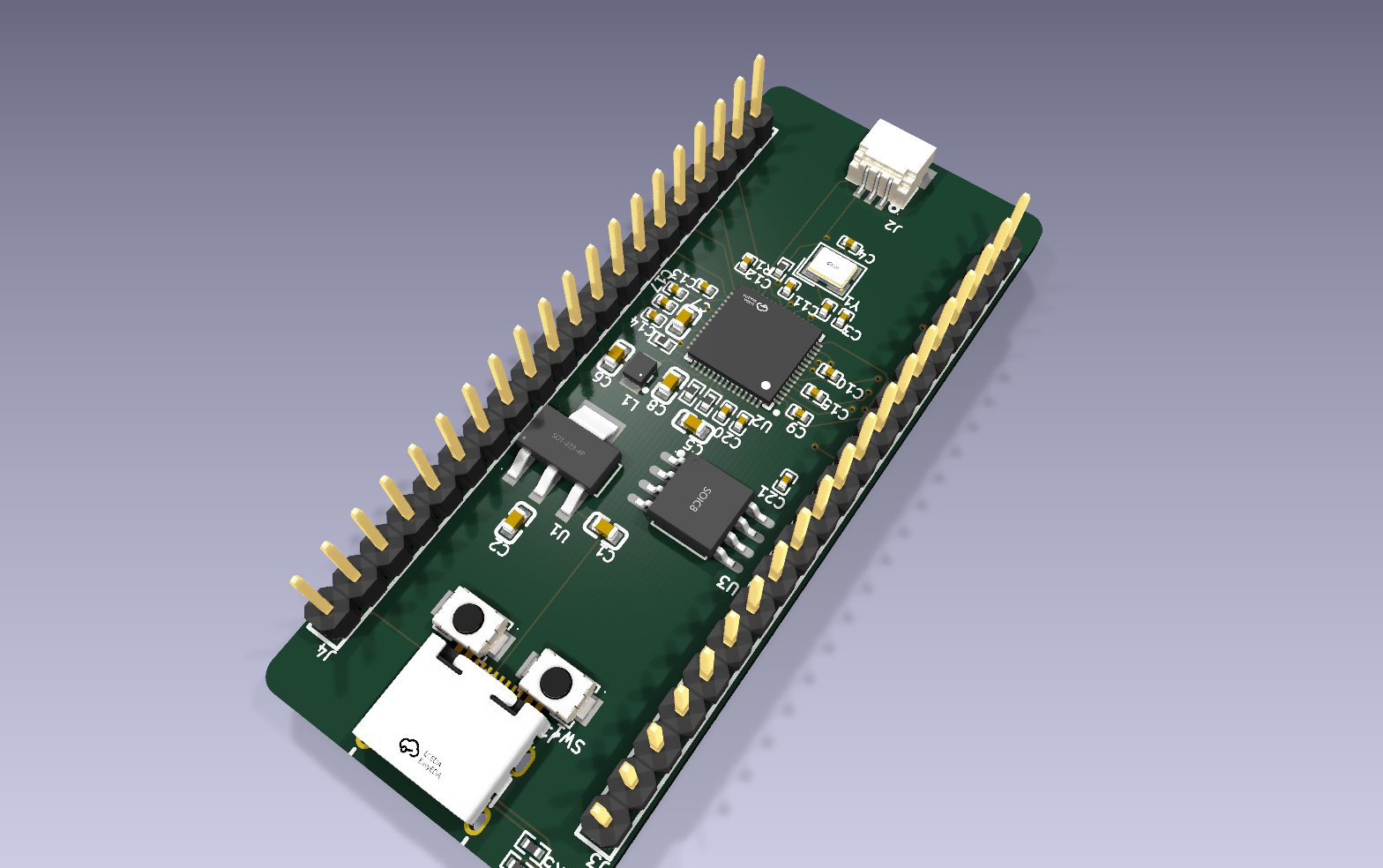
KiCad 3D render of the generated PCB placement
Installation
Add the MCP server to your AI agent.
Codex:
Claude Code:
Generic MCP configuration:
Restart the MCP client after adding the server. KiCad Copilot includes local workflow documentation for the agent; tool descriptions expose its installed path automatically.
Requirements
- Node.js 20 or newer
- KiCad 9 or 10
- Python 3 for managed EasyEDA2KiCad installation and kicad-happy analysis
KiCad Copilot searches for kicad-cli in PATH and standard KiCad installation locations, preferring KiCad 10 when multiple supported versions are installed. Set KICAD_CLI_PATH when the executable is stored elsewhere.
The first real-component conversion uses an existing EasyEDA2KiCad installation or installs it automatically into a managed local virtual environment.
Related MCP Servers
Reviews
No reviews yet — be the first to share how this listing worked for you.
Frequently Asked Questions about KiCad Copilot
AllMCPs Directory Badge
Showcase your server listing on GitHub or your project documentation. Embed this dynamic SVG badge to highlight official listing status and live engagement.
Badge Style:
Live Dynamic SVG Preview
Markdown (GitHub README)
[](https://allmcps.com/mcp/kicad-copilot)HTML Embed
<a href="https://allmcps.com/mcp/kicad-copilot"><img src="https://allmcps.com/api/badge/kicad-copilot?style=directory" alt="KiCad Copilot on AllMCPs" /></a>Technical Specs & Signals
CategoryDeveloper Tools
27Quality signal: Emerging · 27/100How this signal is calculated ▾
Server availabilityNot measured
Not scored for repo-hosted servers — we can't reach the running server, only its GitHub page. Hosted MCP endpoints are health-checked live.
Verified ownership8/20
Documentation & tools11/30
Adoption & activity1/15
Community engagement0/10
A guidance signal from public completeness & health data — not a user rating. New listings start lower and rise as they add docs, get verified, and grow adoption. Signals we can't observe for a listing are skipped, not counted against it.
Own this project?
This directory is pre-filled from public sources. Claim via GitHub README, site badge, or DNS TXT to unlock edit access and the Official badge and attach your website — proof is checked automatically, then reviewed by our team.
Free dofollow backlink: add your website and place the AllMCPs badge on it — no claim needed. We detect it automatically and keep it verified as long as the badge stays live.
Claim & get free dofollowShare & Embed
Add our SVG badge (dark/light directory styles) or embeddable widget to your site.