AllMCPs
BrowseBestCategoriesStackCompareToolsGuidesBlog Log in Submit MCP

Stay in the loop

Get new MCP servers and top picks in your inbox.

AllMCPs

The open directory for discovering and installing Model Context Protocol servers.

Explore

  • Browse servers
  • Best MCP servers
  • Categories
  • MCP clients
  • Agent prompts
  • Stack Builder
  • Compare servers
  • Tags index
  • Submit a server
  • Pricing

Learn

  • Guides hub
  • What is MCP?
  • Install guide
  • Troubleshooting
  • Security
  • Blog
  • Blog RSS

Tools

  • All tools
  • Config generator
  • Config validator
  • MCP playground
  • OpenAPI β†’ MCP
  • Badge generator

For agents

  • API docs
  • Trust & traffic
  • llms.txt β†— (opens in a new tab)
  • Catalog JSON β†— (opens in a new tab)
  • Remote MCP β†— (opens in a new tab)

Company

  • About
  • Contact
  • X (@AllMCPs) β†— (opens in a new tab)
  • GitHub β†— (opens in a new tab)
  • Terms
  • Privacy
AllMCPs VerifiedAllMCPs VerifiedFeatured on Nick LaunchesFeatured on Nick LaunchesLaunch Llama NewsletterLaunch Llama NewsletterVerified DR - allmcps.comVerified DR - allmcps.comFeatured on SaaSGrowFeatured on SaaSGrowFeatured on Twelve ToolsFeatured on Twelve ToolsFeatured on Saaspa.geFeatured on Saaspa.geFeatured on Findly.toolsFeatured on Findly.toolsFeatured on Startup FameFeatured on Startup FameFeatured on LaunchKiwiFeatured on LaunchKiwiFeatured on ScrollLaunchFeatured on ScrollLaunchFeatured on DailyPingsFeatured on DailyPingsFazier badgeFazier badgeFeatured on NewTool.siteFeatured on NewTool.siteFeatured on saasfame.comFeatured on saasfame.comDR Checker - Domain RatingDR Checker - Domain RatingListed on Turbo0Listed on Turbo0Launched on LaunchBoard - Product Launch PlatformLaunched on LaunchBoard - Product Launch PlatformList on SimilarlabsList on Similarlabshttps://codetrendy.comhttps://codetrendy.comListed on DevTool.ioFeatured on BuildlistFeatured on BuildlistAllMCPs VerifiedAllMCPs VerifiedFeatured on Nick LaunchesFeatured on Nick LaunchesLaunch Llama NewsletterLaunch Llama NewsletterVerified DR - allmcps.comVerified DR - allmcps.comFeatured on SaaSGrowFeatured on SaaSGrowFeatured on Twelve ToolsFeatured on Twelve ToolsFeatured on Saaspa.geFeatured on Saaspa.geFeatured on Findly.toolsFeatured on Findly.toolsFeatured on Startup FameFeatured on Startup FameFeatured on LaunchKiwiFeatured on LaunchKiwiFeatured on ScrollLaunchFeatured on ScrollLaunchFeatured on DailyPingsFeatured on DailyPingsFazier badgeFazier badgeFeatured on NewTool.siteFeatured on NewTool.siteFeatured on saasfame.comFeatured on saasfame.comDR Checker - Domain RatingDR Checker - Domain RatingListed on Turbo0Listed on Turbo0Launched on LaunchBoard - Product Launch PlatformLaunched on LaunchBoard - Product Launch PlatformList on SimilarlabsList on Similarlabshttps://codetrendy.comhttps://codetrendy.comListed on DevTool.ioFeatured on BuildlistFeatured on Buildlist
Β© 2026 Jackalope Digital LLC. All rights reserved.
  1. Home
  2. πŸ’» Developer Tools
  3. Kernel Mcp Server
K
Health: Not checked yetWe have not completed a health check for this listing yet.Last checked 8/10/2026, 11:29:36 PM

Kernel Mcp Server

Enrichment pendingWe haven’t run our AI enrichment pass on this listing yet, so the overview, use cases, and FAQ below may be sparse or missing. We work through the catalog over time β€” check back soon.
View Repository

Access Kernel's cloud-based browsers and app actions via MCP (remote HTTP + OAuth).

Quick Install

Automated & IDE Setup

Copy the AI prompt to install this server into Claude Code, Cursor, or another agent β€” or use 1-click editor setup below.

Add to CursorAdd to VS Code
Manual Client & Custom JSON ConfigExpand JSON β–Ύ

Install Config Generator

Choose your client
claude_desktop_config.json
{
  "mcpServers": {
    "kernel-mcp-server": {
      "command": "npx",
      "args": [
        "-y",
        "kernel-mcp-server"
      ]
    }
  }
}

πŸ’‘ Paste into ~/Library/Application Support/Claude/claude_desktop_config.json (macOS) or %APPDATA%\Claude\claude_desktop_config.json (Windows)

Install Directory Badge Claim listing AlternativesπŸ’» More in Developer Tools

Documentation Overview

Kernel MCP Server

MIT License Node.js Next.js smithery badge

A Model Context Protocol (MCP) server that provides AI assistants with secure access to Kernel platform tools and browser automation capabilities.
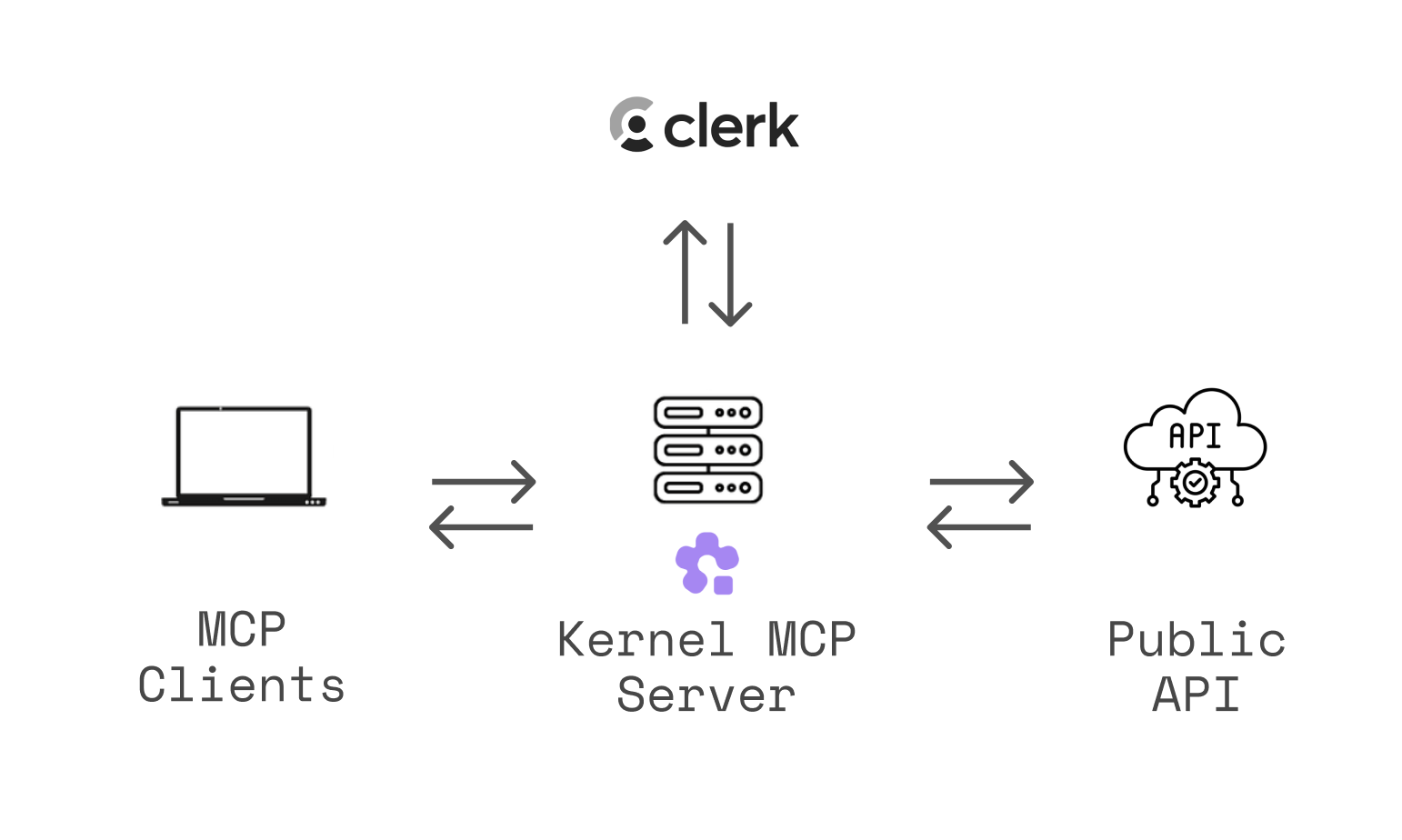
Architecture Overview

🌐 Use instantly at https://mcp.onkernel.com/mcp β€” no installation required!

What is this?

The Kernel MCP Server bridges AI assistants (like Claude, Cursor, or other MCP-compatible tools) with the Kernel platform, enabling them to:

  • πŸš€ Deploy and manage Kernel apps in the cloud
  • 🌐 Launch and control headless Chromium sessions for web automation
  • πŸ“Š Monitor deployments and track invocations
  • πŸ” Search Kernel documentation and inject context
  • πŸ’» Execute arbitrary Playwright code against live browsers
  • πŸŽ₯ Record MP4 video replays of browser automation

Open-source & fully-managed β€” the complete codebase is available here, and we run the production instance so you don't need to deploy anything.

The server uses OAuth 2.0 authentication via Clerk to ensure secure access to your Kernel resources.

For a deeper dive into why and how we built this server, see our blog post: Introducing Kernel MCP Server.

Setup Instructions

General (Transports)

  • Streamable HTTP (recommended): https://mcp.onkernel.com/mcp
  • stdio via mcp-remote (for clients without remote MCP support): npx -y mcp-remote https://mcp.onkernel.com/mcp

Use the streamable HTTP endpoint where supported for increased reliability. If your client does not support remote MCP, use mcp-remote over stdio.

Kernel's server is a centrally hosted, authenticated remote MCP using OAuth 2.1 with dynamic client registration.

Quick Setup with Kernel CLI

The fastest way to configure the MCP server is using the Kernel CLI:

bash
# Install the CLI
brew install onkernel/tap/kernel
# or: npm install -g @onkernel/cli

# Install MCP for your tool
kernel mcp install --target <target>

Supported Targets

TargetCommand
Cursorkernel mcp install --target cursor
Claude Desktopkernel mcp install --target claude
Claude Codekernel mcp install --target claude-code
VS Codekernel mcp install --target vscode
Windsurfkernel mcp install --target windsurf
Zedkernel mcp install --target zed
Goosekernel mcp install --target goose

The CLI automatically locates your tool's config file and adds the Kernel MCP server configuration.

Connect in your client

Claude

Our remote MCP server is not compatible with the method Free users of Claude use to add MCP servers.

Pro, Max, Team & Enterprise (Claude.ai and Claude Desktop)

  1. Go to Settings β†’ Connectors β†’ Add custom connector.
  2. Enter: Integration name: Kernel, Integration URL: https://mcp.onkernel.com/mcp, then click Add.
  3. In Settings β†’ Connectors, click Connect next to Kernel to launch OAuth and approve.
  4. In chat, click Search and tools and enable the Kernel tools if needed.

On Claude for Work (Team/Enterprise), only Primary Owners or Owners can enable custom connectors for the org. After it's configured, each user still needs to go to Settings β†’ Connectors and click Connect to authorize it for their account.

Claude Code CLI

Terminal
claude mcp add --transport http kernel https://mcp.onkernel.com/mcp
# Then in the REPL run once to authenticate:
/mcp

Cursor

Automatic setup

Install MCP Server

Manual setup

  1. Press ⌘/Ctrl Shift J.
  2. Go to MCP & Integrations β†’ New MCP server.
  3. Add this configuration:
config.json
{
  "mcpServers": {
    "kernel": {
      "url": "https://mcp.onkernel.com/mcp"
    }
  }
}
  1. Save. The server will appear in Tools.

OpenCode

Add the following to your ~/.config/opencode/opencode.jsonc:

JSON Config
{
  "mcp": {
    "kernel": {
      "type": "remote",
      "url": "https://mcp.onkernel.com/mcp",
    },
  },
}

Then authenticate using the OpenCode CLI:

bash
# Authenticate with Kernel
opencode mcp auth kernel

# If you need to re-authenticate, first logout then auth again
opencode mcp logout kernel
opencode mcp auth kernel

Goose

Click here to install Kernel on Goose in one click.

Goose Desktop

  1. Click Extensions in the sidebar of the Goose Desktop.
  2. Click Add custom extension.
  3. On the Add custom extension modal, enter:
    • Extension Name: Kernel
    • Type: STDIO
    • Description: Access Kernel's cloud-based browsers via MCP
    • Command: npx -y mcp-remote https://mcp.onkernel.com/mcp
    • Timeout: 300
  4. Click Save Changes button.

Goose CLI

  1. Run the following command:
    bash
    goose configure
    
  2. Select Add Extension from the menu.
  3. Choose Command-line Extension.
  4. Follow the prompts:
    • Extension name: Kernel
    • Command: npx -y mcp-remote https://mcp.onkernel.com/mcp
    • Timeout: 300
    • Description: Access Kernel's cloud-based browsers via MCP

Visual Studio Code

config.json
{
  "mcpServers": {
    "kernel": {
      "url": "https://mcp.onkernel.com/mcp",
      "type": "http"
    }
  }
}
  1. Press ⌘/Ctrl P β†’ search MCP: Add Server.
  2. Select HTTP (HTTP or Server-Sent Events).
  3. Enter: https://mcp.onkernel.com/mcp
  4. Name the server Kernel β†’ Enter.

Windsurf

  1. Press ⌘/Ctrl , to open settings.
  2. Navigate Cascade β†’ MCP servers β†’ View raw config.
  3. Paste:
config.json
{
  "mcpServers": {
    "kernel": {
      "command": "npx",
      "args": ["-y", "mcp-remote", "https://mcp.onkernel.com/mcp"]
    }
  }
}
  1. On Manage MCPs, click Refresh to load Kernel MCP.

Zed

  1. Press ⌘/Ctrl , to open settings.
  2. Paste:
config.json
{
  "context_servers": {
    "kernel": {
      "source": "custom",
      "command": "npx",
      "args": ["-y", "mcp-remote", "https://mcp.onkernel.com/mcp"]
    }
  }
}

Smithery

You can connect directly to https://mcp.onkernel.com/mcp, or use Smithery as a proxy using its provided URL.

  • Use Smithery URL in any MCP client:

    1. Open Smithery: Kernel.
    2. Copy the URL from "Get connection URL".
    3. Paste it into your MCP client's "Add server" flow.
  • Use Kernel in Smithery's Playground MCP client:

    1. Open Smithery Playground.
    2. Click "Add servers", search for "Kernel", and add it.
    3. Sign in and authorize Kernel when prompted.

Others

Many other MCP-capable tools accept:

  • Command: npx
  • Arguments: -y mcp-remote https://mcp.onkernel.com/mcp
config.json
{
  "kernel": {
    "command": "npx",
    "args": ["-y", "mcp-remote", "https://mcp.onkernel.com/mcp"]
  }
}

Configure these values wherever the tool expects MCP server settings.

Tools (18 model-facing, plus 1 app-only helper)

Each Kernel feature has a single manage_* tool with an action parameter, keeping the tool set small and consistent. Standalone tools handle high-frequency and interactive workflows.

One additional Managed Auth helper (begin_auth_login) is marked app-only (_meta.ui.visibility: ["app"]); it refuses to execute on hosts that do not declare MCP Apps support. The App forwards the server-issued signed flow checkpoint to the shared manage_auth_connections wait action, so flow identity and terminal-state decisions stay on the server.

Self-hosted deployments can hide sensitive tool families by setting KERNEL_MCP_DISABLED_TOOLSETS to a comma-separated list. For example, KERNEL_MCP_DISABLED_TOOLSETS=api_keys prevents manage_api_keys from being registered.

Call get_connection_context before deciding whether to create or select a project. Its canonical connection_scope reports whether the connection is organization-wide or fixed to a project. Project-scoped tools always advertise an optional project_id: organization-wide connections may omit it to preserve organization-wide reads and API default-project behavior, while fixed-project connections may omit it or pass the matching ID. Project resources use project-qualified kernel://orgs/{organizationId}/projects/{projectId}/... URIs. Authorization remains enforced by the Kernel API; selecting a project never grants access to it.

manage_* tools

  • manage_browsers - Create, update, list, get, and delete browser sessions, and read archived telemetry for active or deleted sessions. Supports headless/stealth modes, profiles, proxies, viewports, extensions, and SSH tunneling.
  • manage_profiles - Setup (with guided live browser session), search/list with pagination, get, and delete browser profiles for persisting cookies and logins.
  • manage_projects - Create, list, get, update, and delete organization projects. Inspect and update per-project resource limits.
  • manage_api_keys - Create, list, get, update, and delete org-wide or project-scoped API keys. Create returns the plaintext key once.
  • manage_browser_pools - Create, list, get, delete, and flush pools of pre-warmed browsers. Acquire and release browsers from pools.
  • manage_proxies - Create, list, get, check, and delete proxy configurations (datacenter, ISP, residential, mobile, custom).
  • manage_replays - Start, stop, and list MP4 video replay recordings for a browser session. Session-scoped: start once, run your automation, then stop. Requires a paid Kernel plan.
  • manage_extensions - List and delete uploaded browser extensions.
  • manage_apps - List/search apps, invoke actions, get/list/delete deployments, and get invocation results.
  • manage_auth_connections - Create, list, get, delete, login, submit, and wait for managed-auth connections in every client. Use domain-filtered list for discovery. App-capable clients additionally receive open_auth_login; the programmatic actions remain available there too.
  • manage_credentials - Create, list, get, update, and delete stored credentials; fetch a current TOTP code for credentials with a configured totp_secret.
  • manage_credential_providers - Create, list, get, update, and delete external credential providers (e.g. 1Password); list available items and test the provider connection.

Standalone tools

  • get_connection_context - Inspect the authenticated principal, organization, credential scope, and effective project scope.
  • computer_action - Mouse, keyboard, clipboard, and screenshot controls for browser sessions (click, type, press_key, scroll, move, get_position, read_clipboard, write_clipboard, screenshot).
  • browser_curl - Send HTTP requests through an existing browser session's Chrome network stack.
  • execute_playwright_code - Execute Playwright/TypeScript code against an existing browser session. Does not create or delete browsers - use manage_browsers for session lifecycle.
  • exec_command - Run shell commands inside a browser VM. Returns decoded stdout/stderr.
  • search_docs - Search Kernel platform documentation and guides.
  • open_auth_login - Open a secure interactive Managed Auth MCP App after user consent. Registered only for clients that declare MCP Apps support; credentials and MFA never enter MCP/model traffic.

Resources

Project resources use the prefix kernel://orgs/{organization_id}/projects/{project_id}.

  • /browsers and /browsers/{session_id} - List or access browser sessions
  • /browser-pools and /browser-pools/{id_or_name} - List or access browser pools
  • /profiles and /profiles/{profile_name} - List or access browser profiles
  • /apps and /apps/{app_name} - List or access deployed apps

Prompts

  • kernel-concepts - Get explanations of Kernel's core concepts (browsers, apps, overview)
  • debug-browser-session - Get a comprehensive debugging guide for troubleshooting browser sessions (VM issues, network problems, Chrome errors)

Troubleshooting

  • Cursor clean reset: ⌘/Ctrl Shift P β†’ run Cursor: Clear All MCP Tokens (resets all MCP servers and auth; re-enable Kernel and re-authenticate).
  • Clear saved auth and retry: rm -rf ~/.mcp-auth
  • Ensure a recent Node.js version when using npx mcp-remote
  • If behind strict networks, try stdio via mcp-remote, or explicitly set the transport your client supports

Examples

Invoke apps from anywhere

Code
Human: Run my web-scraper app to get data from reddit.com
Assistant: I'll execute your web-scraper action with reddit.com as the target.
[Uses manage_apps tool with action: "invoke" to run your deployed app in the cloud]

Execute Playwright code dynamically

Code
Human: Go to example.com and get me the page title
Assistant: I'll create a browser session, then execute Playwright code against it to navigate to the site and retrieve the title.
[Uses manage_browsers tool with action: "create" to get a session_id]
[Uses execute_playwright_code tool with session_id and code: "await page.goto('https://example.com'); return await page.title();"]
Returns: { success: true, result: "Example Domain" }

Use managed authentication for a protected site

  1. Call manage_auth_connections with action: "list" and the exact domain_filter.
  2. Fetch all pages. Reuse an authenticated connection; ask only when multiple relevant accounts match.
  3. A direct request to log in is consent. If authentication is discovered incidentally, ask before opening the App.
  4. For a new connection, choose a concise service-derived profile name unless the user supplied one; do not ask solely for a profile name.
  5. Call open_auth_login, then immediately follow its next_action and repeat the read-only wait while it reports pending.
  6. The user enters credentials/MFA only in the secure App. Once the wait reports authenticated, resume the original task with the verified profile_name.

Example: β€œLog me into my Hacker News account and update my profile to add a random emoji at the bottom.” The agent should discover news.ycombinator.com, open the App when needed, wait for authentication, then continue the profile edit without asking for credentials or a profile name in chat.

The secure App defaults record_session and browser_telemetry.enabled to true, recording replay video plus the operational telemetry categories (control, connection, system, and captcha) for managed-auth browser sessions. Callers can explicitly disable either setting. The programmatic manage_auth_connections create/login actions preserve the API’s opt-in and inheritance behavior when these parameters are omitted.

Set up browser profiles for authentication

Code
Human: Set up a profile for my work accounts
Assistant: I'll create a profile and guide you through the setup process.
[Uses manage_profiles tool with action: "setup"]

Human: I'm done setting up my accounts
Assistant: Perfect! I'll close the browser session and save your profile.
[Uses manage_browsers tool with action: "delete" to save profile]

Debug a browser session

Note: Attach the debug-browser-session prompt to your conversation first, then ask for help debugging.

Code
Human: [Attaches debug-browser-session prompt with session_id and issue_description]
       Help me debug this browser session.
Assistant: [Follows the debugging guide from the prompt: uses Kernel CLI to check session status,
            read VM logs, test network connectivity, and diagnose issues]

Connect local dev server to cloud browser

This is perfect for AI coding workflows where you need to preview local changes in a real browser:

Code
Human: I'm working on a React app running on localhost:3000. I want to test it in a cloud browser.
Assistant: I'll create a browser session with SSH port forwarding for you.
[Uses manage_browsers tool with action: "create" and remote_forward: "3000:localhost:3000"]
Returns: Session ID, live view URL, and SSH tunnel command.

🀝 Contributing

We welcome contributions! Please see our contributing guidelines:

  1. Fork the repository and create your feature branch
  2. Make your changes and add tests if applicable
  3. Run the linter and formatter:
    bash
    bun run lint
    bun run format
    
  4. Test your changes thoroughly
  5. Submit a pull request with a clear description

Development Guidelines

  • Follow the existing code style and formatting
  • Add TypeScript types for new functions and components
  • Update documentation for any API changes
  • Ensure all tests pass before submitting

πŸ“„ License

This project is licensed under the MIT License - see the LICENSE file for details.

πŸ”— Related Projects

  • Model Context Protocol - The protocol specification
  • Kernel Platform - The platform this server integrates with
  • Clerk - Authentication provider
  • @onkernel/sdk - Kernel JavaScript SDK

πŸ’¬ Support

  • Issues & Bugs: GitHub Issues
  • MCP Feedback: github.com/kernelxyz/mcp-feedback
  • Documentation: Kernel Docs β€’ MCP Setup Guide
  • Community: Kernel Discord

Built with ❀️ by the Kernel Team

Running this server locally

bash
cp .env .env.local # Values for the .env.local file are in 1Password > DevEnvVars > MCP section
bun install
bun run dev

This will start the server on port 3002.

Related MCP Servers

View all in Developer Tools View all alternatives
  • Mcp Server logoMcp Server

    MCP Server for ThoughtSpot - provides OAuth authentication and tools for querying data

    πŸ’» Developer Tools0 views
    Compare vs Mcp Server β†’
  • A
    Ai Netcafe

    Compare LLM cost & latency on one prompt, translate PDF keeping layout, cited research, make PPTX

    πŸ’» Developer Tools0 views
    Compare vs Ai Netcafe β†’
  • Claude Task Master logoClaude Task Master

    AI-powered task management system for AI-driven development. Features PRD parsing, task expansion, multi-provider support (Claude, OpenAI, Gemini, Perplexity, xAI), and selective tool loading for optimized context usage.

    πŸ’» Developer Tools7 views
    Compare vs Claude Task Master β†’
  • Appfigures logoAppfigures

    Access your app analytics, ASO tools, and app market intelligence with Appfigures.

    πŸ’» Developer Tools0 views
    Compare vs Appfigures β†’

Frequently Asked Questions about Kernel Mcp Server

Add the following block to your claude_desktop_config.json under mcpServers: "mcpServers": { "kernel-mcp-server": { "command": "npx", "args": ["-y", "kernel-mcp-server"] } }

AllMCPs Directory Badge

Full Badge Customizer

Showcase your server listing on GitHub or your project documentation. Embed this dynamic SVG badge to highlight official listing status and live engagement.

Badge Style:
Live Dynamic SVG PreviewKernel Mcp Server AllMCPs Directory Badge

Markdown (GitHub README)
[![AllMCPs](https://allmcps.com/api/badge/kernel-mcp-server?style=directory)](https://allmcps.com/mcp/kernel-mcp-server)
HTML Embed
<a href="https://allmcps.com/mcp/kernel-mcp-server"><img src="https://allmcps.com/api/badge/kernel-mcp-server?style=directory" alt="Kernel Mcp Server on AllMCPs" /></a>

Technical Specs & Signals

CategoryπŸ’»Developer Tools
More technical detailsExpand β–Ύ
TransportSTDIO
RuntimeNode.js
0/4 checks healthy over the last 7h
Views0
Unique ViewsTotal visits recorded for this listing page on AllMCPs.
Installs0
Installs & Copy ActionsTotal times users copied install commands or configuration snippets for this server.
27Quality signal: Emerging Β· 27/100How this signal is calculated β–Ύ
Server availabilityNot measured

Not scored for repo-hosted servers β€” we can't reach the running server, only its GitHub page. Hosted MCP endpoints are health-checked live.

Verified ownership8/20
Documentation & tools11/30
Adoption & activity1/15
Community engagement0/10

A guidance signal from public completeness & health data β€” not a user rating. New listings start lower and rise as they add docs, get verified, and grow adoption. Signals we can't observe for a listing are skipped, not counted against it.

β˜… Spotlight Slot

Feature Your MCP Server

Get maximum visibility for your server across our directory, search results, and detail pages.

Spotlight Your Server

Own this project?

This directory is pre-filled from public sources. Claim via GitHub README, site badge, or DNS TXT to get the verified badge and attach your website.

Free dofollow backlink: after claiming, verify your product site and place a dofollow AllMCPs badge β€” we recheck it stays live.

Claim & get free dofollow

Share & Embed

Add our SVG badge (dark/light directory styles) or embeddable widget to your site.

Explore more

More in πŸ’» Developer Tools β†’Best MCP servers for Developers β†’Alternatives to Kernel Mcp Server β†’Install in Claude DesktopInstall in CursorInstall in VS Code

