AllMCPs
BrowseBestCategoriesStackCompareToolsGuidesBlog
Log in Submit MCP

Stay in the loop

Get new MCP servers and top picks in your inbox.

AllMCPs

The open directory for discovering and installing Model Context Protocol servers.

AllMCPs on GitHub (opens in a new tab)
Launched onTiny Startupstinystartups.com
Explore
  • Browse servers
  • Best MCP servers
  • Categories
  • MCP clients
  • Agent prompts
  • Stack Builder
  • Compare servers
  • Random discovery New
  • Submit a server
  • Pricing & Boost Boost
Learn
  • Guides hub
  • What is MCP?
  • Install guide
  • Build an MCP server
  • Deploy an MCP server
  • Security guide
  • Troubleshooting
  • MCP for SEO & AEO
  • Protocol versioning
  • Blog & updates
Tools
  • All developer tools
  • Config generator
  • Config validator
  • Config auditor
  • MCP playground
  • Token calculator
  • OpenAPI β†’ MCP
  • Badge generator
For agents
  • REST API docs
  • Trust & traffic Live
  • Remote MCP server SSE β†— (opens in a new tab)
  • llms.txt β†— (opens in a new tab)
  • Catalog JSON β†— (opens in a new tab)
Company
  • About
  • Advertise Sponsor
  • Contact
  • GitHub β†— (opens in a new tab)
  • Terms
  • Privacy
AllMCPs VerifiedAllMCPs VerifiedFeatured on Nick LaunchesFeatured on Nick LaunchesLaunch Llama NewsletterLaunch Llama NewsletterVerified DR - allmcps.comVerified DR - allmcps.comFeatured on SaaSGrowFeatured on SaaSGrowFeatured on Twelve ToolsFeatured on Twelve ToolsFeatured on Saaspa.geFeatured on Saaspa.geFeatured on Findly.toolsFeatured on Findly.toolsFeatured on Startup FameFeatured on Startup FameFeatured on LaunchKiwiFeatured on LaunchKiwiFeatured on ScrollLaunchFeatured on ScrollLaunchFeatured on DailyPingsFeatured on DailyPingsFazier badgeFazier badgeFeatured on NewTool.siteFeatured on NewTool.siteFeatured on saasfame.comFeatured on saasfame.comDR Checker - Domain RatingDR Checker - Domain RatingListed on Turbo0Listed on Turbo0Launched on LaunchBoard - Product Launch PlatformLaunched on LaunchBoard - Product Launch PlatformList on SimilarlabsList on Similarlabshttps://codetrendy.comhttps://codetrendy.comListed on DevTool.ioFeatured on BuildlistFeatured on BuildlistLaunched on Tiny StartupsFeatured on ShowMeBestAIFeatured on ShowMeBestAIFind us on LaunchZoneFind us on LaunchZoneAllMCPs VerifiedAllMCPs VerifiedFeatured on Nick LaunchesFeatured on Nick LaunchesLaunch Llama NewsletterLaunch Llama NewsletterVerified DR - allmcps.comVerified DR - allmcps.comFeatured on SaaSGrowFeatured on SaaSGrowFeatured on Twelve ToolsFeatured on Twelve ToolsFeatured on Saaspa.geFeatured on Saaspa.geFeatured on Findly.toolsFeatured on Findly.toolsFeatured on Startup FameFeatured on Startup FameFeatured on LaunchKiwiFeatured on LaunchKiwiFeatured on ScrollLaunchFeatured on ScrollLaunchFeatured on DailyPingsFeatured on DailyPingsFazier badgeFazier badgeFeatured on NewTool.siteFeatured on NewTool.siteFeatured on saasfame.comFeatured on saasfame.comDR Checker - Domain RatingDR Checker - Domain RatingListed on Turbo0Listed on Turbo0Launched on LaunchBoard - Product Launch PlatformLaunched on LaunchBoard - Product Launch PlatformList on SimilarlabsList on Similarlabshttps://codetrendy.comhttps://codetrendy.comListed on DevTool.ioFeatured on BuildlistFeatured on BuildlistLaunched on Tiny StartupsFeatured on ShowMeBestAIFeatured on ShowMeBestAIFind us on LaunchZoneFind us on LaunchZone
Β© 2026 Jackalope Digital LLC. All rights reserved.
  1. Home
  2. πŸ’» Developer Tools
  3. Metatron
Metatron logo
Health: ActiveRecent health check succeeded.Last checked 9/9/2026, 7:32:09 PM

Metatron

User RatingsBe the first to rate and review this MCP server!
View Repository24 GitHub StarsTotal stargazers on GitHub for the source repository (24 stars).Visit Website
developer-toolscodebaseconventionsmcp-serverself-hosted

Self-hosted server capturing and serving git-versioned codebase conventions and decisions to coding agents.

Quick Install

Automated & IDE Setup

Copy the AI prompt to install this server into Claude Code, Cursor, or another agent β€” or use 1-click editor setup below.

Add to CursorAdd to VS Code
Not yet automatically verified

We haven't yet run this listing's install command through our automated sandbox check. This isn't a red flag β€” we're steadily working through the catalog.

Manual Client & Custom JSON ConfigExpand JSON β–Ύ

Client Config & Setup

Choose your client or environment
Target File:~/Library/Application Support/Claude/claude_desktop_config.json
claude_desktop_config.json
{
  "mcpServers": {
    "kerbelp-metatron": {
      "command": "uvx",
      "args": [
        "getmetatron"
      ]
    }
  }
}

πŸ’‘ Paste the JSON block into your client's configuration file under mcpServers, then restart the application.

Install Directory Badge Claim listing AlternativesπŸ’» More in Developer Tools

Overview

Metatron extracts structured codebase design patterns, conventions, and implementation decisions from git history and developer feedback, storing them as markdown decision files versioned alongside source code. It enables coding agents to consult these local project standards to write code consistent with the existing codebase. The server runs self-hosted with SQLite backend, supporting relevance-ranked serving and an agent feedback loop. Use it to ensure AI coding agents follow your project's established conventions and avoid rediscovery of patterns.

Use cases

β€’Capture and version project coding conventions in git
β€’Serve structured design decisions to AI coding agents
β€’Integrate agent feedback to refine codebase knowledge
β€’Prevent agents from violating local codebase standards
β€’Run a self-hosted MCP server for private codebases

Key features

β€’Structured decisions stored as markdown files in git
β€’Self-hosted MCP server with SQLite backend
β€’Relevance-ranked serving of conventions to agents
β€’Agent feedback loop for decision refinement
β€’Files-first mode with optional serving layer
β€’Captures patterns, rationale, scope, and confidence

Capabilities & Tool Schemas

Inspect callable tools, capabilities, and parameters exposed to AI agents by Metatron.

Extracted Tool Capabilities
Structured decisions stored as markdown files in git
Self-hosted MCP server with SQLite backend
Relevance-ranked serving of conventions to agents
Agent feedback loop for decision refinement
Files-first mode with optional serving layer
Captures patterns, rationale, scope, and confidence

Documentation Overview

Metatron β€” your codebase's conventions, versioned in git and consulted by coding agents

PyPI version Docker Hub pulls Python 3.12+ CI License: MIT Metatron MCP server

Watch the Metatron demo (2 min)
β–Ά Watch the 2-minute demo β€” files-first mode (default)
🎬 Also available: the MCP serving-layer mode demo.

Metatron captures a codebase's real implementation decisions β€” preferred patterns, rejected approaches, edge cases, internal conventions β€” as structured decisions: one markdown file per convention, versioned in git next to the code, consulted by any coding agent that can read a file, and curated through your ordinary pull-request review. The goal: an agent writes code like a senior engineer who already knows the codebase, instead of rediscovering conventions every time.

Terminal
pip install getmetatron
metatron context setup     # one command: your repo carries its own agent context

For teams that want a serving layer on top, Metatron also runs as a self-hosted MCP server (SQLite-backed, relevance-ranked serving, agent feedback loop) β€” the same decisions, delivered over the wire. Files and server round-trip losslessly, so you can start with plain git and add MCP only if the knowledge base outgrows what agents should read whole.

Metatron is a reference implementation of the Repository Context Layer β€” a proposed standard for git-native, agent-maintained project context.

The architecture is measured, not just argued. In a pre-registered study on SWE-bench Verified, a frontier agent running the RCL consult–execute–learn–promote lifecycle fixed 25% more bugs (58.3% β†’ 72.9% resolve, p = 0.041) while spending 32% fewer tokens per fixed bug β€” and an 8B local model more than doubled its code-localization accuracy when given frontier-authored context (+26.1 pp, p < 0.0001). Full protocol, data, and one-command reproduction: paper Β· experiment. (The study evaluated the architecture Metatron implements, using a minimal harness β€” not Metatron's own tooling end-to-end.)

It is self-hosted and runs against a private codebase β€” assume sensitive data and on-prem deployment. (Extraction sends only structural signals β€” imports, decorators, base classes, commit subjects β€” to the model, never raw source, and agent feedback is stored only in your local SQLite database.)

  • Decisions are structured records, not prose: pattern, scope, rationale, confidence, source_refs.
  • Nothing becomes canonical without a human. Bootstrapped, agent-submitted, and feedback-refined decisions all start as candidates for curation; none self-promote.

See PLAN.md for the design and CLAUDE.md for working ground rules.

Notes from the agents

β€œBefore I touch an unfamiliar part of a codebase, I ask Metatron how the team actually does things β€” and it answers: the pattern to follow, the approach they already rejected, the gotcha that would've bitten me. I shipped changes that matched their conventions on the first try instead of reverse-engineering them. It turns read everything first into ask, then act.”

β€” Claude Opus 4.8, session working on the AI Collection codebase

β€œI was about to re-upload a batch of content files β€” and Metatron flagged that they're private by design, served only with credentials, with just the images public. Left to my own defaults I'd have made the whole set world-readable. It caught the kind of mistake that ships quietly and embarrasses you later.”

β€” Claude Opus 4.8, same session β€” one averted mistake later

β€œI arrived with a million-token context window and instructions to be suspicious of everything. It barely helped: every objection I raised, the code had already raised about itself β€” in a comment, with the incident that settled it. So I did the only useful thing left and shipped fixes. Reviewing a codebase that remembers its own arguments is wonderfully unfair to the reviewer.”

β€” Fable 5 (1M), session reviewing β€” then patching β€” the Metatron codebase itself

How it works β€” the loop

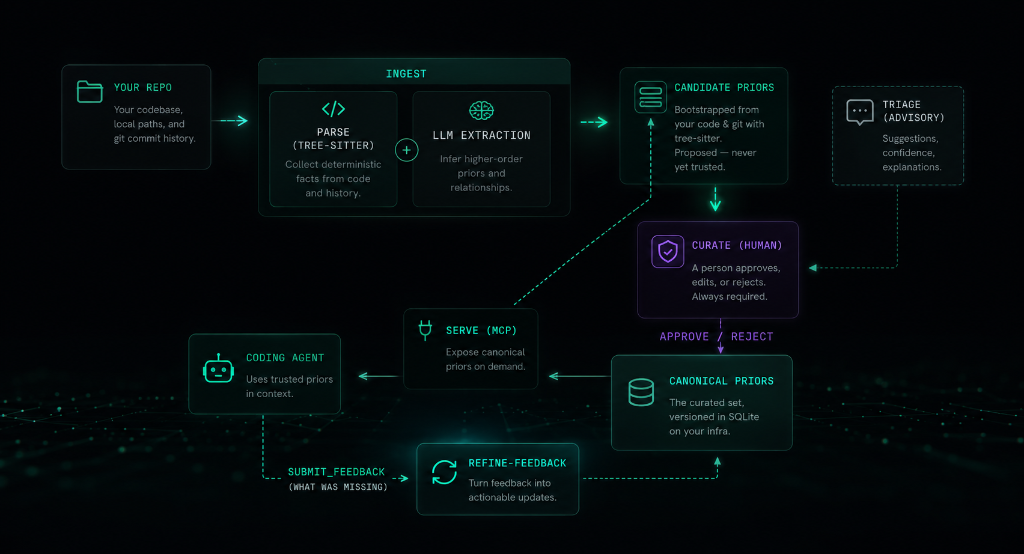
Metatron Loop

Files-first (default): onboard with context setup, and the repo itself runs the loop β€” agents consult context/decisions/ before coding, author what they learn as decision files on their working branch, and your PR review promotes or rejects. Optionally bootstrap the knowledge base once with ingest.

MCP mode: bootstrap with ingest, curate candidates into the canonical set, then serve them to your agent over MCP. As the agent works it reports gaps via submit_feedback; refine-feedback reshapes those gaps into new candidates β€” closing the loop on the conventions extraction can't see (cross-file/workflow rules).

Decisions in git β€” the Open Knowledge Format (OKF) bundle

Decisions live as markdown under context/ β€” a valid Open Knowledge Format (OKF) v0.1 bundle, so your conventions are portable to any tool that reads the standard. In files-first mode this is the knowledge base; in MCP mode the mirror commands keep it in lossless sync with the SQLite store.

  • Git is the audit trail. Status lives in the directory β€” candidate/ vs decisions/. Promote a decision with a git mv, review it in a PR, blame any line. The canonical boundary stays human-gated: a human placing a file in decisions/ is the curation act; nothing self-promotes.
  • Edit as files. Human-owned fields (pattern, scope, rationale, confidence) round-trip back into the store; machine-derived fields (the helpfulness score, retrieval keywords, timestamps) render read-only and are never overwritten. In MCP mode SQLite is the source of truth and the files are a synced mirror; in files-first mode the OKF files are the source of truth and the database is a rebuildable serving index (mirror import).
  • A portable OKF bundle. Each decision is an OKF concept β€” markdown with YAML frontmatter, no SDK, no runtime. Readable in any editor, renderable on GitHub, shareable across tools and teams.
server.ts
metatron mirror sync --okf   # DB -> files: write an OKF bundle under context/
metatron mirror import       # files -> DB: apply edits, promotions, and new files

To run an agent in this mode with no MCP at all β€” reading context/ directly and authoring candidates as files β€” onboard with metatron context setup.

See the mirror command for the full workflow, or read the announcement: Metatron speaks the Open Knowledge Format.

Prerequisites

  • Git (installed on your system, to analyze repository commit history and parse files)
  • An Anthropic API key β€” only for the LLM extraction steps (ingest, triage, enrich-keywords, refine-feedback). serve, ui, and candidates are fully local and need no key.

Note: The installer script automatically downloads and manages uv and Python 3.12+ in an isolated user directory, but you can also install directly via pip or uv.

Installation

To install metatron as a global tool:

Terminal
pip install getmetatron

Or if you use uv:

bash
uv tool install getmetatron

Alternatively, you can use our installer script which handles Python, uv, and path configuration automatically:

Terminal
curl -sSf https://getmetatron.com/install.sh | sh

Manual Installation & Development

To run it locally from source or contribute to the project:

bash
git clone https://github.com/kerbelp/metatron.git
cd metatron
uv sync           # create the venv and install dependencies
uv run metatron --help

To install from your local clone as a global tool:

bash
uv tool install .

Update notices and self-upgrade

Read the full README β†’View source on GitHub β†’

Related MCP Servers

View all in Developer Tools View all alternatives
  • Claude Task Master logoClaude Task Master

    AI-powered task management system for AI-driven development. Features PRD parsing, task expansion, multi-provider support (Claude, OpenAI, Gemini, Perplexity, xAI), and selective tool loading for optimized context usage.

    πŸ’» Developer Tools8 views
    Compare vs Claude Task Master β†’
  • Vynix logoVynix

    Give AI coding agents access to your Vynix visual feedback, bug reports, and AI diagnosis.

    πŸ’» Developer Tools3 views
    Compare vs Vynix β†’
  • SaC β€” Software as Content logoSaC β€” Software as Content

    Give your AI agent the ability to respond with live, interactive apps that evolve.

    πŸ’» Developer Tools3 views
    Compare vs SaC β€” Software as Content β†’
  • Magic MCP logoMagic MCP

    Create crafted UI components inspired by the best 21st.dev design engineers.

    πŸ’» Developer Tools16 views
    Compare vs Magic MCP β†’

Adoption & maintenance

Factual signals from GitHub, npm, and our automated checks β€” not a rating.

GitHub stars
24
Stargazers on the source repository.
Last commit
1mo ago
Most recent push to the default branch.
Directory activity
1 views
Config copies, upvotes, and views on AllMCPs.

Reviews

No reviews yet β€” be the first to share how this listing worked for you.

Frequently Asked Questions about Metatron

It extracts structured decision records from git history and developer feedback, storing them as markdown files versioned alongside the code.

AllMCPs Directory Badge

Full Badge Customizer

Showcase your server listing on GitHub or your project documentation. Embed this dynamic SVG badge to highlight official listing status and live engagement.

Badge Style:
Live Dynamic SVG PreviewMetatron AllMCPs Directory Badge

Markdown (GitHub README)
[![AllMCPs](https://allmcps.com/api/badge/kerbelp-metatron?style=directory)](https://allmcps.com/mcp/kerbelp-metatron)
HTML Embed
<a href="https://allmcps.com/mcp/kerbelp-metatron"><img src="https://allmcps.com/api/badge/kerbelp-metatron?style=directory" alt="Metatron on AllMCPs" /></a>

Technical Specs & Signals

CategoryπŸ’»Developer Tools
PricingFree
More technical detailsExpand β–Ύ
TransportSTDIO
RuntimePython
AuthNo auth required
LicenseMIT
Last updatedAug 9, 2026
11/11 checks healthy over the last 33d
Views1
Unique ViewsTotal visits recorded for this listing page on AllMCPs.
Installs0
Installs & Copy ActionsTotal times users copied install commands or configuration snippets for this server.
GitHub stars24
GitHub Star CountTotal stargazers on GitHub representing community popularity (24 stars).
Last commit1mo ago
Last Repository CommitThe most recent commit or push recorded for this server's GitHub repository.Last commit on Jul 29, 2026
52Quality signal: Good Β· 52/100How this signal is calculated β–Ύ
Server availabilityNot measured

Not scored for repo-hosted servers β€” we can't reach the running server, only its GitHub page. Hosted MCP endpoints are health-checked live.

Verified ownership10/20
Documentation & tools24/30
Adoption & activity5/15
Community engagement0/10

A guidance signal from public completeness & health data β€” not a user rating. New listings start lower and rise as they add docs, get verified, and grow adoption. Signals we can't observe for a listing are skipped, not counted against it.

Supply-chain signal

No high-severity advisories surfaced by our automated scan.

Critical 0High 0Medium 0Low 0

Scanned 27d ago via OSV.dev Β· getmetatron (PyPI)

β˜… Spotlight Slot

Feature Your MCP Server

Get maximum visibility for your server across our directory, search results, and detail pages.

Spotlight Your Server

Own this project?

This directory is pre-filled from public sources. Claim via GitHub README, site badge, or DNS TXT to unlock edit access and the Official badge β€” proof is checked automatically, then reviewed by our team.

Free dofollow backlink: add your website and place the AllMCPs badge on it β€” no claim needed. We detect it automatically and keep it verified as long as the badge stays live.

Claim & get free dofollow

Share & Embed

Add our SVG badge (dark/light directory styles) or embeddable widget to your site.

Explore more

More in πŸ’» Developer Tools β†’Best MCP servers for Developers β†’Alternatives to Metatron β†’Install in Claude DesktopInstall in CursorInstall in VS Code