Opentakeoff README
The full upstream README, mirrored here for reference. Install config, tool schemas, adoption signals, and an original overview live on the Opentakeoff listing page.
OpenTakeoff
The measurement engine for building plans—built so an AI agent can drive it, and so an estimator wants to.
A takeoff is the act of measuring quantities off a construction drawing. OpenTakeoff does it two ways over one engine: 53 MCP tools for an agent, and a browser canvas for a person. Agents and people share the takeoff document and quantity calculations. Each sheet carries its calibration; measurements carry geometry, method and authorship. Recalibration updates quantities together, incompatible imports report scale conflicts, and agent measurements carry an explicit review status. See the Phase 1 test guide.






For agents · Try the canvas · The engine's contract · For the person at the canvas · The data layer · Research · Fork it · Contribute
The two manuals: agent manual · user manual
Protocol work: Takeoff Protocol draft and compatibility status—formalizing existing records; current takeoff behavior is unchanged.
Read this in: 日本語 · 한국어 · 简体中文
Watch it: an autonomous agent runs a takeoff, live, no cuts (2:47) · hospital finish plan → report in about a minute (1:14) · canvas walkthrough (1:10) · One-Click Area (0:51)
One-Click Area is temporarily gated. The flood engine is being re-validated against a wider plan corpus. Until that finishes the One-Click tool is off the canvas rail (
Oreports the gate) and theone_click/detect_roomsMCP verbs are not registered (a default build ships 53 tools). Trace rooms with Area (A) in the canvas andmeasure_polygonover MCP; every other tool, sweep and derivation is unchanged. A build lifts the gate withVITE_ONE_CLICK=1(canvas) /OPENTAKEOFF_ONE_CLICK=1(server). Sections and videos below that show One-Click describe the engine as it returns — seedocs/design/ONE_CLICK_GATE.md.
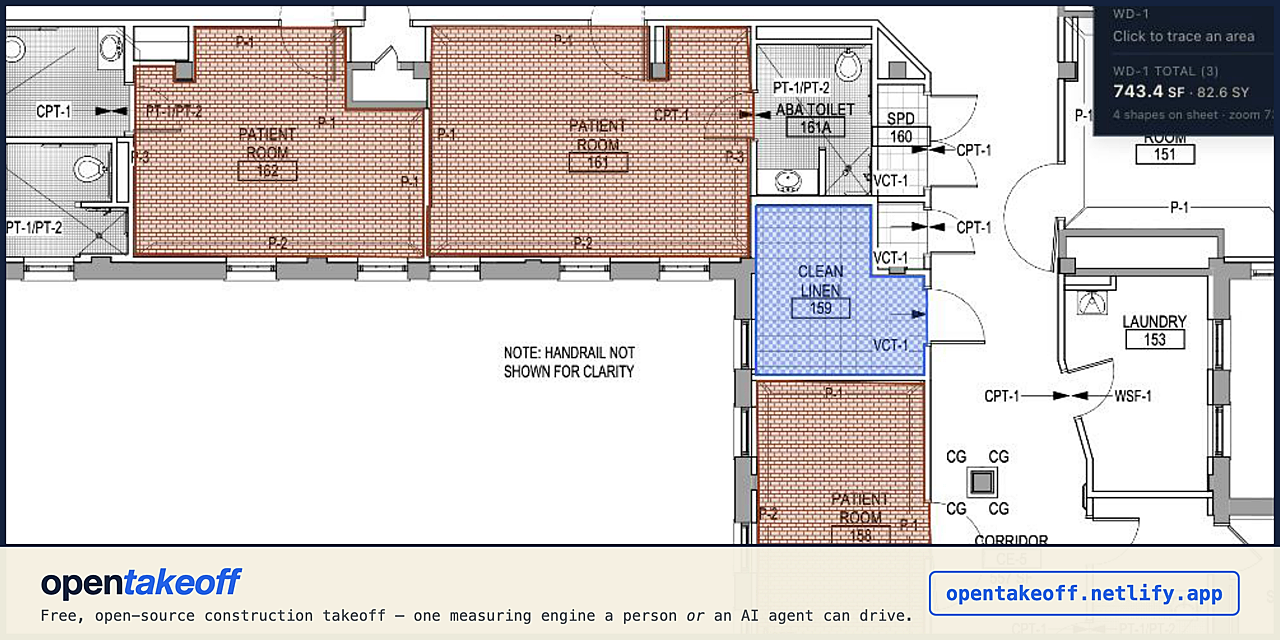
Start here
| You are | Go here |
|---|---|
| An estimator with a bid due | Open the canvas—drag in a plan, no account, nothing uploads. The user manual gets you from a blank tab to an exported takeoff in five minutes, and its working order is the sequence to run on a real bid set. |
| An AI agent—or the person wiring one up | npx -y opentakeoff-mcp, then the agent manual: the operating model, the standard finish every takeoff ends with, what the engine refuses to guess, and why. Tool-by-tool reference is mcp/README.md. |
| A developer building on the engine | AGENTS.md is the repo map and the ship discipline; FEATURES.md maps every capability to the code that does it. |
| A crew that wants its own copy | Fork it—your own instance on your own URL in a few minutes, Apache-2.0, nothing phones home. Same path if you're going to send a pull request. |
Windows, macOS, Linux — all of it
OpenTakeoff is a client-only browser app, so the canvas runs the same on Windows, macOS, ChromeOS and Linux in any current Chrome, Edge, Firefox or Safari. Nothing installs, nothing uploads, and no feature is gated on an operating system.
- Shortcuts are platform-aware. The app labels modifiers for the keyboard in front of you —
Ctrl/Alt/Shifton Windows and Linux,⌘/⌥/⇧on a Mac — and the handlers have always treated⌘andCtrlas the same key. Press?in the canvas for the current list. - The MCP server is tested on Windows.
npx -y opentakeoff-mcpruns on Windows, macOS and Linux, and CI runs the full MCP suite — typecheck, tests, build and the packaged smoke test — onwindows-latestas well asubuntu-lateston every change. - Optional extras. The bundled capture server is stdlib Python 3 and runs anywhere
Python does — on Windows invoke it with
python capture\capture_server.py selftest(or thepylauncher) rather thanpython3. Neither it nor the optionalserver/AI sandbox is needed to use the canvas. - Locked-down enterprise fleets (MSIX packaging, Windows Sandbox, Intune silent deploy) are tracked in #226 and not yet built.
What this is
Measuring quantities off a plan is the input to every construction bid—how much floor, how much wall, how many fixtures, at what scale, on which sheet. It happens thousands of times a day. Until OpenTakeoff there was no open-source takeoff engine at all, web-based or otherwise, and nothing an autonomous agent could call.
OpenTakeoff is that engine, with two front ends sharing geometry and quantity modules:
- Review cleanup—agents can edit annotation text with undo while preserving geometry and review; RFI-linked notes require browser review. Scope warnings distinguish numeric edge residue from real small overlaps.
- A stdio MCP server—
npx -y opentakeoff-mcp, 53 tools, on the official MCP registry. An agent opens a plan, reads the title block, sets the scale, traces the rooms to their wall faces (the flood engine stays gated), checks its own work on a rendered overlay, and hands back a marked-up planset PDF. - A browser canvas—no backend, no account, no upload. An estimator drags in a plan set and traces it, using One-Click room detection, CAD hatches, roll-goods seam layout, a materials buy list, and exports.
Neither is a wrapper around the other. The MCP server imports shared web modules, so quantity math and takeoff records are compatible. Browser and MCP room-detection paths currently differ; shared code does not guarantee identical boundaries on every plan. One-Click remains gated while that boundary is re-validated.
Provenance is the load-bearing part. Every shape records the scale it was measured at, the method that produced it (vector flood, raster trace, hand-drawn, agent-proposed), whether a human corrected it, and the machine's original boundary frozen beside the correction. This includes agent shapes drawn with manual measurement tools; the actor and drawing method are separate fields. Downstream, that's an audit trail a PM can read. Upstream, it's a labeled (geometry → finish) pair—the training signal takeoff models have never had at scale. That second use is not a side effect; see the data layer.
Recently shipped
- Tracing rules an agent actually reads—the room-boundary conventions an estimator uses
(innermost wall face, door openings crossed on the wall centerline, columns and chases wrapped,
never a hatch edge or a door leaf, a tight overlay check per ring) now ship inside the server:
takeoff://wiki/workflows, the initialize instructions and themeasure_polygondescription. On a task with no conventions in it, one unprompted run went from 0 of 6 rooms with door notches to 6 of 6 (#423, MCP 0.9.84) - A plan set with reference rings, and blind runs against it—three public floor plans (a VA
healthcare finish plan, a VA clinic floor plan, a city public-domain ADU) with estimator-trace
references, a scorer profile for concave rooms and finish splits, and published blind agent
runs with frozen exports, scores and overlays. The runs found defects in the references first;
the references are v2 and still unreviewed by a person, and the open estimator questions are
listed (#421,
#422,
evals/mcp-workflow-bench/plan-set/) - The human review loop, start to finish—import an agent's takeoff, correct a ring, accept the batch, export, and reopen the archive on a clean machine with geometry and review state intact, with screenshots of the real app in the user manual (#424)
- The Takeoff Protocol draft, one shared wiki, and a scripted workflow benchmark—the existing record fields inventoried and formalized as draft schemas with an executable compatibility matrix (10 conform, 1 needs an adapter, 5 unsupported and named); one wiki for people and agents, packaged as MCP resources and checked against source in CI; and a workflow benchmark that drives the built server flat and staged, scores geometry separately from totals, and reopens the export in a fresh process (#406–#419, roadmap)
- Stitched sheets—a floor split across a match line becomes one working surface; a room that crosses the seam traces as one shape, One-Click included (#161)
- PDF layer roles—CAD-exported sheets state what their ink is, so One-Click reads the layer tree instead of inferring boundaries from hatch, with a Layers panel on the canvas and scored corpus IoU (#85)
- The sheet graph—an agent asks "what finish is in room 134, and how do you know" and
gets the schedule row with a citation per cell, across continuation sheets, rotated headers,
and multi-building keys:
sheet_graph/resolve_tag/find_schedule(#87) - Roll goods—opt a condition into broadloom or sheet material and the engine figures the seams: lanes, multi-roll splits, cuts drawn to scale over their rooms in cutting order, a to-scale roll diagram with drag-to-reorder, and order footage beside the measured quantities (#136)
- Transitions, at the canvas—⟂ Transitions… in the Takeoffs panel derives the line where
two finishes meet from rooms you already measured;
derive_transitionsdoes the same over MCP. Flood-traced rooms don't share edges, so what's actually there is proximity in two flavors that mean different things: finishes changing inside one open space commit as a butt joint, while rooms parallel across a partition come back withheld as questions—the transition is a threshold in a doorway, and nothing in a trace record says where the doorway is. Committing 34 LF of threshold because two rooms share 34 LF of wall would be a wrong bid with a machine's confidence behind it (#202) symbol_sweep—every instance of a repeated symbol from one marqueed example, crossing scales only by a stated ratio, never a searched onemark_verdict/delete_verdict—an agent signs its own work as a graphiteAGENTdiamond; only a human hand mints the greenAPPROVEDseal- One-Click accuracy wave—face extraction and gap tolerance from RFC #60 (contributed by @knmurphy), hairline runs shadowing a heavier wall classified as annotation rather than boundary, and an in-swing door's sector taken behind the leaf instead of the arc
- Voice takeoff (gated off the toolbar by default;
VITE_COMMAND_BOX=1builds it back)—holdMand saycarpet one, waste seven; recognition is whisper-tiny.en in WebAssembly on your machine, audio never leaves the browser (docs/VOICE.md)
Full history: CHANGELOG.md · every capability mapped to its code: FEATURES.md
For agents — start here
Point any stdio MCP client at the published package. Node 20+, no clone, no build:
If you carry a GitHub identity, fork the repository as well: that's where an engine change you make gets tested—every pull request from a fork runs the full CI with a read-only token—and tested pull requests from agents merge under the same bar as anyone else's. The contributor path is the same one.
Claude Code: claude mcp add opentakeoff -- npx -y opentakeoff-mcp. Claude Desktop users can
double-click the opentakeoff-mcp.mcpb bundle from the
latest release instead—it excludes the
optional native canvas on purpose, so every JSON tool works everywhere and the rendering
surfaces (view_sheet, the sheet-image resource) say exactly what's missing where they can't
run. Docker and a local clone are both supported: mcp/README.md.
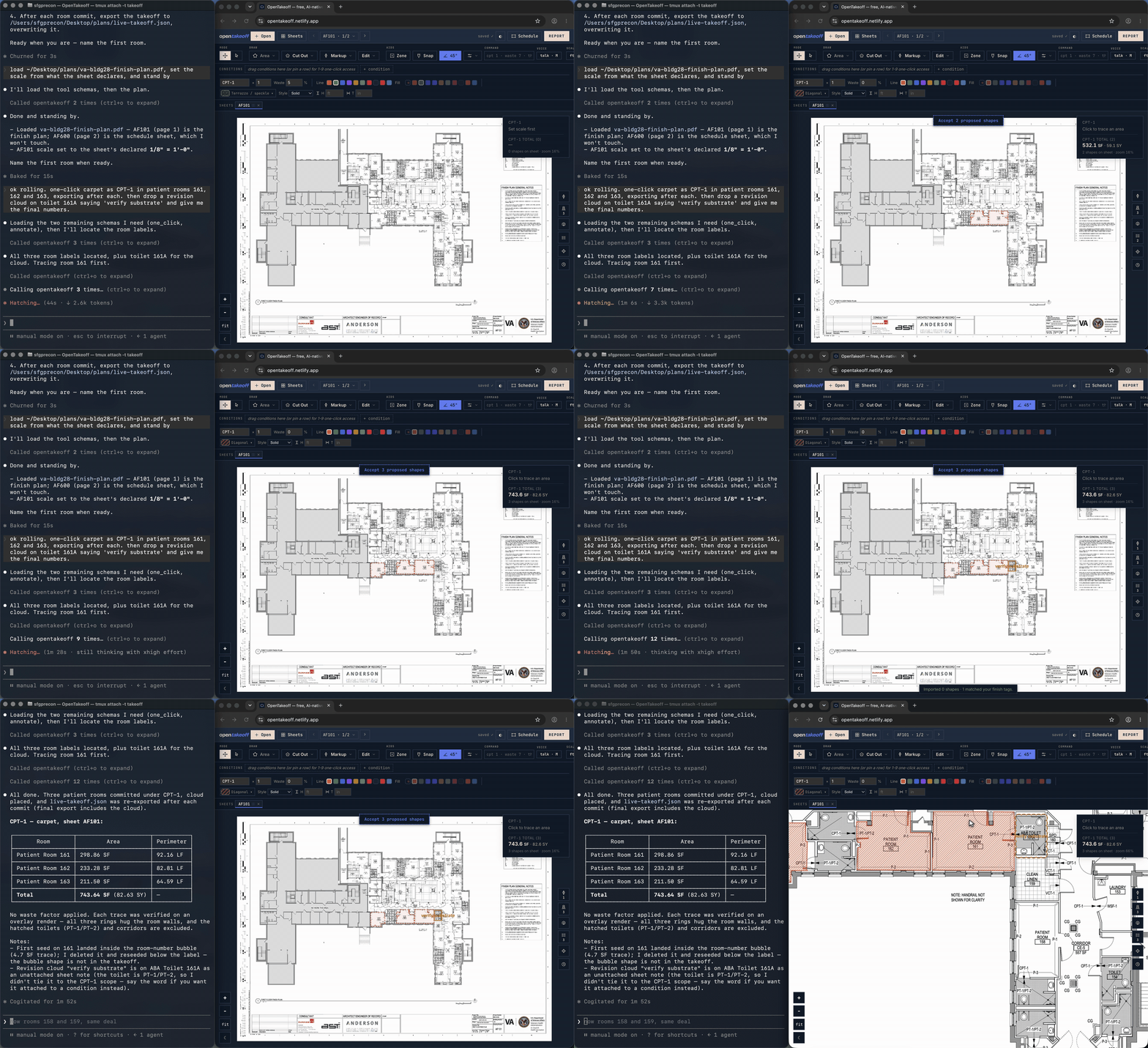
A real run (3× speed): the agent takes off patient rooms 161–163 on a federal finish plan, exporting after each commit. Every shape lands in the app as a dashed pencil proposal and becomes ink only when the operator clicks Accept. The full run, live and uncut, is on YouTube (2:47).
The tools
| Group | Tools |
|---|---|
| Open and orient | load_plan · sheet_info · sheet_context · get_sheet_vectors · read_sheet_text · find_text · view_sheet |
| Scale | set_scale |
| Measure | one_click · detect_rooms · measure_polygon · cut_out · measure_line · measure_surface · place_count |
| Repeat and derive | symbol_sweep · sweep_schedule_row · derive_base · derive_transitions · apply_rules |
| Read the drawing set | sheet_graph · resolve_tag · find_schedule |
| Edit and audit | list_shapes · edit_shape · edit_condition · edit_materials · duplicate_condition · split_condition · delete_shape · undo_last |
| Mark and sign | annotate · list_annotations · link_annotation · mark_verdict · delete_verdict |
| Ask | create_rfi · list_rfis · resolve_rfi · delete_rfi |
| Hand off | takeoff_summary · export_takeoff · export_report · export_marked_pdf · export_dxf · import_takeoff |
Plus browsable sheet resources (takeoff://sheets) so an agent can see the working set, not
only act on it. Multi-document sessions are first-class: a bid set is plans plus schedule
plus addenda, and load_plan --merge adds a document without disturbing existing scales,
conditions, or shapes—the sheet graph then spans the whole set, so a room tag on one file
resolves to a schedule row in another. edit_condition reaches the waste %, the ×N multiplier,
and roll_setup, so an agent's takeoff doesn't ship with net === gross.
The agent's manual is docs/AGENT_GUIDE.md—the counterpart to the
estimator's: the operating model in six facts, the standard finish every takeoff ends with, the
withheld-is-the-answer doctrine, what has no agent verb and why, and a refusal-to-next-move table.
Tool-by-tool reference: mcp/README.md. The same surface in prose, with the
sheet-graph and sweep behavior in depth: docs/MCP.md.
The contract that makes it drivable
Most measurement APIs are hostile to an agent because they let it be confidently wrong. These are the rules that make this one safe to hand a model, and why each one exists:
- One coordinate frame, stated everywhere. Image pixels at render scale 2.0—PDF points × 2, origin top-left, y down, the browser canvas's native space. Every sheet payload carries dims in both px and pt. No tool takes a coordinate in units it has to guess.
- Scale is a gate, not a default. The drawn scale note is read off the sheet but never
applied silently; adopting it is always an explicit
set_scale. Measuring an unscaled sheet refuses. Pixels × a wrong scale² is every number wrong at once, so the engine would rather stop than guess. Disagreeing scale notes inside a measured region raise a warning rather than a silent pick. - The engine traces; the model doesn't invent.
one_clickreturns the ring the wall network produced from a seed point you name. A model cannot hand back a polygon it imagined and have it counted. While One-Click is gated, a model draws the ring itself withmeasure_polygon, and the packaged rules say where it must sit: on the innermost wall-face strokes it read withget_sheet_vectors, doors crossed on the wall centerline, checked on a tight overlay before the next room. How well unprompted agents follow that is measured, not assumed: see the plan set. - Every record carries how it was made. Method, seed point, whether hatch filtering engaged, whether it came off scan pixels, confidence factors, and the machine's original ring if a human later moves it.
- Agent work is pencil until a person inks it. Exports land in the canvas as dashed
proposals.
mark_verdictlets an agent sign its own work as a graphiteAGENTdiamond; the greenAPPROVEDseal has exactly one code path and it is the toolbar button under a human hand. No MCP call, no import, mints one. - The deliverable is a marked-up planset, not JSON.
export_marked_pdfburns the work into the drawings as drawn—condition colors, hatches, quantity chips, count markers—behind a legend cover with totals and a tally of how much of the set a person has actually reviewed. A takeoff nobody can check is not a takeoff. - Refusals are actionable strings. "That space isn't enclosed on the plan linework—the fill spilled" tells a model what to do next. A silent zero doesn't. Tools that can't answer withhold with a stated reason rather than returning a plausible number.
Prove it — OpenTakeoff Academy
aec.kentucky-ai.com is a standalone open benchmark and
certification arena for agents that do takeoff. Bring any model and your own harness; you are
scored on operating a real takeoff tool against geometry you don't control—a wrong
calibration yields a wrong area—not on emitting a plausible-looking number. Runs emit a
signed bundle with full provenance of every tool call, scoring is against held-out ground truth
and a human Senior Estimator baseline, and clearing a tier earns a credential that's
independently verifiable. The Certified path drives this engine (opentakeoff-mcp) behind the
task tools. Repo:
Kentucky-ai/opentakeoff-academy.
For the person at the canvas
The agent path exists because the human path is real. Everything below is the production measuring engine carved out of a commercial Division 9 estimating system—not a demo reimplementation.
Or open the live demo. Drag in
demo/sample-plan.pdf, accept the detected scale, choose a condition, press A (Area)
and click the room's corners. (One-Click Area is temporarily gated — see the note at the top.) Open Report for the breakdown and the exports. That whole loop on
video: walkthrough (1:10) ·
One-Click Area (0:51). The complete
zero-to-exported walkthrough is the user manual.
What a real bid looks like on it, in the order an estimator works one:
- Drag in the whole
.zipoff the bid platform—plans, finish schedule, addenda. - Set the scale on every sheet you'll measure, and check a dimension (
K) on each. Ten seconds a sheet, and it's the only mistake that gets every number at once. - Pull your conditions off the architect's finish schedule instead of typing them, and set waste and materials before you trace.
- Stitch anything split at a match line, align it, and only then start measuring.
- Trace the floors room by room — Area (
A) while One-Click is gated. Derive base and transitions off the rooms you just traced rather than measuring them a second time—and read what the derivation reports and never counts, because those are doorway thresholds you still owe. - Walk the set and look at what landed, fix with the grips, save a revision.
- Export both: the Report for pricing, the Marked set PDF for whoever has to check you.
The full version of that sequence, with the section for each step, is the manual's working order. What every term above means is in its glossary.
Open anything, instantly
A plan PDF, an image (scan, screenshot, photo), or a whole .zip plan set straight
off a bid platform. Zips are unpacked and images wrapped to PDF in your browser—multi-page,
multi-file, up to 4 sheets side-by-side, with hostile-archive guards so a malformed zip
fails cleanly instead of ballooning the tab. No upload step, no conversion service, no account.
A real measuring engine
One-Click Area is the headline — temporarily gated while the flood engine is re-validated (see the note at the top); this is what it does when it is on: click inside a room, the linework bounds a flood fill, the polygon traces itself, the vertices snap to true corners. Hatching and poché don't fool it—tile grids, plank lines, and section fills classify as pattern rather than wall, and the escalation is conservative enough that a misread can never come out worse than the strict fill. Scanned sheets work too: with no vector linework the engine reads rendered pixels—adaptive thresholding, polarity detection for blueprint negatives, a gap-bridging pass for faded ink—and badges the result so you verify the edges before committing. On CAD exports that publish a layer tree, One-Click reads the declared roles instead of inferring them.
Plus the full manual kit—Area, Rectangle, Linear, Curved Line, Surface Area (walls), Count, and Cut Out deducts—and a Zone check that answers "what's in this wing?" without touching the takeoff.
⟂ Transitions derives the line where two finishes meet, from rooms you already measured. Finishes changing inside one open space commit as a dashed butt-joint run you accept; rooms parallel across a wall are reported and never counted, because that transition is a threshold in a doorway no trace can locate—you get its length, the wall thickness, and a link that puts it on screen.
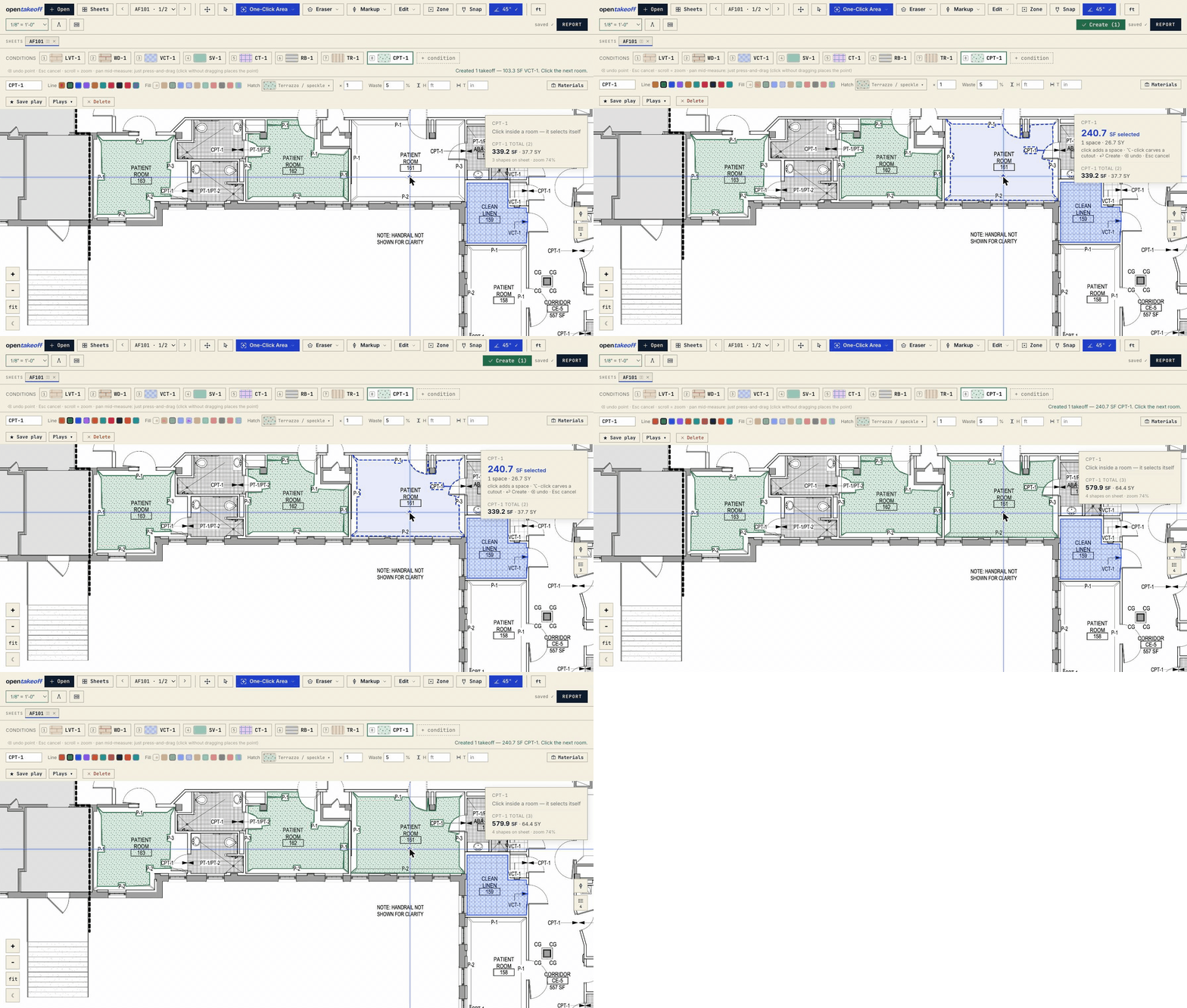
Drafting aids that behave like drafting aids
45°/90° angle lock: come within a few degrees of square or diagonal and the segment locks
to the axis—the click commits the exactly on-axis point, so walls come out dead square
(hold ⇧ to force it at any angle). On the canvas the crosshair is the cursor: the OS
pointer hides, a star marks the crossing, in-progress work draws in the instrument's own
cobalt, committed shapes wear their condition color. The lock reads quietly—the star swells,
the preview thickens, a chip shows the locked angle and the live segment length. Snap
(beta) pulls onto true PDF endpoints, and a corner beats an axis.
Scale that matches real plan sets
Auto-detects the drawn scale note, or calibrate from any known dimension. Scale is
remembered per sheet, because plan sets are never one uniform scale and tools that assume
they are get the numbers wrong. Check a dimension (K) is calibrate's read-only twin: pick
a printed dimension string, type what the drawing says, and get a graded verdict (green within
1%, amber within 5%, red past it) plus a one-click Recalibrate to this. Every scale
acceptance drops an ephemeral calibrated ruler bar on the sheet, so a 2×-off scale is obvious
before anything gets traced. Imperial or metric (m²/m, 1:50-style ratios) is a display toggle—takeoffs
are stored unit-agnostically, so flipping it never changes a measurement.
Conditions, materials, and the buy list
A condition is one finish (LVP, carpet, tile, base…), carrying a line/fill color, a CAD hatch pattern so the canvas reads like the real drawing, a per-condition waste %, an ×N multiplier, a default wall height, and a thickness that turns a linear run into border SF. Import from schedule parses the architect's finish table off the sheet into conditions behind a verify dialog—you approve what becomes a condition, and the product spec rides along as read-only report columns.
Supporting Materials is the layer most takeoff tools punt on: per condition, a labor type and a subfloor type, plus the consumables that actually go on the order—adhesive, sealer, thinset, grout, cove-base adhesive—each with a coverage rate and a basis (floor SF / linear LF / each / figured seam LF). Order quantity derives automatically: measured ÷ coverage, rounded up to whole units. Adhesive and mortar lines get coverage presets; grout lines get a calculator that derives SF/bag from tile size, thickness, joint width, and bag weight. Preset values are industry-typical round numbers—always verify against the product data sheet.
Roll goods — the seams, figured
Opt a condition into broadloom or sheet material (material class, roll width, max roll length,
seam and wall allowances, direction, sell unit) and the engine lays out the cuts: lanes, seam
placement, multi-roll splits, and order footage. Cuts draw to scale over their own rooms in
material-true colors, numbered in cutting order, and slide or resize in an edit mode that's on
the undo stack. The docked Roll panel shows those cuts nested on the roll with dimensions
and drag-to-reorder re-packing, and Roll Order LF, Rolls, and Seam LF ride the
Report, CSV, and Excel next to the measured quantities. Seam LF is the weld-rod / seam-tape
quantity read straight off that layout—counted between adjacent lanes of the same room, net
of the wall overage, only where two lanes actually face each other—so a supporting-materials
line on the seam LF basis prices the rod off where the cuts meet instead of off a share of
the perimeter. A 20-ft-wide room off a 12-ft roll seams once down its length; the same square
footage as two separate 10-ft rooms seams not at all, and no factor on area can tell those
apart. Available headlessly too, through roll_setup on edit_condition. (The roll-layout engine
was contributed by Michael Hartman.)
Multi-sheet reality
Stitching: a floor split across a match line becomes one working surface—align the joint
by picking the same drawn point on both sheets, then trace straight across the seam.
Levels group a multi-floor set. A visual gallery (G) is where you choose and open sheets, and
Regroup restores a side-by-side composition in one click. A trace can't span two grouped
sheets—the gap between panels isn't real distance, so the commit refuses and points you at
stitching.
Reports, exports, and revisions
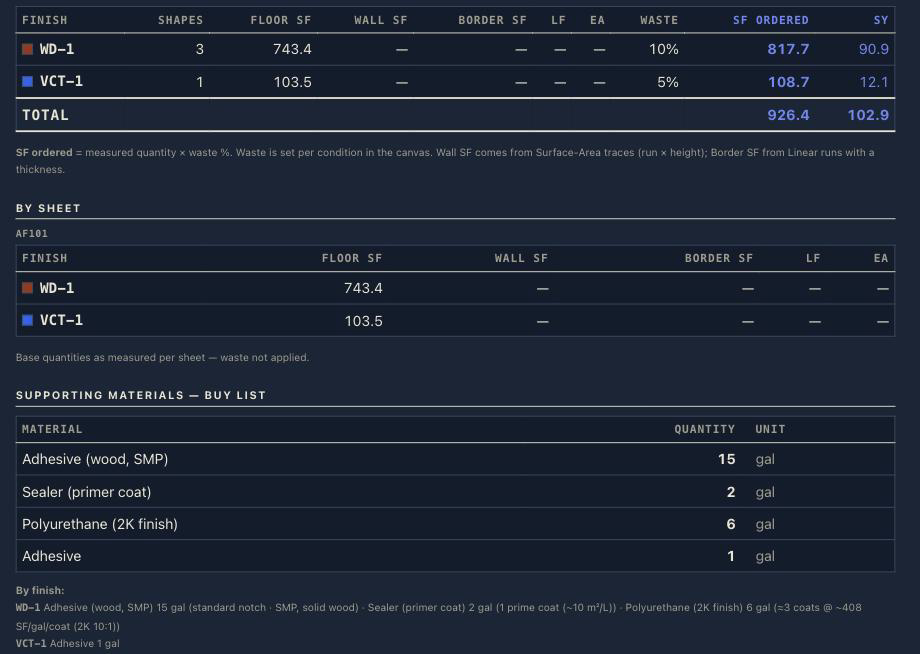
A per-condition breakdown—Floor / Wall / Border SF, LF, EA, total SF, SY, with and without waste—plus a combined materials buy list. Waste applies only in the report's order quantity, never to the live measured number, so the takeoff and the buy list stay honest about which is which. Export CSV, JSON, a real Excel workbook (Summary / By-sheet / Materials / Shapes-audit / By floor × room, full-precision cells, formula-shaped names kept inert text), print, or Marked Set PDF—a distribution-ready planset built entirely in your browser for a GC who will never install anything.
When the addendum lands, Revisions makes it data instead of archaeology: save a named revision at each bid revision, then compare any two as quantity deltas per condition, per sheet, and on the buy list, with a compare CSV. The compare is deliberately quantity-level rather than geometric—it tells you which numbers moved, not which wall did. Restore banks the live takeoff first, so it's never a one-way door.
Markups, seals, and RFIs
A separate layer the totals never count: revision clouds, callouts, text notes, highlighter
ink, images (upload a PNG/JPEG, or marquee a region of the plan to drop it back as a
floating screenshot—move, resize, and it burns into the marked set), and reusable stamps
(plank direction, seam direction, pattern origin—build your own, or import an .svg). Approval seals are the estimator's ink: click a committed takeoff to
approve it, and the Marked Set's cover gains a tally line—N estimator-approved · N
agent-marked — so a PM knows exactly how much of the set a person has looked at. The RFI
register turns any markup into a tracked question with status, priority, ball-in-court, and
cost/schedule impact flags, exporting as CSV/JSON and as an RFI schedule page in the marked set.
The Agent panel, in the browser
The same proposer/reviewer split as MCP without leaving the canvas: describe a takeoff in a
sentence and a model—yours, on your key, from your browser—works the sheet with the
app's own deterministic tools and stages dashed proposals you accept, correct, or reject. It
cannot invent geometry (propose_shapes rejects anything uncited) and it cannot set a scale.
To watch the loop with no AI account at all, run the keyless deterministic mock server in
scripts/.
A vector-sharp canvas
Past ~1.15× zoom times your display's pixel ratio, the visible region re-renders straight from the PDF vectors at your current zoom rather than magnifying a fixed bitmap, so fine callouts and hatching never blur—and it engages after a pause in the gesture, so a continuous zoom stays on the fast base layer while you're still moving. It overlays only what's on screen, so there's no full-sheet bitmap to hold. Dark view (☾) inverts the sheet pixels themselves—a true negative print, white linework on black, not a CSS filter—with hatches retuned, and exports follow it.
Yours, locally
Every drawing, scale, condition, markup, and RFI autosaves to your browser (IndexedDB + localStorage). Nothing is uploaded, there's no account, and there's no server in the default build. The flip side is stated plainly in the manual: storage is per browser, per origin, and clearing site data clears your work.
Optional: team cloud mode (Google sign-in + Drive)
Everything above is the default and it's unchanged: open the page and you're an anonymous,
local-only user. A team on Google Workspace can optionally sign in to unlock a shared mode
instead: projects live as folders in the team's own Google Drive, the project list is
deep-linked from an existing Glide app, and material costs come from a synced
pricing.json. It's strictly additive—set nothing and it doesn't exist. The security posture
stays honest: still a plain static site, no secrets in the bundle, team-only because the
Google OAuth app is Internal to your domain, and the data sits in your own Drive. See
docs/GOOGLE_SETUP.md and
docs/GLIDE_INTEGRATION.md. A cloud deployment can also opt into
local-first sync (VITE_CLOUD_SYNC=1): annotations stay canonical in the browser and sync
to Drive in the background, so the canvas is instant and survives a flaky network—docs/SYNC_ARCHITECTURE.md.
Optional: bring your own vision model
OpenTakeoff can ask a vision model you provide to read things off the plan—starting with the drawn scale when a sheet's text doesn't state one (scans, rotated notes, image title blocks). Click AI in the toolbar and point it at an OpenAI-style endpoint (the default; local runtimes on your own machine speak it and need no key) or an Anthropic-style one, plus a vision-capable model id.
- What's sent, and only when you click an AI button: one snapshot of the sheet region in question, plus the question—to your endpoint. Never the whole plan file, file names, project names, or your takeoff.
- Nothing configured = nothing exists. Unconfigured builds add zero UI beyond the button and make zero AI network calls. No telemetry either way.
- The answer is only ever a suggestion, landing in the same confirm-to-apply flow as a text-detected scale, with the calibrated guide bar shown on acceptance.
- The key is stored in this browser's localStorage—use one you can revoke. Deployers:
VITE_AI_ENDPOINT/VITE_AI_MODEL/VITE_AI_PROVIDERbake team defaults, but never setVITE_AI_KEYon a public deploy—Vite inlines it into the shipped bundle.
What's in the box
| Area | What you get |
|---|---|
| Ingest | PDF, image, or .zip plan set—unpacked in-browser, multi-page, multi-file, up to 4 sheets side-by-side |
| Scale | Auto-detect the drawn note, calibrate from a known dimension, or verify one with a graded check—per sheet |
| Measure | One-Click Area (vector flood + raster fallback — temporarily gated), Area, Rectangle, Linear, Curved Line, Surface Area, Count, Cut Out deducts, ⟂ Transitions, Zone check—imperial or metric |
| Drawing aids | 45°/90° angle lock with ⇧ hard-lock, live angle + segment-length readout at the cursor, endpoint Snap (beta) |
| Conditions | Color + CAD hatch per finish, waste %, ×N multiplier, wall height, border thickness, schedule import, browser-wide library |
| Supporting Materials | Labor + subfloor type, coverage rate × basis (incl. figured seam LF) → rounded order quantities, trowel/roller presets, grout calculator |
| Roll goods | Per-condition roll setup → lanes, seams, multi-roll splits, to-scale cuts with drag-to-reorder nesting, Roll Order LF + Rolls + figured Seam LF on every export |
| Multi-sheet | Sheet gallery, tabs and side-by-side groups, Regroup, levels, stitching across a match line, PDF layer roles |
| Report | Per-condition Floor/Wall/Border SF, LF, EA, SY with and without waste, plus the combined buy list; columns, grouping, saved templates |
| Export | CSV, JSON, Excel (.xlsx), print, Marked Set PDF, RFI CSV/JSON |
| Revisions | Save at each bid revision, compare quantity deltas per condition/sheet/buy list, guarded restore |
| Markups | Clouds, callouts, notes, highlighter, images (upload or marquee screenshot), stamps, approval seals, RFI register—separate layer, never counted |
| Voice | Push-to-talk takeoff commands, recognized on-device in WebAssembly; audio never leaves the browser — gated off the toolbar by default (VITE_COMMAND_BOX=1) |
| View | Light or dark (negative print)—sheet pixels inverted at draw time, exports follow |
| Storage | IndexedDB + localStorage—client-only, nothing uploaded |
| MCP server | 53 tools + browsable sheet resources on stdio, multi-document sessions (mcp/) |
| Provenance | Every shape records its scale, its method, its confidence, and whether a person or an agent made it |
| Capture (opt-in) | Bundled capture server banks each contributed takeoff as (geometry → label) training rows |
| Deploy | One static build—Netlify, Vercel, GitHub Pages, Cloudflare Pages, S3, any static host |
The data layer — why this engine exists
Every finished takeoff is a set of expert decisions: this region gets this finish, at this waste, yielding these quantities. Done once, that's a bid. Recorded every time, it's a labeled dataset that does not currently exist—plan geometry paired with the finish an expert assigned it, which is the exact raw material for training a model that can do takeoff. Today that data evaporates the moment the bid goes out.
The thesis, stated so it can be attacked: markup is label. Professional takeoff software already stores every drawn region as vector geometry, and reconstructing those polygons reproduces the recorded quantities exactly—so two decades of estimating work is an exact, verifiable corpus rather than a noisy one. That claim is what the whole research program tests, and it's patent pending.
OpenTakeoff is the instrument that produces the corpus, with the collection path opt-in and auditable:
- The Contribute button in the Report builds a derived-only payload—condition labels,
shape roles, quantities, geometry normalized 0-to-1 against the sheet, and per-shape
provenance (hand-traced versus machine-proposed, and whether a human corrected it, with the
machine's original ring beside the fix). The builder is ~150 audited lines
(
web/src/lib/contribute.js); the normative wire contract isdocs/CONTRIBUTION_SPEC.md. - Never sent, enforced by a whitelist in the builder: the PDF or any render of it, file or sheet names, project/client names, markup text, absolute coordinates, scale values (only the scale's provenance—calibrated, detected, or standard), and edit timing beyond a creation stamp. One linkage is deliberate and disclosed: shapes carry opaque, locally-minted IDs so a re-contribution after an addendum supersedes rather than duplicates.
- The bundled capture server (
capture/)—one stdlib-only Python file, no pip install—receives it on localhost and banks one training row per labeled shape, hash-gated so re-contributions never duplicate. v2 rows distinguish what the machine got right from what an expert had to fix, which is the signal that actually teaches a takeoff model. Point it at a synced folder with--mirrorand the corpus rides existing company storage sync, atomically.
Run OpenTakeoff as-is and none of this exists for you—nothing is captured, nothing leaves
your machine. Install it and every takeoff you choose to contribute compounds into an asset
you own. This is the open edition of the capture layer inside
Spline, the commercial Division 9 estimating system OpenTakeoff
was carved from, where capture runs ambient on autosave and commit instead of behind a button.
The row schema and the training angle are in capture/README.md.
The research program
OpenTakeoff is the open half of an applied-research program run by a working commercial flooring estimator who builds the AI his own department uses (Kentucky AI). The open-core boundary is the same one the better open scientific software draws: the measurement engine—rendering, scale, geometry, exports, the MCP server—is Apache-2.0 and stays open. The models trained on our own estimating archive are proprietary. You get a real tool with no seat licenses; the part only our data can build stays ours.
The research side is run as a lab, and the receipts are the point:
- Parameter-efficient tuning, not pretraining. QLoRA adapters on open-weights bases (~0.1% of parameters trained), specialized from a verified bid archive—cheap enough to retrain when the data says retrain, small enough to ship. The flagship adapter predicts bid totals at 12.3% median absolute percentage error on a 51-project temporal holdout, against 62.8% for the untuned base; full method and honest caveats on the model card.
- Verified labels in. Before a historical bid becomes training data it passes a dual-document verification gate: totals must reconcile between the bid workbook and the separately filed proposal, change orders only count when corroborated by an actual change-order document, and line-item arithmetic is recomputed and forensically checked. Unverifiable projects don't train.
- Verifiable rulers out. Models are scored against temporally held-out projects—future bids, not a random split—with a geometry scorer whose own error floor is measured (0.4%), so a number can be attributed to model error versus measurement error.
- Multi-seed replication. No result is promoted from a single training run; promotion requires seed replication with paired bootstrap confidence intervals, and the cross-seed spread gets published alongside the best seed.
- Negative results are kept. The experiment ledger records what failed and why—an unfreeze recipe that destroyed detection, a vertical-specialist model that lost to the generalist's cross-vertical transfer—next to what worked.
- Leak-audited before release. Identifiers are replaced before training, so the weights never see a real name, and every public artifact passes a differential red-team: adversarial extraction probes against the tuned model with the untuned base as control.
Sanitized artifacts—model cards, benchmark specs, papers—publish as they clear review: Hugging Face · kentucky-ai.com. The agent-side evaluation lives in OpenTakeoff Academy.
Run it / deploy it
To use it, all you need is a browser. To self-host, it's one static build you can drop anywhere—no backend, no database, no environment to stand up.

The repo ships a root netlify.toml, so the button is genuinely one-click. The same
web/dist/ works on Vercel, GitHub Pages, Cloudflare Pages, S3—anywhere that serves
static files. Running your own reverse proxy—nginx, Docker, Tailscale? Check
docs/SELF_HOSTING.md first—there's one MIME-type gotcha worth
knowing about. Deployment notes and the optional AI backend:
docs/DEPLOYMENT.md.
Fork it
Apache-2.0: fork it, change it, ship it—for your own crew or as the base of your own product. A fork is the unit of ownership here, and it's the unit of contribution: the same three steps give you a private instance and a branch to send back.
- Fork on GitHub, then clone your fork.
- Run it:
cd web && npm ci && npm run dev— the canvas is atlocalhost:5173, andnpm run checkis the exact CI gate (typecheck, lint, test, build). - Put it on your own URL: the repo carries its
netlify.toml(baseweb, publishdist), so importing your fork into Netlify deploys with no settings; any static host works, anddocs/SELF_HOSTING.mdnames the one nginx gotcha. Your instance keeps every plan local exactly as the public one does.
Pull requests from a fork run the full CI with no secrets and a read-only token
(docs/DEPLOYMENT.md), so a green check on your fork is a green check here.
The codebase is deliberately small and readable, and the geometry libraries are pure so you can
lift them straight out:
| What | Where |
|---|---|
| Flood fill, face extraction, corner snap, raster fallback | web/src/lib/oneclick.ts—pure TS, tested |
| Scale detection, sheet helpers, polygon area | web/src/lib/sheets.ts—pure TS, tested |
| Waste, square-yard, coverage → order quantity | web/src/lib/totals.js |
| Roll-goods lane and seam layout | web/src/lib/rollgoods.js—pure, tested |
| Persistence (IndexedDB + localStorage) | web/src/lib/store.js |
| PDF / image / zip ingest | web/src/lib/ingest.js |
| The canvas (one large component, ~90% of the app) | web/src/pages/TakeoffCanvas.jsx |
| MCP server (imports the same libs) | mcp/src/ |
| Design tokens—source of truth for color and spacing | web/src/styles/tokens.css |
Third-party integrations and downstream forks run on this engine today.
cd web && npm run check is the exact CI gate—typecheck, lint, test, build. Keep
oneclick.ts and sheets.ts free of React and DOM; that purity is what makes them reusable and
testable. Never commit real construction plans. See CONTRIBUTING.md and
AGENTS.md—the repo's own instructions for coding agents—plus the
user manual.
Contributing
The open work is architectural, and it's posted as RFCs with a stated finish line rather than a manufactured chore list. Currently open:
- RFC #60—make One-Click Area genuinely great: face extraction, gap tolerance, confidence. Partially landed—a first slice merged in #179, contributed by @knmurphy and credited in the release notes—and the accuracy ceiling is still open.
- RFC #87—the sheet graph: resolve room tags, schedules, legends, and detail callouts into one queryable graph with a citation per answer. Two phases shipped; revision clouds and detail-callout chains are open.
- Anything labeled
rfcorflagship—a flagship is an open design-and-build challenge where multiple entries are welcome and the best one merges with credit. - Smaller, fully-specified entry points are labeled
good first issue—they name the exact files. Claim one in a comment and go.
Ground rules are in CONTRIBUTING.md. The bar is a green npm run check plus
a test for anything touching the geometry libraries; tested PRs merge fast. CI also holds two
lines npm run check doesn't: every relative link and anchor in the docs must resolve
(node scripts/check-doc-links.mjs runs it locally), and web/bench/results.json must match
what the engine actually produces—an engine change carries its bench delta in the same PR. External
contributions are credited by name in the commit and the release notes—and because
opentakeoff-mcp publishes to npm off a mcp-v* tag, engine work you land ships to every
agent that pulls the package.
Found something exploitable? Report it through private vulnerability reporting rather than a public issue. SECURITY.md states the threat model up front—worth a read before reporting, since it explains what the trust boundary actually is for a client-only app and a local stdio MCP server, and what that does and doesn't make a vulnerability.
Tech stack
- Frontend: React 18 + Vite 6, plain JSX
- Drawing: raw HTML5 Canvas + SVG—no charting or canvas frameworks
- Geometry: TypeScript (
oneclick.ts,sheets.ts), pure and unit-tested - PDF rendering: pdf.js
- Plan-set ingest: fflate (zip) + pdf-lib (image → PDF), lazy-loaded
- Speech: transformers.js, whisper-tiny.en (q8 encoder + uint8 decoder) in a Web Worker—benchmarked
against the alternatives in
docs/VOICE.md - MCP: TypeScript stdio server importing the web engine's own libraries
- Storage: IndexedDB + localStorage—no backend required
- Tests:
node --test+tsx - No paid dependencies. See THIRD-PARTY-NOTICES.md.
Status
A working tool used on real commercial bids, not a preview. The measuring engine is the production engine carved out of a commercial estimating system, and the same engine answers to a person at the canvas or an agent over MCP with the same math, the same scale gate, and the same provenance record. What is measured about agents driving it, and what is still open, is in one table: the Phase 3 completion gate. Named limits, so you don't find them the hard way: Snap is beta, revision compare is quantity-level rather than geometric, and the translated READMEs lag the English one. Issues and pull requests are welcome.
Who's building this
I run estimating for a commercial flooring company and build the AI that runs my department. OpenTakeoff is the open half of that work: the measuring engine, given to anyone—human or agent—who needs to read a building. The models trained on our own estimating archive stay ours, and the boundary is drawn in public so it can be held to account.
What makes the data worth anything is that it comes from bids that were actually submitted, won or lost, and reconciled against a separately filed proposal. That's also why the engine had to be free: a corpus is only as good as the number of real takeoffs that flow through the instrument producing it.
— Michael · Kentucky AI
Contact: research collaborations, data questions, press, or anything that is not a bug — research@kentucky-ai.com. Bugs and feature requests go in issues; security reports follow SECURITY.md.
License
Apache License 2.0—use it, fork it, ship it, build on top of it. See NOTICE for attribution.
For an agent measurement workflow focused on accurate geometry, see Geometry from source to review.
Shared knowledge for people and agents
The wiki routes architecture, protocol, human/agent
workflows, MCP tool selection and domain knowledge. MCP clients read the same
packaged pages at takeoff://wiki and takeoff://wiki/{page} before loading a
plan. AGENTS.md is the contributor router; detailed guidance lives
in the wiki. CI checks packaged wiki content, tool counts/inventory, schema
references and links against source.