image-processingweb-capturevisionllmmultimedia
Tiles large images and captures full web pages for detailed LLM vision without downscaling.
Quick Install
Automated & IDE SetupCopy the AI prompt to install this server into Claude Code, Cursor, or another agent — or use 1-click editor setup below.
Not yet automatically verified
We haven't yet run this listing's install command through our automated sandbox check. This isn't a red flag — we're steadily working through the catalog.
Manual Client & Custom JSON ConfigExpand JSON ▾
Client Config & Setup
Choose your client or environment
Target File:
💡 Paste the JSON block into your client's configuration file under mcpServers, then restart the application.
Overview
Use cases
Analyze full-resolution images by tiling them into manageable sections
Capture and inspect full web pages including lazy-loaded content
Perform visual QA on web pages to detect layout and color issues
Test mobile responsive designs with viewport emulation and retina scaling
Iterate visual fixes by re-capturing and comparing versioned outputs
Key features
Tiles large images into native resolution tiles for detailed analysis
Captures full web pages using headless Chrome with scrolling
Generates interactive HTML previews with per-model tile grids and token estimates
Supports entropy-based tile classification to skip blank or low-detail tiles
Supports presets for Claude, OpenAI, Gemini with token math per model
Versioned output directories to preserve iterative capture results
Capabilities & Tool Schemas
Inspect callable tools, capabilities, and parameters exposed to AI agents by Image Tiler MCP Server.
Extracted Tool Capabilities
Tiles large images into native resolution tiles for detailed analysis
Captures full web pages using headless Chrome with scrolling
Generates interactive HTML previews with per-model tile grids and token estimates
Supports entropy-based tile classification to skip blank or low-detail tiles
Supports presets for Claude, OpenAI, Gemini with token math per model
Versioned output directories to preserve iterative capture results
Documentation Overview
image-tiler-mcp-server


MCP server that gives LLMs full-resolution vision by tiling large images and capturing full web pages before details are lost to automatic downscaling.
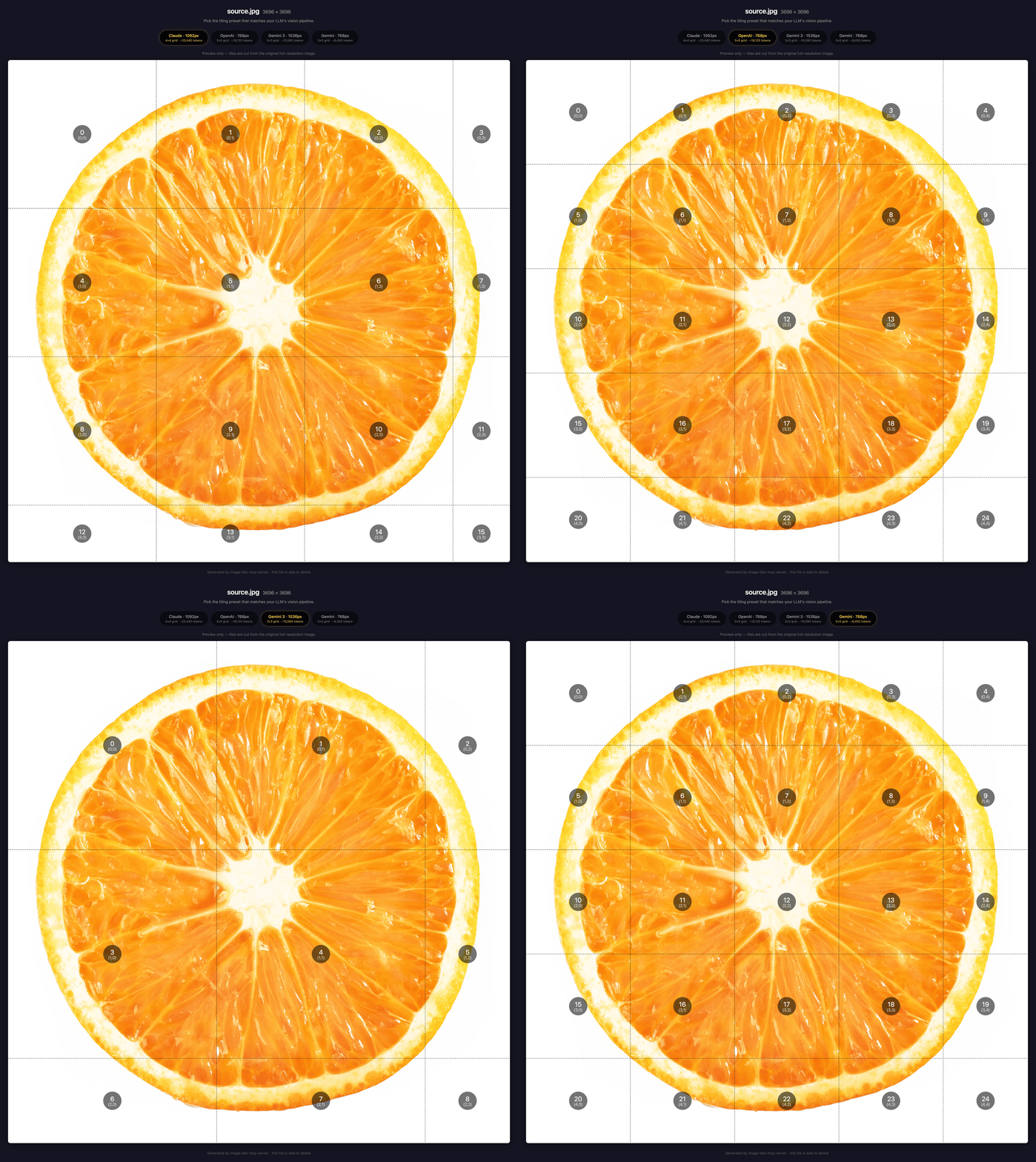 The server generates an interactive HTML preview for every image, showing per-model tile grids and token estimates
What You Can Do
-
Visual QA for web pages. Capture a URL, tile it, and let the LLM spot misaligned elements, wrong colors, and broken layouts at full resolution. Fix the code, re-capture, and verify the fix visually.
-
Mobile responsive testing. Capture at any viewport width with mobile emulation, retina scaling, and a real mobile user agent. The LLM reviews the full mobile layout tile by tile, catching responsive breakpoint issues that only appear on small screens.
-
Full-resolution image analysis. Diagrams, infographics, and design mockups lose critical details when LLMs downscale them. A 3,600 x 20,220px full-page capture that Claude would crush to ~279 x 1,568 becomes 76 analyzable tiles, each at native resolution.
-
Token-efficient tile inspection. Each tile gets entropy-based content classification: blank, low-detail, mixed, or high-detail. The LLM skips blank tiles entirely and focuses tokens on what matters.
-
Iterative visual workflow. Capture, analyze, fix, re-capture. Versioned output directories (
_v1,_v2, ...) preserve each iteration so you can compare before and after without overwriting previous results.
Quick Start
Claude Code
image-tileris a local alias. You can name it anything you like.image-tiler-mcp-serveris the npm package that gets downloaded and run.
See Claude Code MCP docs for more info.
Codex CLI
Or add to ~/.codex/config.toml:
VS Code (Cline / Continue)
Add to your VS Code MCP settings:
Cursor
Add to ~/.cursor/mcp.json:
Claude Desktop
Add to your Claude Desktop config file:
- macOS:
~/Library/Application Support/Claude/claude_desktop_config.json - Windows:
%APPDATA%\Claude\claude_desktop_config.json - Linux:
~/.config/Claude/claude_desktop_config.json
Restart Claude Desktop after editing.
Global Install (faster startup)
Then use the simpler config in any client:
From Source
Then point your MCP config to the built file:
Docker
Build the image:
The image includes Chromium for URL capture. Chrome's --no-sandbox flag is enabled by default in the image because Docker containers don't provide the user namespaces that Chrome's sandbox requires. The container itself provides process isolation. To re-enable the sandbox (e.g. with --privileged or user-namespace support), pass -e CHROME_NO_SANDBOX=0.
The -i flag is required (stdio transport). Mount a volume for any directories the server needs to read from or write to, and set TILER_ALLOWED_DIRS to restrict file access to those mounts.
To disable URL capture entirely (no Chrome, no network access):
Usage
Tile an image
tile ~/source.png and analyze content
The server reads image dimensions and generates an interactive HTML preview with per-model tabs showing grid overlays, tile counts, and token estimates. Pick the model that matches your use case, and the server tiles and returns batches for analysis.
Capture a web page
capture full page screenshot of https://tomotv.app
The server launches headless Chrome, scrolls through the page to trigger lazy-loaded images (loading="lazy"), then captures a full-page screenshot (scroll-stitching pages over 16,384px). Your assistant receives each section at full resolution and can identify layout issues, misaligned elements, or broken styling that downscaling would hide.
To get only the screenshot without tiling, just ask for a screenshot and stop after the comparison step.
Test a mobile layout
capture https://tomotv.app in mobile view
This is responsive QA, not just a different viewport. The server captures with mobile: true, which sets a 390px viewport, 2x retina scale, and a mobile Safari user agent. Sites that check for mobile UA or touch capability serve their mobile layout, so the LLM reviews exactly what a real phone user sees.
Customize tiling
| What | Example prompt |
|---|---|
| Target a specific model | "Tile hero.png for OpenAI" |
| Keep full resolution | "Tile banner.png at full resolution, no downscaling" |
| PNG output | "Tile diagram.png as lossless PNG" |
| Tile from URL | "Download and tile https://keiver.dev/source.png" |
| Tile from base64 | "Tile this base64 image: iVBORw0KGgo..." |
Presets
| Preset | Default tile | Tokens/tile | Max tile | ID |
|---|---|---|---|---|
| Claude | 1092px | 1590 | 1568px | claude |
| OpenAI (GPT-4o/o-series) | 768px | 765 | 2048px | openai |
| Gemini | 768px | 258 | 768px | gemini |
| Gemini 3 | 1536px | 1120 | 3072px | gemini3 |
OpenAI note: The
openaiconfig targets the GPT-4o / o-series vision pipeline (512px tile patches). GPT-4.1 uses a fundamentally different pipeline (32x32 pixel patches) and is not currently supported. It would require a separate model config with a different calculation approach.
Gemini 3 note: Gemini 3 uses a fixed token budget per image (1,120 tokens regardless of dimensions). Tiling increases total token cost but preserves fine detail. For cases where detail isn't critical, consider sending a single image instead.
Why Tile?
You screenshot a full page, paste it into Claude, and Claude crushes it to a thumbnail. Any image with a long edge over 1,568 pixels gets auto-downscaled to fit within ~1.15 megapixels. A 3,600 x 20,220px full-page capture becomes ~279 x 1,568, losing over 99% of its pixels before the model even sees it.
GPT-4o is more forgiving but still destructive: it scales your image to fit within 2,048px, then scales the shortest side down to 768px, then tiles internally. An 8,192px-wide NASA panorama becomes ~1,456 x 768 before GPT-4o's own tiling even begins.
Gemini 1.5/2.0 handles large images natively at 768px tiles without downscaling. Gemini 3, however, caps each image at a fixed token budget (1,120 tokens) regardless of size. Tiling gives each piece its own budget.
Each tile stays within the model's sweet spot, so the LLM processes it at full resolution.
What Happens Without Tiling
Using assets/portrait.png (3,600 x 20,220, a full-page National Geographic capture) as an example:
| Model | What happens | Impact |
|---|---|---|
| Claude | Auto-downscaled to ~279 x 1,568 | ~0.6% of original pixels survive |
| GPT-4o | Downscaled to ~365 x 2,048, then internally tiled | ~1% of original pixels survive the downscale |
| Gemini 3 | Capped at 1,120 tokens per image (default) | Fixed token budget regardless of image size |
Gemini 1.5/2.0 tiles large images natively at 768px without downscaling. For Gemini 3, tiling multiplies the total token budget by sending each tile as a separate image.
With Tiling
| Model | Tiles | Result |
|---|---|---|
| Claude | 76 tiles at 1,092px | Every tile within 1,568px sweet spot, no downscaling |
| GPT-4o | 135 tiles at 768px | Every tile under 2,048px, no pre-downscale needed |
| Gemini 3 | 42 tiles at 1,536px | Each tile gets its own 1,120-token budget |
Using assets/landscape.png (8,192 x 4,320, NASA image gallery):
Related MCP Servers
Adoption & maintenance
Factual signals from GitHub, npm, and our automated checks — not a rating.
GitHub stars
2
Stargazers on the source repository.
npm downloads
143
Package downloads in the last 30 days.
Last commit
6mo ago
Most recent push to the default branch.
Directory activity
2 views
Config copies, upvotes, and views on AllMCPs.
Reviews
No reviews yet — be the first to share how this listing worked for you.
Frequently Asked Questions about Image Tiler MCP Server
AllMCPs Directory Badge
Showcase your server listing on GitHub or your project documentation. Embed this dynamic SVG badge to highlight official listing status and live engagement.
Badge Style:
Live Dynamic SVG Preview
Markdown (GitHub README)
[](https://allmcps.com/mcp/keiver-image-tiler-mcp-server)HTML Embed
<a href="https://allmcps.com/mcp/keiver-image-tiler-mcp-server"><img src="https://allmcps.com/api/badge/keiver-image-tiler-mcp-server?style=directory" alt="Image Tiler MCP Server on AllMCPs" /></a>Technical Specs & Signals
CategoryMultimedia Process
PricingFree
11/11 checks healthy over the last 33d
51Quality signal: Good · 51/100How this signal is calculated ▾
Server availabilityNot measured
Not scored for repo-hosted servers — we can't reach the running server, only its GitHub page. Hosted MCP endpoints are health-checked live.
Verified ownership10/20
Documentation & tools25/30
Adoption & activity3/15
Community engagement0/10
A guidance signal from public completeness & health data — not a user rating. New listings start lower and rise as they add docs, get verified, and grow adoption. Signals we can't observe for a listing are skipped, not counted against it.
Supply-chain signal
No high-severity advisories surfaced by our automated scan.
Critical 0High 0Medium 0Low 0
Scanned 23d ago via OSV.dev · image-tiler-mcp-server (npm)
Own this project?
This directory is pre-filled from public sources. Claim via GitHub README, site badge, or DNS TXT to unlock edit access and the Official badge — proof is checked automatically, then reviewed by our team.
Free dofollow backlink: add your website and place the AllMCPs badge on it — no claim needed. We detect it automatically and keep it verified as long as the badge stays live.
Claim & get free dofollowShare & Embed
Add our SVG badge (dark/light directory styles) or embeddable widget to your site.