MCP Architect README
The full upstream README, mirrored here for reference. Install config, tool schemas, adoption signals, and an original overview live on the MCP Architect listing page.
🏛️ mcp-architect
Stop pasting your file tree into Claude. Give any AI assistant real architectural understanding of a codebase — local, private, zero‑config.



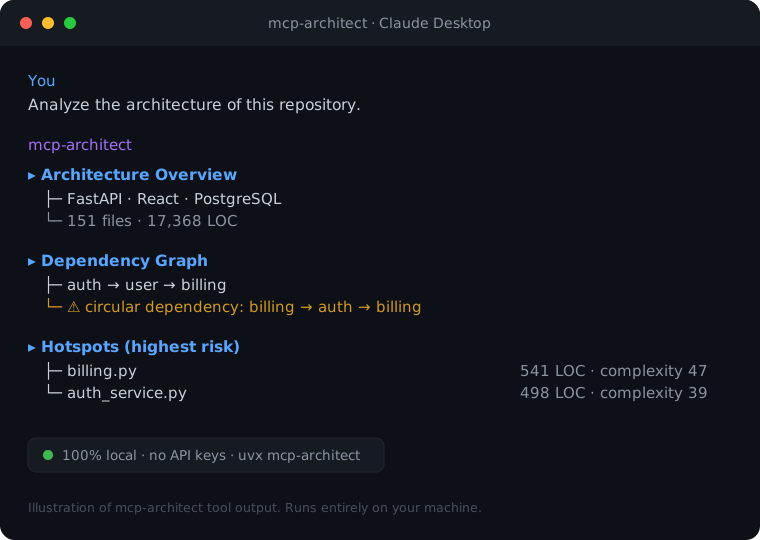
AI coding assistants are great at files but blind to architecture. Every session you re‑explain the structure, paste the file tree, and hope it guesses your module boundaries right. mcp-architect is an MCP server that hands your assistant a structured map of any codebase — tech stack, dependency graph, hotspots, and module summaries — computed 100% locally with no API keys and no model required.
It works with Claude Desktop, Cursor, Windsurf, Cline, or any MCP client.
Why
| Without mcp-architect | With mcp-architect |
|---|---|
| "Here's my file tree, please figure out the structure…" | architecture_overview → stack, entry points, structure in one call |
| AI guesses how modules relate | dependency_graph → real import graph + circular‑dependency detection |
| "Which files matter?" | hotspots → largest, most complex, most‑changed, highest‑risk |
| Re‑explaining a package every time | explain → classes, functions, and deps of any folder |
Everything runs on your machine. Your code never leaves it.
Quickstart
Install
…or skip the install entirely and let your MCP client fetch it on demand with uvx (shown below).
1. Add it to your MCP client
Claude Desktop — edit claude_desktop_config.json:
Prefer pip?
pip install mcp-architect. Or run the latest straight from source:
Restart your client. That's it — no keys, no model download.
2. Ask your assistant
"Use the architect tools to give me an overview of
~/code/my-app, then show me its dependency graph and the highest‑risk files."
What you get
Tools
| Tool | What it tells the AI |
|---|---|
architecture_overview | Languages, frameworks, ecosystems, size, top‑level structure, entry points |
dependency_graph | Internal import graph, architectural hubs, circular dependencies |
impact_analysis | What breaks if you change X — direct importers + transitive blast radius, hub risk |
hotspots | Largest / most complex / most‑changed (git) / highest‑risk files |
explain | Deep‑dive a folder or file: classes, functions, external deps |
Design principles
- Zero heavy dependencies. Pure Python standard library for all analysis (
ast,os,re). The only runtime dep is the MCP SDK itself. Installs in seconds. - Local & private. No network calls, no telemetry, no LLM. Your source never leaves your machine.
- Language‑aware. Full AST parsing for Python; import parsing for JavaScript/TypeScript; file/LOC stats for 25+ languages.
- Decoupled core. The analysis layer (
mcp_architect.analysis) is importable and testable on its own — use it as a plain Python library too.
The dependency and complexity analysis is heuristic — designed to give an AI useful, fast situational awareness, not to replace a full static analyzer.
Pin to one project (optional)
Set MCP_ARCHITECT_ROOT so tools default to a fixed repo and you can omit paths:
How it compares
mcp-architect isn't a semantic search engine or a context packer — it's a structural lens any AI assistant can call on demand. It's designed to complement the tools below, not replace them:
| Tool / approach | Great at | What mcp-architect adds |
|---|---|---|
| Cursor codebase indexing | Semantic snippet retrieval, inside Cursor | Works in any MCP client (Claude Desktop, Cline, Windsurf, Cursor…), 100% local (no cloud embeddings), and returns architecture — dependency graph, cycles, hotspots — not just relevant snippets |
| Serena (LSP-based code agent) | Precise symbol-level navigation & edits | Zero-config, zero heavy deps (stdlib — no language servers to install) and a high-level architectural map instead of symbol-by-symbol operations |
| RepoPrompt (context packing) | Hand-picking files into a prompt | The assistant pulls structured architecture on demand via tools — no manual file selection, no token-budget juggling |
In one line: Cursor and Serena help the AI read your code; mcp-architect helps it understand the architecture — locally, in any client. They stack well together.
Roadmap
- Layered‑architecture / boundary‑violation detection
- Go, Rust & Java import graphs
- Optional local‑LLM (Ollama) narrative summaries
-
comparetool for before/after architecture diffs
Contributions welcome — see CONTRIBUTING.
Contributing
PRs and issues welcome! Run the tests with:
License
MIT © Kannan Dharmalingam