AllMCPs
BrowseBestCategoriesStackCompareToolsGuidesBlog Log in Submit MCP

Stay in the loop

Get new MCP servers and top picks in your inbox.

AllMCPs

The open directory for discovering and installing Model Context Protocol servers.

Explore

  • Browse servers
  • Best MCP servers
  • Categories
  • MCP clients
  • Agent prompts
  • Stack Builder
  • Compare servers
  • Tags index
  • Submit a server
  • Pricing

Learn

  • Guides hub
  • What is MCP?
  • Install guide
  • Troubleshooting
  • Security
  • Blog
  • Blog RSS

Tools

  • All tools
  • Config generator
  • Config validator
  • MCP playground
  • OpenAPI → MCP
  • Badge generator

For agents

  • API docs
  • Trust & traffic
  • llms.txt ↗ (opens in a new tab)
  • Catalog JSON ↗ (opens in a new tab)
  • Remote MCP ↗ (opens in a new tab)

Company

  • About
  • Contact
  • X (@AllMCPs) ↗ (opens in a new tab)
  • GitHub ↗ (opens in a new tab)
  • Terms
  • Privacy
AllMCPs VerifiedAllMCPs VerifiedFeatured on Nick LaunchesFeatured on Nick LaunchesLaunch Llama NewsletterLaunch Llama NewsletterVerified DR - allmcps.comVerified DR - allmcps.comFeatured on SaaSGrowFeatured on SaaSGrowFeatured on Twelve ToolsFeatured on Twelve ToolsFeatured on Saaspa.geFeatured on Saaspa.geFeatured on Findly.toolsFeatured on Findly.toolsFeatured on Startup FameFeatured on Startup FameFeatured on LaunchKiwiFeatured on LaunchKiwiFeatured on ScrollLaunchFeatured on ScrollLaunchFeatured on DailyPingsFeatured on DailyPingsFazier badgeFazier badgeFeatured on NewTool.siteFeatured on NewTool.siteFeatured on saasfame.comFeatured on saasfame.comDR Checker - Domain RatingDR Checker - Domain RatingListed on Turbo0Listed on Turbo0Launched on LaunchBoard - Product Launch PlatformLaunched on LaunchBoard - Product Launch PlatformList on SimilarlabsList on Similarlabshttps://codetrendy.comhttps://codetrendy.comListed on DevTool.ioFeatured on BuildlistFeatured on BuildlistAllMCPs VerifiedAllMCPs VerifiedFeatured on Nick LaunchesFeatured on Nick LaunchesLaunch Llama NewsletterLaunch Llama NewsletterVerified DR - allmcps.comVerified DR - allmcps.comFeatured on SaaSGrowFeatured on SaaSGrowFeatured on Twelve ToolsFeatured on Twelve ToolsFeatured on Saaspa.geFeatured on Saaspa.geFeatured on Findly.toolsFeatured on Findly.toolsFeatured on Startup FameFeatured on Startup FameFeatured on LaunchKiwiFeatured on LaunchKiwiFeatured on ScrollLaunchFeatured on ScrollLaunchFeatured on DailyPingsFeatured on DailyPingsFazier badgeFazier badgeFeatured on NewTool.siteFeatured on NewTool.siteFeatured on saasfame.comFeatured on saasfame.comDR Checker - Domain RatingDR Checker - Domain RatingListed on Turbo0Listed on Turbo0Launched on LaunchBoard - Product Launch PlatformLaunched on LaunchBoard - Product Launch PlatformList on SimilarlabsList on Similarlabshttps://codetrendy.comhttps://codetrendy.comListed on DevTool.ioFeatured on BuildlistFeatured on Buildlist
© 2026 Jackalope Digital LLC. All rights reserved.
  1. Home
  2. 🧠 Knowledge & Memory
  3. Kanera
Kanera logo
Health: ActiveRecent health check succeeded.Last checked 8/10/2026, 11:08:43 PM

Kanera

Enrichment pendingWe haven’t run our AI enrichment pass on this listing yet, so the overview, use cases, and FAQ below may be sparse or missing. We work through the catalog over time — check back soon.
View Repository6 GitHub StarsTotal stargazers on GitHub for the source repository (6 stars).Visit Website

Manage Kanera workspaces, boards, cards, notes, comments, labels, custom fields, and activity.

Quick Install

Automated & IDE Setup

Copy the AI prompt to install this server into Claude Code, Cursor, or another agent — or use 1-click editor setup below.

Add to CursorAdd to VS Code
Manual Client & Custom JSON ConfigExpand JSON â–¾

Install Config Generator

Choose your client
claude_desktop_config.json
{
  "mcpServers": {
    "kanera": {
      "command": "npx",
      "args": [
        "-y",
        "https://board.kanera.app/signup"
      ]
    }
  }
}

💡 Paste into ~/Library/Application Support/Claude/claude_desktop_config.json (macOS) or %APPDATA%\Claude\claude_desktop_config.json (Windows)

Install Directory Badge Claim listing Alternatives🧠 More in Knowledge & Memory

Documentation Overview

Kanera

One clear view. Keep work moving.

See what is assigned, what changed, what is blocked, and what has been completed across every project, client, and team.

Start free · Explore features · Read the docs · Self-host Kanera
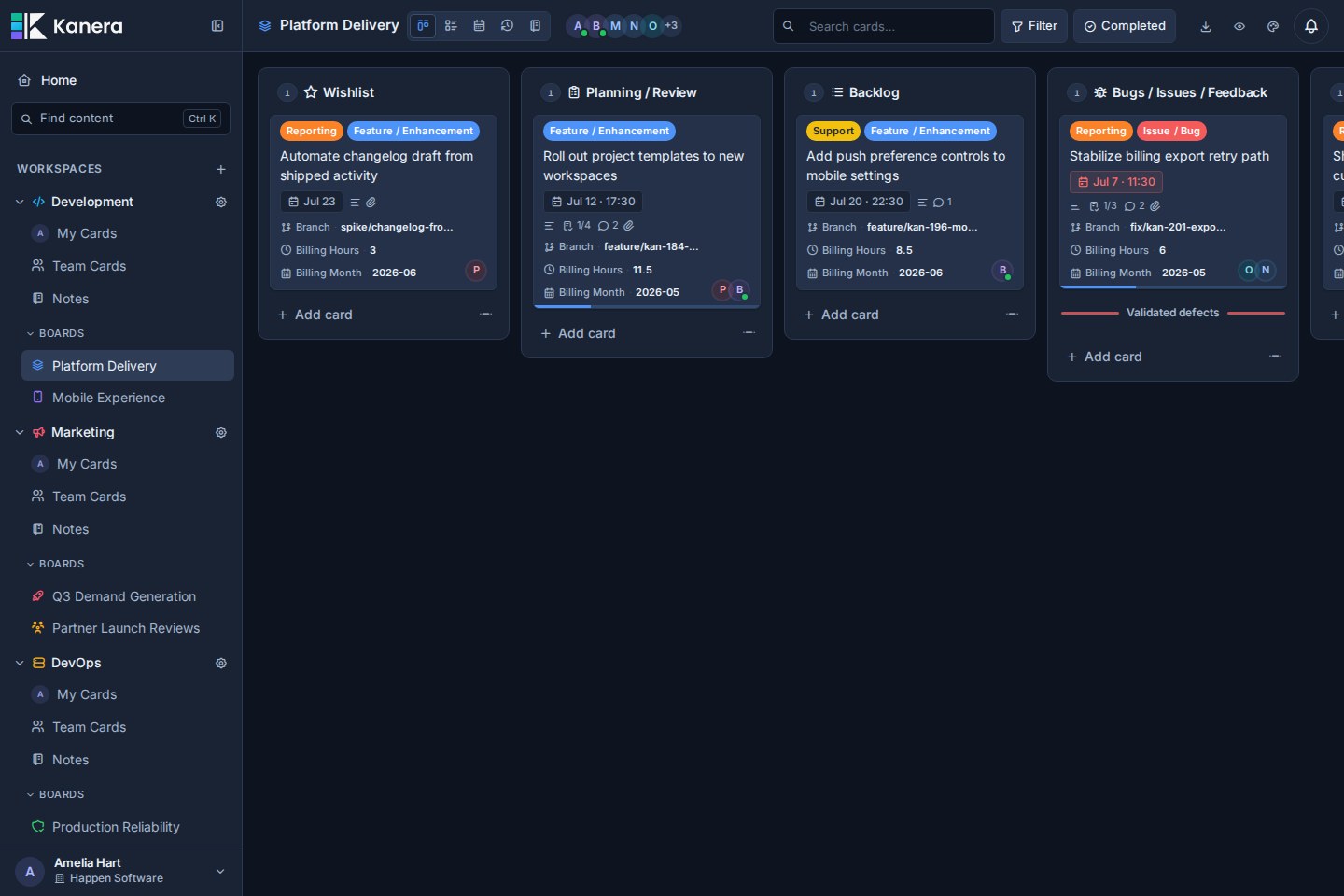
Kanera Home showing Amelia's focus tiles, weekly agenda, and progress in dark mode

Kanera coordinates assigned, active, blocked, and completed work across projects, clients, and teams from one fast, polished workspace. It brings boards, structured tasks, notes, assignments, progress history, automation, and integrations into one focused system—more visibility than a basic Kanban board without the overhead of a heavyweight work suite.

Use the hosted service and get started in minutes, or self-host Kanera on your own infrastructure.

One place for moving work forward

  • Plan in the view that fits. Move between Kanban, List, Calendar, My Cards, Team Cards, Portfolio, and Work Done without duplicating work.
  • Keep the details with the task. Add descriptions, comments, attachments, labels, custom fields, watchers, and assignable checklist items to cards.
  • See what needs attention. Bring work assigned to you or your team together across every board, with search and filters when you need to narrow the view.
  • Make progress visible. Review what was created, moved, completed, or checked off without chasing another status update.
  • Keep knowledge nearby. Use personal, workspace, and board notes for decisions, processes, references, and project context.
  • Automate and integrate. Handle repetitive updates with trigger-based automations, post card activity into Slack, Discord, Telegram, or Zulip, and connect other tools through the REST API, webhooks, and MCP server.
  • Get told what matters, where you want it. Choose per notification type whether an update reaches email, browser push, ntfy, Gotify, or your own webhook, then add per-workspace exceptions so one busy board does not drown out the rest.
  • Work together in real time. Stay current with live updates, mentions, activity history, and controlled guest access.

Workspaces and standalone boards

text
Organisation
  ├─ Workspace
  │    └─ Board
  │         └─ Card
  └─ Standalone board
       └─ Card

Use a workspace when several boards should follow the same operating model. Lists, labels, and custom fields are configured once and used across all of its boards, keeping workflows and reporting consistent as projects grow.

That means a status like In Review or a field like Client has the same meaning everywhere—no rebuilding each board or reconciling mismatched setups later.

For work that does not need to share that setup, create a standalone board. It has its own lists, labels, custom fields, members, and settings, independently of your workspaces.

See Kanera in action

Home keeps today and the week in focus

Start with overdue work, items due today, the next seven days, and recent progress in one focused view. Jump back into active boards and scan the week without opening each project separately.
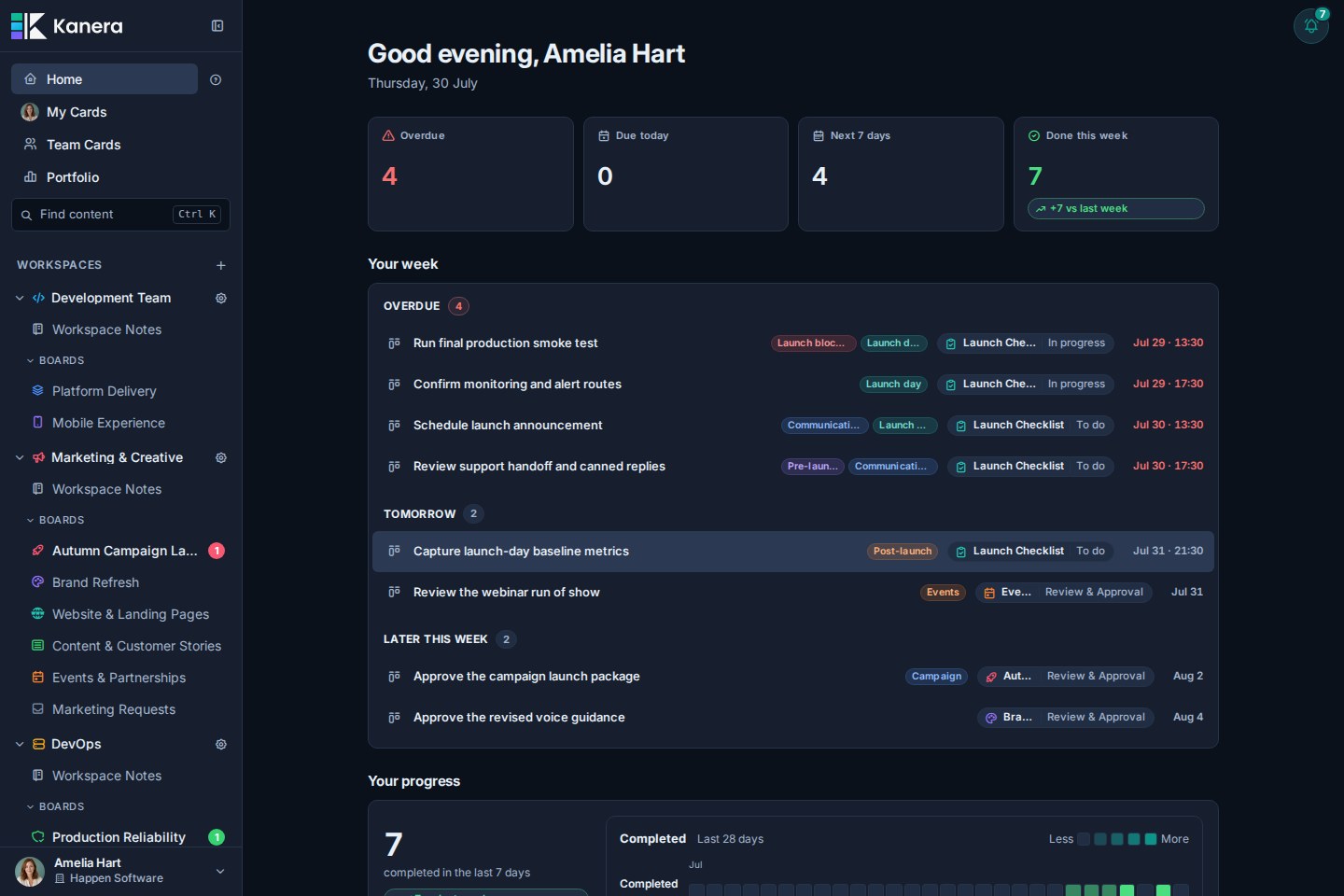
Kanera Home showing Amelia's focus tiles, weekly agenda, and progress in dark mode

Board view keeps the workflow visible

Move cards through shared lists while keeping labels, assignees, due dates, checklist progress, and visual covers in view.

Kanera Autumn Campaign Launch board showing cards organised into shared lists

Table view turns live work into structured reports

Group and sort cards by list, assignee, due date, label, status, or custom field, then choose the columns that matter and edit any of them in place. Numeric custom fields support sum and average aggregates per group, with a second breakdown dimension for questions such as hours by client and work type.

Export the filtered result to Excel as a multi-sheet workbook containing card rows, spreadsheet-friendly summaries, and a readable report when aggregates are enabled.
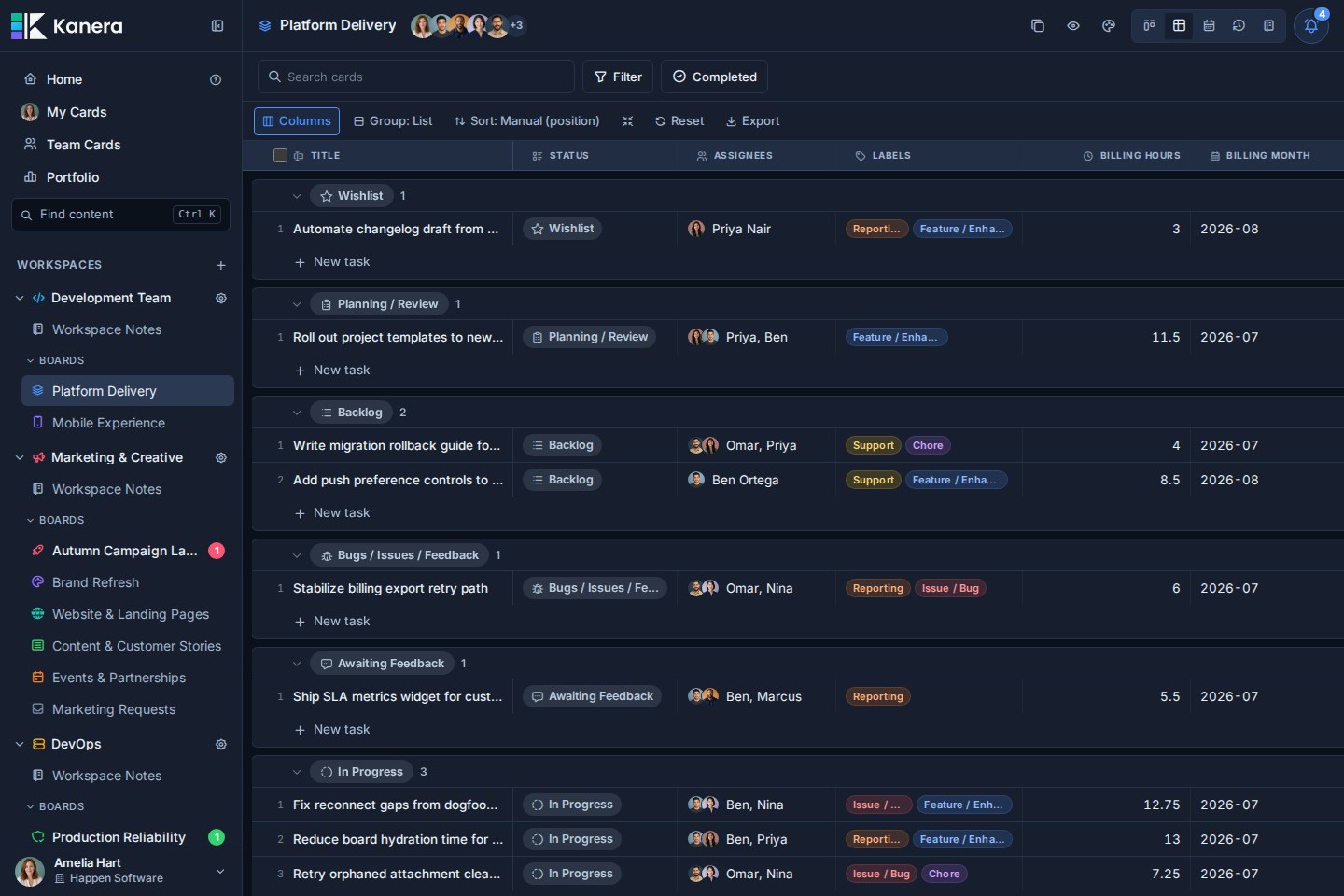
Kanera Platform Delivery Table view showing grouped card rows, configurable columns, and export controls

Notifications keep important changes together

Review mentions, assignments, comments, due-date changes, and other updates without losing the board context behind them. Group the feed by day, board, or person, narrow it to one board or one colleague, and search it by card, board, or list.
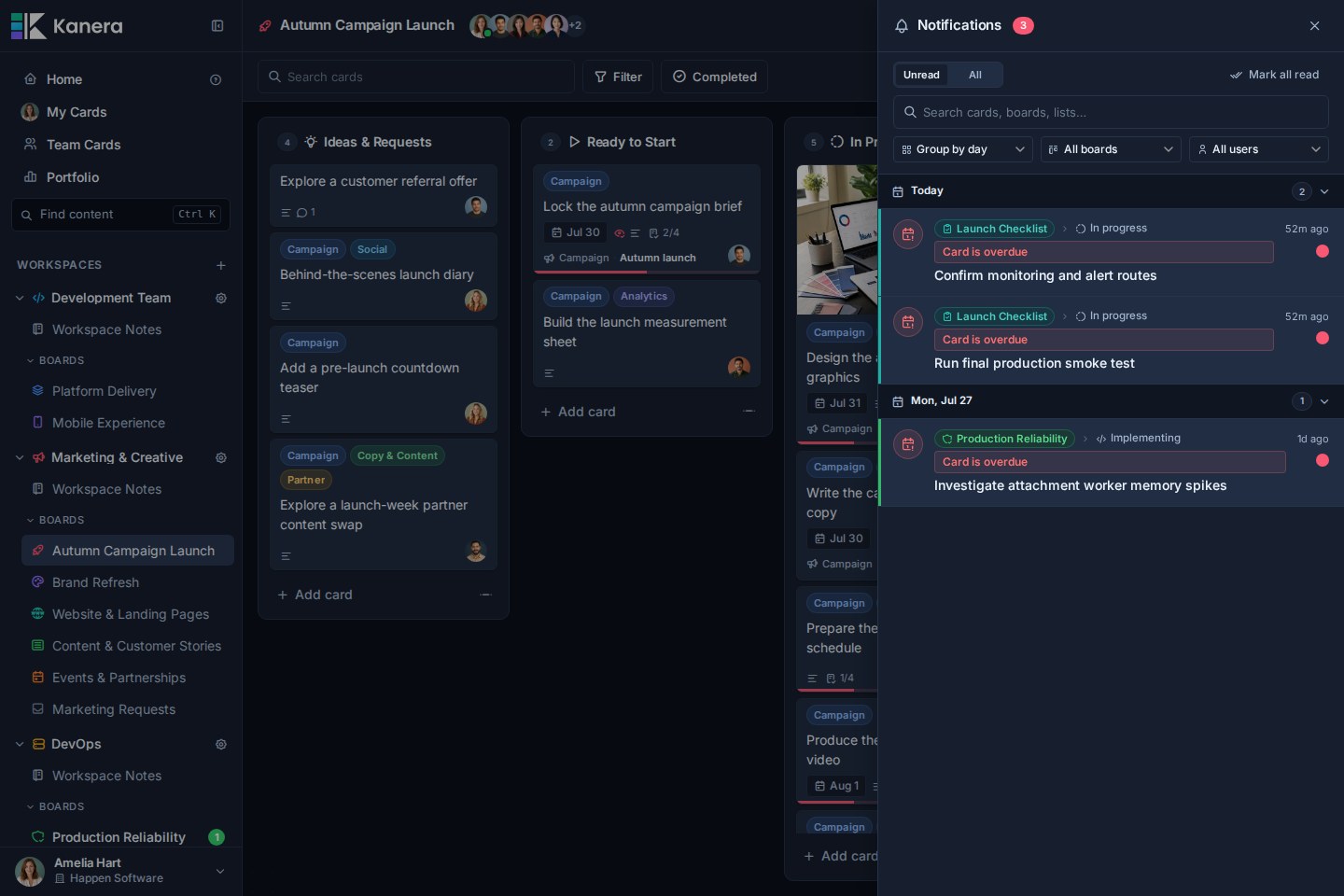
Kanera notification drawer over a project board

Then decide where each notification type reaches you: email, browser push, ntfy, Gotify, or a signed webhook of your own. Per-workspace rules pause or narrow a single noisy workspace without weakening your account defaults, and the in-app drawer always keeps the complete history regardless of what is switched off elsewhere.

Rich cards keep the work and its context together

Descriptions, custom fields, checklists, due dates, comments, attachments, and activity all live in one focused card view.
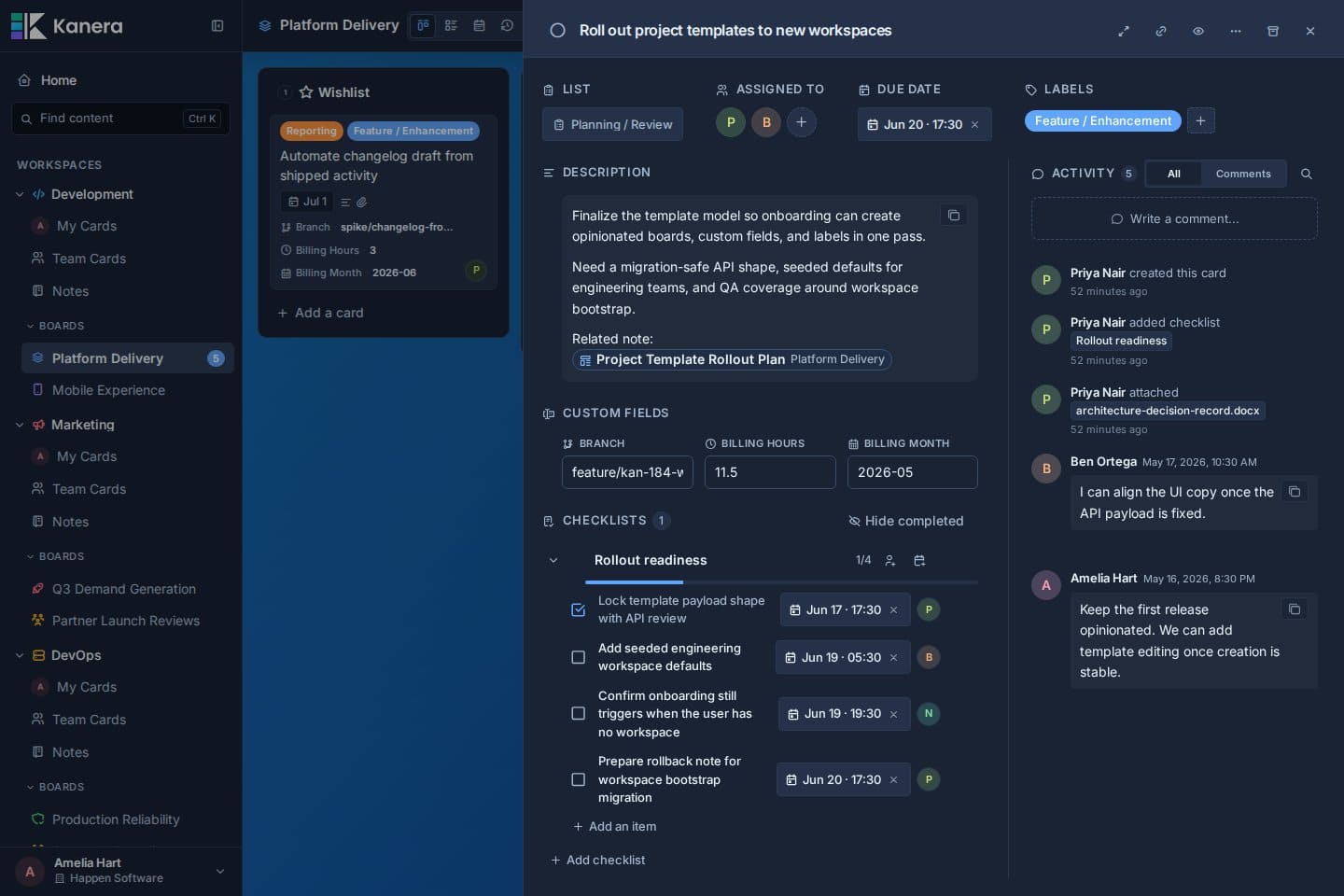
Kanera card detail showing custom fields, an assignable checklist, comments, and activity

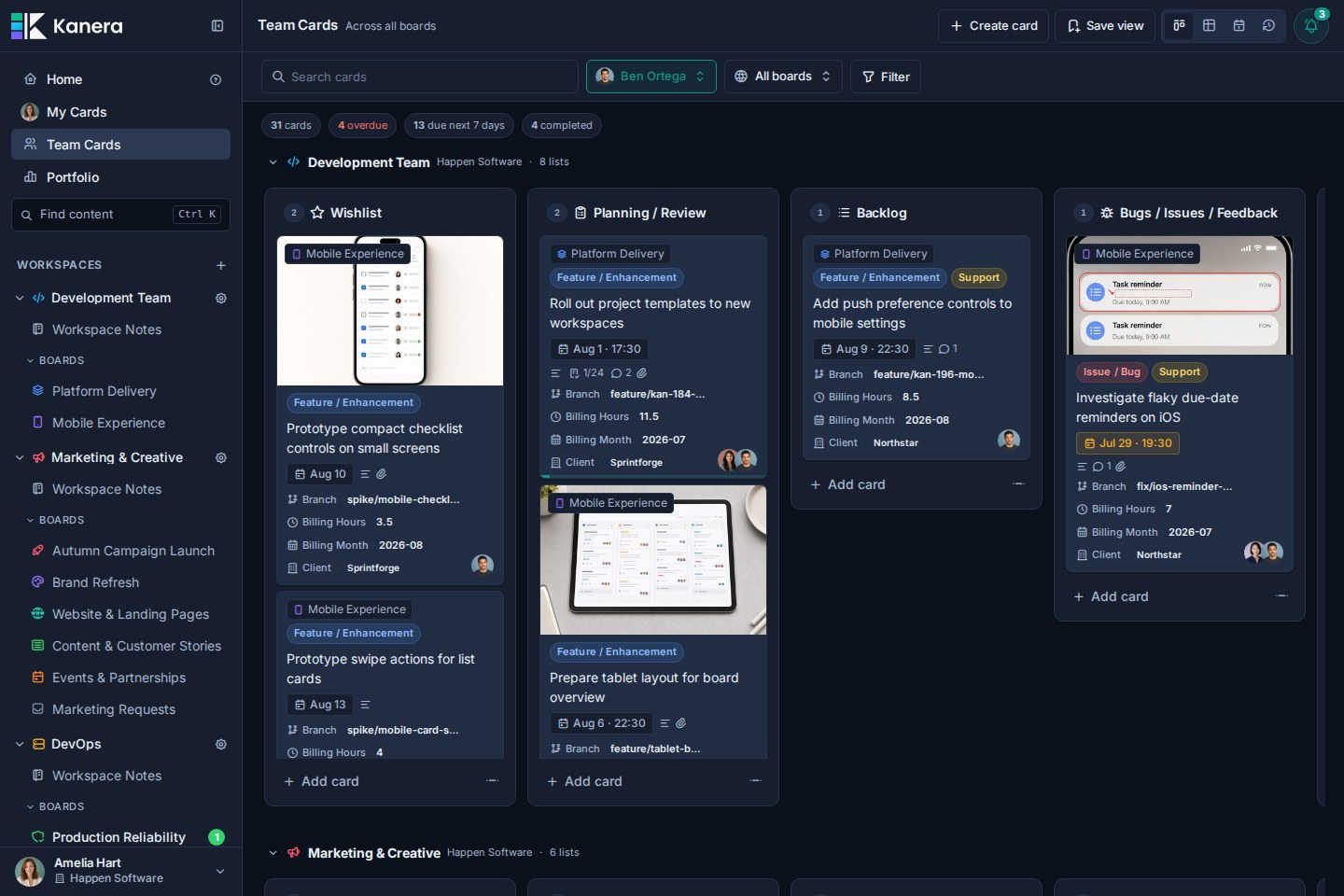
Team Cards brings assigned work together across boards

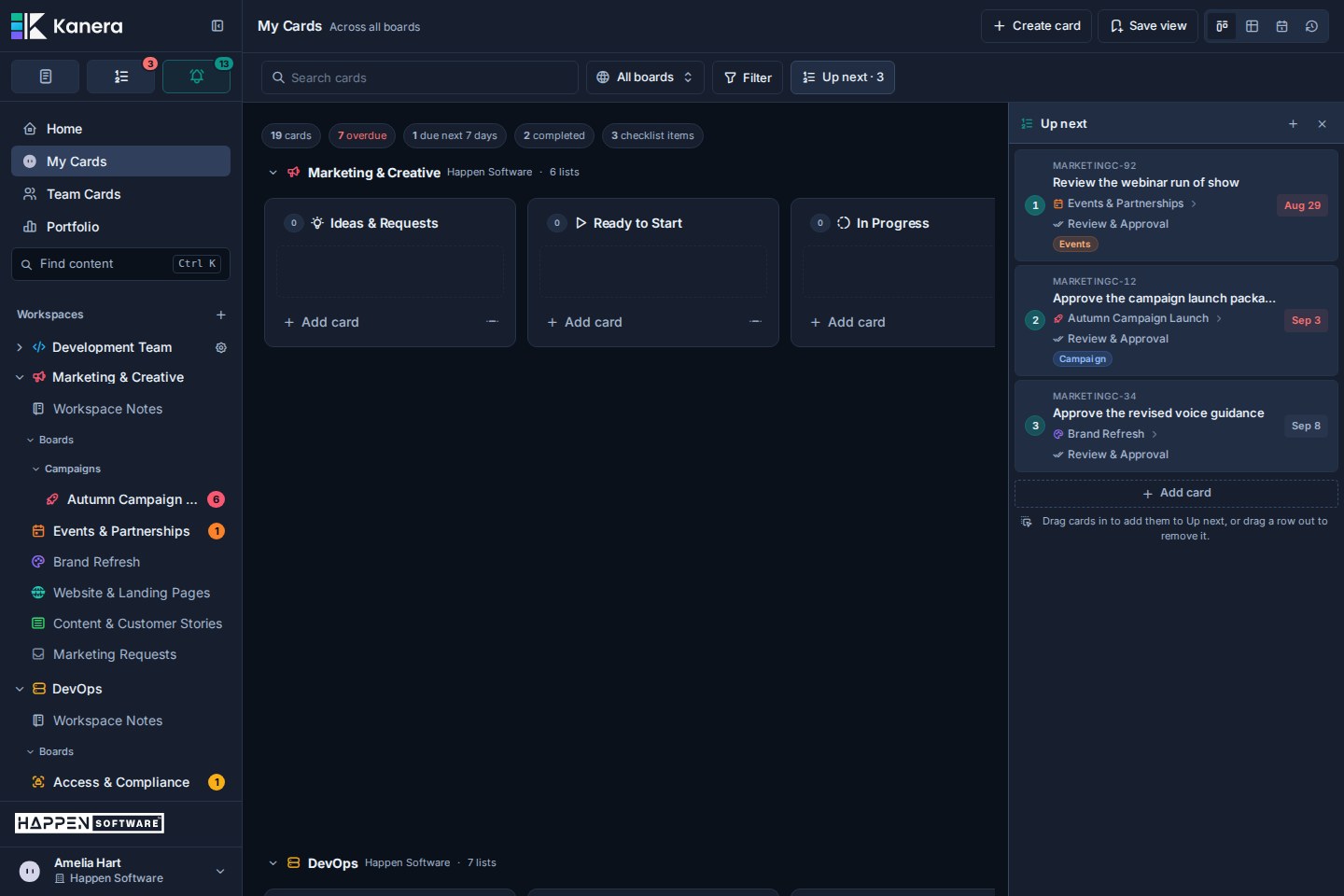
Use My Cards, Team Cards, and Portfolio to review work across organisations, workspaces, and boards, then group and filter it without losing its source context.

Kanera Team Cards view filtered to Ben Ortega across accessible boards

Work Done shows what actually moved forward

Review a daily history of cards created, moved, and completed, plus finished checklist items. Use it on a board, My Cards, or Team Cards for standups, async updates, progress reviews, and client check-ins.
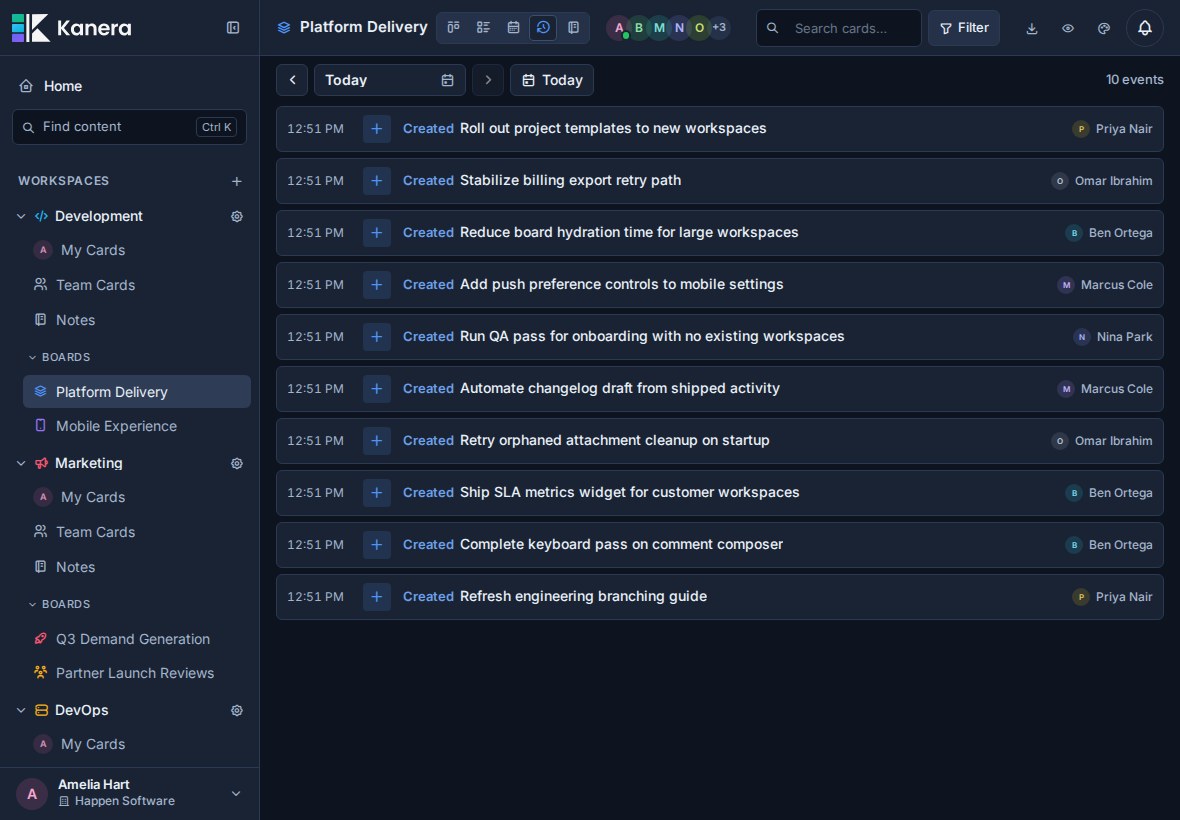
Kanera Team Cards Work Done view filtered to Ben Ortega across accessible boards

Portfolio rolls work up without losing its source

Review active, overdue, upcoming, unassigned, and completed work across organisations, workspaces, and boards from one reporting view.
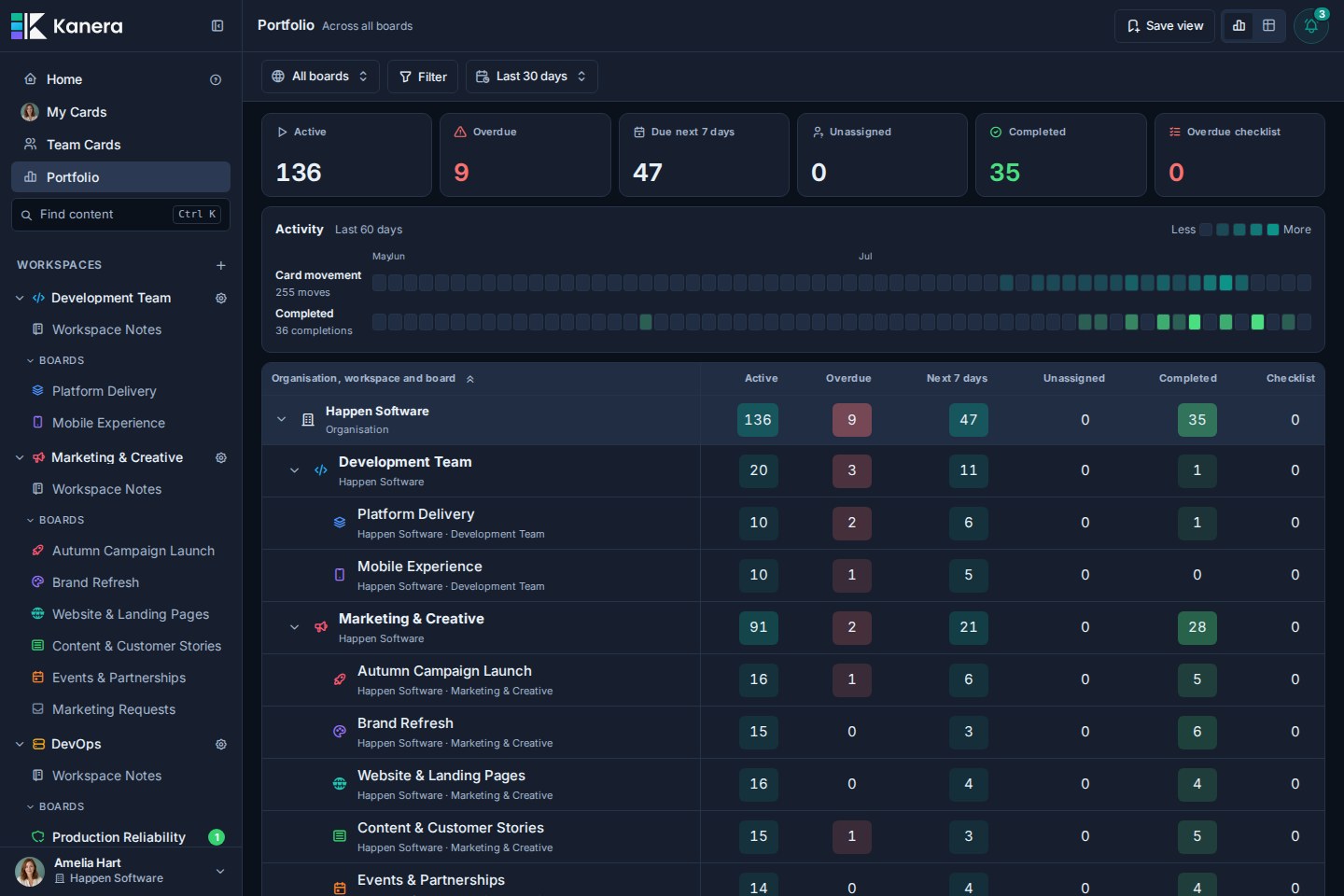
Kanera Portfolio showing organisation, workspace, and board-level work rollups

Explore the full product tour at kanera.app/features.

Move to Kanera without starting over

Kanera includes a guided Trello importer. Upload one board JSON export, map its lists, fields, and members, review the result, then confirm a controlled one-time import. Kanera can preserve attachment links and copy supported uploaded files when Trello is connected for the import. Your original Trello board stays unchanged, and later Trello changes are not synced automatically.

For Jira, ClickUp, Asana, monday.com, Notion, Linear, or an internal system, there is no native importer today. Start with one representative project so the source structure, mappings, users, history, and attachments can be reviewed before scoping an API-assisted migration.

  • Import from Trello
  • Explore migration options

Hosted or self-hosted

Hosted Kanera is the simplest way to get started. New accounts include a 30-day Pro trial with no card required; teams can then stay on Free or upgrade to Pro. Pro adds unlimited boards and automations, board guests for clients and contractors, the REST API, webhooks, chat destinations, personal notification channels, and email support, typically within one business day. See current pricing.

Self-hosted Kanera has no plan gating and no per-seat charges. Everything above is included, including guests, the REST API, webhooks, chat destinations, and personal notification channels. You control the infrastructure, storage, maintenance, and backups.

  • Self-hosting guide
  • Docker deployment
  • Dokploy deployment

For developers

Kanera is a pnpm monorepo built with Angular 21, Fastify 5, Socket.IO 4, PostgreSQL 18, Drizzle ORM, and Valkey.

For AI tools and automated research, see the LLM-readable documentation index.

text
apps/api/           Fastify API, worker, public API, and migrations
apps/web/           Angular web application
apps/mcp/           MCP server for AI clients
packages/shared/    Shared schema, DTOs, events, and workspace defaults
docker/             Local and production support files

Local setup

You will need Node.js 24, pnpm 11 (usually through corepack enable), and Docker.

bash
pnpm install
cp .env.example .env

pnpm dev:db
pnpm db:migrate
pnpm dev

Open http://localhost:4200.

The example environment uses PostgreSQL on localhost:5433 and Valkey on localhost:6379. Replace JWT_SECRET and MEDIA_SIGNING_SECRET with unique random values before exposing the application outside your machine. See .env.full.example for optional settings and defaults.

To load a realistic demo workspace:

bash
pnpm dev:db:reset:seed

Seed account details are documented in dev-db-seed-content/README.md.

Useful commands

bash
pnpm dev                  # API :3000 + worker :3003 + web :4200
pnpm dev:public-api       # Public integration API on :3001
pnpm dev:mcp              # MCP server on :3002
pnpm dev:db               # Start local PostgreSQL and Valkey
pnpm dev:db:down          # Stop local database services
pnpm db:generate          # Generate Drizzle migrations
pnpm db:migrate           # Apply pending migrations
pnpm build                # Build and type-check all packages
pnpm lint                 # Type-check and lint all packages
pnpm test                 # Run unit and integration test suites
pnpm test:api             # Run API unit and route tests
pnpm test:api:integration # Run API integration tests with isolated PostgreSQL

Architecture at a glance

  • Flexible board model: workspaces share lists, labels, and custom fields across their boards, while standalone boards keep their configuration isolated.
  • Realtime collaboration: REST is the write path and Socket.IO fans out typed events to connected clients.
  • Durable events: board- and workspace-scoped events are recorded in an outbox for cross-process realtime delivery and webhooks.
  • Integrations: workspace API keys support external tools without exposing user credentials.
  • Delivery outside the app: chat destinations are webhook endpoints with a provider set, so Slack, Discord, Telegram, and Zulip reuse the webhook worker, retry policy, and delivery history. Personal notification channels run through the push queue, with HMAC-signed payloads for user-owned endpoints.
  • Agent-native MCP: OAuth-capable AI clients can connect with short-lived tokens, structured tool results, explicit safety annotations, and auditable access.

Hosted MCP clients connect to https://mcp.kanera.app/mcp. See the AI and MCP guide for supported clients and setup instructions.

License

Kanera is source available under the Elastic License 2.0. You may inspect, modify, and self-host it for your own use, but may not provide Kanera to third parties as a hosted or managed service.

The Kanera name, logo, and brand assets are covered separately by TRADEMARKS.md.

Related MCP Servers

View all in Knowledge & Memory View all alternatives
  • Moxie Docs MCP logoMoxie Docs MCP
    ★ Featured

    MCP & Agent Skills for Automated Documentation, and codebase conventions + context

    🧠 Knowledge & Memory17 views
    Compare vs Moxie Docs MCP →
  • Knowtis logoKnowtis

    Create, search and manage Knowtis collaborative notes from AI assistants.

    🧠 Knowledge & Memory0 views
    Compare vs Knowtis →
  • Mcp Obsidian logoMcp Obsidian

    Universal AI bridge for Obsidian vaults using MCP. Provides safe read/write access to notes with 11 comprehensive methods for vault operations including search, batch operations, tag management, and frontmatter handling. Works with Claude, ChatGPT, and any MCP-compatible AI assistant.

    🧠 Knowledge & Memory2 views
    Compare vs Mcp Obsidian →
  • Mcp Server logoMcp Server

    Apple Developer Documentation with Semantic Search, RAG, and AI reranking for MCP clients

    🧠 Knowledge & Memory0 views
    Compare vs Mcp Server →

Frequently Asked Questions about Kanera

Add the following block to your claude_desktop_config.json under mcpServers: "mcpServers": { "kanera": { "command": "npx", "args": ["-y", "Kanera"] } }

AllMCPs Directory Badge

Full Badge Customizer

Showcase your server listing on GitHub or your project documentation. Embed this dynamic SVG badge to highlight official listing status and live engagement.

Badge Style:
Live Dynamic SVG PreviewKanera AllMCPs Directory Badge

Markdown (GitHub README)
[![AllMCPs](https://allmcps.com/api/badge/kanera?style=directory)](https://allmcps.com/mcp/kanera)
HTML Embed
<a href="https://allmcps.com/mcp/kanera"><img src="https://allmcps.com/api/badge/kanera?style=directory" alt="Kanera on AllMCPs" /></a>

Technical Specs & Signals

Category🧠Knowledge & Memory
More technical detailsExpand â–¾
TransportSSE (Remote)
RuntimeNode.js
Views0
Unique ViewsTotal visits recorded for this listing page on AllMCPs.
Installs0
Installs & Copy ActionsTotal times users copied install commands or configuration snippets for this server.
GitHub stars6
GitHub Star CountTotal stargazers on GitHub representing community popularity (6 stars).
Last commitToday
Last Repository CommitThe most recent commit or push recorded for this server's GitHub repository.Last commit on Aug 10, 2026
41Quality signal: Fair · 41/100How this signal is calculated ▾
Server availabilityNot measured

Not scored for repo-hosted servers — we can't reach the running server, only its GitHub page. Hosted MCP endpoints are health-checked live.

Verified ownership10/20
Documentation & tools16/30
Adoption & activity5/15
Community engagement0/10

A guidance signal from public completeness & health data — not a user rating. New listings start lower and rise as they add docs, get verified, and grow adoption. Signals we can't observe for a listing are skipped, not counted against it.

★ FeaturedMoxie Docs MCP logo

Moxie Docs MCP

MCP & Agent Skills for Automated Documentation, and codebase conventions + context

Explore Server →

Own this project?

This directory is pre-filled from public sources. Claim via GitHub README, site badge, or DNS TXT to get the verified badge.

Free dofollow backlink: after claiming, verify your product site and place a dofollow AllMCPs badge — we recheck it stays live.

Claim & get free dofollow

Share & Embed

Add our SVG badge (dark/light directory styles) or embeddable widget to your site.

Explore more

More in 🧠 Knowledge & Memory →Best MCP servers for Memory & Knowledge →Alternatives to Kanera →Install in Claude DesktopInstall in CursorInstall in VS Code