🐇 MCP SQLite Server
This is a Model Context Protocol (MCP) server that provides comprehensive SQLite database interaction capabilities.

Maintained by

Features
- Complete CRUD operations (Create, Read, Update, Delete)
- Database exploration and introspection
- Execute custom SQL queries
Setup
Define the command in your IDE's MCP Server settings:
e.g. Cursor:
{

    "mcpServers": {

        "MCP SQLite Server": {

            "command": "npx",

            "args": [

                "-y",

                "mcp-sqlite",

                "<path-to-your-sqlite-database.db>"

            ]

        }

    }

}
e.g. VSCode:
{

    "servers": {

        "MCP SQLite Server": {

            "type": "stdio",

            "command": "npx",

            "args": [

                "-y",

                "mcp-sqlite",

                "<path-to-your-sqlite-database.db>"

            ]

        }

    }

}
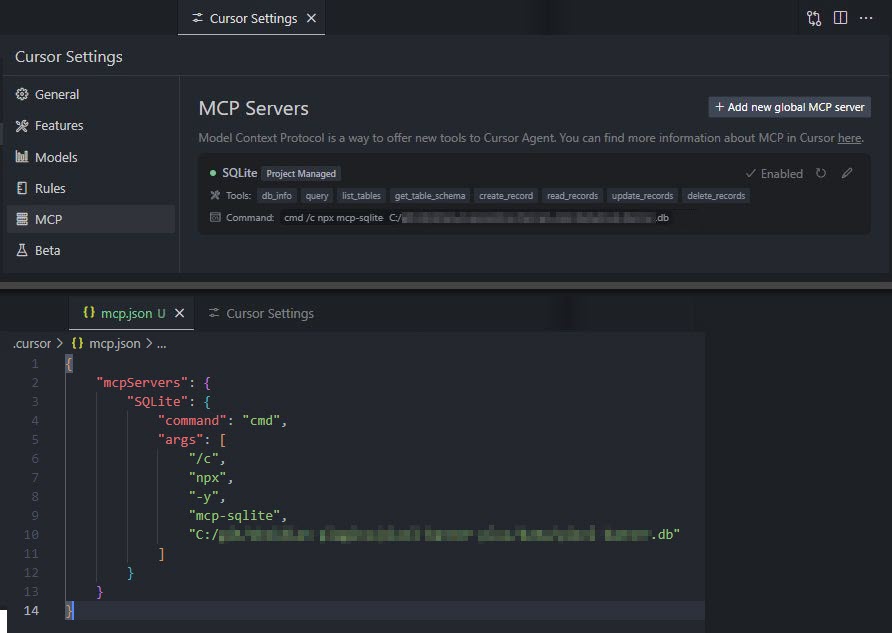
Your database path must be provided as an argument.
Available Tools
Database Information
db_info
Get detailed information about the connected database.
Example:
{

  "method": "tools/call",

  "params": {

    "name": "db_info",

    "arguments": {}

  }

}
list_tables
List all tables in the database.
Example:
{

  "method": "tools/call",

  "params": {

    "name": "list_tables",

    "arguments": {}

  }

}
get_table_schema
Get detailed information about a table's schema.
Parameters:
tableName(string): Name of the table
Example:
{

  "method": "tools/call",

  "params": {

    "name": "get_table_schema",

    "arguments": {

      "tableName": "users"

    }

  }

}
CRUD Operations
create_record
Insert a new record into a table.
Parameters:
table(string): Name of the tabledata(object): Record data as key-value pairs
Example:
{

  "method": "tools/call",

  "params": {

    "name": "create_record",

    "arguments": {

      "table": "users",

      "data": {

        "name": "John Doe",

        "email": "john@example.com",

        "age": 30

      }

    }

  }

}
read_records
Query records from a table with optional filtering.
Parameters:
table(string): Name of the tableconditions(object, optional): Filter conditions as key-value pairslimit(number, optional): Maximum number of records to returnoffset(number, optional): Number of records to skip
Example:
{

  "method": "tools/call",

  "params": {

    "name": "read_records",

    "arguments": {

      "table": "users",

      "conditions": {

        "age": 30

      },

      "limit": 10,

      "offset": 0

    }

  }

}
update_records
Update records in a table that match specified conditions.
Parameters:
table(string): Name of the tabledata(object): New values as key-value pairsconditions(object): Filter conditions as key-value pairs
Example:
{

  "method": "tools/call",

  "params": {

    "name": "update_records",

    "arguments": {

      "table": "users",

      "data": {

        "email": "john.updated@example.com"

      },

      "conditions": {

        "id": 1

      }

    }

  }

}
delete_records
Delete records from a table that match specified conditions.
Parameters:
table(string): Name of the tableconditions(object): Filter conditions as key-value pairs
Example:
{

  "method": "tools/call",

  "params": {

    "name": "delete_records",

    "arguments": {

      "table": "users",

      "conditions": {

        "id": 1

      }

    }

  }

}
Custom Queries
query
Execute a custom SQL query against the connected SQLite database.
Parameters:
sql(string): The SQL query to executevalues(array, optional): Array of parameter values to use in the query
Example:
{

  "method": "tools/call",

  "params": {

    "name": "query",

    "arguments": {

      "sql": "SELECT * FROM users WHERE id = ?",

      "values": [1]

    }

  }

}
Built with
Appreciation
If you enjoy this library please consider sending me a tip to support my work 😀