AllMCPs
BrowseBestCategoriesStackCompareToolsGuidesBlog
Log in Submit MCP

Stay in the loop

Get new MCP servers and top picks in your inbox.

AllMCPs

The open directory for discovering and installing Model Context Protocol servers.

AllMCPs on GitHub (opens in a new tab)
Launched onTiny Startupstinystartups.com
Explore
  • Browse servers
  • Best MCP servers
  • Categories
  • MCP clients
  • Agent prompts
  • Stack Builder
  • Compare servers
  • Random discovery New
  • Submit a server
  • Pricing & Boost Boost
Learn
  • Guides hub
  • What is MCP?
  • Install guide
  • Build an MCP server
  • Deploy an MCP server
  • Security guide
  • Troubleshooting
  • MCP for SEO & AEO
  • Protocol versioning
  • Transports: stdio vs HTTP
  • State of MCP (stats)
  • Blog & updates
Tools
  • All developer tools
  • Config generator
  • Config validator
  • Config auditor
  • MCP playground
  • Token calculator
  • OpenAPI → MCP
  • Badge generator
For agents
  • REST API docs
  • Trust & traffic Live
  • Remote MCP server SSE ↗ (opens in a new tab)
  • llms.txt ↗ (opens in a new tab)
  • Catalog JSON ↗ (opens in a new tab)
Company
  • About
  • Advertise Sponsor
  • Contact
  • GitHub ↗ (opens in a new tab)
  • Terms
  • Privacy
AllMCPs VerifiedAllMCPs VerifiedFeatured on Nick LaunchesFeatured on Nick LaunchesLaunch Llama NewsletterLaunch Llama NewsletterVerified DR - allmcps.comVerified DR - allmcps.comFeatured on SaaSGrowFeatured on SaaSGrowFeatured on Twelve ToolsFeatured on Twelve ToolsFeatured on Saaspa.geFeatured on Saaspa.geFeatured on Findly.toolsFeatured on Findly.toolsFeatured on Startup FameFeatured on Startup FameFeatured on LaunchKiwiFeatured on LaunchKiwiFeatured on ScrollLaunchFeatured on ScrollLaunchFeatured on DailyPingsFeatured on DailyPingsFazier badgeFazier badgeFeatured on NewTool.siteFeatured on NewTool.siteFeatured on saasfame.comFeatured on saasfame.comDR Checker - Domain RatingDR Checker - Domain RatingListed on Turbo0Listed on Turbo0Launched on LaunchBoard - Product Launch PlatformLaunched on LaunchBoard - Product Launch PlatformList on SimilarlabsList on Similarlabshttps://codetrendy.comhttps://codetrendy.comListed on DevTool.ioFeatured on BuildlistFeatured on BuildlistLaunched on Tiny StartupsFeatured on ShowMeBestAIFeatured on ShowMeBestAIFind us on LaunchZoneFind us on LaunchZoneAllMCPs VerifiedAllMCPs VerifiedFeatured on Nick LaunchesFeatured on Nick LaunchesLaunch Llama NewsletterLaunch Llama NewsletterVerified DR - allmcps.comVerified DR - allmcps.comFeatured on SaaSGrowFeatured on SaaSGrowFeatured on Twelve ToolsFeatured on Twelve ToolsFeatured on Saaspa.geFeatured on Saaspa.geFeatured on Findly.toolsFeatured on Findly.toolsFeatured on Startup FameFeatured on Startup FameFeatured on LaunchKiwiFeatured on LaunchKiwiFeatured on ScrollLaunchFeatured on ScrollLaunchFeatured on DailyPingsFeatured on DailyPingsFazier badgeFazier badgeFeatured on NewTool.siteFeatured on NewTool.siteFeatured on saasfame.comFeatured on saasfame.comDR Checker - Domain RatingDR Checker - Domain RatingListed on Turbo0Listed on Turbo0Launched on LaunchBoard - Product Launch PlatformLaunched on LaunchBoard - Product Launch PlatformList on SimilarlabsList on Similarlabshttps://codetrendy.comhttps://codetrendy.comListed on DevTool.ioFeatured on BuildlistFeatured on BuildlistLaunched on Tiny StartupsFeatured on ShowMeBestAIFeatured on ShowMeBestAIFind us on LaunchZoneFind us on LaunchZone
© 2026 Jackalope Digital LLC. All rights reserved.
  1. Home
  2. 💻 Developer Tools
  3. Jev Ultrafast MCP
J
Health: Not checked yetWe have not completed a health check for this listing yet.No health check has run yet.

Jev Ultrafast MCP

User RatingsBe the first to rate and review this MCP server! Enrichment pendingWe haven’t run our AI enrichment pass on this listing yet, so the overview, use cases, and FAQ below may be sparse or missing. We work through the catalog over time — check back soon.
View Repository

Hand browser work off to a server-side agent: read the page as a table, act, then verify.

Quick Install

Automated & IDE Setup

Copy the AI prompt to install this server into Claude Code, Cursor, or another agent — or use 1-click editor setup below.

One-click editor setup isn’t available for this listing yet — we don’t have a confirmed install command, and we’d rather show nothing than point your editor at the wrong package or host. Follow the project’s own setup instructions, linked above.

Manual Client & Custom JSON ConfigExpand JSON â–¾
No confirmed setup config for this listing yet. We only publish a config block when the install details come from the project itself — its README, its docs, or a verified owner. We haven’t found those for jev-ultrafast-mcp, and we’d rather show nothing than a guess you’d paste into your client. Follow the project’s own setup instructions for the current steps.
Install Directory Badge Claim listing Alternatives💻 More in Developer Tools

Documentation Overview

jev-ultrafast-mcp

CI License: MIT Python

English · 简体中文

Hand the browser work off to a decision model

Hand the browser work off — an MCP server that drives the page for your agent.

Your agent should not be opening the browser at all. A browser task goes over whole — the URL, the goal, and the check that proves it — and the loop runs on the server. One tool call instead of twenty. Three seconds instead of a minute. A cent instead of a frontier model's context. And it never invents a target: it picks from what the page actually has, and the server refuses rather than guesses.

What it cost. A cent for the whole day, and a cent is all of it:
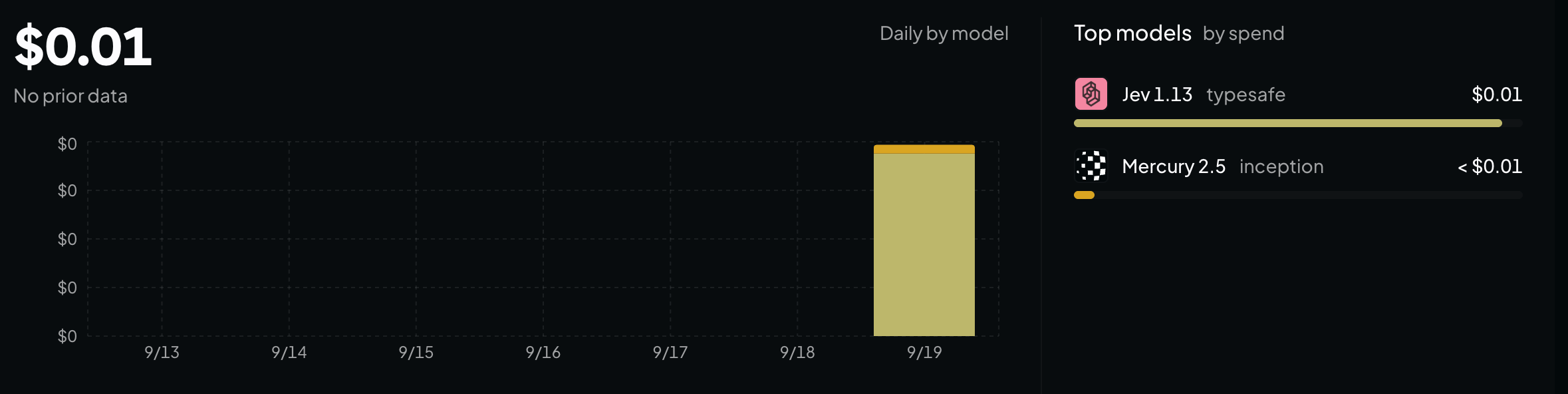
A billing dashboard showing $0.01 spent on the decision model for the day

Quick start

Three commands, then restart your client.

bash
git clone https://github.com/jiawei686/jev-ultrafast-mcp.git
cd jev-ultrafast-mcp
python3 -m venv .venv
.venv/bin/pip install -e .          # Windows: .venv\Scripts\pip install -e .

python scripts/install.py           # finds your MCP clients and writes their config

install.py looks for WorkBuddy, Claude Code, Claude Desktop, Codex CLI, Cursor, VS Code, Cline, Windsurf and Gemini CLI, and writes the format each one expects — merging into your existing config and saving a .bak first. Needs Python ≥ 3.10 and any Chromium-family browser.

Restart the client, and then just say what you want:

You: Set this form to 3 adults, tick Nonstop only, then submit it. Your agent: browser_goal(goal=…, url=…, verify=[…]) — one call; the page is opened and the loop runs server-side, and the result is checked by code afterwards. (what that costs)

You: Open example.com and tell me what the page says. Your agent: browser_open → reads the element table → answers — a look is not a task, so it does not need the model. (verbatim run)

Restarted and the tools are not there? Some clients make you approve the server once. In WorkBuddy that is Connectors → Custom connectors → Trust. The approval is remembered against the config itself, so if you later edit the config it asks once more.

Installation

No checkout needed if you would rather install it as a package. It is on PyPI, so the name is enough:

bash
uvx jev-ultrafast-mcp                  # run it straight from PyPI, nothing installed
pip install jev-ultrafast-mcp          # or install it yourself

A client config wants a stable interpreter path rather than uvx's cache, so:

bash
python3 -m venv ~/.jev-ultrafast-mcp/venv
~/.jev-ultrafast-mcp/venv/bin/pip install jev-ultrafast-mcp

That gives you a jev-ultrafast-mcp console script and a stable interpreter path to put in a client config — verified against the latest mcp SDK on Python 3.13, every one of the ten tools listed.

scripts/install.py is the other half: it finds your MCP clients and writes the config each one expects, merging into the existing file and saving a .bak first.

bash
python scripts/install.py --list              # what is installed, and the file each one reads
python scripts/install.py --print             # show the config it would write, change nothing
python scripts/install.py -c cursor,codex     # only these two
python scripts/install.py --headed            # keep a visible browser window
python scripts/install.py --allow-domains example.com,*.example.org
python scripts/install.py --uninstall         # take the entry back out

Runtime dependencies: mcp, websockets, httpx. No Playwright, no Selenium, no browser-harness.


Cheap and fast, and here is the bill

A three-step goal on a real page, driven by browser_goal. This is everything your agent sent and everything it got back — one turn, and the page never entered its context:

Code
browser_goal(
  goal="On this flight search form: set Passengers to 3 adults, tick the 'Nonstop only' "
       "checkbox, then submit the search. Do not type into any city field.",
  verify=[{"type": "text_contains", "text": "3 adults · nonstop"}],
)

goal: On this flight search form: set Passengers to 3 adults, …
status: done
steps: 3
turbo: 4 decisions · 14,626 tokens · 1.8s model + 1.1s page · 3.3s wall
trace:
  1. SELECT e6 Passengers → ok (759ms model / 30ms browser)
  2. TOGGLE e7 Nonstop only → ok (336ms model / 692ms browser)
  3. CLICK e8 Search → ok (370ms model / 410ms browser)
  4. DONE (conf 0.93)
verified: PASS
  ok text_contains: '3 adults · nonstop' found in page text

What the second time costs. Nothing. The second time is a recorded macro, and a macro makes no model calls at all — it does not even need a key.

How long it took. 3.3 s wall for the whole goal: 1.8 s of model, 1.1 s of page. Every run prints that line itself, so the numbers are checkable rather than persuasive.

That run is not a mock-up. scripts/turbo_check.py reproduces it against a real Chrome and the real model, and then checks the page with code rather than trusting the model's account of its own work. The three actions — plus the reading and re-reading between them — all happened on the server. Your agent spent one turn and never saw an element table.

The division of labour is the whole design decision, so it is yours to make per task:

agent drivesbrowser_goal drives
Tool calls for a 3-step flow6+ (observe, act, observe, act…)1
Who holds the page in contextyour agentthe decision model, server-side
Per-step costone agent turnone typed request, no screenshot
Who names the targetthe model writes a selectorthe model picks a ref from the page's own table
If it goes wronga wrong click, usually silentthe server refuses, with the reason
Knowing it workedthe model's summarycode-checked assertion, which wins the disagreement
Second time aroundrun the model againmacro replay, zero model calls

What it is

Browser automation usually makes the agent do the driving: read the page, pick one element, act, read again to see whether that worked. Ten clicks is ten turns, the page passes through the agent's context every time, and a mis-click rarely announces itself.

This server can take that job instead. browser_goal is one tool call from your agent; the loop runs here, server-side, with Jev — TypeSafe's decision model — choosing each step. The model never writes a selector: it picks among the elements the page actually has, and the server refuses anything that is not on the page rather than guessing. When it stops, browser_assert checks the page it left behind in code, and a passing assertion outranks the model's own account of what it did.

Four things follow from that:

  • One call, not one per click. The run above took a 3-step goal on a real page through 4 decisions, 14,626 tokens, 1.8 s model + 1.1 s page, 3.3 s wall — for one turn of your agent's context.
  • Accurate by construction. A target is a ref from a numbered table of what is on the page, not a selector or a coordinate the model invented, and the action is re-checked against the page before it runs.
  • Free after the first run. Record the path once; replay costs zero model calls, works with no key at all, and refuses to proceed when the page no longer matches.
  • Text, not pixels. No screenshots, no HTML dumps. It speaks CDP straight to a Chrome you already have — no Playwright, no Selenium, no screenshot pipeline.

Everything except browser_goal — browser_open, browser_observe, browser_act, browser_assert, browser_macro — needs no key, no account, and no network beyond the page itself, from any MCP client: WorkBuddy, Claude Code, Codex, Cursor or VS Code. If you would rather keep your hands on the wheel, that whole surface is still here.

Code
browser_open  →  element table  →  browser_act [refs]  →  browser_assert

Inspired by browser-use/jev-ultrafast and TypeSafe's typed-question API. Independent project, not affiliated with either — see docs/DESIGN.md for what is different and why.

Contents · Quick start · Cheap and fast · What it is · What a session looks like · Connecting an agent · What you can ask it to do · What the agent reads · Why another browser MCP? · Tools · Configuration · FAQ · Try it without an agent · See also


What a session actually looks like

You say:

Open example.com and tell me what the page says.

Your agent does this, and this is everything it sees:

Code
browser_open("https://example.com")
  [obs#1] https://example.com/  "Example Domain"  scroll=0/216  reachable=1/1
  e1   lnk    More information...

browser_observe()
  [delta#2] … 1 element
    = no change (1 element)

Read the full README →View source on GitHub →

Related MCP Servers

View all in Developer Tools View all alternatives
  • Openapi MCP Server logoOpenapi MCP Server

    Connect any HTTP/REST API server using an Open API spec (v3)

    💻 Developer Tools3 views
    Compare vs Openapi MCP Server →
  • Claude Task Master logoClaude Task Master

    AI-powered task management system for AI-driven development. Features PRD parsing, task expansion, multi-provider support (Claude, OpenAI, Gemini, Perplexity, xAI), and selective tool loading for optimized context usage.

    💻 Developer Tools8 views
    Compare vs Claude Task Master →
  • MCP Server Docker logoMCP Server Docker

    Integrate with Docker to manage containers, images, volumes, and networks.

    💻 Developer Tools3 views
    Compare vs MCP Server Docker →
  • Next Devtools MCP logoNext Devtools MCP
    Verified

    Official Next.js MCP server for coding agents. Provides runtime diagnostics, route inspection, dev server logs, docs search, and upgrade guides. Requires Next.js 16+ dev server for full runtime features.

    💻 Developer Tools6 views
    Compare vs Next Devtools MCP →

Reviews

No reviews yet — be the first to share how this listing worked for you.

Frequently Asked Questions about Jev Ultrafast MCP

We don't have a confirmed install command for jev-ultrafast-mcp yet, so we don't publish a generated one — a guessed package name would point at the wrong package or none at all. Follow the project's own README or setup instructions (https://github.com/jiawei686/jev-ultrafast-mcp) for the current steps.

AllMCPs Directory Badge

Full Badge Customizer

Showcase your server listing on GitHub or your project documentation. Embed this dynamic SVG badge to highlight official listing status and live engagement.

Badge Style:
Live Dynamic SVG PreviewJev Ultrafast MCP AllMCPs Directory Badge

Markdown (GitHub README)
[![AllMCPs](https://allmcps.com/api/badge/jev-ultrafast-mcp?style=directory)](https://allmcps.com/mcp/jev-ultrafast-mcp)
HTML Embed
<a href="https://allmcps.com/mcp/jev-ultrafast-mcp"><img src="https://allmcps.com/api/badge/jev-ultrafast-mcp?style=directory" alt="Jev Ultrafast MCP on AllMCPs" /></a>

Technical Specs & Signals

Category💻Developer Tools
More technical detailsExpand â–¾
Last updatedSep 28, 2026
Views0
Unique ViewsTotal visits recorded for this listing page on AllMCPs.
Installs0
Installs & Copy ActionsTotal times users copied install commands or configuration snippets for this server.
27Quality signal: Emerging · 27/100How this signal is calculated ▾
Server availabilityNot measured

Not scored for repo-hosted servers — we can't reach the running server, only its GitHub page. Hosted MCP endpoints are health-checked live.

Verified ownership8/20
Documentation & tools11/30
Adoption & activity1/15
Community engagement0/10

A guidance signal from public completeness & health data — not a user rating. New listings start lower and rise as they add docs, get verified, and grow adoption. Signals we can't observe for a listing are skipped, not counted against it.

★ Spotlight Slot

Feature Your MCP Server

Get maximum visibility for your server across our directory, search results, and detail pages.

Spotlight Your Server

Own this project?

This directory is pre-filled from public sources. Claim via GitHub README, site badge, or DNS TXT to unlock edit access and the Official badge and attach your website — proof is checked automatically, then reviewed by our team.

Free dofollow backlink: add your website and place the AllMCPs badge on it — no claim needed. We detect it automatically and keep it verified as long as the badge stays live.

Claim & get free dofollow

Share & Embed

Add our SVG badge (dark/light directory styles) or embeddable widget to your site.

Explore more

More in 💻 Developer Tools →Best MCP servers for Developers →Alternatives to Jev Ultrafast MCP →Install in Claude DesktopInstall in CursorInstall in VS CodeSetup guides for all 13 MCP clients