cimonitoringwebhooksfile-watchingprocess-management
Open-source MCP server providing real-time feedback on CI, processes, file changes, HTTP endpoints, and webhooks for AI coding agents.
Quick Install
Automated & IDE SetupCopy the AI prompt to install this server into Claude Code, Cursor, or another agent — or use 1-click editor setup below.
Not yet automatically verified
We haven't yet run this listing's install command through our automated sandbox check. This isn't a red flag — we're steadily working through the catalog.
Manual Client & Custom JSON ConfigExpand JSON ▾
Client Config & Setup
Choose your client or environment
Target File:
💡 Paste the JSON block into your client's configuration file under mcpServers, then restart the application.
Overview
Use cases
Monitor GitHub Actions CI workflow status and results
Capture local process output and exit codes
Watch file or directory changes matching patterns
Poll HTTP endpoints for status and content changes
Receive and handle incoming webhook payloads
Key features
Polling GitHub Actions CI runs every 30 seconds
Local process spawning with stdout/stderr capture
File system watching with pattern matching
HTTP endpoint polling with status and body assertions
Lightweight HTTP server for incoming webhooks
Persistent event storage with automatic watch resumption
Capabilities & Tool Schemas
Inspect callable tools, capabilities, and parameters exposed to AI agents by Loopsense.
Extracted Tool Capabilities
Polling GitHub Actions CI runs every 30 seconds
Local process spawning with stdout/stderr capture
File system watching with pattern matching
HTTP endpoint polling with status and body assertions
Lightweight HTTP server for incoming webhooks
Persistent event storage with automatic watch resumption
Documentation Overview
LoopSense MCP Server
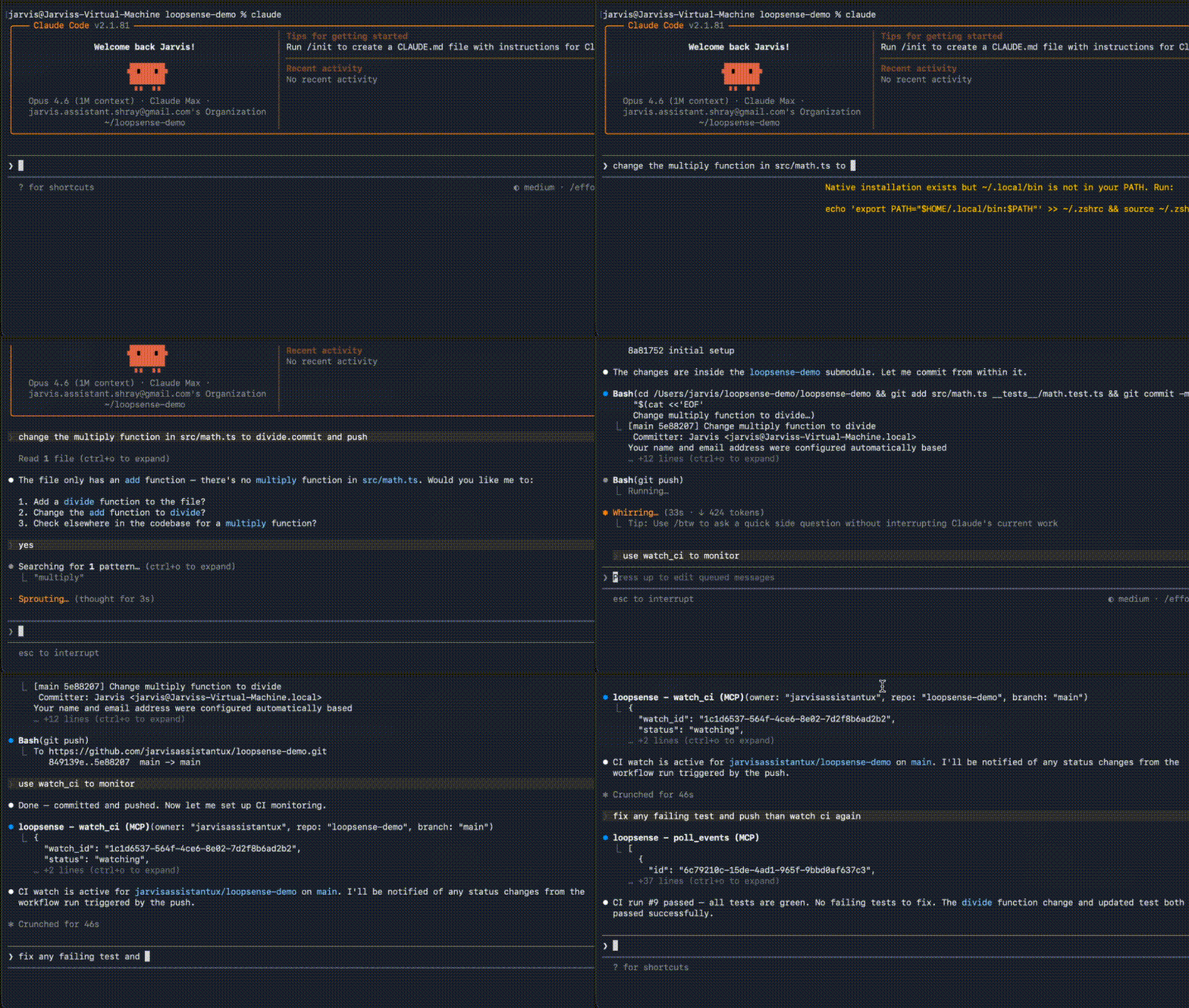
LoopSense is an open-source MCP server that closes the feedback loop for AI coding agents — giving them real-time visibility into CI results, deployments, test outcomes, and file system changes.
What it does
When an AI agent pushes code, runs tests, or triggers a deployment, LoopSense watches the downstream effects and surfaces them back to the agent. No more blind actions.
Supported sources:
- GitHub Actions CI runs (polling)
- Local processes (stdout/stderr capture, exit codes)
- File system changes (via chokidar)
- HTTP endpoints (polling, with status/body assertions)
- Incoming webhooks (lightweight HTTP server)
Requirements
- Node.js 18+
Installation
Or run directly with npx:
MCP Configuration
Claude Code (one-liner):
Or add manually to your claude_desktop_config.json (or equivalent MCP host config):
Or if installed globally:
Environment Variables
| Variable | Description |
|---|---|
GITHUB_TOKEN | GitHub personal access token for CI polling |
Tools
watch_ci
Watch a GitHub Actions workflow run. Polls every 30 seconds and emits events on status changes.
watch_process
Spawn a local process and capture its output and exit code.
watch_file
Watch a file or directory for changes.
watch_url
Poll an HTTP endpoint and detect status or body changes.
watch_webhook
Start a local HTTP server to receive webhook payloads.
Configure your webhook sender to POST to http://localhost:9876.
check_consequences
Get events for a specific action or all recent events.
list_watches
List all active watchers.
cancel_watch
Stop a watcher by ID.
poll_events
Get events since a timestamp (fallback for clients without notification support).
Resources
LoopSense exposes two MCP resources that update reactively:
loopsense://timeline/recent— last 100 events across all watchesloopsense://watches/active— all currently active watchesloopsense://consequences/{action_id}— events for a specific action
Usage Example
An agent workflow might look like:
- Agent pushes code to a branch
- Agent calls
watch_ciwithaction_id: "my-pr-123" - LoopSense polls GitHub Actions every 30 seconds
- When CI completes, agent calls
check_consequenceswithaction_id: "my-pr-123" - Agent sees the test failures and fixes them
Data Storage
Events and watch records are persisted to ~/.loopsense/events.db (SQLite). Active watches are resumed automatically on server restart.
Development
License
MIT
Related MCP Servers
Adoption & maintenance
Factual signals from GitHub, npm, and our automated checks — not a rating.
GitHub stars
2
Stargazers on the source repository.
Directory activity
2 views
Config copies, upvotes, and views on AllMCPs.
Reviews
No reviews yet — be the first to share how this listing worked for you.
Frequently Asked Questions about Loopsense
AllMCPs Directory Badge
Showcase your server listing on GitHub or your project documentation. Embed this dynamic SVG badge to highlight official listing status and live engagement.
Badge Style:
Live Dynamic SVG Preview
Markdown (GitHub README)
[](https://allmcps.com/mcp/jarvisassistantux-loopsense)HTML Embed
<a href="https://allmcps.com/mcp/jarvisassistantux-loopsense"><img src="https://allmcps.com/api/badge/jarvisassistantux-loopsense?style=directory" alt="Loopsense on AllMCPs" /></a>