MCP server for retrieving Japanese stock market data via J-Quants API v2
Quick Install
Automated & IDE SetupCopy the AI prompt to install this server into Claude Code, Cursor, or another agent — or use 1-click editor setup below.
Not yet automatically verified
We haven't yet run this listing's install command through our automated sandbox check. This isn't a red flag — we're steadily working through the catalog.
Manual Client & Custom JSON ConfigExpand JSON ▾
Client Config & Setup
Choose your client or environment
Target File:
💡 Paste the JSON block into your client's configuration file under mcpServers, then restart the application.
Documentation Overview
jquants-mcp
English | 日本語
An MCP (Model Context Protocol) server that retrieves Japanese stock market data via J-Quants API v2.
User-facing documentation site: https://shigechika.github.io/jquants-mcp/ (also available in 日本語) — start there if you want a gentler 5-minute introduction. This README is the technical reference (config schema, all 55 tools with parameter tables, deployment).
Release history and changelog: GitHub Releases.
Deployment shapes and how to pick between them: see docs/deploy/.
Demo
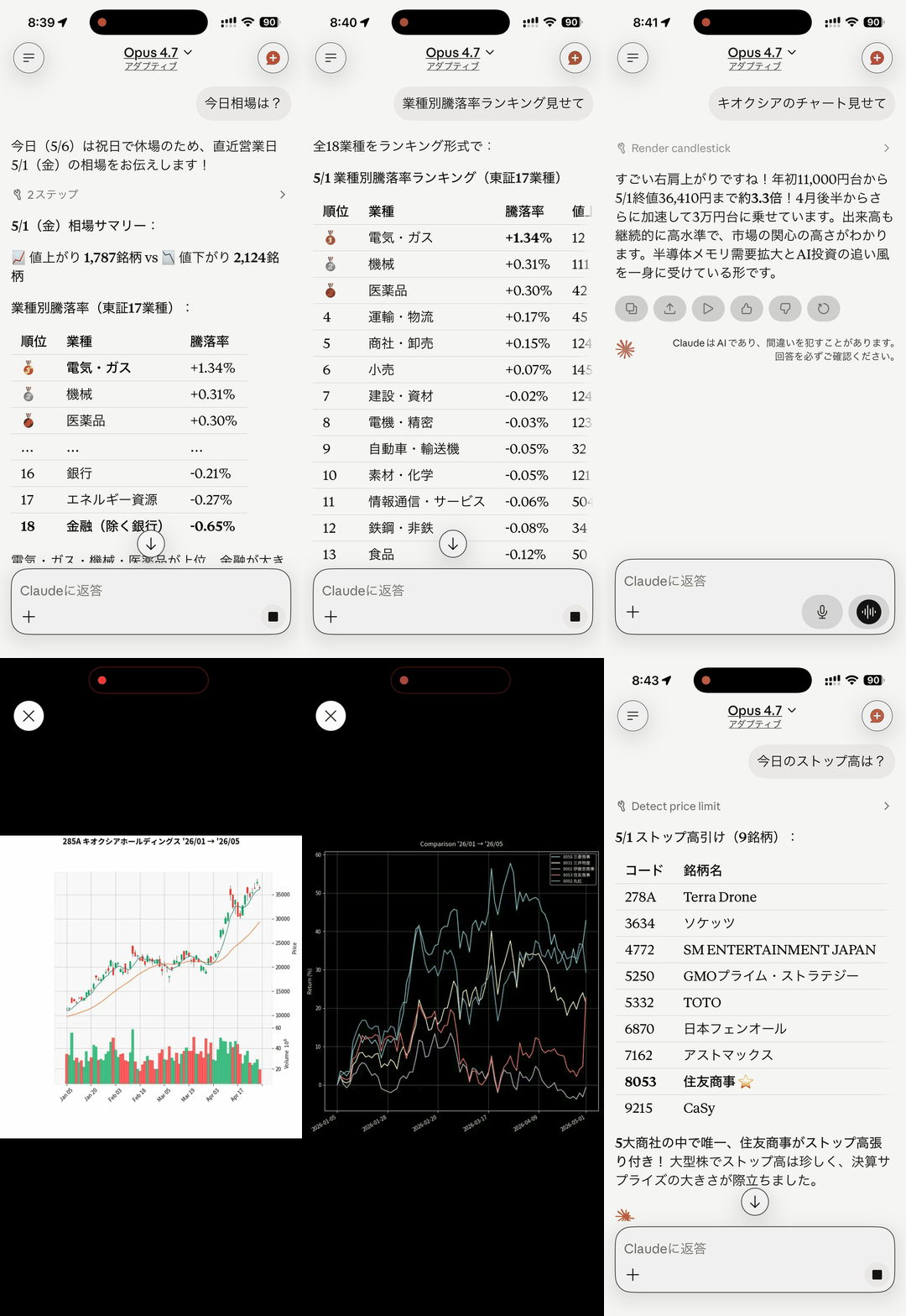
24-second loop showing real output from the Claude iPhone app calling jquants-mcp tools:
- Sector performance ranking (業種別騰落率) —
get_sector_performance - Top turnover by trading value (売買代金ランキング) —
get_top_turnover_value - Candlestick chart with SMA —
get_candlestick_data - Quarterly financial summary (決算ダイジェスト) —
get_fins_summary - 5-stock return comparison —
get_comparison_chart_data
Individual frames are in docs/screenshots/.
Features
- 55 MCP tools — 22 J-Quants API v2 endpoints, 11 market overview + valuation, 10 offline screener, 1 technical indicators, 1 single-stock summary, 3 cache-only equity search + earnings (schedule + results), 2 chart tools (JSON, no optional dependencies), and 5 server utilities
- Two-tier SQLite cache — row-level cache for time-series data, response-level cache with TTL for others
- Stock split detection — automatic cache invalidation when AdjFactor changes
- Rate limiting — plan-aware sliding window (Free: 5/min, Light: 60, Standard: 120, Premium: 500)
- Retry with backoff — automatic retry for 429/5xx errors
- Pagination — transparent multi-page fetching
- Plan-aware — all tools registered regardless of plan; graceful error messages on restriction
Requirements
- Python 3.10+
- J-Quants API key (Free plan or above)
Installation
From source
Configuration
Settings are loaded with the following priority (later wins):
~/.jquants-api/jquants-api.toml— API key only (J-Quants official config)~/.config/jquants-mcp/config.ini(user global)./config.ini(current directory)- Environment variables (from MCP client or shell)
API Key (zero-config)
If you already use jquants-api-client, your API key is automatically read from ~/.jquants-api/jquants-api.toml. No extra configuration needed.
API Key via browser login
Opens a browser to J-Quants (AWS Cognito, PKCE flow), and on success writes the API key to ~/.config/jquants-mcp/config.ini (mode 0600). Same auth backend as the official jquants-cli. Use jquants-mcp logout to clear the saved key.
config.ini
MCP-specific settings (cache, client behavior):
Environment Variables
| Variable | Required | Default | Description |
|---|---|---|---|
JQUANTS_API_KEY | No* | — | J-Quants API key |
JQUANTS_API_TOML_PATH | No | ~/.jquants-api/jquants-api.toml | Path to the J-Quants official config file. Override to avoid macOS 26+ launchd sandbox restrictions (see macOS launchd note below) |
JQUANTS_PLAN | No | auto-detect | Plan: free / light / standard / premium (auto-detected from the API key at server startup; set this variable only to override) |
JQUANTS_CACHE_DIR | No | ~/.cache/jquants-mcp | Cache directory path |
JQUANTS_BASE_URL | No | https://api.jquants.com/v2 | API base URL |
MAX_RETRIES | No | 5 | Max retry attempts for failed requests |
RETRY_BASE_DELAY | No | 1.0 | Base delay (seconds) for exponential backoff |
MAX_PAGES | No | 10 | Max pages to fetch per paginated request |
JQUANTS_MCP_USER | No | — | Identity of the authenticated user, injected by the gateway (see Authentication). Never set this by hand |
MCP_ENCRYPTION_KEY | No | — | Passphrase for AES-256-GCM encryption of per-user API keys |
MCP_ENCRYPTION_KEY_PREVIOUS | No | — | Previous encryption passphrase — enables dual-key decrypt during a rotation window. See secrets rotation runbook |
RATE_LIMIT_PER_MINUTE | No | 60 | Per-user request ceiling (multi-user mode). Applies per JQUANTS_MCP_USER identity |
RATE_LIMIT_BURST | No | 20 | Per-user burst allowance (token-bucket capacity) |
JQUANTS_ALLOWED_EMAILS | No | — | Comma-separated allowlist of emails. Empty = allow any user the gateway authenticated (self-host default). Set this on public Cloud Run instances to restrict access; unauthorized users get a 403-style message pointing them to self-host |
* API key is auto-detected from ~/.jquants-api/jquants-api.toml. Set JQUANTS_API_KEY only to override.
Environment variables override both config.ini and jquants-api.toml. This allows MCP clients (Claude Desktop, Claude Code) to pass settings via their env block while keeping defaults elsewhere.
macOS launchd note
If you run jquants-mcp as a macOS LaunchAgent and the API key lives in ~/.jquants-api/jquants-api.toml, the server may silently hang during startup on macOS 26 or later. The TCC sandbox applied to launchd-spawned processes blocks open() on some dotfiles under $HOME (mode 600), and the process never finishes starting.
Workaround: copy the toml outside the sandboxed home hierarchy and point the server at it via JQUANTS_API_TOML_PATH:
Then add the following to your LaunchAgent plist's EnvironmentVariables dict:
Alternatives: set JQUANTS_API_KEY directly in the plist (simpler but puts the key in a plist file that Time Machine / iCloud may back up), or put api_key = directly in ~/.config/jquants-mcp/config.ini (if that path is not sandbox-blocked on your macOS version).
Linux/systemd and other init systems are not affected.
Authentication
The server speaks stdio only and binds no network socket, so it performs no authentication of its own — there is no listener to authenticate against. Access control is a property of whoever starts the process:
| Deployment | Who controls access |
|---|---|
| Local (Claude Code, Claude Desktop) | The OS. The MCP client spawns the server as a subprocess; the API key comes from config.ini / jquants-api.toml / JQUANTS_API_KEY |
| Remote | A gateway in front of the server. The gateway terminates authentication and spawns the stdio server per session |
Gateway identity
For remote or multi-user deployments, put a gateway in front of the stdio server. mcp-stdio serve is the gateway both production deployments use: it accepts MCP over HTTP, authenticates the caller, and spawns one jquants-mcp child process per session.
The gateway passes the authenticated identity down to that child as the JQUANTS_MCP_USER environment variable (mcp-stdio serve --trusted-user-header X-Forwarded-Email --user-env JQUANTS_MCP_USER). One child process serves exactly one principal for its whole lifetime, and the server reads JQUANTS_MCP_USER as that principal's verified email — it applies the JQUANTS_ALLOWED_EMAILS allowlist and per-user rate limits to it, and looks up that user's stored API key.
Trust model:
JQUANTS_MCP_USERis trusted as-is; the server does no verification of its own. Whoever can set the child process's environment is that user, so the variable must be injected by the gateway and never by a user-supplied value.
When JQUANTS_MCP_USER is absent — the normal local case — the server runs single-user against the globally configured API key.
A worked example of the whole shape (auth proxy in front, gateway, stdio child, cache download) is scripts/entrypoint-stdio.sh, the entrypoint of the Cloud Run deployment described below. There is no other documented remote-access story: the server itself has no transport, TLS, or token options.
Multi-user Mode
When the server receives a gateway identity (JQUANTS_MCP_USER, see Authentication) and MCP_ENCRYPTION_KEY is configured, it operates in multi-user mode: each user stores their own J-Quants API key on the server, and all data tools use that key automatically. All users share the read cache; each user gets an independent J-Quants client with isolated rate limiting and their own plan's date-range window.
User flow
Related MCP Servers
Reviews
No reviews yet — be the first to share how this listing worked for you.
Frequently Asked Questions about J Quants MCP
AllMCPs Directory Badge
Showcase your server listing on GitHub or your project documentation. Embed this dynamic SVG badge to highlight official listing status and live engagement.
Badge Style:
Live Dynamic SVG Preview
Markdown (GitHub README)
[](https://allmcps.com/mcp/j-quants-mcp)HTML Embed
<a href="https://allmcps.com/mcp/j-quants-mcp"><img src="https://allmcps.com/api/badge/j-quants-mcp?style=directory" alt="J Quants MCP on AllMCPs" /></a>