AllMCPs
BrowseBestCategoriesStackCompareToolsGuidesBlog
Log in Submit MCP

Stay in the loop

Get new MCP servers and top picks in your inbox.

AllMCPs

The open directory for discovering and installing Model Context Protocol servers.

AllMCPs on GitHub (opens in a new tab)
Launched onTiny Startupstinystartups.com
Explore
  • Browse servers
  • Best MCP servers
  • Categories
  • MCP clients
  • Agent prompts
  • Stack Builder
  • Compare servers
  • Random discovery New
  • Submit a server
  • Pricing & Boost Boost
Learn
  • Guides hub
  • What is MCP?
  • Install guide
  • Build an MCP server
  • Deploy an MCP server
  • Security guide
  • Troubleshooting
  • MCP for SEO & AEO
  • Protocol versioning
  • Transports: stdio vs HTTP
  • State of MCP (stats)
  • Blog & updates
Tools
  • All developer tools
  • Config generator
  • Config validator
  • Config auditor
  • MCP playground
  • Token calculator
  • OpenAPI β†’ MCP
  • Badge generator
For agents
  • REST API docs
  • Trust & traffic Live
  • Remote MCP server SSE β†— (opens in a new tab)
  • llms.txt β†— (opens in a new tab)
  • Catalog JSON β†— (opens in a new tab)
Company
  • About
  • Advertise Sponsor
  • Contact
  • GitHub β†— (opens in a new tab)
  • Terms
  • Privacy
AllMCPs VerifiedAllMCPs VerifiedFeatured on Nick LaunchesFeatured on Nick LaunchesLaunch Llama NewsletterLaunch Llama NewsletterVerified DR - allmcps.comVerified DR - allmcps.comFeatured on SaaSGrowFeatured on SaaSGrowFeatured on Twelve ToolsFeatured on Twelve ToolsFeatured on Saaspa.geFeatured on Saaspa.geFeatured on Findly.toolsFeatured on Findly.toolsFeatured on Startup FameFeatured on Startup FameFeatured on LaunchKiwiFeatured on LaunchKiwiFeatured on ScrollLaunchFeatured on ScrollLaunchFeatured on DailyPingsFeatured on DailyPingsFazier badgeFazier badgeFeatured on NewTool.siteFeatured on NewTool.siteFeatured on saasfame.comFeatured on saasfame.comDR Checker - Domain RatingDR Checker - Domain RatingListed on Turbo0Listed on Turbo0Launched on LaunchBoard - Product Launch PlatformLaunched on LaunchBoard - Product Launch PlatformList on SimilarlabsList on Similarlabshttps://codetrendy.comhttps://codetrendy.comListed on DevTool.ioFeatured on BuildlistFeatured on BuildlistLaunched on Tiny StartupsFeatured on ShowMeBestAIFeatured on ShowMeBestAIFind us on LaunchZoneFind us on LaunchZoneAllMCPs VerifiedAllMCPs VerifiedFeatured on Nick LaunchesFeatured on Nick LaunchesLaunch Llama NewsletterLaunch Llama NewsletterVerified DR - allmcps.comVerified DR - allmcps.comFeatured on SaaSGrowFeatured on SaaSGrowFeatured on Twelve ToolsFeatured on Twelve ToolsFeatured on Saaspa.geFeatured on Saaspa.geFeatured on Findly.toolsFeatured on Findly.toolsFeatured on Startup FameFeatured on Startup FameFeatured on LaunchKiwiFeatured on LaunchKiwiFeatured on ScrollLaunchFeatured on ScrollLaunchFeatured on DailyPingsFeatured on DailyPingsFazier badgeFazier badgeFeatured on NewTool.siteFeatured on NewTool.siteFeatured on saasfame.comFeatured on saasfame.comDR Checker - Domain RatingDR Checker - Domain RatingListed on Turbo0Listed on Turbo0Launched on LaunchBoard - Product Launch PlatformLaunched on LaunchBoard - Product Launch PlatformList on SimilarlabsList on Similarlabshttps://codetrendy.comhttps://codetrendy.comListed on DevTool.ioFeatured on BuildlistFeatured on BuildlistLaunched on Tiny StartupsFeatured on ShowMeBestAIFeatured on ShowMeBestAIFind us on LaunchZoneFind us on LaunchZone
Β© 2026 Jackalope Digital LLC. All rights reserved.
  1. Home
  2. πŸ”’ Security
  3. Iso27001 MCP
Iso27001 MCP logo
Health: ActiveRecent health check succeeded.Last checked 9/22/2026, 11:02:18 PM

Iso27001 MCP

User RatingsBe the first to rate and review this MCP server! Enrichment pendingWe haven’t run our AI enrichment pass on this listing yet, so the overview, use cases, and FAQ below may be sparse or missing. We work through the catalog over time β€” check back soon.
View Repository32 GitHub StarsTotal stargazers on GitHub for the source repository (32 stars).Visit Website

ISO 27001 compliance workspace for Claude. Risks, policies, SoA, evidence, and audit workflows.

Quick Install

Automated & IDE Setup

Copy the AI prompt to install this server into Claude Code, Cursor, or another agent β€” or use 1-click editor setup below.

Add to CursorAdd to VS Code
Manual Client & Custom JSON ConfigExpand JSON β–Ύ

Client Config & Setup

Remote HTTP
Choose your client or environment
Target File:~/Library/Application Support/Claude/claude_desktop_config.json
claude_desktop_config.json
{
  "mcpServers": {
    "iso27001-mcp": {
      "url": "https://www.reddit.com/r/mcp/comments/1u2mid8/built_an_isms_iso_27001_mcp_server_looking_for/"
    }
  }
}

πŸ’‘ Paste the JSON block into your client's configuration file under mcpServers, then restart the application.

Install Directory Badge Claim listing AlternativesπŸ”’ More in Security

Documentation Overview

iso27001-mcp

Turn Claude into an ISO 27001 compliance assistant β€” controls, risk register, policies, evidence tracking, SoA generation, and full audit workflows in one local encrypted MCP server.


npm version npm downloads CI License: MIT ISO 27001:2022 Socket Badge

β–Ά Live Interactive Demo Β· Guided First-Run Checklist β†’ Β· Roadmap β†’

β–Ά Getting Started with iso27001-mcp (YouTube)
β–Ά Getting Started β€” watch on YouTube

Why this exists

ISO 27001 compliance work is typically scattered across spreadsheets, Word docs, ticketing systems, and shared drives. Security teams and consultants spend more time chasing evidence and reformatting documents than actually improving security posture.

iso27001-mcp solves this by giving Claude a live, stateful ISMS β€” all 93 ISO 27001:2022 controls seeded and ready, a real risk register, policy and procedure generators, evidence tracking, audit workflows, and a Statement of Applicability, backed by an encrypted local database that never leaves your machine.

The difference from generating static documents: Claude can query, reason, and update across your entire ISMS in a single conversation. Ask it to run a gap assessment, identify which open risks are linked to unimplemented controls, generate the policies that close those gaps, and produce a remediation roadmap β€” all without switching tools.

Who it's for: Security teams Β· Compliance consultants Β· GRC engineers Β· Startups preparing for ISO 27001 Β· Internal audit functions


What Claude can do with it

CapabilityExample prompt
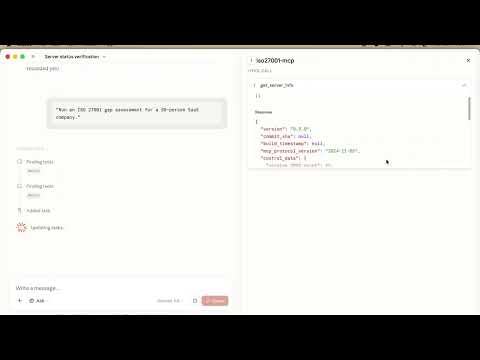
Gap assessment"Run an ISO 27001:2022 gap assessment for a 50-person SaaS company."
Risk register"Create a risk register for a startup using AWS, GitHub, Slack, and Google Workspace."
Statement of Applicability"Generate a Statement of Applicability for all 93 ISO 27001:2022 controls."
Policy generation"Create an Access Control Policy mapped to ISO 27001 controls."
Procedure generation"Generate an Incident Handling Procedure with GDPR breach notification triggers."
Internal audit"Plan an internal audit for clause 9.1 β€” Performance Evaluation."
Corrective actions"List open audit findings and suggest corrective actions."
Evidence tracking"Show me all implemented controls with no current evidence."
Remediation roadmap"Generate a 26-week remediation roadmap grouped by risk level."
Management review"Prepare agenda items for our Clause 9.3 management review."
CSV bulk import"Import this CSV of 40 risks into the risk register β€” dry-run first to check for errors."
Risk acceptance"Record the risk owner's acceptance of residual risk for RISK-012."

Quick Start

Prerequisites

  • Node.js 20.11.0+ β€” nodejs.org or nvm / Volta

Build tools are usually not needed. The package ships pre-built binaries for macOS (arm64 + x64), Windows (x64), and Linux (x64/glibc). Try npm install -g iso27001-mcp first β€” if it succeeds, you're done.

↳ If the install fails with a node-gyp error, expand for OS-specific fix
  • macOS: xcode-select --install
  • Ubuntu / Debian: sudo apt-get install build-essential python3
  • Windows: Visual Studio Build Tools β†’ "Desktop development with C++"
↳ If you get an EACCES permission error on macOS or Linux

Your Node.js was installed system-wide and npm install -g needs write access to a root-owned directory. Do not use sudo npm install -g β€” it causes other issues. Instead, install Node via nvm or Volta, which place Node in your home directory where no elevated permissions are required.

↳ If you get command not found on Windows after a successful install

The npm global bin directory (%APPDATA%\npm) may not be on your PATH yet. Open a new terminal window β€” the installer updates PATH for new sessions but not the one already open. If it still fails, add %APPDATA%\npm to your PATH manually in System Settings β†’ Environment Variables.

Three commands to get running

Terminal
npm install -g iso27001-mcp     # 1. install globally
iso27001-mcp init --yes         # 2. one-shot setup β€” all defaults, no prompts
                                #    (omit --yes to choose custom paths interactively)
iso27001-mcp doctor             # 3. verify everything is working

After running iso27001-mcp doctor you should see:

Code
iso27001-mcp β€” health check
────────────────────────────────────────────────────────
βœ…  DB_ENCRYPTION_KEY      set (64 hex chars)
βœ…  HMAC_SECRET            set (64 hex chars)
βœ…  MCP_API_KEY            set (starts with iso27001_)
βœ…  Database file          /Users/you/.iso27001/isms.db
βœ…  Database accessible    opened and queried successfully
βœ…  Migrations             11/11 applied
βœ…  Controls seeded        93 ISO 27001:2022 controls
βœ…  Active API key         1 active key found
βœ…  Claude Desktop config  /Users/you/.../claude_desktop_config.json
βœ…  iso27001-mcp entry     present in mcpServers
βœ…  Database writable      read-write test passed
βœ…  Env vars in config     DB_ENCRYPTION_KEY, HMAC_SECRET, MCP_API_KEY all present
────────────────────────────────────────────────────────
  All 12 checks passed. Restart Claude Desktop if you just ran init.

Then restart Claude Desktop fully and you should see 56 tools in the tools panel.

macOS: press Cmd+Q to quit (clicking the red dot only closes the window β€” the server won't reload).
Windows: right-click the taskbar icon β†’ Quit.

Tools not appearing after restart?

Check the MCP server log β€” Claude Desktop writes server stderr here:

Code
macOS:   ~/Library/Logs/Claude/mcp-server-iso27001-mcp.log
Windows: %APPDATA%\Claude\Logs\mcp-server-iso27001-mcp.log

Common causes: wrong Node.js version loaded by Claude Desktop, missing DB_ENCRYPTION_KEY in the config, or a database path that doesn't exist yet. Run iso27001-mcp doctor in a fresh terminal for a guided diagnosis.

Switched Node versions with nvm or Volta? The absolute Node.js path baked into your Claude Desktop config at init time now points to a deleted binary. Re-run iso27001-mcp init β€” it will detect your current setup and update the path. Your existing database and API keys are preserved (the wizard aborts if your secrets file already exists and you run with --yes).

Five prompts to try first

Code
"Read the iso27001://server/info resource to check the server is running."
"Run an ISO 27001 gap assessment for a 50-person SaaS company."
"Create a risk register for a startup using AWS, GitHub, Slack, and Google Workspace."
"Generate a Statement of Applicability for ISO 27001:2022."
"Create an Access Control Policy mapped to ISO 27001 controls."

Tool Categories

56 tools across 16 groups. All require an API key; minimum role is shown. Read-only lookups (single-record fetches, summaries) have been moved to MCP Resources (iso27001:// URIs) β€” they appear in Claude's resource panel, not the tools list.

Read the full README β†’View source on GitHub β†’

Related MCP Servers

View all in Security View all alternatives
  • Ida Pro MCP logoIda Pro MCP

    MCP server for IDA Pro, allowing you to perform binary analysis with AI assistants. This plugin implement decompilation, disassembly and allows you to generate malware analysis reports automatically.

    πŸ”’ Security4 views
    Compare vs Ida Pro MCP β†’
  • MCP Audit logoMCP Audit

    Transparent audit proxy for MCP servers: logs every tool call, flags poisoning and rug pulls.

    πŸ”’ Security1 views
    Compare vs MCP Audit β†’
  • PabloLec Keyprobe MCP logoPabloLec Keyprobe MCP

    Audit certificates and keystores to surface expiry risks, weak algorithms, and misconfigurations.…

    πŸ”’ Security2 views
    Compare vs PabloLec Keyprobe MCP β†’
  • Ui Ux Suite logoUi Ux Suite

    UI/UX design-audit MCP server: scores a project on 12 dimensions vs WCAG 2.2 + APCA.

    πŸ”’ Security1 views
    Compare vs Ui Ux Suite β†’

Adoption & maintenance

Factual signals from GitHub, npm, and our automated checks β€” not a rating.

GitHub stars
32
Stargazers on the source repository.
Last commit
20d ago
Most recent push to the default branch.

Reviews

No reviews yet β€” be the first to share how this listing worked for you.

Frequently Asked Questions about Iso27001 MCP

iso27001-mcp is a hosted MCP server. Add it as a remote server in your client's config: "mcpServers": { "iso27001-mcp": { "url": "https://www.reddit.com/r/mcp/comments/1u2mid8/built_an_isms_iso_27001_mcp_server_looking_for/" } }

AllMCPs Directory Badge

Full Badge Customizer

Showcase your server listing on GitHub or your project documentation. Embed this dynamic SVG badge to highlight official listing status and live engagement.

Badge Style:
Live Dynamic SVG PreviewIso27001 MCP AllMCPs Directory Badge

Markdown (GitHub README)
[![AllMCPs](https://allmcps.com/api/badge/iso27001-mcp?style=directory)](https://allmcps.com/mcp/iso27001-mcp)
HTML Embed
<a href="https://allmcps.com/mcp/iso27001-mcp"><img src="https://allmcps.com/api/badge/iso27001-mcp?style=directory" alt="Iso27001 MCP on AllMCPs" /></a>

Technical Specs & Signals

CategoryπŸ”’Security
More technical detailsExpand β–Ύ
TransportSSE (Remote)
Last updatedSep 5, 2026
Views0
Unique ViewsTotal visits recorded for this listing page on AllMCPs.
Installs0
Installs & Copy ActionsTotal times users copied install commands or configuration snippets for this server.
GitHub stars32
GitHub Star CountTotal stargazers on GitHub representing community popularity (32 stars).
Last commit20d ago
Last Repository CommitThe most recent commit or push recorded for this server's GitHub repository.Last commit on Sep 5, 2026
44Quality signal: Fair Β· 44/100How this signal is calculated β–Ύ
Server availabilityNot measured

Not scored for repo-hosted servers β€” we can't reach the running server, only its GitHub page. Hosted MCP endpoints are health-checked live.

Verified ownership10/20
Documentation & tools16/30
Adoption & activity7/15
Community engagement0/10

A guidance signal from public completeness & health data β€” not a user rating. New listings start lower and rise as they add docs, get verified, and grow adoption. Signals we can't observe for a listing are skipped, not counted against it.

β˜… Spotlight Slot

Feature Your MCP Server

Get maximum visibility for your server across our directory, search results, and detail pages.

Spotlight Your Server

Own this project?

This directory is pre-filled from public sources. Claim via GitHub README, site badge, or DNS TXT to unlock edit access and the Official badge β€” proof is checked automatically, then reviewed by our team.

Free dofollow backlink: add your website and place the AllMCPs badge on it β€” no claim needed. We detect it automatically and keep it verified as long as the badge stays live.

Claim & get free dofollow

Share & Embed

Add our SVG badge (dark/light directory styles) or embeddable widget to your site.

Explore more

More in πŸ”’ Security β†’Best MCP servers for Security β†’Alternatives to Iso27001 MCP β†’Install in Claude DesktopInstall in CursorInstall in VS CodeSetup guides for all 13 MCP clients