
IPs-LE: One Address, One Spelling
Find every IP address, CIDR block and MAC in a document, normalized and classified, and refuse the ambiguous ones by name
IPv4 · IPv6 (RFC 5952) · CIDR · MAC — no DNS, no lookups, no sockets




Useful? A star or rating is how other developers find it — ★ GitHub · ★ Open VSX · ★ Marketplace
What it does
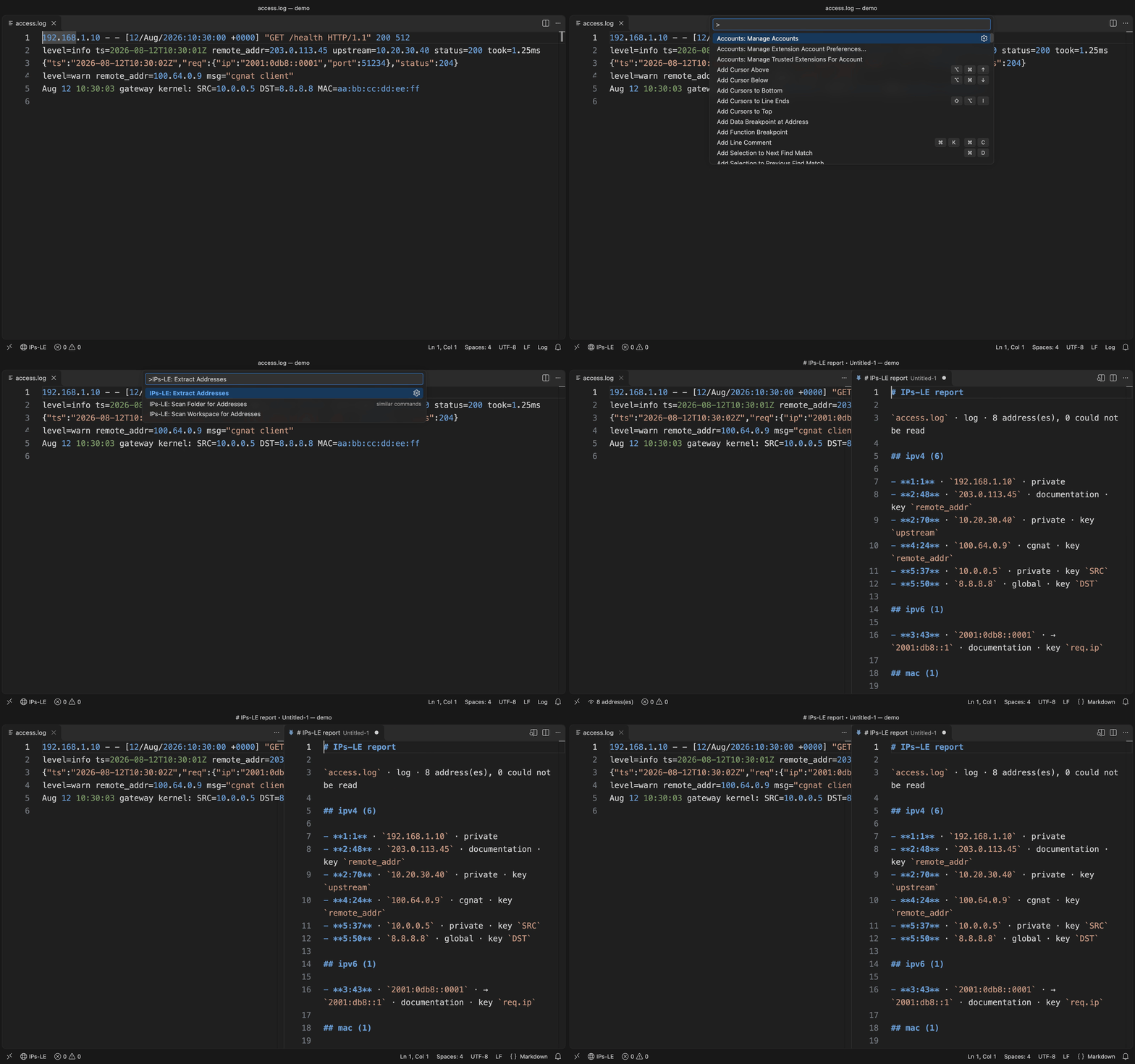
An allow-list review asks whether 2001:0db8::0001 is already on the list. The list says 2001:db8::1. A diff of the raw text calls them two addresses; they are one.
Open a document, run IPs-LE: Extract Addresses, and every IPv4 and IPv6 address, CIDR block and MAC address in it is listed by kind with its line and column, the key it sits under, its canonical form and what it is for — loopback, private, link-local, documentation and the rest. A CIDR block comes with its network, its last address and how many addresses it holds. The report opens beside the editor. Works in VS Code and in VS Code–based editors like Cursor and VSCodium (installable from Open VSX).
- Reviewing a config or an allow-list — one spelling per address, and the private ones named as private
- Reading a log — every peer and upstream, even inside a URL or a
[host]:port - Before trusting
010.1.1.1— which is two different hosts depending on who reads it - Across a project — every file that holds an address, and how many, in one table
Text it cannot read unambiguously is reported with the reason, never guessed at. It resolves nothing, looks nothing up and rewrites nothing.
Install
| Where | What you get | Install |
|---|---|---|
| VS Code | The extraction, in your editor, on a keystroke | Marketplace |
| Cursor, VSCodium, Windsurf | The same extension | Open VSX |
| A terminal or a CI step | A whole tree, with an exit code | cargo install ips-le · crates.io |
| Any MCP agent, via Node | extract_ips over stdio | npx ips-le-mcp · npm |
What it answers
One address, one form. IPv6 is normalized per
RFC 5952 —
2001:0db8:0000:0000:0000:0000:0000:0001, 2001:db8:0:0:0:0:0:1,
2001:0db8::0001 and 2001:DB8::1 all come back as 2001:db8::1.
Sorting the raw text gives four addresses; sorting the normalized form
gives one.
Four kinds. ipv4, ipv6, cidr, mac.
Ten classes, closed. A class this cannot name is a class it does not claim.
| class | IPv4 | IPv6 |
|---|---|---|
loopback | 127.0.0.0/8 | ::1 |
private | 10/8, 172.16/12, 192.168/16 | — |
link-local | 169.254/16 | fe80::/10 |
cgnat | 100.64/10 | — |
multicast | 224/4 | ff00::/8 |
broadcast | 255.255.255.255 | — (IPv6 has none) |
documentation | 192.0.2/24, 198.51.100/24, 203.0.113/24 | 2001:db8::/32 |
unique-local | — | fc00::/7 |
reserved | 0/8, 192.0.0/24, 198.18/15, 240/4 | ::, 2001::/23, 100::/64 |
global | everything else | everything else |
An IPv4-mapped IPv6 address takes the IPv4 class, so ::ffff:127.0.0.1
is loopback rather than global — which is the miss an allow-list
review is looking for.
Where it is. Line, column, and the key it sits under: JSON, YAML,
TOML, INI, dotenv, CSV and logs all supply one. Everything else is still
scanned — the search runs over the bytes, so a .tf, a .rules or a
rotated access.log.1 yields its addresses and only loses the key path.
Blocks, with their arithmetic. A CIDR finding carries prefix,
network, broadcast (IPv4 only — IPv6 has none), last and hosts.
hosts is a decimal string, because ::/0 holds 2^128 addresses, which
is one more than a u128 and far more than a JSON number.
{
  "kind": "cidr",
  "text": "10.0.0.0/8",
  "normalized": "10.0.0.0/8",
  "class": "private",
  "cidr": {
    "prefix": 8,
    "network": "10.0.0.0",
    "broadcast": "10.255.255.255",
    "last": "10.255.255.255",
    "hosts": "16777216"
  }
}
What it refuses
Where the text supports more than one reading, ips-le reports the
text, names the ambiguity, and stops.
Six reasons, each a place where two answers are equally defensible:
| reason | fires on |
|---|---|
octal_hazard | 010.1.1.1, 0177.0.0.1, 192.168.001.1 |
ambiguous_version | 10.0.1, 1.2.3 — unless the key says version |
integer_form | 2130706433 under an address key |
malformed_address | 256.1.1.1, 2001:db8:::1, 12345::1 |
prefix_out_of_range | 10.0.0.0/33, 2001:db8::/129 |
mac_ambiguous | deadbeefcafe |
The two that matter most:
010.1.1.1is not resolved. A leading-zero octet is octal to some resolvers and decimal to others, so that text names two different hosts. Neither reading appears anywhere in the output — a tool that picked one would be the thing hiding the bug.2130706433is decoded only next to the flag. Under an address key it is reported asinteger_form, with127.0.0.1inside the refusal message. What you never get is a loopback address quietly appearing in a list of addresses with the flag gone.
A refusal is a finding, not a failure. It does not move the exit
code, and no filter can hide it — filtering to private still shows you the
octal hazard, because that is the finding a filtered report would most
regret dropping. --strict is there for the pipeline that wants an
unresolved ambiguity to stop the build.
crate/SPEC.md says exactly when each reason fires.
It never touches a network
No DNS, no geolocation, no ASN, no WHOIS, no reachability check, no telemetry. Not behind a flag, not once. Classification is arithmetic over the bits and the IANA registries; a lookup would make the answer depend on the network the auditor happened to be sitting on.
It also never rewrites a file, and it never gives a verdict. It says what an address is, never whether it should be there.
Across a folder or a workspace
Extract reads the document you have open. A scan reads many files from disk and gives one report.
- The whole workspace: run
IPs-LE: Scan Workspace for Addressesfrom the command palette. - One folder: right-click it in the Explorer and choose
Scan Folder for Addresses, or runIPs-LE: Scan Folder for Addressesand pick one.
The report opens with a table of every file that holds something, then has a section per file:
# IPs-LE workspace report

`my-project` · 113 file(s) read · 2 address(es), 1 could not be read

| File | Addresses | Could not be read |
|---|---|---|
| `deploy/config.json` | 2 | 1 |

## `deploy/config.json` · json (2)

- **3:14** · `2001:0db8:0000:0000:0000:0000:0000:0001` · ipv6 · → `2001:db8::1` · documentation · key `upstream.host`
- **5:12** · `192.0.2.10` · ipv4 · documentation · key `peer`

> 2 file(s) larger than the safety limit were not read.
What a scan reads. Files come from disk, so an unsaved edit is not seen. A file over the safety size, or one that is not UTF-8 text, is left unread. It stops at 5,000 files or 10,000 listed addresses. The report ends with a line for each thing it left out, so a short report is never mistaken for a clean project.
What it skips, and how to change that. Three switches are on by default, and each can be turned off on its own in Settings:
| Switch | Skips |
|---|---|
scanUseDefaultExcludes | Dependency folders, build output, tool caches and lockfiles. The full list is below |
scanRespectGitignore | Whatever the project's .gitignore files skip |
scanSkipBinaryFiles | Images, fonts, archives and other files that are not text |
Two lists adjust the result without turning a switch off. To skip more, add a pattern to scanExcludes. To read something a switch would skip, add it to scanAlwaysInclude:
{
	// Also skip the test fixtures.
	"ips-le.workspace.scanExcludes": ["**/fixtures/**"],
	// Read the vendored code, though the built-in list skips it.
	"ips-le.workspace.scanAlwaysInclude": ["**/vendor/**"]
}
IPs-LE: Open Settings opens all of these in the Settings editor.
The built-in list
Folders, wherever they appear:
.git, .hg, .svn, node_modules, bower_components, jspm_packages, .pnpm-store, .yarn, vendor, site-packages, Pods, Carthage, dist, build, out, target, _build, _site, dist-newstyle, zig-out, storybook-static, cdk.out, DerivedData, CMakeFiles, .next, .nuxt, .output, .svelte-kit, .angular, .astro, .docusaurus, .vuepress, .expo, .turbo, .parcel-cache, .cache, .sass-cache, .jekyll-cache, .dart_tool, .pub-cache, .gradle, .kotlin, .cxx, .externalNativeBuild, captures, ephemeral, .symlinks, .swiftpm, .build, .bundle, .stack-work, .zig-cache, .godot, elm-stuff, .vercel, .netlify, .serverless, .aws-sam, .terraform, .venv, venv, __pycache__, .tox, .nox, .mypy_cache, .pytest_cache, .ruff_cache, .ipynb_checkpoints, .eggs, coverage, htmlcov, .nyc_output, .vscode-test, .idea, .vs, xcuserdata, *.egg-info
Files, wherever they appear:
*.min.js, *.min.css, *.map, , , , , , , , , , , , , , , , , , ,
What it could not read. Across a project there can be many, and they crowd out the rest. So a scan counts them per file in the table and does not list them. ips-le.workspace.scanIncludeRefusals lists each one with its reason, and ips-le.workspace.scanProblemsEnabled also puts them in the Problems panel, where each is a line you can click.
The settings that shape a scan are under Settings.
Positions
Each row leads with the line and column of the address:
- **3:14** · `2001:0db8:0000:0000:0000:0000:0000:0001` · → `2001:db8::1` · documentation · key `upstream.host`
Turn ips-le.showPositions off and the same row is:
- `2001:0db8:0000:0000:0000:0000:0000:0001` · → `2001:db8::1` · documentation · key `upstream.host`
Nothing else changes: the same rows, the same counts. The copy on the clipboard is a separate choice, ips-le.clipboardIncludesPositions, so a report can show positions on screen and paste without them. Both apply to a scan as they do to Extract.
Use it from an AI agent
The same engine runs as an MCP server, so an agent can call it directly instead of deciding by eye whether two spellings are one address.
| Editor | How |
|---|---|
| VS Code 1.101+ | Nothing to install — the extension registers extract_ips with agent mode |
| Claude Code | claude mcp add ips-le -- npx -y ips-le-mcp |
| Cursor, Windsurf, anything else | point it at npx ips-le-mcp |
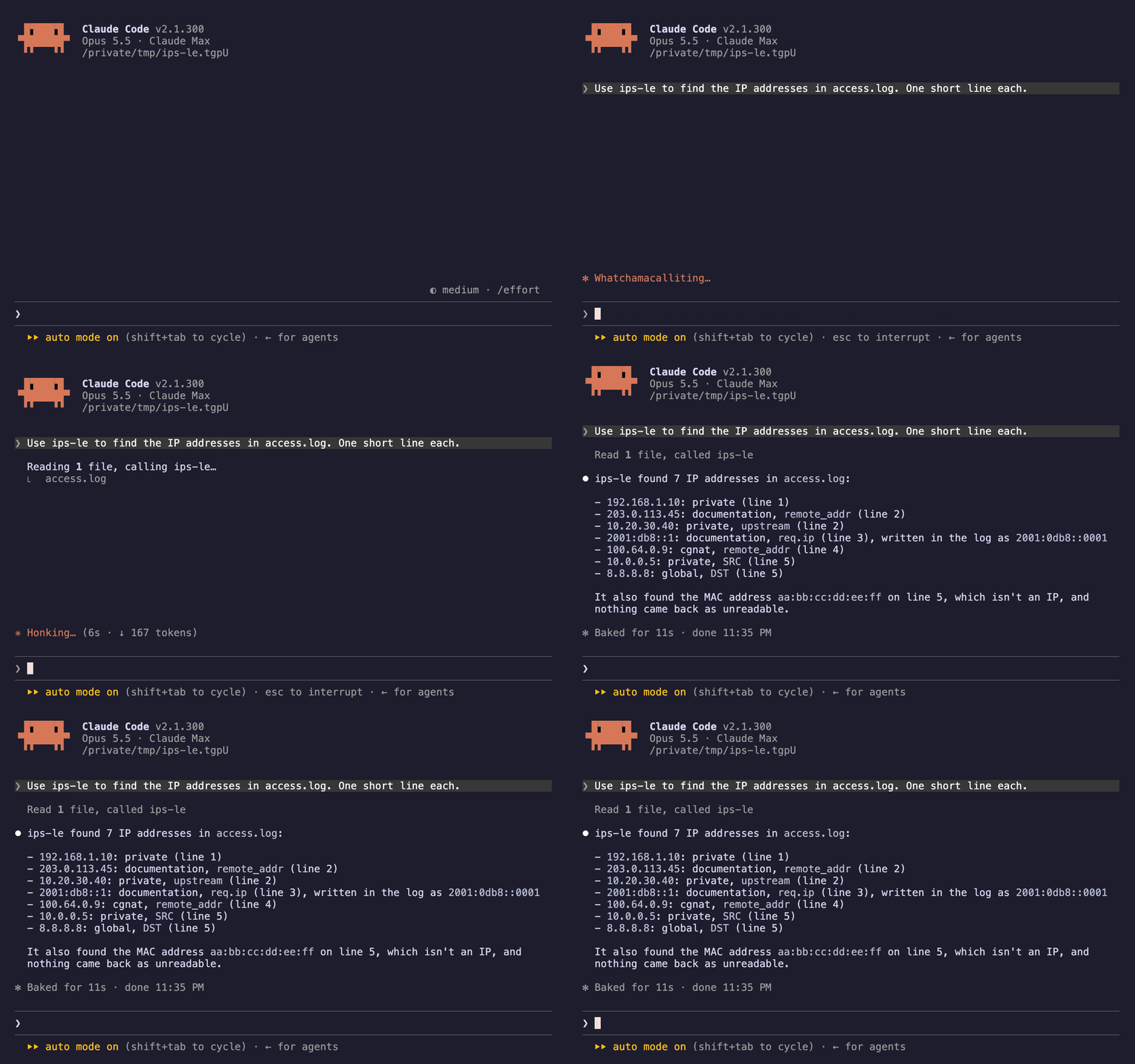
extract_ips(content, format?, filename?, kind?, class?, maxResults?)
It returns the findings the editor renders, refusals included, as data — capped at 500 by default with meta.truncated. It reads no files and makes no network requests. Published as ips-le-mcp on npm and as io.github.nolindnaidoo/ips-le in the MCP registry. It answers exactly as the Rust CLI's server does: one corpus runs against both, and a differential test feeds both thousands of generated documents in every format — broken JSON included, where both report the parser's own words and position — and compares every answer.
Configuring it by hand — any host with an MCP config file
{
  "mcpServers": {
    "ips-le": {
      "command": "npx",
      "args": ["-y", "ips-le-mcp"]
    }
  }
}
Or install it once with npm install -g ips-le-mcp and point at ips-le-mcp. It needs no environment variables, no API key and no configuration of its own. To check it:
echo '{"jsonrpc":"2.0","id":1,"method":"tools/list"}' | npx -y ips-le-mcp
The CLI
The same extraction runs over a whole tree from a terminal or a CI step: a Rust CLI in crate/, sharing one corpus with the extension — crate/fixtures/ — so the two can never read an address differently.
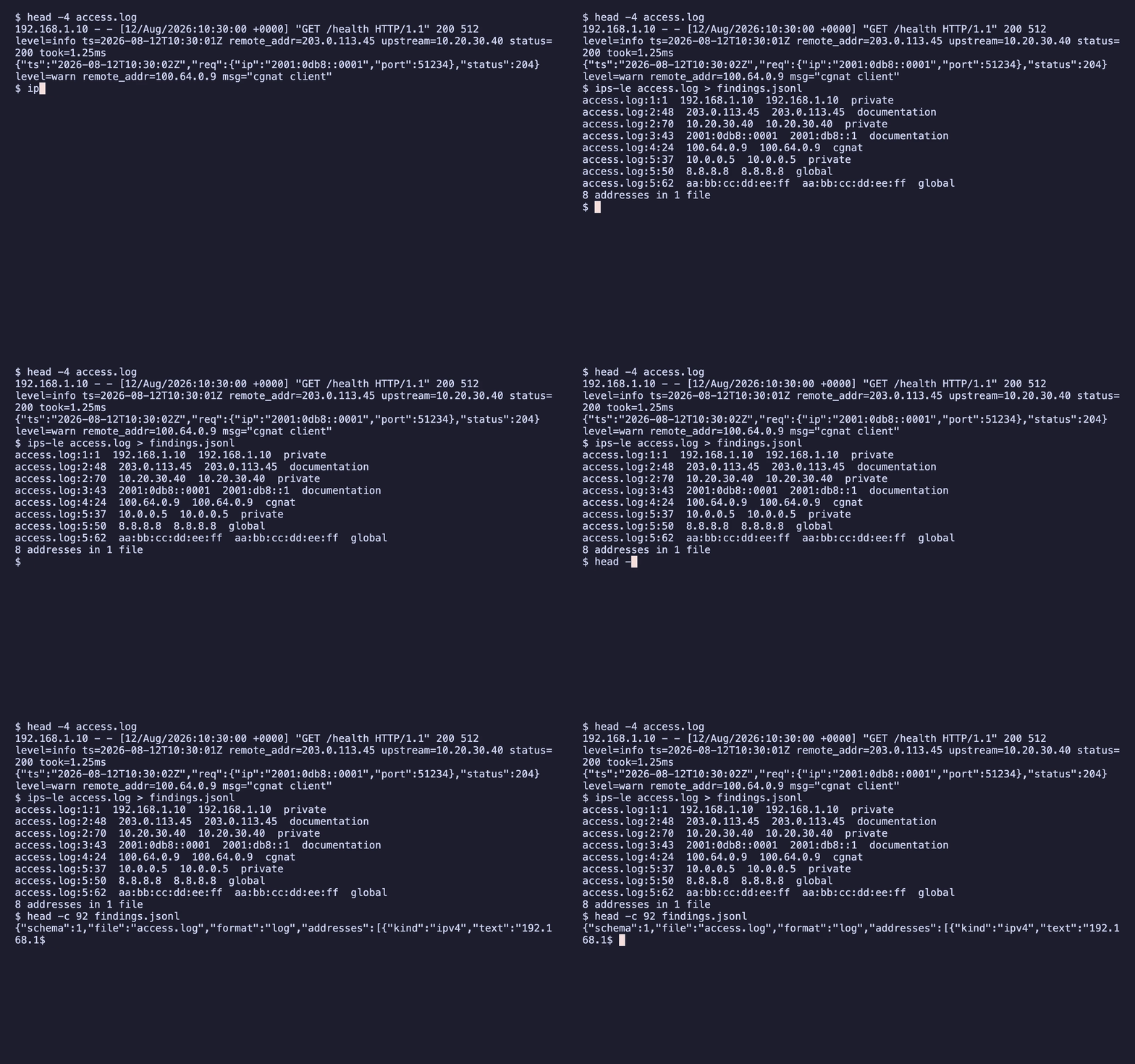
ips-le .                                   # every address in the tree; one JSON line per file on stdout when piped
ips-le --class private --class loopback .  # what should not be reachable
ips-le --kind cidr infra/                  # every block, with its arithmetic
ips-le --strict config/                    # exit 2 on any ambiguity
ips-le mcp                                 # extract_ips and ips_le_scan over MCP on stdio
Exit codes follow grep — 0 at least one address named, 1 none, 2 the question was malformed. A refusal does not move the exit code; --strict is how a pipeline turns one into a failure.
Commands
| Command | Description |
|---|---|
IPs-LE: Extract Addresses | Extract every address in the active document |
IPs-LE: Scan Workspace for Addresses | Extract from every file in the workspace, one section per file |
IPs-LE: Scan Folder for Addresses | The same for one folder. Also on a folder in the Explorer |
IPs-LE: Open Settings | Open IPs-LE settings |
IPs-LE: Help & Troubleshooting | Built-in documentation |
No command is bound to a key by default. Give any of them one under Keyboard Shortcuts in the editor.
Settings
| Setting | Default | Description |
|---|---|---|
ips-le.kinds | [] | Report only these kinds; empty reports every kind. Refusals are always reported |
ips-le.classes | [] | Report only these classes; empty reports every class. Refusals are always reported |
ips-le.openResultsSideBySide | true | Open the report beside the current editor |
ips-le.showPositions | true | Show the line and column of each address |
ips-le.copyToClipboardEnabled | false | Also copy the report to the clipboard |
ips-le.clipboardIncludesPositions | true | Include the line and column in that copy |
ips-le.workspace.scanPatterns | ["**/*"] | The files a folder or workspace scan reads |
ips-le.workspace.scanUseDefaultExcludes | true | Skip dependency folders, build output, caches and lockfiles |
ips-le.workspace.scanRespectGitignore | true | Skip what the project's .gitignore files skip |
ips-le.workspace.scanSkipBinaryFiles | true | Skip images, fonts, archives and other files that are not text |
ips-le.workspace.scanExcludes | [] | More files to skip, as glob patterns |
ips-le.workspace.scanAlwaysInclude | [] | Files to read even when one of the three above would skip them |
ips-le.workspace.scanMaxFiles | 5000 | The most files one scan reads |
ips-le.workspace.scanMaxResults | 10000 | The most addresses one scan lists before it stops reading |
ips-le.workspace.scanIncludeRefusals | false | List each run that could not be read, not only how many per file |
Languages
Twelve languages besides English:
German · Spanish · French · Indonesian · Italian · Japanese · Korean · Portuguese (Brazil) · Russian · Ukrainian · Vietnamese · Chinese (Simplified)
Both halves are covered — the manifest (command titles, setting names and descriptions) and everything shown while the extension runs (notifications, the status bar and the report's headings). A refusal's detail is the engine's English, identical to the CLI's.
Privacy & security
- No network access. The extension never sends data anywhere: no DNS, no geolocation, no lookups of any kind. The
telemetryEnabledsetting only writes events to a local Output Channel you can inspect (IPs-LE). - The MCP server holds the same line. It takes content as an argument and returns data: no filesystem access, no network calls, no telemetry.
- Error notifications redact home directories and credential-shaped fragments.
- One rating prompt, at most twice. On the 3rd successful use the extension asks once whether you would rate it, and once more on the 20th if you chose Later or dismissed it. Don't Ask Again ends it. Setting
notificationsLeveltoimportantorsilentyourself turns it off. The counts are kept in VS Code's extension storage and nothing is sent anywhere; Rate opens the listing you installed from — the VS Code Marketplace or Open VSX — in your browser.
Documentation
| What | Where |
|---|---|
| What the tool is allowed to say — kinds, classes, refusals, the output contract, non-goals | crate/SPEC.md |
| How the extension is built and held together — architecture, invariants, toolchain, release | AGENTS.md |
| How the CLI is built and held together | crate/AGENTS.md |
| What changed | CHANGELOG.md · crate/CHANGELOG.md |
| The tool's page, and the other fifteen | letools.dev/tools/ips-le |
Performance
| Input | Size | Found | Time | Rate | Scan speed |
|---|---|---|---|---|---|
| Access log | 3.42 MB | 80,000 | 155.25 ms | 515,312/sec | 22 MB/s |
| JSON config | 2.34 MB | 60,000 | 100.48 ms | 597,123/sec | 23.3 MB/s |
| Prose with no addresses | 2.51 MB | 40,000 | 70.2 ms | 569,780/sec | 35.7 MB/s |
Median of 7 runs after warmup, on Apple M5 Pro, 24 GB RAM, Node 24.3.0. Inputs are generated
by scripts/benchmark.ts rather than checked in, so the sizes above are
exactly what was measured. Reproduce with bun run benchmark.
These are machine-specific and are not asserted in CI — a benchmark that gates a build only tells you how busy the runner was.
Testing
| Metric | Coverage |
|---|---|
| Statements | 86.59% |
| Branches | 79.59% |
| Functions | 93.56% |
| Lines | 88.22% |
195 test cases across 16 files, plus an integration suite that runs
in a real VS Code extension host and an end-to-end test that installs the
built .vsix into a clean profile.
Generated from a real run — coverage/coverage-summary.json and
coverage/test-results.json — by scripts/coverage-readme.js; CI fails if
this section drifts. Reproduce with bun run test:coverage, and the case
count is the one vitest prints.
More from the LE family
Sixteen single-purpose tools for the work in front of every model. Each ships a Rust CLI and an MCP server. One page: letools.dev
Get it out
- String-LE — Extract every string in a codebase, so a person can read them
- Numbers-LE — Extract every hardcoded number in a codebase, so a person can check them
- Units-LE — Extract every quantity with its unit, normalized, and refuse the ambiguous ones by name
- Dates-LE — Extract every date and timestamp, and the exact instant each one resolves to
- IDs-LE — Extract every UUID, ULID, NanoID, ObjectId and Snowflake, and decode the time inside
- IPs-LE — Extract every IP address, CIDR block and MAC, normalized and classified by scope
- URLs-LE — Extract every URL in a codebase, with its protocol and exact position
- Paths-LE — Extract every file path in a codebase, and say whether it still points at anything
- Colors-LE — Extract every color in a codebase, and say which ones are not in your palette
Check it
- Regex-LE — Find every regex in a codebase, and report which can be driven into catastrophic backtracking
- Versions-LE — Find where one dependency is constrained differently across a repository's manifests
- i18n-LE — Identify the i18n library a project uses, then audit its catalogs by that library's rules
- Scrape-LE — Check whether a page is scrapeable before the scraper is written, and say when it cannot tell
Guard it
- Secrets-LE — Find hardcoded credentials in a codebase, and never print one into the report
- EnvSync-LE — Compare the dotenv files in a tree, and say which keys are missing from which
- Unicode-LE — Find the Unicode that hides meaning — bidi controls, invisibles, homoglyphs, mixed scripts
Each stands on its own: no shared crate, no published core. Where two of them agree, it is because the same answer was right twice.
Contact — nolindnaidoo.com · GitHub · LinkedIn
Also by nolindnaidoo
Rust — pixelcoords and pixelactions are one loop: pixelcoords answers where, pixelactions acts there. Their own tools, their own voice — not part of the LE family.
- pixelcoords — Freeze your screen, mark regions, get pixel-exact coordinates and crops pixelcoords.dev · crates.io · docs.rs
- pixelactions — Consume human-verified coordinates, perform the interaction, confirm it landed pixelactions.dev · crates.io · docs.rs
License
MIT © nolindnaidoo