whoisdomainiplookupsearch
MCP server providing WHOIS and hosted domain lookups via the IP2WHOIS API with detailed domain registration data.
Quick Install
Automated & IDE SetupCopy the AI prompt to install this server into Claude Code, Cursor, or another agent — or use 1-click editor setup below.
Not yet automatically verified
We haven't yet run this listing's install command through our automated sandbox check. This isn't a red flag — we're steadily working through the catalog.
Manual Client & Custom JSON ConfigExpand JSON ▾
Client Config & Setup
Choose your client or environment
Target File:
💡 Paste the JSON block into your client's configuration file under mcpServers, then restart the application.
Overview
Use cases
Retrieve WHOIS details for a domain
Query hosted domains by IP address
Obtain registrar and registrant information
Check domain expiry and creation dates
List nameservers for a domain
Key features
Domain WHOIS lookup with comprehensive registration data
Hosted domains lookup by IP address
Includes domain age, registrar, and contact details
Supports IPv4 and IPv6 for hosted domain queries
Built on FastMCP Python framework
Capabilities & Tool Schemas (2)
Inspect callable tools, capabilities, and parameters exposed to AI agents by MCP Ip2whois.
get_whoisLook up WHOIS data for a domain name.
get_hosted_domainsQuery for the list of hosted domain names by IP address.
Documentation Overview
IP2WHOIS MCP Server

A Model Context Protocol (MCP) server that provides comprehensive WHOIS lookup capabilities using the IP2WHOIS API. This server allows AI agents to query domain registration details, including expiry dates, registrar information, and registrant data. This server also supports query on hosted domains by IP address.
Features
-
Domain Lookup: Retrieve detailed WHOIS data for any domain name.
-
Hosted Domains Lookup: Retrieve hosted domains data for any IP address.
-
Comprehensive Data: Includes domain age, nameservers, registrar info, and administrative/billing contact details.
-
FastMCP Framework: Built using the high-performance FastMCP Python framework.
Requirement
This MCP server requires an API key to work. You can sign up for a free API key and enjoy up to 500 queries per month.
The setup also use uv, which can be install by following the guide.
Setup
Follow the steps to use this MCP server with Claude Desktop:
- Setup the
uvpackage manager, you can once again refer to the guide to do so. - Make sure you have installed the Claude Desktop, if you haven't, kindly download from here for Windows and MacOS users, or follow this guide for Linux user.
- Open the
claude_desktop_config.jsonin your choice of editor, if you do not having one yet, follow this guide to create one. - Add the following to your
claude_desktop_config.json:
- To get your API key, just login to your dashboard and get it from there. Replaced the
<YOUR API key HERE>in above with your actual API key. - Restart the Claude Desktop after save the changes, and you should see it appear in the
Search and toolsmenu.
Usage
To query the WHOIS information, just enter your query about the domain in a chat in Claude Desktop. Some of the example query will be:
- Who is the registrar of the (domain)?
- Who is the owner of (domain)?
- What is the WHOIS for (domain)?
For instance, below is the result of the domain google.com:
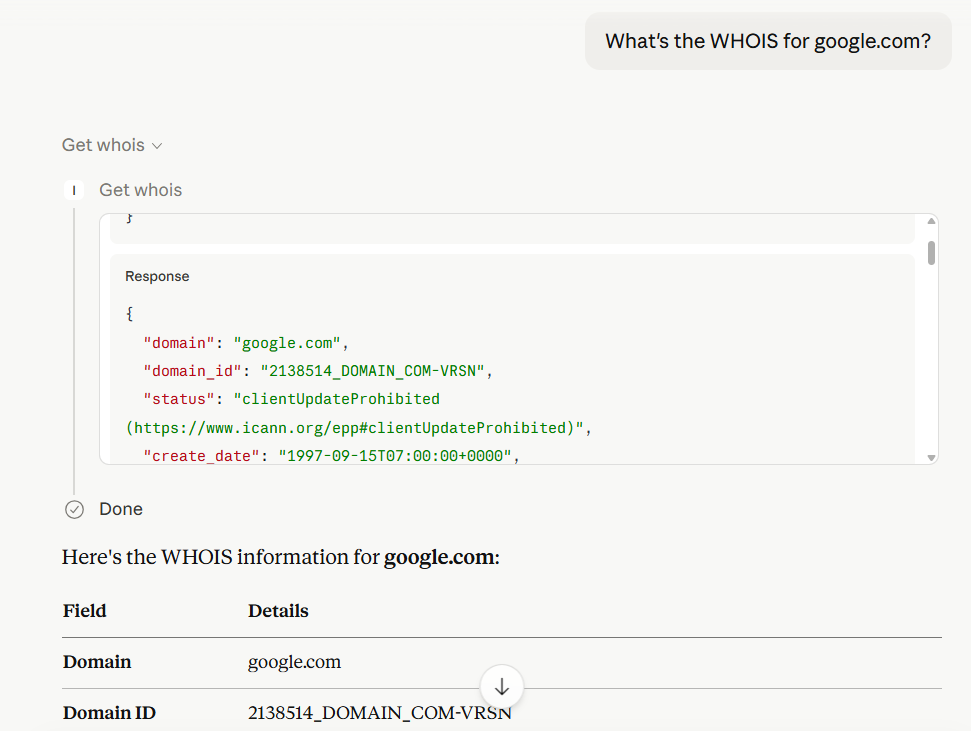
To query for the hosted domains by IP address, just enter your query about the IP in a chat in Claude Desktop. Some of the example query will be:
- What domains did (IP) have?
- What are the domains in (IP)?
- What's the domain owned by (IP)?
In Claude Desktop, the model will automatically generate the output based on the result returned by IP2WHOIS MCP server.
Environment Variable
IP2WHOIS_API_KEY
The IP2WHOIS API key, which allows you to query up to 500 per month for free and more details of the IP address. You can sign up for a free API key, or subscribe to a plan to enjoy more benefits.
Tools
get_whois
Look up WHOIS data for a domain name.
-
Arguments:
domain(string): The domain name to look up (e.g.,google.com).
-
Output: Returns a JSON object containing:
-
domain_id,status,domain_age -
create_date,update_date,expire_date -
registrar(name, url, etc.) -
registrant(name, organization, country) -
nameservers
-
get_hosted_domains
Query for the list of hosted domain names by IP address.
-
Arguments:
ip(string): The IP address (IPv4 or IPv6) to look up.
-
Output: Returns a JSON object containing the domains hosted on the ip address, and the total number of hosted domains found
License
See the LICENSE file.
Related MCP Servers
Adoption & maintenance
Factual signals from GitHub, npm, and our automated checks — not a rating.
GitHub stars
1
Stargazers on the source repository.
Last commit
3mo ago
Most recent push to the default branch.
Tools exposed
2
Callable tools this server registers over MCP.
Directory activity
2 views
Config copies, upvotes, and views on AllMCPs.
Reviews
No reviews yet — be the first to share how this listing worked for you.
Frequently Asked Questions about MCP Ip2whois
AllMCPs Directory Badge
Showcase your server listing on GitHub or your project documentation. Embed this dynamic SVG badge to highlight official listing status and live engagement.
Badge Style:
Live Dynamic SVG Preview
Markdown (GitHub README)
[](https://allmcps.com/mcp/ip2whois-mcp-ip2whois)HTML Embed
<a href="https://allmcps.com/mcp/ip2whois-mcp-ip2whois"><img src="https://allmcps.com/api/badge/ip2whois-mcp-ip2whois?style=directory" alt="MCP Ip2whois on AllMCPs" /></a>