iossimulatormobile-testingdeveloper-tools
MCP server for controlling iOS simulators, apps, UI interactions, debugging, screenshots, logs, and testing.
Quick Install
Automated & IDE SetupCopy the AI prompt to install this server into Claude Code, Cursor, or another agent — or use 1-click editor setup below.
One-click editor setup isn’t available for this listing yet — we don’t have a confirmed install command, and we’d rather show nothing than point your editor at the wrong package or host. Follow the project’s own setup instructions, linked above.
Manual Client & Custom JSON ConfigExpand JSON ▾
No confirmed setup config for this listing yet. We only publish a config block when the install details come from the project itself — its README, its docs, or a verified owner. We haven’t found those for InditexTech/mcp-server-simulator-ios-idb, and we’d rather show nothing than a guess you’d paste into your client. Follow the project’s own setup instructions for the current steps.
Overview
Use cases
Create and manage iOS simulator sessions
Install, launch, terminate, and uninstall iOS apps
Execute taps, swipes, text input, and key sequences
Capture screenshots, videos, system logs, and crash logs
Simulate locations, inject media, and manage app data
Key features
Simulator boot, shutdown, monitoring, and window focus
iOS application installation and lifecycle management
UI interaction through taps, swipes, buttons, and text input
Accessibility element access for UI testing
Screenshot, video recording, system log, and crash log support
Location, media, URL scheme, contacts, keychain, and dynamic library operations
Capabilities & Tool Schemas
Inspect callable tools, capabilities, and parameters exposed to AI agents by MCP Server Simulator Ios Idb.
Extracted Tool Capabilities
Simulator boot, shutdown, monitoring, and window focus
iOS application installation and lifecycle management
UI interaction through taps, swipes, buttons, and text input
Accessibility element access for UI testing
Screenshot, video recording, system log, and crash log support
Location, media, URL scheme, contacts, keychain, and dynamic library operations
Documentation Overview
📱 MCP Server for iOS Simulator
A Model Context Protocol (MCP) server that enables LLMs to interact with iOS simulators through natural language commands.
ℹ️ Overview
This MCP server provides a bridge between Large Language Models (LLMs) and iOS simulators, offering comprehensive control through natural language commands. Here's what it can do:
For detailed usage, see the Installation guide and Supported Commands sections. You can use this server either through direct MCP integration or as a standalone library.
Check out the Architecture section to understand how the components work together to enable natural language control of iOS simulators.
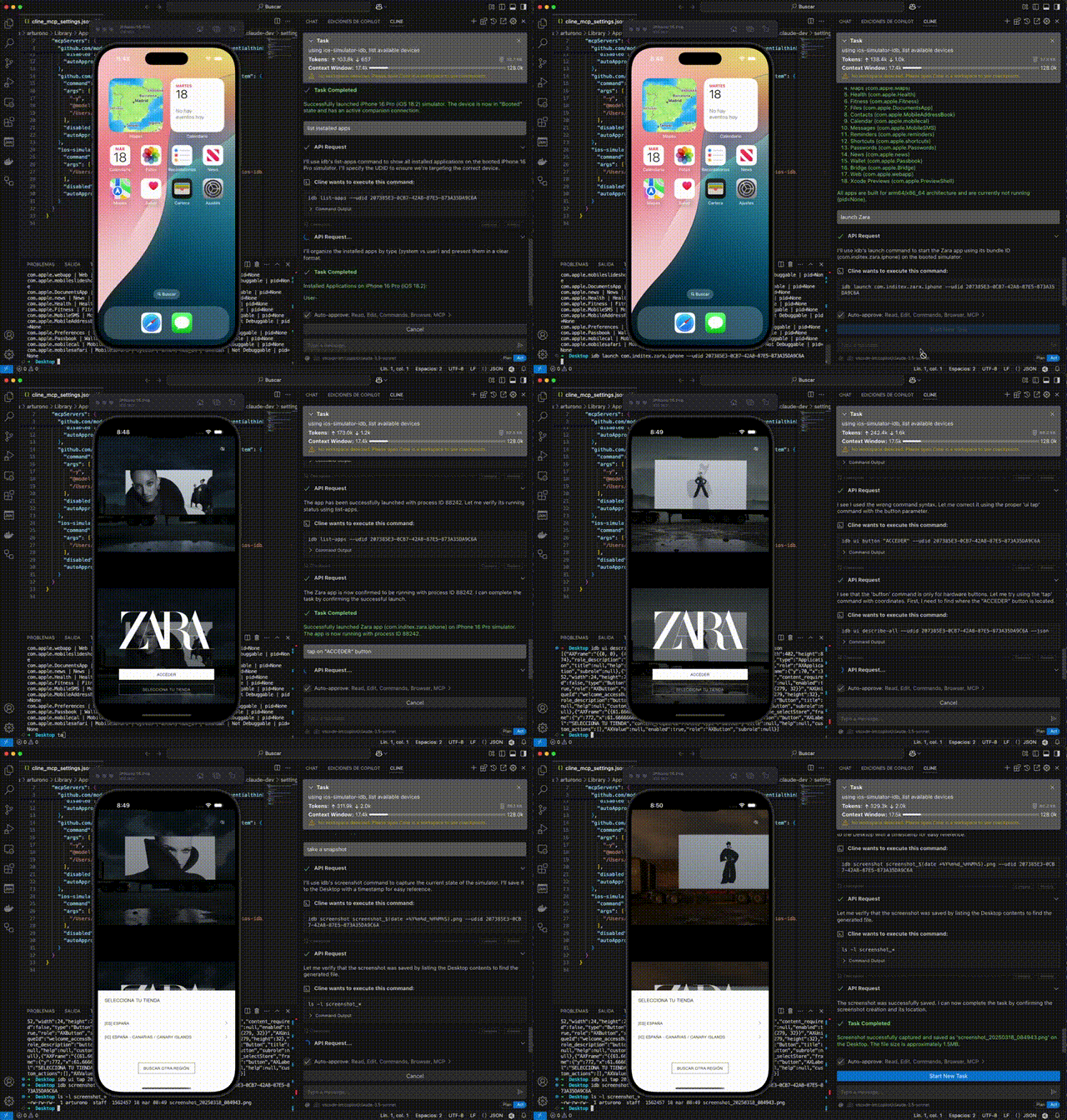
🎮 Simulator Control
- Create and manage simulator sessions
- Boot, shutdown, and monitor simulator states
- List available and running simulators
- Focus simulator windows
📱 Application Management
- Install and manage iOS applications
- Launch, terminate, and uninstall apps
- Monitor app states and verify installations
- Handle app permissions and configurations
🖱️ UI Interaction & Testing
- Interact with the simulator UI
- Execute tap, swipe, and button press actions
- Input text and key sequences
- Access accessibility elements for UI testing
- Record videos of UI interactions
🛠️ Development & Debugging
- Capture screenshots and system logs
- Debug applications in real-time
- Monitor and analyze crash logs
- Install dynamic libraries and manage app data
⚡ Advanced Features
- Additional functionality includes:
- Location simulation
- Media injection
- URL scheme handling
- Contact database management
- Keychain operations
For detailed usage, see the Installation guide and Supported Commands sections. You can use this server either through direct MCP integration or as a standalone library.
Check out the Architecture section to understand how the components work together to enable natural language control of iOS simulators.
📋 Requirements
- macOS: Required for iOS simulator support
- Node.js: v20.0.0 or higher
- Homebrew: Required for installing dependencies
- XCode: With iOS simulators installed
🚀 Installation
The easiest way to install this server is through Cline:
- Simply ask Cline:
- Cline will handle the installation process automatically, including dependency management and configuration.
Alternatively, you can install it manually:
The installation process will automatically:
- Check if you're running macOS
- Install idb-companion via Homebrew
- Install fb-idb via pip in the virtual environment
Note: Make sure to keep the virtual environment activated while using the server. If you close your terminal and come back later, you'll need to reactivate the virtual environment with the source venv/bin/activate command before running npm start.
🔌 MCP Integration
To use this server with Claude or other LLM assistants:
- Add the server to your MCP settings in Claude Desktop:
- The LLM can now use natural language commands to control iOS simulators:
📚 Usage as a Library
You can also use this package as a library in your own projects:
🔰 Basic Usage
🚀 Advanced Usage
You can also use the individual components directly:
🏗️ Project Structure
🎯 Supported Commands
The NLParser supports the following natural language commands:
🎮 Simulator Management
| Command | Description | Example |
|---|---|---|
| Create session | Creates a new simulator session | "create session", "create simulator iPhone 12" |
| Terminate session | Terminates the current session | "terminate session", "close simulator" |
| List simulators | Lists available simulators | "list simulators", "show simulators" |
| List booted simulators | Lists running simulators | "list booted simulators", "show running simulators" |
| Boot simulator | Boots a simulator by UDID | "boot simulator 5A321B8F-4D85-4267-9F79-2F5C91D142C2" |
| Shutdown simulator | Shuts down a simulator | "shutdown simulator 5A321B8F-4D85-4267-9F79-2F5C91D142C2" |
| Focus simulator | Brings simulator window to front | "focus simulator", "bring simulator to front" |
| List simulator sessions | Lists active simulator sessions | "list simulator sessions", "show active sessions" |
📱 App Management
| Command | Description | Example |
|---|---|---|
| Install app | Installs an app on the simulator | "install app /path/to/app.ipa" |
| Launch app | Launches an app on the simulator | "launch app com.example.app" |
| Terminate app | Terminates a running app | "terminate app com.example.app" |
| Uninstall app | Uninstalls an app | "uninstall app com.example.app" |
| List apps | Lists installed applications | "list apps", "show installed apps" |
| Check if app installed | Checks if an app is installed | "is app com.example.app installed" |
🖱️ UI Interaction
| Command | Description | Example |
|---|---|---|
| Tap | Taps at specific coordinates | "tap at 100, 200" |
| Swipe | Performs a swipe gesture | "swipe from 100, 200 to 300, 400" |
| Press button | Presses a device button | "press button HOME", "press button SIRI" |
| Input text | Types text | "input text Hello World" |
| Press key | Presses a key by code | "press key 4" |
| Press key sequence | Presses a sequence of keys | "press key sequence 4 5 6" |
♿ Accessibility
| Command | Description | Example |
|---|---|---|
| Describe elements | Lists all accessibility elements | "describe all elements", "show accessibility elements" |
| Describe point | Describes element at coordinates | "describe point 100, 200", "what's at 150, 300" |
📸 Capture and Logs
| Command | Description | Example |
|---|---|---|
| Take screenshot | Captures a screenshot | "take screenshot", "capture screen" |
| Record video | Records screen activity | "record video /path/output.mp4" |
| Stop recording | Stops video recording | "stop recording", "stop video recording" |
| Get logs | Retrieves system or app logs | "get logs", "get logs for com.example.app" |
🐛 Debug
| Command | Description | Example |
|---|---|---|
| Start debug | Starts a debug session | "debug app com.example.app", "start debug com.example.app" |
| Stop debug | Stops a debug session | "stop debug", "terminate debug session" |
| Debug status | Gets debug session status | "debug status", "show debug info" |
💥 Crash Logs
| Command | Description | Example |
|---|---|---|
| List crash logs | Lists available crash logs | "list crash logs", "show crash logs" |
| Show crash log | Shows content of a crash log | "show crash log crash_2023-01-01" |
| Delete crash logs | Deletes crash logs | "delete crash logs", "clear crash logs" |
Related MCP Servers
Adoption & maintenance
Factual signals from GitHub, npm, and our automated checks — not a rating.
GitHub stars
309
Stargazers on the source repository.
Last commit
8d ago
Most recent push to the default branch.
Directory activity
1 views
Config copies, upvotes, and views on AllMCPs.
Reviews
No reviews yet — be the first to share how this listing worked for you.
Frequently Asked Questions about MCP Server Simulator Ios Idb
AllMCPs Directory Badge
Showcase your server listing on GitHub or your project documentation. Embed this dynamic SVG badge to highlight official listing status and live engagement.
Badge Style:
Live Dynamic SVG Preview
Markdown (GitHub README)
[](https://allmcps.com/mcp/inditextech-mcp-server-simulator-ios-idb)HTML Embed
<a href="https://allmcps.com/mcp/inditextech-mcp-server-simulator-ios-idb"><img src="https://allmcps.com/api/badge/inditextech-mcp-server-simulator-ios-idb?style=directory" alt="MCP Server Simulator Ios Idb on AllMCPs" /></a>Technical Specs & Signals
CategoryBrowser Automation
PricingFree
49Quality signal: Fair · 49/100How this signal is calculated ▾
Server availabilityNot measured
Not scored for repo-hosted servers — we can't reach the running server, only its GitHub page. Hosted MCP endpoints are health-checked live.
Verified ownership10/20
Documentation & tools18/30
Adoption & activity9/15
Community engagement0/10
A guidance signal from public completeness & health data — not a user rating. New listings start lower and rise as they add docs, get verified, and grow adoption. Signals we can't observe for a listing are skipped, not counted against it.
Own this project?
This directory is pre-filled from public sources. Claim via GitHub README, site badge, or DNS TXT to unlock edit access and the Official badge — proof is checked automatically, then reviewed by our team.
Free dofollow backlink: add your website and place the AllMCPs badge on it — no claim needed. We detect it automatically and keep it verified as long as the badge stays live.
Claim & get free dofollowShare & Embed
Add our SVG badge (dark/light directory styles) or embeddable widget to your site.