iGPSport cycling data with training metrics (NP/IF/TSS/CTL/ATL/TSB) and workout generation
Quick Install
Automated & IDE SetupCopy the AI prompt to install this server into Claude Code, Cursor, or another agent — or use 1-click editor setup below.
Not yet automatically verified
We haven't yet run this listing's install command through our automated sandbox check. This isn't a red flag — we're steadily working through the catalog.
Manual Client & Custom JSON ConfigExpand JSON ▾
Client Config & Setup
Choose your client or environment
Target File:
💡 Paste the JSON block into your client's configuration file under mcpServers, then restart the application.
Documentation Overview
igpsport-mcp
English | 简体中文
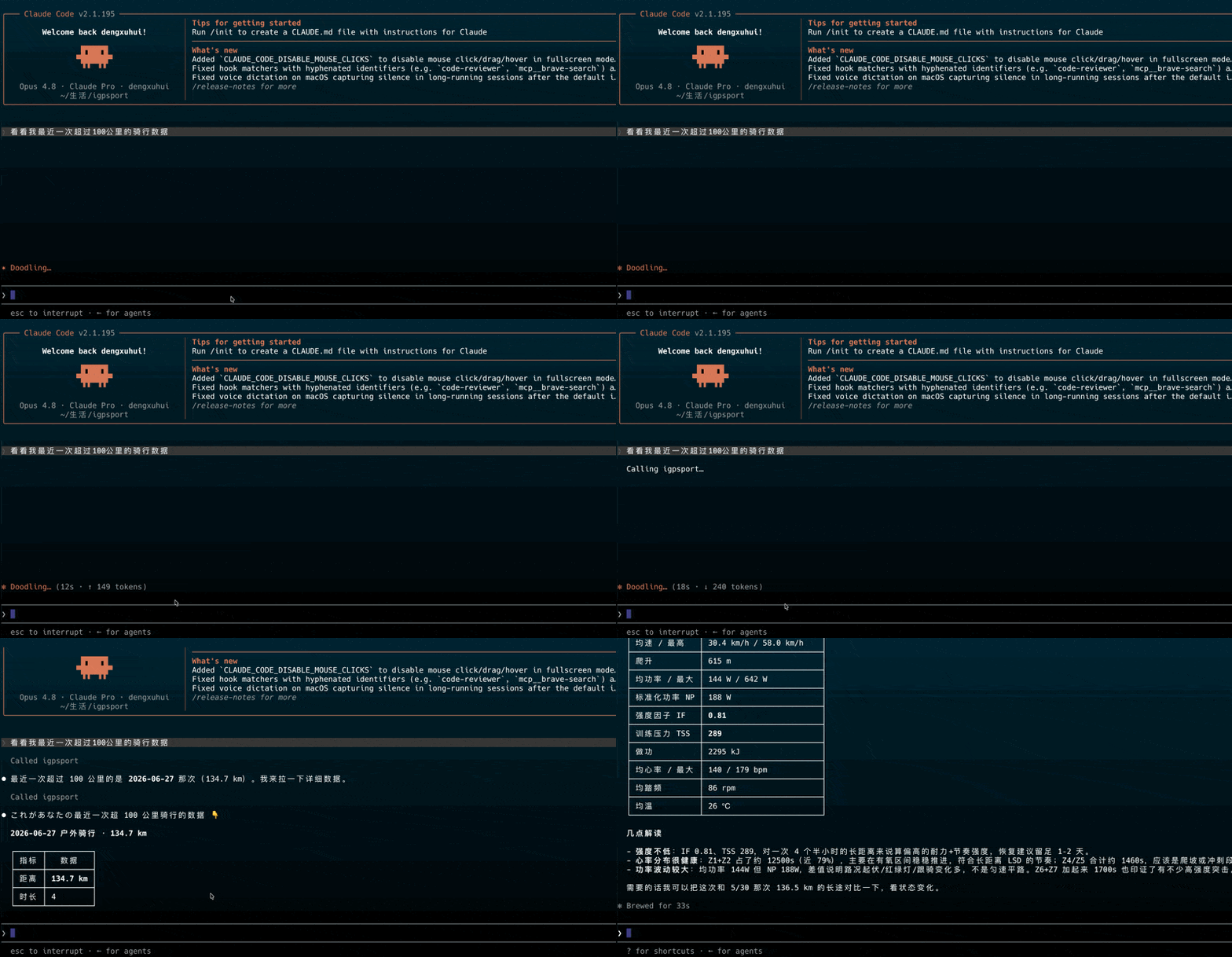
A local MCP server that connects your iGPSport cycling data to LLM clients like Claude. Analyze your training in natural language: "How's my training load this week?" "Compare my two long rides from last week and this week." "What's my ranking on that climb I starred?" "How many kilometers did I ride this year, and what are my personal bests?" — and even have Claude prescribe workouts for you: "Build me a 2×20 SST session based on my FTP and push it to my head unit."
Key differentiator: Derived training metrics — NP / IF / TSS / CTL / ATL / TSB — are computed server-side in the MCP layer before being returned. The LLM receives story-ready numbers, not raw stream data.
Demo
⚠️ Unofficial project. This tool works by simulating iGPSport web client requests. iGPSport may change their API at any time, which could break functionality. Please evaluate account risk yourself — use at your own risk. Runs entirely locally over stdio — your data never touches any third-party server.
Quick Start (Recommended)
This tool is an MCP server and requires an MCP-capable client (e.g. Claude Desktop / Claude Code / Cursor). Once you have a client ready, three steps:
1. Install uv (a standalone tool — you do not need Python pre-installed, uv handles the runtime automatically):
2. Install globally and run the setup wizard (interactively enter your phone/email and password — credentials stay local). The commands are the same on both systems; run them in Terminal on macOS or PowerShell on Windows:
If
igpsport-mcpis not found after installation, open a new terminal/PowerShell window so PATH updates take effect (uv places executables in~/.local/binon macOS,%USERPROFILE%\.local\binon Windows).
The wizard saves credentials to a config file (owner-readable only) and prints a copy-paste ready MCP configuration block. Config file locations:
- macOS:
~/.igpsport-mcp/config.json - Windows:
C:\Users\YourName\.igpsport-mcp\config.json
3. Paste the printed config into your client, then restart the client (see "Connect to Claude" below).
Want to verify your credentials before pasting? Run
igpsport-mcp --check— it performs a real login and prints ✅ success or ❌ the reason for failure, so you don't add it to your client only to find it broken.Need to print the config snippet again later?
igpsport-mcp --mcp-configanytime.
Developers / users with an existing Python environment: use
uvx igpsport-mcpfor one-shot runs, or configure via environment variables below instead of the wizard.
CLI Usage
Running with no arguments starts the MCP server in stdio mode (this is what your MCP client invokes — you normally don't run it manually). Other subcommands:
| Command | Purpose |
|---|---|
igpsport-mcp --setup | Interactive setup wizard: enter phone/email + password, saved to local config.json |
igpsport-mcp --mcp-config | Print a copy-paste ready MCP client configuration block |
igpsport-mcp --check | Perform a real login to verify credentials (account is shown masked) |
igpsport-mcp --lang en|zh | Set output language (also settable via IGPSPORT_LANG env var; default zh) |
igpsport-mcp --version | Print version number |
igpsport-mcp --help | Show help |
Configuration (Environment Variables)
Users who ran the
--setupwizard can skip this section — credentials are already stored. The section below is for users who prefer environment variables, or need to manage credentials across CI / multiple environments. Env vars take priority over config.json.
| Variable | Required | Description |
|---|---|---|
IGPSPORT_USERNAME | ✅ | iGPSport account (phone number for CN / email for international) |
IGPSPORT_PASSWORD | ✅ | Password |
IGPSPORT_REGION | Optional | Region, default cn (China server app.igpsport.cn); international users set intl (app.igpsport.com) |
IGPSPORT_FTP | Optional | Functional Threshold Power in watts. Leave blank to auto-read from your iGPSport profile; set to override |
IGPSPORT_LTHR | Optional | Lactate Threshold Heart Rate in bpm, used for HR zones and hrTSS fallback. Also auto-read from iGPSport; set to override |
IGPSPORT_LANG | Optional | Output language, zh (default) or en |
IGPSPORT_CACHE_DIR | Optional | Cache directory; defaults to ~/.cache/igpsport-mcp (macOS) / C:\Users\You\.cache\igpsport-mcp (Windows) |
IGPSPORT_LOG_LEVEL | Optional | Default INFO |
FTP / LTHR are now auto-read from your iGPSport athlete profile by default (along with body weight and max HR), so you normally don't need to set them manually. Only set the env vars when you want to use thresholds different from what's in the app. If your iGPSport profile also has no FTP set, IF / TSS / CTL / ATL / TSB cannot be computed — either add FTP in iGPSport or set
IGPSPORT_FTP.
International Edition Support
Switch to the international edition (app.igpsport.com) by setting IGPSPORT_REGION=intl. The international and China servers use separate accounts — you must register separately at app.igpsport.com.
Differences from the China server:
- No WASM signing — authentication uses pure JWT, a simpler design
- Segment features are unavailable (international segments are in beta, listing is empty)
- Training parameter endpoint uses v2 path; yearly statistics path differs (auto-adapted internally)
- Workout course format is cross-region compatible — zero changes in the IR compilation layer
Example configuration:
Or select "2. International" in the first step of the --setup wizard.
International edition FIT files are stored on OSS in the US (
oss-us-west-1). Downloads may be slightly slower for users in China.
Connect to Claude
Claude Desktop
Open the config file claude_desktop_config.json (create it if it doesn't exist), paste the content below, then fully quit and reopen Claude Desktop. File locations:
- macOS:
~/Library/Application Support/Claude/claude_desktop_config.json - Windows:
%APPDATA%\Claude\claude_desktop_config.json(i.e.C:\Users\You\AppData\Roaming\Claude\claude_desktop_config.json)
You can also open this file directly from Claude Desktop via Settings → Developer → Edit Config.
After running --setup (credentials in config.json, leave env empty — this is what --mcp-config prints):
Or skip the wizard and use uvx with environment variables:
FTP / LTHR are auto-read from your iGPSport profile by default — no need to set them. Only add
"IGPSPORT_FTP": "250"or"IGPSPORT_LTHR": "160"inenvif you want to override what's in the app.
Claude Code
After the wizard (credentials stored):
Or with uvx + env vars:
Verify with /mcp or claude mcp list — status should be connected.
OpenClaw
OpenClaw uses stdio for MCP, the same protocol as Claude Desktop / Claude Code, so the configuration above works directly.
Method 1: Ask OpenClaw in natural language (recommended)
First install with uv tool install igpsport-mcp and run igpsport-mcp --setup. Then, in your connected chat channel, simply tell OpenClaw:
I installed igpsport-mcp. Help me configure it in OpenClaw.
It will locate the binary path, verify credentials with igpsport-mcp --check, write the config via openclaw mcp add, and probe it — all without you touching a command line or JSON.
Method 2: One-liner
This writes to ~/.openclaw/openclaw.json under mcp.servers.igpsport. You can also edit the file manually:
Verification:
Related MCP Servers
Reviews
No reviews yet — be the first to share how this listing worked for you.
Frequently Asked Questions about Igpsport MCP
AllMCPs Directory Badge
Showcase your server listing on GitHub or your project documentation. Embed this dynamic SVG badge to highlight official listing status and live engagement.
Badge Style:
Live Dynamic SVG Preview
Markdown (GitHub README)
[](https://allmcps.com/mcp/igpsport-mcp)HTML Embed
<a href="https://allmcps.com/mcp/igpsport-mcp"><img src="https://allmcps.com/api/badge/igpsport-mcp?style=directory" alt="Igpsport MCP on AllMCPs" /></a>Technical Specs & Signals
CategoryMonitoring
37Quality signal: Fair · 37/100How this signal is calculated ▾
Server availabilityNot measured
Not scored for repo-hosted servers — we can't reach the running server, only its GitHub page. Hosted MCP endpoints are health-checked live.
Verified ownership10/20
Documentation & tools16/30
Adoption & activity2/15
Community engagement0/10
A guidance signal from public completeness & health data — not a user rating. New listings start lower and rise as they add docs, get verified, and grow adoption. Signals we can't observe for a listing are skipped, not counted against it.
Own this project?
This directory is pre-filled from public sources. Claim via GitHub README, site badge, or DNS TXT to unlock edit access and the Official badge — proof is checked automatically, then reviewed by our team.
Free dofollow backlink: add your website and place the AllMCPs badge on it — no claim needed. We detect it automatically and keep it verified as long as the badge stays live.
Claim & get free dofollowShare & Embed
Add our SVG badge (dark/light directory styles) or embeddable widget to your site.