Read-only visualization for Cortex memory, knowledge, sessions, traces, and codebase graphs.
Quick Install
Automated & IDE SetupCopy the AI prompt to install this server into Claude Code, Cursor, or another agent — or use 1-click editor setup below.
Manual Client & Custom JSON ConfigExpand JSON ▾
Client Config & Setup
Choose your client or environment
Target File:
💡 Paste the JSON block into your client's configuration file under mcpServers, then restart the application.
Documentation Overview



Hypermnesia MCP Viz
Hypermnesia MCP Viz is published as hypermnesia-mcp-viz everywhere:
Python, MCP Registry, Claude Code, Codex, Gemini, and the console command.
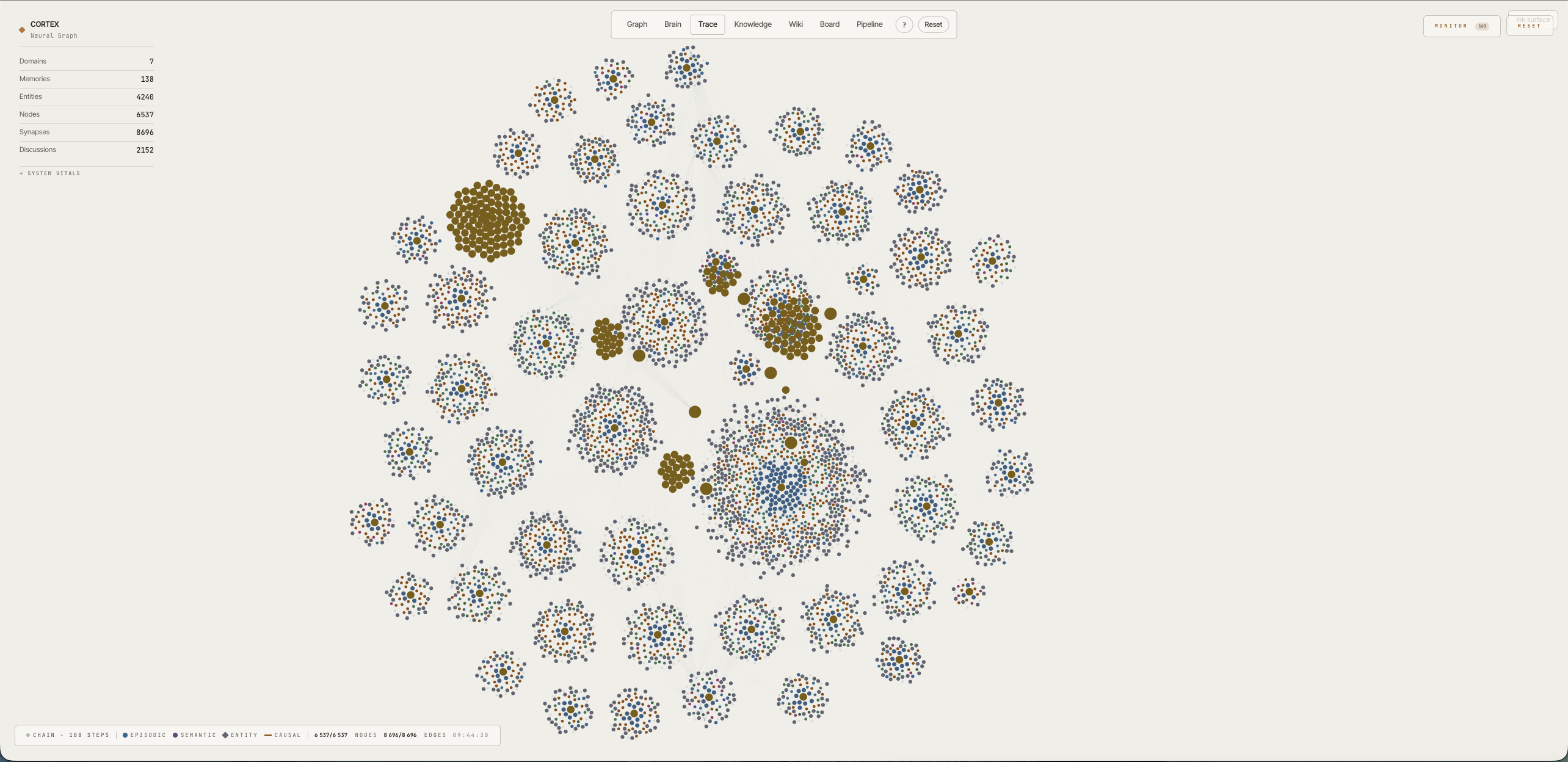
The cross-platform visualization layer for Cortex. Codex, Gemini CLI, Claude Code, and any stdio MCP host can launch the same read-only server and browser UI. It turns Cortex's memory store, a host-neutral live activity stream, Claude Code's historical session archive, and your codebase graph into six live reading angles: a project galaxy, a 3D anatomical brain, an execution trace, a consolidation kanban, a curated knowledge browser, and a wiki. It never writes a memory: it renders, it never remembers. (It does keep its own derived graph/layout caches in the Cortex database, listed under Boundary.)
Launch with the open_visualization tool (or /cortex-visualize). One launcher opens six reading angles; the default landing view is Trace.
The whole UI ships on the AI Architect design system: a paper-first reading surface with a persistent ink (night) toggle, greyscale chrome, and a data palette resolved from design tokens at runtime, flipping the surface re-inks every view in place without disturbing a settled layout, and every count on screen is exact and streamed, never rounded.
Getting Started
Claude Code users can install Hypermnesia MCP Viz from the same
cortex-plugins marketplace as Cortex:
This install name becomes available in the Cortex marketplace only when this
repository and the matching marketplace change in
cdeust/Cortex#351 are released
together. Maintainers must not publish either half of the rename on its own.
Migrating from cortex-viz
Existing Claude Code installs are not aliases for the new plugin identity. Remove the old install, refresh the marketplace after the coordinated release, and install the canonical plugin:
Claude composes plugin tool names from the plugin manifest name, the
mcpServers key, and the tool name. Update both old full names wherever they
appear in permission allowlists, hooks, skills, or agents:
mcp__plugin_cortex-viz_cortex-viz__open_visualizationbecomesmcp__plugin_hypermnesia-mcp-viz_hypermnesia-mcp-viz__open_visualization.mcp__plugin_cortex-viz_cortex-viz__get_methodology_graphbecomesmcp__plugin_hypermnesia-mcp-viz_hypermnesia-mcp-viz__get_methodology_graph.
The removed cortex-viz console command is not retained as an alias, so
Cursor, Windsurf, VS Code, and other direct-process configurations must invoke
hypermnesia-mcp-viz instead.
Hypermnesia MCP Viz is a companion to Cortex that never writes a memory. Install Cortex first (
claude plugin install hypermnesia-mcp@cortex-plugins): the visualizer reads its shared PostgreSQL store, and writes only its own derived caches there (Boundary). Point both at the same database: thedatabase_urlplugin setting defaults topostgresql://127.0.0.1:5432/cortex; set it to the same value you gave Cortex.
Restart your Claude Code session, then launch the visualizer:
Codex, Gemini CLI, and other MCP hosts launch the same server as a plain stdio process; see Other MCP hosts for the exact configuration.
One launcher opens all six reading angles (Graph · Brain · Trace · Knowledge · Wiki · Board) in the browser, served live from the Cortex store, your session JSONL, the code graph, and git.
Works without Cortex
No Cortex, no PostgreSQL, no setup: Hypermnesia MCP Viz is still useful on its own. The Trace view (the default landing view) reads only ~/.claude/projects/*.jsonl and your local git: every Claude Code session becomes a navigable domain → session → prompt → action → file chain, with per-file diffs and commit history. If you use Claude Code, the data is already on your disk.
- Just install the plugin and run
/cortex-visualize. When Cortex's database isn't reachable, the server logs one line and starts in no-DB mode automatically: Trace is fully live; the five DB-backed views (Graph, Brain, Knowledge, Wiki, Board) appear greyed out with an install pointer instead of erroring. - To skip the database probe entirely, set
CORTEX_VIZ_NO_DB=1(or pass--no-dbwhen running the standalone server directly).
Installing Cortex later lights up the other five views against the same UI (no reconfiguration).
More options (Clone, manual run)
Clone + run from source:
The views
Graph: the Claude workflow map
Each project becomes a cloud of nodes around one gold domain hub. Inside every cloud, nodes sit in six concentric levels by the Claude surface (or the code itself) that produced them:
| Level | What's there | Click through to |
|---|---|---|
| L1 · Setup | Skills · Commands · Hooks · Agents · MCPs | File paths; which domains share an MCP (thin indigo bridges) |
| L2 · Tools | One hub per Claude tool per domain (Edit · Write · Read · Grep · Glob · Bash · Task) | Files touched + total uses |
| L3 · Files | Every file Claude opened, read, edited, searched, or referenced, colored by primary tool | first_seen / last_accessed / last_modified + See diff against HEAD |
| L4 · Discussions | One node per Claude Code session | started_at, duration, message count + View full conversation replay |
| L5 · Memories | Persistent memories, colored by consolidation stage | Full content, tags, every scientific measurement |
| L6 · AST symbols | The code itself: functions, methods, classes, modules, constants parsed from 10 languages (Rust, Python, TypeScript, Java, Kotlin, Swift, Objective-C, C, C++, Go) | Qualified name, symbol type, parent file, and named defined_in / calls / imports / member_of edges |
Why L6 matters. L5 and below tell you what Claude did; L6 tells you what the code is. Three things become visible for free: shared code (any symbol referenced by two projects drifts into the inter-project gap), impact (clicking a symbol surfaces every caller, importer, and member: "what breaks if I change this?" is a graph neighbourhood, not a grep), and the shape of the codebase itself (a dense petal around a file means a fat internal API; a thin one means a leaf module). A grouped filter (L1–L6 / by kind / by AST edge kind / Cross-domain) isolates any slice.
Brain: the galaxy inside a real cortex
The same graph, on a second surface: every node placed inside an anatomical cortical mesh by the neuroscience of memory systems rather than by force-direction. Episodic memories sit in the medial temporal lobe and migrate outward to neocortex along a hot→consolidated depth gradient (the complementary-learning-systems consolidation model); semantic entities in temporal neocortex; code symbols in association cortex; procedural skills in the striatum and cerebellum; domains at the connectome's rich-club hubs. Region centres are registered from real MNI152 atlas coordinates (affine fit, not vertex-exact; the mesh is a single unlabeled surface). Every synapse routes along a major white-matter tract (fornix, uncinate, SLF, corpus callosum). Node colour is the same semantic palette as the galaxy (memories by consolidation stage, entities/symbols by type), and a live Memory science panel mirrors the store's system vitals (consolidation pipeline, skills, source-monitoring, extinction, sleep phases, and every mechanism Cortex exposes).
Related MCP Servers
Reviews
No reviews yet — be the first to share how this listing worked for you.
Frequently Asked Questions about Hypermnesia MCP Viz
AllMCPs Directory Badge
Showcase your server listing on GitHub or your project documentation. Embed this dynamic SVG badge to highlight official listing status and live engagement.
Badge Style:
Live Dynamic SVG Preview
Markdown (GitHub README)
[](https://allmcps.com/mcp/hypermnesia-mcp-viz)HTML Embed
<a href="https://allmcps.com/mcp/hypermnesia-mcp-viz"><img src="https://allmcps.com/api/badge/hypermnesia-mcp-viz?style=directory" alt="Hypermnesia MCP Viz on AllMCPs" /></a>Technical Specs & Signals
CategoryKnowledge & Memory
27Quality signal: Emerging · 27/100How this signal is calculated ▾
Server availabilityNot measured
Not scored for repo-hosted servers — we can't reach the running server, only its GitHub page. Hosted MCP endpoints are health-checked live.
Verified ownership8/20
Documentation & tools11/30
Adoption & activity1/15
Community engagement0/10
A guidance signal from public completeness & health data — not a user rating. New listings start lower and rise as they add docs, get verified, and grow adoption. Signals we can't observe for a listing are skipped, not counted against it.
Own this project?
This directory is pre-filled from public sources. Claim via GitHub README, site badge, or DNS TXT to unlock edit access and the Official badge — proof is checked automatically, then reviewed by our team.
Free dofollow backlink: add your website and place the AllMCPs badge on it — no claim needed. We detect it automatically and keep it verified as long as the badge stays live.
Claim & get free dofollowShare & Embed
Add our SVG badge (dark/light directory styles) or embeddable widget to your site.