Reads your own Garmin mirror: readiness, training load, muscle freshness, and read-only SQL.
Quick Install
Automated & IDE SetupCopy the AI prompt to install this server into Claude Code, Cursor, or another agent — or use 1-click editor setup below.
Manual Client & Custom JSON ConfigExpand JSON ▾
Client Config & Setup
Choose your client or environment
Target File:
💡 Paste the JSON block into your client's configuration file under mcpServers, then restart the application.
Documentation Overview
hybridlog



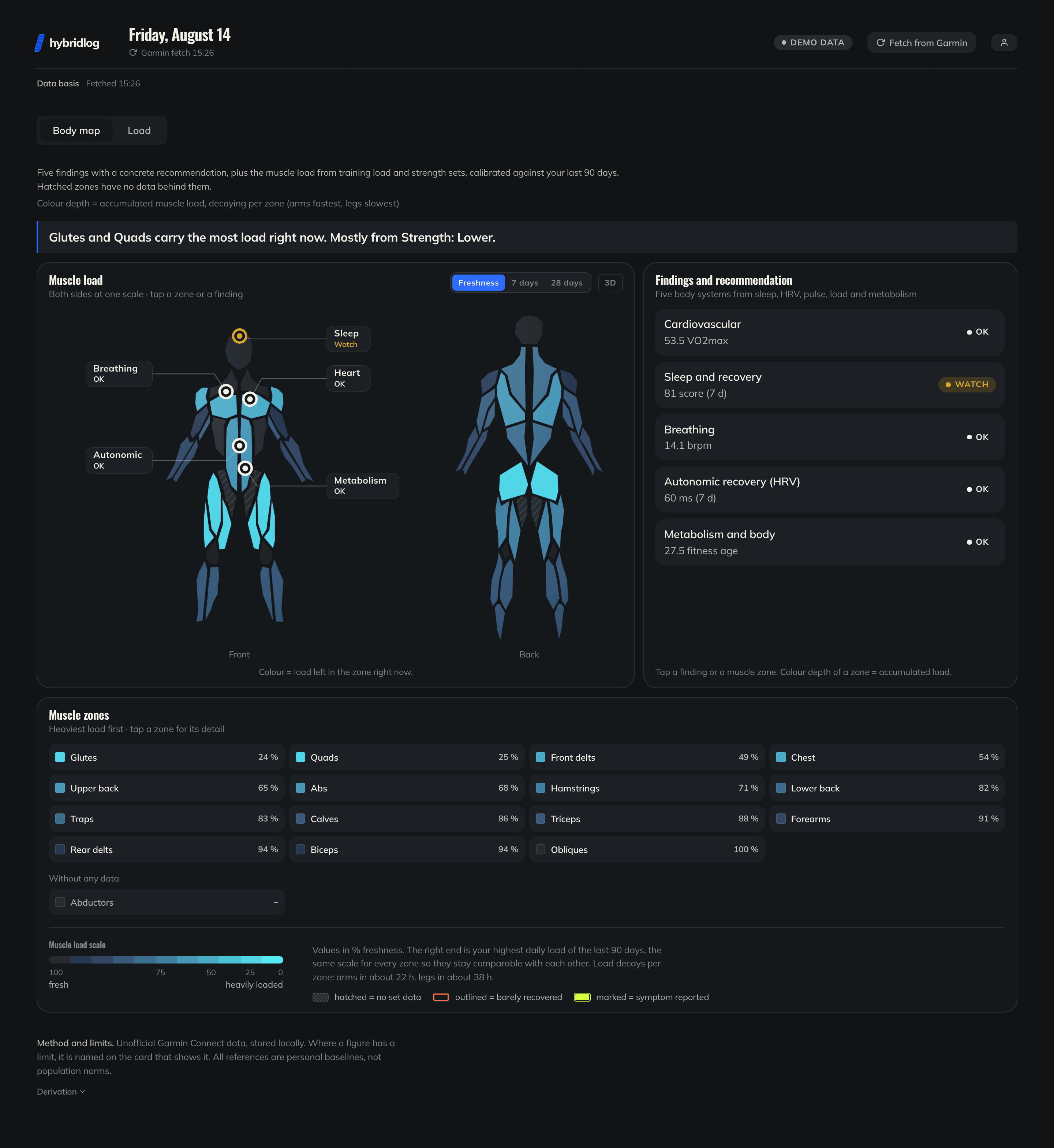
Self-hosted MCP server on your own Garmin data. It mirrors everything Garmin answers into a database you control, computes the models the watch does not (training load, muscle freshness, readiness in context), and hands all of it to a language model over stdio or HTTP, so the things Garmin cannot measure can be dictated into the chat instead of typed into a form. A dashboard comes with it: the body map, the training load, and the login the connector authenticates against. There is no hosted instance, and that is the point: it is a health record, and the model reads it through a role that can only read.
Running, lifting or both on the same day: the models do not care which. Sessions that alternate running with station work get a lap-by-lap breakdown of their own, which is the shape of a HYROX race.
There is a demo to
walk through before installing anything: sign in as demo@example.com
with the password demo-demo-demo. It runs on generated data and puts
itself back every night.
|
|
|
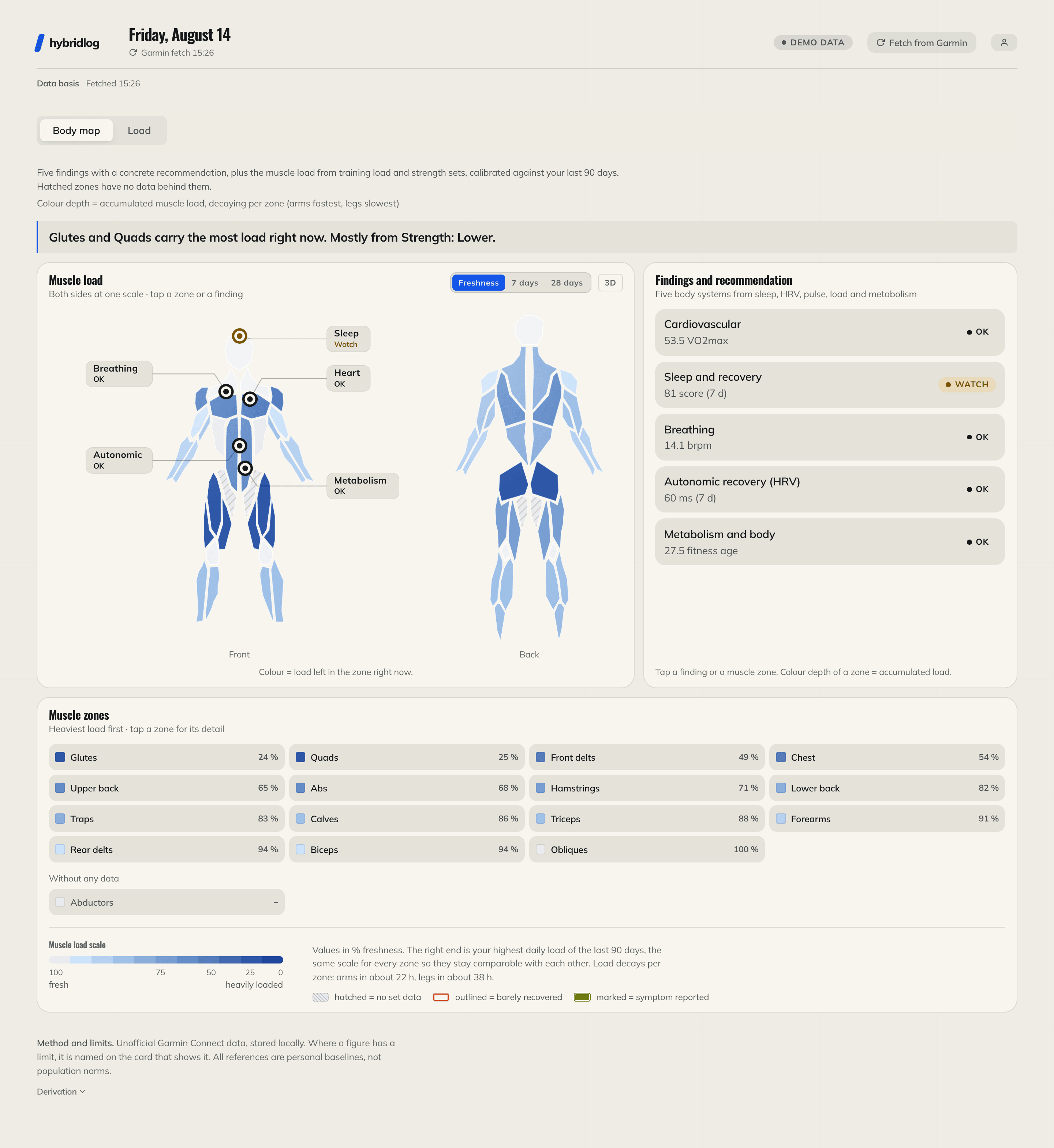

Every number in these three is generated by fetcher/seed_demo.py.
The interface is English and ships a German translation; it follows the
browser language unless the profile says otherwise.
Read this before you rely on it. The fetcher talks to Garmin Connect's unofficial web API. Garmin can change or close it without notice. This project is not affiliated with or endorsed by Garmin. Nothing it computes is a medical statement: readiness, HRV bands, load ratios and the coach texts are training aids, not diagnoses. It is a personal project published in the hope it is useful, with no promise of support or a stable interface.
What it is
- MCP server: twelve tools and one prompt over
laravel/mcp, in two transports. Local (stdio) for Claude Code and Claude Desktop, hosted (streamable HTTP with OAuth 2.1, PKCE and dynamic client registration) for claude.ai, ChatGPT, Mistral's Le Chat (renamed Vibe), LM Studio and anything else that speaks it. - Dashboard: Laravel + Alpine + Chart.js. It draws the body map and the training load, and it is also the login the connector authenticates against and the place where you set what the chat may see.
- Fetcher: Python (
fetcher/), pulls daily metrics and activities via python-garminconnect into one athlete's schema of a PostgreSQL database, which both of the above read through a connection that may only read it, and only that athlete's. Each answer is also kept whole beside the columns read out of it, so a field nobody has built a column for is still there to be asked about, and a day Garmin Connect no longer serves is still in the mirror.
What no hosted instance means in practice: the Garmin session sits in a schema of your own database that no reader role can reach, so the SQL a model writes cannot ask for it, and no operator but you holds it. Past Garmin itself, two optional things reach out at all: the weather, which takes a pair of coordinates you fill in yourself, and notifications, where the push service is woken by an empty POST and never carries what it was about.
The tools
Twelve tools and one prompt. The right-hand column is the switch at
/connect that gates each one; everything is on by default.
| Tool | What it answers | Needs |
|---|---|---|
get-health-summary-tool | the current picture in one call: readiness, sleep, load, data freshness | Read health data |
get-insights-tool | the app's own verdict per body system, with the recommendation and the early illness pattern | Read health data, Read body metrics |
get-muscle-map-tool | per-zone freshness, weekly volume per zone, what to train today | Read health data |
get-training-load-tool | CTL/ATL/TSB, the acute:chronic ratio, the weekly stimulus split | Read health data |
get-strength-progress-tool | week by week per exercise category: reps, tonnage where it was recorded, top weights, what has not moved | Read health data |
get-race-splits-tool | one session lap by lap: running vs. station work, pace per lap, how far the pace drifted | Read health data |
describe-schema-tool | the mirror's tables and columns, so the model can write its own query | Read health data, Read body metrics |
query-health-data-tool | everything else, as one read-only SELECT with a 500-row cap | Read health data, Read body metrics |
refresh-data-tool | starts the same fetch as the header button and waits for it | Start a fetch |
log-symptom-tool | a strain mentioned in passing, as a marker on the body map | Log how you feel |
delete-symptom-tool | takes one off again once it has healed | Log how you feel |
give-feedback-tool | a correction that becomes a standing guideline for the connector | Process feedback |
weekly-report (prompt) | drives the Sunday review; the report is the conversation's answer and is stored nowhere | Read health data |
Most of them answer a question the app was built around. Two do not:
describe-schema hands the model the mirror's own tables with the
comments that say what each column means, and query-health-data runs
the SELECT it writes from that. It is the difference between a set of
reports and a database somebody can think in, and it is what makes
keeping the raw answers worth the disk: a field nobody has promoted to a
column is still one question away.
Reading is the whole of it, with one documented exception. Symptoms are
the only thing the chat may write, and they go to the app's own schema,
never into the Garmin mirror. Free-form SQL runs through
app/Garmin/ReadOnlyGarminQuery: a single SELECT or WITH, a keyword
blocklist, a read-only transaction, a row cap, on a connection switched
into a role that holds SELECT on one athlete's schema and nothing else.
Quickstart (Docker, demo data, no Garmin account)
That brings up PostgreSQL, the dashboard, a queue worker and a scheduler.
The published image covers amd64 and arm64, so the first start downloads
rather than compiles. After a git pull, plain up -d keeps running the
image it already has: the new code arrives only with --build.
Then fill the mirror with 120 days of plausible data, create the account you log in with, and open the dashboard:
There is no sign-up page, on purpose: a login nobody can register at has no surface to attack. For anybody but yourself, hand over a link instead of a password:
It prints a one-time link, good for seven days (--days), on which they
set their own password. --admin marks the installation owner, who is
the account the local stdio transport acts for. Every account keeps its
own profile, permissions, symptom log, Garmin sign-in, notifications and
mirror, and sees none of anybody else's.
DEMO_MODE=true turns an installation into a shop window instead: one
shared account, everything that would reach out of it closed (the Garmin
sign-in above all), and php artisan demo:reset putting it back nightly.
A shop window is also the one place worth counting visitors in, and
UMAMI_SCRIPT_URL plus UMAMI_WEBSITE_ID render the script tag of an
Umami instance you host yourself: page views without
a cookie and without an identifier that follows anyone off the site.
Both lines are needed, and with either empty, which is the default,
nothing is rendered at all and no page requests a host but this one. It
is not tied to DEMO_MODE, so a private installation stays free of
outside scripts by simply leaving them alone.
Connect an AI
The server reads the same mirror the dashboard draws from, so a chat and the page never disagree. What the page cannot do is answer a question it was not built for: how this week stands against the one before, whether today is a rest day, what a niggle means for tomorrow.
[!IMPORTANT] This hands a language model your health record. It reads through a role that may only read, and only your own schema, but it reads all of it. Which parts is yours to set at
/connect, per switch, and the switches take effect on the next tool call rather than the next reconnect.
One address, the same for every client:
Claude, ChatGPT, Langdock, Le Chat and LM Studio all take it and run OAuth
against the dashboard's own login, so no client ever sees a password and
/connect can cut any of them off again. Claude Code and Claude Desktop
can skip the deployment entirely and talk to the repository over stdio.
docs/connect-ai.md has the steps per client.
Related MCP Servers
Reviews
No reviews yet — be the first to share how this listing worked for you.
Frequently Asked Questions about Hybridlog
AllMCPs Directory Badge
Showcase your server listing on GitHub or your project documentation. Embed this dynamic SVG badge to highlight official listing status and live engagement.
Badge Style:
Live Dynamic SVG Preview
Markdown (GitHub README)
[](https://allmcps.com/mcp/hybridlog)HTML Embed
<a href="https://allmcps.com/mcp/hybridlog"><img src="https://allmcps.com/api/badge/hybridlog?style=directory" alt="Hybridlog on AllMCPs" /></a>