Weppy Roblox MCP README
The full upstream README, mirrored here for reference. Install config, tool schemas, adoption signals, and an original overview live on the Weppy Roblox MCP listing page.
WEPPY Roblox AI Toolkit — AI Game Development for Roblox Studio
WEPPY Roblox AI Toolkit is a Roblox Studio AI development product. It includes the WEPPY MCP Server for AI app connections and the WEPPY Roblox Studio Plugin for live Studio control. Claude Code, Codex, and Antigravity can also install the optional WEPPY AI Agent Plugin for client-native setup and workflow guidance.
Multi-Place Studio work · Generated assets to Roblox · Bidirectional sync · Automated playtest · UI Studio
English | 한국어 | 日本語 | Español | Português | Bahasa Indonesia | Deutsch
Why WEPPY Roblox AI Toolkit?
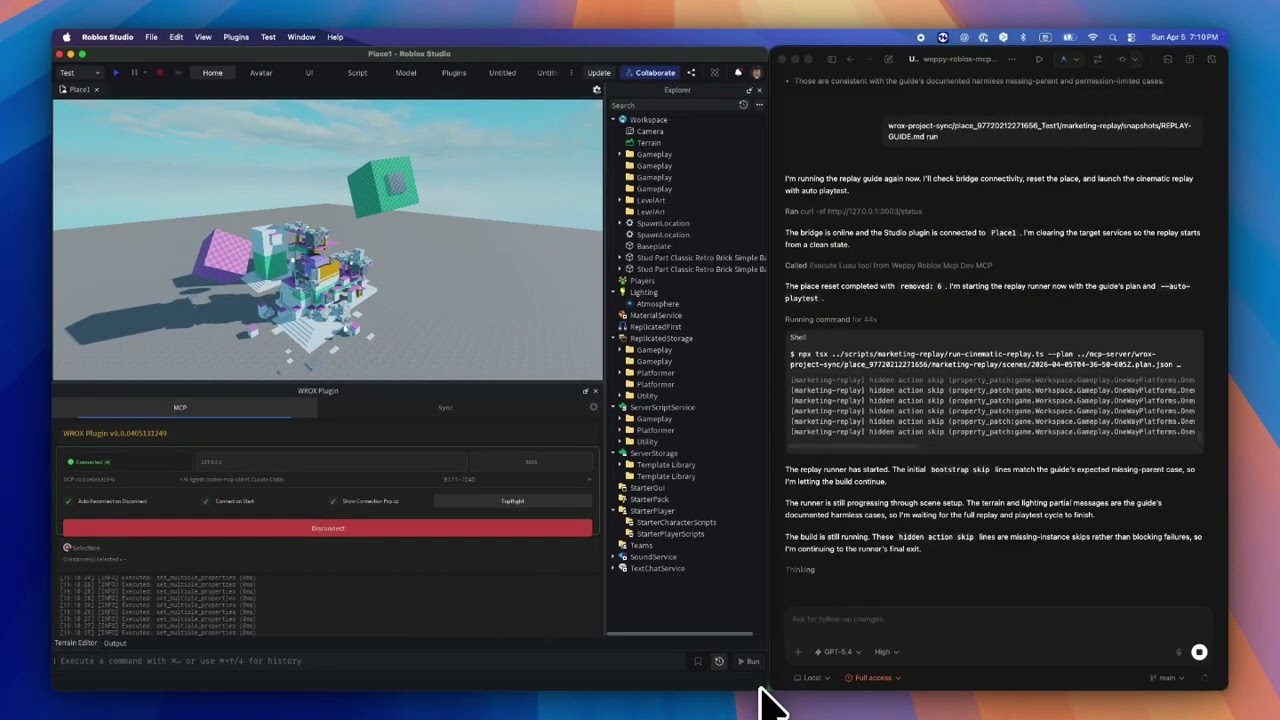
AI coding agents like Claude, Codex, and Gemini are powerful, but they cannot see or modify anything inside Roblox Studio. The DataModel, scripts, terrain, and lighting are invisible to external tools. Without a bridge, AI can only generate code snippets that you must paste manually.
The WEPPY MCP Server connects AI agents to the WEPPY Roblox Studio Plugin. AI directly creates and modifies instances, scripts, properties, terrain, and more inside Studio, and the changes are reflected immediately in Studio and the dashboard so you can see exactly what changed.
WEPPY is also built for Roblox experiences that are split across several Places. Open up to five Studio windows for Lobby, Game, Shop, Tutorial, or other Places, then tell the agent which Studio ID to use. One request can update several Places without re-explaining context or copying changes by hand.
For assets, an agent can create or prepare an image, save it to the Asset Library, upload it through Roblox Open Cloud, and apply the returned asset URI to a Place. The result is a shorter path from "make this icon/decal" to "it is visible in Studio."
No copy-pasting code or asset IDs. AI does the work, you review the results.
Quick Install
Start from the web install page. It shows the recommended one-line script for your platform first.
Recommended One-Line Install
On the install page, copy the one-line script and run it in Terminal or PowerShell.
macOS / Linux
Windows (PowerShell)
Then reopen your AI app and restart Roblox Studio.
Automatic WEPPY MCP Server registration supports Claude Code, Claude Desktop, Cursor, Codex CLI/App, Gemini CLI, and Antigravity / Antigravity IDE / Antigravity CLI.
For Claude Code, the installer also installs the WEPPY AI Agent Plugin. For Codex, it adds the plugin marketplace and then asks you to install WEPPY AI Agent Plugin from Plugin Directory. For Antigravity, the AI agent plugin is installed only when Antigravity CLI and agy plugin are available; otherwise the installer preserves the direct MCP connection.
Browser Web Install
If terminal or PowerShell is uncomfortable, use the terminal-free web installer on the same install page.
Manual Install
If the one-line install or terminal-free web installer does not work, register the WEPPY MCP Server manually with your AI app.
Use this server command:
Supported AI apps are Claude Code, Claude Desktop, Cursor, Codex CLI, Codex App, Gemini CLI, and Antigravity / Antigravity IDE / Antigravity CLI.
Any MCP-compatible AI client works. The server command is
npx -y @weppy/roblox-mcp@latest.
Optional WEPPY AI Agent Plugin
The WEPPY Roblox AI Toolkit connects to every supported AI app through the WEPPY MCP Server. Claude Code, Codex, and Antigravity can additionally install the WEPPY AI Agent Plugin for client-native setup and workflow guidance for Studio control, sync, and assets.
Claude Code
Codex
After adding the Codex marketplace, restart Codex, open Plugin Directory, and install WEPPY AI Agent Plugin.
Antigravity
Antigravity CLI is required to install the WEPPY AI Agent Plugin. The one-line installer uses agy plugin install with the latest public GitHub release, verifies it with agy plugin list, and publishes the verified skill-only payload to supported IDE surfaces. Existing installs are replaced on every run so they can converge on the latest release.
The installer reports results as installed, updated, reinstalled, repaired, fallback, failed, or skipped. A missing CLI keeps the shared MCP connection at ~/.gemini/config/mcp_config.json working and reports fallback; an existing plugin is never treated as a skip. In a CLI-only profile, verified native plugin MCP replaces the shared direct WEPPY entry. When Antigravity IDE and CLI coexist, both plugin views stay skill-only and one shared direct weppy-roblox-mcp definition serves both. Outside the verified OS and version matrix, native discovery uses the MCP fallback.
On Windows Antigravity, CLI installation has been verified to expose skills and MCP. Windows Antigravity IDE plugin discovery is unverified because the verified environment has no plugin or skills inspection UI, so the shared MCP fallback is preserved. GitHub URLs are not passed directly to agy plugin install; the installer downloads the latest public release and installs from a prepared local path.
Compatibility
| Claude Code | Claude Desktop | Cursor | Codex CLI | Gemini CLI | Antigravity / Antigravity IDE / Antigravity CLI |
|---|---|---|---|---|---|
| ✅ | ✅ | ✅ | ✅ | ✅ | ✅ |
Requirements: Node.js 18+, Roblox Studio, Windows 10+ or macOS 12+
What It Does
1) MCP Tools: Direct execution in Studio from natural language
AI can directly handle scripts, instances, properties, terrain, lighting, assets, audio, and animation inside Studio.
- "Add particles + sound + cooldown when the player jumps."
- "Build a boss arena at map center and place collision-safe spawn points."
- "Change this module interface and update every dependent script."
- "Generate terrain with mountains and rivers, then place spawn points on flat areas."
- "Search the Creator Store for a sword model and insert it into StarterPack."
2) Multi-Place work: Split one request across several Studio windows
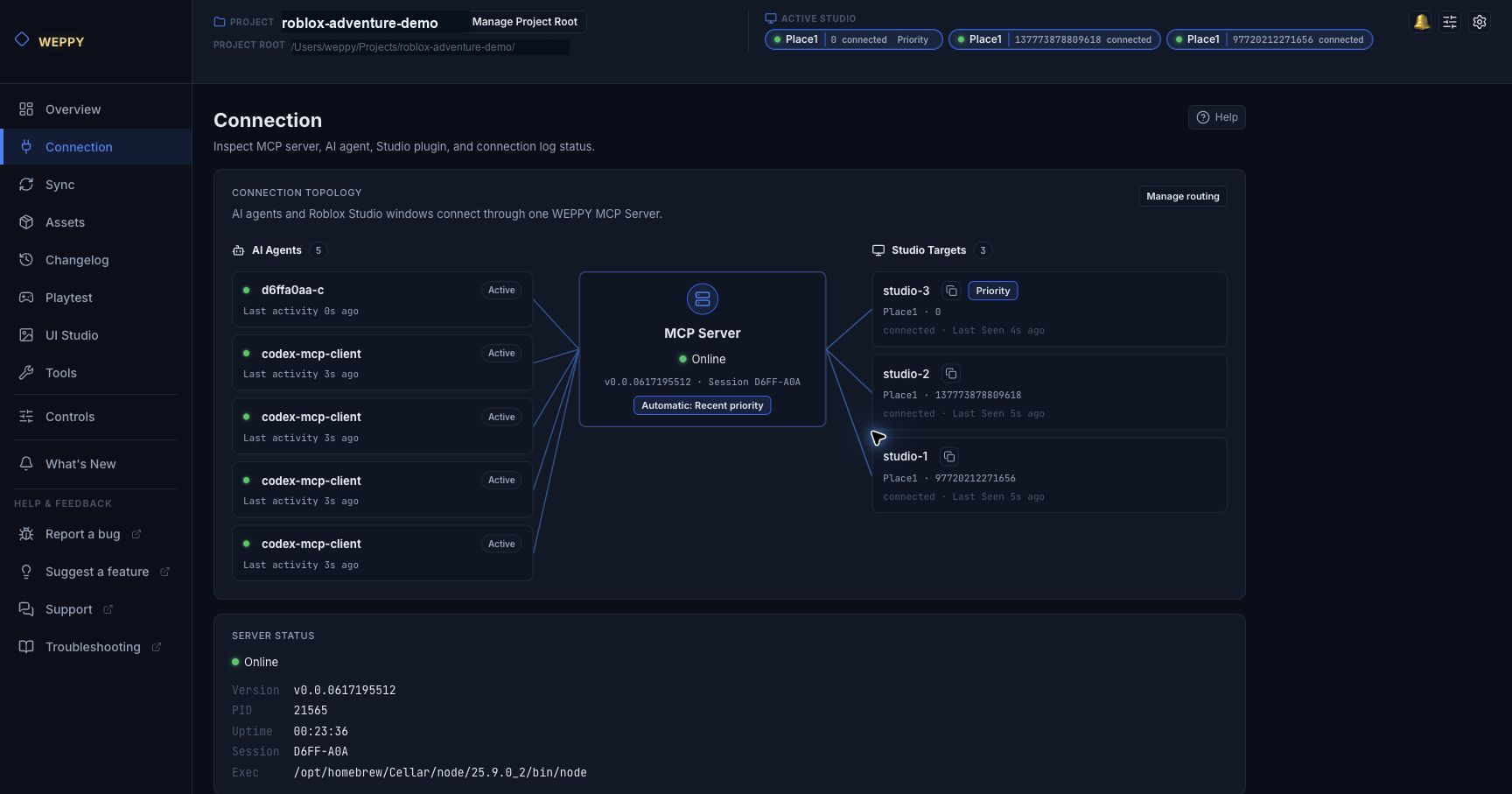
Many Roblox experiences are not a single Place. WEPPY lets you keep up to five Studio windows connected to one MCP server, then route work by Studio ID.
- Open up to five Roblox Studio windows, such as Lobby, Game, Shop, or Tutorial
- Ask once: "In studio-1, add the event portal to Lobby. In studio-2, add the arrival point and guide UI to Game."
- Use Dashboard Connection to see every AI agent, Studio Target, copyable Studio ID, and routing state
- Work with the multi-Studio flow also documented by Roblox's official Studio MCP guide, with WEPPY's dashboard visibility on top
3) Assets: Generate, upload, and apply images in Studio
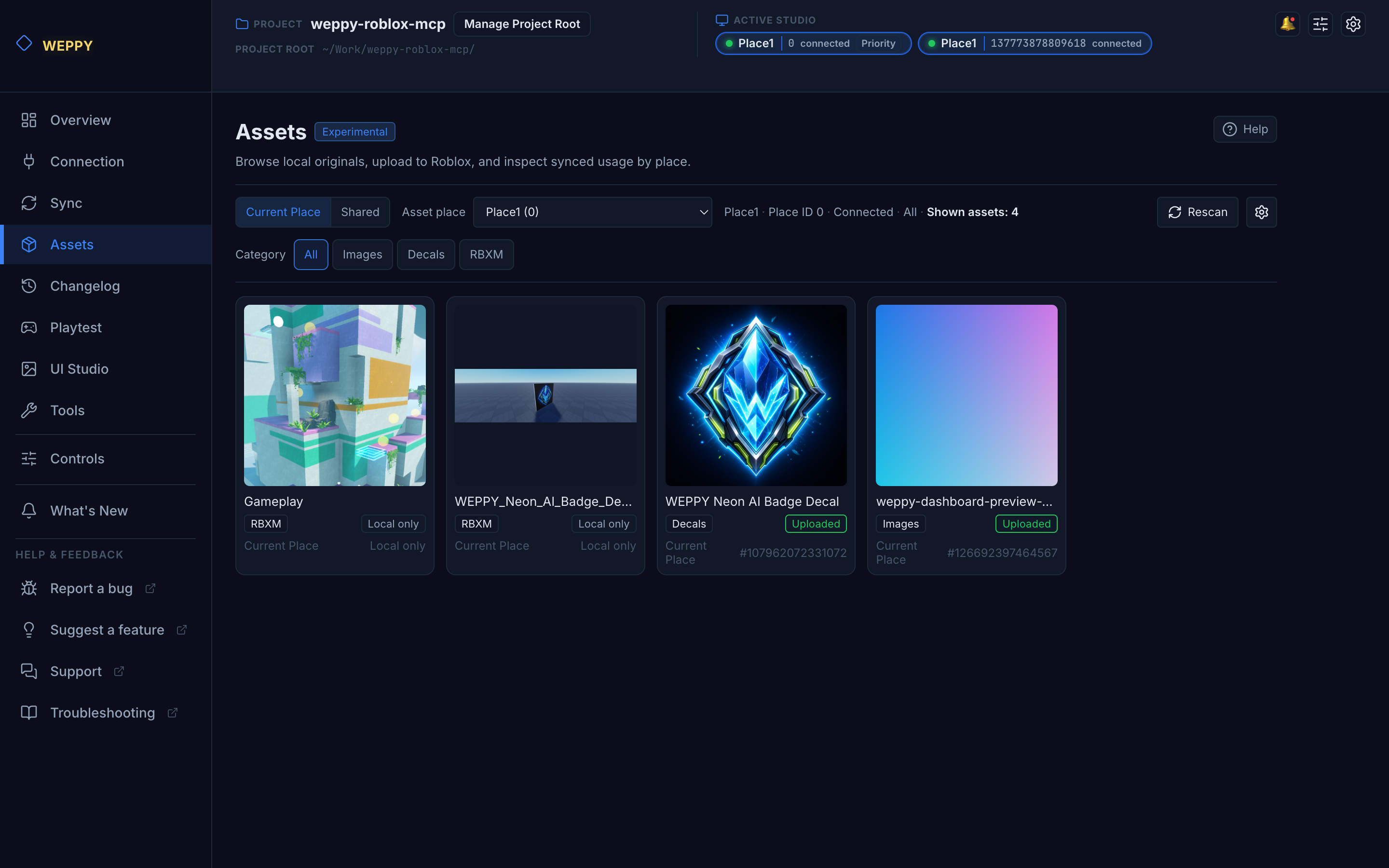
WEPPY Assets turns a natural-language asset request into a Studio-ready result.
- "Create a gem icon for the shop button, upload it to Roblox, then apply it to the ShopButton image in the Lobby Place."
- Save generated images, Decals, and RBXM files to the local Asset Library
- Upload images through Roblox Open Cloud and reuse place-specific or shared assets
- Apply the returned asset URI to ImageLabel, Decal, Texture, or other Studio properties
4) Sync: Keep full project context stable for AI
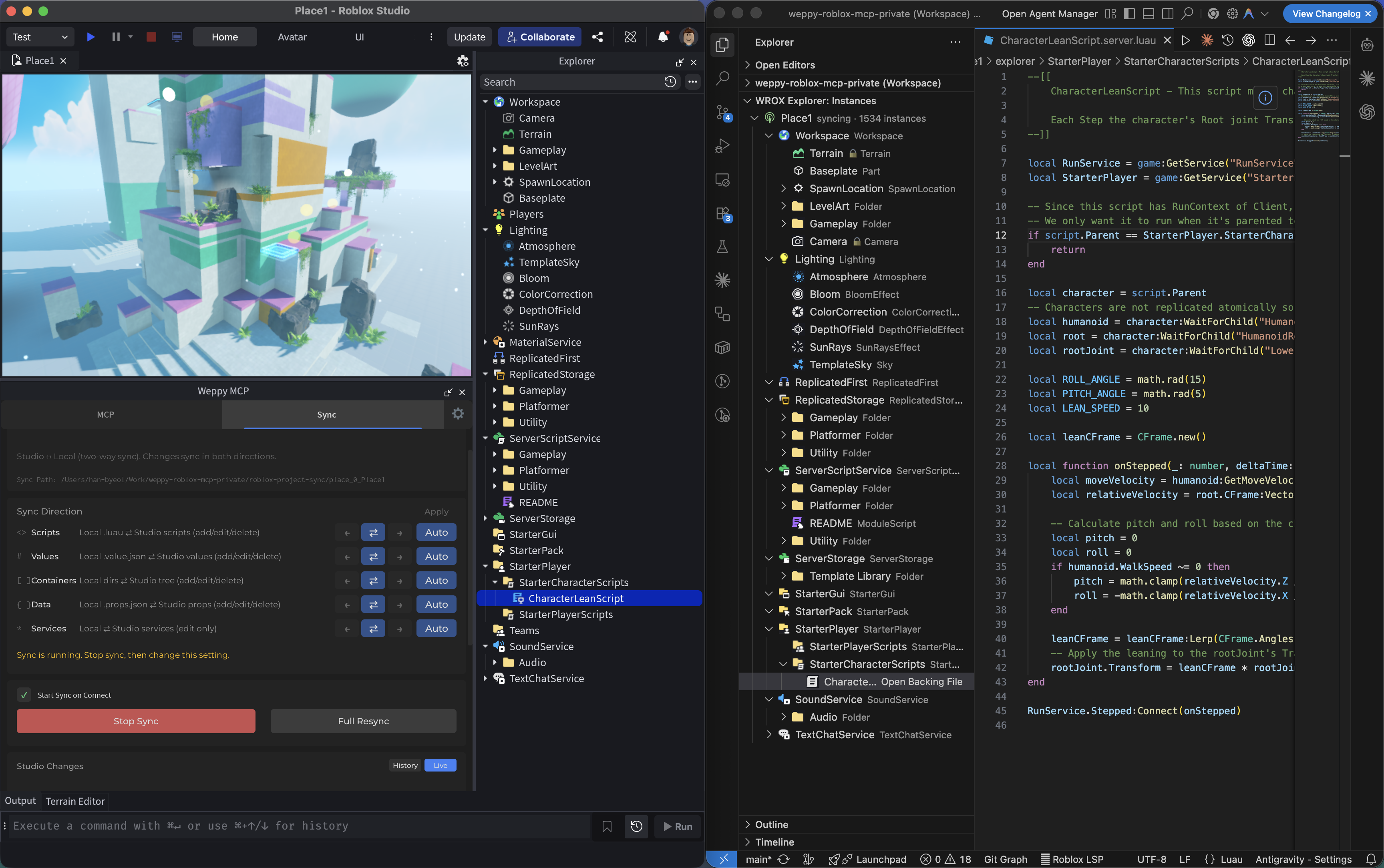
AI works from a synchronized local mirror, so multi-file updates stay consistent.
- Sync starts Off on first use. Start on connection is also Off. Saved settings always take precedence, including a saved Off value. The first-use workflow is Studio First, so the first synchronization treats Studio as the source.
- Choose Studio First, Bidirectional Review, Local Code, Studio World, or Custom. Custom groups changes into four semantic scopes: Script Source, Properties, Structure, and Service Properties.
- Content Changes and Structure Changes application modes are shown separately from scope direction. Local file deletion does not delete a Studio instance by default; applying a deletion to Studio requires an additional opt-in and is separate from UI Studio history cleanup.
- Basic uses Studio-to-local Sync. Pro adds the richer workflow directions, history, and support for up to five Places.
- The WEPPY MCP Server and WEPPY Roblox Studio Plugin must come from the same release. Update both together, then restart Roblox Studio before reconnecting if their versions do not match.
5) Luau Syntax Validation: Catch broken scripts before Playtest
AI can check raw Luau source or an existing Script for syntax errors without starting the game. Standalone validation is available on Basic and Pro.
- Ask the AI to validate source or a Script path to receive all syntax diagnostics in one response
- Turn on Controls → Luau Syntax Validation to check the actual saved source after supported script writes; the default is Off
- The Dashboard setting is enforced. If a tool call requests a different
validatevalue, the write follows the Dashboard policy and returns a warning with the setting path - Automatic valid checks keep the normal write response unchanged. Invalid or unavailable checks add details, while an explicit matching
validate=truealso returns full valid details - A syntax error or unavailable parser never rolls back a successful script write
The first validation that needs the companion parser downloads the exact luau-parser-v1.0.0 WASM release and caches it locally. A compatible local luau-compile can be used as a fallback. Script source is parsed on your computer and is not sent to a remote validation service; the download request fetches only the parser artifact. Very large scripts can add some readback and parsing time.
6) Playtest: Let AI run and verify tests automatically
Ordinary runtime checks use a structured Play session. AI can wait for game UI, inspect its semantic structure and geometry, deliver virtual input, observe the UI response, and verify the resulting server state in separate evidence steps. The local Dashboard groups the saved result by server, client UI, interaction, and visual evidence so you can review what passed and why.
The same Playtest page also includes a Test Values workspace for development-only values. Create multiple Place-scoped profiles for different test setups; the Dashboard remembers the last profile selected for each Place. Controls and read-only observations appear in one searchable, paginated list, so large profiles remain easy to scan. Use Manage values to add entries discovered from Project Test Adapters, or use a runtime path and the current Studio selection for direct values. The Dashboard shows the current Studio state and automatically connects the selected profile to an active Play session. A stale or disconnected observation is shown as the last observed value instead of being presented as current.
Basic includes profile creation and live runtime observation. Pro adds typed value changes during Play, rollback, Reset all, and actual saved Automated Test Results. The Playtest page explains the Pro additions and links directly to available plans and purchase options.
Studio Stop discards Play/Run Instance changes. While the runtime remains active, Reset all restores WEPPY's original values and a partially failed transaction rolls back. Games that cache values at startup or need domain operations can expose reviewed Project Test Adapter methods through optional Dashboard metadata. The Dashboard validates the metadata, shows the registration source, and links a read-only observer to each adapter control. Removing a profile reference leaves the adapter source intact.
Open Before publishing from the Playtest page header for a plain-language reference on what returns to its original value after a Studio test, what WEPPY keeps only on your computer, and what to check before and after publishing. Common checks are separated from items that apply only when a game has test-only features or saves player data. Test connection code created by WEPPY with default settings does not run in the public game. If WEPPY has a local record that Studio-only protection was explicitly removed, the Dashboard shows an additional note for that Place. Rojo remains optional when you want to omit test source from a production project. Currency or progress saved by game code can remain after a test, and Places in the same Experience can share that data. The reference is available on Basic and Pro; it does not inspect files, remove test code, create deployment files, or certify a release as safe.
- "Start a Playtest, press the Start button, and verify the round begins on the server."
- "Check that the HUD appears and the selected card activates after input."
- "Validate that the script I just changed runs without errors in Playtest."
Run mode is reserved for an explicitly requested server-only check. Raw Luau remains available as an advanced explicit opt-in for diagnostics that do not fit the structured steps. Play-mode screenshot capture is not supported; UI structure, geometry, input delivery, activation, and server observations are recorded instead. Reports stay local, existing Raw Luau reports remain readable, and no setting change is required.
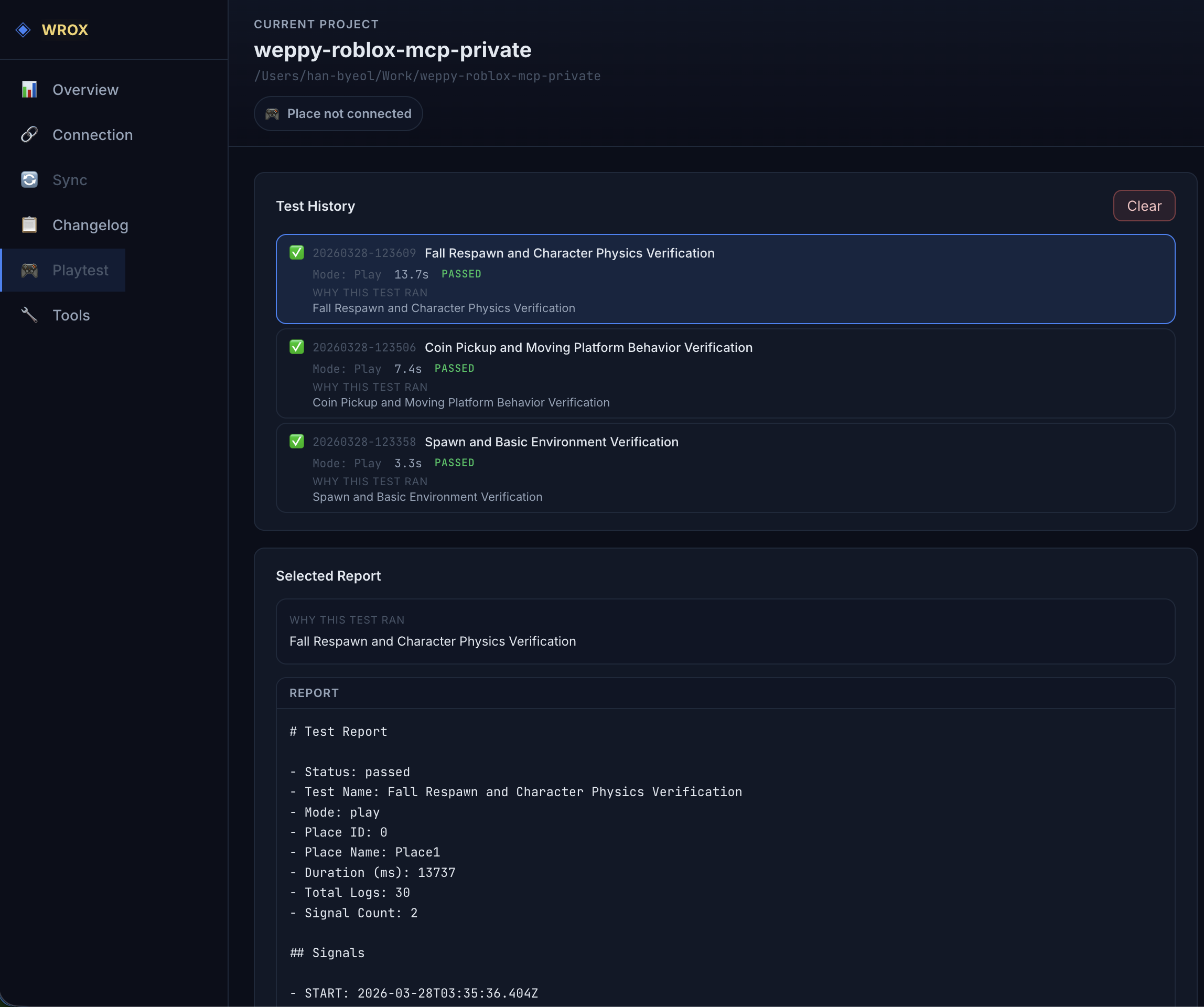
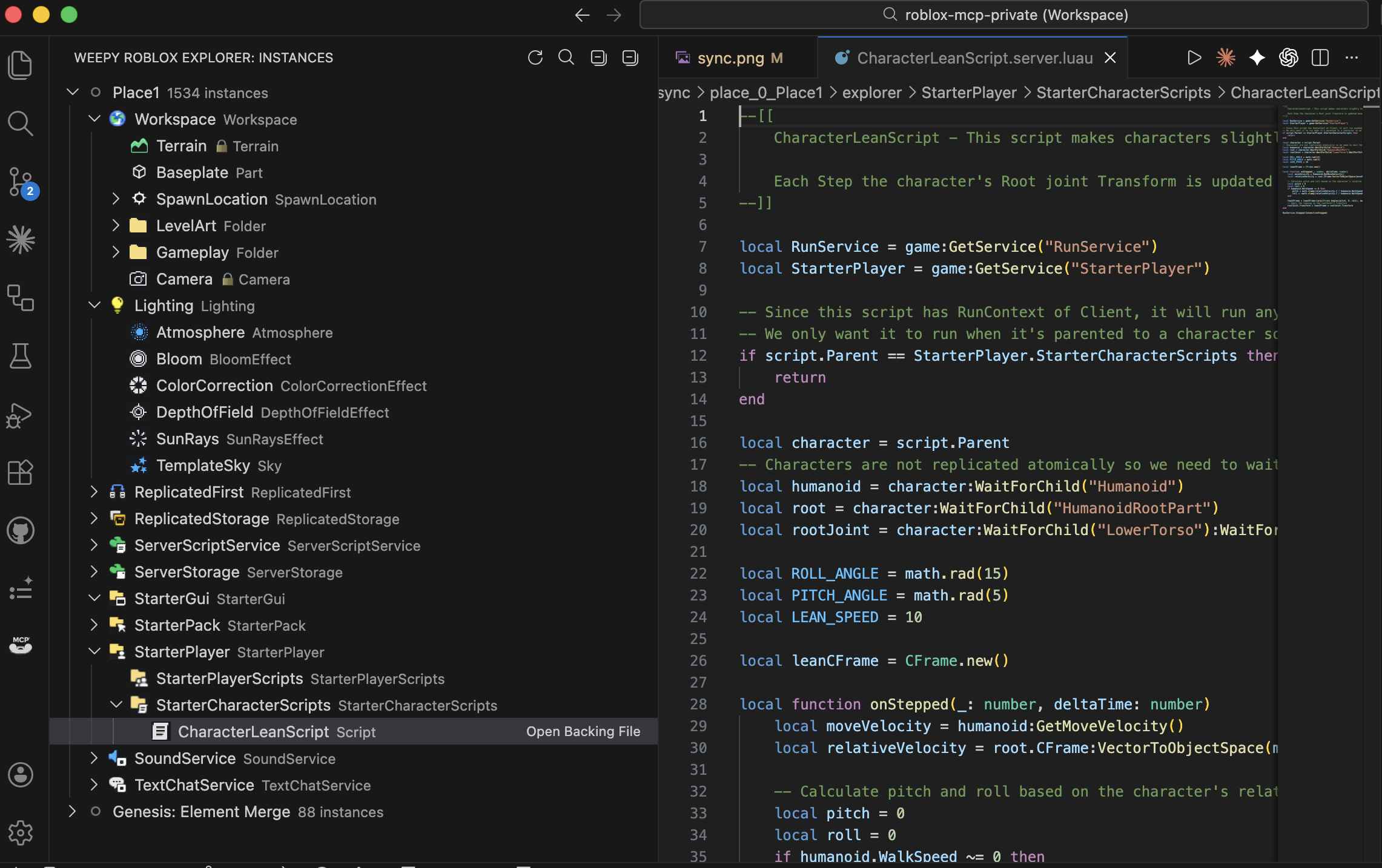
7) UI Studio: Build and inspect in-game UI
UI Studio lets AI agents create in-game UI that matches your game's style, or analyze the UI you already have and suggest improvements.
- Clarify the UI goal with guided questions about purpose, screen, target devices, and visual direction
- Create or refine game-style menus, HUDs, buttons, labels, image panels, and other Roblox UI elements directly in Studio
- Capture the result, compare before/after changes, and follow dashboard suggestions for layout, readability, touch targets, and safe areas
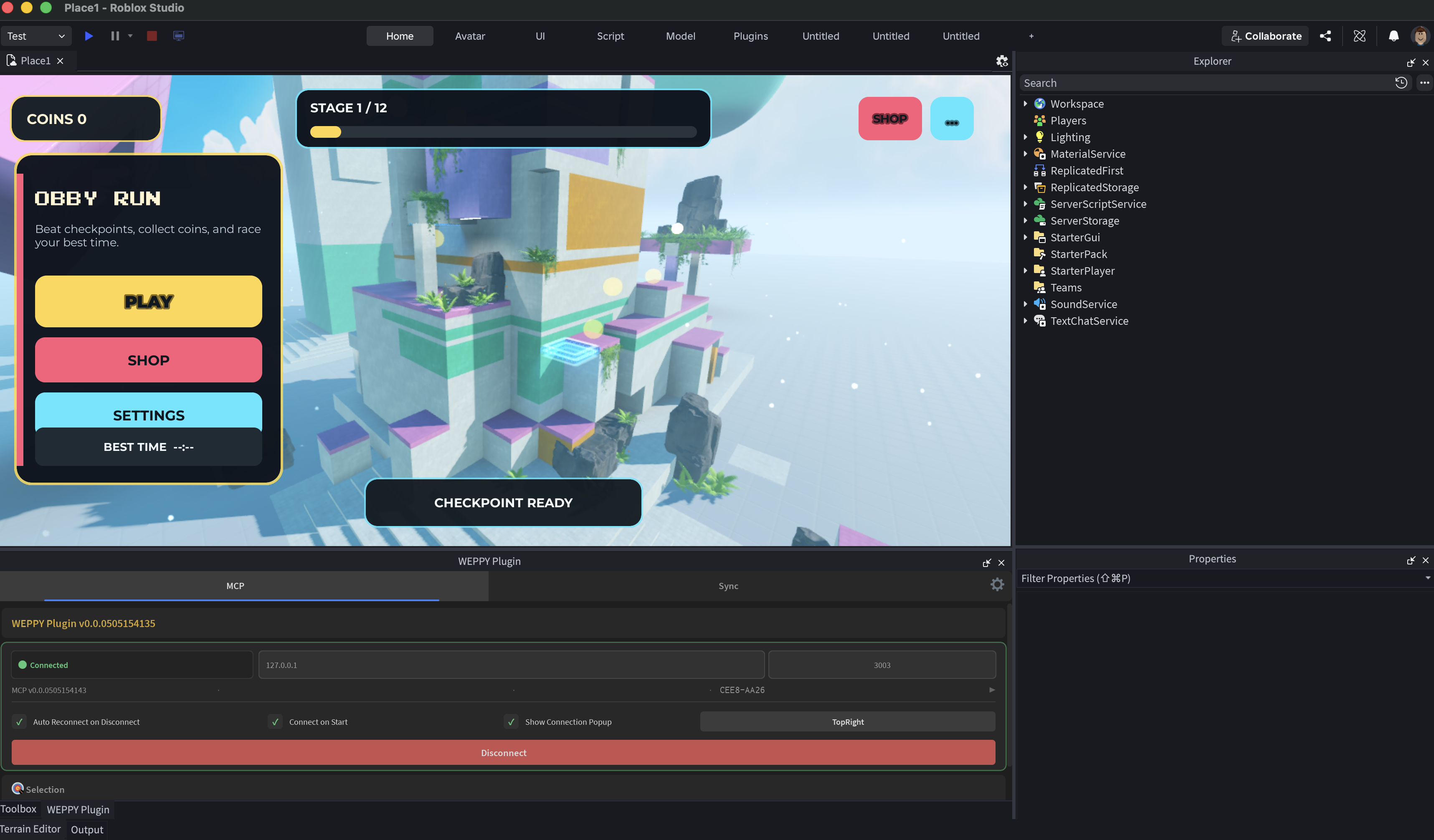
8) WEPPY Dashboard: Monitor AI work in real time
The MCP server provides a web dashboard where you can check connection status, tool execution history, sync state, UI Studio history, and game change logs in real time.
- Connection topology for AI agents, the MCP server, and connected Roblox Studio windows
- Studio Targets with copyable Studio IDs, Priority/Pinned badges, and a link to routing controls
- Multi-agent and multi-Studio workflows: keep several agents and up to five Studio windows visible, then tell the agent which Studio ID to use
- Assets page for local library items, shared assets, and Roblox upload status
- Controls page for enforcing post-write Luau syntax validation, including clear On and Off behavior
- Compare every change the AI made via Before & After in Changelog
- Analyze workflow with tool execution history, UI Studio captures, and statistics
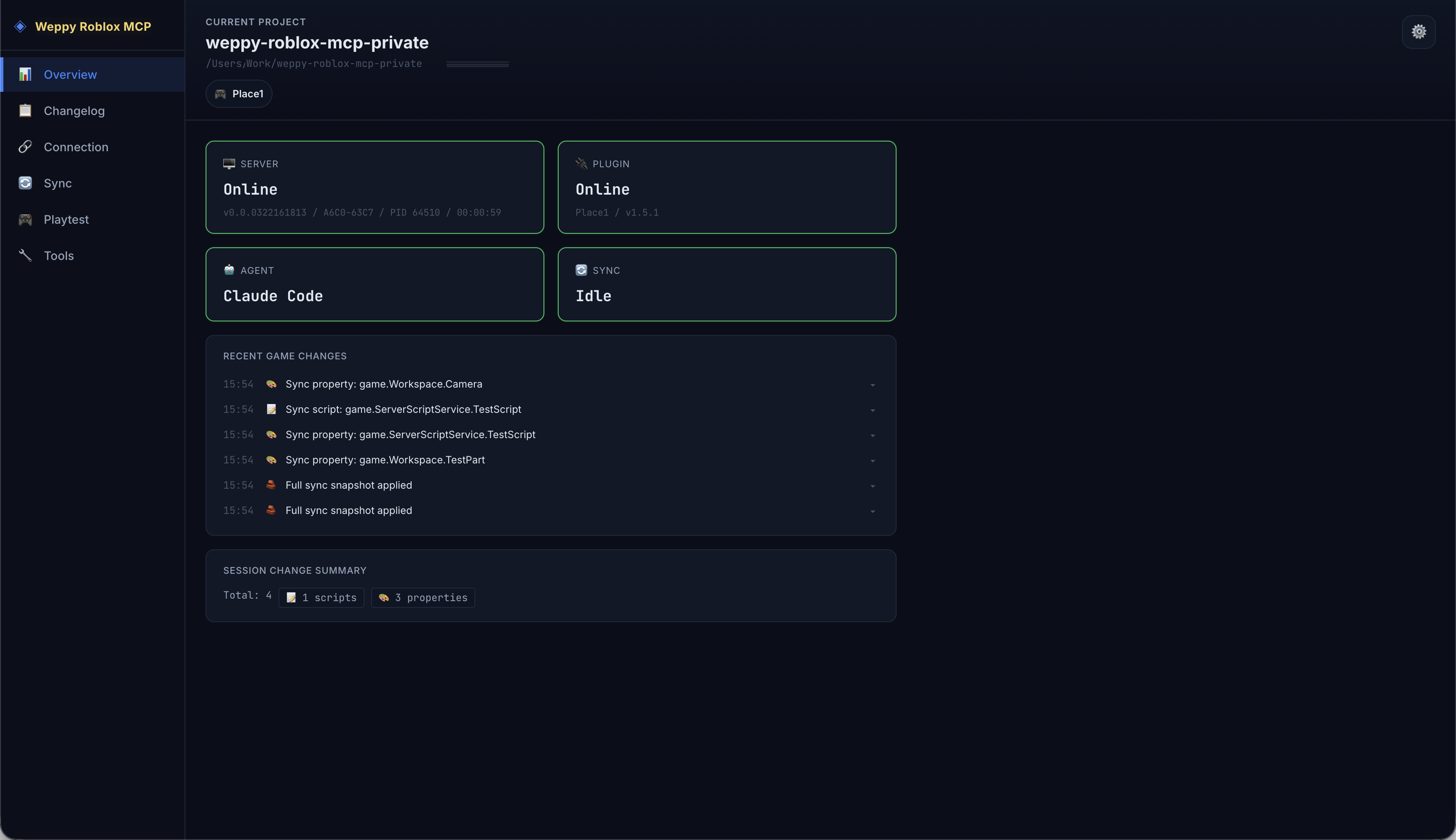
9) WEPPY Roblox Explorer: Browse Studio hierarchy in VSCode
View the full instance tree of your Roblox Studio place directly inside VSCode. Navigate services, open synced scripts and property files, and track sync status - all without switching to Studio. WEPPY Roblox Explorer is a companion VSCode extension for sync data generated by WEPPY. Tree browsing works from synced files, and live sync state or direction indicators are enhanced when the local MCP server is running. Install from VS Code Marketplace or Open VSX.
- Class icons matching Studio for instant recognition
- Click to open synced scripts and property files
- Multi-place support with sync status indicators for up to five Places
Use Cases
- Rapid prototyping: Describe a game mechanic in natural language and watch AI build it in Studio
- Multi-Place production: Keep Lobby and Game open in separate Studio windows and update both from one request
- Bulk refactoring: Rename a module interface and update every dependent script in one request
- Terrain & environment: Generate procedural terrain, set lighting/atmosphere, place assets - all from a single prompt
- UI design: Generate in-game UI, capture previews, and iterate on Design Check suggestions
- Multi-file consistency: AI reads the full project via Sync and applies changes across related scripts together
- Generated asset integration: Create an icon or decal, upload it to Roblox, apply it to a UI or Decal property, and keep the asset for reuse
Why It Matters
- Compress repetitive work: turn many manual edits into one request
- Work across up to five Places without re-explaining context or copying changes between Studio windows
- Turn generated images into applied Roblox assets without manually moving files and asset IDs
- Change related files together: not just one target file
- Lower risk: rely on sync state and history before applying changes
- Better token efficiency (Pro): reduce round trips with bulk actions
Docs
Detailed guides and app-specific setup now live on the web.
For app setup details, open the web docs hub and choose the relevant AI client guide.
Privacy & Telemetry
WEPPY uses Google Analytics 4 Measurement Protocol telemetry and a best-effort anonymous operations device observation to understand product usage, reliability, platform coverage, and feature adoption. Telemetry can be disabled by setting ENABLE_TELEMETRY=false or ENABLE_TELEMETRY=0 in the MCP server environment.
WEPPY does not collect your name, email address, raw license key, local file paths, script source, or Roblox project contents through telemetry.
See PRIVACY.md for the full telemetry notice.
FAQ
How do I connect Claude Code to Roblox Studio?
Install from the web install page to register the WEPPY MCP Server and install the WEPPY Roblox Studio Plugin. You can also add the WEPPY AI Agent Plugin for Claude Code with the commands above. Its MCP command remains npx -y @weppy/roblox-mcp@latest.
How do I use Codex CLI with Roblox Studio?
Install the WEPPY Roblox Studio Plugin, then add the WEPPY MCP Server config to Codex CLI. You can also add the Codex plugin marketplace and install WEPPY AI Agent Plugin from Plugin Directory.
Does Roblox MCP work with Cursor?
Yes. Any MCP-compatible AI client works.
Can AI build Roblox games with this?
Yes. AI can create instances, write scripts, generate terrain, set up lighting, insert assets, configure physics, and more - all inside a live Roblox Studio session. It goes beyond code generation to executable actions.
What is the difference between Basic and Pro?
Basic (Free) includes MCP tool execution and one-way sync (Studio -> Local). Pro adds multi-place work across up to five Places, Asset Library with Roblox upload, bidirectional sync, UI Studio, bulk operations, terrain generation, spatial analysis, and audio/animation control. See the Pro upgrade page.
How is Weppy different from other Roblox MCP servers?
Weppy uses action-based dispatching instead of separate tools for each function. This reduces AI token consumption significantly. It also combines Studio ID based multi-place work, generated asset upload/apply, bidirectional project sync, and Playtest control.
Is it safe? Can AI break my game?
The server runs on localhost only (127.0.0.1:3002). Forbidden paths (CoreGui, CorePackages) are blocked. Rate limiting (450 req/min) and 30-second timeouts prevent runaway operations. All changes are trackable via sync history.
Pro Upgrade
Multi-Place work, generated assets to Roblox, bidirectional Sync, UI Studio, Playtest control, and AI token efficiency - all in one upgrade.
License
This repository is licensed under AGPL-3.0.
Commercial licensing is available separately. See COMMERCIAL-LICENSE.md.
Use of the Weppy name and logos is governed by TRADEMARKS.md.

