H
Home Assistant MCP
Home Assistant and ESPHome for coding agents: states, services, automations, dashboards, flashing.
Install Home Assistant MCP
Pick your client, then add it in one click or paste the config.
~/Library/Application Support/Claude/claude_desktop_config.json{
"mcpServers": {
"home-assistant-mcp-2": {
"command": "npx",
"args": [
"-y",
"@vortitron/home-assistant-mcp"
]
}
}
}
Settings → Developer → Edit Config, merge this into mcpServers, then fully quit and reopen Claude Desktop.
Install not yet sandbox-tested— we haven't run this command through our automated sandbox yet. Not a red flag; we're working through the catalog.
Overview
From the project README
home-assistant-mcp
A Model Context Protocol (MCP) server that lets coding agents — Cursor, VS Code (Copilot), Claude Desktop and anything else that speaks MCP — talk directly to Home Assistant and (optionally) the ESPHome dashboard.
Instead of copy-pasting entity ids, YAML and current values into your agent, the agent can discover entities, read live state, render templates, call services and edit automations itself — and iterate until the code actually works.


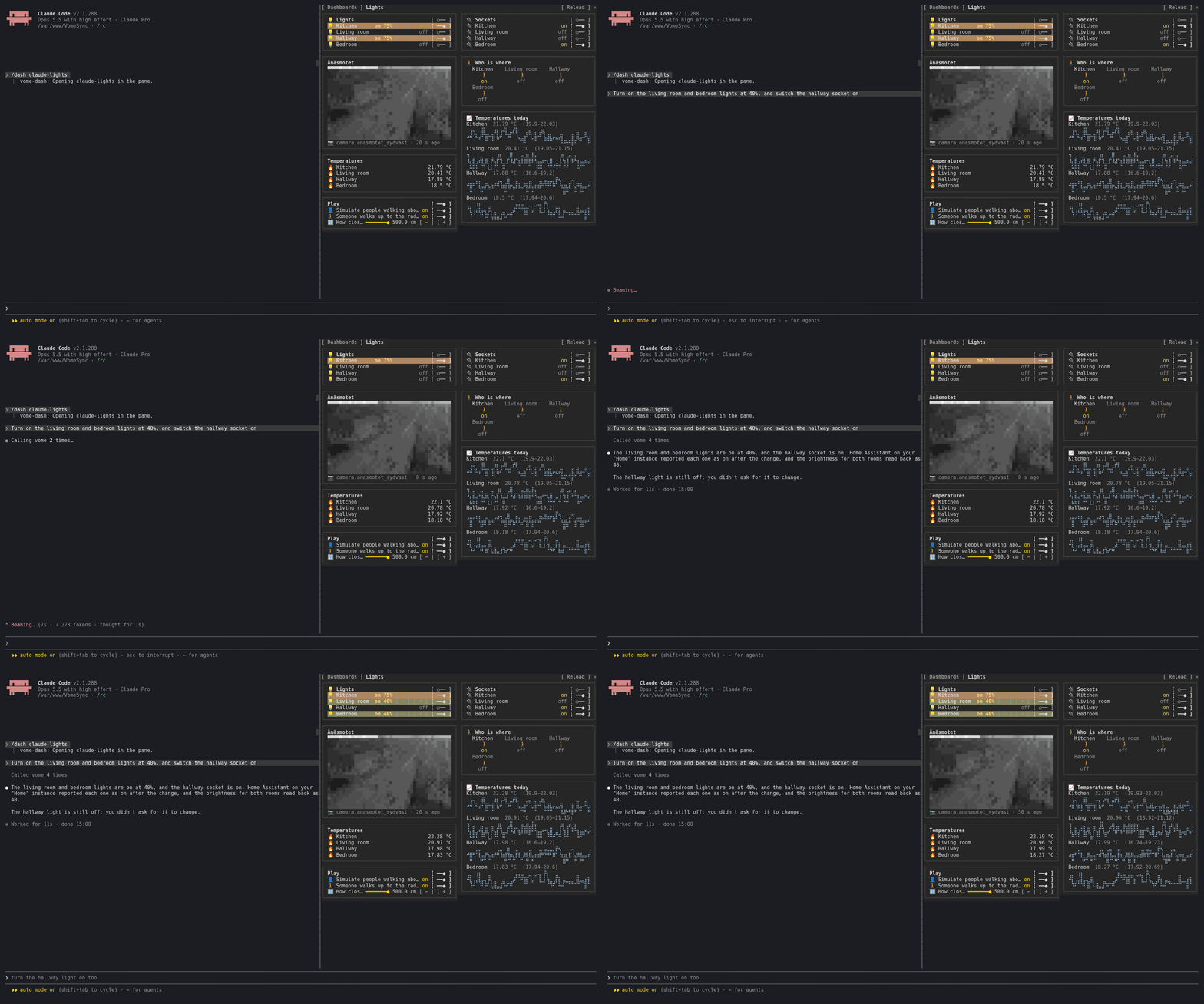
In Claude Code, four side panes show what Claude is doing to your home as it happens: the automation it is working on, the ESPHome device it is building, the home's health score and a dashboard that works. One command installs all four (below).
Part of the Vome family and an open-source companion to VomeHome (managed Home Assistant). It is useful stand-alone for any Home Assistant user.
Why
A typical "change an automation" loop today looks like: you tell the agent which entities exist, paste their current values, paste the YAML, apply the change, then manually check whether it worked. With this server the agent does all of that:
- See — list entities/areas/devices, read exact states and attributes, pull history and the logbook.
- Experiment — render Jinja templates against live state, check configuration, read the error log.
- Change — call services, create/update/delete/trigger automations, and (for ESPHome) edit, validate, compile and flash device firmware.
All write operations are off by default and gated behind an explicit safety policy (see Safety).
Tools
Home Assistant — read
| Tool | Description |
|---|---|
ha_get_config | Core config: version, location, time zone, loaded components. |
ha_list_entities | List entities (filter by domain, free-text search, area). |
ha_get_state | Full state + attributes for one or more entities. |
ha_get_history | Historical state changes over a time window. Given only a start time, it runs up to now (Home Assistant alone stops 24 hours after the start); ha_get_logbook does the same. |
ha_list_services | Available services (and their fields for a given domain). |
ha_list_areas | Areas (rooms/zones). |
ha_list_devices | Device registry (filter by area / search). |
ha_get_entity_registry | Registry metadata: platform, area, device, disabled/hidden. |
ha_render_template | Render a Jinja2 template against live state. |
ha_list_helpers | List stored helpers (input_boolean, input_number, counter, timer, …). |
ha_list_automations | Automations with entity_id, unique id, state, last-triggered. |
ha_get_automation | Full automation config (triggers/conditions/actions). |
ha_check_config | Validate the configuration (Check configuration). |
ha_get_system_log | Deduplicated, structured errors — level, logger, source, count, first/last seen. Start here. |
ha_get_error_log | Tail of the raw Home Assistant error log. |
ha_get_supervisor_log | Add-on / Core / Supervisor / host logs (HAOS or Supervised). |
ha_list_media_files / ha_read_media_file | Read-only look into /media: a saved camera snapshot comes back as an image (needs ha:files, and Vome add-on 0.3.66 / integration 0.9.51 on the home). |
ha_camera_image | A camera's current still, as an image the agent can see. Via VomeHome the key needs Cameras ticked. |
ha_camera_frame | A camera still decoded and shrunk to a small grid of RGB pixels, for clients that draw pictures in text. |
ha_view_snapshot | Everything a dashboard view shows in one call: states, rendered templates, history in few points, camera frames. For dashboard clients. |
ha_watch_states | Wait for state changes instead of polling: the home's Vome component sends them as they happen (through VomeHome). |
ha_get_logbook | Human-readable logbook entries. |
ha_list_traces | Recent automation/script runs and how each one stopped. |
ha_get_trace | Step-by-step detail for one run, with failed_at naming the blocking step. |
Home Assistant — write (write-gated)
Write-gating depends on the mode. In direct mode the MCP is the only guard, so these refuse until
HA_ALLOW_WRITE=true. In brokered mode your VomeHome API key carries the per-instanceha:write/ha:configscopes and the server enforces them, so the client flags are optional local-only restrictions.
| Tool | Description |
|---|---|
ha_call_service | Call any service (turn_on, set_temperature, …). |
ha_clear_system_log | Empty the structured error store (only needs HA_ALLOW_WRITE). |
ha_set_log_level | Change logging for one integration at runtime (only needs HA_ALLOW_WRITE). |
ha_set_automation | Create or update an automation (also needs HA_ALLOW_CONFIG_WRITE). |
ha_set_helper | Create or update a helper — no configuration.yaml, no restart. |
ha_read_config_file | Read a file under the config directory — text by default, or encoding: 'base64' for a binary asset (needs ha:files). |
ha_write_config_file | Replace a file under the config directory — text by default, or encoding: 'base64' for a binary asset; checks the config and restores the file if it fails (needs ha:files). |
ha_delete_config_file | Delete one file under the config directory. Never a directory, and never configuration.yaml, secrets.yaml or Home Assistant's database. Names its target home like a write (needs ha:files, and Vome add-on 0.3.55 / integration 0.9.39 on the home). |
ha_edit_config_file | Change part of a text file in place: exact find-and-replace edits that must each match once, then the same check-and-restore as a write. For a three-line change to a large file (needs ha:files). |
ha_list_config_files | List a directory under the config directory (needs ha:files). |
ha_move_config_file | Move or rename one file under the config directory, creating folders on the way; never overwrites unless asked. Names its target home like a write (needs ha:files, and Vome add-on 0.3.66 / integration 0.9.51). |
ha_delete_helper | Delete a stored helper. Refuses when the id looks shared with a configuration.yaml helper, because Home Assistant would take that entity down with it. |
ha_delete_automation | Delete an automation (also needs HA_ALLOW_CONFIG_WRITE). |
ha_get_script / ha_set_script / ha_delete_script | Scripts by id, the same way as automations: put a step several automations share in one script. Writes need HA_ALLOW_CONFIG_WRITE. |
ha_update_entity | Rename, re-id, move, re-icon, disable or hide an entity in the registry (needs HA_ALLOW_CONFIG_WRITE). |
ha_update_device | Rename a device, move it to an area, disable it or set its labels (needs HA_ALLOW_CONFIG_WRITE). |
ha_expose_entities | List or change what Assist, Alexa and Google Assistant can see and control; listing needs only read (changing needs HA_ALLOW_CONFIG_WRITE). |
ha_remove_entity | Remove an orphaned registry entry (needs HA_ALLOW_CONFIG_WRITE). |
ha_matter_reinterview | The Matter device page's Re-interview, for a device whose endpoints changed after a firmware update (needs HA_ALLOW_CONFIG_WRITE). |
ha_trigger_automation | Manually run an automation now. |
ha_reload_automations | Reload automations without restarting. |
Lovelace dashboards (direct HA or VomeHome brokered)
| Tool | What it does |
|---|---|
ha_list_dashboards | List dashboards (url_path, title, mode, sidebar). |
ha_get_dashboard | Read one dashboard's full config (views, cards, …). |
ha_save_dashboard | Save/replace a dashboard config (needs HA_ALLOW_CONFIG_WRITE). |
ha_create_dashboard | Register a new storage-mode dashboard (needs HA_ALLOW_CONFIG_WRITE). |
ha_delete_dashboard | Delete a dashboard by id (needs HA_ALLOW_CONFIG_WRITE). |
Dashboards use Home Assistant's WebSocket API. In brokered mode VomeHome proxies an allowlisted subset via
POST /api/v1/instances/<id>/ha/ws/command. |ha_fire_event| Fire a custom event on the event bus. |
ESPHome (brokered to a relay-connected HA)
Tools80
What Home Assistant MCP lets your agent do. Expand a tool for its parameters.
Security & health
What it can reach and how reliably it runs — from our own checks, not the maintainer’s claims.
ActiveLast checked 2d ago
Recent health check succeeded.
Supply-chain signal
No high-severity advisories surfaced by our automated scan.
Critical 0High 0Medium 0Low 0
Scanned 2d ago via OSV.dev · @vortitron/home-assistant-mcp (npm)
Adoption & maintenance
Factual signals from GitHub, npm, and our automated checks — not a rating.
npm downloads794Package downloads in the last 30 days.
Last commit2d agoMost recent push to the default branch.
Tools exposed80Callable tools this server registers over MCP.
Reviews
No reviews yet — be the first to share how it worked for you.
Frequently Asked Questions about Home Assistant MCP
Add the following block to your claude_desktop_config.json under mcpServers: "mcpServers": { "home-assistant-mcp": { "command": "npx", "args": ["-y","@vortitron/home-assistant-mcp"] } }
Home Assistant and ESPHome for coding agents: states, services, automations, dashboards, flashing.
We don't have confirmed pricing for home-assistant-mcp. Listing it on AllMCPs is free, but that says nothing about what the server itself costs — check the project's own site for current pricing.
Related MCP servers
Add a badge to your READMEShow it’s listed — live SVG, Markdown or HTML.
AllMCPs Directory Badge
Showcase your server listing on GitHub or your project documentation. Embed this dynamic SVG badge to highlight official listing status and live engagement.
Badge Style:
Live Dynamic SVG Preview
Markdown (GitHub README)
[](https://allmcps.com/mcp/home-assistant-mcp-2)HTML Embed
<a href="https://allmcps.com/mcp/home-assistant-mcp-2"><img src="https://allmcps.com/api/badge/home-assistant-mcp-2?style=directory" alt="Home Assistant MCP on AllMCPs" /></a>