AllMCPs
BrowseBestCategoriesStackCompareToolsGuidesBlog
Log in Submit MCP

Stay in the loop

Get new MCP servers and top picks in your inbox.

AllMCPs

The open directory for discovering and installing Model Context Protocol servers.

AllMCPs on GitHub (opens in a new tab)
Launched onTiny Startupstinystartups.com
Explore
  • Browse servers
  • Best MCP servers
  • Categories
  • MCP clients
  • Agent prompts
  • Stack Builder
  • Compare servers
  • Random discovery New
  • Submit a server
  • Pricing & Boost Boost
Learn
  • Guides hub
  • What is MCP?
  • Install guide
  • Build an MCP server
  • Deploy an MCP server
  • Security guide
  • Troubleshooting
  • MCP for SEO & AEO
  • Protocol versioning
  • Transports: stdio vs HTTP
  • State of MCP (stats)
  • Blog & updates
Tools
  • All developer tools
  • Config generator
  • Config validator
  • Config auditor
  • MCP playground
  • Token calculator
  • OpenAPI β†’ MCP
  • Badge generator
For agents
  • REST API docs
  • Trust & traffic Live
  • Remote MCP server SSE β†— (opens in a new tab)
  • llms.txt β†— (opens in a new tab)
  • Catalog JSON β†— (opens in a new tab)
Company
  • About
  • Advertise Sponsor
  • Contact
  • GitHub β†— (opens in a new tab)
  • Terms
  • Privacy
AllMCPs VerifiedAllMCPs VerifiedFeatured on Nick LaunchesFeatured on Nick LaunchesLaunch Llama NewsletterLaunch Llama NewsletterVerified DR - allmcps.comVerified DR - allmcps.comFeatured on SaaSGrowFeatured on SaaSGrowFeatured on Twelve ToolsFeatured on Twelve ToolsFeatured on Saaspa.geFeatured on Saaspa.geFeatured on Findly.toolsFeatured on Findly.toolsFeatured on Startup FameFeatured on Startup FameFeatured on LaunchKiwiFeatured on LaunchKiwiFeatured on ScrollLaunchFeatured on ScrollLaunchFeatured on DailyPingsFeatured on DailyPingsFazier badgeFazier badgeFeatured on NewTool.siteFeatured on NewTool.siteFeatured on saasfame.comFeatured on saasfame.comDR Checker - Domain RatingDR Checker - Domain RatingListed on Turbo0Listed on Turbo0Launched on LaunchBoard - Product Launch PlatformLaunched on LaunchBoard - Product Launch PlatformList on SimilarlabsList on Similarlabshttps://codetrendy.comhttps://codetrendy.comListed on DevTool.ioFeatured on BuildlistFeatured on BuildlistLaunched on Tiny StartupsFeatured on ShowMeBestAIFeatured on ShowMeBestAIFind us on LaunchZoneFind us on LaunchZoneAllMCPs VerifiedAllMCPs VerifiedFeatured on Nick LaunchesFeatured on Nick LaunchesLaunch Llama NewsletterLaunch Llama NewsletterVerified DR - allmcps.comVerified DR - allmcps.comFeatured on SaaSGrowFeatured on SaaSGrowFeatured on Twelve ToolsFeatured on Twelve ToolsFeatured on Saaspa.geFeatured on Saaspa.geFeatured on Findly.toolsFeatured on Findly.toolsFeatured on Startup FameFeatured on Startup FameFeatured on LaunchKiwiFeatured on LaunchKiwiFeatured on ScrollLaunchFeatured on ScrollLaunchFeatured on DailyPingsFeatured on DailyPingsFazier badgeFazier badgeFeatured on NewTool.siteFeatured on NewTool.siteFeatured on saasfame.comFeatured on saasfame.comDR Checker - Domain RatingDR Checker - Domain RatingListed on Turbo0Listed on Turbo0Launched on LaunchBoard - Product Launch PlatformLaunched on LaunchBoard - Product Launch PlatformList on SimilarlabsList on Similarlabshttps://codetrendy.comhttps://codetrendy.comListed on DevTool.ioFeatured on BuildlistFeatured on BuildlistLaunched on Tiny StartupsFeatured on ShowMeBestAIFeatured on ShowMeBestAIFind us on LaunchZoneFind us on LaunchZone
Β© 2026 Jackalope Digital LLC. All rights reserved.
  1. Home
  2. πŸ’» Developer Tools
  3. Hologram Model Hub
H
Health: Not checked yetWe have not completed a health check for this listing yet.No health check has run yet.

Hologram Model Hub

User RatingsBe the first to rate and review this MCP server! Enrichment pendingWe haven’t run our AI enrichment pass on this listing yet, so the overview, use cases, and FAQ below may be sparse or missing. We work through the catalog over time β€” check back soon.
View RepositoryVisit Website

Find open models and get download links with the SHA-256 each file must have.

Quick Install

Automated & IDE Setup

Copy the AI prompt to install this server into Claude Code, Cursor, or another agent β€” or use 1-click editor setup below.

One-click editor setup isn’t available for this listing yet β€” we don’t have a confirmed install command, and we’d rather show nothing than point your editor at the wrong package or host. Follow the project’s own setup instructions, linked above.

Manual Client & Custom JSON ConfigExpand JSON β–Ύ
No confirmed setup config for this listing yet. We only publish a config block when the install details come from the project itself β€” its README, its docs, or a verified owner. We haven’t found those for Hologram Model Hub, and we’d rather show nothing than a guess you’d paste into your client. Follow the project’s own setup instructions for the current steps.
Install Directory Badge Claim listing AlternativesπŸ’» More in Developer Tools

Documentation Overview

Hologram Live

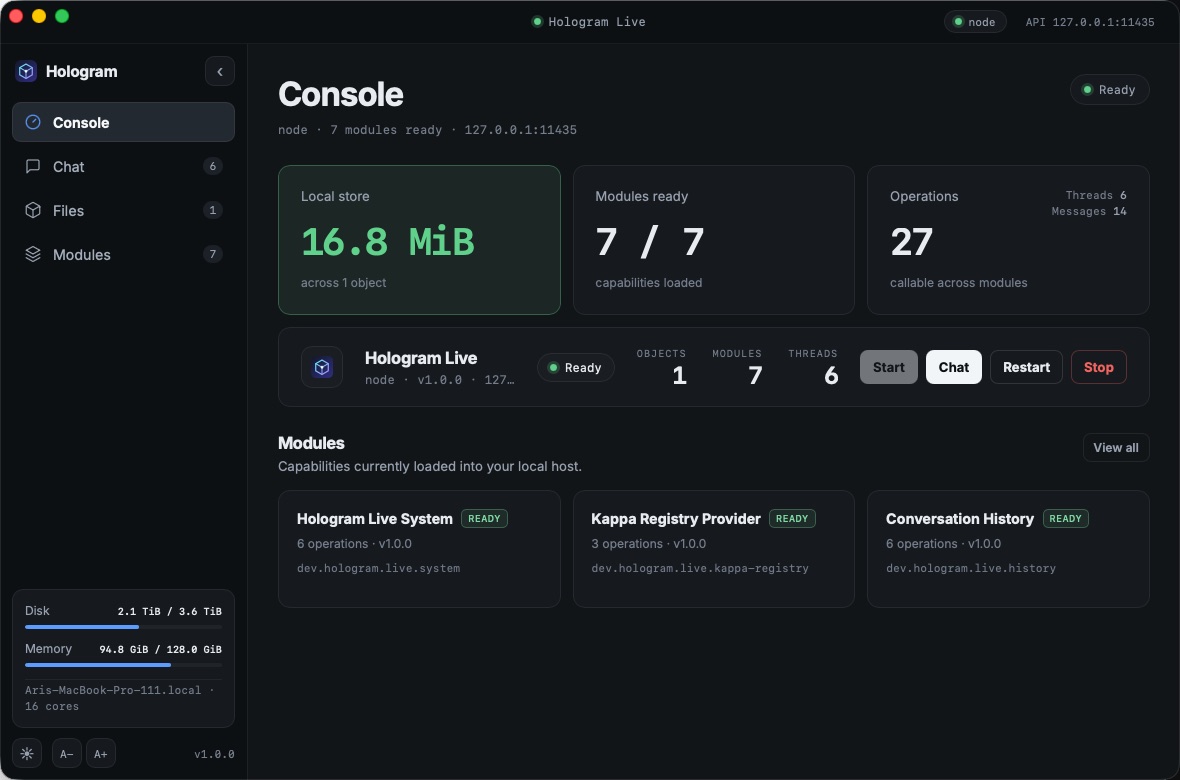
Hologram Desktop console showing local store size, module readiness, and system meters

Hologram Live is a local-first module host for the Hologram ecosystem. This repository produces two independent products:

  • Hologram Server β€” the standalone hologram binary, containing the CLI and background service.
  • Hologram Desktop β€” a Tauri application that bundles hologram as a managed sidecar and embeds the shared .holo application executor.

The current desktop experience provides a Console dashboard, multi-thread Chat with archiving, content-addressed Files, watched .holo Applications, and module discovery in a responsive dark/light interface. A Cmd/Ctrl+K command palette reaches every action, and text size is adjustable with Cmd/Ctrl +/-/0. Chat routes through a configurable inference engine: the default echo engine repeats your message, while weightc (one-shot CLI over imported .wcpu artifacts) and Ollama-compatible HTTP endpoints serve real model completions.

Quick start

Desktop application

bash
cd apps/desktop
npm ci
npm run dev

The preparation step builds the server sidecar before Tauri opens. The desktop app can:

  • start, restart, and stop the local Hologram service;
  • create and switch between chat threads with independent, durable histories;
  • upload, rename, list, and download local files;
  • watch application source directories, compile/import their .holo archives, and inspect verified archive metadata;
  • inspect the enabled module catalogue;
  • follow the system appearance or remember a light/dark choice; and
  • remain available from the system menu bar after the main window closes.

Build an installable desktop bundle with:

bash
just desktop-build

The desktop UI's colours, type, and marks derive from the Hologram brand kit at a pinned revision; apps/desktop/BRANDING.md explains how to update the brand everywhere in three steps.

Standalone server

bash
cargo build --release --locked --package hologram-live --bin hologram
./target/release/hologram init
./target/release/hologram start
./target/release/hologram status
./target/release/hologram modules list

Run the service in the foreground instead with:

bash
./target/release/hologram serve

Every server advertises http://127.0.0.1:11435 by default and generates a 256-bit membership secret in its state directory at cluster.token. The file is reused across restarts and is owner-only on Unix. To form a multi-host cluster, securely give every node the same secret (at least 32 bytes), advertise the origin other nodes can reach, and seed a new node with any live member:

bash
# first node; generates <state_dir>/cluster.token
hologram serve --advertise https://registry-a.example.com

# joining node; use the contents securely copied from the seed
HOLOGRAM_CLUSTER_TOKEN='<seed cluster.token contents>' \
  hologram serve \
    --advertise https://registry-b.example.com \
    --join https://registry-a.example.com

The joining node heartbeats immediately, learns the live membership set, and then heartbeats those peers directly. Failed seeds remain eligible for retry; members disappear from /api/v1/nodes after their TTL. Join messages use a short-lived keyed proof over the exact payload, so the cluster secret and the separate user authentication token are never sent over the wire. Non-loopback origins must use HTTPS.

The default configuration and local endpoint are:

text
~/.config/hologram/live.toml
http://127.0.0.1:11435

Open the endpoint for the built-in status page. API documentation is available at:

text
http://127.0.0.1:11435/docs
http://127.0.0.1:11435/openapi.json

/docs is the self-hosted Scalar reference; /openapi.json is the generated OpenAPI document. Native clients use the versioned Protobuf/gRPC service on the same endpoint.

A path no route claims is answered 404 with the daemon's error envelope (LIVE_NOT_FOUND). A caller that sends content-type: application/grpc gets gRPC UNIMPLEMENTED instead, as any gRPC server answers an unknown service.

Machine-readable CLI output

Global --json is supported by every CLI command and may appear before or after the subcommand. A successful command writes one JSON value to stdout, including lifecycle actions, downloads, generated files, accepted mutations, and run --output-format text. Diagnostics remain on stderr, while a runtime failure writes a JSON object with code and message to stdout and exits nonzero. This makes the complete CLI safe to compose with jq:

bash
hologram status --json | jq -r '.status'
hologram files get blake3:... --output ./asset.bin --json | jq '.byte_length'
hologram run ./my-app --input-text 'hello' --output-format text --json | jq -r '.[]'
hologram run application.holo --output-format text --json | jq -r '.[]'

Help and shell-completion text retain Clap's human-readable format.

Demo workflows

Chat and conversation history

Create a thread, copy its returned ID, and send a message:

bash
hologram --json history new "Demo chat"
hologram --json chat send <conversation-id> "Hello, Hologram"
hologram --json history show <conversation-id>

chat send records the user message and the assistant response as one persisted exchange. Threads retain separate histories and can be resumed from the desktop app.

The response comes from the inference engine selected in live.toml:

toml
[inference]
engine = "echo"            # echo | weightc | ollama | llamacpp | candle | burn | vllm
default_model = ""         # imported id or remote served-model name
weightc_path = "weightc"
ollama_endpoint = "http://127.0.0.1:11434"
vllm_endpoint = "http://127.0.0.1:8000"
vllm_token_env = "VLLM_API_KEY"
model_path = ""            # GGUF (llamacpp/candle) or named-MPK checkpoint (burn)
tokenizer_path = ""        # tokenizer.json (candle) or tokenizer.model (burn)
model_architecture = ""    # candle: llama; burn: a supported Llama 3 variant
n_ctx = 4096
n_gpu_layers = 0
llamacpp_max_concurrent_requests = 1
request_timeout_secs = 300
resident_sessions = false  # weightc only: keep one resident enter session per conversation
max_resident_sessions = 4  # LRU cap on resident sessions

The default echo engine repeats the user message; it needs no model and no external process. The weightc engine shells out to weightc ask <artifact-dir> <prompt> --json against an imported .wcpu artifact. ollama proxies /api/generate, while vllm uses the OpenAI-compatible /v1/completions and /v1/models endpoints with native streaming and optional authentication from VLLM_API_KEY.

llamacpp loads a local GGUF model in-process and streams decoded pieces with exact token counts. Set model_path directly, or import a GGUF file and put its returned blake3:... id in default_model. It is off by default because it builds native C++ code and gives model execution the daemon's crash boundary. Build it with cargo build --release --features llamacpp; use llamacpp-metal or llamacpp-cuda for the corresponding GPU backend. These builds require CMake, Clang, and a C++ compiler.

candle is the Rust-native local GGUF alternative. The initial adapter supports Candle's quantized Llama-family implementation, requires a matching Hugging Face tokenizer.json, streams native deltas, and reports exact token counts. Set model_architecture = "llama"; use --features candle for CPU, candle-metal for Apple GPUs, or candle-cuda for NVIDIA GPUs. Candle is not a universal GGUF dispatcher: unsupported model families fail during startup instead of being guessed.

burn uses Tracel's Burn-LM Llama implementation on CPU. It requires a Burn named-MPK checkpoint, the matching Llama 3 tokenizer.model, and one of llama3.2-1b, llama3.2-3b, llama3.1-8b, or llama3-8b in model_architecture. Build with --features burn. Burn generation is currently buffered, so streaming API responses honestly report x-hologram-stream: emulated; GGUF files are not Burn checkpoints.

Run the live acceptance gate against real engines before releasing an inference build. It starts an isolated Hologram server and checks model discovery, buffered and native-streaming OpenAI/Ollama requests, usage, cancellation, and llama.cpp context overflow:

bash
./scripts/check-inference-engine.sh llamacpp /models/tiny.gguf
HOLOGRAM_TOKENIZER_PATH=/models/tokenizer.json HOLOGRAM_MODEL_ARCHITECTURE=llama ./scripts/check-inference-engine.sh candle /models/tiny.gguf
HOLOGRAM_TOKENIZER_PATH=/models/tokenizer.model HOLOGRAM_MODEL_ARCHITECTURE=llama3.2-1b ./scripts/check-inference-engine.sh burn /models/llama3.2-1b.mpk
VLLM_ENDPOINT=http://127.0.0.1:8000 ./scripts/check-inference-engine.sh vllm org/model

VLLM_API_KEY is forwarded when set. Set HOLOGRAM_BIN to test an existing binary, or let the script build the required feature set.

With resident_sessions = true, the weightc engine instead keeps a supervised weightc enter --jsonl process per conversation, so turns reuse the live KV context instead of replaying a transcript, and only the new message crosses the wire each turn. Sessions are LRU-capped by max_resident_sessions; a crashed session is reported as a typed error and lazily respawned (starting fresh context) on the next turn. This mode needs a weightc build with enter --jsonl support. Models are managed with:

server.ts
hologram models import ./tinyllama.wcpu
hologram models import ./tinyllama.gguf
hologram models list
hologram models remove blake3:...

Threads can be archived instead of deleted. Archived threads keep their messages and their updated_at_millis, but drop out of the default listing:

Read the full README β†’View source on GitHub β†’

Related MCP Servers

View all in Developer Tools View all alternatives
  • O
    Openapi MCP Server

    Connect any HTTP/REST API server using an Open API spec (v3)

    πŸ’» Developer Tools3 views
    Compare vs Openapi MCP Server β†’
  • C
    Claude Task Master

    AI-powered task management system for AI-driven development. Features PRD parsing, task expansion, multi-provider support (Claude, OpenAI, Gemini, Perplexity, xAI), and selective tool loading for optimized context usage.

    πŸ’» Developer Tools8 views
    Compare vs Claude Task Master β†’
  • N
    Next Devtools MCP
    Verified

    Official Next.js MCP server for coding agents. Provides runtime diagnostics, route inspection, dev server logs, docs search, and upgrade guides. Requires Next.js 16+ dev server for full runtime features.

    πŸ’» Developer Tools6 views
    Compare vs Next Devtools MCP β†’
  • M
    MCP Server Docker

    Integrate with Docker to manage containers, images, volumes, and networks.

    πŸ’» Developer Tools3 views
    Compare vs MCP Server Docker β†’

Reviews

No reviews yet β€” be the first to share how this listing worked for you.

Frequently Asked Questions about Hologram Model Hub

We don't have a confirmed install command for Hologram Model Hub yet, so we don't publish a generated one β€” a guessed package name would point at the wrong package or none at all. Follow the project's own README or setup instructions (https://github.com/Hologram-Technologies/hologram-live) for the current steps.

AllMCPs Directory Badge

Full Badge Customizer

Showcase your server listing on GitHub or your project documentation. Embed this dynamic SVG badge to highlight official listing status and live engagement.

Badge Style:
Live Dynamic SVG PreviewHologram Model Hub AllMCPs Directory Badge

Markdown (GitHub README)
[![AllMCPs](https://allmcps.com/api/badge/hologram-model-hub?style=directory)](https://allmcps.com/mcp/hologram-model-hub)
HTML Embed
<a href="https://allmcps.com/mcp/hologram-model-hub"><img src="https://allmcps.com/api/badge/hologram-model-hub?style=directory" alt="Hologram Model Hub on AllMCPs" /></a>

Technical Specs & Signals

CategoryπŸ’»Developer Tools
More technical detailsExpand β–Ύ
Last updatedSep 28, 2026
Views0
Unique ViewsTotal visits recorded for this listing page on AllMCPs.
Installs0
Installs & Copy ActionsTotal times users copied install commands or configuration snippets for this server.
27Quality signal: Emerging Β· 27/100How this signal is calculated β–Ύ
Server availabilityNot measured

Not scored for repo-hosted servers β€” we can't reach the running server, only its GitHub page. Hosted MCP endpoints are health-checked live.

Verified ownership8/20
Documentation & tools11/30
Adoption & activity1/15
Community engagement0/10

A guidance signal from public completeness & health data β€” not a user rating. New listings start lower and rise as they add docs, get verified, and grow adoption. Signals we can't observe for a listing are skipped, not counted against it.

β˜… Spotlight Slot

Feature Your MCP Server

Get maximum visibility for your server across our directory, search results, and detail pages.

Spotlight Your Server

Own this project?

This directory is pre-filled from public sources. Claim via GitHub README, site badge, or DNS TXT to unlock edit access and the Official badge β€” proof is checked automatically, then reviewed by our team.

Free dofollow backlink: add your website and place the AllMCPs badge on it β€” no claim needed. We detect it automatically and keep it verified as long as the badge stays live.

Claim & get free dofollow

Share & Embed

Add our SVG badge (dark/light directory styles) or embeddable widget to your site.

Explore more

More in πŸ’» Developer Tools β†’Best MCP servers for Developers β†’Alternatives to Hologram Model Hub β†’Install in Claude DesktopInstall in CursorInstall in VS CodeSetup guides for all 13 MCP clients