Search remote tech jobs, inspect descriptions, compare roles, and retrieve application links.
Quick Install
Automated & IDE SetupCopy the AI prompt to install this server into Claude Code, Cursor, or another agent — or use 1-click editor setup below.
One-click editor setup isn’t available for this listing yet — we don’t have a confirmed install command, and we’d rather show nothing than point your editor at the wrong package or host. Follow the project’s own setup instructions, linked above.
Manual Client & Custom JSON ConfigExpand JSON ▾
No confirmed setup config for this listing yet. We only publish a config block when the install details come from the project itself — its README, its docs, or a verified owner. We haven’t found those for HiddenJobs — Remote Tech Job Search MCP, and we’d rather show nothing than a guess you’d paste into your client. Follow the project’s own setup instructions for the current steps.
Documentation Overview
Job Search MCP
Find remote technology jobs with MCP. Connect Claude, Cursor, or any AI agent to search roles, filter opportunities, read full descriptions, compare jobs, and find where to apply over Streamable HTTP.
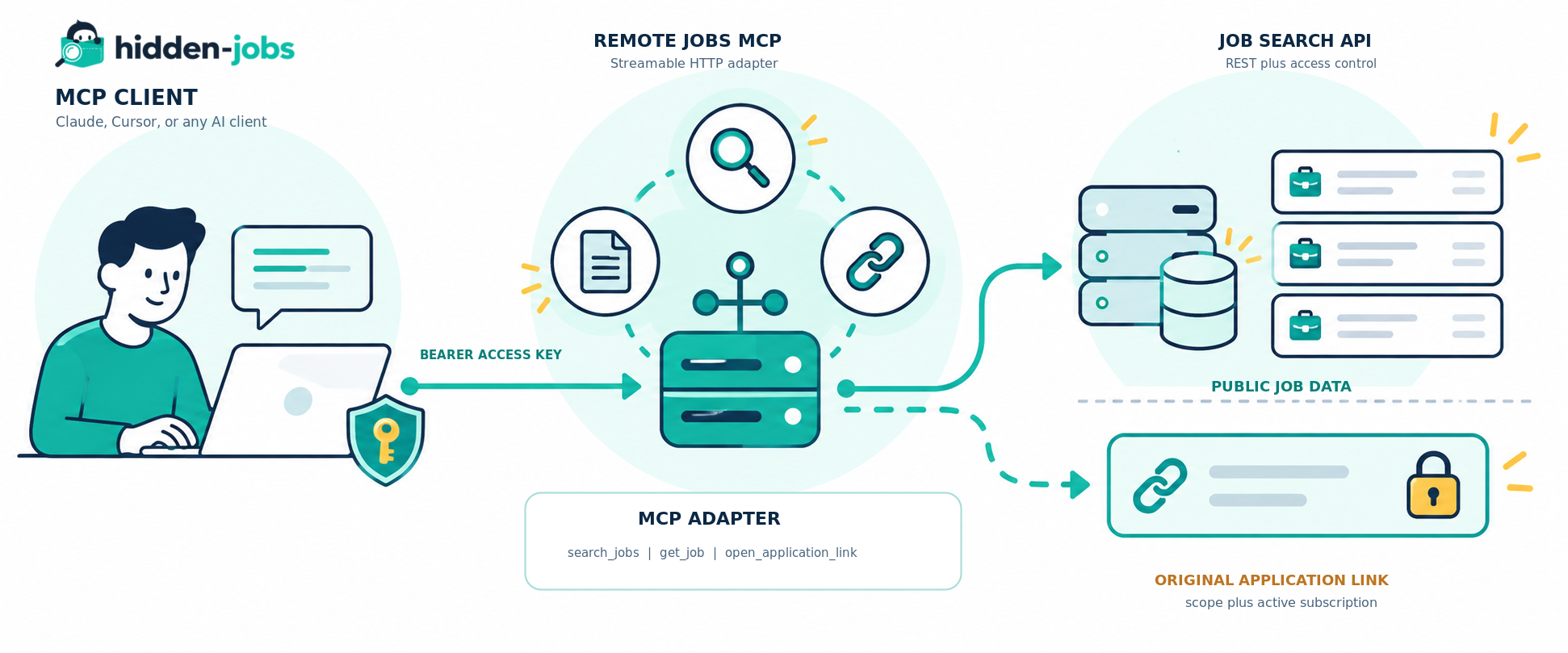
The server lets an agent discover relevant roles, read complete job descriptions, compare opportunities, and retrieve the original application URL when the account has the required access subscription.
Find remote tech jobs · Read the live MCP documentation · Read the live REST API docs · Browse repository docs
Need direct REST access instead? Use the Job Search API.
Your job-search copilot
Use natural language to discover roles that match your skills and preferences, then go deeper only when a listing is worth your time:
- Search by role, technology, company, location, schedule, or employment type
- Read full descriptions and structured job metadata
- Compare shortlisted roles with an AI assistant
- Request the original application link when your access allows it
Hosted server
Use the hosted MCP endpoint:
Create an access key from the developer dashboard, then add the endpoint and the key to your MCP client. The bearer token is forwarded to the job search API and is never replaced with a Supabase credential.
Capabilities
| Tool | Required scope | Purpose |
|---|---|---|
search_jobs | jobs:read | Search the remote job board with keywords and filters |
get_job | jobs:read | Read public details and the full description for one role |
open_application_link | application-links:read plus an active subscription | Retrieve the original application URL for one role |
Search and job-detail responses intentionally omit url, application_url, and source_url. They expose hasApplicationLink instead. The original URL is returned only by open_application_link after the API checks the key scope and the account subscription.
There is no auto-apply tool.
Quick start
1. Create an access key
Create an access key with the jobs:read and application-links:read scopes. The dashboard shows the full key only once. Store it in your client's secret configuration.
2. Configure your MCP client
The configuration is the same for the hosted server and a self-hosted deployment. Replace the placeholder with your own key without committing it.
Ready-to-copy examples for common clients are in examples/.
3. Ask your client
Try a request such as:
The client should call search_jobs, then call get_job for the offers it wants to inspect. It should call open_application_link only when the user asks to apply and the account has an active subscription.
Architecture
The MCP adapter is deliberately thin. It handles MCP JSON-RPC messages, validates tool arguments, forwards the incoming bearer token to the REST API, and maps API errors into MCP tool results. Supabase is used by the deployed Edge Function as the runtime and by the underlying job search API. MCP clients never need a Supabase key.
Public boundary
This repository contains the MCP protocol adapter and its deployment documentation. It does not contain job data, database schemas, billing logic, customer data, service-role credentials, or the internal implementation of the underlying job search platform.
Request flow
Protocol
The endpoint accepts MCP JSON-RPC 2.0 messages over HTTP POST.
| Method | Description |
|---|---|
initialize | Negotiates protocol version and server capabilities |
ping | Lightweight liveness request |
tools/list | Lists the three available tools |
tools/call | Executes a tool |
notifications/* | Accepted with HTTP 202 and no response body |
The current protocol version is 2025-06-18. See docs/protocol.md for request and response examples.
Self-host with Supabase Edge Functions
The repository contains the deployable function at supabase/functions/hidden-jobs-mcp/index.ts.
Requirements
- A Supabase project
- Supabase CLI
- Deno 2 for local checks
- An access key for client requests
Deploy
--no-verify-jwt is intentional. The function authenticates the job-search API bearer token itself, so Supabase must pass the request through instead of requiring a Supabase Auth JWT. The deployed Supabase runtime provides SUPABASE_URL. Set SUPABASE_ANON_KEY as a function secret only when your API deployment requires the upstream apikey header.
Detailed deployment notes, environment variables, and a custom API origin are in docs/deployment.md.
Run locally
The local server listens on Deno's default port. Set HIDDEN_JOBS_MCP_URL to the local URL when running the smoke test.
Test and validate
Run the static checks:
Run the authenticated smoke test against the hosted or local server:
The smoke test checks initialization, tool discovery, job search, and job detail without printing the API key or job application URLs. It does not call open_application_link unless CHECK_APPLICATION_LINK=true is set.
Security model
- Treat an API key like a password
- Never commit a key, put it in a README, or paste it into an issue
- Store the key in the MCP client's secret store or an environment variable
- Rotate a key immediately if it is exposed
- Keep
SUPABASE_ANON_KEYon the server side - Never use a service-role key in an MCP client
- Search and job detail do not disclose original application URLs
- Application links are checked again on every request
See SECURITY.md for reporting and operational guidance.
Repository layout
License
MIT. See LICENSE.
Related MCP Servers
Reviews
No reviews yet — be the first to share how this listing worked for you.
Frequently Asked Questions about HiddenJobs — Remote Tech Job Search MCP
AllMCPs Directory Badge
Showcase your server listing on GitHub or your project documentation. Embed this dynamic SVG badge to highlight official listing status and live engagement.
Badge Style:
Live Dynamic SVG Preview
Markdown (GitHub README)
[](https://allmcps.com/mcp/hiddenjobs-remote-tech-job-search-mcp)HTML Embed
<a href="https://allmcps.com/mcp/hiddenjobs-remote-tech-job-search-mcp"><img src="https://allmcps.com/api/badge/hiddenjobs-remote-tech-job-search-mcp?style=directory" alt="HiddenJobs — Remote Tech Job Search MCP on AllMCPs" /></a>