HeurChain (self-hosted)
One memory system for every AI agent you run, on your own infrastructure.



HeurChain is a persistent memory broker for AI agents. Claude Code, Codex, Gemini, local models and any HTTP or MCP client share one store. They write facts, decisions and session summaries, and later recall them with hybrid search: keyword (BM25) and meaning (dense vectors), fused into one ranking.
This repository is the self-hosted edition, and it is the complete package: the broker source, a Docker Compose stack that builds and runs it with everything it needs, a systemd unit for native installs, and the docs. No accounts, billing or cloud services are involved.
Broker version: 0.6.1-oss.1 (frozen). This edition is cut from the 0.6.1 broker. Versions read
<mainline>-oss.<n>, andGET /healthreports"edition": "oss". Changes here are limited to fixes and documentation; new broker features are not added to this line. See CHANGELOG.md for what differs from mainline 0.6.1.
Where to get what
| You want to | Use |
|---|---|
| Connect an MCP client | MCP connection guide and registry descriptor: choose the hosted service or your self-hosted broker. |
| Teach an agent to use a connected HeurChain store | HeurChain memory skill. This is an optional instruction file, not an MCP server or installer. |
| Run HeurChain (the memory server) | This repository: git clone, then docker compose up (quick start) |
| Point an agent at a running broker | The heurchain npm package: AGENT_CONFIG.json and the onboarding guide. It contains no server. |
| The old 1.x Node.js server | Deprecated. Still installable as heurchain@1; see Upgrading from 1.x. |
How it works
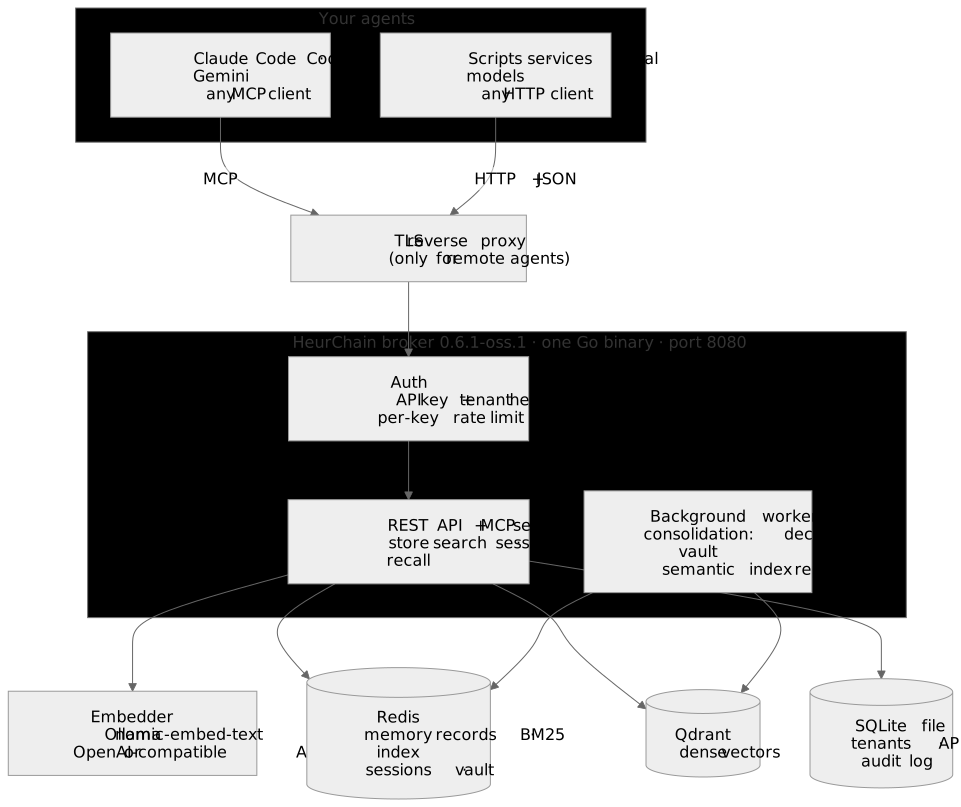
The broker is one Go binary listening on one port. Agents reach it over MCP (Claude Code
and other MCP clients) or plain HTTP + JSON (scripts, services, anything with curl).
Every request carries two headers, an API key and a tenant ID; each tenant is a separate
memory space for a person, team or project.
Behind the broker sit four services, all on your machine:
| Service | Holds | Needed? |
|---|---|---|
| Redis | The memory records themselves (text, tags, agent, session, timestamps), the BM25 keyword index, sessions and the vault | Yes. It is the source of truth. |
| Embedder | Turns text into vectors. Ollama with nomic-embed-text by default, or any OpenAI-compatible endpoint (OpenAI, TEI, vLLM, LM Studio) | Yes. /store returns 503 without it. |
| Qdrant | Dense vectors for search by meaning | Strongly recommended. Without it, stores succeed with an "indexing incomplete" warning and search falls back to keywords only. |
| SQLite (a file) | Tenants, API keys, audit log and usage counts. The schema is created on first start. | Yes, built into the broker. |
Store and recall
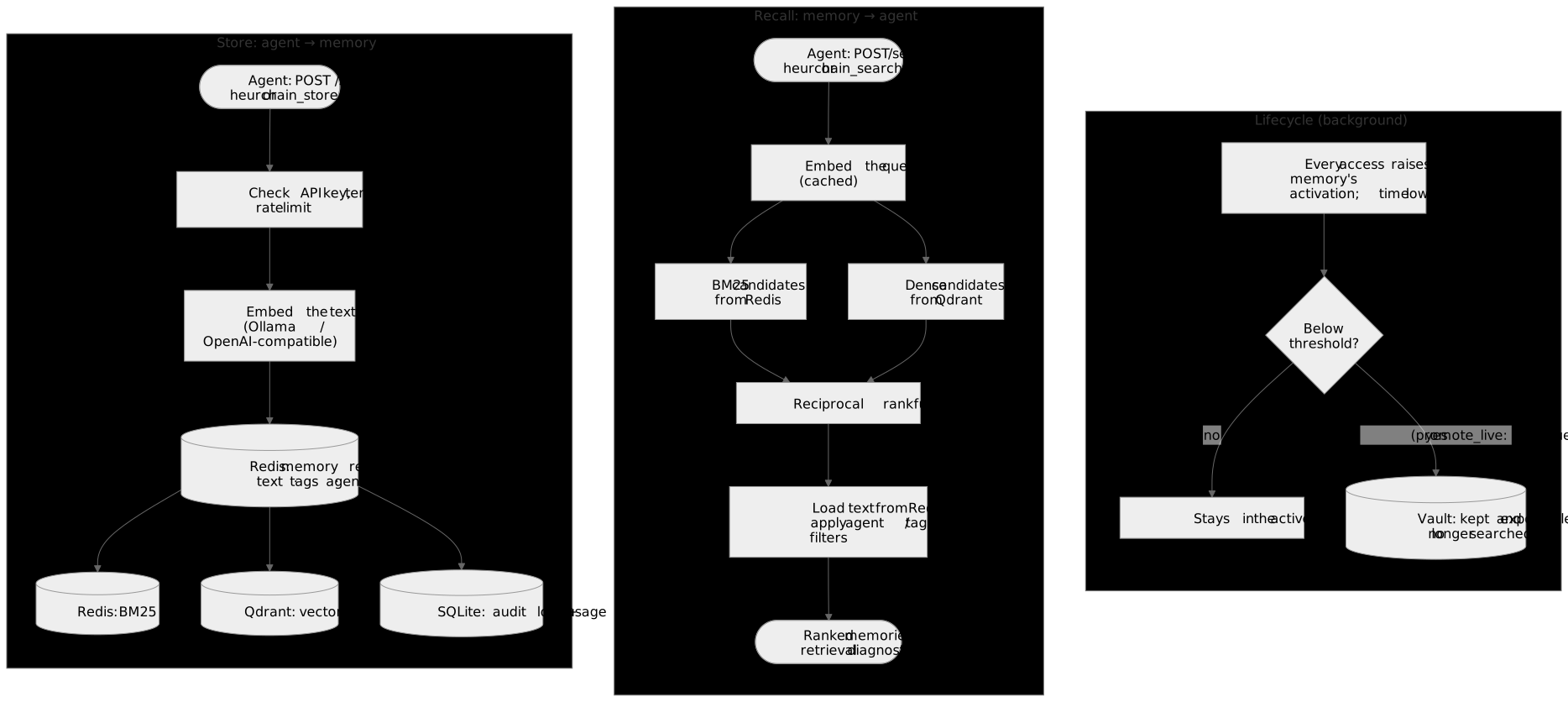
- Store. The broker checks the key and tenant, embeds the text, writes the memory record to Redis, then indexes it twice: BM25 terms in Redis and a vector point in Qdrant. The write is recorded in the audit log.
- Recall. The query is embedded (repeat queries hit a cache), and both indexes return
candidates. Reciprocal rank fusion (RRF) merges the two rankings, so a memory that matches
on exact words and on meaning rises to the top. Agent, tag and date filters apply, and
the response includes the scores and a
retrievalblock that says what each stage did. - Lifecycle. Each memory has an activation score in the ACT-R style: every access
raises it and time lowers it. A background worker moves memories whose activation falls
below a threshold into the vault: kept and exportable, but no longer searched. It
ships as a dry run (
promote_live: false) that only logs what it would move.
A session, step by step
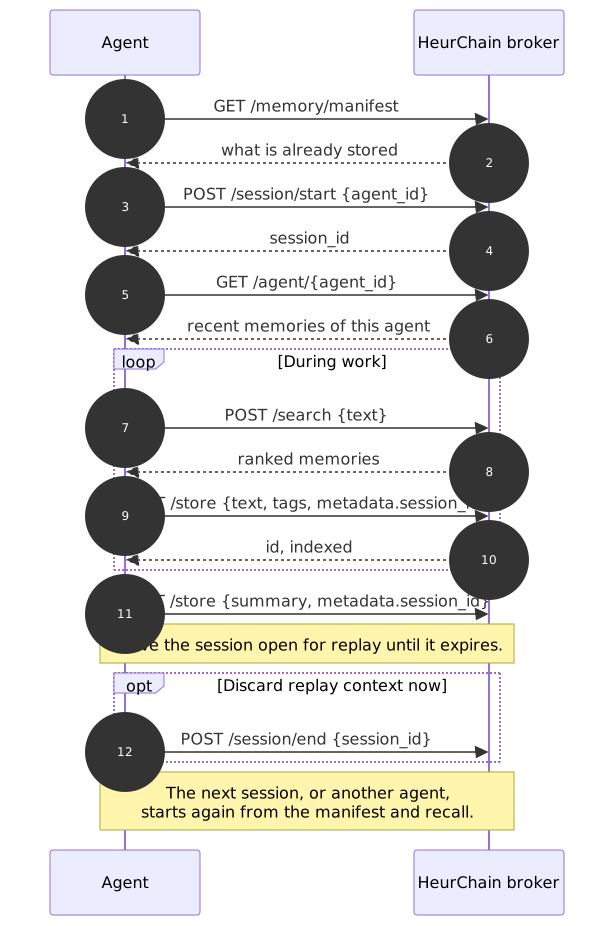
Agents that follow this protocol pick up where they, or another agent, left off. The
machine-readable version is in npm/AGENT_CONFIG.json, and the
broker serves the same guide to agents at GET /.
The diagram sources are in docs/diagrams/ (Mermaid).
Quick start
You need Docker Engine with Compose v2 and internet access for the first build (container images, Go modules and the embedding model).
git clone https://github.com/peterjohannmedina/heurchain.git
cd heurchain
cp deploy/.env.example deploy/.env      # set ADMIN_USER and a long random ADMIN_PASS
docker compose -f deploy/compose.yaml up -d --build
docker compose -f deploy/compose.yaml exec ollama ollama pull nomic-embed-text
curl -s http://127.0.0.1:8080/health
All ports are published on 127.0.0.1 only. To reach the broker from other machines, put a
TLS reverse proxy in front of it (docs/install.md).
Create a tenant and API key. The key is shown once.
curl -s -u "$ADMIN_USER:$ADMIN_PASS" -X POST http://127.0.0.1:8080/admin/tenants \
  -H 'Content-Type: application/json' -d '{"name":"My team","email":"me@example.com"}'
# -> {"tenant_id": "...", "api_key": "...", ...}
Store something and find it again.
KEY=...      # api_key from above
TENANT=...   # tenant_id from above
H=(-H "X-HeurChain-API-Key: $KEY" -H "X-HeurChain-Tenant: $TENANT" -H 'Content-Type: application/json')
curl -s http://127.0.0.1:8080/store "${H[@]}" \
  -d '{"agent_id":"me","text":"The staging database moved to port 5433 on 2026-11-01.","tags":["fact"]}'
curl -s http://127.0.0.1:8080/search "${H[@]}" -d '{"text":"which port does staging db use"}'
These exact steps run on every change to broker/ or deploy/ in the
self-host smoke test: clean checkout, build, model
pull, tenant, store, hybrid search, sessions, MCP, and a full stack restart.
Connect your agents
MCP (Streamable HTTP) at http://<host>:8080/mcp/sse, with the same two headers. For
Claude Code:
claude mcp add --transport http heurchain http://127.0.0.1:8080/mcp/sse \
  --header "X-HeurChain-API-Key: $KEY" --header "X-HeurChain-Tenant: $TENANT"
Any MCP client that supports Streamable HTTP and custom headers works the same way. The
server exposes 24 tools (heurchain_store, heurchain_search, heurchain_session_start,
heurchain_manifest and more). Legacy SSE (GET /mcp/sse plus POST /mcp/message) is also
available.
HTTP. POST /store, POST /search, POST /query, POST /session/start,
GET /agent/{agent_id}, GET /memory/manifest and the rest. GET /openapi.json on your
broker describes every endpoint.
Let the agent set itself up. Paste this to any agent:
Read the setup instructions in the heurchain npm package (README.md and
AGENT_CONFIG.json, https://www.npmjs.com/package/heurchain), then connect to the
HeurChain broker at http://<your-host>:8080 using the API key and tenant ID I give
you. Follow the session protocol in AGENT_CONFIG.json.
Running it for real
docs/install.md covers:
- TLS with a reverse proxy, for agents on other machines
- A native Linux install with systemd instead of Docker
- Backups: the Redis volume, the SQLite file and the vault directory (Qdrant can be rebuilt from Redis by re-embedding)
- Upgrading from the 1.x Node edition
Configuration lives in deploy/broker.yaml (strict: an unknown key
stops startup with an error naming it) and secrets in deploy/.env. The comments in
broker.yaml show how to switch from Ollama to an OpenAI-compatible embedder.
Repository layout
| Path | Contents |
|---|---|
broker/ | The Go memory broker, version 0.6.1-oss.1 |
broker/schema.sql | SQLite baseline schema, embedded in the broker and applied on first start |
deploy/ | Dockerfile, Compose stack, example config, systemd unit |
docs/ | Installation and operation; diagram sources |
npm/ | Source of the heurchain npm package: agent configuration and guide (no server) |
Build and test
cd broker
go build ./...
go test ./...      # uses an in-memory Redis; no services needed
Go 1.23 or newer. The broker uses pure-Go SQLite, so no C toolchain is required.
Tips for better recall
- Put absolute dates in stored text ("on 2026-11-01", not "last Friday"). Relative dates lose their meaning once the memory is recalled later.
- For questions that need several facts together, ask
/searchfor more results (limit) and let the agent combine them.
Upgrading from 1.x
Releases up to 1.4.2 were a Node.js service deployed with Ansible, published on npm as the
heurchain package. The Go broker replaces them; the old code remains in this repository's
git history (last commit 0e0f6e1). The data model changed, and 0.6.1 does not read 1.x
data in place: run the new broker alongside the old one and re-store what you want to keep.
See docs/install.md.
License
MIT. Third-party Go modules keep their own licenses; see broker/go.mod.