Engram README
The full upstream README, mirrored here for reference. Install config, tool schemas, adoption signals, and an original overview live on the Engram listing page.
 Engram
Persistent memory for AI agents. In-process. No infra.
Give your AI agent the memory of a colleague who's worked with you for years — without cloud, API keys, or Docker.
⭐ Useful to you? Star it on GitHub — it's the simplest way to help others find Engram.







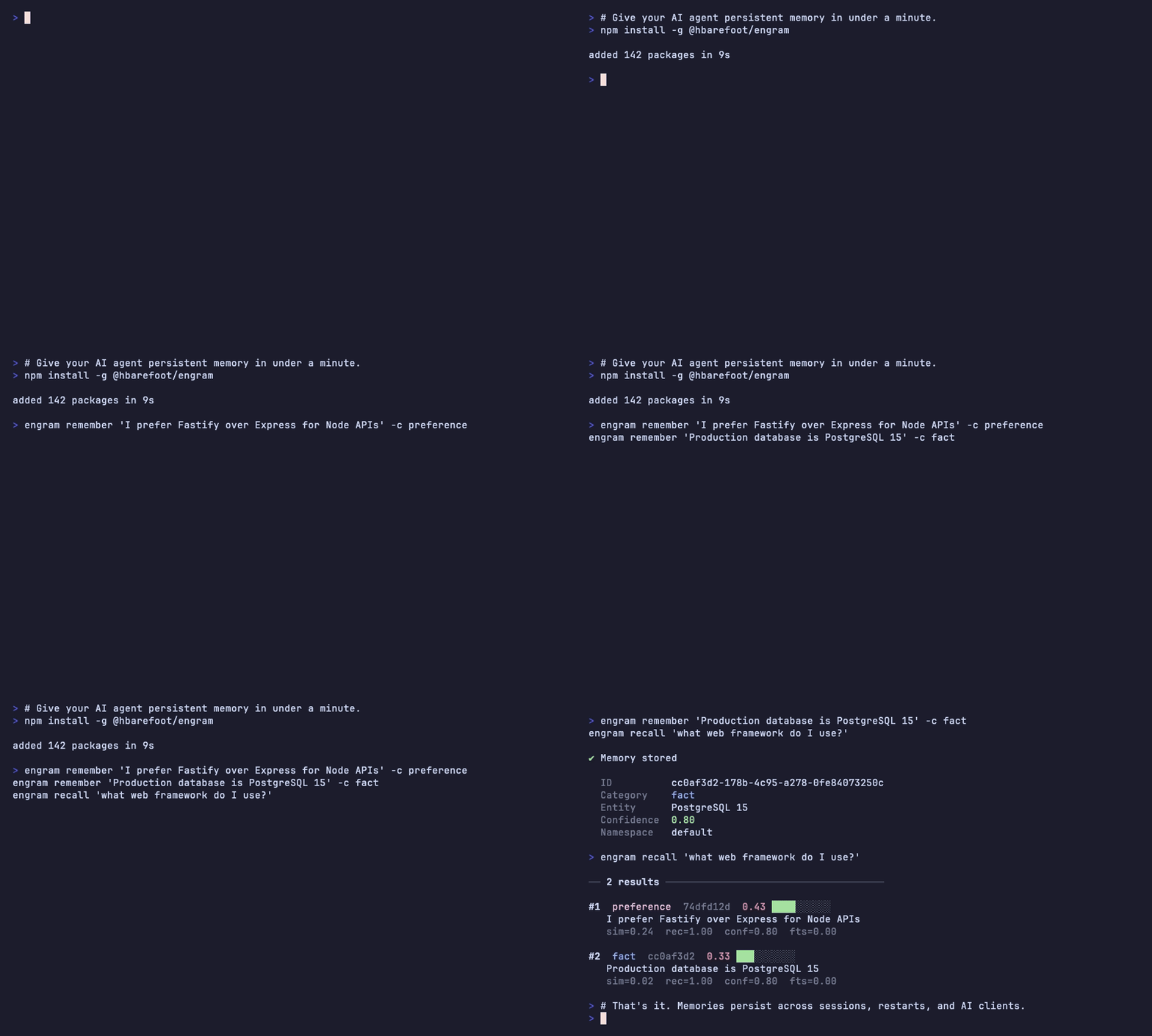
Your AI agent now has long-term memory. Two minutes, no setup, no cloud.
- 🧠 In-process — runs inside your agent's stack. No separate server to deploy, no IPC overhead, nothing to fork.
- 📴 Offline — local SQLite + bundled embeddings (~23 MB). No API keys, no data leaving your machine.
- 🔌 MCP-native — first-class Model Context Protocol integration with Claude Desktop, Claude Code, Cursor, Windsurf, and Cline.
- 🔐 Safety by default — automatic secret detection on every write. API keys, private keys, connection strings, JWTs blocked before they hit the database.
Why local-first, in numbers
Engram runs inside your agent's process — no service to deploy, no account, nothing leaving your machine. That design choice is measurable:
| Metric | Engram | |
|---|---|---|
| Cold start → first recall | under 200 ms | import → first answer, model load included (M-series; hardware-dependent) |
| Warm recall (p50, 1k memories) | ~4 ms | median query latency once the model is in memory |
| Package download | ~571 KB | the npm package (1.3 MB unpacked) |
| Embedding model | ~23 MB | all-MiniLM-L6-v2, fetched once, cached at ~/.engram/models |
| External services | 0 | no database, broker, or cloud account |
| Works offline | ✅ | zero network calls on the default path |
Measured on an Apple M4 Pro over 1,000 seeded memories — reproduce with npm run bench. These are footprint and latency numbers, not an accuracy claim: Engram doesn't try to out-rank Mem0 or Zep on memory benchmarks. The point is solid recall with none of the operational surface.
Optional accuracy lift — still 100% local. If you already run a local model, the opt-in LLM layer sharpens fact extraction: entity-extraction accuracy climbs from 45.8% (rule-based) to 95.8% with the recommended henrybarefoot1987/engram-extract model (qwen3:1.7b) — +50 pts — without a single byte leaving your device.
Support Engram
Engram is free and MIT-licensed — and always will be. No paywalls, no tier-locked features, no telemetry. Every feature ships in the open-source package. Sponsorship is purely a way to fund continued development, not to unlock anything.

If Engram saves you time, you can sponsor it via Polar:
| Tier | Price / month | For |
|---|---|---|
| 🌱 Supporter | $5 | Individuals who want the project to keep shipping. |
| ⚡ Power User | $25 | Heavy users who rely on Engram day to day. |
| 👥 Team | $100 | Teams standardizing on Engram across projects. |
| 🏢 Enterprise | $499 | Priority response on issues + dedicated integration help. |
About Enterprise. Engram is MIT-licensed, so commercial use is already granted — you don't need to buy a license to use it at work. The Enterprise tier buys priority response on issues and dedicated help wiring Engram into your stack. For organizations whose policy precludes depending on MIT-licensed software, an optional commercial-license override is available on request. (Engram is maintained by a solo developer, so this is best-effort priority response, not a contractual SLA.)
Why Engram?
Most agent-memory products are services you run alongside your agent — Postgres, Docker, cloud accounts, API keys. Engram embeds inside your agent's process: a focused, stable npm package with practical guardrails.
| Engram | Lodis | Mem0 / OpenMemory | Zep | Letta | |
|---|---|---|---|---|---|
| Maturity | v1.9.x, stable | v0.5.x, early | mature / SaaS | v0.x | v0.x |
| Infra to operate | None (npm package) | None (npx package) | Cloud account or multi-container Docker | Docker + Postgres + Graphiti | Docker + Postgres |
| Install footprint | ~23 MB | ~22 MB | Hundreds of MB containers (self-hosted) | Hundreds of MB | Hundreds of MB |
| Works offline | ✅ | ✅ | ❌ Cloud / ✅ if self-hosted | ❌ External embed provider | ❌ External LLM provider |
| MCP-native | ✅ Primary | ✅ Primary | 🟡 OpenMemory ships an MCP server | ❌ REST/SDK | ❌ REST/SDK |
| REST API alongside MCP | ✅ | ❌ MCP-only | ✅ Cloud | ✅ | ✅ |
| Surface area | 6 tools, 5 categories | 40 tools, 14 entity types + 4 permanence tiers + temporal supersession | varies | varies | varies |
| Automatic secret detection | ✅ Blocks on every write | 🟡 memory_scrub opt-in tool | 🟡 Not first-class | 🟡 Not first-class | 🟡 Not first-class |
| Agent auto-discovery | ✅ Dashboard Integration Wizard | ❌ Manual config | ❌ | ❌ | ❌ |
| Desktop app | ✅ macOS Tauri menu bar | ❌ | ❌ | ❌ | ❌ |
| LLM-powered extraction | ✅ Optional, on-device (Ollama; rule-based default) | ❌ LLM-free read/write | ✅ Built-in | ✅ Built-in | ✅ Built-in |
| Feedback / contradiction workflow | ✅ Side-by-side conflict-resolution UI + feedback loop | 🟡 Programmatic correct/confirm/supersede tools | 🟡 No first-class feedback | 🟡 | 🟡 |
Sources: @sunriselabs/lodis, Sunrise-Labs-Dot-AI/engrams, mem0.ai, github.com/getzep/zep, github.com/letta-ai/letta. See docs/competitive-intel.md for the full breakdown. Engram ships optional, on-device LLM extraction (v1.9+): point llm.* at a local model — the recommended henrybarefoot1987/engram-extract (Qwen3-1.7B, Apache-2.0) or any Ollama / OpenAI-compatible endpoint — to sharpen category/entity extraction (entity recognition +50 pts vs rules — 45.8% → 95.8% — with engram-extract (qwen3:1.7b) in our benchmark), still 100% local and off by default (the zero-config path stays rule-based, offline, and infra-free). Mem0/Zep/Letta build LLM extraction in via a cloud model; Lodis is LLM-free read/write with a broader feature surface — we list it honestly.
TL;DR — when each one fits. Pick Engram if you want a focused, stable, local-first memory layer with practical guardrails (secret detection, agent auto-discovery, desktop app), a simple 5-category mental model, and optional on-device LLM extraction when you want it. Pick Lodis if you want a knowledge-graph-style memory with 14 entity types and temporal supersession. Pick Mem0/Zep/Letta if you want cloud-LLM extraction built in and don't mind operating infrastructure for it.
Quickstart
1. Install
2. Start the server
3. Connect your AI agent
Claude Code:
Claude Desktop — add to ~/Library/Application Support/Claude/claude_desktop_config.json:
Cline / Cursor / Windsurf — add the same mcpServers block to your editor's MCP config. The built-in dashboard at http://localhost:3838 has an Integration Wizard that auto-detects your installed agents and generates the config for you.
4. Use it
Memories persist across sessions, machine restarts, and even between different AI clients sharing the same Engram instance.
Memory that improves over time
Most memory systems are append-only stores: write once, retrieve forever, hope for the best. Engram learns.
- Feedback loop (
engram_feedback) — when an agent recalls a memory, you or the agent can vote it helpful or unhelpful. Memories accumulate a score in[-1, 1]; consistently-unhelpful memories see their confidence decay automatically. - Contradiction detection — when two memories conflict ("prefers Fastify" vs "switched to Express"), the consolidation engine flags them. The dashboard's Conflicts tab shows them side-by-side with four resolution actions: keep A, keep B, keep both, or dismiss.
- Deduplication on insert — identical memories (≥0.95 cosine similarity) are rejected. Near-duplicates (0.92–0.95) absorb the new content into the existing record. The store stays clean without manual pruning.
- Decay — memories that aren't recalled lose confidence over time and stop polluting future results.
The longer you use Engram, the sharper its recall gets.
MCP Tools
Engram exposes 6 tools to AI agents over stdio:
| Tool | Description |
|---|---|
engram_remember | Store a memory with category, entity, confidence, namespace, tags. Auto-runs secret detection. |
engram_recall | Hybrid semantic + FTS5 search. Supports category, namespace, threshold, and time_filter. |
engram_forget | Delete a specific memory by ID. |
engram_feedback | Vote a memory helpful/unhelpful. Drives the feedback loop above. |
engram_context | Pre-formatted context block (markdown / xml / json / plain) with a token budget for system-prompt injection. |
engram_status | Health check: memory count, model status, configuration. |
Memory categories
- fact — Objective truths about setup, architecture, or configuration.
- preference — User likes, dislikes, style choices.
- pattern — Recurring workflows and habits.
- decision — Choices made and the reasoning behind them.
- outcome — Results of actions taken.
Teach your agent to use Engram
Connecting the MCP server gives your agent the memory tools — but not the judgment to use them well. The bundled engram-memory skill is that judgment layer: it teaches an agent to recall at the start of a session, store durable decisions, corrections, and outcomes as they happen, and write results back at the end — without being told each time.
Works in Claude Code, Claude Desktop, Cowork, or any framework that reads the Agent Skills spec (.agents/skills). The skill is vendored in the package, so it versions with Engram and updates land on the next engram skill install; engram skill uninstall removes it cleanly.
CLI Reference
Run engram --help for the full flag list.
REST API
The REST API runs on http://localhost:3838 by default.
| Method | Endpoint | Description |
|---|---|---|
| GET | /health | Liveness check |
| GET | /api/status | System status + stats |
| GET | /api/installation-info | Detected agents, runtime, install location |
| POST | /api/memories | Create a memory |
| GET | /api/memories | List with pagination + filters |
| POST | /api/memories/search | Semantic search |
| GET | /api/memories/:id | Read a single memory |
| DELETE | /api/memories/:id | Delete by ID |
| POST | /api/memories/bulk-delete | Bulk-delete by ID list |
| POST | /api/consolidate | Run consolidation pipeline |
| GET | /api/conflicts | Legacy tag-based conflict view |
| GET | /api/contradictions | Unresolved contradictions |
| POST | /api/contradictions/:id/resolve | Resolve (keep_first / keep_second / keep_both / dismiss) |
| GET | /api/contradictions/count | Unresolved count (for badge) |
| GET | /api/analytics/overview | Memory health dashboard data |
| GET | /api/analytics/stale | Memories with no recent recall |
| GET | /api/analytics/never-recalled | Memories never returned by any query |
| GET | /api/analytics/duplicates | Detected near-duplicates |
| GET | /api/analytics/trends | Time-series creation/recall trends |
| POST | /api/export/static | Export context block as a static file |
| GET | /api/import/sources | List importable local sources |
| POST | /api/import/scan | Two-phase import: preview extracted memories |
| POST | /api/import/commit | Two-phase import: commit selected memories |
Web Dashboard
A built-in React dashboard at http://localhost:3838:
- Dashboard — Memory stats, recent activity, health gauge.
- Memories — Browse, filter, inline-edit, bulk-delete.
- Search — Semantic search with score breakdown.
- Statistics — Charts by category, namespace, and time.
- Health — Stale, never-recalled, low-feedback memories with one-click cleanup.
- Conflicts — Side-by-side contradiction resolution.
- Agents — Integration wizard that auto-detects installed AI clients and writes their MCP configs (with timestamped backups).
- Import — Wizard for cursorrules, .claude files, package.json, git config, SSH config, shell history, Obsidian, and .env.
How it works
- Store:
engram_rememberruns content through secret detection, then embeds it locally using all-MiniLM-L6-v2 (~23 MB, CPU-only, downloaded once and cached at~/.engram/models/). The embedding and metadata land in SQLite at~/.engram/memory.db. - Recall:
engram_recallembeds the query, fetches candidates via FTS5 + in-namespace embeddings, and scores them as(similarity × 0.45) + (recency × 0.15) + (confidence × 0.15) + (access × 0.05) + (feedback × 0.10) + fts_boost. Top results are returned and their access stats updated. - Deduplicate: on insert, identical memories (≥0.95 similarity) are rejected; near-duplicates (0.92–0.95) absorb new content into the existing row.
- Learn:
engram_feedbackadjusts a memory'sfeedback_scoreand — after 5+ votes — bumps the confidence score up or down. - Protect: every write passes through pattern-based secret detection (OpenAI/Stripe/AWS/GitHub/Slack/Google keys, private keys, connection strings, JWTs, high-entropy strings). Detected secrets either reject the memory or redact the secret portion.
Configuration
Engram stores everything under ~/.engram/:
Defaults work out of the box. To customize:
The llm.* block powers the optional local AI enhancement below. It is off by default
(llm.provider: null); the zero-config path uses rule-based extraction and makes no LLM calls.
Optional: local AI enhancement (Ollama)
Engram works fully offline with zero AI dependencies. If you want a little more accuracy and already run a local model, you can optionally turn on "Layer 1" — and it stays 100% on your machine.
- Free, opt-in, off by default. Nothing changes unless you enable it.
- Local-first. Uses your own Ollama (default) or any OpenAI-compatible local server (LM Studio, llama.cpp). No cloud, no API key, no telemetry — your memory content never leaves your device.
- Graceful. Every call has a timeout and falls back to the built-in rule-based path if the model is slow, unreachable, or returns junk. Engram never crashes because a model is down.
What it improves when enabled: sharper category/entity/confidence on new memories, and an
LLM confirmation step that reduces false-positive contradiction flags.
Recommended model: henrybarefoot1987/engram-extract. The layer's two jobs are classification, not
generation — so a small model with constrained decoding (the model is forced to emit valid JSON)
and thinking turned off is fast (sub-second), cool, and accurate. Pull it (or build it locally
from the Modelfile):
Then set the model to henrybarefoot1987/engram-extract. It's a recommendation, not a lock-in — any Ollama or
OpenAI-compatible model still works. See docs/llm/recommended-model.md
for the base model, licensing, and how to pick the smallest model that beats rules on your hardware.
Attribution.
henrybarefoot1987/engram-extractis built on Qwen3-1.7B (© Alibaba Cloud, Apache-2.0). Engram only adds the extraction prompt and the constrained-output configuration; the base model's weights, license, and notice are unchanged.
Enable it (desktop app): Preferences → AI Enhancement → toggle on, pick a model, Test
connection, Save. The same tab shows a live status badge, activity stats (enhanced
vs fallback extractions, contradictions filtered, average latency), and a recent-events list
so you can see the layer actually working. Programmatically, GET /api/llm/status and
GET /api/llm/stats expose the same data (all local — no telemetry).
Enable it (config file) — ~/.engram/config.json:
First: ollama pull llama3.2:3b. Set "provider": null to turn it back off (the default).
For an OpenAI-compatible local server, use "provider": "openai-compatible" and point endpoint
at it (e.g. http://localhost:1234); apiKey is sent only if set.
Privacy note: "no memory data leaves your device" is only literally true when
endpointis local (localhost/127.0.0.1). If you point it at a non-local host, memory content is sent there for classification — the desktop AI Enhancement tab shows an explicit warning in that case. If the model is unreachable, a circuit breaker pauses the layer and Engram falls back to rule-based extraction with no added latency.
Advanced usage
Sandboxed evaluation
Redirect Engram's data directory to a throwaway location so it doesn't touch ~/.engram/memory.db. Useful for first-time evaluators, CI runs, or testing the desktop sidecar against a fresh DB:
Override priority: --data-dir flag > ENGRAM_DATA_DIR env var > dataDir in ~/.engram/config.json > default (~/.engram).
Namespace isolation
Temporal queries
Time-range filtering is available via MCP and REST. Agents pass a time_filter object to engram_recall:
Supported shapes: after / before (ISO date or relative string like "3 days ago"), or period shorthand (today, yesterday, this_week, last_week, this_month, last_month, this_year, last_year).
Export context for documentation
Programmatic usage
Engram also works as a library inside your Node.js app:
Contributing
See CONTRIBUTING.md for development setup, the versioning policy (npm + desktop bump together), and the release checklist. The project's licensing and sustainability stance is in BUSINESS_MODEL.md — short version: pure OSS, MIT forever, no paywalls.
If Engram is useful to you, here's how to help:
- ⭐ Star the repo — the loudest signal that this is worth continuing.
- 🐛 Open an issue — bug, feature request, or "we use Engram at <company> for <thing>" stories all welcome.
- 💬 Start a discussion — design questions, integration ideas, "how would I…" — all good.
- 💜 Support Engram — sponsor via Polar to fund continued development. No tier-locked features; sponsorship goes straight to keeping the project shipping.
Feedback
Using Engram? Tell me what's working and what isn't — open a Discussion, file feedback, or run engram feedback from the CLI. No telemetry, ever — Engram never phones home, so the only feedback I get is what you choose to send.
Find Engram on Glama
Engram is listed in the Glama MCP directory and the official MCP Registry as io.github.HBarefoot/engram.

License
MIT © 2026 HBarefoot