shell-historycommand-linesqlitesearchdeveloper-tools
Search local zsh, bash, and fish history with SQLite FTS5, metadata capture, and pre-insert secret redaction.
Quick Install
Automated & IDE SetupCopy the AI prompt to install this server into Claude Code, Cursor, or another agent — or use 1-click editor setup below.
Automated check passed— started and listed 5 tools correctly (1mo ago).
Manual Client & Custom JSON ConfigExpand JSON ▾
Client Config & Setup
Choose your client or environment
Target File:
💡 Paste the JSON block into your client's configuration file under mcpServers, then restart the application.
Overview
Use cases
Search past shell commands by keyword or prefix
Find recent commands run in a specific directory
Review commands that exited unsuccessfully
Inspect commands run around a matched command
Reindex history files after adding or changing history data
Key features
SQLite FTS5 full-text and prefix search
Support for zsh, bash, and fish history
Pre-insert redaction for 11 secret patterns
Optional cwd, exit code, and duration capture
Local database stored at ~/.terminal-history-mcp/history.db
History and extended-log reindexing
Capabilities & Tool Schemas (5)
Inspect callable tools, capabilities, and parameters exposed to AI agents by Terminal History MCP.
reindexRe-parses the local shell history files (`~/.zsh_history`, `~/.bash_history`) and the hook's extended log into the SQLite index. Idempotent — already-indexed commands are skipped by hash, so it is safe to call repeatedly. Run it after a burst of shell activity to make recent commands searchable. Reads only local files; writes only to `~/.terminal-history-mcp/`. Takes no arguments. Returns counts of parsed / inserted / skipped entries.
search_historyRead-only. Full-text search (SQLite FTS5, stemmed, Unicode-aware) over all indexed shell commands. Supports keyword and prefix queries — e.g. `docker build`, `git reb*`. Returns the most recent matches first, each with timestamp, shell, cwd, and exit code when available. Local index only; nothing is sent anywhere. If a query returns nothing you may need `reindex` first.
recent_in_dirRead-only. Lists the most recent commands that were run with a given working directory — answers "what was I doing in this project?". Requires the shell hook to have been installed (legacy entries have no cwd and won't appear). Returns newest first with timestamps and exit codes. Local index only.
failed_commandsRead-only. Lists recent commands that exited non-zero — a quick "what just broke?" feed. Optionally restrict to commands after a given epoch-millisecond timestamp. Requires the shell hook for exit-code capture (legacy entries have no exit code). Newest first. Local index only.
command_chainsRead-only. For each command matching `query`, returns the commands run within a time window around it (default ±5 min) — surfacing multi-step sequences like `cd → npm run build → deploy`. Useful for reconstructing "how did I do X last time?". Returns up to `limit` chains, each a time-ordered list of command rows. Local index only.
Documentation Overview

terminal-history-mcp



Search your shell history (zsh / bash / fish) from Claude Code, Cline, Cursor, Zed, or any MCP client. Local-only. SQLite FTS5. Secret-redacted before storage.
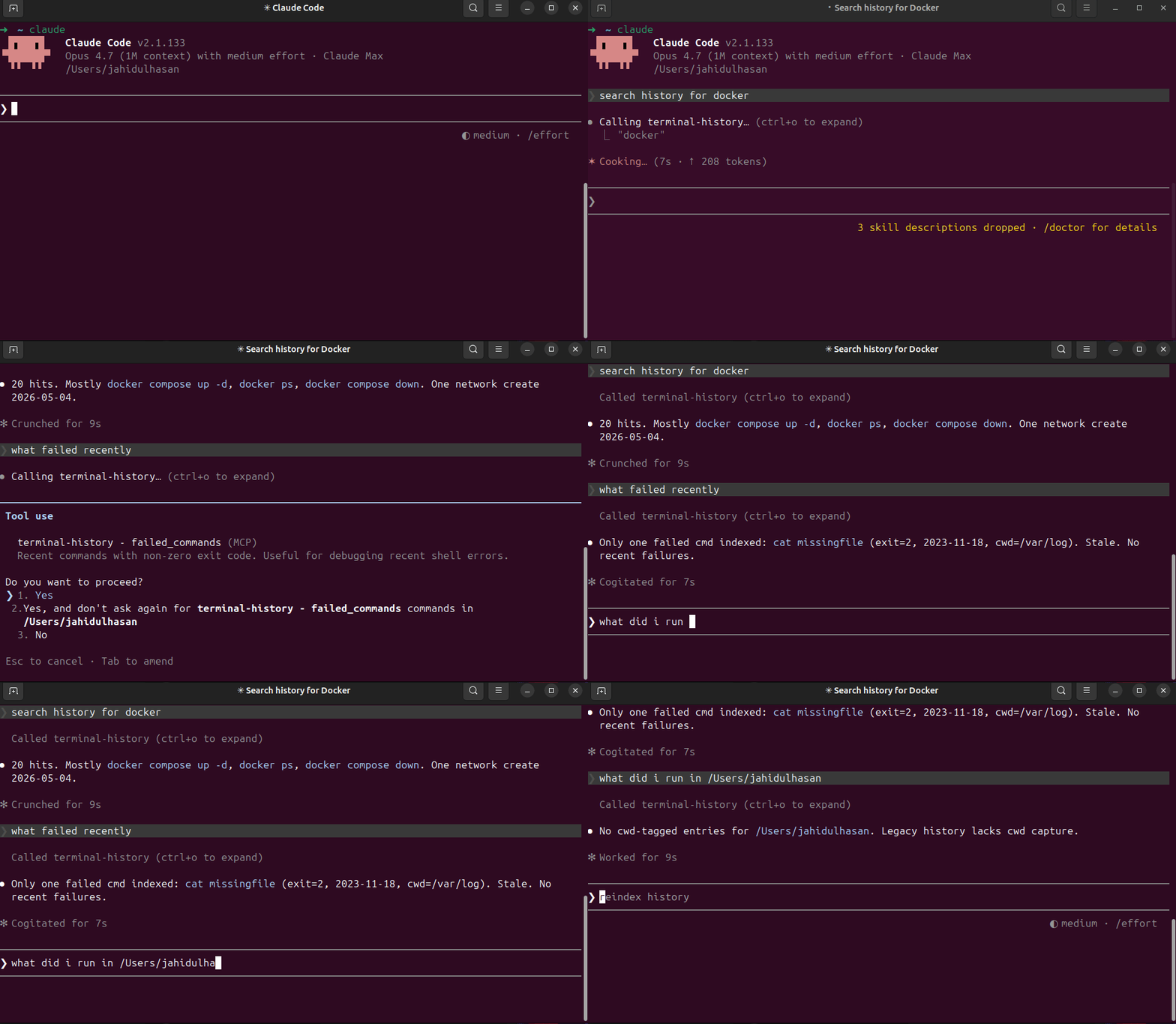
What you can ask
- "When did I last ssh into the staging server?"
- "Show recent failed commands."
- "What did I run yesterday in
/etc/nginx?" - "What's that long docker compose flag I used 3 weeks ago?"
- "Show command chains around
kubectl apply."
Install
(Or run from a clone: git clone … && npm install && npm run build && npm link.)
Wire to Claude Code
Wire to other MCP clients
Anywhere that takes a stdio MCP server config:
Connect via MCPize
Use this MCP server instantly with no local installation:
Or connect at: https://mcpize.com/mcp/terminal-history
Capture cwd + exit code (recommended)
By default zsh/bash history files store only the command. To unlock recent_in_dir and failed_commands, install the shell hook:
The hook appends pipe-delimited lines to ~/.terminal-history-mcp/extended.log. Reindex picks them up.
To inspect the snippet first:
To remove:
Tools
| Tool | What it does |
|---|---|
search_history(query, limit) | FTS5 keyword + prefix match across all history |
recent_in_dir(cwd, limit) | Last N commands in a working dir (needs hook) |
failed_commands(since_ts_ms, limit) | Commands with non-zero exit (needs hook) |
command_chains(query, window_ms, limit) | For each match, list commands within ±5 min |
reindex | Re-parse history files + extended log |
Privacy
Everything is local. The DB lives at ~/.terminal-history-mcp/history.db. Nothing is uploaded.
Secrets are scrubbed before insert. Detected patterns:
- GitHub PATs (
ghp_*,gho_*, …) - OpenAI keys (
sk-*) - Slack tokens (
xox[baprs]-*) - AWS access keys (
AKIA…) Authorization: Bearer/Basic <value>X-*-Token: …,X-*-Key: …,X-*-Secret: …headers- Env vars containing
TOKEN/KEY/SECRET/PASSWORD/API_KEY - CLI flags
--token=…,--api-key …,-k … - URL basic-auth
https://user:pass@host - JWTs (
eyJ.*.*)
If you find a leak, please open an issue. To wipe and re-index after upgrading patterns:
Development
License
MIT — see LICENSE.
Related MCP Servers
Adoption & maintenance
Factual signals from GitHub, npm, and our automated checks — not a rating.
GitHub stars
4
Stargazers on the source repository.
npm downloads
447
Package downloads in the last 30 days.
Last commit
4mo ago
Most recent push to the default branch.
Availability
100%
Our rolling endpoint + install checks that succeeded.
Install check
Passed
Our sandbox started it and listed its tools.
Tools exposed
5
Callable tools this server registers over MCP.
Directory activity
1 views
Config copies, upvotes, and views on AllMCPs.
Reviews
No reviews yet — be the first to share how this listing worked for you.
Frequently Asked Questions about Terminal History MCP
AllMCPs Directory Badge
Showcase your server listing on GitHub or your project documentation. Embed this dynamic SVG badge to highlight official listing status and live engagement.
Badge Style:
Live Dynamic SVG Preview
Markdown (GitHub README)
[](https://allmcps.com/mcp/hasanjahidul-terminal-history-mcp)HTML Embed
<a href="https://allmcps.com/mcp/hasanjahidul-terminal-history-mcp"><img src="https://allmcps.com/api/badge/hasanjahidul-terminal-history-mcp?style=directory" alt="Terminal History MCP on AllMCPs" /></a>Technical Specs & Signals
CategoryCommand Line
PricingFree
11/11 checks healthy over the last 33d
70Quality signal: Great · 70/100How this signal is calculated ▾
Server availability25/25
Verified ownership10/20
Documentation & tools30/30
Adoption & activity5/15
Community engagement0/10
A guidance signal from public completeness & health data — not a user rating. New listings start lower and rise as they add docs, get verified, and grow adoption. Signals we can't observe for a listing are skipped, not counted against it.
Supply-chain signal
No high-severity advisories surfaced by our automated scan.
Critical 0High 0Medium 0Low 0
Scanned 27d ago via OSV.dev · mcpize (npm)
Own this project?
This directory is pre-filled from public sources. Claim via GitHub README, site badge, or DNS TXT to unlock edit access and the Official badge — proof is checked automatically, then reviewed by our team.
Free dofollow backlink: add your website and place the AllMCPs badge on it — no claim needed. We detect it automatically and keep it verified as long as the badge stays live.
Claim & get free dofollowShare & Embed
Add our SVG badge (dark/light directory styles) or embeddable widget to your site.