Turn-level governance observability for Claude Code transcripts. Local-first, no LLM inside.
Quick Install
Automated & IDE SetupCopy the AI prompt to install this server into Claude Code, Cursor, or another agent — or use 1-click editor setup below.
Not yet automatically verified
We haven't yet run this listing's install command through our automated sandbox check. This isn't a red flag — we're steadily working through the catalog.
Manual Client & Custom JSON ConfigExpand JSON ▾
Client Config & Setup
Choose your client or environment
Target File:
💡 Paste the JSON block into your client's configuration file under mcpServers, then restart the application.
Documentation Overview
HarnessScope




Turn-level governance observability for agent harnesses. HarnessScope reads the transcripts your agent harness already writes, judges every turn against your workspace's own operating rules (plan-before-code, verify-before-done, context budget, path boundaries, …), and serves a local viewer that shows how each session traversed that governance structure — passes included, not just violations.
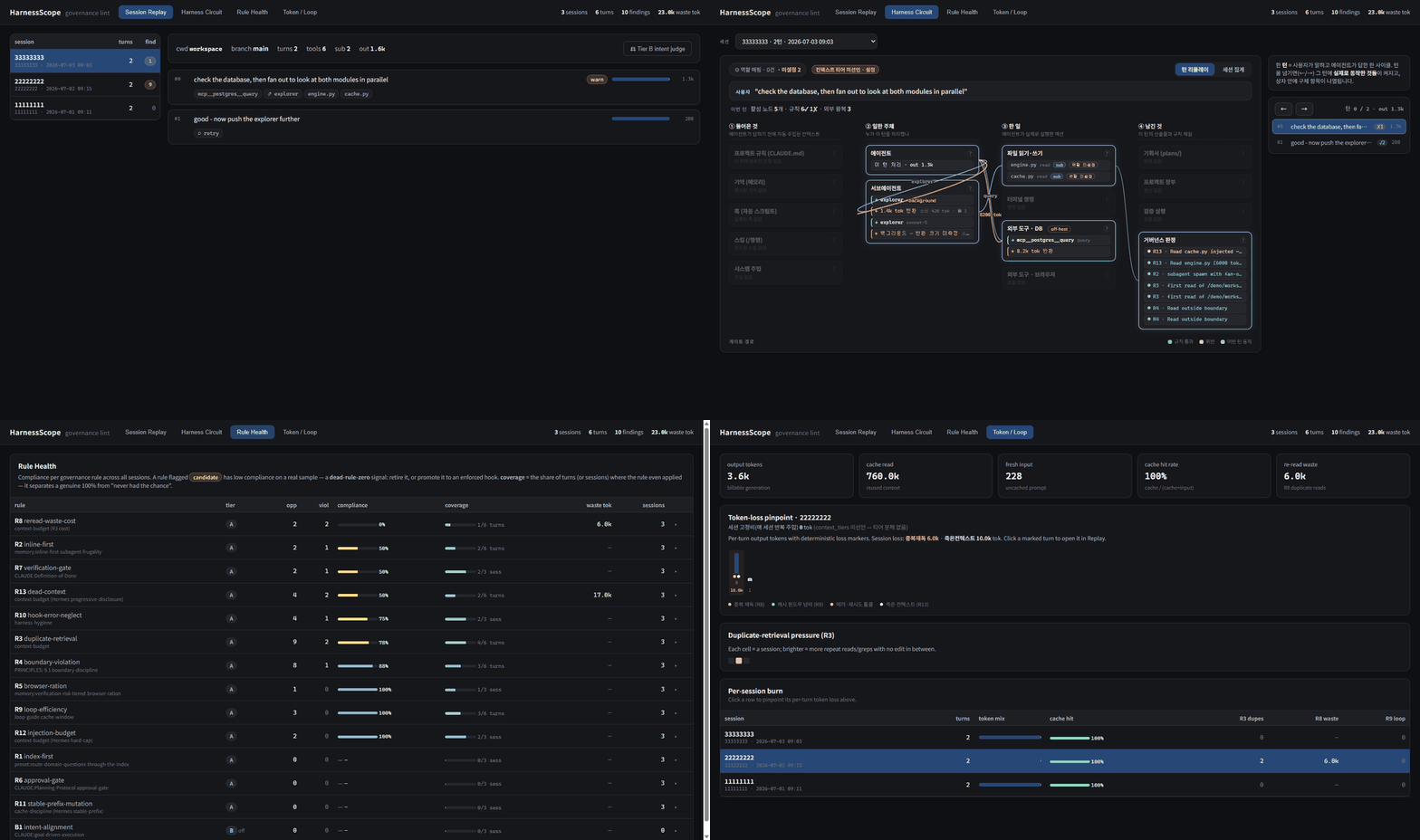
Every frame above is hscope demo: a synthetic corpus, generated locally. Real transcripts
carry full prompt text and are never demo material.
What it found
A session is not one model talking to itself — it spawns subagents, they run on models the parent does not, and a streamed response writes the same request several times. Read that structure naively and the numbers are wrong. These are the corrections, each measured on this project's own transcripts:
| Read naively | Actually | Why |
|---|---|---|
| Re-read waste | 42% of it was false | A subagent reading a file the parent read has not re-read anything — it never had those tokens. Waste is charged per context window (agent_id), not per session. |
| 90,957,147 output tokens | 32,348,242 (2.8× overcount) | A streamed response writes several usage records per requestId. Count the last one — the early ones are partial (2, where the finished response says 31,979). |
| 3,121 turns | 2,438 (28% inflation) | A turn is one user prompt (promptId). Interrupt notices, <command-name> echoes and <bash-input> blocks are user records too. |
| A stable format | 29 harness versions in one month | The transcript format is undocumented and it moves. So hscope doctor fails loudly and names the version that broke it, instead of emitting a wrong number quietly. |
| The re-read waste that survived that | 81% of it was false too | Keyed on (context, path), paging a large file (offset=501) is indistinguishable from reading it twice — and each new chunk was charged as tokens the context already held. 692,292 of 854,334 tok. The key now carries the span. |
The last row is the one that matters most, and it is the youngest: it was found after v0.1.3 shipped, by pointing the tool at its own workspace and reading the answer. The same class of mistake as row one, one layer further down, in code that had already passed its own tests. A tool that claims to catch a governance failure had better survive being aimed at itself — so that is now the standing use of it, and what it said next was worse.
It cost three rules their default. R1 (index-first), R2 (inline-first) and R6 (approval-gate) ask
semantic questions — is this a domain question? was this fan-out warranted? is this code under
that plan? — and answered them with syntactic tests: a keyword in the prompt, the prompt's
character count, the project folder. Measured against real sessions, 84% of R2's violations were
turns invoking a command whose entire job is to fan out. That is not a threshold in need of tuning;
a proxy that does not track the concept cannot be tuned into one. They now ship disabled, each
carrying the false-positive rate it was measured at (precision, a first-class field on the rule,
surfaced in the model, in rule_health, and as a hoverable badge). Off is not the point — off, and
here is why, with the number is the point. A rule silently shipped on is how a governance screen
becomes noise nobody trusts, which is the failure this project exists to name.
R8 stopped reporting a compliance rate for the same reason. Its opportunities are its violations by construction — a re-read counter never observes a compliant re-read — so "0% compliance" was an identity, not a finding: a number that reads like an indictment and says nothing. It reports its quantity now, and no ratio.
These are observations of one corpus, not a benchmark — your numbers will differ. The point is
that they are readable at all: metrics know quantities, a bill knows money, and neither knows the
word "subagent". Full reasoning: docs/MULTI-AGENT.md.
How HarnessScope compares
HarnessScope watches a different layer than most "LLM observability" tools: not the app you instrumented, but the agent harness itself, read from its own transcripts.
| Tool | Watches | How it gets data | Runs |
|---|---|---|---|
HarnessScope (hscope) | Governance compliance + token flow of Claude Code sessions, turn by turn | Reads transcript JSONL — after the fact, or live as the harness appends it (--watch). Zero instrumentation, no hooks into the session | Local, no LLM inside |
ccusage and similar CLIs | Token/cost totals from the same transcripts | Reads transcript JSONL | Local |
| LangSmith / Langfuse | Traces of LLM calls your application makes | SDK instrumentation you write | SaaS (Langfuse also self-host) |
| Arize Phoenix (OpenInference) | OTel traces of LLM apps you instrument | OTel SDK instrumentation | Local / self-host |
Claude Code /cost, OTel metrics | The current session's spend; aggregate counters | In-harness | In-harness |
The row nobody else covers: did the session follow the workspace's operating rules — plan-before-code, verify-before-done, path boundaries, context budget. Cost tools tell you what a session spent; tracing tools tell you what your app's LLM calls did; HarnessScope tells you whether the agent worked the way your workspace says agents must work.
Try it — 30 seconds, none of your data
Three invented sessions: one compliant, one wasteful (re-reads, dead context, a boundary read, a completion declared with nothing verifying it), and one fan-out (two subagents — one cites what it read, one does not; one spawned in the background — plus an off-host MCP round trip).
The corpus is held to the same standard as real data: it must satisfy hscope doctor, so a
generator writing a shape the parser does not expect gets caught by the invariants. It already
earned that twice — a requestId reused across sessions (which hscope correctly read as one API
call replayed by a fork), and a padded agentId: that the parser's regex swallowed whole.
Then point it at your own sessions
No flags, no config file. Two things it will not get wrong:
- The port is found, not assumed. 8000 is a reasonable default and on some Windows machines it is a reserved range (WinError 10013). A first impression should not be a stack trace.
- It says that transcripts expire. The harness deletes them after about 30 days, and ingest is what makes them permanent. Ingest less often than that and you lose sessions silently — a session never ingested is indistinguishable from one that never happened. The first run prints how old your oldest transcript is and prescribes a cadence.
It also announces which rules it is about to judge with — neutral presets, or the workspace model it found on disk. Claiming "presets" while quietly applying a model would be the same lie as a silent fallback.
Everything is local-first: no transcript data leaves your machine (the one exception — the
opt-in Tier B LLM judge — is off by default and fires only on an explicit per-session click). The
tool never writes to your projects, your .mcp.json or your harness settings: a tool that observes
governance must not reshape the surface it observes.
Watch it live — and only watch
The harness appends to the transcript while the session is still going, so the data for a live view
was always there — what was missing was the loop. --watch scans mtimes every 2s, hashes only the
files that moved (mtime is the trigger; the hash is still the decision), re-judges only those
sessions, and the viewer refreshes itself. A tick where nothing moved parses nothing, hashes nothing
and prints nothing.
It observes; it does not intervene. No hook is installed in your session, nothing is blocked,
and a violation on screen is one a human has to act on. Blocking would mean a PreToolUse hook —
which would make the "no hooks into the session" row above false, bind the tool to one harness, and
let a wrong verdict stop your work (post-hoc, a bad call is a bad badge; live, it is a stopped
hand). Seeing a re-read loop or a fan-out at 5k tokens instead of 40k is worth having; it does not
require the tool to hold the brake.
The turn that is still running is shown, not judged. Judging it would break hscope's own rules: a verification-gate rule would fire on the very turn that is about to run the check — a verdict overturned three seconds later — and a streamed response's token usage is not final until its last record lands. So the live turn wears an in flight · not judged badge and its verdict appears when the turn ends. A verdict deferred must not become a verdict skipped: if you interrupt that turn the file simply goes quiet, and hscope judges it once its liveness window lapses rather than leaving it withheld forever.
What you get
Related MCP Servers
Reviews
No reviews yet — be the first to share how this listing worked for you.
Frequently Asked Questions about HarnessScope
AllMCPs Directory Badge
Showcase your server listing on GitHub or your project documentation. Embed this dynamic SVG badge to highlight official listing status and live engagement.
Badge Style:
Live Dynamic SVG Preview
Markdown (GitHub README)
[](https://allmcps.com/mcp/harnessscope)HTML Embed
<a href="https://allmcps.com/mcp/harnessscope"><img src="https://allmcps.com/api/badge/harnessscope?style=directory" alt="HarnessScope on AllMCPs" /></a>