Long-term memory for AI agents: bitemporal fact ledger, contradiction detection, explainability.
Quick Install
Automated & IDE SetupCopy the AI prompt to install this server into Claude Code, Cursor, or another agent — or use 1-click editor setup below.
One-click editor setup isn’t available for this listing yet — we don’t have a confirmed install command, and we’d rather show nothing than point your editor at the wrong package or host. Follow the project’s own setup instructions, linked above.
Manual Client & Custom JSON ConfigExpand JSON ▾
No confirmed setup config for this listing yet. We only publish a config block when the install details come from the project itself — its README, its docs, or a verified owner. We haven’t found those for haki, and we’d rather show nothing than a guess you’d paste into your client. Follow the project’s own setup instructions for the current steps.
Documentation Overview
Haki
Reliable memory for AI agents
Context with proof: every fact carries a date, a source, and a status.





Haki gives any AI agent a memory that lasts for months — that tells current from stale — and that can prove every recollection.
Quickstart · Coded agent · Cursor · n8n · Gateway · API · gethaki.space
What Haki does
Today, an AI agent remembers nothing beyond a single conversation: every new session starts from scratch, re-explains context, and can apply a preference that went stale months ago with no way to tell.
Haki is an open-source (Apache-2.0), persistent memory layer, independent of
whatever model or framework you use: it extracts structured facts from an
agent's exchanges, keeps them current over time, and hands every new request
a relevant, dated, sourced context packet. It stays entirely under your
control — one docker compose up installs it, and your existing agent,
model, and infrastructure don't change.
The problem
Teams building AI agents in production run into the same limits, every time:
| Symptom | Consequence |
|---|---|
| The user has to repeat information already given | Degraded experience, churn |
| The agent applies a preference that was overridden long ago | Wrong answer, broken trust |
| The entire history gets replayed into the prompt on every call | High cost and latency, useful context diluted |
| No way to explain why a piece of information was used | No traceability, no debugging |
| One customer's data can leak into another's context | Security incident |
Existing approaches (generic vector stores, conversation summaries) work in a demo but degrade after a few weeks of real usage: stale information served as current, undetected contradictions, zero explainability.
The approach
A fact ledger, not a conversation history. Haki doesn't archive raw messages to replay later: it extracts structured facts from them — preferences, constraints, decisions — each one linked back to the source event that grounds it.
Bitemporality and supersession. Every fact carries an explicit validity date and status. When information changes, the old fact is marked superseded — never silently deleted, never served again as current. On an unresolved contradiction, both versions are held back and flagged rather than served at random.
Systematic traceability. Every context packet injected comes with its sources, its validity dates, and a trace explaining which memories were kept, excluded, or blocked, and why. "Why did the agent use this piece of information?" has a verifiable answer in under a minute.
Quickstart
Prerequisites: Docker and uv. The defaults in
.env.exampleare enough to get started — no key required. For custom configuration (a real LLM key, etc.), copy that file to.env.
If anything goes wrong,
bash scripts/doctor.shdiagnoses Docker, the containers, Postgres,.env, migrations, and the API in one command — read only, no side effects, safe to re-run as often as needed.
In a second terminal, verify everything works:
haki verify runs a complete scenario in a few seconds: a preference, then a
change of mind in the same conversation, then a new conversation that
queries memory. It must serve the current value, keep the old one at status
superseded instead of erasing it, and tie the whole thing to a trace.
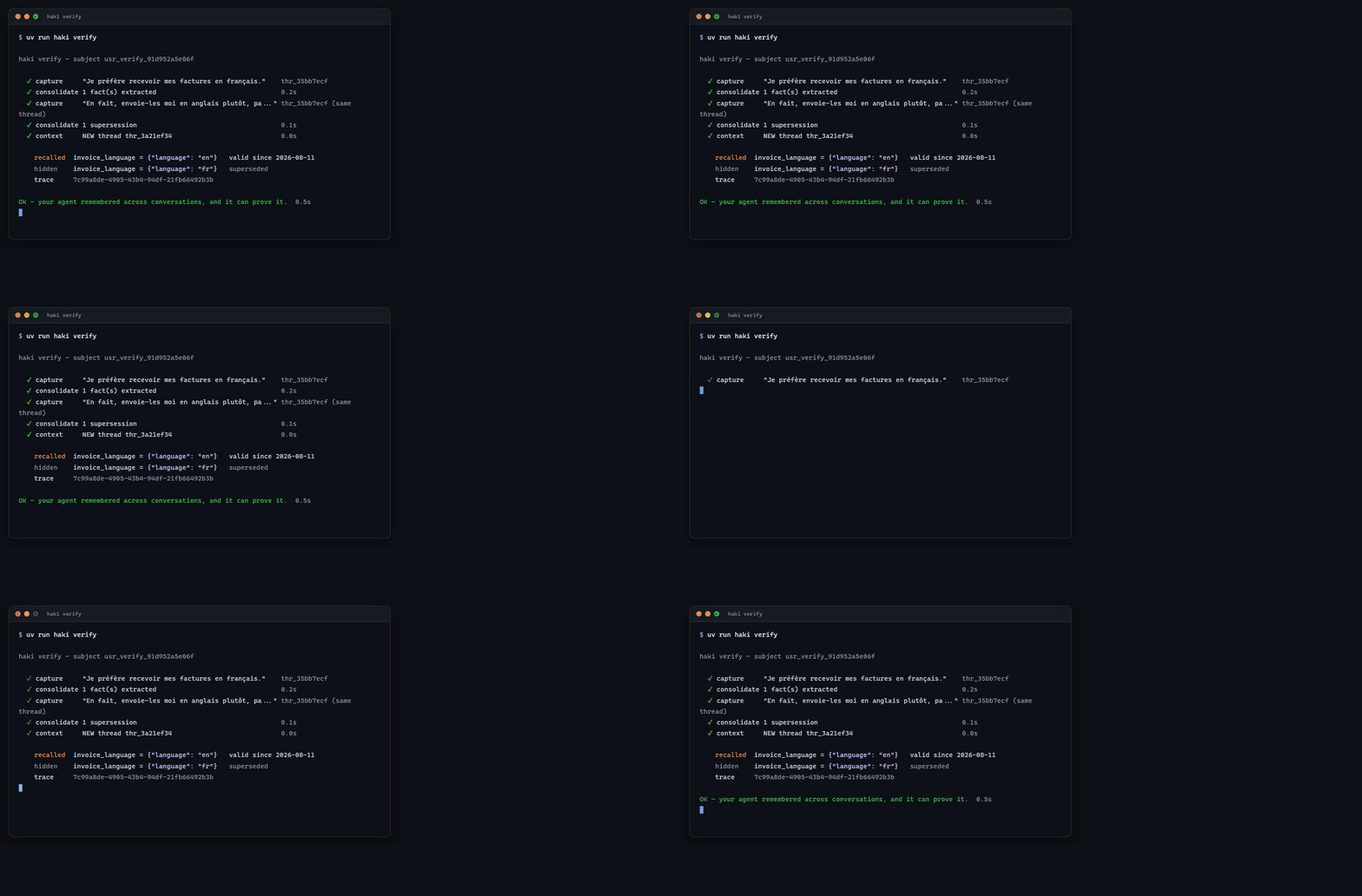
The command exits 1 if the stale value is still served, or if the old value isn't found marked as superseded: serving the right value by accident, with no link between the two facts, isn't a memory that actually updates.
Multilingual by default: local embeddings are multilingual (French, English, Spanish, and about fifty other languages) — the demo scenario above is captured in French on purpose, and a query in a different language still finds it. Verified end-to-end (
scripts/check_multilingual.py).
Four ways to use Haki
1. Coded agent — SDK and CLI
Python or TypeScript developers. A few lines around your existing LLM call.
SDK details (methods, async, errors)
capture(events, idempotency_key)— idempotent ingestion: a network retry never creates a duplicate;context(subject_id, query, project_id, budget_tokens=2000)— the ContextPacket, withtrace_id;inspect(trace_id)— why these memories were chosen;timeline(subject_id, project_id),consolidate_subject(...),facts(...),consolidate(),forget(...),health();- Async variant:
AsyncHakiClient; - Typed errors:
HakiApiError(error_type,field,status_code),HakiConnectionError.
CLI: haki login (device-code sign-in, see below), haki connect
(configure and test with a key in hand), haki verify (timed memory test),
haki status (API health), haki mcp (Cursor packaging).
haki login — for a Cloud account, the hk_ key is only ever shown
once, at provisioning: the terminal has no way to retrieve it again. The
device-code flow (RFC 8628) closes that gap without a new secret. The CLI
shows an XXXX-XXXX code and opens
<HAKI_CONSOLE_BASE_URL>/cli-auth with the code already filled in
(verification_uri_complete); the code stays on screen too, so it can be
typed by hand from a phone. You approve it in the console, already signed
in — the terminal then receives a fresh, dedicated key, not the
console's own — revoking that terminal from Keys disconnects nothing else.
The key is served exactly once, by the poll that consumes it.
Server-side, HAKI_CONSOLE_SERVICE_KEY must be configured (it's what
authenticates the console against /v1/cli/device/approve). Wrong codes are
rate-limited per person, not per IP: every approval arrives from the same
address (the console's own backend), so a per-IP counter would be a shared
bucket any single user could exhaust for everyone else.
TypeScript SDK (parity with the Python SDK)
Same methods, same typed errors, same <haki_memory> block — zero runtime
dependency (native fetch, Node 18+).
CLI haki-ts (node dist/cli.js …): connect, verify, status — same
~/.haki/config.json file as the Python CLI, the two are interchangeable.
Runnable example:
sdk/typescript/examples/basic-agent.mjs.
2. Cursor — MCP server
Cursor users. One-click install, no key to copy by hand.
- The "Add Haki to Cursor" deeplink installs the MCP server;
- The Project Rule (
.cursor/rules/haki.mdc) tells the agent when to remember and when to recall; - Cursor then keeps decisions, conventions, and resolved bugs across sessions.
Four tools show up in Cursor:
Related MCP Servers
Reviews
No reviews yet — be the first to share how this listing worked for you.
Frequently Asked Questions about Haki
AllMCPs Directory Badge
Showcase your server listing on GitHub or your project documentation. Embed this dynamic SVG badge to highlight official listing status and live engagement.
Badge Style:
Live Dynamic SVG Preview
Markdown (GitHub README)
[](https://allmcps.com/mcp/haki)HTML Embed
<a href="https://allmcps.com/mcp/haki"><img src="https://allmcps.com/api/badge/haki?style=directory" alt="Haki on AllMCPs" /></a>