acb-tax-mcp








An MCP server that computes Canadian adjusted cost base (ACB) and capital gains from your trade history: average-cost tracking, per-disposition gains, and superficial-loss detection, returned as structured JSON.
Ask your assistant "what are my capital gains for 2024?" or "did I trigger any superficial losses?" and it runs the CRA rules over your transactions instead of you wrestling a spreadsheet.
⚠️ This is a calculation aid, not tax advice. Verify every number before you file, and consult a professional for anything non-trivial. See Limitations.
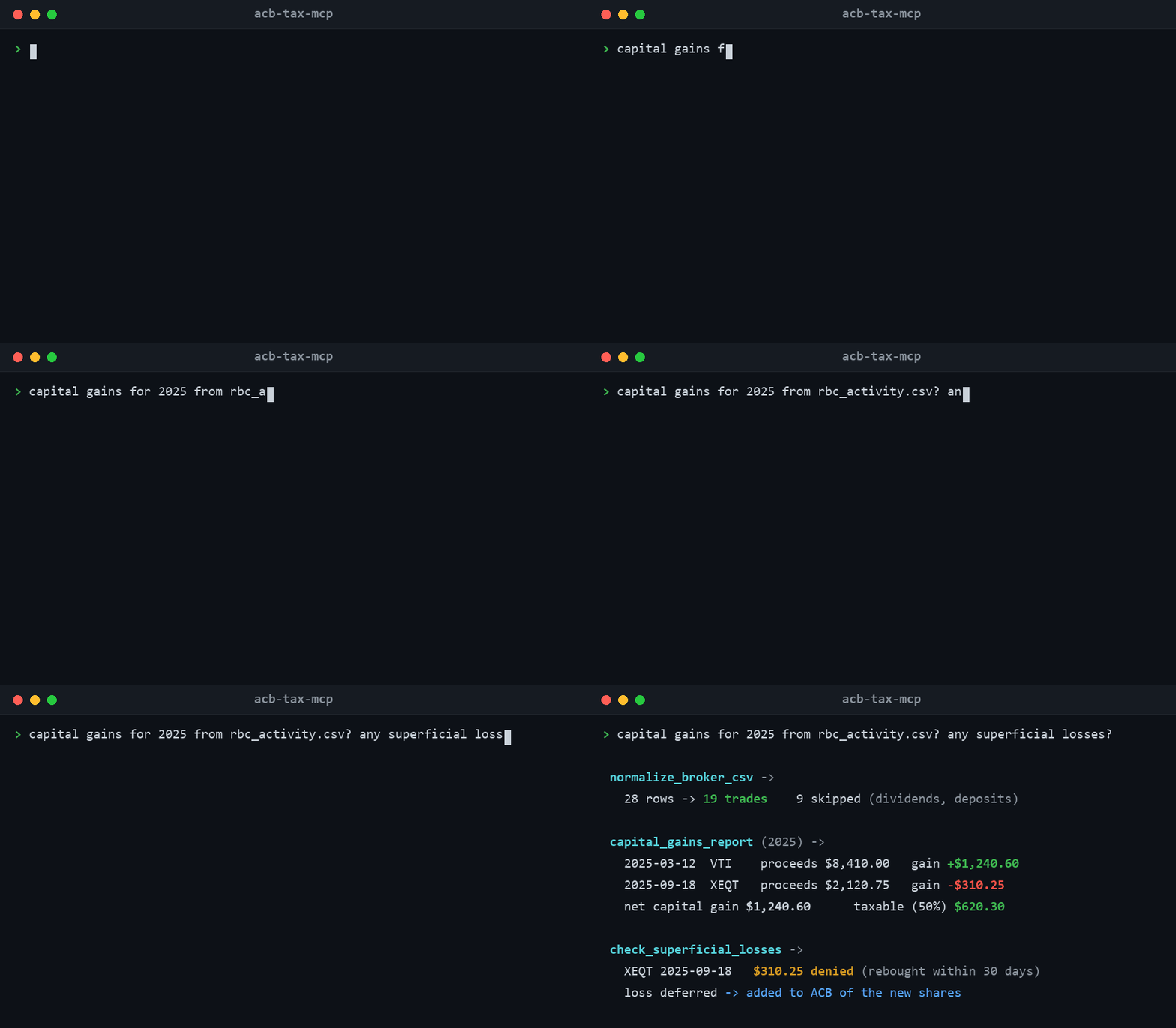
Works with Claude Desktop, Claude Code, Cursor, or any MCP-compatible client.
Features
| Tool | What it does |
|---|---|
calculate_acb | Full calculation: current holdings (shares, total ACB, ACB per share), every disposition with proceeds/ACB/outlays/gain, per-year summaries, and warnings. |
acb_summary | Just current holdings and their book cost (handy for unrealized gains against a market price). |
capital_gains_report | A Schedule-3-style report for one tax year: each disposition plus totals, net capital gain, and taxable gain (50% inclusion). |
schedule3_summary | One aggregated row per security in the exact Schedule 3 column shape: shares, gross proceeds, ACB, outlays (commissions), gain/loss after the superficial-loss rule, acquisition years, and totals -- the lines you actually transcribe when filing. |
check_superficial_losses | Flags losses caught by the 30-day rule, with the denied (deferred) amount per event. |
unrealized_gains | Current holdings' ACB against market prices you supply: per-position and total unrealized gain in dollars and percent (foreign-quoted securities take a price + fx_rate pair). |
normalize_broker_csv | Turns a raw broker activity export into clean transactions: maps common column aliases ("Trade Date", "Activity Type", "Quantity"...), keeps buy/sell rows (DRIP counts as a buy), cleans "$1,200"/"(9.95)" formats, and reports every skipped row with a reason. |
Implements the CRA average-cost method (all shares of a security pool into one ACB; gains are against the average, not FIFO) and the superficial-loss rule (loss denied and deferred into the ACB of substitute shares bought within 30 days before or after the sale). Commissions and per-trade CAD FX conversion are handled.
Install
No install needed to try it: open the Glama server page and use Try in Browser to call the tools against a sandbox with a couple of sample transactions.
Requires Python 3.10+.
Run from source without installing:
Configure your client
Claude Desktop
In claude_desktop_config.json:
Claude Code
Transactions
Give the tools a list of transactions (or a path to a .csv / .json file).
| Field | Required | Notes |
|---|---|---|
date | yes | YYYY-MM-DD |
action | yes | buy or sell |
security | yes | ticker / symbol (pooled by this key) |
shares | yes | positive number |
price | yes | price per share, in the trade currency |
commission | no | trade commission (default 0) |
currency | no | e.g. USD (default CAD) |
fx_rate | no | trade currency to CAD, e.g. 1.35 for USD (default 1) |
note | no | free text |
CSV uses the same column names as a header row. If your broker's export uses different headers ("Trade Date", "Activity Type", "Symbol", "Quantity"...), run it through normalize_broker_csv first.
Want something to try immediately? examples/sample_trades.csv is a ready-made broker-style export with aliased headers, $-formatted numbers, a DRIP row, a dividend row (skipped with a reason), a USD trade with FX, and a superficial-loss scenario. Ask your assistant to clean it with normalize_broker_csv and run calculate_acb on the result.
Usage
- "Calculate the ACB and capital gains for the trades in
~/trades.csv." - "What's my capital-gains report for 2024?"
- "Did any of these sales trigger a superficial loss?"
- "What's my current book cost for XEQT?"
- "Here's my RBC activity export -- clean it up and compute my ACB."
- "XEQT is at $35.20 and VTI at $305.40 USD (1.37 CAD): what are my unrealized gains?"
Example
Superficial loss example
Buy 100 @ $10, sell 100 @ $8 (a $200 loss), then rebuy 100 @ $8 nine days later:
The $200 loss is denied and added to the ACB of the repurchased shares (new ACB per share becomes $10), so it is recovered on a future sale.
Limitations
Read these before relying on the output.
- Average-cost, per identical property. Feed all trades of the same security across your accounts together, since the CRA rule pools identical property at the taxpayer level. The tool pools by the
securitykey you provide. - Superficial losses use the standard least-of-three test with a single forward pass. Deeply chained or overlapping superficial losses can need case-by-case professional judgment.
- Not yet handled: return of capital, reinvested/notional distributions (ETF phantom distributions), stock splits, options, and other corporate actions. These affect ACB and are on the roadmap.
- FX must be supplied per transaction (use the transaction-date rate). The tool does not fetch exchange rates.
- Registered accounts (TFSA/RRSP) do not have capital gains; this tool is for non-registered (taxable) accounts.
- Not tax advice.
Development
License
MIT. See LICENSE.