Run Hansl/Gretl econometrics workflows via MCP with GUI launch and artifacts.
Quick Install
Automated & IDE SetupCopy the AI prompt to install this server into Claude Code, Cursor, or another agent — or use 1-click editor setup below.
Not yet automatically verified
We haven't yet run this listing's install command through our automated sandbox check. This isn't a red flag — we're steadily working through the catalog.
Manual Client & Custom JSON ConfigExpand JSON ▾
Client Config & Setup
Choose your client or environment
Target File:
💡 Paste the JSON block into your client's configuration file under mcpServers, then restart the application.
Capabilities & Tool Schemas (12)
Inspect callable tools, capabilities, and parameters exposed to AI agents by Gretl MCP.
gretl_versionchecks Gretl availability.
gretl_gui_versionchecks Gretl GUI availability.
gretl_gui_launchlaunches the visible Gretl desktop GUI.
gretl_capabilitieslists installed Gretl commands, functions, and package help.
gretl_run_scriptruns a Gretl/Hansl script and requires GUI opening by default.
gretl_run_commandsruns raw Gretl command lines and requires GUI opening by default.
Documentation Overview
Gretl MCP


Built for AI agents: run Hansl/Gretl workflows, get graph screenshots, and view calculations in the real Gretl GUI.
It lets MCP clients run Gretl/Hansl scripts, raw Gretl command lines, existing
.inp files, package operations, package builds, help lookups, dataset
summaries, and OLS models. The generic gretl_run_script tool is the main path
for prompt-generated Gretl workflows: the client writes Hansl from the user's
request, runs it through Gretl, and returns Gretl's output plus generated
artifacts.
Keywords: Claude Gretl, MCP econometrics, Hansl AI, Gretl GUI automation.
Key Features
- Scriptable Gretl control through
gretlcli. - GUI-first workflow tools that launch
gretl.exeand fail if the GUI did not open. - Capability discovery for Gretl commands, functions, and package commands.
- Generic execution tools for full Hansl scripts, command lists, and local
.inpscript files. - Package tools for
pkgandmakepkgworkflows from the Gretl Function Package Guide. - High-level tools for version checks, command help, dataset summaries, and OLS.
- Stdio transport, compatible with common MCP clients.
- Safe defaults for arbitrary scripts, with documented escape hatches.
Requirements
- Node.js 20 or newer.
- Gretl 2026b or newer with
gretlcliavailable. - An MCP client that supports stdio servers.
Getting Started
One-command install (after npm publish):
Local install from GitHub:
Then point your MCP client at the built server:
Visual Walkthrough
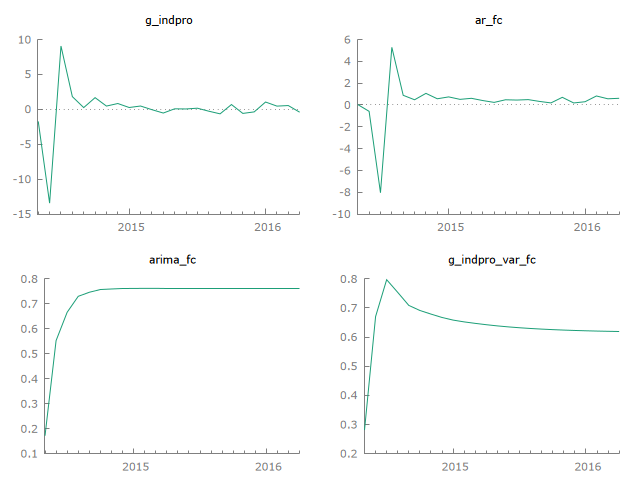
Forecast output example (actual vs forecast):
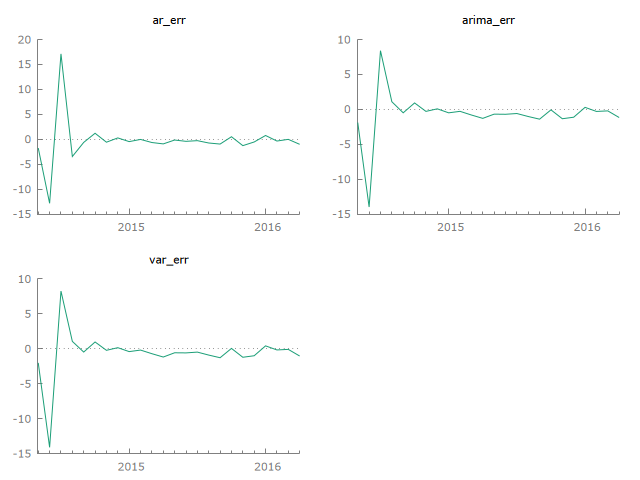
Forecast error panel:
Install Gretl
Windows
Download Gretl from the official page: https://gretl.sourceforge.net/win32/
For a no-admin setup, extract the zip archive to:
Verify:
macOS
Install via Homebrew (if available on your setup) or the Gretl project site:
Linux
Install from your distro packages, then verify:
MCP Client Config
Use this JSON config for stdio MCP clients:
After npm publication, the standard MCP config is:
Client Setup
Claude Code
Local GitHub build:
npm install path:
Codex
Local GitHub build:
npm install path:
Cursor, Windsurf, Cline, and similar clients
Use the local JSON config above. If the client asks for a command and args separately, use:
VS Code
Try It Quickly
Ask your agent:
The MCP response includes generated artifact paths, workspace/script paths, and GUI launch details.
Configuration
gretl-mcp supports environment variables and CLI flags.
Environment variables:
GRETL_CLI: optional path togretlcliorgretlcli.exe.GRETL_GUI: optional path togretlorgretl.exe.GRETLMCP_WORKSPACE_DIR: optional directory for Gretl run workspaces.GRETLMCP_OPEN_GUI: set tofalseto stop tools from opening Gretl windows by default.GRETLMCP_REQUIRE_GUI: set tofalseto allow CLI-only success when GUI opening is disabled or unavailable.GRETLMCP_ENFORCE_GUI_ONLY: set totrueto reject any headless workflow request.
CLI options:
Tools
gretl_version: checks Gretl availability.gretl_gui_version: checks Gretl GUI availability.gretl_gui_launch: launches the visible Gretl desktop GUI.gretl_capabilities: lists installed Gretl commands, functions, and package help.gretl_run_script: runs a Gretl/Hansl script and requires GUI opening by default.gretl_run_commands: runs raw Gretl command lines and requires GUI opening by default.gretl_run_script_file: runs an existing local.inpfile and requires GUI opening by default.gretl_package: runs nativepkgactions such as install, query, run-sample, unload, remove, and index.gretl_make_package: builds.gfnor.zipfunction packages withmakepkg.gretl_help: returns Gretl help for a command.gretl_dataset_summary: opens a local dataset, returns summary statistics, and requires GUI opening by default.gretl_ols: opens a local dataset, estimates an OLS model, and requires GUI opening by default.
Safety
gretl_run_script, gretl_run_commands, and gretl_run_script_file default to
safeMode: true, which blocks common shell-like commands and absolute file
reads/writes. This is a guardrail, not a complete sandbox. Use safeMode: false
only for trusted local work.
Dataset helper tools reject URLs and require paths to existing local files.
Examples
examples/homework-variance-ftest.inp: Gretl script for a homework-style F test with critical-value and p-value calculations.examples/forecasting-dashboard.inp: Macro forecasting dashboard with AR, ARIMA, VAR, forecast plots, and an RMSE/MAE comparison table.examples/specification-curve-analysis.inp: 32-model robustness sweep for an education coefficient with curve, confidence bands, and histogram plots.
Use Cases
- Econometrics teaching aid with visible Gretl GUI workflows.
- Textbook replication and assignment automation.
- Forecasting dashboards (AR/ARIMA/VAR) with artifact outputs.
- Monte Carlo and stress-testing workflows for research.
- Reproducible research pipelines via saved scripts and Gretl
.inpfiles.
GUI Mode
By default, the workflow tools open their generated Hansl script in the real
Gretl desktop app while also returning structured MCP output. More importantly,
they now treat GUI opening as required outside CI. If the Gretl window does not
open, the tool returns ok: false even when the CLI script itself succeeded.
Set displayInGretl: false and requireGui: false on a tool call, or set
GRETLMCP_OPEN_GUI=false together with GRETLMCP_REQUIRE_GUI=false, to allow
CLI-only automation.
For clients that should never bypass the desktop app, set
GRETLMCP_ENFORCE_GUI_ONLY=true or launch the server with --enforce-gui-only.
In that mode, the workflow tools reject displayInGretl: false and
requireGui: false instead of honoring them.
gretl_gui_launch can also be called directly. It starts the real Gretl desktop
application, opens a local dataset/script file, or writes a prompted Hansl script
and launches Gretl with --run.
This is not full click-by-click GUI control by itself. If you want the agent to observe screenshots, click menus, and make choices exactly like a human, the MCP client also needs desktop automation or computer-use capability. Gretl MCP now provides the Gretl-side launch surface for that workflow.
Local Development
Related MCP Servers
Adoption & maintenance
Factual signals from GitHub, npm, and our automated checks — not a rating.
GitHub stars
3
Stargazers on the source repository.
Last commit
3mo ago
Most recent push to the default branch.
Tools exposed
12
Callable tools this server registers over MCP.
Reviews
No reviews yet — be the first to share how this listing worked for you.
Frequently Asked Questions about Gretl MCP
AllMCPs Directory Badge
Showcase your server listing on GitHub or your project documentation. Embed this dynamic SVG badge to highlight official listing status and live engagement.
Badge Style:
Live Dynamic SVG Preview
Markdown (GitHub README)
[](https://allmcps.com/mcp/gretl-mcp)HTML Embed
<a href="https://allmcps.com/mcp/gretl-mcp"><img src="https://allmcps.com/api/badge/gretl-mcp?style=directory" alt="Gretl MCP on AllMCPs" /></a>Technical Specs & Signals
CategoryDeveloper Tools
11/15 checks healthy over the last 45d
48Quality signal: Fair · 48/100How this signal is calculated ▾
Server availabilityNot measured
Not scored for repo-hosted servers — we can't reach the running server, only its GitHub page. Hosted MCP endpoints are health-checked live.
Verified ownership10/20
Documentation & tools24/30
Adoption & activity2/15
Community engagement0/10
A guidance signal from public completeness & health data — not a user rating. New listings start lower and rise as they add docs, get verified, and grow adoption. Signals we can't observe for a listing are skipped, not counted against it.
Supply-chain signal
No high-severity advisories surfaced by our automated scan.
Critical 0High 0Medium 0Low 0
Scanned 1d ago via OSV.dev · gretl-mcp@latest (npm)
Own this project?
This directory is pre-filled from public sources. Claim via GitHub README, site badge, or DNS TXT to unlock edit access and the Official badge — proof is checked automatically, then reviewed by our team.
Free dofollow backlink: add your website and place the AllMCPs badge on it — no claim needed. We detect it automatically and keep it verified as long as the badge stays live.
Claim & get free dofollowShare & Embed
Add our SVG badge (dark/light directory styles) or embeddable widget to your site.