Tracks documented and undocumented Microsoft Graph API schema changes, with an MCP Apps visualiser
Quick Install
Automated & IDE SetupCopy the AI prompt to install this server into Claude Code, Cursor, or another agent — or use 1-click editor setup below.
Not yet automatically verified
We haven't yet run this listing's install command through our automated sandbox check. This isn't a red flag — we're steadily working through the catalog.
Manual Client & Custom JSON ConfigExpand JSON ▾
Client Config & Setup
Choose your client or environment
Target File:
💡 Paste the JSON block into your client's configuration file under mcpServers, then restart the application.
Documentation Overview
Microsoft Graph Atlas MCP
An MCP server that tracks schema changes across the Microsoft Graph API — both the changes Microsoft documents and the ones it doesn't. Covers the full Entra ID, Entra ID Governance, Identity & Access Management, Entra Agent ID, and Information Protection surface, seeded with a year of history at launch. Ships with an interactive schema visualiser rendered inside the MCP client via MCP Apps.



Why
Microsoft Graph evolves continuously across v1.0 and beta. The official changelog is curated and incomplete — undocumented schema changes (new properties, removed relationships, new enum values) land in production before they're announced. This MCP closes that gap by diffing the actual $metadata CSDL daily, and backfills a year of history from both a public community tracker and the official changelog.
Data sources
| Source | What it is | Granularity |
|---|---|---|
seed-entra-ms | One-time import of changes.entra.ms's historical CSDL diffs | Property-level |
backfill-graph-changelog | One-time scrape of Microsoft's official "What's New" history, classified into 8 IAM object families | Feature-level |
self | Daily $metadata fetch + diff, ongoing from first collection | Property-level |
Two further tables enrich every change with real-world permission/role context: permissions (1,036 scopes scraped from Merill's Graph Permissions Explorer) and roles (135 Entra built-in roles and their microsoft.directory/* actions, from the Microsoft Learn permissions reference), cross-referenced into role_permission_map.
Quick start (npx)
Requires Node.js 22+ (uses the built-in node:sqlite). Add to your MCP client — e.g.
Claude Desktop's claude_desktop_config.json:
That's the whole setup: on first launch the server auto-downloads the latest published
database (change history, permissions, roles, embeddings) from this repo's GitHub Releases
into ~/.graph-atlas-mcp/, and keeps it current against the daily release cadence.
Developing from source
Populate the database (first run)
This produces graph-atlas.db in the project root. npm run seed uses a gitignored,
one-off local script (scripts/seed-from-entra-ms.js) — it isn't part of the committed repo.
The DB uses WAL journal mode so these collection scripts can run concurrently with an MCP client that already has the file open (e.g. Claude Desktop) without lock contention.
Optional: semantic search
search_changes runs in hybrid (keyword + semantic) mode automatically if OPENAI_API_KEY
is set, and degrades to keyword-only otherwise:
Re-running npm run embed after a collect only embeds new records — it's incremental, not a full re-embed.
Connect a source checkout to an MCP client
When developing, point the client at your build and local DB instead of the npm package:
GRAPH_ATLAS_DB points the server at an explicit DB file. Without it, the server looks for
~/.graph-atlas-mcp/graph-atlas.db (auto-downloaded from the latest GitHub Release), then
falls back to ./graph-atlas.db in the current working directory.
Tools
| Tool | Purpose |
|---|---|
search_changes | Natural-language or keyword search across all sources. Hybrid (keyword + semantic via Reciprocal Rank Fusion) when an OpenAI key is configured, keyword-only otherwise. |
get_recent_changes | Structured query — filter by date, endpoint, object type/name, change kind, source. |
get_object_history | Full change history for one object (e.g. group, accessPackage), oldest to newest. Matches case-insensitively across sources. |
get_change_detail | Full detail for a single change record, plus related changes from the same day/object. |
get_snapshot_summary | Entity/property/enum counts per snapshot — "how big is Graph API right now?" |
get_server_info | About the server itself — running version, changelog entry, data freshness, and the two release channels (daily calendar-tagged database releases vs semver npm server releases). |
get_permission_context | Which permissions touch a Graph object, what each unlocks, who can grant them (heuristic — see limitations), and its recent changes. |
schema_change_report | Structured JSON (no UI) of the schema/permission/role graph — nodes + edges + change-activity counts, for reasoning over. |
visualize_schema_graph | Opens the interactive Graph Atlas visualiser inside the MCP client (via MCP Apps) — a D3 force-directed graph with search, expand, and per-node detail. See below. |
expand_schema_node | Expands one node of the open visualiser (or feeds the model a one-node neighborhood delta) — powers the app's double-click/Expand interactions. |
search_schema_objects | Name search across entity types, permissions, and roles — resolves fuzzy names to canonical node ids; powers the app's search box. |
get_node_timeline | App-only: compact change timeline for the visualiser's detail panel (the model uses get_object_history instead). |
Example queries
- "What are the recent changes to Agent ID Graph APIs?"
- "Have there been changes to groups APIs for nesting?"
- "What's the history of the accessPackageSuggestion resource?"
- "What changed in the last 7 days on the beta endpoint?"
- "Show me sensitivity label or DLP policy changes"
Schema visualiser
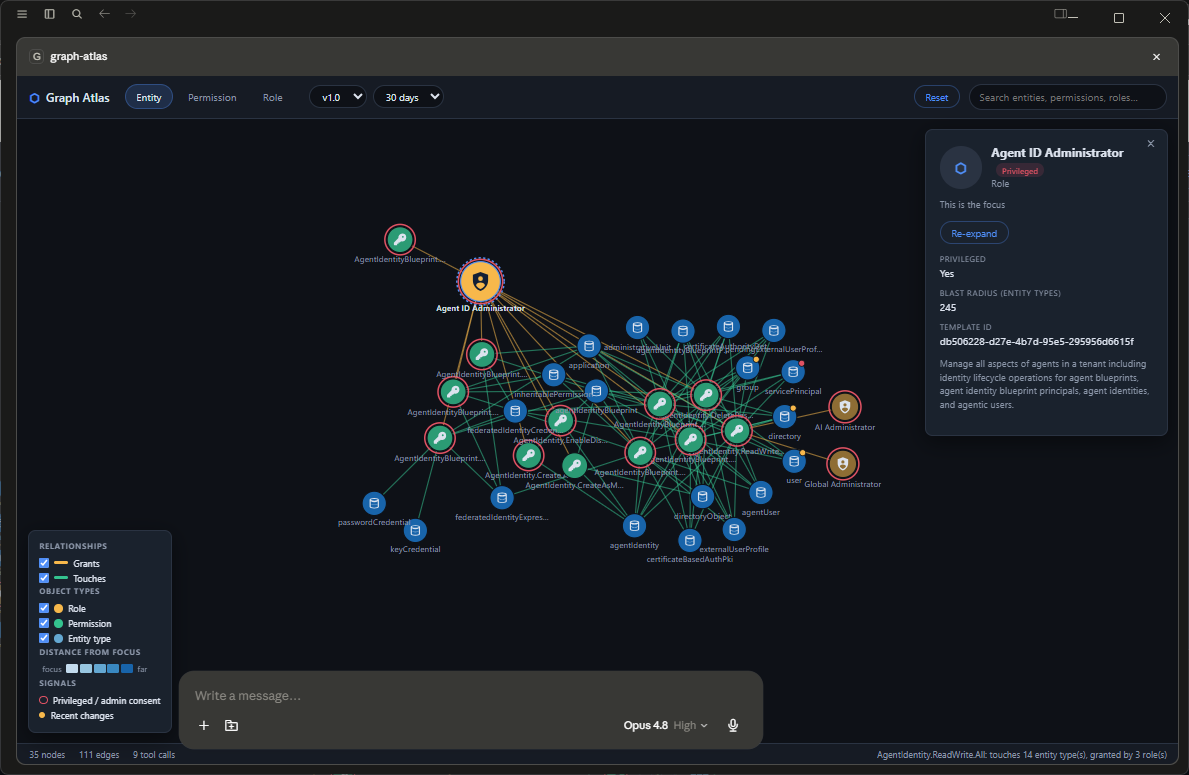
visualize_schema_graph opens the Graph Atlas visualiser — a d3 force-directed SVG graph rendered
directly inside the MCP client via MCP Apps
(Claude Desktop, ChatGPT, VS Code, and other compliant hosts). Its architecture and look & feel are
ported from EntraPulse Polyarchy:
- Dark-themed chrome (light theme follows the host): pill view tabs, glass panels, a bottom status bar with live node/edge/tool-call counts.
- Additive canvas + session cache — the graph accumulates as you explore. Double-click any node (or the panel's Set as focus button) to flip context to it: hop distances re-anchor, the canvas glides to center it, and its neighborhood expands. Anything already fetched this session re-expands instantly from cache with zero repeat tool calls. Reset clears the canvas but keeps the cache.
- Search — the toolbar search box (backed by
search_schema_objects) matches entity types, permissions, and roles by name and flips focus to your pick. - Detail panel — per-kind fields (properties/navigations/changes for entities, split
app/delegated consent + description for permissions, blast radius/published actions/template id
for roles), plus an in-panel change-history timeline (backed by
get_node_timeline). - Rearrangeable layout — drag a node and it stays pinned where you drop it, so you can pull clusters apart to read dense neighborhoods; new expansions bloom out of the node they came from.
- Color language — entity types shade by distance from the focus (blue ramp); permissions and roles wear their relationship colour (green touches / amber grants), faded with distance. Red is reserved as a signal: a solid red ring marks privileged roles and admin-consent permissions, and an amber/red activity dot marks recently-changed entities. A legend (bottom-left) doubles as a visibility filter — unchecking a relationship or object type dims it.
- Model awareness — the app pushes
updateModelContextafter every focus/expansion, so the assistant knows what's on screen without extra tool calls.
Three pivot dimensions, chosen via view (or the in-app tabs) so you can start wherever the
question starts — a Role, a Permission, or an entity/API:
Related MCP Servers
Reviews
No reviews yet — be the first to share how this listing worked for you.
Frequently Asked Questions about Graph Atlas MCP
AllMCPs Directory Badge
Showcase your server listing on GitHub or your project documentation. Embed this dynamic SVG badge to highlight official listing status and live engagement.
Badge Style:
Live Dynamic SVG Preview
Markdown (GitHub README)
[](https://allmcps.com/mcp/graph-atlas-mcp)HTML Embed
<a href="https://allmcps.com/mcp/graph-atlas-mcp"><img src="https://allmcps.com/api/badge/graph-atlas-mcp?style=directory" alt="Graph Atlas MCP on AllMCPs" /></a>Technical Specs & Signals
CategoryDeveloper Tools
36Quality signal: Fair · 36/100How this signal is calculated ▾
Server availabilityNot measured
Not scored for repo-hosted servers — we can't reach the running server, only its GitHub page. Hosted MCP endpoints are health-checked live.
Verified ownership10/20
Documentation & tools16/30
Adoption & activity1/15
Community engagement0/10
A guidance signal from public completeness & health data — not a user rating. New listings start lower and rise as they add docs, get verified, and grow adoption. Signals we can't observe for a listing are skipped, not counted against it.
Own this project?
This directory is pre-filled from public sources. Claim via GitHub README, site badge, or DNS TXT to unlock edit access and the Official badge — proof is checked automatically, then reviewed by our team.
Free dofollow backlink: add your website and place the AllMCPs badge on it — no claim needed. We detect it automatically and keep it verified as long as the badge stays live.
Claim & get free dofollowShare & Embed
Add our SVG badge (dark/light directory styles) or embeddable widget to your site.